

Unclaimed: Are you working at Copper?




Copper Reviews: 4.5/5 — Highly Rated
Formerly known as ProsperWorks CRM, Copper CRM is a software that’s best known for its ability to seamlessly integrate with Google’s collection of cloud applications. To date, it’s recognized as the only sales automation solution that’s endorsed by Google, which makes the platform a top choice for many businesses whose work systems are already operating using tools in the Google ecosystem. Preferred by small to medium enterprises, Copper CRM also boasts streamlined features with a user-friendly interface.




| Capabilities |
API
|
|---|---|
| Segment |
Small Business
Mid Market
|
| Deployment | Cloud / SaaS / Web-Based, Mobile Android, Mobile iPad, Mobile iPhone |
| Support | 24/7 (Live rep), Chat, Email/Help Desk, FAQs/Forum, Knowledge Base, Phone Support |
| Training | Documentation |
| Languages | English |

Copper is the CRM for teams who never wanted to leave Gmail. It is built specifically around Google Workspace and carries Google’s “Recommended for Google Workspace” designation, which in practice means contacts, emails and calendar entries sync without you thinking about it and most of the day’s CRM work happens in a sidebar rather than another tab. That focus is the whole proposition, and it also draws the line on who should not buy it. The pricing has one wrinkle worth knowing: the advertised “up to 26% off” annual discount only applies to the most expensive plan.
- What it is: A CRM built around Google Workspace, formerly ProsperWorks.
- Best for: Small and mid-sized teams already living in Gmail, Calendar and Drive.
- Pricing: $23–$99 a seat a month billed annually ($29–$134 monthly). Verified August 2026.
- The honest catch: Contact limits, not features, are what force you up a tier.
What Is Copper?
Copper — which launched as ProsperWorks in 2014 and is now a 51–200 person company in San Francisco — is a relationship-focused CRM that treats Google Workspace as its home, rather than a general CRM with a Gmail plugin bolted on.
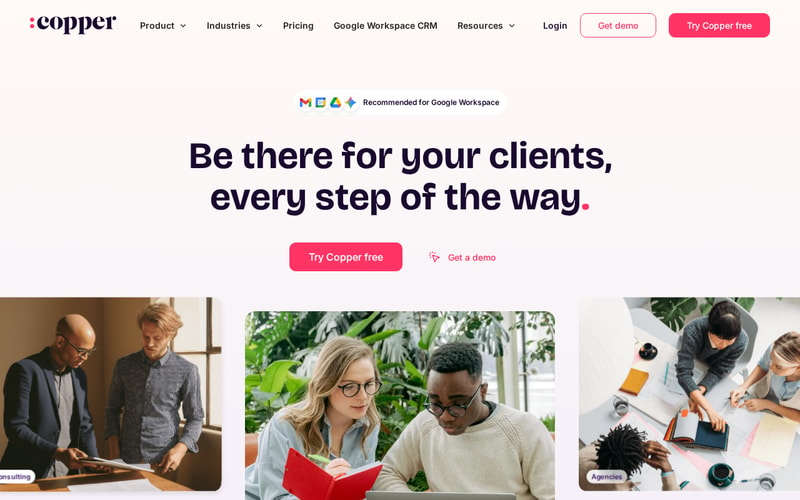
The positioning is notably not “sales machine”. Copper leads with client relationships over time — the industries it names first are agencies, consulting, financial advisors, production and creators, all businesses where the same client relationship runs for years. That is a different product from a high-velocity outbound CRM, and the feature set follows it.
Over 30,000 companies use it, and it integrates with roughly 49 tools including Gmail, DocuSign, ActiveCampaign, Chargebee, JustCall and Notion.
How Copper Works
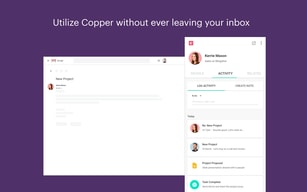
- Lives inside Gmail via the Workspace sidebar — the primary interface for daily use.
- Automatic sync of contacts, email and calendar from Google.
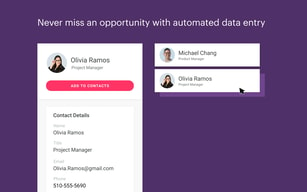
- Contact enrichment fills in records rather than making you type them.
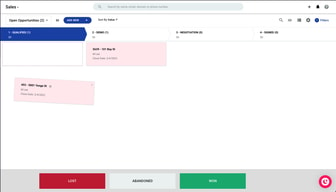
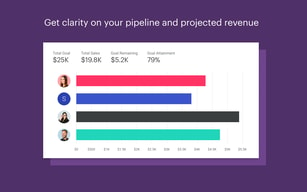
- Pipelines and project management for tracking deals and delivery.
- Task and workflow automation from Professional upward.
- Bulk email and reporting at Professional; custom reports at Business.
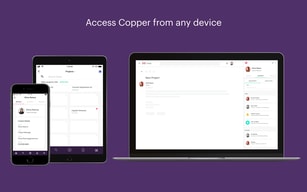
- Mobile apps for iPhone, iPad and Android.
Copper Pricing
| Plan | Annual | Monthly | Contact limit |
|---|---|---|---|
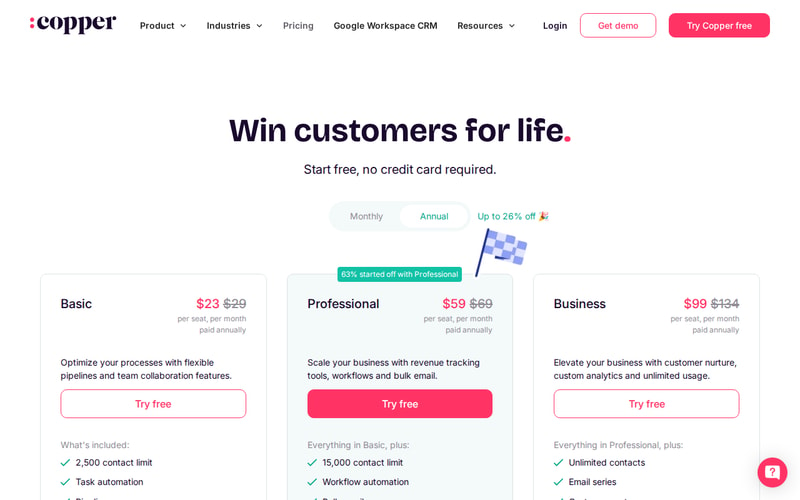
| Basic | $23/seat/mo | $29 | 2,500 |
| Professional | $59/seat/mo | $69 | 15,000 |
| Business | $99/seat/mo | $134 | Unlimited |
Prices are per seat per month in USD. Copper states that 63% of customers start on Professional, which is a useful signal — Basic’s 2,500-contact ceiling is low for any business with history, and most teams discover that quickly.
The annual discount is where the page is doing some work:
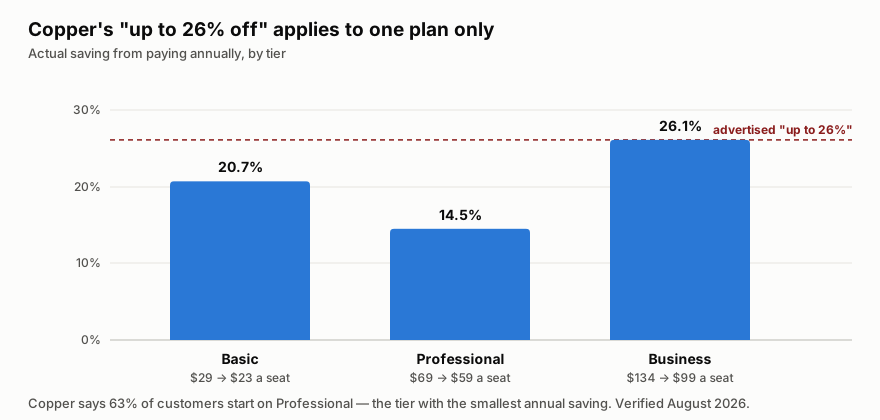
“Up to 26% off” is true only on Business. Professional — the plan most customers actually choose — saves 14.5%, the smallest discount of the three. That is not misleading in the strict sense, but it does mean the headline number is unavailable to the majority of buyers.
The more important pattern is that contact limits, not features, drive the upgrades. Going Basic → Professional multiplies your contact ceiling six-fold and adds workflow automation and bulk email; Professional → Business removes the ceiling entirely. If you are evaluating on feature checklists you will mis-size this; check your contact count first.
Who Should Use Copper
The decision is unusually clean. If your company runs on Google Workspace and your work is relationship-led rather than volume-led, Copper is a strong fit — agencies, consultancies, financial advisors, production companies. The Gmail-native experience removes the single biggest reason CRMs fail, which is that nobody updates them.
If you are on Microsoft 365, this is the wrong tool, and no tier changes that. The entire value proposition is the Google integration.
It is also a poor fit for high-velocity outbound sales teams who need sequencing, dialler-first workflows and heavy pipeline analytics. Copper is built for tending relationships, not for working a list of 3,000 cold leads.
Honest Pros and Cons
Strengths
- The Google integration is the real thing, not a plugin — it carries Google’s “Recommended for Google Workspace” designation.
- Adoption problem largely solved. Living in the Gmail sidebar means the CRM actually gets updated.
- Genuinely simple. Onboarding is fast and the interface does not require training days.
- Contact enrichment reduces manual data entry, which is where CRM hygiene usually dies.
- Good integration breadth at around 49 tools across billing, e-signature, marketing and comms.
- Free trial with no credit card, so evaluation costs nothing.
Limitations
- The headline annual discount is only on the top plan. Professional, which most people buy, saves the least.
- Basic’s 2,500-contact cap is restrictive for any business with history — expect to start on Professional.
- Google Workspace only in practice. On Microsoft 365 the core advantage disappears.
- Not built for outbound volume — sequencing and dialler-led workflows are not its strength.
- Business at $99 a seat is not cheap once you have a team of ten, and unlimited contacts is the main thing it buys.
Copper Alternatives and How It Compares
The natural comparison is HubSpot, which has a genuinely capable free tier and far deeper marketing tooling, but is a bigger system that lives in its own tab. Teams that want a CRM they visit choose HubSpot; teams that want a CRM they never have to visit choose Copper.
Pipedrive is the closer match on price and simplicity and is stronger on pipeline mechanics, but it does not have the Workspace relationship — the difference shows up daily if Gmail is where you work.
For relationship-led firms specifically, Attio is the modern challenger with more flexible data modelling, though it asks more configuration of you up front. Copper’s argument against all three is the same and it is a good one: the CRM that gets used is the one that is already open.
The Verdict
Copper is a focused product that is excellent for a specific setup and irrelevant outside it. Google Workspace plus relationship-led work is the sweet spot, and within it the Gmail-native experience solves the adoption problem that kills most CRM rollouts.
Size it by contacts, not by features — that is what actually moves you between tiers, and Basic’s 2,500 ceiling is why most teams land on Professional. Pay annually if you can, but do not plan around the advertised 26%: on Professional the real saving is 14.5%. And if you are on Microsoft 365, look elsewhere; there is no version of this that works well for you.
FAQ
How much does Copper cost?
Basic is $23 a seat per month billed annually ($29 monthly), Professional $59 ($69) and Business $99 ($134). Prices are in USD excluding tax. There is a free trial with no credit card required. Verified August 2026.
Is Copper’s “up to 26% off” annual discount real?
Yes, but only on Business, where $134 drops to $99. Basic saves 20.7% and Professional — the plan Copper says 63% of customers start on — saves 14.5%, the smallest of the three.
What is the difference between Copper’s plans?
Mostly contact limits. Basic caps you at 2,500 contacts, Professional at 15,000, and Business is unlimited. Professional adds workflow automation, bulk email and reporting; Business adds email series, custom reports and multi-currency.
Does Copper work with Microsoft 365 or Outlook?
Not meaningfully. Copper is built specifically around Google Workspace, and that integration is the entire reason to choose it. On Microsoft 365 you would be paying for the part you cannot use.
Is Copper good for outbound sales?
Not particularly. It is built for tending long-running client relationships — agencies, consultancies, advisors — rather than working high volumes of cold leads. If you need sequencing and dialler-first workflows, a sales-engagement-focused CRM will serve you better.

Compare Copper with other popular tools in the same category.
the Automation. The automation was most helpful
the Renewal process is the only thing I disliked.
Automation and pipeline setup. Its not hard if you know what you want to capture.

It provides excellent solutions for my firm. Since we purchased Copper, our client relationships have grown. Furthermore, it is simple and inexpensive to install. Since its acquisition, we have greatly complemented each other. Our output has grown, and clients and workers are working together. on the road to success Without a doubt, creating contacts and offers is very useful, it also generates leads and helps to create opportunities easily, and it is what distinguishes Copper from other CRMs, in addition to keeping everything organized, including my suppliers, this is the best in CRM, I can see the activity of each account and when it's idle, just the highlight I've tried so far.
There have been background issues that generally irritate us, but they are fixed promptly. I must mention that their customer support service is amazing; it has assisted us in resolving each event in the most pleasant manner; otherwise, it is a terrific CRM at a very reasonable price for my company. Copper on the other hand has arrived to solve everything; it is genuinely an incredible tool its functions are improving all the time, we are in love with its features, and it is without a doubt propelling our company to new heights.
I could enumerate the aspects of Copper that have been really helpful and beneficial to my business, such as how effectively it integrates with Gmail and other Google products. It has also assisted me in sorting my leads, which is quite important, as well as convenient lead tracking. Copper allows us to assign tasks to each supplier and then receive an alarm to send me an email when the process is completed so that I don't miss any opportunities without receiving an email and verifying it, another aspect that helped us a lot is that their pipeline is effective and easy to use, which is very useful for each member, and the display of tasks and earnings on their platform is something that we like and can recommend to Copper.

The user interface is simple to use and ideal for rapidly recording contact information. The system records all contacts with consumers, including files delivered through email, to make the work of sales reps easier. The Report and Analysis tool gives vital indicators to help us plan and decide on our commercial initiatives. It is also really valuable since it has helped me to be a little more organized with all of the information it provides; it not only helps me to keep in touch with my customers, but it also allows me to keep in touch with my suppliers.
Although the program is effective, it lacks some customization and integration features with third-party software. Furthermore, there is nothing I dislike about Copper because in all the time I have used it, I have only experienced minor inconveniences with the system, such as when this system emits certain errors that slow down the process, but when I communicate this novelty to Customer service, they quickly get to work and solve this novelty, allowing me to continue working.
Copper promotes commercial management and decision-making by facilitating contact registration, sales administration, task planning, and potential customer tracking. Simplifies workflow, is adaptable, and meets the needs and demands of the commercial department. I was able to create alarms when I received emails from my suppliers, allowing me to speed up the negotiating and delivery procedures of new items looking to replace my stockpiles. At the same time, I was able to create a daily and weekly job plan for my team in order to meet and sometimes exceed our monthly goals. This solution is extremely nicely synced with my company Gmail emails as well as other apps. This is without a doubt a significant advantage since it helps us to be efficient and sort the emails using their adaptable filter to swiftly review the emails of my new and regular suppliers and customers.
The way I can interact with customers or leads. It helps me a lot, If I have everything organized is pretty easy for me not to forget some possible lead, customer, or just a simple reminder.
That is not that intuitive, sometimes it bothers me that I have to do so much clicking and typing to complete information or just to see customer info.
I forget a lot, so Copper help me to realize what customers or leads I'm forgetting to get in touch
A lot of flexibility in the software. We use it to track consulting efforts and pipelines, goals, reports and daily conversations.
Automation workflows are useful but are limited to integrations to get full functionality.
Solid CRM tool to track activities and create new automation tasks.
I love how easy it is to add a client to Copper CRM. In particular, I love sharing tasks and tracking pipelines with teams, as new leads are only offered via email. The interface is really simple and I like being able to drag and drop opportunities to the next stage. You tend to use the Opportunity tab instead of leads, which is great for that purpose.
If we got across problems, having a dedicated account manager would be beneficial. A tab that aggregates all of the value in our pipeline would be useful, but it is not required for the method we predict. It would be fantastic to charge through Copper and see the money; now, when individuals make payments, I have to manually add value and update the pipeline. I'd want a Copper inbox as well. When I get a lead on Gmail, I add it to Copper. I'd want to be able to evaluate new messages in Copper exclusively from Copper leads because they are the ones that matter the most to me.
Make sure your prospects don't get cracked. Spinning leads, does task communication with my team, and sends a lot of emails to clients. It is mainly used as a place to gather opportunities. The ability to create opportunities directly from Gmail is an absolute game-changing feature that can save you a lot of time.

It provides great solutions to my company, and our relationships with our clients have improved since we acquired Copper, in addition to the fact that installing it is simple and inexpensive. Since its acquisition, we have complemented each other greatly, our production has increased, clients and employees are working together to make progress, emails are automatically logged, and it is simple to share information with other Copper users.
Even if you can't send automated email to your customers, you still need to integrate with other CRMs to perform this feature. I'm currently using an older report that doesn't contain much useful information, such as the number of calls analyzed to translate leads and other metrics. The new reporting tool may have fixed this issue, but there is no marketing guarantee for the functionality of Copper's new reporting tool.
I can list the features of Copper that have been very useful and informative to my business. It works very well in Gmail and other Google applications. It also helped me sort the leads. This has been very helpful and allows us to manage our leads better. Currently, there is a set of guidelines that define leads and copper companies, with notes and records for each lead. And customers have greatly facilitated the systematization of their work.
Very efficient to use and access information when I need it. Integrates well with other software. Helps me keep track of my follow ups and keeps me informed each step of the way.
I don't really have any dislikes that I am able to think of at this time. I like Copper and use it every day. It really helps me with my day to day position.
Keeping up with 100+ clients at any given time and not missing a beat. I would not be able to handle my work load otherswise and keeping in contact with our team.
Ease of use, integration w/ gmail, does the essentials w/o a bunch of extra functionality that I don't need as a small biz
Would like the projects dashboard to visually resemble Asana.
The capability of attaching all related files to the client/company eliminates the extra step of organizing them elsewhere. Delegation of tasks to team members simplifies workflow. Management of opportunities in the newly named "pipeline" provides helpful data.

I prefer Copper because of its connectedness; the Copper plugin for Gmail allows me to save contacts and search for them straight in Gmail. On the opposite end of the spectrum, the Pandadoc/Copper plugin allows us to produce and view legal documents from a client's registry from within Copper. I particularly appreciate the to-do list and the built-in automatic integrations. It also integrates with Zapier, allowing for all sorts of creative integrations. It's also useful to be able to create custom fields, which allows me to include things like expiration dates, etc. You may also create custom task categories, so the possibilities are limitless.
Copper is meant to tell us when the receiver opens an email we send. However, when we go to the sent folder and look at the email, Copper considers it to be open. To put it another way, we don't obtain a genuine open rate for our emails.
The two most difficult tasks were managing people and managing opportunities. Because the direction of G Suite is terrible, a CRM is required to capture everyone who crosses your path. Simultaneously, you must be able to manage opportunities when they present themselves. Copper made it simple to accomplish both. Copper assists us in running our drip programs. We use Copper in conjunction with PersistIQ to conduct email drip campaigns directly from Gmail. We have obtained open rates of 70-80% and response rates of 10-20%. Copper is also used to track our offerings and earn percentages. We may personalize our offers' pipelines and shift them from one step to another.

The tagging tool, as well as the follow-up email feature, are both appealing to me. I've linked my Gmail account, which makes things lot faster. Google Suite is used by our organization to run our operations. Copper interacts with Google's will and seems like a natural extension of the Google Suite, making it simple for team members to embrace.
Within Copper, I'd want to be able to produce proposals and quotes. It would be fantastic to have a manager's degree of expertise in developing bespoke reports that are relevant to your department. I'm having trouble locating where another team member has tagged me; I have to browse to find the remark. I believe it would be fantastic if clicking the notification bell took us to the remark that was made.
We have a better grasp of the verticals in which we are effective and should focus on our strengths while also looking at areas where we may improve or where it may not be a smart use of our time. It has also enabled us to tailor our numerous client offers to individual consumers. We have open lines of contact with our clients, but I seldom see where my job is directly tied to the firm that benefits from it. I've been trying to figure out how I might use the pipeline to help me monitor and manage my clients from beginning to end. I'll need to conduct additional study and consider how it may work for me.
One of my favorite features is the interface with Google; we utilize the Google application suite and it is incredibly handy to have all of the data linked. Furthermore, the Gmail plugin is really handy for our purposes. I enjoy the many phases that are accessible, as well as the various pipelines that may be created. It's also very customisable, allowing you to add your own fields for possibilities, which is useful for data analysis. I can also export data, which comes in handy for data analysis and organizing. We compared Copper to other platforms and discovered that the other products had limitations, but Copper allows for endless possibilities.
So far, there hasn't been anything I don't enjoy. We evaluated Copper to other CRMs with comparable formats and found Copper to be superior. It's simple to add additional opportunities and stages. Reports are fine and improving as a result of recent revisions. We utilize a lot of activities and would want to see more detailed activity reporting. As we use the opportunities for project tracking, attaching or connecting photographs would be ideal.
We utilized shared spreadsheets for project management and papers for client profiles in the past. Everything has been consolidated and shared. Email connection is incredibly beneficial. We were able to monitor the progress of many prospects with our clientele. This has taught us not to overlook anyone or their potential. The export tool has been quite useful; I receive an email with the exported data when it is complete, and I can then use it for data analysis; we also utilize Copper data to measure our efficiency with opportunities.
Integrates my Gmail, phone calls and texts without me having to do anything.
It gets turned off regularly enough and then my calls are not logging
My poor memory
I like the extension and that it syncs with Gmail. It allows me to centralize information and keep an eye on new opportunities and their progress on the same screen.
So far, I do not have any significant complaints. It would be helpful to add on new funding agencies and partner types. It would also be helpful to be able to add on new thematic areas.
I am keeping an individual and organization repository and sharing updates or new opportunities and how they move with the rest of my team in real-time. My business performance has increased.
The task reminders are very helpful! They keep me on track for my day, and I like the reminder system.
Now and then, the tasks won't load on their correct date. I have to refresh the page a few times to get all the tasks to load.
I have to email customers about samples they order, so it's easy to keep track of my previous emails.
Makes communication and notekeeping amongst all of our team members more streamlined and visible, rather than keeping hardcopy notes of each customer.
Potential for duplicate customers being put into the system without a pop-up filter for this.
Data integrity - We do alot of regular manual work making sure that the data is entered in correctly. As long as it is, then the information is accurate and easily accessible by all team members.
How I can track and keep myself organized. It also holds my team accountable to everything they do. I can use Linkedin and Gmail easily with Copper. Makes my day to day a lot easier.
Difficult to tag multiple people to one company.
Realizing how easily I can end a day and pick up at the same spot the next day. We are not calling the same clients over and over. Allows us to be more efficient.
I like how easy it is to create new pipelines
I wish the the tracking was easier and we could incorporate sales commission at different tiers into the system.
Managing 600 Investors and their follow-up, capital calls, new leads
Searches out missing info for leads and people.
Pretty pricey for a solo without a need or a full-blown CRM program.
Reduced hours inputting contact information and sending it Mailchimp for future email campaigns.
Pipelines and legacy report, I love it because it's a simple app and you can control everything.
I couldn't match my WhatsApp to my tasks.
Improve my forecast and add more leads.
the ability to track all projects and conversations
some issues with activities being logged
multiple projects and conversations
Being able to navigate seamlessly through the CRM system and integrate it with different software. The app is straightforward too.
I have some contacts that have positions at multiple companies, and I cannot link them. Cannot track all exchanges with contacts, such as text and other social networking applications (twitter, instagram, etc.)
Easy to navigate CRM system and keeping track
Custom fields specific to our business and clients; Integration with Gmail, including templates and email-syncing; Extensive reporting capabilities; Many views that cater to your work style; High-level Dashboard view to help plan your day/week
Not much to dislike - more differentiation on side view tabs of what view you're looking at , such as People, Company, Opportunity)
Tracking events for each client so all team members can see the same information; Easily see where you stand at a portfolio level
emails are logged automatically and it's easy to share information with other Copper users
Inability to send automated emails to customers, still require integration with other CRM's to perform this function. Reporting - we are currently using legacy reporting which doesn't show a lot of useful information such as number of phone calls done and other metrics that we look at to convert a lead. The new reporting tool may have fixed this but there isn't any marketing collateral that shows what the new reporting tool in Copper does.
Allowed us to manage leads better and we now have a set of guidelines that define what a lead vs a company is for Copper. And certainly having notes and logs for every lead and customer has made it very easy for us to systemise work.
Having Copper has allowed our team to cut back on unnecessary communications, because folks can go look in on other communications that have gone out. It's been great for me, personally!
Sometimes I try to connect things to my email, and it takes two to four times to work. Also, when we set up records that say everyone has access, there are still records that are locked. AND, lastly, sometime Copper shows it's connected to the email, but you still cannot access it to attach a contact to an email.
Being able to upload information from our system saves individual input time; we've been able to send bulk emails; plus it's reducing data isolation. More people can view the content on our teaching staff and central office staff members (which is what we use it for)
I am a big fan of how integrated Copper is within G Suite, not only for the email tracking and reminders in G Cal, but the API enables us to automate scorecards and Google Data Studio dashboards too. We use multiple pipelines and use it as our one source of truth for sales data.
Maybe more integrations with the rest of G suite beyond Gmail, and a simpler native reporting method. Also I cannot find a way to change the reporting date of the week in Copper updates, Other than that, really enjoy it.
A single source of truth for sales reporting and pipeline.
The look and feel makes it an app I enjoy using. It's really intuitive and I love how much we've been able to customise to our needs. Having a dedicated customer success contact makes all the difference.
There is so much in the platform, it takes time to learn it all to make sure we optimise. But having Natalie on hand is really reassuring to help with that. The dashboard could be better. I'd like to be able to add my own reports on there.
We needed a forecasting system but it's ended up being our go to tool for customer management and we've integrated other software with it to have everything in one place.
Integration with Gmail is seemless - and the Android app works really well.
Some basic integrations are only available on higher paid tier levels e.g. Mailchimp integration.
Copper CRM makes sales pipelines very easy and helps keep me on track with prospective customers.
The integration with G-suite is unlike any other CRM system I've used. Syncs with all emails and tracks all the critical data.
Everything has been great so far. If you're a large enterprise org, this probably isn't for you. But it's perfect for a small/medium size org using G-suite.
Copper helps our team track all of our sales conversations and keeps the details organized.
Love the Google plug-in, intuitive UX, and responsive customer service. Ideal product for our Gmail/GSuite-run company in terms of functionality vs. value. Does all we need but not too much.
Have not found a way to make the automation useful for us yet.
Quick, easy entry of leads and contacts into the system directly from Gmail. Easy sorting and exporting.