

Unclaimed: Are you working at Copper?






Copper Reviews: 4.5/5 — Highly Rated
Formerly known as ProsperWorks CRM, Copper CRM is a software that’s best known for its ability to seamlessly integrate with Google’s collection of cloud applications. To date, it’s recognized as the only sales automation solution that’s endorsed by Google, which makes the platform a top choice for many businesses whose work systems are already operating using tools in the Google ecosystem. Preferred by small to medium enterprises, Copper CRM also boasts streamlined features with a user-friendly interface.




| Capabilities |
API
|
|---|---|
| Segment |
Small Business
Mid Market
|
| Deployment | Cloud / SaaS / Web-Based, Mobile Android, Mobile iPad, Mobile iPhone |
| Support | 24/7 (Live rep), Chat, Email/Help Desk, FAQs/Forum, Knowledge Base, Phone Support |
| Training | Documentation |
| Languages | English |

Copper is the CRM for teams who never wanted to leave Gmail. It is built specifically around Google Workspace and carries Google’s “Recommended for Google Workspace” designation, which in practice means contacts, emails and calendar entries sync without you thinking about it and most of the day’s CRM work happens in a sidebar rather than another tab. That focus is the whole proposition, and it also draws the line on who should not buy it. The pricing has one wrinkle worth knowing: the advertised “up to 26% off” annual discount only applies to the most expensive plan.
- What it is: A CRM built around Google Workspace, formerly ProsperWorks.
- Best for: Small and mid-sized teams already living in Gmail, Calendar and Drive.
- Pricing: $23–$99 a seat a month billed annually ($29–$134 monthly). Verified August 2026.
- The honest catch: Contact limits, not features, are what force you up a tier.
What Is Copper?
Copper — which launched as ProsperWorks in 2014 and is now a 51–200 person company in San Francisco — is a relationship-focused CRM that treats Google Workspace as its home, rather than a general CRM with a Gmail plugin bolted on.
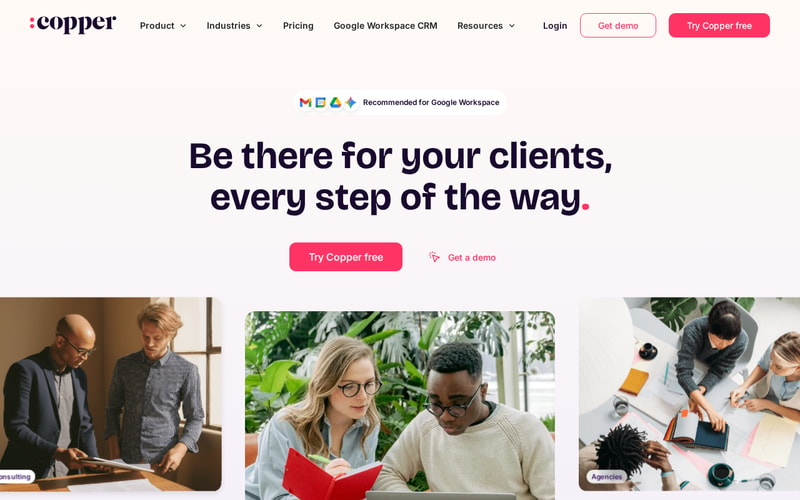
The positioning is notably not “sales machine”. Copper leads with client relationships over time — the industries it names first are agencies, consulting, financial advisors, production and creators, all businesses where the same client relationship runs for years. That is a different product from a high-velocity outbound CRM, and the feature set follows it.
Over 30,000 companies use it, and it integrates with roughly 49 tools including Gmail, DocuSign, ActiveCampaign, Chargebee, JustCall and Notion.
How Copper Works
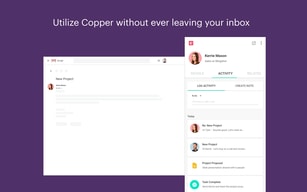
- Lives inside Gmail via the Workspace sidebar — the primary interface for daily use.
- Automatic sync of contacts, email and calendar from Google.
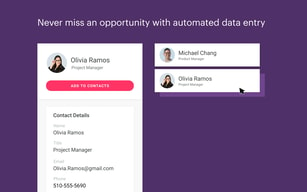
- Contact enrichment fills in records rather than making you type them.
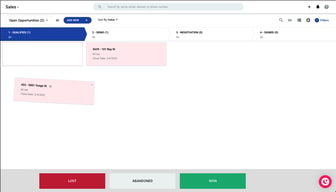
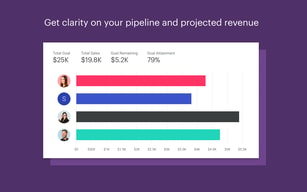
- Pipelines and project management for tracking deals and delivery.
- Task and workflow automation from Professional upward.
- Bulk email and reporting at Professional; custom reports at Business.
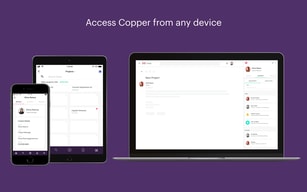
- Mobile apps for iPhone, iPad and Android.
Copper Pricing
| Plan | Annual | Monthly | Contact limit |
|---|---|---|---|
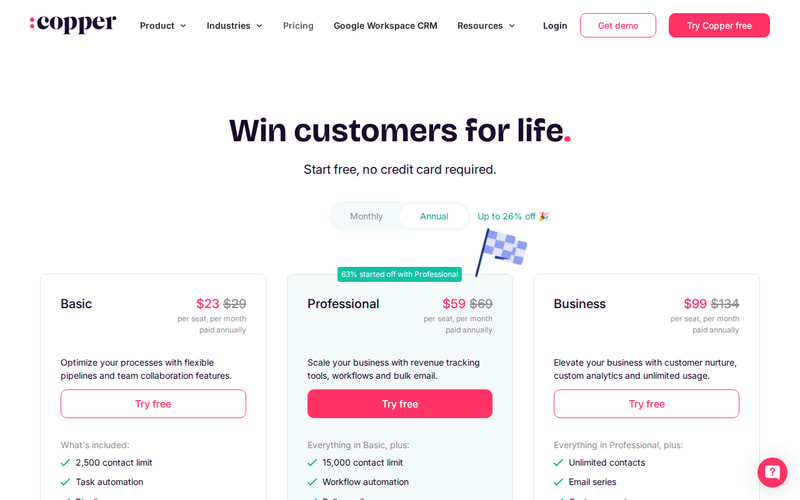
| Basic | $23/seat/mo | $29 | 2,500 |
| Professional | $59/seat/mo | $69 | 15,000 |
| Business | $99/seat/mo | $134 | Unlimited |
Prices are per seat per month in USD. Copper states that 63% of customers start on Professional, which is a useful signal — Basic’s 2,500-contact ceiling is low for any business with history, and most teams discover that quickly.
The annual discount is where the page is doing some work:
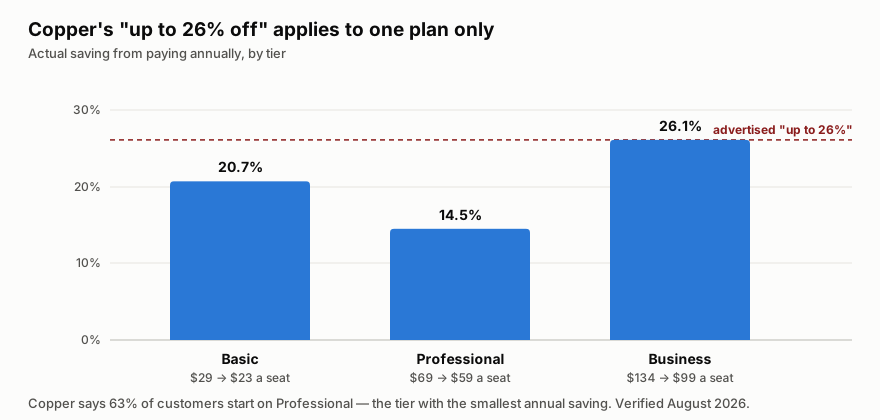
“Up to 26% off” is true only on Business. Professional — the plan most customers actually choose — saves 14.5%, the smallest discount of the three. That is not misleading in the strict sense, but it does mean the headline number is unavailable to the majority of buyers.
The more important pattern is that contact limits, not features, drive the upgrades. Going Basic → Professional multiplies your contact ceiling six-fold and adds workflow automation and bulk email; Professional → Business removes the ceiling entirely. If you are evaluating on feature checklists you will mis-size this; check your contact count first.
Who Should Use Copper
The decision is unusually clean. If your company runs on Google Workspace and your work is relationship-led rather than volume-led, Copper is a strong fit — agencies, consultancies, financial advisors, production companies. The Gmail-native experience removes the single biggest reason CRMs fail, which is that nobody updates them.
If you are on Microsoft 365, this is the wrong tool, and no tier changes that. The entire value proposition is the Google integration.
It is also a poor fit for high-velocity outbound sales teams who need sequencing, dialler-first workflows and heavy pipeline analytics. Copper is built for tending relationships, not for working a list of 3,000 cold leads.
Honest Pros and Cons
Strengths
- The Google integration is the real thing, not a plugin — it carries Google’s “Recommended for Google Workspace” designation.
- Adoption problem largely solved. Living in the Gmail sidebar means the CRM actually gets updated.
- Genuinely simple. Onboarding is fast and the interface does not require training days.
- Contact enrichment reduces manual data entry, which is where CRM hygiene usually dies.
- Good integration breadth at around 49 tools across billing, e-signature, marketing and comms.
- Free trial with no credit card, so evaluation costs nothing.
Limitations
- The headline annual discount is only on the top plan. Professional, which most people buy, saves the least.
- Basic’s 2,500-contact cap is restrictive for any business with history — expect to start on Professional.
- Google Workspace only in practice. On Microsoft 365 the core advantage disappears.
- Not built for outbound volume — sequencing and dialler-led workflows are not its strength.
- Business at $99 a seat is not cheap once you have a team of ten, and unlimited contacts is the main thing it buys.
Copper Alternatives and How It Compares
The natural comparison is HubSpot, which has a genuinely capable free tier and far deeper marketing tooling, but is a bigger system that lives in its own tab. Teams that want a CRM they visit choose HubSpot; teams that want a CRM they never have to visit choose Copper.
Pipedrive is the closer match on price and simplicity and is stronger on pipeline mechanics, but it does not have the Workspace relationship — the difference shows up daily if Gmail is where you work.
For relationship-led firms specifically, Attio is the modern challenger with more flexible data modelling, though it asks more configuration of you up front. Copper’s argument against all three is the same and it is a good one: the CRM that gets used is the one that is already open.
The Verdict
Copper is a focused product that is excellent for a specific setup and irrelevant outside it. Google Workspace plus relationship-led work is the sweet spot, and within it the Gmail-native experience solves the adoption problem that kills most CRM rollouts.
Size it by contacts, not by features — that is what actually moves you between tiers, and Basic’s 2,500 ceiling is why most teams land on Professional. Pay annually if you can, but do not plan around the advertised 26%: on Professional the real saving is 14.5%. And if you are on Microsoft 365, look elsewhere; there is no version of this that works well for you.
FAQ
How much does Copper cost?
Basic is $23 a seat per month billed annually ($29 monthly), Professional $59 ($69) and Business $99 ($134). Prices are in USD excluding tax. There is a free trial with no credit card required. Verified August 2026.
Is Copper’s “up to 26% off” annual discount real?
Yes, but only on Business, where $134 drops to $99. Basic saves 20.7% and Professional — the plan Copper says 63% of customers start on — saves 14.5%, the smallest of the three.
What is the difference between Copper’s plans?
Mostly contact limits. Basic caps you at 2,500 contacts, Professional at 15,000, and Business is unlimited. Professional adds workflow automation, bulk email and reporting; Business adds email series, custom reports and multi-currency.
Does Copper work with Microsoft 365 or Outlook?
Not meaningfully. Copper is built specifically around Google Workspace, and that integration is the entire reason to choose it. On Microsoft 365 you would be paying for the part you cannot use.
Is Copper good for outbound sales?
Not particularly. It is built for tending long-running client relationships — agencies, consultancies, advisors — rather than working high volumes of cold leads. If you need sequencing and dialler-first workflows, a sales-engagement-focused CRM will serve you better.

Compare Copper with other popular tools in the same category.
Easy to use, good app, and very thorough
Nothing major, sometimes it's a little confusing to flip between company, opportunity, contact etc, but you get the hang of it quickly enough
I am solving the problem of making sure that long term prospects don't get forgotten about or fall through the cracks.
How easy and open it is to use for myself and collegues
Not really anyting bad to say, Can be a bit slow at times
Keeping all the leads i have in one place and having infomation stored for each of them
Easy to use, user friendly. I've used other CPM 'S and this is far the best so far.
Nothing much, just maybe make the program a little quicker
It definitely keeps all of my customers information and what we have talked about At my fingertips.
Copper allows you to fully customize your CRM, with additional fields, drop-downs, etc. Additionally, it is so easy to add these fields "on the fly". You might have thought your CRM was "perfectly set up", only to find out there is another triggering quality or metric you want to track on each account. You can go in and edit your entire CRM to include this new metric and use it immediately.
They tend to provide more live person support within the pre-sales process of your account. Basically answering questions live with a sales person. The people are super knowledgeable, which is fantastic! However, after the sale, they are pretty much gone and on to the next account. The support from there is more of a submit a ticket (at best), otherwise using tutorials via their website. I believe there is a "partner community" as well, but I've never really liked to rely on those myself, for product support. It would be great if they had a small dedicated support team to answer questions live and also shawdow into your account to help you do things. Even if you had to pay for this service (one time or additional as a monthly premium), would be great!
Copper allows me to quickly search for account records, as well as create new ones. The speed at which I can do this helps greatly with productivity. I can search based upon any criteria that I have set up within the CRM.

Great interface and team features that make collaborating easy.
I have nothing negative to report about Copper.
Streamlining communication and sales tasks amoung my team.
I appreciate the online chat help. When I run into issues, it is nice to know someone is there to help me.
It's plethora of features are not necessarily easy to use. There is a steep learning curve.
It allows us to track our prospects in an orderly and efficient manner.
It's a great platform with everything I need in one place. It's beneficial to have my calendar and email handy
I had some trouble syncing my email, but all is well now
I have none right now, It's a place to keep all notes about clients very helpful.

We are very pleased with the account management staff and strive to make sure that using the platform is as rewarding as possible. Copper reduces onboarding new customers manually, through a Gmail message or by using a template and collating a large repertoire. Copper is a CRM system that is easy to use and has the ability to generate custom fields, multiple workflows, sales stages, etc. It is really customizable and has a less complex nature compared to other CRMs I have used before. The Google embedding and Chrome extension automatically monitors and updates marketing and marketing jobs that are within the CRM. Data entry is simpler.
I like using copper and there is no way to think of another adversity since going live. We were not able to merge properly with RingCentral, however this is not a big issue. Copper automatically performs information gathering on people and their images when people do an internet search. Sometimes this information is not correct.
Copper is managed by the Sales and Business Development staff of the institution I represent. We had a group of 7 people and we realized that we needed a new CRM program after leaving Salesforce. We did some detailed research and found that Copper was the best alternative to what we were aiming for with our CRM. Copper's CRM is simple to use and also pairs perfectly with G-Suite. The mix with G-Suite items was what really interested us. The number one CRM for companies using G-Suite products is Copper. We use copper for the purpose of generating and managing the accounts we intend to service, activity and opportunity management, and project development on a daily basis.

Copper helped me stay on top of all my contacts, relationships, and processes in a startup endeavor. It is beneficial that it syncs with my gmail account! I've just upgraded for even more usefulness. Another helpful feature that sets it apart from others is the ability to have multiple customizable pipelines.
The pricing for Copper can be a bit expensive but seems comparable to other similar CRM software. The app can feel a bit complex, even overwhelming, when you first start to use it but it is necessary to capture all the parts and relate them together. Once you get familiar with it, it becomes quite easy to navigate.
I needed a CRM that also allowed more than a sales pipeline. As I am developing non-profit programs, I required mulitple pipelines (process tracking) that I could also customize since each process had distinct milestones.
Utilizing the "People" and "Pipeline" directories to keep track of all contacts, and sales funnel.
The transition period in adopting this software took about a full month to fully feel comfortable using.
Managing the sales process. Keeping track of potential clients. Email base across our company. Productivity. Efficiency. Organization.
That I can keep a check on my pipeline. I also love its ease of use, having used a number of big name CRMs in my career this is by far the best, it is easy to use and has many extra added benefits and uses that the bigger name ones don't
The way it will assign an email address to a specific company, working with the NHS I have many customers who have a similar email address but from different trusts, I have to keep going back and changing the hospital trust because of this.
I can keep an eye on my pipeline and see at a glance if I need to follow up with a customer as it will change to red, I can easily move them along the pipeline in the cabana view and also keep an eye of the amount of sales I have made that month and where I can get my next sale from

relationship management is super easy. Easy to access all communications and deals from anywhere in google. The pipeline view is very nice as well compared to our previous CRM. It's easy to see everything we have going on at once.
It would be nice if there were more report generating features. Many of our reports don't give us an accurate week by week view of deals confirmed and won. It would be nice if the mobile app could integrate with the google phone apps. Since I have a google phone, it would be nice if google could implement copper into more of their mobile platforms as well.
We can stay on top of our deals very well. having such a small company that works with a decent sized artist client roster, we could easily get lost in all the deals and inquiries we have coming in. But copper makes it so we don't have to worry about keeping everything in our heads. Also having an app on our phone makes it easy to access things as well.
Tracks leads and opportunities efficiently. Allows you to set tasks accordingly, and set automated tasks based on the stage of each lead/opportunity. Access to invoices and files is quick, easy and convenient. Navigation moves quickly for the most part.
If I open a new tab and start typing in the search bar it bumps me down to the nearest text box (log an activity/note most of the time). Copper can't keep up with me in this regard and I wish it could. The "plus" sign next to "files" in leads/people/opportunities/companies has disappeared. You can still click where it should be and it will function the same, but it is confusing for new users. Copper doesn't always recognize duplicate leads/people, which is often annoying. Again, these are nitpicky items but thought I should bring them up.
Tracking leads/opportinities - not a chance I could do this as efficiently without Copper. Pipeline view and filters show me my most pressing opportunities instantly, which helps with daily/weekly/monthly prioritization.
It´s a simple way to keep an accurate record of how you are doing with your customers or future customers, organizing the information in pipelines.
I don't know how to synchronize it with my email or that I don't know many of its functions.
It helps me to keep track of the stages I am in with my current and potential clients and to be able to define specific tasks to be accomplished within their respective deadlines.
Great CRM Software, very user friendly, easy to customize, can add as many as custom fields and can cross-reference many different fields, as a Real Estate Broker managing a team of 5 people it becomes extremely easy to customize the pipeline, track communication
The software still needs more API to connect to other platforms using Microsoft suite
Keeping tabs on all communication, managing the follow-up and tracking pipeline
Managing workflow. We work in real estate and we can create pipelines for each transactions and track everything with the transaction. All emails are tied back to the transaction. Best part is the TASK generation, I use it to manage my daily work flow and keep up with all the details in each transaction.
Reporting is a little difficult and you have to download in order to print.
Using the task help me manage all our transactions, our agents use it to grow their business. It ties into mailchimp so that is another added bonus.
I have used copper with two companies now. I really like the tight integration with GSuite. I also just really like the layout, the tool is great for anyone in sales. Easy to use, search, organize, filter, etc.
No real complaints. It would be nice to have more integrations with other tools.
Sales CRM
Copper automatically compiles all my communications, contacts, and relevant info into one searchable source that simplifies EVERYTHING. Our previous system from a competitor was tedious and frustrating.
My one and only issue with Copper is that it has an ever-growing number of features that I don't know yet, and I can't wait to get even better at it! I appreciate the user support resources!
Keeping track of thousands of daily emails is impossible. I forget names, I forget to send a PDF, things like that. Copper ensures that I don't need to pressure myself to remember everything all at once.

Love the Gmail integration. Makes data transfer super easy and accurate.
Honestly, nothing to dislike. It's built for small businesses like mine.
Keeping track of customers, sending tailored emails, and running pipeline reports.
I like that it's a comprehensive CRM with tasks, leads, multiple automation possibilities, and gmail integration
Gmail integration works, all my emails sync, but the sidebar doesn't allow me to run more than one instance of gmail at the same time. I would love if I could have a functional sidebar for all 4 email accounts I have to operate for the mulitple I oversee simultaneously, instead of having to log out and into another google account every time.
The historical data for all communications with a client is all in one place and reviewable. Even if we lose staff their communications are all saved.
I love how easy it is to use Copper from every angle - viewing pipelines, customizing pipelines, reporting, learning history from past clients - there really are so many great aspects of Copper, and I haven't even scratched the surface!
Since I am in a position that relies heavily on the data that Copper stores, I would love to be able to get real-time reports instead of waiting for the updates every 10 hours! (But I also understand that it is a work-in-progress so I'll look forward to continued work on this aspect!)
Copper is helping our organization to monitor our sales process and maintain thorough records of all clients and client interactions to ensure that our pipeline remains full and that we always know where opportunities are in the process.
Copper has been great with our financial and insurance business. The CRM allows us to effectively build and grow our business by maintaining and tracking clients and projects. It is simple to use and easy to communicate with our team. Copper is priced competitively - excellent value for the money. The customer service is fast to respond too.
Copper has a few glitches we've discovered in the last few years, but the Copper team is very good at solving the issues and providing solutions. We've had a few days where Copper ran very slowly, but most of the time, it works well.
Our team can communicate easily about clients and projects. All of our client's information is housed in the CRM, including email communication and project communication. We are also able to attach client files to each client's Copper file.
A lot of features, but not complicated to use! Very user-friendly. Easy-to-use pipelines, deals, email tools, tasks etc.
Reports could be a little more robust with more options.
Allowing us to manage prospects, tasks, and the sales pipeline in an organized way will enable us to be more productive and close more sales.
The connection with my gmail account makes communication with clients easy.
Some things take a while to find, like how to do a group email, no answers in the search bar.
It is providing a way of prioritizing my clients based on close rate percentages.

I love the Google plugin. My business uses Google Workspace and Clickup, and the Google workspace integration is fantastic. I tried Hubspot because I thought I wanted more marketing stack features, but in reality I wanted more Copper Integrations, which I now have. Copper is lightweight and fast with a simple UI. I would love to have a 2 Way Clickup Integration so that I could push Projects, People, and Companies back and forth. If you are looking for a sales and operations CRM and use Google, I feel very confident that this is the tool you want.
If what you want is a robust marketing stack and landing pages, this is not your tool. I am a believer in integrated and separate tools (i.e. Copper+Clickup+Mailchimp+Calendly), rather than a single tool attempting to "do it all" (i.e. Hubspot, Salesforce)
It is managing my contacts, it is easily and neatly fitting into my Google-based tech stack, and it is a CRM that I can get more out of than I put in. Most CRMs I've ever used feel like some sort of task in and of themselves. As a small businesss owner, I am not trying to produce reports that my higher ups and their higher ups can track and I am a believer in minimalism.
the way it integrates with google to track all activity in one place.
i wish it showed me who opened my email as opposed to just showing it was open
tracking all emails and attachments in place instead of searching each time for activity
it is obvious and easy to use. it shows different colors and stages
Nothing really bothers me. Copper is great.
it helps me keep track on which client i should contact in case I forget them
Most CRMs I have used in the past have very similar functions and capabilities; what separates Copper is how helpful its support staff has always been whenever my organization has questions.
I haven't experienced any difficulties with Copper; the platform works great and is very rarely down due to updates or upgrades. When Copper is down, it is always at times that are not inconvenient or hinder my work day.
Copper serves as our source of truth for our organization. We use Copper as our database for all our clients and prospects. It has been highly reliable and also has simple connections to other external tools we utilize.
It is easy to use, intuitive and we rarely encounter any difficulties with it. It is also a very cost effective solution compared to other CRM's.
Like most online CRM's, they are not designed nor intended for the sales rep in the trenches. All online CRM's focus on pleasing the person who signs the check (e.g., the sales manager or VP) by providing reports, etc. It was a trend started by the early online pioneers as they diverged from the client/server solutions which were much more focused on making the sales rep's life easy. Not like that these days with any online CRM.
Helping us to keep track and engage with prospects and customers.
I like Copper's user-friendly setup, organization, and regular updating of the software to always have new features available.
The only feature that I wish Copper had was the ability to attach a file to an activity. For example, when I am logging a meeting with a client, it would be very helpful to be able to attach the presentation I shared with that client or a video recording of the meeting.
Copper is helping keep the business I work for organized, and allows us to track all communication with our clients.