

Unclaimed: Are you working at GetResponse?
GetResponse Reviews: 4.3/5 — Solid Choice
GetResponse is a reliable email marketing software with marketing automation capabilities that can deliver tailored marketing experiences, engage customers, and boost sales through its extensive selection of features. A recent addition to the platform includes web push notifications and an email chat function. Improved automation workflows and SMS marketing features make it a preferred software for users.
Best known for being a platform that provides comprehensive marketing tools for small businesses, bloggers, and marketing agencies, GetResponse is a cloud-based software that simplifies communication with your core audience. GetResponse primary feature is an email creator that allows users to create professionally designed emails for mass sending through its selection of templates. The platform can build marketing automation workflows based on data and behavior ensuring personalized marketing experiences, better-engaged customers, and higher sales.

| Capabilities |
AI
API
|
|---|---|
| Segment |
Small Business
Mid Market
Enterprise
|
| Deployment | Cloud / SaaS / Web-Based, Mobile Android, Mobile iPad, Mobile iPhone |
| Support | 24/7 (Live rep), Chat, Email/Help Desk, FAQs/Forum, Knowledge Base, Phone Support |
| Training | Documentation |
| Languages | English |
GetResponse Pros and Cons
- List building and list automation options available
- GetResponse offers good templates
- Easy-to-use design and spam testing
- Supports powerful lead generation features best for eCommerce sites and webinar promotions
- Lets users monitor Google, Facebook, and Instagram from the GetResponse account
- Some of the landing pages don’t work great on mobile devices
- The drag-and-drop feature could use some tweaks
- The deliverability rate needs improvement
- Basic plan doesn’t offer webinar features
- Phone support is available only for the custom paid price plan








Are you looking for a new comprehensive email marketing solution? If you have an online business that relies on reaching out to and nurturing leads, you’ll definitely need a reliable tool to help you do it.
For many marketers, that solution is GetResponse—a powerful email marketing tool that has evolved into an all-in-one marketing automation platform with a comprehensive selection of inbound marketing solutions.
In this post, we’re going to provide a detailed review of the cloud-based software GetResponse to help you decide if this is the software that your business needs.
What is GetResponse?
GetResponse is an all-in-one email marketing software solution that you can use for all your email marketing needs. It’s a simple, yet robust tool that lets users send customized emails, generate leads, engage customers, automate marketing tasks, and even help boost sales.
Because of its numerous automation features, users spend less time crafting and sending emails and more time driving effective strategies for their brands. This also means users get more timely responses and see more efficiency in their marketing efforts.
The platform is focused on providing solutions for email marketing, which means the tools that it offers are built to help a company grow its audience and contact list, promote its services and sell its products in the most personalized way. Notably, the platform’s user-friendly navigation, affordable price points, and numerous customizable options make it ideal for a wide range of businesses—whether you’re a fledgling start-up or a blue-chip organization.
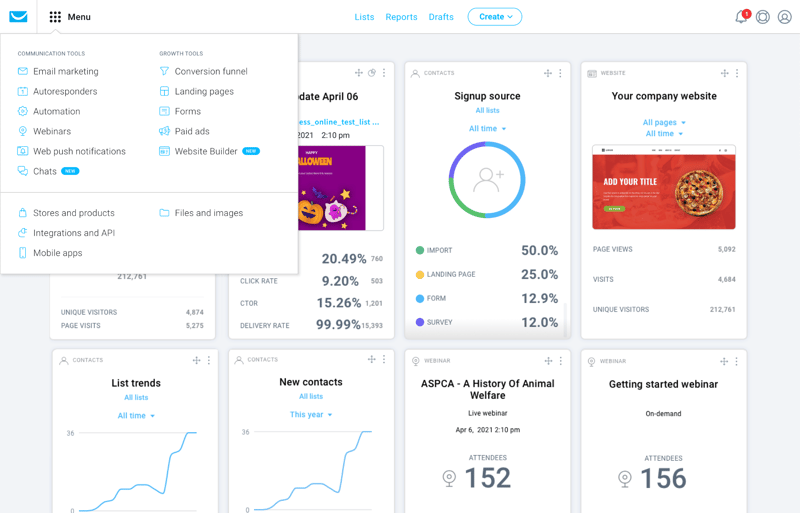
With GetResponse, you also don’t just get email marketing. It touts itself as an all-in-one marketing tool and thankfully, they live up to this promise. With GetResponse, users also get integrated email marketing features, autoresponders, automated landing page tools, and advanced analytics.
GetResponse has added AI-powered features including an AI email generator and AI campaign builder.
How GetResponse Works: Key Features
Now, let’s take a closer look at what features you can expect from this all-in-one marketing software.
Email Marketing
GetResponse’s lineup of key features is designed to get users more opens, clicks, and ultimately sales. The platform gives users the option to create custom emails using a simple drag-and-drop builder or choose from a variety of free, ready-made templates that can be personalized to fit their brand. The customization tools are user-friendly and offer a wide range of professional templates to choose from.
Some notable tools to take note of are:
- Newsletter Templates – GetResponse’s newsletter template feature is a powerful tool for creating professional and engaging emails that let users choose from a wide range of pre-designed templates that can be customized to fit your brand. With this feature, you can create newsletters that are visually appealing and help you connect with your subscribers.
- Autoresponders – GetResponse’s Autoresponders feature is one of the platform’s most useful tools for streamlining email marketing efforts, helping users save time and effort by automating repetitive tasks. Because it’s a fully customizable feature, businesses can tailor the timing, and frequency of autoresponder emails and personalize content to fit a brand.
- Automation emails – To improve the overall effectiveness of campaigns, GetResponse lets users create action-based, automated emails that help engage audiences and encourage more sales.
- Automated Blog Digest – This is a user is a time-saving tool that allows you to send a weekly or monthly email to your subscribers highlighting your latest blog posts. It ensures subscribers are engaged and up-to-date on your latest content, without having to manually create and send an email each time you publish a new post.
- Perfect Timing feature – GetResponse’s Perfect Timing feature is a unique and useful tool that allows users to send emails at the optimal time for maximum engagement. The platform analyzes data from past campaigns and taking into account subscriber time zones, the platform automatically determines the best time to send an email to each recipient.
- Transactional emails – This feature is a paid add-on that uses SMTP-triggered emails so you can send receipts or personalized reminders to your contacts.
- A/B testing – You can also A/B test your emails to ensure you’re sending out the most engaging and relevant emails.

Marketing Automation Builder
GetResponse’s automation feature makes it an incredibly efficient platform for creating a personalized customer journey. By automating your email marketing efforts based on customer data and behavior, it can deliver highly personalized content that is tailored to each customer, resulting in a more enjoyable and engaging experience. In short, the automation feature is what makes GetResponse stand out and helps users achieve their ideal customer journey.
Top features include:
- Visual Workflow Builder: Their visual drag-and-drop automation builder can help you set up your automation to make sure your customers get the experience they want. Once your marketing processes are automated, this can help you save time and focus more on capturing new leads and selling your products.
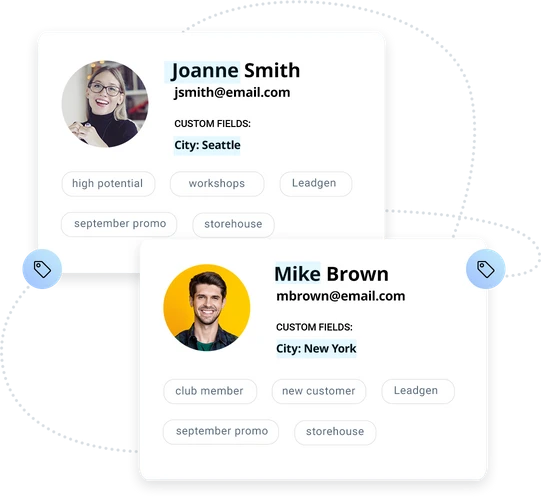
- Customer Segments: By using an unlimited number of tags to appropriately profile your customers, you’ll be able to deliver exactly what they want.
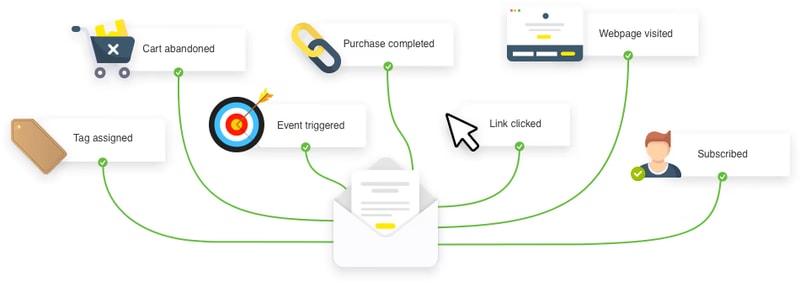
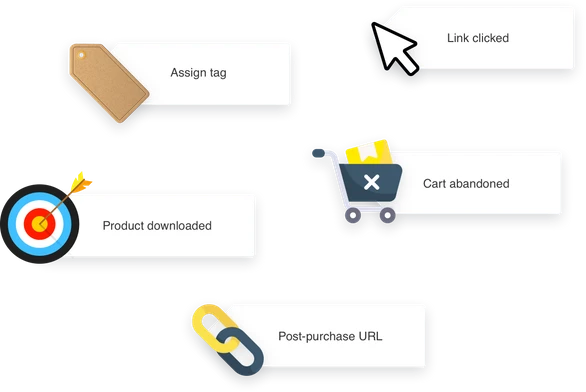
- Web Events: GetResponse let users choose to receive alerts whenever a customer takes a certain action on your website (e.g. logs in, watches a video, abandons a cart, or downloads content). This will help you identify what your customers are engaging with so you can improve their experience.
Conversion Funnel
This is one of GetResponse’s standout features. It’s a lead-generation feature that helps you create sales funnels and landing pages for the different parts of your business. You’ll have access to over 30 conversion-optimized scenarios to help you build your contacts, and sell your offers.
If you’re running an e-commerce store or promoting a webinar or other events, this will be a valuable addition for you.
Landing Pages
Your landing pages are what’s going to convert your traffic into leads as they showcase your product lists and any other promotional content. GetResponse simplifies this process while still ensuring that it’s effective by allowing you to build your landing pages in minutes using a drag-and-drop editor.
This builder also includes:
- Sign-up forms to help grow your contact list
- A/B testing for your pages
- SEO optimization directly from the platform so you can ensure your landing page appears in search results
- Customizable landing page templates
Website Builder
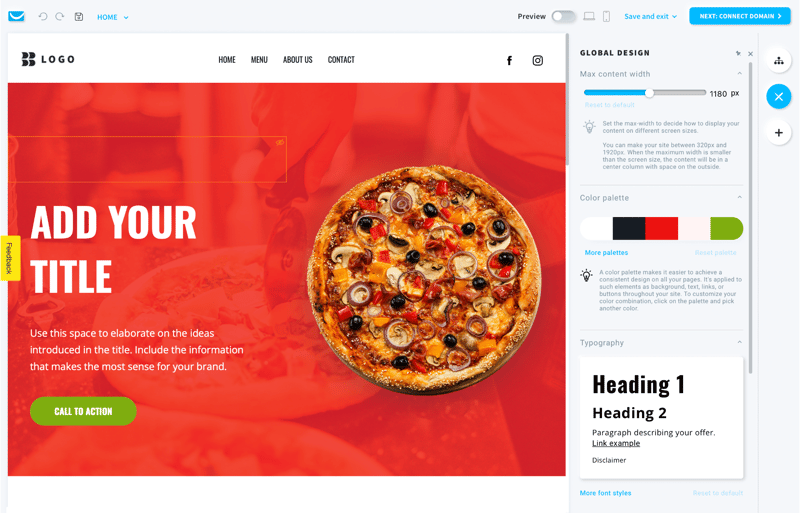
GetResponse has an AI-driven, and code-free website builder. If you need more guidance and don’t want to build from scratch, this feature simplifies the entire process so much that even those with no coding experience can easily build and tailor a site for their specific needs. Simply input your business description and your brand’s visual preferences to receive personalized web templates.
Webinar Builder
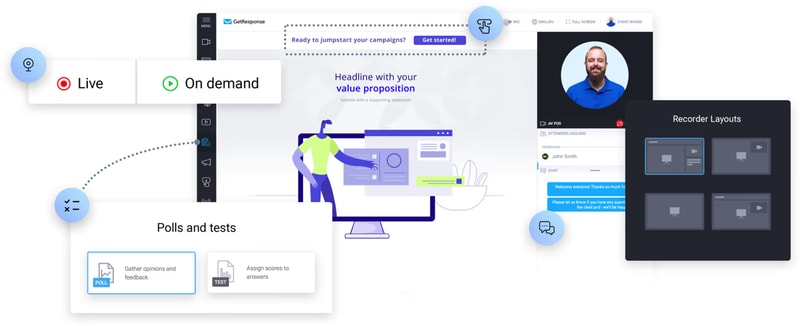
GetResponse’s webinar builder is a no-download tool capable of connecting and engaging with your audience anywhere and anytime, which means it will give users a real opportunity to encourage conversions.
Some key perks to take note of in this specific feature are:
- Ability to host unlimited webinars
- Access to a room for up to 1,000 live attendees
- Platform sharing with two other presenters
- Storage of up to 20 hours of webinar recordings
Who is GetResponse For?
Whether you’re looking to grow your email list, increase engagement, or drive sales, GetResponse is the ideal platform for anyone looking to maximize their email marketing efforts and achieve their marketing goals. But given its range of tools and features, GetResponse is great for:
Entrepreneurs
GetResponse is an excellent platform for entrepreneurs looking to market their businesses online. The platform offers a range of features that are specifically designed to help entrepreneurs reach potential clients and build relationships, including email marketing, a website builder, and paid ads. With email marketing, entrepreneurs can create custom emails, use ready-made templates, and automate their email campaigns to reach their target audience.
Online marketers
For entrepreneurs who are looking to generate and convert leads, this is a great option. The platform offers a range of features specifically designed for online marketers, including sales funnels, popup forms, and autoresponders. These tools provide entrepreneurs with the flexibility they need to effectively reach their target audience and convert leads into paying customers. Whether you’re looking to grow your email list, increase engagement, or boost sales, GetResponse has the tools and features you need to achieve your marketing goals
Marketing managers
With GetResponse, these professionals can easily reach specific customer segments by using personalized and automated messaging across various channels. This includes email, website tracking, and the ability to host live and on-demand webinars. These features allow entrepreneurs to effectively engage with their target audience and drive results, that can help take their marketing efforts to the next level.
Mid and large companies
With its ability to increase return on investment (ROI) with various tools that are tailored to meet the specific needs of businesses, GetResponse is a great platform for businesses. This means that regardless of the size of the business, GetResponse can help achieve key metrics across the customer journey. The platform’s transactional emails and dedicated customer support are just two examples of how GetResponse is specifically designed to help entrepreneurs succeed.
GetResponse Pricing
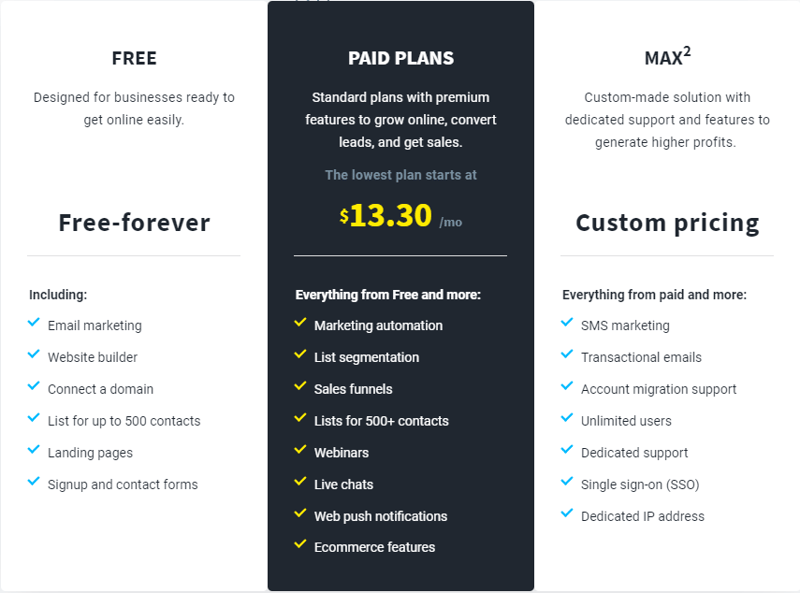
GetResponse offers three main tiers in their pricing; Free , Paid Plans , and MAX² (for large enterprises).
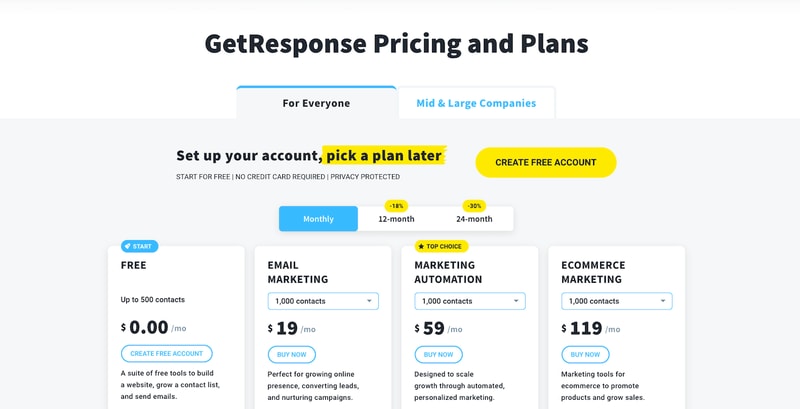
The paid plans are also divided into email marketing, marketing automation, and e-commerce marketing.
Email Marketing Plan
With the email marketing plan, you can build your email list and deliver valuable information to your audience. You’ll be able to create a website with an unlimited number of landing pages to generate signups. You can also segment your subscribers, but only based on the basic information you’ll have collected about them. This plan works best for those who don’t need complex automation, like small businesses, entrepreneurs, bloggers, etc.
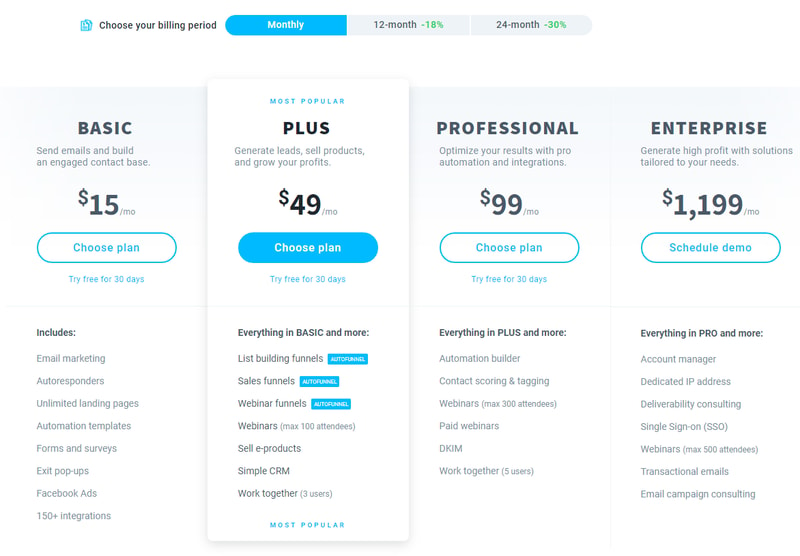
Pricing varies depending on your contract length and the number of contacts. See GetResponse pricing for current rates.
Marketing Automation Plan
If you want to include more advanced automation settings and segmentation, then this is the plan for you. It includes all the features in the free plan, and email marketing plan, as well as trigger and event-based sequences to collect more data on your audience. You’ll be able to create automated email chains so customers can receive personalized emails based on their behavior and preferences.
Additionally, you’ll get access to the webinar builder so this plan is typically great for B2B and tech companies that want to nurture their leads.
See GetResponse pricing for current Marketing Automation plan rates.
E-commerce Marketing Plan
This plan includes everything from the two previous plans and includes web push notifications, abandoned cart recovery, product recommendations, transactional emails, and promo codes. Of course, this plan is beneficial if you want to increase sales for your online store.
See GetResponse pricing for current E-commerce Marketing plan rates. Pricing scales with the number of subscribers.
GetResponse Pros & Cons
Pros
- The free plan includes valuable marketing features.
- GetResponse is feature-rich while being easy to use.
- This a great option if you have an e-commerce business.
- GetResponse integrates with over 120 tools. You can also use GetResponse’s advanced API to build your integration.
- Choose from over 2,000,000 Shutterstock images and GIFs from GIPHY to add an attractive and professional touch to your emails. No extra purchases are necessary.
- Caters to various devices so you can design and preview well-formatted emails that look good on any device (desktop, tablet, or mobile).
- You get digital marketing reports to track your marketing campaign’s performance.
- You can create and monitor your paid Google, Facebook, and Instagram ads from your GetResponse account.
- 24/7 live representative customer support is available via email or live chat.
- 30-day free trial available, with no credit card required, for all features.
- A discounted plan is offered for charities and NGOs (50% off every monthly plan)
Cons
- Although GetResponse integrates with over 120 tools, it omits some notable project management platforms. Also, integrations with PayPal and Eventbrite can only be done using Zapier.
- GreatResponse doesn’t automatically create a mobile-friendly version of your landing pages. You need to remember to design the mobile-friendly version separately.
- Although GetResponse’s mobile app is great at showing you the progress of your campaigns, the drag-and-drop editor is difficult to use and makes it hard to make changes while you’re on the go.
Conclusion
GetResponse is a great and affordable tool to help you upstart your email marketing campaigns. They have other offerings that are all designed to complement core features and boost your presence online, including a selection of builders, for websites, landing pages, and even webinars. GetResponse also has a customer support team that is always available to help users onboard and address any concerns.
However, don’t forget that there are still other email marketing software options available—all with their own set of unique features and tools. Be sure to take a look at our wide range of software categories to find the perfect software that your business needs.

Compare GetResponse with other popular tools in the same category.
allows for multiple lists to be sent out individually with heir own emails.
to be perfectly honest, i have no complaints!
customer retention and keeping clients updated
Email Analytics, I can analyse and compare my emails easily
Not many choices of webform templates, you could do better here
Digital marketing and lead generation
Fairly easy to use and start using right away.
The interface when writing an email is a bit slow and choppy. It's not a huge deal but can be somewhat frustrating.
Staying in contact with clients.
I Like the ease of use and keeping templates
I sometimes lose what I have created, I would like an auto save feature
I am able to track weather or not my emails are opened.
The fact that they allow single opt in. I also like the predestined templates nave been able to create some nice looking mailers by modifying their templates. Also LOVE that they have very helpful live phone support with shirt wait times
We have had an issue with getting a plug in to integrate with Get Response.
We get a substantial sales boost when sending emails to our list.
Great templates, easy split testing, price is very reasonable - especially with annual plan.
Editor can be VERY buggy. Frequently italicized my entire message when I went back to edit. Tricky to maneuver images at times.
I have been able to grow a responsive following through my weekly newsletter. Also fantastic for autoresponder needs.
I like that it is easy to reuse old templates and resend them as new contacts are added.
It would be nice to see more Spa, natural themed templates to be able to use.
The ability to alert our clients of upcoming events and specials and the ability to add new contacts easily.
i like that the support is fast at responding and solving problems, and also i like that that there"s course that teach you how to do email marketing.
i dislike that the dashboard is little hard to explore for the first time. and also you cant resend the verification email to the users who failed to verify their emails.
we do provide our users with promo codes for our discounted products on amazon, our users loves that and in return they provide us with their feedbacks that allow us to improve our product.
Chat window help, right now. This feature is great.
Some of the usability is confusing and requires help from customer service to figure it out. Some features are not just click and go, but there are "tricks" that you have to know.
Great setting up of autoresponder emails to train new team members.
The ease to Design great looking on the get response platform
The way in views on and misaligns itself even when you use a stock template on email clients
We found that we stay connected with our clients and use get response as platform to show our clients different options and upgrade options with ease.
The deliverability and open rate has been really good in local campaigns.
Some of the tech is not very intuitive or flowing...kind of clunky.
Solving: Reach to contacts Realizations: Analytics are helping a lot with content writing.
I like the ease of sending and tracking our emails
I would like to be able to access the specific emails that were unsubscribed or hard bounce. This functionality is not available in Get Response.
We can track activity on our website based on when we send emails. There is a direct relationship.
Easy message editing and segmented list selection
I sometimes get confused as to what features are accessed where. The "flow" and terms are not consistent with other autoresponder services I use (Aweber).
Segmenting lists for funnel message delivery. Haven't implemented them yet.
I enjoy the ease of segmentation and ability to add custom fields.
The upload process can sometimes be confusing, particularly when I am editing existing emails.
Segmentation is a challenge for us. GetResponse allows us to segment our donor base efficiently.
I love that I can create landing pages right within GetResponse and easily send out to my mailing lists.
In the time I've been using GetResponse there is nothing I dislike. GetResponse is very easy to navigate and continues to add valuable updates to the program since I joined.
I'm always building my email list and the benefits are being able to see the analytics in real time.
The ease of use. Get response if very easy to build email campaigns.
I am not really sure abut the auto responder portion of the site.
With Get Response I do not have to spend time worrying that my communications will not get delivered when I need them.
I'm very new to using this software but so far I like the ease of constructing an email newsletter and the analysis that helps me track the outcomes.
I dislike the fact that I cannot access the contacts that have complaint or bounced from the contact list. Perhaps, you can do that with a different subscription.
I can see who is interested in receiving information and news about our brand and how many are just indifferent.
I like the variety of features in get response. the best is the newsletter.
I dislike the bounce rate in my email list.
I get more sales and leads now.
Professional looking templates. Easy to navigate.
Impossible to have customers sign back up to our list after accidental unsubscribes.
In today's business climate having professional emails is key. Getresponse is affordable and professional.
I love the fact that I'm not limited in the number of subscribers I can add. Unlike other companies, who make you buy a more expensive plan if you grow your subscriber base! I also like the API allowing us to move and segment our prospects
Nothing really. My only suggestion would be that GetResponse needs to continually work on improving deliverability.
I'm not really solving any "problems", but I am in constant communications with our customers and prospects, allowing us to drive more revenue and sales
GetResponse is very user friendly. I have no technical experience but the system is set up to make it very easy to use. And customer support is easy to access.
I have no complaints. Everything I have tried has worked for me.
I am building my email list with little effort. It is growing slowly but I don't spend time on email marketing to increase it more. GetResponse offers training webinars to help me grow the list if I choose to put more effort into it. I can also make great posters for my business promotion using GetResponse. There are many choices for easy to use forms for marketing.
I love the ability to sync my Getresponse account with my shopping cart to instantly add customers to the corresponding list. I also love that I can have customers automatically removed from advertising campaigns so they aren't pestered with promotions for products they've already purchased.
I dislike that my campaigns are increasingly delivered into my readers' promotions (in Gmail) and junk folders.
I help business owners write compelling marketing copy. Through the use of email marketing, I've built a passive income business largely on selling information products to my email database.
I love the ease of sending newsletters to my list.
There are a few options I wish GetRedponse had, like Instagram buttons for newsletters.
I regularly communicate Roth my audience and grow my list.
Pricing and ease of use. After looking at all the principal product options, this was the best choice for us.
It is a little cumbersome communicating with the support. I've been trying to get yet another organization setup with your services and there has been a whole disconnect on their nonprofit status. Been very frustrating.
The easy of distributing information is the greatest advantage. List management is another.
The design feature is easy to use. Straightforward steps.
Resending an email to the unopened contacts can be a bit confusing.
email campaigns, lead gen, win back campaigns,
Simplicity in service from creating webforms to sending out newsletters and easy segmentation of lists
Some things are not customizable like URL's in confirmation URL to add special characters there.
Keeping informed with my customers
Ease of use and the feedback I get knowing how my correspondence is received.
No issues that I find displeasing that I can think of.
Online marketing
I like the email/newsletter features. I plan on setting up landing pages too.
Would like more templates for healthcare etc
Keeping in touch with patient base
It's hard to pin down a favorite thing I like about GetResponse, but I would have to say that the extensive "hands-free" tracking and analytics tops the charts. It allows us to not only track performance of our current campaigns, but to gain actionable intelligence for future campaigns. In addition to the great analytics, GetResponse has excellent email builder, contact management, and cool deliverability features like Perfect Timing. The form builder, custom fields, personalization and saved searches that allow for list segregation are awesome features, too.
One of the main things I dislike about GetResponse is their lack of clear guidelines and features that let you know when there's issues with your list and how to get back on track. Pretty much if GetResponse decides, by whatever criteria, that you're putting their delivarability at risk with high bounce/unsubscribe/complaint rates, they will shut you down without warning or reason. This is an unacceptable business practice for a B2B service like GetResponse and is the #1 reason I would leave. It's nerve wracking every time you send an email because you're always in fear that some jerk on your list will mark you as spam and GetResponse will suspend your account permanently for it. I think GetResponse could do a much better job at communicating with their clients where they're at on the "threat level" and what they can do to get back in the green.
We use GetResponse for our own communications and as a preferred vendor for our clients when we manage their email communications. The problems we're solving is how to maximize the marketing and PR potential of in-house customer information. We've realized that email has much greater value as a marketing channel than we previously thought, and have used the experience to help our clients manage and optimize their email marketing and communications.
I do like the ease of use for the software.
More tutorials can be helpful to increase readers.
We are sending newsletters and generating more business.