

Unclaimed: Are you working at Glide?
Glide Reviews: 4.7/5 — Highly Rated
Build a powerful, data-driven app or website, without writing a line of code. Over 250,000 people & companies have made millions of apps with Glide. Reduce cost and time to market by using Glide.

| Segment |
Small Business
Mid Market
Enterprise
|
|---|---|
| Deployment | Cloud / SaaS / Web-Based, Mobile Android, Mobile iPad, Mobile iPhone |
| Support | 24/7 (Live rep), Chat, Email/Help Desk, FAQs/Forum, Knowledge Base, Phone Support |
| Training | Documentation |
| Languages | English |








Glide goes from free to $199 a month with nothing in between, and the paid plan is metered on something most buyers do not think about: updates. You get 5,000 a month, and every one after that costs $0.02. An update is any row Glide writes or changes, so an app that a team actually uses all day consumes them far faster than a headcount-based estimate would suggest.
- What it is: A no-code platform that turns spreadsheets and databases into working web and mobile apps.
- Best for: Teams turning an existing spreadsheet workflow into a real internal tool without hiring a developer.
- Pricing: Free tier. Business from $199/month billed yearly. Enterprise quoted. Verified July 2026.
- The honest catch: The gap between free and $199 is a cliff, and update overages can exceed the base price on a busy app.
What Is Glide?

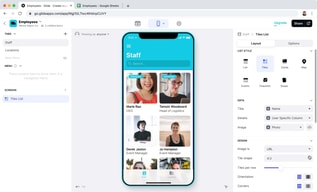
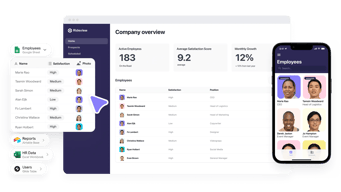
Glide’s proposition is narrow and well-executed: point it at a spreadsheet or database and it produces a functioning app with a real interface, permissions, and workflows. Its own tagline for the paid tier — “turn your spreadsheets into tools” — describes the job precisely.
The reason it matters is that most companies run meaningful operations on spreadsheets that everyone knows should be an application: inventory counts, field inspections, client onboarding, equipment checkouts. Building those properly means a developer and weeks of work. Glide gets to something usable in an afternoon, with 40-plus components, workflows, an API, and support for over 100 data sources at the Enterprise tier including HubSpot, Stripe, Salesforce, QuickBooks, and PostgreSQL.
The trade-off is that you are building inside Glide’s model. It is excellent for CRUD-style internal tools built on tabular data, and a poor fit for anything needing unusual interaction design or complex client-side logic.
How Glide Works
- Data first. Connect a spreadsheet or database; the app is generated from the table structure.
- Updates as the meter. Every row Glide writes or changes counts. 5,000 included on Business, then $0.02 each.
- Editors versus users. 1 editor on Free, 10 on Business; 30 app users included, then $5 each.
- Row limits. 25,000 on Free, 100,000 high-scale rows on Business.
- Workflows and APIs. Business adds workflows, Call API, and the Glide API.
- Custom domains and branding on Business, SSO and backups on Enterprise.
Glide Pricing
Captured from Glide’s pricing page in July 2026, in US dollars, with yearly billing selected. VAT is added at checkout.
| Plan | Price | Editors | Users | Updates/mo | Rows |
|---|---|---|---|---|---|
| Free | $0 | 1 | Unlimited personal | — | 25,000 |
| Business | from $199/mo yearly | 10 | 30, then $5 each | 5,000, then $0.02 each | 100,000 |
| Enterprise | Quoted | Custom | Custom | Custom | Custom |

What decides your real bill:
- Updates are the cost that surprises people. Five thousand a month sounds generous until you consider what generates one. A team of twenty logging a handful of records each per day reaches it inside a month, and at $0.02 each the overage compounds quietly: 10,000 updates is $299 a month, 25,000 is $599. Model your write volume, not your headcount.
- The free-to-paid gap is a cliff, not a step. There is nothing between $0 and $199. A solo builder with a working app and no budget has no intermediate option, which is the most common complaint about Glide’s pricing and the reason people compare it unfavourably against Softr or Airtable.
- The free tier is genuinely usable for building. One editor, unlimited personal users, and 25,000 rows is enough to build and validate an app properly before paying anything.
- Extra users are cheap; extra updates are not. $5 per user beyond 30 is reasonable. The metered updates are where an app’s success turns into a bill.
- “Starting at” is doing work in that $199. It is the floor for Business, not the price for a real deployment with users and usage.
- A 14-day free trial covers Business features, which is the right way to measure your actual update consumption before committing.
Who Should Use Glide
- Teams with a spreadsheet that should be an app. The clearest case, and what Glide is built for.
- Operations and field teams. Inventory, inspections, checklists, and dispatch are natural fits for its data model.
- Businesses without developers. A working internal tool without a hiring decision is a genuine saving.
- Companies validating an idea. Build free, prove the workflow, then decide whether $199 is justified.
It fits poorly for consumer-facing apps at scale, where update costs and the platform model work against you; for complex custom logic, where Bubble offers far more control; and for solo builders on a budget, given the absence of anything between free and $199.
Honest Pros and Cons
Strengths
- Genuinely fast. A working app from a spreadsheet in an afternoon is not marketing.
- A usable free tier. One editor and 25,000 rows is enough to build and validate.
- Good data source coverage. 100-plus sources at Enterprise including Salesforce, Stripe, and PostgreSQL.
- Cheap incremental users. $5 each beyond the 30 included.
- Workflows and API on Business. Real automation rather than static views.
- 14-day trial of paid features.
Limitations
- No tier between free and $199. The most-cited weakness.
- Update overages can exceed the base price. $0.02 each compounds on a busy app.
- Update consumption is hard to forecast before you have real usage data.
- Only 1 editor on free. Collaborative building requires Business.
- Constrained by the data model. Excellent for tabular CRUD, limited beyond it.
- VAT added at checkout, so the headline is not the invoice.
Glide Alternatives and How It Compares
- Softr is the closest competitor for turning Airtable and databases into apps, with a gentler pricing ladder.
- Airtable is the database layer many Glide apps sit on, and its own interfaces cover simpler cases without a second tool.
- Bubble offers far deeper control for genuinely custom applications, at the cost of a much steeper learning curve.
- Notion covers lightweight internal tools and documentation where an app is more than you need.
- Make handles the automation side if what you actually need is workflow rather than an interface.
- Zapier and AppSheet are the other names commonly shortlisted, the latter being Google’s equivalent for spreadsheet-driven apps.
For a broader survey, browse our no-code platforms directory.
The Verdict
Glide is very good at one job: taking a spreadsheet that has quietly become business-critical and turning it into an application with permissions, workflows, and an interface people can actually use on a phone. For an operations team running inventory or inspections out of a shared sheet, that is a real problem solved in an afternoon rather than a quarter, and the free tier lets you prove it works before spending anything.
The pricing is where care is needed, in two distinct ways. First, there is nothing between free and $199 a month — a cliff rather than a ladder — which makes Glide awkward for solo builders and small teams whose app works but cannot justify a four-figure annual commitment. Softr and Airtable both handle that middle ground better.
Second, and more importantly, updates are the meter and they are difficult to forecast. Five thousand a month is the Business allowance, every additional one costs $0.02, and an update is any row written or changed. That means your bill scales with how much your app is used rather than how many people can log in — so the more successful the tool becomes internally, the more it costs, in a way headcount-based budgeting will not predict. Ten thousand updates is $299 a month; twenty-five thousand is $599, or triple the advertised price.
The practical advice follows directly: build on the free tier, then use the 14-day Business trial with real users doing real work, and watch the update counter rather than the feature list. That number, not the $199, is what determines whether Glide is cheap or expensive for your particular workflow.
FAQ
How much does Glide cost?
Glide has a free tier, a Business plan starting at $199 per month billed yearly, and a custom-quoted Enterprise plan. Yearly billing saves 20% against monthly. Business includes 10 editors, 30 app users with additional users at $5 each, 5,000 monthly updates with additional updates at $0.02 each, and up to 100,000 rows. VAT is added at checkout, and a 14-day free trial of Business features is available.
What is an “update” in Glide?
An update is any row that Glide writes or changes — creating a record, editing a field, or a workflow modifying data. Business includes 5,000 per month and charges $0.02 for each one beyond that. Because updates track how much the app is used rather than how many people can access it, consumption is difficult to estimate in advance and is the most common source of unexpected cost.
Is Glide’s free plan good enough?
For building and validating, yes. It provides one editor, unlimited personal users, up to 25,000 rows, 40-plus components, and unlimited drafts, which is enough to construct a real app and confirm the workflow. It stops being sufficient the moment you need multiple editors, custom domains, workflows, or a team using it in production — and at that point the only step up is $199 a month.
Why is there nothing between free and $199?
That is Glide’s chosen structure, and it is the most frequent criticism of the product. There is no intermediate tier for a solo builder or small team whose app works but cannot justify roughly $2,400 a year. If you are in that position, Softr and Airtable’s own interfaces both offer gentler pricing ladders for comparable internal-tool use cases.
What is Glide best for?
Turning existing spreadsheet workflows into proper internal tools — inventory, inspections, checklists, dispatch, and similar operational data — for teams without developers. It is fastest where the data is genuinely tabular and the app is CRUD-shaped. It is a weaker choice for consumer-facing apps at scale, for anything needing unusual interaction design, and for budget-constrained solo builders.

Compare Glide with other popular tools in the same category.

Glide helped me to solve a lot of small business problems, allowing me to creat fast paced solutions that have an impact TODAY! The learning curve is very attractive, and allow anyone to use it in an heartbeat! The community is very helpfull and participative, the Academy is very straight forward and explain every corner of Glide universe!
I would like to explore more the free version, and to understand the limits of it, so I could help more people, withou asking, a value for maintaining a soultion for those who are uncapable of paying
With Glide we are solving a lot of problems for small businesses, schools or NGO's that couldn't afford to pay a full development price. Here are some of the problems that we are solving: - Automating Schedulles for a school - Creating reports for financial administration - Sports CRM - Student Management activities - LMS for safety - A Quote a day for stoics - Your CV's - etc...

Simplicity and performance is the best way to describe Glide ;) I meet Glide in 2019 and since I've never stopped using it ! It's simple and performant and you can do so many apps and tools with it.
I don't really have stuff that i don't like about Glide. I think the principal thing it the way they shipped new features every week ahah ;) it's hard to follow (joke)
I'm doing a lot of different tools with Glide ! Some app for my student to get course and info, Some apps for French event to get the speaker and the info. Internal Tools for company, CRM, ERP, Local Shop, etc...

Ease of use, quick prototyping, innovative and supportive staff.
No in-app subscription support, no way to edit/delete multiple records at once from the front end of the app (set column > multiple relation)
All types of problems. All of them have the same theme: give users an easy, interactive and visual way to access and modify data.
It's very easy to use, the community is helpful, and the possibilities with Glide are endless.
Whatever I or the majority of the community dislikes, Glide seems to resolve and improve quickly
Customer portal, quote generation, project management, automated processes
Glide makes it so easy to transform a process that is reliant on a spreadsheet into a fun, interactive tool that can be used across an organization. Even if you don't have a spreadsheet to start with, you can use Glide's built-in Tables to build Apps without any reliance on external sources.
I wish Glide allowed more sign in options (sign in with Microsoft account, Facebook login, etc.). The current options are a bit limiting and expanding on this area would likely lead a better user experience.
Glide is making it much easier to collaborate on processes in our organization. A shared spreadsheet is a boring thing to interact with, but a bright, beautiful app or webpage leads to much more interest and adoption from staff.
Glide has empowered me to create professional and functional apps without having to rely on traditional coding skills. It's a game-changer for no-code development, and I highly recommend it to anyone looking to unlock their creativity and bring their app ideas to life.
With the growing size of your app, performance becomes a challenge. I have heard there are ways to improve that but for that you will have to hire an expert
Any simple minor tasks can be automated with Glide. Prototyping is a huge plus coz you can actually hand it over to customers to get their feedback.
One thing that stands out is, the ability to integrate with various data sources, such as Google Sheets, enables effortless data management. Overall, Glide empowers individuals to bring their app ideas to life effortlessly and efficiently, making it an exceptional tool for app development.
One aspect that could be improved is the availability of more advanced functionalities and integrations with third-party services. While Glide offers a solid foundation for creating basic to moderately complex apps, it may fall short for more advanced or specialized requirements.
Glide's solutions to the challenges of coding, time-consuming development processes, real-time data syncing, and design resources greatly benefit users like me, enabling us to create functional and visually appealing apps efficiently and effectively.

Glide has completely transformed the way I approach app development, making it accessible and enjoyable even for someone with little to no coding experience. This powerful no-code tool has opened up a world of possibilities for me and my projects.
Support for GraphQL APIs can be improved.
I particularly appreciate how seamlessly Glide integrates with various data sources. Connecting to Google Sheets, databases, or APIs is a straightforward process, allowing me to easily fetch and display real-time data within my app. This functionality has greatly enhanced the user experience and the overall functionality of my apps.
Su panel de interacción, sus caracteristica sencillas a utilizar
Poco botones, podría ver mas opciones de facilidad de pago
muestra datos certeros y faciles de lectura

It is user-friendly and there are many tutorials out there to learn from
no downsides yet, still learning the development features.
Helping me to build a travel app

As an avid developer and entrepreneur, I am always on the lookout for tools that can streamline the app development process. Recently, I had the opportunity to explore a revolutionary no-code app development tool called Glide, and I must say, it exceeded my expectations in every aspect. This tool has truly transformed the way I approach app development, and I am excited to share my experience. First and foremost, Glide embraces the concept of empowering creativity. It offers a user-friendly interface with an intuitive drag-and-drop functionality, allowing even those with minimal technical knowledge to create robust and visually stunning applications. The tool eliminates the need for writing complex lines of code, enabling users to focus on their ideas rather than getting caught up in programming intricacies. One of the standout features of this tool is its extensive library of pre-built components and templates. Whether you're developing a mobile app, a web application, or even a complex enterprise solution, this tool offers a vast collection of customizable elements that cater to various industries and functionalities. From login forms and database integrations to advanced UI components and data visualization tools, the possibilities are endless. The ability to rapidly prototype and iterate upon ideas significantly accelerates the app development process. Furthermore, the tool provides seamless integration with popular third-party services and APIs, ensuring that your application can leverage the functionalities of existing systems effortlessly. Whether you need to incorporate payment gateways, social media sharing, or cloud storage solutions, the tool offers a range of integrations that enable you to build feature-rich apps without writing a single line of code. I was particularly impressed by the tool's scalability and performance. It generates clean and optimized code behind the scenes, resulting in apps that are not only visually appealing but also efficient and responsive. The generated code is lightweight, ensuring faster load times and a seamless user experience across different devices and platforms. Moreover, the tool offers excellent collaboration capabilities, allowing multiple team members to work on a project simultaneously. The ability to invite colleagues, share feedback, and track progress in real-time fosters a collaborative environment, making it ideal for both small teams and large enterprises. Customer support is also a crucial aspect to consider, and this tool delivers in that area as well. The dedicated support team is responsive, knowledgeable, and always ready to assist with any queries or issues that may arise during the development process. They also provide extensive documentation and tutorials, enabling users to quickly familiarize themselves with the tool's features and make the most out of their app-building journey. In conclusion, the no-code app development tool I had the pleasure of using has transformed the way I approach app development. Its user-friendly interface, extensive component library, seamless integrations, scalability, and excellent customer support make it a top choice for developers, entrepreneurs, and businesses alike. Whether you're a beginner or an experienced developer, this tool empowers you to bring your ideas to life efficiently and without the need for extensive coding knowledge. I highly recommend giving it a try and experiencing the freedom and creativity it offers firsthand.
While the tool claimed to offer seamless integrations with third-party services, I missed the integration with Microsoft tools, like Excel. The integration process was cumbersome and required unnecessary workarounds and manual configurations. This not only hindered the functionality of the apps but also made the development process needlessly complex.
Glide helps solve several business problems. Here are some key business challenges that a no-code tool addresses: - Speeding up App Development - Reducing Development Costs - Bridging the Skills Gap - Enhancing Agility and Iterative Development - Promoting Collaboration and Communication - Empowering Business Users - Scaling and Customization In summary, Glide helps businesses overcome challenges related to development speed, costs, skills gaps, agility, collaboration, empowerment of business users, and scalability. By leveraging these tools, businesses can streamline app development, reduce expenses, foster innovation, and create customized solutions that align with their specific needs and goals.

Glide has really helped me to improve my app making skills and has allowed me to make ideas come to life. The best part is that Glide is user friendly and easy to use!
I would like to see more affordable plans for small businesses owners like me. This would be a great solution for small businesses owners in general. This is just a minor improvement.
Glide is solving the issue of making apps easier for the layperson because it doesn't involve any coding. I believe this aspect helps to increase business performance.
The speed of learning is truly astonishing. You can effortlessly construct an app within minutes, and subsequently explore a multitude of features to enhance your business capabilities.
The newly introduced pricing plan imposes excessive limitations on small-scale use cases such as association or friends apps. Also I'd like a Make integration instead of Zapier.
Using efficient tools instead of relying on sheets or papers proves to be highly beneficial. Numerous small businesses can save a significant amount of time, given the remarkable number of use cases that can be addressed.
Easy to use and simple to create via Google Sheets or Airtable
Price for countries like Brazil should be lower
Quick creation of apps
The one thing that I love about the Glide App is that it is easy to use for a non-coder. I was able to use my existing Google Sheets to create a beautiful app for my team!
Honestly, I do not have a lot to say here. I use it fairly regularly for the same type of projects so I do not have to dive deep into all the other areas of the platform.
Glide has helped my colleague and I develop a beautiful looking app for our team Instructional Hub (Resource Center). It will allow us to house all our resources in one place for easy access.
I love how they continue to build and improve their product offerings.
Nothing at the moment. Glide has been great to use.
It is allowing us to build faster internal work apps for clients.
The simplicity of the tool is fundamental because in a short time it is possible to launch and measure the results
What I still haven't found is how to import data from other sources (spreadsheets or text files)
CRM Task Manager improvement of team communication and agility in processes business sector organization

After trying many No-code apps for a particular project that i needed to build, i finally went with Glide for: - Best UI - Easier to use - Versatility of own tables
Although it might seem costly its actually quite afordable compared with other competitors
Create apps at a glance!
I like the fact that I don't need to know how to code to use the software. It has an easy-to-understand interface.
I cannot think of any dislikes at this time.
Helping create an inventory management solution for our distributors.
Glide helped us to develop internal apps and also a brand new external app for our customers. With glide we got the same experience as a native app but with amazing speed and easy to develop and integrate with our different tools!
Not a lot. Still testing some functionalities. i know that a lot of plugins or widgets are still to be develop. Happy to see what glide will develop soon. Having the app in app store or google play I think is a must in the near future
Internal apps to manage changes in the database. Customer's app to see their subscription and execute changes

Es la opión más versátil y fácil de usar para actualizar el catálogo interno de productos en mi empresa y nos ha facilitado la gestión para tener una herramienta todo en uno con la que poder adelantar los inventarios,
Es perfecta <3 estoy aprendiendo a sacarle más provecho pero estoy encantado con sus usos y resultados, las posibilidades que me brinda por ahora son infinitas. Hasta puedo hacer uso de forma inicial sin pagar.
En mi caso la uso para administrar el catálogo de productos de mi tienda de bicicletas de forma que los diferentes colaboradores puedan obtener y alimentar la información en simultanea

It's really intuitive to use....I was able to begin using right out of the gate! I also how easy it is to share apps with others. Once people see an app created in Glide, they IMMEDIATELY want to know, "How'd you do that?" and I've seen many cases where others have in turn seen something I created and run with it.
Off the top of my head, nothing. I think if I were to say something I WISH was more present was a portal / section for people using it to build educational apps (as I do).
My organization focuses on making it easier for teachers and learners to be connected to high-quality, free content. The ease with which you can set up relations within Glide makes it super simply to create topical "shells" that can be applied to any content area...then it's just a matter of plugging in links to great content for learners and instructors to explore.
The easiness to use. It is a really easy to use platform, but with a lot of potential. Normally all the no-code apps out there are somehow complicated to use, Glide is the opposite.
In some scenarios, the pricing can be complicated, overall when you try to expand your MVP into another solution. As well, it could have more integrations in order to be able to do more.
There are a lot of times in which I have an idea for a product or system, and with Glide I can develop it really fast and easy. The templates are really good and you can really develop over them or even learn on how to do certain things within the app.

If you are looking for a solution that can be easy to build, use, and share your Google sheet data with others on mobile or web devices, then you must try Glide. It's fascinating how easy its to build mobile web apps with Glide!
I still sometimes find some missing features, such as more layouts and navigation flexibility. Also, it will be great to have a way to design the UI without having to bind the UI to the sheet backend and conform to data parameters.
Bringing my data onto my mobile device interactively and intuitively allows me to be close to my data and update and share on the go. This has undoubtedly improved productivity and usage.
I love that Glide is growing at a rapid pace in terms of functionality and users. Glide bridges the gap between developers and creatives.
I think Glide could begin to offer more design customizations. I think competitors provide more custom options in terms of layout/UI.
Glide makes platform development quick and easy. This is benefitting my business by allowing me to have a quicker turnaround time on projects.
Ease of starting up - One of the critical things for no coders is the speed to launch for any project type. With Glide, you can quickly set up a fully functional App within a day The community - Glide's key success factor lies in its community. The support you get is second to none. Continuous improvement - Every month, there is something new that has been released which makes the platform great Documentation - They recently introduced Glide university, where you can read through the documentation and the tutorials to upskill yourself
They recently introduced an updates metric, which limits what you can add, edit or delete from the database; however, they have higher tier packages, which can be costly for entry-level users.
Nontechnical founders can now create solutions for their problems without needing to hire coders or technical staff. Creating my own solution results in lower costs for projects and also gives control to people like myself in terms of the solutions I come up with for my business
Glide has allowed me to create tools and resources for my real estate teams that are an incredible value for my agents. They're assets are easy to use and compared to any competitors, the learning curve is miniscule.
Customizability could be improved with colors. Would love to have charts and graphs available on mobile. And the last thing is the speed in which google sheets updates - if it could be a bit snappier, that would be ideal.
Glide allows me to create various solutions to consistent problems which allows me to focus on bigger issues and problems that take more time and deserve more focus. It allows me to tell agents to refer to this app to find the answer, and if the answer isn't there, I can work on getting it in there.

I like how you can create complex apps without having to write code. Being able to set up a database and build a friendly native UI in one app is fun
There is a bit of a learning curve. I'm a product designer with no coding background. It took me a while to understand the fundamentals of the app
I had been looking for a personal journaling app for a while. Many of the options are complicated and require subscriptions. With glide I was able to build my own
Easy to learn and very good community who respond quickly to questions. A lot of nice templates are made for you and ready to use. The fact that I was able to create my first app so quickly impressed not just me but my business partner, who is a developer.
I guess the privacy and permissions table doesn't quite seem to work as expected or described. I haven't had the time yet to figure this part of it out as it's not that important for what I'm doing. But I'm sure the community would be able to answer my question very easily should I wish to understand it more.
It's helping our business to prototype ideas very quickly as proof of concept. It allows us to show our clients sample screens and work flows without having our developer spend hours doing the same thing. It reduces are cost and overhead.
I love how simple easy & friendly the interface is. The no code software logics have incredibly help me scale my business to new heights and I dont think I'll move out of it now.
I think it could be faster at times , hangs sometimes.
I host airbnb experiences virtually for corporates around the world & wanted a bird's eye view of my events using parcering. Glide helped me create a unique kind of front end that was easy to look at and had all information at ome place. I can now assign events to other hosts, take their feedback and customise it fully.