

Unclaimed: Are you working at Glide?
Glide Reviews: 4.7/5 — Highly Rated
Build a powerful, data-driven app or website, without writing a line of code. Over 250,000 people & companies have made millions of apps with Glide. Reduce cost and time to market by using Glide.

| Segment |
Small Business
Mid Market
Enterprise
|
|---|---|
| Deployment | Cloud / SaaS / Web-Based, Mobile Android, Mobile iPad, Mobile iPhone |
| Support | 24/7 (Live rep), Chat, Email/Help Desk, FAQs/Forum, Knowledge Base, Phone Support |
| Training | Documentation |
| Languages | English |








Glide goes from free to $199 a month with nothing in between, and the paid plan is metered on something most buyers do not think about: updates. You get 5,000 a month, and every one after that costs $0.02. An update is any row Glide writes or changes, so an app that a team actually uses all day consumes them far faster than a headcount-based estimate would suggest.
- What it is: A no-code platform that turns spreadsheets and databases into working web and mobile apps.
- Best for: Teams turning an existing spreadsheet workflow into a real internal tool without hiring a developer.
- Pricing: Free tier. Business from $199/month billed yearly. Enterprise quoted. Verified July 2026.
- The honest catch: The gap between free and $199 is a cliff, and update overages can exceed the base price on a busy app.
What Is Glide?

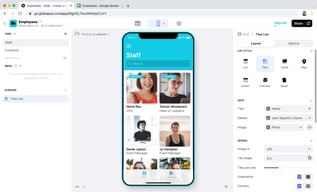
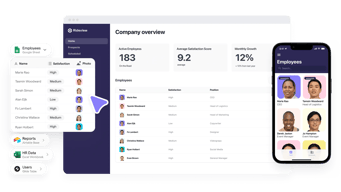
Glide’s proposition is narrow and well-executed: point it at a spreadsheet or database and it produces a functioning app with a real interface, permissions, and workflows. Its own tagline for the paid tier — “turn your spreadsheets into tools” — describes the job precisely.
The reason it matters is that most companies run meaningful operations on spreadsheets that everyone knows should be an application: inventory counts, field inspections, client onboarding, equipment checkouts. Building those properly means a developer and weeks of work. Glide gets to something usable in an afternoon, with 40-plus components, workflows, an API, and support for over 100 data sources at the Enterprise tier including HubSpot, Stripe, Salesforce, QuickBooks, and PostgreSQL.
The trade-off is that you are building inside Glide’s model. It is excellent for CRUD-style internal tools built on tabular data, and a poor fit for anything needing unusual interaction design or complex client-side logic.
How Glide Works
- Data first. Connect a spreadsheet or database; the app is generated from the table structure.
- Updates as the meter. Every row Glide writes or changes counts. 5,000 included on Business, then $0.02 each.
- Editors versus users. 1 editor on Free, 10 on Business; 30 app users included, then $5 each.
- Row limits. 25,000 on Free, 100,000 high-scale rows on Business.
- Workflows and APIs. Business adds workflows, Call API, and the Glide API.
- Custom domains and branding on Business, SSO and backups on Enterprise.
Glide Pricing
Captured from Glide’s pricing page in July 2026, in US dollars, with yearly billing selected. VAT is added at checkout.
| Plan | Price | Editors | Users | Updates/mo | Rows |
|---|---|---|---|---|---|
| Free | $0 | 1 | Unlimited personal | — | 25,000 |
| Business | from $199/mo yearly | 10 | 30, then $5 each | 5,000, then $0.02 each | 100,000 |
| Enterprise | Quoted | Custom | Custom | Custom | Custom |

What decides your real bill:
- Updates are the cost that surprises people. Five thousand a month sounds generous until you consider what generates one. A team of twenty logging a handful of records each per day reaches it inside a month, and at $0.02 each the overage compounds quietly: 10,000 updates is $299 a month, 25,000 is $599. Model your write volume, not your headcount.
- The free-to-paid gap is a cliff, not a step. There is nothing between $0 and $199. A solo builder with a working app and no budget has no intermediate option, which is the most common complaint about Glide’s pricing and the reason people compare it unfavourably against Softr or Airtable.
- The free tier is genuinely usable for building. One editor, unlimited personal users, and 25,000 rows is enough to build and validate an app properly before paying anything.
- Extra users are cheap; extra updates are not. $5 per user beyond 30 is reasonable. The metered updates are where an app’s success turns into a bill.
- “Starting at” is doing work in that $199. It is the floor for Business, not the price for a real deployment with users and usage.
- A 14-day free trial covers Business features, which is the right way to measure your actual update consumption before committing.
Who Should Use Glide
- Teams with a spreadsheet that should be an app. The clearest case, and what Glide is built for.
- Operations and field teams. Inventory, inspections, checklists, and dispatch are natural fits for its data model.
- Businesses without developers. A working internal tool without a hiring decision is a genuine saving.
- Companies validating an idea. Build free, prove the workflow, then decide whether $199 is justified.
It fits poorly for consumer-facing apps at scale, where update costs and the platform model work against you; for complex custom logic, where Bubble offers far more control; and for solo builders on a budget, given the absence of anything between free and $199.
Honest Pros and Cons
Strengths
- Genuinely fast. A working app from a spreadsheet in an afternoon is not marketing.
- A usable free tier. One editor and 25,000 rows is enough to build and validate.
- Good data source coverage. 100-plus sources at Enterprise including Salesforce, Stripe, and PostgreSQL.
- Cheap incremental users. $5 each beyond the 30 included.
- Workflows and API on Business. Real automation rather than static views.
- 14-day trial of paid features.
Limitations
- No tier between free and $199. The most-cited weakness.
- Update overages can exceed the base price. $0.02 each compounds on a busy app.
- Update consumption is hard to forecast before you have real usage data.
- Only 1 editor on free. Collaborative building requires Business.
- Constrained by the data model. Excellent for tabular CRUD, limited beyond it.
- VAT added at checkout, so the headline is not the invoice.
Glide Alternatives and How It Compares
- Softr is the closest competitor for turning Airtable and databases into apps, with a gentler pricing ladder.
- Airtable is the database layer many Glide apps sit on, and its own interfaces cover simpler cases without a second tool.
- Bubble offers far deeper control for genuinely custom applications, at the cost of a much steeper learning curve.
- Notion covers lightweight internal tools and documentation where an app is more than you need.
- Make handles the automation side if what you actually need is workflow rather than an interface.
- Zapier and AppSheet are the other names commonly shortlisted, the latter being Google’s equivalent for spreadsheet-driven apps.
For a broader survey, browse our no-code platforms directory.
The Verdict
Glide is very good at one job: taking a spreadsheet that has quietly become business-critical and turning it into an application with permissions, workflows, and an interface people can actually use on a phone. For an operations team running inventory or inspections out of a shared sheet, that is a real problem solved in an afternoon rather than a quarter, and the free tier lets you prove it works before spending anything.
The pricing is where care is needed, in two distinct ways. First, there is nothing between free and $199 a month — a cliff rather than a ladder — which makes Glide awkward for solo builders and small teams whose app works but cannot justify a four-figure annual commitment. Softr and Airtable both handle that middle ground better.
Second, and more importantly, updates are the meter and they are difficult to forecast. Five thousand a month is the Business allowance, every additional one costs $0.02, and an update is any row written or changed. That means your bill scales with how much your app is used rather than how many people can log in — so the more successful the tool becomes internally, the more it costs, in a way headcount-based budgeting will not predict. Ten thousand updates is $299 a month; twenty-five thousand is $599, or triple the advertised price.
The practical advice follows directly: build on the free tier, then use the 14-day Business trial with real users doing real work, and watch the update counter rather than the feature list. That number, not the $199, is what determines whether Glide is cheap or expensive for your particular workflow.
FAQ
How much does Glide cost?
Glide has a free tier, a Business plan starting at $199 per month billed yearly, and a custom-quoted Enterprise plan. Yearly billing saves 20% against monthly. Business includes 10 editors, 30 app users with additional users at $5 each, 5,000 monthly updates with additional updates at $0.02 each, and up to 100,000 rows. VAT is added at checkout, and a 14-day free trial of Business features is available.
What is an “update” in Glide?
An update is any row that Glide writes or changes — creating a record, editing a field, or a workflow modifying data. Business includes 5,000 per month and charges $0.02 for each one beyond that. Because updates track how much the app is used rather than how many people can access it, consumption is difficult to estimate in advance and is the most common source of unexpected cost.
Is Glide’s free plan good enough?
For building and validating, yes. It provides one editor, unlimited personal users, up to 25,000 rows, 40-plus components, and unlimited drafts, which is enough to construct a real app and confirm the workflow. It stops being sufficient the moment you need multiple editors, custom domains, workflows, or a team using it in production — and at that point the only step up is $199 a month.
Why is there nothing between free and $199?
That is Glide’s chosen structure, and it is the most frequent criticism of the product. There is no intermediate tier for a solo builder or small team whose app works but cannot justify roughly $2,400 a year. If you are in that position, Softr and Airtable’s own interfaces both offer gentler pricing ladders for comparable internal-tool use cases.
What is Glide best for?
Turning existing spreadsheet workflows into proper internal tools — inventory, inspections, checklists, dispatch, and similar operational data — for teams without developers. It is fastest where the data is genuinely tabular and the app is CRUD-shaped. It is a weaker choice for consumer-facing apps at scale, for anything needing unusual interaction design, and for budget-constrained solo builders.

Compare Glide with other popular tools in the same category.

Glide is super easy to setup, easy to use, easy to manage, and can be used with lots of data.
Can't think of anything! If Glide doesn't have anything that you'd like, chances are that they are already working on providing it.
The biggest problem I see in using spreadsheets on your phone is navigating all of the data. It's too difficult. Glide changes all of that. It turns it into an app and makes it searchable and easy to use.

The interface is easy to use and the features are great. Sheet integration is seamless. It's also very affordable for startups like mine. Regular feature updates are superb.
I want to use multiple sheets in one single app. Multiple sheets will help in making diverse apps. I find it very needful. More guides and video tutorials would be great.
Seamless data sharing Easy app making Nice interface Very easy to make an app No coding is excellent and legit It helps me make better work flow My business SOP is better with sheets + glide
I like about system analysis that can make table in glide app directly. And about the function that help me create app by none coding
I want That I can import fonts from other ways. And have some kind of different size of pictures.
The problem is I can't coding very much . But glide app help me a lot I can create app by no coding !

Glide is probably the best no-code platform to build high-fidelity MVPs for a fraction of the cost/time of traditional coding methods. Here are some things I love about Glide: - Fast! You can build fully functional mobile-friendly apps literally in seconds. - Great tool to convert any Google Sheet, Excel doc, or AirTable base into a beautiful app in just a few clicks. - Build complex logic (without coding) using Glide's custom actions.
Currently, apps are limited to 25K rows of data (they are working to increase the limit though) Apps are not native and cannot be easily published in the App or Play Store.
I've built 20+ apps in record time without writing a single line of code. Probably, saved over $40K in development costs by using Glide vs hiring a traditional app development agency.
With Glide I'm able to build powerful data driven web pages and apps without code, easily and with awesome interfaces. Fast and enjoyable.
There still some pending improvements but Glide Team surprise us almost every week with new and exciting updates.
I can give my corporate team a nice and easy tu use experience to manage corporate or user related data.

The speed to publishing a workable final product.
Nothing really. I am looking forward to integrations with more data sources that will help enterprise adoption a cakewalk.
Streamlining internal operations for businesses, presenting data in a more user-friendly way for non-technical users, and helping businesses with technology adoption.

Most of the business users already know tools like Excel, Google Sheets, or Airtable, and Glide makes it easy to build apps on top of these platforms. Some will say that Glide has limited UI capabilities, but because they offer you pre-made elements you, as a developer, have no need to spend too much time thinking about the right size of the pictures, buttons, etc., but can focus on the logic side of your app. Plus, the end result usually looks good and is easy to understand for app users. Overall, I have been using it for side projects and for my work projects, and I am recommending others to try Glide too.
I can't think from top of my head of a single thing that would make my experience with Glide bad or that I wouldn't like. Once you will start to use it, you will better understand what are the capabilities for it and will be able to see for which projects you can use Glide and for which, maybe, you have to choose something else.
We use Glide as an internal tool for some education programs, as well as, have been using it for startup events. It helps digitalize and make some processes automatic. For others, I have helped to build apps that they use not only internally but also give for their companies' customers. While Glide focuses on business, I would say, you can also try it out for your own side projects and test your ideas with it too.
Glide makes it so easy to develop apps for my users. They have private and public apps. Glide allows me to develop apps I didn't even know I could develop. Glide is the best in the no-code app development industry.
There are a few limitations to Glide on the free plan. Most of Glide is easy to understand, but there is a few things that are very minor. Glide has definitely gaven a few more features to users though, which I appreciate.
I was trying to create a travel guide for Washington, DC and Glide allowed me to do that effortlessly. I am now able to create anything I want because of Glide.
It is very easy to use, user-friendly and cheap compared to other solutions. You still need technical knowledge to make it work, but it is common for all no-code solutions.
The front-end for the end user it is not very customizable, and the insights you can give to customers are very hard to use and just a pie chart and a bar chart.
It helps create small apps for my customers, which are quick to develop and solve perfectly their needs.

I use Airtable for knowledge management and design great applications in the education/training fields for my clients thanks to Glide. Simple, smooth and elegant.
Glide evolves quickly - which is a great thing - but you have to keep an eye on your applications regularly. New features sometimes pop-up inexpectedly.
Glide allows to design front-end interfaces without code but great interactions (forms, buttons, gamification) which proves ideal for my educational projects.
user friendly, easy to maintain and can get shortly in time
database and user login is expensive and for big size orgainsation subscription is not okay
can easily get computerized within in a day
The Google Sheet integration is really interesting, combined with the very friendly UX compared to similar solutions.
Glide is always trying to push its own "sheets" solution. We understand why, as it is better integrated than google Sheets but not as convenient.
In matter of hours we can have a working prototype of simple apps. The apps we made through glide became one the most important tools we use daily.

Glide excels at performing complex tasks at ease through their UI and the design elements that are present for us to use are very well designed. Really like the native part of it.
Sometimes it could be hard to understand the advanced logic however a few tutorials online would solve the issue. I find the pricing to be reasonable but would like more customisable options
Glide solves the issue of having to code something from scratch that would include authentication, user storing, proper db access. It also makes it so much easier to do basic CRUD operations
I like the tool's simplicity with the possibility of doing advanced stuff. It's like a game for me.
Maybe the lack of custom design and the way users have to sign up and install the app. It's hard for some people.
Create MVP for Startups quickly
I love the airtable integration, allowing you to create apps instantly. The synch between Glide and your database happens in a matter of seconds. With a simple component system, you can create exactly what you want for your business. Say bye to google sheets and share a professional app with your colleagues in less than a day of set-up. With some deeper knowledge of no-code like webhooks, your app can really increase productivity.
The only downside of Glide is the UX/UI limitations. You cannot precisely change the colors of each button, and you only have some minor features to make your app exactly as you want. But the recent updates of Glide are positive and we are starting to see some improvements.
Making an app with Glide allows you to streamline many workflows and processes. When working with multiple teams or clients across the world, having a centralized product is more than necessary. People will instantly be impressed by your app and soon will say: "how did I live without it?".
I love how easy it is to create the components that I want in my app. Very user-friendly and there are plenty of how-to videos to learn different things in the app
Sometimes I am not as savvy with spreadsheets or some of the terminology to do calculations or relations in the app. I think having some tutorials on that and relating it to Glide would be really helpful.
I wanted a way for my students to see their progress towards building XP in class that wasn't tied to grades. Now not only can they see their own progress but they can see their team's progress in XP and the other teams as well. Has provided a friendly competitive edge.

Spreadsheet tool like Google sheet are strong and have versatile usecase but adding and retriveing data is not very ove mobile phone and also when multiple people are working on same dataset. Glide solve this big problem by helping create beautiful app to push and pull data from spreadsheet. With native app like actions like click to call/sms/copy etc. It brings life to data and make it easy to take actions.
The platfrom is so advanced and well built but lacks a few very cirtical feature such as ability to create dependent dropdown. Though its extremely easy to build and start using apps with glide but it does not loads us as fast as an native mobile app.
Glide allowed us to build various apps to easily log and manage many of our organisational activities. We built and usilitied many glide apps for our organastion such as sleep tracker for our scholars, expense tracker for teams & many more. We used it to built an digital OMR entry system for inclassroom testing which fully autiomated the process of evaulation sharing result, these apps also allowed us shairng results privately to studenst with its feauture of row owner.

Allows the use of multiple templates and a large number of users strive to have the best product for the general public. Glide also allows you to see various options and to be able to decide
One of the main problems that can be found in Glide, is that being such a complete platform, you must have an optimal equipment to work on it. But all in all, the platform is very good and suitable for all types of people.
Among the problems that Glide has helped me solve in my life, there is the issue of professional and personal projects that, not needing to be an expert in the subject, helped me with the time used to develop solutions.
As an artist with no programming background, I love that I can finally create a user experience to my exacting standards without needing to know how to code. I haven't found this in any other software out there yet.
I dislike that there isn't even more control over the layouts & styles and that I can't do more complicated table formats (spreadsheet style) for user entry.
Glide allowed me to create a database of information for my company, from projects to contacts to how-tos. One of the most helpful things I've made is an app to track all of our different cities and jurisdictions where we submit plans for permits & call in for inspections. It makes it really easy to now look up just the information you need depending on the city you are working on.

The YouTube tutorials are incredible and they make it so easy to create exactly what you want
Nothing I just like just happy the service exists, instead of having to code an entire app by ourselves
Not having to code an app for iOS, and for android is monumental
The ease of creating a simple app from a Google Sheets spreadsheet without having to know any programming. Scripting knowledge helps but is not required for the basics.
Not really a dislike but with the innovation it's hard to keep up. I'm still learning how to make use of the data sheet and not just the Google Sheets spreadsheet.
Online and team quizzing. Data and information collection. Data and information sharing. Records management. Reusing resources. It's helped me and my students communicate and collaborate.
Platform is easy to use,you don't need to brainstorm a lot to use it.
When I update something on Google sheet,it takes 5-10sec to update on glide .
Without coding we can make a website or an app.Since we have to check MVP of an idea,what better could we get than Glide.
Love the ability to make it my own, glide has so many options and ways to customize what I'm doing. It's great for all of my needs. Haven't tried any other competitors, becuase I don't need to!
Downside is the time it takes to load when opening the app on my phone, sometimes it crashes, but I just restart the app and try again. Could be better, ya know?
Using it as my budgeting app, for personal usage, and my own financial tracking. Much easier than writing transactions in notes and then transferring to an excel
You have the ability to create pretty much any type of process/app and have are able to do some interesting UI thanks for custom CSS.
I'm not a developer but I think when you code html or any other language it's all on that one page with comments and best practices developer use to make it possible for another developer to jump in. In glide however there are so many ways to do one thing it's hard to understand the intrecate build for certain apps and jump in, there isn't any comment options.
Adapting a tool to any kind of process and the speed in which you can build an app.
Glide came up with a Beautiful and clever way to create mobile and desktop apps for non-developers without the hazzle of a database and simply using GSheets. I am a full stack developer and Glide has saved me months of development of simple tools that are in need in my business. and they just did not do it well, they did it beautifully, the UI is amazing, and everything always works, simple to use, etc, etc, etc. Honestly the best and most user-friendly and beautiful SAS I have tried this year. Congratulations
There is nothing I dislike. but If I could add something would be more customization of fields, layouts and colors. And MySQL integration
It solves the neeed to develop simple apps for my and my clients business without having to spend thousands of dollars and long periods of time developing things for the daily use in our business.
I love how easy it is to use. I love how easy it is to put the videos, maps, images, etc. I give a new experience to my clients, students and other stakeholders. I usually make challenges in the app that makes people feel connected, into an organized project and updated. I also love the new feature about webpages...I haven't tried out completly but I am starting to think in projects with it. I love this much the platform that I have a MOOC in EdX.
ohhhh I'd love that the app could make notifications in the phone! I haven't being able to do it with zapier either. Another thing I think could be improved is the relationship between tables...¿maybe more graphic and easy to use? I am thinking something like the blocks of Unreal Engine has inside.
To mantain focus on the target we need to address, of the people that is working with me, clients and students specially. My business performance increase definiltly because I had clear the process of how it should work and this digital tool mad it easier. I am also thinking about how I can give more value to my clients with Glide.
Glide is simple to start using. They have a number of great templates to help you turn any idea into a product in no time at all. I have used it to build whole products in a few hours. Their platform has a number of common modules to turn any data source into a usable application. With the new Airtable integration, the platform is more powerful than ever. I hands down recommend Glide for anyone looking to launch an MVP or validate an idea. We consistently get compliments on the look and feel of our application (onarrival.com). Thanks Glide!
Glide is great for simple solutions, MVPs, and product validations. It is limited however in custom development and for launching native applications. We have faithfully used Glide for almost a year now. If we ever move on, it will be for greater customization and for building a native application.
Glide is our current user interface. We present all of our personalized travel guides to our customers using Glide. They are able to log in, view, and interact with guides made specifically for them. We run all of our data from Airtable, which makes for a powerful combination.
The example templates make it easier to understand how to use Glide and accomplish the layouts you want.
Some of the help documentation/articles don't provide easy to follow step by step instructions. I imagine this is due to the flexibility of Glide.
We can create an app for free that is more accessible and easy to use for our client base than our website.
The best thing about glide is that it's super easy to start. You don't need any previous knowledge or abilities to create basic but beautiful apps and pages. In addition, glide makes it easy to scale up you're business with many tools and beautiful UI
The thing I like less is the new pricing which makes glide less affordable and less attractive if you're not a medium plus business
Glide's ability to take basic data sets and turn them into beautiful desinwd apps and pages is helping me solve many problema to customers and turn their everyday tasks done usually on excel to a user friendly robust and secure tools with authorizations and heirarchy
We used Google Sheets to store a lot of data about our event, like e.g. about speaker and keynotes. In the backend we used a lot of Google Forms and Zapier to manage information from different sources and then used Glide to display it to all attendees. Making changes in the data was super easy.
Unfortunately we had some performance issues when it came to bookings. Glide is working on improving performance and we will try to use the Glide internal storage engine for some data in the future to mitigate the issue.
We run an annual event, Bansko Nomad Fest, where we use Glide as our conference app. It has information about all sessions and activities for the participants and allows us to take reservations for activities where we can then check-in attendees later with a barcode or taking online payment e.g. for food ordering directly in the app is streamlining the experience and making it easier for us. Overall having this custom app tailored to all our requirements compared to using another event app solution is making a difference for us. And with Glide it was possible to build it much faster and cheaper than developing a "normal" app