

Unclaimed: Are you working at GoodAccess?
GoodAccess Reviews: 4.8/5 — Highly Rated
GoodAccess is a cloud VPN with zero-trust access controls built for small and medium businesses. Designed to be simple and easy to use, GoodAccess is a secure remote access solution that easily connects remote workers, applications, data centers, clouds, and offices on one reliable virtual network. The platform doesn’t require hardware or complex setup and can be deployed in minutes.

| Capabilities |
API
|
|---|---|
| Segment |
Small Business
Mid Market
Enterprise
|
| Deployment | Cloud / SaaS / Web-Based, Desktop Mac, Desktop Windows, Mobile Android, Mobile iPhone |
| Support | 24/7 (Live rep), Chat, Email/Help Desk, FAQs/Forum, Knowledge Base, Phone Support |
| Training | Documentation |
| Languages | English |

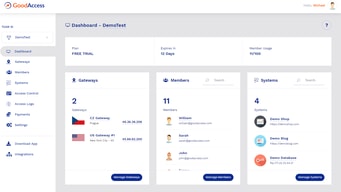
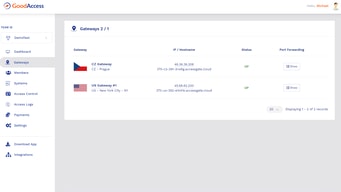
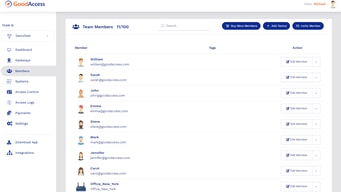





GoodAccess charges $7 per user per month and $49 per dedicated gateway. At the five-user minimum, the gateway costs more than every seat combined. Five seats come to $35; one gateway is $49. So the realistic entry price is $84 a month, not the $7 in large type — and a business VPN with static IP whitelisting is not much use without a gateway.
- What it is: A business VPN and zero-trust network platform with dedicated gateways and static IP whitelisting.
- Best for: Small and mid-sized businesses needing secure remote access to specific systems.
- Pricing: Essential $7, Premium $11 per user monthly on annual billing; $9 and $14 monthly. Verified July 2026.
- The honest catch: Minimum five users, plus $49 per gateway and $29 per extra connector.
What Is GoodAccess?
GoodAccess provides a private network for a business: a dedicated cloud gateway with a static IP that you can whitelist on the systems you want to protect, so only traffic coming through your gateway reaches them. The Premium tier extends that into full zero-trust architecture — SSE, SDP, and ZTNA — for multi-site and cloud businesses.

It is well regarded by its users — the page cites 4.7/5 from 149 G2 reviews, 4.9/5 from 98 on another platform, 10/10 from 25 on TrustRadius, and 4.7/5 from 20 more.
Three plans: Essential, Premium, and Enterprise, the last on request with a fifty-user minimum.
How GoodAccess Works
- Priced per user with a five-user minimum on both published plans.
- Gateways are charged separately at $49 a month each.
- Extra cloud and branch connectors cost $29 a month each.
- The page loads on monthly billing — annual saves around 21%.
- Enterprise requires fifty users and is quoted.
- A 14-day full-featured trial, no credit card required.
GoodAccess Pricing
Captured from GoodAccess’s pricing page in July 2026 in US dollars, reading both billing toggles.
| Plan | Annual | Monthly | Minimum | Gateway | Connectors |
|---|---|---|---|---|---|
| Essential | $7/user | $9/user | 5 users | +$49/mo each | +$29/mo each |
| Premium | $11/user | $14/user | 5 users | +$49/mo each | +$29/mo each |
| Enterprise | On request | — | 50 users | — | Custom |

What actually decides your cost:
- Add the gateway before you compare anything. At the five-user minimum on annual billing, seats cost $35 and one gateway costs $49 — so the gateway is 58% of the bill and the headline per-user figure describes less than half of what you will pay. The realistic entry price is $84 a month.
- Gateways multiply with locations. Each dedicated gateway is $49, so a business wanting presence in two regions pays $98 in gateways alone. For a distributed team that is the number that scales, not the seat count.
- The page opens on monthly billing. The $9 and $14 you see first are the monthly rates; annual billing brings them to $7 and $11 — a saving of 22% and 21% respectively, slightly better than the “extra 20%” advertised.
- Connectors are a third line item. Additional cloud and branch connectors cost $29 a month each beyond the one included. If you are connecting several cloud environments or offices, budget for those alongside the gateways.
- Premium is where zero trust lives. Essential is a dedicated VPN with static IP whitelisting; Premium adds full SSE, SDP, and ZTNA for multi-site and cloud businesses. The $4 per-user difference is small relative to the architectural change.
- Enterprise starts at fifty users. That is a real floor, so mid-sized businesses in the twenty-to-fifty range are on Premium regardless of what they need.
Who Should Use GoodAccess
- Small businesses needing static IP whitelisting. The clearest case — a dedicated gateway IP you can allow on your systems.
- Distributed teams accessing internal tools. Secure remote access without building your own infrastructure.
- Companies moving toward zero trust. Premium’s SSE, SDP, and ZTNA at $11 per user is inexpensive for that architecture.
- Businesses with a handful of locations. Multiple gateways are supported, if budgeted.
It fits poorly for very small teams, given the five-user minimum plus gateway; for single-user or consumer VPN needs, which this is not; and for organisations of twenty to fifty users wanting enterprise support, since that tier starts at fifty.
Honest Pros and Cons
Strengths
- A genuinely low per-user rate at $7 on annual billing.
- Dedicated static IP for whitelisting, which consumer VPNs cannot provide.
- Full zero-trust architecture at $11 per user — inexpensive for SSE, SDP, and ZTNA.
- All add-on prices published, so the total is calculable in advance.
- Strong user ratings across four review platforms.
- A 14-day full-featured trial with no credit card.
Limitations
- The $49 gateway exceeds the cost of five seats.
- A five-user minimum on both published plans.
- Extra connectors cost $29 a month each.
- The page defaults to monthly, showing the higher rates first.
- Enterprise requires fifty users, leaving a gap for mid-sized teams.
- Multi-region deployments multiply the gateway charge.
GoodAccess Alternatives and How It Compares
- NordLayer is the closest business-VPN competitor, from the NordVPN family.
- Twingate and Tailscale take a mesh and zero-trust approach without traditional gateways.
- Perimeter 81, now part of Check Point, targets similar zero-trust network access needs.
- Cloudflare offers zero-trust access as part of a much wider platform.
- OpenVPN Access Server is the self-hosted option if you have the expertise to run it.
For a broader survey, browse our VPN directory.
The Verdict
GoodAccess does something consumer VPNs cannot: it gives your business a dedicated gateway with a static IP that you can whitelist on the systems you want to protect. That is the whole proposition, and for a small company that needs staff to reach internal tools from anywhere without exposing those tools to the internet, it is a clean solution at a genuinely modest price. The user ratings across four review platforms are consistently strong.
Price it with the gateway included, because the per-user figure is misleading on its own. At the five-user minimum, seats cost $35 a month and one gateway costs $49 — the gateway is the majority of the bill, and a static-IP VPN without a gateway is not a product. The realistic entry cost is $84 a month, and if you need presence in a second region that becomes $133. For a distributed business, gateways rather than users are what scale your spend.
Two smaller things. The page loads on monthly billing, so the $9 and $14 you see first are not the best available rates — annual brings them to $7 and $11, a saving of about 21%, marginally better than the 20% advertised. And note the tier gap: Enterprise requires fifty users, so a company of thirty that wants enterprise support and features has no route to it and stays on Premium. Within its range, though, Premium at $11 per user for full SSE, SDP, and ZTNA is inexpensive for zero-trust architecture, and only $4 more per user than the basic VPN tier.
FAQ
How much does GoodAccess cost?
Captured in July 2026 in US dollars: Essential is $7 per user per month on annual billing or $9 monthly, and Premium is $11 annually or $14 monthly. Both carry a five-user minimum. Dedicated gateways cost $49 per month each, and additional cloud or branch connectors $29 per month each. Enterprise is quoted and requires a minimum of fifty users.
Why is GoodAccess more expensive than the per-user price suggests?
Because the dedicated gateway is charged separately at $49 a month. At the five-user minimum on annual billing, seats total $35 while one gateway costs $49 — so the gateway is more than half the bill. The realistic starting cost is $84 a month rather than the $7 per-user headline, and each additional gateway adds a further $49.
Does GoodAccess have a minimum number of users?
Yes, five on both Essential and Premium. The Enterprise plan has a much higher floor at fifty users. That leaves companies between about twenty and fifty users on Premium regardless of whether they would prefer enterprise features and support, since there is no intermediate option.
What is the difference between GoodAccess Essential and Premium?
Essential provides a dedicated cloud VPN with static IP whitelisting. Premium adds full zero-trust architecture — SSE, SDP, and ZTNA — aimed at multi-site and cloud businesses. On annual billing the difference is $4 per user per month, which is a small premium for a substantially different security architecture if you need it.
Is GoodAccess’s annual discount worth taking?
Yes. Essential falls from $9 to $7 per user and Premium from $14 to $11 — savings of 22% and 21% respectively, slightly better than the “extra 20%” the page advertises. Note that the pricing page loads showing the monthly rates, so the first figures you see are the higher ones.

Compare GoodAccess with other popular tools in the same category.
I tried using several providers to ensure I had a stable, dedicated IP in order to RDP to my clients' servers while I travelled overseas as a digital nomad. I tried Hotspot Shield, Express VPN and Nord VPN and in all cases, I could not get RDP started. I spent many hours working through the various troubleshooting guides and working with the help desks of these providers to no avail. I then tried GoodAccess and was completely shocked when IT JUST WORKED. No hassle, no tickets, no downtime. I've been using them ever since and have had NO ISSUES. Set up was simple, even on my iPhone, and my devices are integrated. I use it almost every day since I installed and have never had a problem.
It is a little expensive for my need - which is only for a dedicated IP address. However, they are the only provider that I tried that actually worked.
I service several clients remotely, but was tied to staying in one place until I could implement a static, dedicated IP that could be whitelisted by my clients. Now I am free to travel all around the world while taking care of my business.
What I appreciate most about GoodAccess is its remarkably user-friendly interface, making it easy to manage VPN settings and user access. The feature of assigning a single IP address to multiple clients streamlines our operations and enhances the overall efficiency of managing our network infrastructure. Moreover, the built-in threat blocking capabilities provide an additional layer of security, ensuring that our critical systems and web applications are safeguarded against potential threats. This combination of ease of use, functionality, and robust security measures makes GoodAccess an outstanding choice for our company's needs.
Nothing at all, we use GoodAccess over 3 years now and we had only one short interruption of service, which was quickly resovled.
GoodAccess effectively addresses our need for secure, simplified access to critical network infrastructure and web applications. By enabling us to assign a single IP address to all clients, it streamlines our access management, reducing the complexity and time involved in network administration. This unified approach not only enhances operational efficiency but also ensures consistency in access control. Additionally, the advanced threat blocking observed in our dashboard indicates proactive security measures, which instills confidence in the system's ability to protect our sensitive data and resources. These benefits collectively translate into a more secure, efficient, and manageable network environment, crucial for our company's smooth and secure operations.
1. Available support 24/7 - GoodAccess provide online and email support that answers almost immediately and answer/solve questions promptly 2. Hardly no interference or downtime - In the 2+ years we have been using GoodAccess the service was unavailable only once
Using mostly the app, the info of the site is not available. it might be useful to add a link to enter the site or to represent data like who connected right on the app.
We can access Our ESP using a dedicated UK ip which we get from GoodAcess, and we need the connection stable and around the clock. GoodAccess provides a very stable VPN with excellent support
small package for small teams (they have a 5 team package which is very useful if oyur team is samll and odnt want to buy a 10 or larger package) Supports azure ad sso which is useful fo rour security as we only needed our users ot be abel to login into the vpn Agent is mostly satble and works well. no issues with users companining they cant connect they were our first consideration andnever looked back
limited chat hours for techjinaol support only 8-5 cet mon to fri is available
we needed as staic vpn when we initally enroled anfd this has helped improve our security accros our oother services the connection is also very good ewhen we are connected ot their vpn
Easy to use administration. Easy to implement.
The price tier is not suitable for small teams.
Through GoodAccess we a have a safe remote work solution working from everywhere.
Static IP address shared by a single teams Multiple gateways per team Access control features Stability and speed
You can only add new users in blocks of 5 users, this leads to unused licenses and unnecessary costs
Providing secure access to cloud environments for our remote teams with good access control for specific team members. Centralised team management makes it easy to administer new or departing users. Ability to have different products per team allows us to have different teams at different price points.
Definitely useful for a remote team like us, located in different countries. I am based in Argentina, and there is a client from our agency that usually blocks IPs from countries outside the US. I had tried 3 different VPNs and I couldn't access with any of them. Until I tried GoodAccess, and it worked out smoothly. Also, its stability is what stands out the most - I've been able to maintain a consistent and strong connection, making remote work smooth, unlike other VPNs that I have tried in the past. The interface is user-friendly and easy to navigate.
So far, it's all positive and no negatives, which is quite a feat for any VPN service in my book. Some say the price is a bit high. But I think the price is reasonable because it allows your international team to use the same Static IP.
We are a remote team located in different countries. Working with GoodAccess has made our work more accessible and more efficient than other services we have tried.
GoodAccess is the only VPN provider that allowed the flexibility we needed to connect our equipment for site to site VPN. All other options focused on individual users wanting to get around geographic restrictions or browse the Internet. Our use case was different and GoodAccess was the best option for us.
Pricing has increased somewhat lately, but this is recognized as the reality of inflationary pressures ad they are still quite competitively priced in the market
We needed a way to connected hundres of remote site networks for audio/video streaminig and video conferencing. Every remote site used different ISP and would not provide static IP addresses or other consistent ways to create a site to site tunnel. Using the good access VPN service makes it easy for us to consistently and reliably and securely connect all of the sites over the Internet. The VPN gateway is fast and reliable and located in our coutry for minimal latency.
It is simple to use. No bugs and works natively in Mac with no issues. My team across the world uses it with no issue.
The only feature I would like is the ability to toggle between different VPN locations as part of the service.
It is helping our foreign staff access US only resources. We were not able to access certain job boards restricted to US IP Addresses.
Good Access is super easy to get started and offers very good protection for the entire team. Getting a static VPN isn't something all providers offer and GoodAccess were able to accommodate this at a very good price point. We switched from NordVPN for these reasons.
It can sometimes be a little heavy on memory use.
It enables us to have a secure connection to all of our services and enables protection for our teams that work remotely at multiple sites or from home. It is easy to set up and has great customer service.
It has allowed us to reliably connect to our server host using a single IP point of access from the country where our servers are hosted. This allows for organized and secure access and saves us money with less up front configuration of different devices in different locations connecting. When our needs have changed customer support has been great explaining our options and meeting our needs.
For our needs the service we get from GoodAccess is perfect, I can't think of how it could be easier than 1 click access to our private IP Address. The few times I have needed support it has been provided extremely fast.
Along with a VPN we require a static IP to access our servers which host our applications. This allows our software developers to have ease of access as well as users in our organization. Our applications are used for Project Management for major construction projects right down to Fabrication shops. Security is obviously of utmost importance as is reliability and we get that with GoodAccess. It is literally one click and we are connected and able to run our software regardless of location our users may be in.
GoodAccess to easy to setup and great features for an affordable price. Very accessible for any small business especially with remote workers.
Maybe education on how to select the best gateway and why multiple gateways are important.
We wanted to have a secure vpn for our overseas employees.
I'm very happy with GoodAccess, it has proved to be a very reliable and stable VPN solution for our team. I particularly like the easy set up (for both users and administrators), the well designed intuitive team dashboard and client app, and excellent customer service and support.
I can't think of anything. We did have an edge case user access bug that was resolved quickly and is resolved long term with the addition of SCIM which they have recently added.
A very reliable and stable VPN solution for our team.
We chose GoodAccess for our zero-trust network access solution, and it surpassed what we initially anticipated. The setup was both rapid and uncomplicated, enabling us to create an ultra-secure environment promptly. Over the course of several months, GoodAccess has demonstrated itself to be a financially prudent and dependable option for our organization.
While utilizing GoodAccess, we ran into a few complications with the Access Control feature during its integration with AWS Cloudfront. Nonetheless, the customer service team was quick to respond and instrumental in pinpointing the issue. It's possible that this concern has been addressed since our most recent interaction with the service. In addition Goodaccess does not work in Egypt but that is because of Egypt strict VPN access rules
Many of the services and networks we need access for requires a static IP in order to provide access and since our team is international we are able to use Godaccess VPN to whitelist one IP for the whole company
We opted for GoodAccess to implement a zero-trust network access solution, and it exceeded our expectations. The deployment process was swift and straightforward, allowing us to establish a highly secure environment in no time. During all these months, GoodAccess proved to be cost-efficient and reliable choice for our organisaiton.
During our experience with GoodAccess, we encountered some issues with the Access Control feature when integrating it with AWS Cloudfront. However, the customer support team was responsive and helpful in identifying the problem. This issue may have been resolved since our last interaction with the service.
We opted for GoodAccess to implement a zero-trust network access solution, and it exceeded our expectations. The deployment process was swift and straightforward, allowing us to establish a highly secure environment in no time.
In our Scenario, Dedicated IP is very useful, gives us security.
Some time GoodAccess VPN client keeps showing connecting and by any way we are not able to connect, it only works after restarting the system. It also does not work by changing the protocol.
VPN with dedicated IP. so easy to give access & security to paricular dedicated IP.
It's very user-friendly, and anyone can access and use it easily.
I don't get anything that I dislike in GoodAccess.
I am using it for VPN purposes.
GoodAccess was exactly what we needed for our team. If you're looking for a budget-friendly enterprise VPN, try GoodAccess. Don't understand how to configure a VPN? No problem with GoodAccess, just create an account and invite your team.
I don't have any and haven't heard any complaints from the team using it either
We needed our remote team members to connect to a single IP whitelisted for VM access. GoodAccess solution did exactly that for us.
GoodAccess simplifies complex setups, but still gives us enough freedom to do exactly what we need. GoodAccess has so far proven to be more stable and fast than our previous cloud VPN. Where our office gateway gave us trouble, GoodAccess offered solutions. The amount of features is commendable, and development is noticably full steam. On top of everything, their support is fast, helpful and kind unlike anything I've ever seen.
The only potential risk we saw when implementing GoodAccess, is that it is not as big as some competitors. But man, am I happy we took that risk. After using GoodAccess for a few months, I am confident that they will do a lot of good as they grow.
GoodAccess reliably allows us redundant access to our resources across various networks securily. It's also a big plus that we can limit access to resources per user as well as per group. No matter where our employees are in the world, no matter which uplink is down, everyone can always do their job.
We were able to connect a large team around the world with a single static IP and were able to administrate them easily. Software works great. No complaints. Highly recommend.
Interface is a bit dated, but it works. Great service. Previous products we used were expensive and didn't offer the same level of support. Can't think of anything I'd like to see improved.
Letting users from around the world connect to custom services using a set IP. Being able to add and remove and administer these users and change them easily and quickly.
We looked for a solution for weeks when we went fully remote. We needed a fixed IP, easy to use app and desktop software and easy user management. GoodAccess ticks all these boxes and is also reasonably priced.
Nothing. We have had no issues with the platform. One small bug was fixed in less than 24 so their tech team is very efficient.
Remote access to a production database, donor data & SFTP by fixed IP and a whitelisted IP address.
- Easy to use, both admin panel and VPN - Reliable network speed
- I would love to have shared nodes to connect to, included in the business plan, for testing intentions
Static IP for our tools, servers, etc.
Ease of setup. Compatible to all operating systems. Engineers can just get an account and go.
Weird default avatar that got assigned when new users got created. Maybe just default to plain avatar.
We need a static gateway for our very widely distributed worldwide development team.

- Fast network for VPN - Static Ips - Clouds connector (Amazon AWS, Azurte, etc) - Zero-trust network access - Private DNS - Threat protection - Customer Support
In over a year of use, I have nothing to dislike., it does not seem expensive compared other which is something that usually displeases in this kind of service.
Al our developers can securely access our infrastructure in the cloud, increasing security and reducing the risk of unauthorized access or information leakage.
My team of 10+ users and I have been using GoodAccess for a few months, and it's proven to be a reliable solution for remote and hybrid work security. The dedicated business VPN, with 35+ gateway locations, offers secure access to company resources across various locations. Features like identity-based access control, traffic encryption, and MFA enhance security without compromising our business agility. While GoodAccess has simplified network security management and reduced costs, it might not be ideal for everyone. Overall, it's a competent choice for SMBs seeking a secure remote access tool.
Nothing particularly comes to mind. Product works exactly as advertised
All users access to company apps through same IP addresses in multiple locations
thier Support strong and smarts , well known in network
every thing well iam waiting add some feutures
smtp and static ip
Works flawlessly, near 100% uptime, simple and easy interface and stellar customer service. If you are looking for a stable VPN solution, look no further than GoodAccess
Nothing that comes to mind, all good here
PBX IP secure access for mobile users
GoodAccess is pretty easy to start using it. When you have a small or medium company, you don't have a big budget to use enterprise VPN. Thanks, GoodAccess anyone can begin using VPN with a team. Don't understand how to configure a VPN? No problem with GoodAccess, just create an account and invite colleagues.
Design and UX could be better. On the other hand, you just connect to your VPN and that's all you need.
GoodAccess helps us to access our internal systems since we work remotely securely.

Super easy to use, secure, fast. We needed a VPN solution so we could connect to web servers securely.
We only use it for the VPN, and have not found any issues yet!
We needed to limit access to our webserver to a single IP address, and GoodAccess solved that problem for us!
User Interface is very intuitive and easy to understand. The ability to control access to different websites and applications using access cards is a huge plus. I also love that the VPN desktop client doubles as an app launcher if you choose to list apps on it. I cannot see us moving away from Good Access.
I wish there was more guidance on how to format connection strings and other information when adding websites/applications to your company profile.
Our company needs a reliable VPN that is easy for users to understand and use. With GoodAccess we get exactly that and even more features that we didn't know we needed.