

Unclaimed: Are you working at Jotform Apps?






Jotform Apps Reviews: 4.7/5 — Highly Rated
Jotform is a web-based form builder that allows users to create custom forms, surveys, quizzes, and more. It offers a range of features that include customizable templates, drag-and-drop form design, form analytics, and integrations with popular apps and services. Jotform is an efficient and cost-effective way to collect information, as it eliminates the need for manual data entry and paper forms. Whether you're a business owner or an individual, Jotform makes it easy to gather information and streamline processes, saving you time and resources.
| Company | Jotform Inc. |
|---|---|
| Year founded | 2006 |
| Company size | 201-500 employees |
| Headquarters | San Francisco, California, United States |
| Social Media |


| Capabilities |
API
|
|---|---|
| Segment |
Small Business
Mid Market
Enterprise
|
| Deployment | Cloud / SaaS / Web-Based, Mobile Android, Mobile iPad, Mobile iPhone |
| Support | 24/7 (Live rep), Chat, Email/Help Desk, FAQs/Forum, Knowledge Base, Phone Support |
| Training | Documentation |
| Languages | English |

Compare Jotform Apps with other popular tools in the same category.

Ease of use. Produces professional results.
When it crashes and I need to rebuild forms or submissions.
Forms on the go.
It is easy to set up. You are basically adding your current forms to an app so all are accessible at one location.
It wasn't something that I would find useful. I have individual forms that do not group. This app did not serve a purpose for me. It works great if you have more than one form that a customer needs to access.
On the rare times the customer needs to access more than one form, this puts them together in one location, so they do not have to input multiple URLs.
Multiple integrations with third parties apps
Pricing is high when scaling your forms for different use cases
Easy and fast deployment of forms to capture data for our websites
The forms are professional and work well. There are lots of customization options and integrations available to use. The ability to generate unique QR codes for each person who fills out the form is also very helpful, as is the option to give someone full access to the form submissions without giving them access to edit the form.
I wish there was an easier way to add explanatory text to the form (text that does not require the user to enter an answer of any kind). It would allow for better visual organization of the form sometimes. Additionally, it would be great if there was a way to insert a button that links to a custom URL as there are sometimes resources form recipients need to access outside the form.
It helps us create a wide variety of forms to meet our business needs across multiple locations and programs. It's a great data collection tool that we use all the time.

We've rolled out many apps for our customers to use. The replicability of the apps into a standard model is incredibly helpful for a quick turnaround. The only other forms I've used is Microsoft forms, and this blows those out of the water.
There aren't many design choice options for creating customized app designs. We pay for Jotform Enterprise and expect to be able to customize more than we currently can.
We use these apps to roll out to our service customers, a quick and simple service request form as well as an appointment request form. Customizing these apps for each individual. Customer is fairly simple to do but I wish there were more options we could take advantage of.
Out of multiple form building platforms, this was by far the easiest to use. The app is great too.
The conditional logic can get a little weird on really long forms. Also, I didn't realize there was a limit to the number of fields the form could have without increasing pay levels until after I was well over the limit. Ended up not using JotForms as a result.
Ease of Survey creation to vet partners for a nonprofit
It's really user friend and easy to build a form.
It doesn't seem that unique in its functionality.
We can survey our members and keep using the same form for years.
I use Jotform to tell people a story about people who need help in the community. I can set each mission up with its own form to inform people about their mission, attach a receipt from one of our partners, and allow the user to tell us who they choose to support. I have been a Jotform customer for close to 5 years now. I plan on being around for a lot longer.
The pay portals are difficult to use, and the information often gets lost or clears on its own, leaving my customers no way to leave a donation for us to continue doing the outreach we are implementing.
It allows me to run the program I created without the expense of a mobile app. It saves me so much money and is so versatile that I can tell the story of everyone we are raising money for.
Professional customer service and pretty straightforward usage
Some features are still lacking. Wish the development can be speedier.
They listen to feedback and inform me when a feature is added
The ease of use from the buildout to launching as well as the clients use. I also love the variety of options I can use to gain the information needed for my business.
It sometimes crashes or doesn't open quickly or timeout while working in the system. It a notification came up to let you know it was timing out that would be great.
My clients are able to send information directly to me, which has saved us several hours of preparation time as well as allows our assistants to retrieve information.
Once forms have been created the submissions are easily tracked and PDF reports generated
Using preexisting forms, if you load a PDF it can hard to edit everything, takes some patience to get them edited to useable forms
Tracking daily reports for customers including reporting of ongoing issues
Pratik kullanım, içerisindeki eklentiler çok kullanışlı. Arayüz basit ve adapte olmak kolay. Pdf eklentileri sosyal medya bağlantıları. Rakiplerine göre daha temiz bir arayüze sahip.
Geliştirmek için yapılan geri bildirimlere kapalılar. Genel anlamda ürün düzgün çalışıyor ama bazı entegrasyon ve düzenleme sıkıntıları mevcut. Kullandığım pdf eklentisi sorunlu, header kısmı düzenlenmiyor ve menü butonu düzenlenmiyor.
Çalıştığımız firmalar için bir yenilik getirdik. Bu sayede firmalarla olan anlaşmalarımızda finasal bir etkisi oldu. App sayesinde daha yaratıcı ve performanslı hissediyorum.

Intergrations. API functionality. customisable ui. Possibility to build intuitive and simple apps with a few steps. Integrating Jotform apps and forms.
It's not fully customizable. Would like to be able to integrate between forms and apps more seamlessly
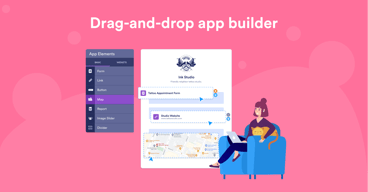
Custom drag and drop function app creator, i can integrate to mySQL and API.
Super easy to create good looking mobile interfaces for your form(s)
For users that are a bit green, it's not common sense to create a desktop shortcut to their phone. Even though the app does a GREAT job suggesting to add to Home Screen, most users will ignore.
Easy access to forms that are commonly used or repeatedly submitted on a regular basis. For example, logging in certain data points that needs to happen daily and by many people.

Really userfriendly and Very good and quick support team. Really easy to use. Allow to create your own app with no programming skills. Allow users to install the app and fill the forms in a easy way.
Still some upgrades needed. Also some bugs sometimes when you create the form or app but support team or througt forum you can solve it most of the time very quickly.
Company follow up in some process and database. Really easy to use for users. Easy tracking of the forms and automatized reports of the filled forms, able to export to excel.
Form structure for educational processes is very easy and fast
Mobile app production is a bit complicated
I use it to enroll students in virtual Classes I have created and for educational surveys.
Jotform has been a great tool for our business to gain information for contracts and reports. The conditional formatting feature saves our Manager's precious time by only showing information relevant to their department and being able to link Jotform to my Trello board is fantastic!
The forms do not generate properly in my email inbox, meaning I have to login to the website every time I need to view a form. Would be great to have the forms as a PDF attachment in my inbox.
I manage the HR function for 11 different companies and require different information from each to complete contracts. The Jotform prompts each Manager to provide the correct information, saving time going back and forth with emails. They also love that they can submit this on their phones.

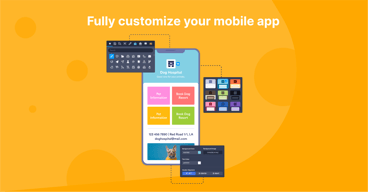
The customization options (logo, app icon, background, etc.) are well implemented, easy to use, and make an impact for a professional app. The ability to integrate forms seamlessly into the interface is also much appreciated.
The biggest frustration is that app users cannot edit their form submissions from within the app. They can only download and print their submissions. At the time of this review, the current workaround is to have app users get an automated email that has an edit link inside it after each submission -- it's not the end of the world, but definitely an oversight.
Workflow management of staff has greatly improved. By having many regularly used forms/processes accessible in one place for our teams in the field, we've been able to free up 'paperwork time' significantly.
I like the fact that I can clone an app and then edit it from there (great time saver!)
I wish the "My Apps" section allowed us to make folders the way we can for "My Forms."
I have made custom apps for health-related daily habits and several for my clients at work and they love them.
I love that I could create my own directory with links that I have for my business.
It didn't feel like a traditional app but more like a quick links page.
I am able to connect my customers to my services in a more effective and efficient way
Admittedly we're still exploring the Jotform app.'s offerings because they're so new. But the rate this product is rolling out is exciting and we're already a Pro user of the forms with good success, so it's a nice bridge to app. dev.
Generally JotForm stands out as a forms tool, with good tables (database) back end. But the form tools outside their core offerings are wonky. We are concerned that app development may suffer the same way, where the few little things that make a difference to us may not behave as we expect (or need.) Basic tools that have been around a long time (poor old Infopath, killed before it's time), had an excellent repeat rows entry option. JotForm has the notion in their 3rd part widgets, but we prefer that JotForm propper had this tool worked out & available before we delve into app. dev.
Centralized app ecosystem for our team. We operate in the field, in the office, and in the board room. Bouncing out URL's and other "links" to this or that for sending information is a universally miserable experience for business operators. Then of course the fragmentation of information must be eliminated by Forming it into cohesion by the creator of the info. and not the consumer. Many hands make light work and even in the 21st century, many hands make much work for the data consumer. Forming information must progress beyond the 20th-century email and web "throw spaghetti at the wall and see if it sticks" information exchanges.
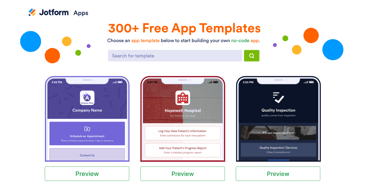
It is free and easy to use; It has 600+ app templates; It integrates with 150+ business apps, It supports online payments. It is customizable and flexible
The app builder is slow and laggy at times; The app pricing plans are expensive and restrictive, The app support and documentation are not sufficient and not updated,
The problem of lack of coding skills or time to learn how to code The problem of lack of ideas or inspiration
Lots of available app integrations are available
Documentation can't be lacking so you may be left to the mercy of the other app
Integration between jotform and Monday.com
IT IS AVAILABLE ON OUR COMPANY'S TABLETS, COMPUTERS, AND ON OUR FLOOR LEAD PHONES. IT IUS VERY EASY TO USE AND UNDERSTAND WHICH MAKES IT VERY USEFUL FOR NONE TECH PEOPLE
HOW YOU HAVE TO GO BACK ONTO YOUR BROWSER TO EDIT OR CHANGE ANYTHING ON THE APP THAT YOU HAVE DESIGNED AND HOW YOU HAVE TO SPECIFICALLY SHARE IT WITH EMAIL ADDRESSES FOR COLLABORATION
WE BUILT AN APP WITH 11 DIFFERENT FORMS FOR THE GUYS ON OUR FLOOR TO ENTER IN EACH COMPANYS TRUCKLOADS OF TOOLING THAT WE RECIEVE EVERYDAY AND IT MAKES IT WAY EASIER THAN HAVING TO WRITE EVERYTHING DOWN

Surprisingly, Jotform allows the launching of an app with all its functionality for free. The free version will display Jotform logo with a link directing to their website. Also, you cannot have your own domain connected to their free version.
Payments form an important component of online forms and apps. Though Jotform Apps supports PayPal and Stripe, PayTm which is most popular in India not supported.
I am developing an app for one of my clients that will help deliver tax filing service.
It's very easy to set up, you don't require any special coding or knowledge of app development it is just plug and play
It tends to crash frequently and is very slow on most devices
We use it for sign up process for new gym members. We allow people to scan a QR code and get the sign up form there or use our iPads to sign forms

Since we use JotForm in a variety of ways, its helpful that the app builder interface is much the same as the form builder. I like that this creates a PWA rather than an APK, saving a lot of the hassle of app building. The 'apps' built through JotForm offer some essential customization options as well as "Add to home screen" prompts for users.
I wish Jotform offered more precise control over styling. It's a bit difficult to control the precise layout of elements on the screen. I also wish for more elegant ways of displaying rich content such as images and PDFs.
JotForm allowed us to create a simple event app and distribute it. The entire build process took a few hours.
Ready to use templates. Focus on the core of my business
It is most applicable to small business where staff strength is minimal
Saves sometime, I don't have to build from scratch. Just a little modifications - good to go
Ease of use and various features that cover the bulk of what is needed for us
I wish there were more features. We purchased a subscription specifically for the HIPAA compliance and after several months of demonstrations and obtaining proper approvals (government), the pricing structure was altered 3 days before our subscription started.
We primarily use it for emergency management planning of special events and pre-plan information for emergency services. The app allows wide-spread availability of the plans to necessary users including emergency responders and event staff/volunteers without carrying a binder around.
It's more professional looking/feeling compared to Google Forms or Survey Monkey. Our clients get a more professional experience.
It is very buggy. When I'm trying to update our form/app, the text will get deleted after I saved it. When I tried copying an app, the button didn't do anything. I refreshed several times, and then all of a sudden I had 30 copies of my app. Very frustrating to use on the backend
We're using it as an MVP training tool with our clients. It's proven the value of our app idea, but we plan to move off Jotform as soon as we have something else built.