







Jotform Reviews: 4.7/5 — Highly Rated
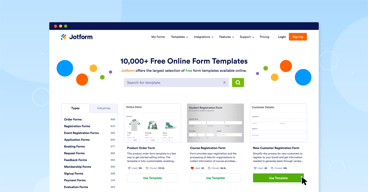
Jotform is one of the most trusted form builders available today that makes it easy for users to create and publish forms such as payment forms, lead generation forms, registration forms, contact forms, application forms, and more from any device. The solution offers more than 10,000 templates and supports hundreds of integrations to 3rd party apps. It also offers advanced design features yet still ensures usability. Conveniently, Jotform also supports plugins for PayPal, Google Drive, Dropbox, MailChimp, Box, OneBip, SalesForce, and Zoho CRM.
| Company | Jotform Inc. |
|---|---|
| Year founded | 2006 |
| Company size | 201-500 employees |
| Headquarters | San Francisco, California, United States |
| Social Media |


| Capabilities |
API
|
|---|---|
| Segment |
Small Business
Mid Market
Enterprise
|
| Deployment | Cloud / SaaS / Web-Based, Mobile Android, Mobile iPad, Mobile iPhone |
| Support | 24/7 (Live rep), Chat, Email/Help Desk, FAQs/Forum, Knowledge Base, Phone Support |
| Training | Documentation |
| Languages | English |

Compare Jotform with other popular tools in the same category.
Jotform makes it easy to create the forms I need -- whether it's from a shared template from its community that you can personalize or creating your own forms
Unfortunately, the free version only includes 5 forms
It saves me time when creating forms for use in my company
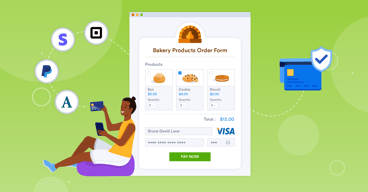
Jotform makes it easy to create forms and surveys and to integrate them with online payment if needed.
With lower pricing tiers, it can be cumbersome to archive old forms to stay under the limit.
Jotform helps us gather information from donors and collect registration for events.
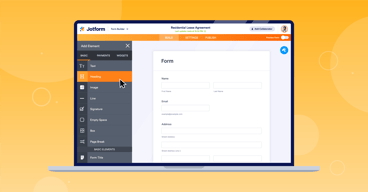
The learning curve for setting up Jotforms is quite low. Various team members have been able to jump in and create forms on their first try without needing assistance. But even with its user-friendly nature, the flexibility and customizability of JotForms is wonderful. It provides any form field type we would need (radio boxes, file upload fields, hidden fields, etc.). We can also setup automatic redirects or confirmation upon a form submission, and have form submissions reported internally by email to anyone we'd like. Another feature we love is that, while we have the ability to embed the forms on a page if we want, each form comes with a standalone URL so we can send users directly to a form without needing to build a webpage. Additionally, we use Constant Contact for email marketing, so we appreciate the built-in Constant Contact integration that allows us to add new submissions directly to a corresponding email list. Finally, as a nonprofit with a small budget, we also appreciate that Jotform offers 50% off paid plans for nonprofit organizations.
While Jotform offers many built-in integration options, the ones we have tried could use some work. We use the Constant Contact integration, but we have a lot of email lists, and the feature for selecting the list you want to pair to is difficult. You cannot search by typing in your Constant Contact list name, and the email lists are not in alphabetical order, so you just have to scroll and search through every list name until you find what you're looking for. It would also be nice if we duplicate a form to have the option to duplicate the integration instead of needing to re-pair each form field every time. Our data team also tried the SalesForce integration, but had trouble with it. In the end, we used a third-party tool (Cazoomi) to sync from Constant Contact to SalesForce, instead of directly from JotForm to SalesForce.
We needed to be able to setup forms quickly and easily and have a direct link to send users to the forms without building a landing page. Originally we used Constant Contact's native form builder, but the form field options were very limited. JotForm allows us to use the form fields we need, while still allowing us to sync to Constant Contact and keep our lists updated.
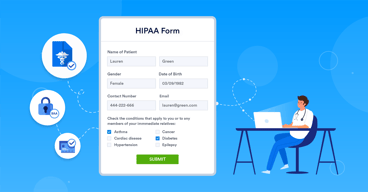
Jotform provides an easy-to-use vehicle for collecting information from our medical partners. The ability to synch with other platforms is especially helpful.
The expense of sharing forms for others on my team to collaborate.
Streamlining our processes
We have utilized jotform at my non-profit since Covid and it has been a lifesaver. We're a small domestic violence shelter and program and we staff 4 advocates on our crisis line. Every time someone calls for the first time in a fiscal year for our services, they are required to fill out what we call a "First Contact Form." When Covid hit, we had to shift from paper forms to an online form and that is where our journey with Jotform started. Even now, they all prefer to submit those forms via Jotform. We love it!
I really can't think of a downside. Thank you!
Allows flexibility to our crisis line attendants.
Conditional Logic. The ability to make the form smarter.
Sometimes it takes a while to get help through the support area.
Keeps our event information in one location. Easily share data with stakeholders.
Everything is in one place, helps us stay organized.
Editing the form can at times be confusing for others who are not as advanced with technology. The app could also be more user friendly.
Keeping all contracts in one place. Contracts are now electronic making it them quick for customers to complete!

I love being able to create forms and send them. They are super easy to create, use, and update whenever you need to. I use the forms for all of my causal fill ins and timesheets. If means less paper and if they forget, they can fill it out a couple days later. I
I wish there was a bit more flexilibty with the timesheets and calculations but I've found a work around for now.
We do annual reviews and not all of my team are tech savey but filling out this form is super easy. It's convienent and quick for any surveys or information gathering that I need.
There are a variety of ways you can use this service to fit any need. They also have great templates already built in and the site is super easy to use, including the advanced features. The service offers functionality that I need for my business, such as document collection, email list integration and e-signatures.
Ideally, I'd love it if I could have the link lead back to my website instead of the jotform domain so that the forms are seamlessly integrated.
It allows me to collect a variety of data necessary for my business--it's a one-stop shop.

We love using Jotform to collect useful data from our various properties. It is very easy to navigate and also I love that you can create branded forms.
The least helpful thing about jotform is the widgets I wish that they would add more.
They are helping us solve gathering information across various companies and keeping this information organized for the onsite staff abd teams.
