







LiveWebinar Reviews: 4.5/5 — Highly Rated
LiveWebinar is a cloud based webinar option that allows companies, both big and small, to easily manage webinars and online meetings. The platform is especially useful for marketing teams and HR departments to host industry related gatherings virtually for their audience. It features like screen sharing, presentations, and broadcasting to major social media platforms like YouTube, Facebook, and Vimeo. The platform also allows users to personalize registration forms to boost branding opportunities and provides numerous engagement features such as voting, surveys and polls.





| Capabilities |
API
|
|---|---|
| Segment |
Small Business
Mid Market
Enterprise
|
| Deployment | Cloud / SaaS / Web-Based, Desktop Chromebook, Desktop Mac, Desktop Windows, Mobile Android, Mobile iPad, Mobile iPhone |
| Support | 24/7 (Live rep), Chat, Email/Help Desk, FAQs/Forum, Knowledge Base, Phone Support |
| Training | Documentation |
| Languages | English |
LiveWebinar Pros and Cons
- Offers a WhiteBoard feature that helps make presentations more engaging
- Fully mobile responsive webinar room
- Allows main rooms to split into break-out rooms during live meetings
- Can host up to 1000 attendees
- Complicated user interface that demands a steep learning curve for first time users
- Users often report issues when trying to upgrade services

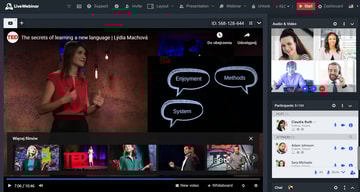
Webinars are a pretty big deal these days.
Although webinar learning opportunities have been gaining attention for a few years now, demand for webinar platforms has grown substantially as remote and hybrid work became the norm.
Companies, educators, and thought leaders are beginning to turn to webinar content as a way of forming deeper connections with their audience. However, there’s still plenty of room for companies looking to get ahead of the curve. After all, 83% of marketers find webinars effective, and webinar adoption has grown steadily, with virtual events now a standard part of most business communication strategies.
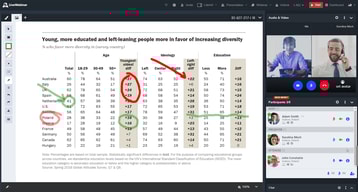
LiveWebinar is a popular, easy-to-use webinar creation software, built to help people create engaging webinars for their target market. Today, we’re taking a closer look at LiveWebinar, and just how effective it is at allowing companies to take advantage of the online learning market.
Who Should Consider LiveWebinar?
LiveWebinar advertises itself as the most advanced webinar software available, allowing companies to collaborate anywhere, and build engaging experiences with speed. Rather than just offering webinar functionality (like most webinar software), LiveWebinar sets itself apart as a cloud-based solution for webinars and meetings in one.
Existing customers include Infoshare, Marketer+, Kaplan, and many other reputable organizations. LiveWebinar boasts around 153968 users and has hosted more than 1277876 meeting rooms to date.
If you’re trying to digitally transform your communication strategy, LiveWebinar offers a relatively affordable way to access meetings and webinar experiences. There’s a free service for people on a tight budget if you’re happy to stick with only 5 attendees.
LiveWebinar Review: The Features
LiveWebinar is a cloud-based solution for streaming meetings, sharing screens, and hosting or recording webinars. The platform has become pretty comprehensive over the years. Here are some of the features you should know about:
Live Webinars
LiveWebinar is suitable for both meetings and webinars.
Let’s start by looking at webinars. The LiveWebinar platform is easy to access, with the option to access the room from any browser, without the need for a download. You’ll also have the option to customize your webinar experience, adding and removing features at your will, and you can embed the webinar directly within your website.

Webinars are delivered in crystal-clear HD quality, with state-of-the-art connections, to ensure you have a professional impact on your audience. When designing your webinar, you can:
- Use an API to embed your webinar into your existing tools
- Allow audience members to join from any device, from their browser
- Access integrations with various tools (like marketing automation services)
- Create phone bridges to call in and out to your webinars.
- Organize webinars in various forms: including training sessions and presentations
- Live stream your own webcam
- Draw and write to share your ideas on a virtual whiteboard
- Share your webinar on social media.
LiveWebinar will allow you to share both your camera feed and your screen in real-time with your audience. You can also store and share files safely through the LiveWebinar personal cloud. If you want to stream your content online while you’re mid-webinar, you can connect to Vimeo, YouTube, and Facebook to do so.
Evergreen Webinars
Evergreen webinars are an alternative to the standard “live webinars” experience. With this strategy, users can pre-record webinar content in HD, then make the content feel more live and engaging with a range of additional tools. The Evergreen Webinar service includes:
- Simple recording in HD quality
- Scheduling, to determine when your content should be available
- Custom CTAs to help your audience get involved
- Recording for live webinars (So you can re-use them later)
- Embedding in your own domain

When you record webinars with LiveWebinar you can store the information in the cloud, then access the in-built editing tool to adjust your content. You’ll be able to edit the frame rate of your recordings, choose you preferred cloud storage provider, adjust resolution and even change the recording layout however you choose.
Webinar Customization and Branding
Whether you’re producing an Evergreen webinar you want to share again later, or you’re designing a webinar to share in real-time, you need the right branding opportunities. The branding templates in LiveWebinar make it easy to ensure you’re delivering a familiar experience with every event.
You can click on the “schedule webinar” section in the free version of the tool and get a handful of options like:
- Room password protection
- Audio mode
- Room layout
- Room templates
Unfortunately, if you want to add your own brand colors and logo, you will need to upgrade to a paid account. When you do this, you’ll be able to make various changes to the color and appearance of your rooms on a greater scale. You can also save multiple branding templates and add them to your future webinars, so you don’t have to build everything from scratch each time.

For Evergreen webinars, there’s also the option to edit the content you save to the cloud with the LiveWebinar Recordings Editor. This means you can put your logo or a branded page at the beginning of a recording, add a branded song, and even customize your own outro.
Editing also allows you to:
- Watermark your recordings
- Trim recordings do the perfect size
- Upload a default ending screen or introduction
Webinar user interaction and engagement
LiveWebinar gives users a variety of ways to engage with your audience.
Once you’ve chosen your Webinar room template, you can find various tools for getting your audience involved with the experience, from polls and surveys to Q&A sessions. Options for audience engagement include:
Tests and surveys: Tests and surveys allow users to collect information from their audience and analyze useful feedback. You can choose what kind of surveys you want to run, whether you want your customers to leave written answers or choose from a scale of numbers, and more.
Once you’ve finished the survey, LiveWebinar creates a handy chart to show your results.

Presentations and screensharing
Presentations in LiveWebinar allow you to create slideshows of visual information to help you make a more impactful presentation. You simply upload the information for your presentation into the LiveWebinar environment before your event, and you can access it whenever you’re ready.
Presentations come with a bunch of handy features, like the option to “sync slides” to ensure everyone is watching the same slide as you at all times. You can also turn on a pointer to help customers or viewers see what you’re trying to emphasize.

While you’re presenting, you can also make notes, draw on the screen, and pull attention to important information using the whiteboard feature.
You can share your screen from any device with LiveWebinar too, making it much easier to add context to a conversation. You can show people what you’re working on by sharing the entire screen, or just a single application.
Interactive whiteboard
The interactive whiteboard can also be a standalone part of your webinar presentation. It comes with a range of drawing tools, whiteboard page templates and grids to help you with sharing information. You can change your cursor style to make it look like a laser pointer and give different people in the presentation nicknames so your viewers can see who is drawing what.
One particularly fun thing about the whiteboard is the ability to download the content you create. This means you can share written notes with your audience after the webinar.
Chat
The live chat function, available for both meetings and webinars, allows you to connect with your audience on another level. You can share emoticons and links, drag and drop files, and even access in-line translation for some languages.
There’s also the option to create a “moderated chat” where you can delete and remove messages, or attendees who might not be acting appropriately.
The chat configuration feature within LiveWebinar allows for a few customization options, like adjusting font size, and changing the background color of the chat app.

You’ll also be able to add voice recording options to chat in some cases, which means that people can share snippets of voice in the chat room.
LiveWebinar: Registration and Forms
Collecting potential attendees for your webinar is simple enough with LiveWebinar. The solution comes with it’s own lead forms and registration forms.
As a free user, you can only create up to 3 registration forms. The Registration form makes it easy to predict how many people you’re likely to have attending your next event. These forms also prevent people from simply sharing the link to your webinar with uninvited guests when the event is running.

You’ll be able to name your registration forms and create custom fields (depending on your pricing plan). You can also integrate these forms with tools like MailChimp, Freshmail, and Active Campaign. Email marketing integration means you can nurture excitement for an upcoming event, and potentially convince previous attendees to come back to future webinars.
Advanced “leads” forms, allow you to capture information from your attendees when they log into your webinar too, so you can collect more information for segmenting your audience.
Aside from giving you registration and lead forms to connect with your participants, LiveWebinar also offers things like:
- Smart “thank you” pages so customers can add your event to their calendar
- Real-time alerts and reminders so customers don’t miss your event
- Personal (non-transferable) event links
- Phone bridging for customers who need to dial in to meetings
- Waiting rooms, so you can decide when to allow access to the event
If you want to invite participants to a webinar directly, you’ll have the same solutions as you get when inviting someone to a meeting. Options include email invitations, text message invitations, call-in invitations, and mass invitations.
LiveWebinar Meeting Rooms
Webinars might be the central feature of LiveWebinar – but they’re far from all you can do with the service. Users can also host all kinds of immersive meetings, with multiple presenters, call out and dial-in options (for people without an internet connection), and comprehensive participant lists, so you can keep track of who’s present in any conversation.
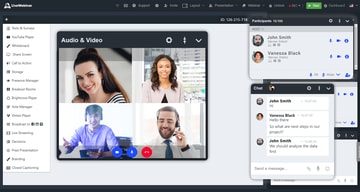
Just like the webinar template, LiveWebinar also has a “Meeting Interface” template designed to help you reach all your attendees at once. The template comes with a big grid camera layout, so you can see multiple people at once. You can also access live chat at the same time as participating in audio and video conversations, so it’s easier to share messages, ideas, links, and files.
The LiveWebinar meeting experience is extremely easy to use, with an intuitive interface that allows you to control your video and content sharing view. You can even turn the taskbar transparent, so it’s not taking up excess screen space. Other features of your LiveWebinar meeting room include:
- Instant meeting buttons with custom links for quick conversations
- Chat history and real-time chat, with link and document sharing
- Screen sharing and control (for adding context to meetings)
- Meeting waiting rooms and breakout rooms (For group conversations)
- Presence (to check who’s available and online)
The online meeting software even comes with storage, so you can keep track of crucial business applications in the cloud.

LiveWebinar: Extra Features
Aside from the huge number of webinar and meeting features mentioned above, LiveWebinar also commits to constantly updating and improving its feature list. There are currently a huge number of bonus features available, though your access to these will depend on your LiveWebinar plan. Features include:
- Waiting rooms with meeting agendas
- Website embedding (so you can host your own meeting or webinar)
- Room security and compliance services
- Connection testing
- YouTube and Vimeo players
- Multiple audio modes
- Language interpretation
- Moderated chat
- In-Webinar Call To Action
- Vote manager and polling
- Statistics and reports
- Advanced APIs
What are the Main Benefits of LiveWebinar?
LiveWebinar is a highly flexible and scalable solution for hosting meetings and webinars on the same platform. During our testing these features stood out most:
- Access to meetings and webinars in the same platform (and on any device)
- Range of engagement tools, like polls, CTA options (in the webinar) and chat
- Registration pages and forms available for converting leads
- Customizable questions on the registration page
- Affordable pricing for a multi-featured tool
With a free plan to get you started, and discounts on annual packages, LiveWebinar is one of the more generous webinar and meeting tools on the market. Access to constantly updating sets of features, and developer support via integrations and APIs also means that LiveWebinar is ideal for companies that may need to scale their webinar strategy rapidly.
LiveWebinar: Customer Support
LiveWebinar customer support is one of the few features that seems to be quite lacking in this software. If you visit your profile page, you’ll see the “Contact Us” button in the bottom left, but you’ll only have the option to choose between email support for sales, or support.

There’s no live chat for LiveWebinar, or phone number that we could find. However, they do seem to respond to their emails relatively quickly (within about 48 hours). You can always access the range of LiveWebinar manuals and tutorials to help you if you’re looking for DIY support.
LiveWebinar Review: Pricing
LiveWebinar’s pricing structure is easy enough to understand. There’s a free package available for small teams and individuals. Here, you won’t be able to brand your webinars or meetings, but you can access polls, tests and surveys within webinars, and record up to 2 hours of content. Other features of the free service include:
- Meetings and presentations for up to 5 attendees
- Screen sharing
- Marketing automation tools
Paid plans include Pro, Business, and Custom tiers with increasing attendee limits, recording hours, and features. See LiveWebinar pricing for current rates.

LiveWebinar Ease of Use
All great webinars require plenty of planning and preparation. A good webinar software can help to reduce the amount of work you need to do to connect with your audience, by simplifying your hosting experience. LiveWebinar offers a simple, clean, and effective environment for meetings and webinars.
With various templates to help you get started faster, and quick launch features, you’ll be able to design live and Evergreen webinars in no time. The dashboard is clean and easy to navigate, and all of your features are organized neatly into a sidebar to help you find them.

When the time comes to launch a meeting or webinar, LiveWebinar simplifies this too. You can choose templates and layouts that suit the kind of presentation you want to create, customize your content with branding, and invite participants in a host of different ways.
Even adding a co-host is simple enough, so you can quickly share the spotlight.
In Conclusion
As an affordable and straightforward solution or both webinars and meetings, LiveWebinar checks a lot of boxes for today’s business leaders. If you want to host an engaging webinar, or simply bring your teams together for better meetings, LiveWebinar has you covered.
Looking for LiveWebinar Alternatives? Check out…

Compare LiveWebinar with other popular tools in the same category.
I love being able to customize almost every detail of my streaming interface with my brand, my brand colors, etc. I also appreciate the API which I anticipate using to customize even further.
The customization interface is a little clumsy and add of my last look, it didn't seem to be able to customize the size and icons etc on the context/mute/disconnect buttons. My colleagues got a little lost the first time they used it since it's not 100% common with zoom/webex in that regard.
We were looking for a less costly and more flexible meeting platform for our monthly streaming presentations and occasional impromptu face to face discussions/demonstrations.
The ability to have my whole company in a meeting and work using a whiteboard while simultaneously having the cameras on. I like the option of recording the meeting as well.
I have nothing bad to say about the software
Better meetings that google hangout
So far, my experience with LiveWebinar has been quite solid. The most significant advantage is being browser-based, making it easy to access on every device I've tried without having to download apps to host or join. The branding controls are fantastic, and the ability to have shared content "queued up" without pausing and resharing new content constantly is exceptional.
One thing I don't like about LiveWebinar is the mobile viewing experience. I know this is a work in progress, but it needs to be mentioned. Meetings and webinars often go back and forth between a presenter on camera and "shared content" (video, images, PowerPoint presentations). Depending on the device being used, the attendee may have to switch from the on-camera presenter and "shared content" by using controls on their screen. This isn't fluid and is not what is expected when viewing a webinar. Same for the presenter; they expect control over what is being seen by those viewing the meeting/webinar. Having attendees have to tap a button on the bottom of their device or a "Switch" button doesn't work well, especially for those needing this for sales & marketing.
Team communication. We're using LiveWebinar for video meetings, brainstorming and recordings. Webinars in the future. The video meetings are helping the team I'm working with to be more productive thanks to the ease of connection and having a permanent room ready anytime it's needed.

One of the notable features of LiveWebinar is its real-time translation capabilities, which allow users to conduct webinars in multiple languages. Additionally, LiveWebinar offers integrations with popular marketing tools and CRMs, making it easier for users to manage their leads and follow-ups.
Limited customization options: While LiveWebinar allows users to customize their landing pages and registration forms, some users may find the customization options limited.
LiveWebinar helps users overcome distance and accessibility challenges by allowing them to host webinars remotely without the need for travel or in-person meetings.
The ability to record and set up speaker profiles has helped us bring in externals successfully.
Lack of integrations with other platforms that have similar services.
Conducting webinars for clients
As a registered dietitian it keeps updated with evidence based information
I like live webinar. I don't have any negative points.
There are many different types of issues that we come across and webinars help us to find solutions while keeping us updated with evidence based information.
Uses the native capabilities of browsers, Limitless customization, Low latency and HD quality, Can be used on any device. Live streaming
Maybe they can improve user interface and smooth
live streaming, surveys, chat during video conference
easy to use and program, in addition to its stability for each video conference.
improve the tutorials to understand all the functionalities.
Easy user access, early delivery of event communication and webinar stability
User friendly and not intimidating compared to other platforms. Professional and works well with business needs
Record feature is not efficient compared to other services.
Interaction with other participants.
I like that it is browser-based and easy to use. I don't have to update the software constantly.
I use link shorteners for my webinar links. Livewebinar does not allow link cloaking. It will be nice to have that.
The connection may be weak and intermittent at times. I have given feedback to LiveWebinar about this and they have improved the connectivity.

