

Unclaimed: Are you working at Nextiva?
Nextiva Reviews: 4.5/5 — Highly Rated
Nextiva is a top-rated business phone solution that is one of the most well-known options available today. The platform transforms the communication strategy of businesses that leverage its all-in-one service and cloud-based communication features. The solution also offers flexible pricing plans and a reliable level of international call quality. Nextiva's VoIP solution is recognized as the “Best Business Phone System” by numerous publications, thanks to its 99.99% uptime and impressive integrations with top apps.

| Capabilities |
AI
API
|
|---|---|
| Segment |
Small Business
Mid Market
Enterprise
|
| Deployment | Cloud / SaaS / Web-Based, Desktop Mac, Desktop Windows, Mobile Android, Mobile iPad, Mobile iPhone |
| Support | 24/7 (Live rep), Chat, Email/Help Desk, FAQs/Forum, Knowledge Base, Phone Support |
| Training | Documentation, Videos, Webinars |
| Languages | English |


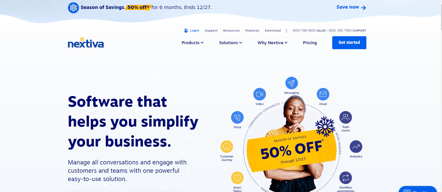

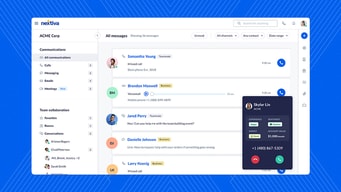






Nextiva advertises $15 per user and prints $23 struck through beside it. Its middle plan advertises $25 against a struck-through $50. Those are 35% and 50% discounts respectively, and the standard figures are what you pay once the promotion ends. Budget from $23 and $50, not from the large numbers, and the comparison against competitors looks quite different.
- What it is: A unified business communications platform — voice, video, SMS, and digital channels — for VoIP and contact centre use.
- Best for: Small and mid-sized businesses wanting a full phone system rather than a shared inbox.
- Pricing: Core $23, Engage $50, Scale $75 per user monthly at standard rates. Promotional rates currently $15 and $25. Verified July 2026.
- The honest catch: Only Core is self-serve — Engage and Scale require a sales demo, with no self-checkout.
What Is Nextiva?
Nextiva is a traditional unified communications platform brought up to date: a proper business phone system with extensions, call routing, auto-attendants, and voicemail, extended with video meetings, SMS, and digital channels. Every plan includes business phone and team messaging as the baseline.

That makes it a different proposition from newer entrants like Quo, which build around a shared conversation inbox and treat telephony as a feature. Nextiva starts from the phone system — the thing a business with desk phones, reception, and departmental routing actually needs — and adds modern channels on top.
The pricing page separates Small business from Enterprise, and layers AI as an addition rather than a default: “add AI when you’re ready” is the framing, with the higher tiers building intelligent routing and interaction analytics on the base system.
How Nextiva Works
- Per user, per month. Standard rates of $23, $50, and $75 with annual billing.
- Every plan includes phone and messaging. Voice, video, SMS, and digital channels from Core.
- AI is a higher-tier addition. Automation and intelligent routing at Engage, full AI optimisation at Scale.
- Core is self-serve. Engage and Scale require a demo before purchase.
- Separate Enterprise track. A distinct tab with its own pricing.
- Annual billing saves up to 50% against monthly, per Nextiva’s own claim.
Nextiva Pricing
Captured from Nextiva’s pricing page in July 2026 in US dollars, on the Small business tab with annual billing selected.
| Plan | Standard | Promotional | Purchase route |
|---|---|---|---|
| Core | $23/user/mo | $15 (35% off) | Self-serve |
| Engage | $50/user/mo | $25 (50% off) | Demo required |
| Scale | $75/user/mo | — | Demo required |

What actually determines your cost:
- Both headline prices are discounted, and unevenly. Core is 35% off, Engage 50%. The deeper discount on the middle tier is the one to treat sceptically — a plan advertised at half its standard rate is a plan whose standard rate is $50, and that is what renewal looks like.
- The demo wall starts at Engage. Core can be bought directly; everything above it routes through sales. That means you cannot compare Engage or Scale against competitors without a conversation, which is a real cost when evaluating.
- A separate “up to 12 months free” offer runs alongside for businesses switching from another provider. Worth asking about explicitly if you are migrating, since it is promoted separately from the plan discounts.
- Core covers most small businesses. Voice, video, SMS, and digital channels at $23 standard is a complete phone system; the higher tiers buy automation, routing intelligence, and analytics rather than more communication.
- Annual billing is where the savings sit. Nextiva claims up to 50% against monthly, so monthly buyers should expect materially higher rates.
- Enterprise is a separate track with its own tab and pricing, not an extension of these tiers.
Who Should Use Nextiva
- Businesses needing a real phone system. The clearest case — extensions, routing, auto-attendants, and reception handling that shared-inbox tools do not attempt.
- Teams consolidating channels. Voice, video, SMS, and digital in one platform with one bill.
- Contact-centre-adjacent operations. Engage and Scale add routing intelligence and interaction analytics.
- Companies wanting phone support. Nextiva publishes a sales line prominently, and support is a consistent strength in this category tier.
It fits poorly for small teams sharing one number, where Quo is cheaper and better shaped; for chat-led support, where LiveChat or Zoho Desk fit better; and for buyers who need published pricing above the entry tier, which Nextiva does not offer.
Honest Pros and Cons
Strengths
- A genuine phone system. Extensions, routing, and auto-attendants rather than a messaging layer.
- All channels from the entry plan. Voice, video, SMS, and digital included at Core.
- Strong reputation for support. Long-established with a direct sales and support line.
- Sensible AI positioning. Added when needed rather than bundled into the base price.
- Substantial switching incentive. Up to 12 months free for businesses migrating.
- Self-serve entry tier. Core can be purchased without a sales call.
Limitations
- Advertised prices are promotional. $15 against $23, and $25 against $50.
- The middle tier is 50% off. Which makes its $50 standard rate the number that matters.
- Demo required above Core. No self-serve purchase for Engage or Scale.
- More expensive than modern alternatives. Quo covers small-team needs for less.
- Monthly billing costs substantially more. Up to double, by Nextiva’s own claim.
- Enterprise pricing is entirely separate. Not comparable to the published small-business tiers.
Nextiva Alternatives and How It Compares
- Quo (formerly OpenPhone) is the modern shared-inbox alternative, cheaper and better suited to small teams sharing numbers.
- Aircall targets sales and support teams with deeper call-centre analytics.
- Grasshopper is the simple virtual-number option for solo operators and very small businesses.
- Zoho Desk adds telephony to a help desk from €23 per agent, if support rather than telephony is the driver.
- LiveChat and HubSpot Service Hub cover chat-led customer communication instead.
- RingCentral and Dialpad are the other large UCaaS platforms usually shortlisted alongside.
For a broader survey, browse our VoIP providers directory.
The Verdict
Nextiva is the right choice when you need a phone system rather than a messaging app with a number attached. Extensions, call routing, auto-attendants, and reception handling are the things a business with a front desk and departments actually requires, and the newer shared-inbox products do not seriously attempt them. Including voice, video, SMS, and digital channels from the entry plan makes Core a complete system rather than a starting point.
Price it from the struck-through figures. Core is advertised at $15 against a standard $23, and Engage at $25 against a standard $50 — a 50% discount on the middle tier, which is the one to be sceptical about. A promotional price is a fine reason to buy now; it is a poor basis for comparing platforms, because the competitor you are comparing against may not be discounting. At standard rates Nextiva’s Core is close to Quo’s Business tier, and the choice becomes a genuine question of shape: full phone system versus shared conversation inbox.
The structural friction is the demo wall. Only Core can be bought self-serve; Engage and Scale route through sales, which means the two tiers that carry the automation and routing intelligence cannot be evaluated on price without a conversation. If you are migrating from another provider, ask specifically about the separate “up to 12 months free” switching offer, since it is promoted independently of the plan discounts and could be worth considerably more than either.
FAQ
How much does Nextiva cost?
At standard rates, captured July 2026 on the Small business tab with annual billing: Core $23 per user per month, Engage $50, and Scale $75. Nextiva was advertising promotional rates of $15 for Core (35% off) and $25 for Engage (50% off). Monthly billing costs substantially more — Nextiva claims annual saves up to 50%. Enterprise pricing sits on a separate tab.
Is the advertised Nextiva price the real price?
No. Both Core and Engage display a struck-through standard rate beside the promotional one — $23 and $50 respectively. The promotional figures are time-limited, so the standard rates are what you should budget from, particularly for renewal. The discount on Engage is 50%, which makes the gap between advertised and standard largest on the most popular plan.
Can I buy Nextiva without talking to sales?
Only the Core plan. Engage and Scale both require a demo before purchase, with no self-serve checkout. That means the two tiers carrying automation, intelligent routing, and interaction analytics cannot be priced or compared without a sales conversation — worth factoring into your evaluation time if you are considering anything above the entry plan.
How does Nextiva compare to Quo or OpenPhone?
They solve different problems. Nextiva is a full unified communications platform with extensions, call routing, and auto-attendants, suited to businesses with reception and departmental structure. Quo, formerly OpenPhone, is built around a shared team inbox for calls and texts, and suits small teams sharing a number. At standard rates Nextiva’s Core is comparable to Quo’s Business tier, so the decision is about shape rather than price.
What is Nextiva best for?
Small and mid-sized businesses that need a genuine business phone system — extensions, routing, auto-attendants — alongside video, SMS, and digital channels, ideally buying annually to access the larger discounts. It is a weaker fit for small teams simply sharing a number, for chat-led support operations, and for buyers who require published pricing above the entry tier.

Compare Nextiva with other popular tools in the same category.
The account manager has been very pleasant to communicate with.
Having to setup phone lines over the phone.
Providing toll free, fax, and local numbers for my business.
Customer service was excellent and made getting set up easy.
Not sure if I have any dislikes as of now, but I am still learning the system. Too early to say.
Our current landline phone bill is $500+ and continues to increase. Nextiva offers a price we could not refuse.
There are alot of features that are useful to to our company such as VIOP which we are now using.
They do not have in office people to come out and help service internet systems and such so its hard having to find a seperate company for that.
Connecting our computers to the call flow and the rest of our database making internet calling simple.
Nextiva allows me to seamlessly connect with my teammates.
Sometimes the Nextiva One app doesn't work the way it was marketed to work. I've dropped calls, unable to transfer, and sometimes it freezes.
Nextiva has allowed me to sync the contacts I've added in the desktop app, to the contact I've added on the mobile app.

It serves its purpose. It works as a VoIP and gets the job done. I like how you can message coworkers within the Nextiva app and call others, not on Nextiva. Texting is an option too but that's where I think they fall short of their potential.
Texting was a huge annoyance when I used this app in 2021. For a while, I couldn't send texts unless I created a contact for that phone number. Creating contacts took forever and would process for several minutes before accepting the contact. I think they aim more at making an app for internal business communication rather than a phone service for making quick and reliable calls to non-contact individuals. Also, the calls would frequently drop or have a poor quality that I'd have to call from my private cell number because the VoIP quality was terrible. In the end it got the job done. But it wasn't worth the money.
I did notice that they fixed the texting option without having that number as a contact. That was appreciated. I think their customer service is good and their representatives are responsive and reliable.
Nextiva is user-friendly. I can easily switch from one status to another one. It can also be minimized so it won't take too much screen space.
They don't respond well or find permanent solutions for issues on their softphone system.
Nextiva has the option to create different queues for different departments which is easier for us since we need separate queues for different concerns from our customers.
Cost efficient and easy to understand wh
Service and Onboarding leave you deflated
They are updating their app and softphone and text options.
the x885 phone is a great tool and works well
the startup of the system was difficult. Very little support was given by nextiva.
had to hire a contractor to complete the install. Fax setup and warehouse paging are equally painful
Text message ability to text my clients from a work number
Different fax login I don't like that I can't just fax from the desktop app
a VOIP carrier, it's fine
Their customer support is good; always going above and beyond
Too many tech support issues. Phone quality is not good, could be our out-dated phones is what Nextiva says.
We use them for phone and faxing services. I do like the faxing portal. Tried to upload screenshot of my account, it gives me an error and will not upload.
Clarity of calls, options for speed-dialing, and ease of connectedness among offices. I use voicemail a lot, so the options within the voicemail box are very helpful.
Have been having some issues getting incoming calls. We have several phone numbers that ring to our phones, and currently one number is not coming through. It sends callers straight to voicemail.
Staying connected with patients, insurances, our other offices, and third parties is so easy with this system. It has been very easy to reach out to folks.
System seems fairly easy to use. When you do get to support they are helpful.
Support is tough to get ahold of and often times hard to understand.
Trying to setup Call2Teams.
I liked that the portal is far easier to use than Ring Central and I hope by using ethernet connected phones we will have far less disconnected or dropped calls.
I did not like my initial experience with Nextiva trying to purchase service, multiple times scheduled meetings were missed. Also the call flow set up took hours!!
Less dropped calls is the biggest one, ease of use, and I believe and hope that the pricing will be less, although I did just find out that i needed a 3rd license which I wasn't happy about.
Uptime is fantastic. I don't have to call support very often.
Ease of use in the admin interface and the fax portal being separate from everything.
Call flows are pretty smooth with this system.
It is really easy to transition between phones at the office
I feel like it can be a little difficult to maintain and add users or make changes, since you have to do it through support.
We have an easy way to connect our offices together, even in different states. Working from home also works with Nextiva which is so nice.

The agent was knowledgeable and helpful. He was willing and able to achieve my needs by multiple avenues if necessary. And got the job done.
It took 20+ calls to Nextiva before the system didn't misdirect and then hang up on me.
I was trying to set notice to clients of our holiday down time. The Nextiva holiday scheduling system online is beyond horrible and counterintuitive. The system when we had Vonage was far superior and easy to use ourselves. The "benefit" was spending over and hour, between Nextiva hanging up on me 20+ times before I could get through to an assistant (the majority of the time) and getting the job done (still too long), which would have taken me 5 minutes to do on Vonage.
Easy to use virtual faxing with email using fax domain given
Customer Portal is outdated and I'm unable to pay bills online
Unable to pay bill online so called in for assistance in paying bill for renewal.
I like how the app links my desktop phone to my PC
Seems to be some bugs that could be fixed to make interface a little easier to use
Used as our main phone service (internal and external calls) Web app is helpful but sometimes acts up and causes frustration

After COVID19, I lost my practice. It moves easily.
Without my own administrative staff (lost in COVID19, not Nextiva's fault); I personally had trouble creating the flows I needed. There was inconsistency in the customer service to assist me. It took months for me to find someone who help me create the flows that I needed and were some that were required per my regulations. The dislike is only in that it is nearly all "self-run," meaning when I lost my staff it was dependent entirely on me until I found a customer service rep who could treat me and speak to me in a way that was compassionate and effective. Some of that is my own responsibility, some of that is the responsibility of Nextiva.
I am solving communication as long as I go in and record my greetings. My business requires me to have certain specialized recorded messages (for safety, as a clinical provider). The benefits are endless when I actually figure out what I have to do. Being without my staff is my problem, it's not Netiva's fault. They have tried their hardest to help me.
Mobile features, call recording, call flow
The NextOS site is great but the experience on iPad is problematic at times.
Easily manage call records, using mobile phones, call transfer.
When it does work, sound quality is very good
Lack of ability to import personal contacts into system. Lack of crossover between phone and desktop app. I cannot text from desktop app like most other services offer. The ability to see the same text messages on both devices is crucial for me. Constant update issues of the phone app. Sometimes takes hours for call logs and text threads to update. Another problem plaguing multiple customers Lack of ability to delete text streams in phone app. Multiple customers have complained about this Lack of ability to save a contact from a text message into the app Constant issues with answering calls in the phone app. Myself and multiple customers have this issue, phone rings 1 time or not at all and then sends the caller to VM
It is a budget friendly system that with a few major tweeks could be great
It works in what it is intended to do. You can make calls, collect data, etc. It is pretty straightforward and simple.
It crashes on a weekly basis, barring me from working from time to time. It also lacks a bit of customizability that I am looking for.
I can efficiently make a lot of calls in a short period of time.
Ease of basic use. All the basic features are easy to use.
Parking calls, picking up a parked call.
We recently solved a problem with not having a receptionist and setting up the automated attendant.
One unified platform to run multiple locations
issues with texting - just not always reliable
with employees working from home, we're able to have their desk phone ring to their home phone.
I like that the people do not see my personal number and I am able to work mobile.
The dropped calls and it took time learning it.
I learned all its features, I am able to transfer calls and conference call.
All of my contacts and all of the company contacts are readily accessed
The "What's on your Mind" feature refreshes every time the program shuts down, so the information is not saved.
We use it for VoIP and in place of Skype for Business now. It's easy to turn the ringer off on my desk phone and see who is calling now.
I like the easy access and the straightforward dashboard, as well as the customer service offered.
I do not believe that the page we use is very pleasing to the eye.
We are utilizing this to track our faxes and delete them from the log
Adequate user interface. Ease of use, quick install, can sync it up to use at home, at work, and on mobile with different extensions for everyone in the office. Good Customer Service.
Intermittent service--sometimes it would not ring and/or would drop calls. Poor IOS app and voicemail.
Constant inbound / outbound calling from Sales, Customer Success, and Support Teams. Nextiva is efficient and easy to use on site and/or remotely.

price, still setting up, havent been able to evaulate
Customer support. waited over 40 minuites on the phone, finally hung up. tried 4 times and same wait, never spoke to anyone. online support was helpful but also took over 30min wait.
office phone system, automted attendant
i like the voice over IP feature and call recording
Not very friendly to use and customer support and billing
like the call recording feature and thats what benefiting us