

Unclaimed: Are you working at Grasshopper?
Grasshopper Reviews: 4.1/5 — Solid Choice
Grasshopper is a convenient tool that empowers businesses with a complete virtual phone system. The solution helps keep costs as low as possible, which is why the platform is preferred by freelancers and solopreneurs. Grasshopper also allows users to choose from various phone number options. With Grasshopper, users can save money on communication while ensuring that you’re backed by professional and sophisticated communication technology that helps boost your brand.
| Company | LogMeIn, Inc. |
|---|---|
| Year founded | 2003 |
| Company size | 1001-5000 employees |
| Headquarters | Boston, MA, United States |
| Social Media |

| Segment |
Small Business
Mid Market
|
|---|---|
| Deployment | Cloud / SaaS / Web-Based, Desktop Mac, Desktop Windows, Mobile Android, Mobile iPhone, On-Premise Linux |
| Support | 24/7 (Live rep), Chat, Email/Help Desk, FAQs/Forum, Knowledge Base, Phone Support |
| Training | Documentation |
| Languages | English |








Grasshopper publishes three prices and bills on about a dozen. The plan tiers are refreshingly simple — $14, $25 and $55 a month on annual billing — and the annual discount is exactly what the page claims it is, which is rarer than it should be. But the fee schedule sitting under those numbers is deeper than the comparison table shows. Turn on business texting and Grasshopper’s own billing system carries three different recurring rates, only one of which appears on the pricing page. Take the professional greeting the table ticks on every plan and it costs $75. None of this is hidden, exactly; it is just not on the page you use to decide.
- What it is: A virtual phone system — business numbers, extensions and texting that ring through to phones you already own.
- Best for: Solo operators and small teams who want a business line without a desk phone or a PBX.
- Pricing: $14–$55/month billed annually, $18–$70 month-to-month. Verified August 2026.
- The honest catch: The 10DLC texting fee shown is $1.50/month; the billing system also holds a $10/month rate.
What Is Grasshopper?
Grasshopper is a virtual phone system, not a VoIP handset platform. There is no hardware, no SIP provisioning and no desk phone. You buy a business number — local, toll-free or vanity — and Grasshopper routes calls to the mobile and desktop devices your team already carries. It has been doing this since 2003 and is now part of GoTo.
That positioning matters, because it puts Grasshopper in an odd spot on a VoIP comparison list. Against Nextiva, RingCentral or GoTo Connect it will look thin: no full contact-centre stack, no per-seat enterprise telephony. Against a personal mobile number written on a van, it is a transformation. Grasshopper is competing with not having a business line at all, and most of its 400,000-plus customers are on that side of the line.
The feature set is deliberately narrow and mostly consistent across tiers: unlimited domestic calling minutes, unlimited business texting, voicemail with transcription, custom greetings, business hours routing, a virtual receptionist, virtual fax, mobile and desktop apps, and 24/7 support. On Findstack it carries 146 user reviews, which is a substantial base for a product this specific.
How Grasshopper Works
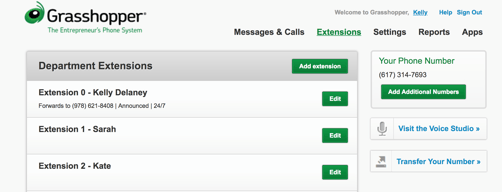
You pick a number during signup, then configure extensions and routing rules in the account afterwards. Calls to the business number ring your chosen devices; outbound calls placed through the Grasshopper app show the business number rather than your personal one. That is the whole product, and its simplicity is the point.
The tiers differ on how many numbers, users and extensions you get, and on a handful of call-handling features:
| True Solo | Solo Plus | Small Business | |
|---|---|---|---|
| Users | 1 | Unlimited | Unlimited |
| Business phone numbers | 1 | 1 | 4 |
| Extensions | 1 | 3 | Unlimited |
| Domestic calling minutes | Unlimited | Unlimited | Unlimited |
| Business texting | Unlimited | Unlimited | Unlimited |
| Call recording | — | ✓ | ✓ |
| Interactive voice response (IVR) | — | ✓ | ✓ |
| Simultaneous call handling | — | ✓ | ✓ |
| Call summaries | — | ✓ | ✓ |
| AI call sentiment | — | ✓ | ✓ |
| Voicemail transcription | ✓ | ✓ | ✓ |
| Virtual receptionist | ✓ | ✓ | ✓ |
| Additional numbers | $9/mo each | $9/mo each | $9/mo each |
| Additional extensions | Not sold | $3/mo each | Included |
Two things stand out. True Solo is genuinely a single-line product — one user, one number, one extension, and no call recording, IVR, simultaneous handling or AI summaries. It is a business number, not a phone system. If two people need to answer the same line, you are on Solo Plus.
And Small Business is the only plan where the number count changes. Four included numbers at $9/month each is $432 a year of value against Solo Plus, which is most of the $360 price gap on its own — a rare case where the top tier is arithmetically the better deal if you actually need the numbers.
(One inconsistency worth naming: the comparison table marks call forwarding “Not Available” on True Solo while the same page’s underlying plan data lists it as supported on all three tiers, and does the same for AI voicemail sentiment. If either matters to you, confirm before you buy — the page contradicts itself.)
Grasshopper Pricing

| True Solo | Solo Plus | Small Business | |
|---|---|---|---|
| Annual, per month | $14 | $25 | $55 |
| Billed once per year | $168 | $300 | $660 |
| Month-to-month | $18 | $32 | $70 |
| Twelve months at that rate | $216 | $384 | $840 |
| You save annually | $48 | $84 | $180 |
| Discount | 22.2% | 21.9% | 21.4% |
| Setup fee | $0 | $0 | $0 |
| Free trial | 7 days | 7 days | 7 days |
Grasshopper claims “annual savings over 20%” and all three plans clear it. That sounds like faint praise until you have checked as many rate cards as this series has; vendors routinely round a 17% discount up to “save 20%”, or quietly cut an allowance to fund it. Grasshopper does neither. The prices are the prices, the arithmetic works, and the seven-day trial takes no card. Credit where it is due.
The $4.50 brand registration and $15 campaign vetting fees footnoted on the pricing table are also exactly right — the billing system charges $4.50 and $15, and the table’s “$19.50 one-time” is their sum. A vendor that footnotes its own fees checkably is a vendor worth trusting on the things you cannot check.
What actually decides your cost
The plan price is the smallest decision you will make here. Four other things move the bill:

1. Which 10DLC rate you land on. US carriers require businesses to register before sending application-to-person texts, and Grasshopper passes that cost through. The comparison table shows a messaging fee of $1.50/month and nothing else. The billing system behind the signup flow carries three recurring 10DLC rates: $1.50/month, $2/month labelled “Sole Proprietor”, and $10/month. Nothing on the pricing page says which one applies to you. At $10/month, a Solo Plus line costs $439.50 in year one against a $300 sticker — a 46% gap decided by a field you never see. Ask before you sign up, not after.
2. Extra numbers, and how many you started with. Additional numbers are $9/month each on annual billing, $10/month month-to-month — identical on all three plans. This is what makes Small Business worth modelling properly. Solo Plus plus three extra numbers is $300 + $324 = $624 a year; Small Business with those four numbers included is $660. For $36 more you also get unlimited extensions, and the extension maths tells the same story: three extra extensions on Solo Plus is $108 a year, on Small Business they are free.
3. Voice Studio. The comparison table shows Professional Voice Studio ticked on all three plans, which reads as included. It is not. The plan data flags Voice Studio as not included on any tier, and Grasshopper’s own FAQ prices it plainly: $75 one-time for up to 250 words. The tick means available, not free — and the pricing table does not distinguish between the two anywhere.
4. International calling. “Unlimited minutes” means unlimited domestic minutes. Grasshopper’s FAQ says so directly: “International calls are not included at this time. International and off-shore calls are billed at per minute rates based on location.” International calling also has to be switched on by support before it works at all. If your customers are outside the US and Canada, unlimited is the wrong word for what you are buying.
Beyond those, the one-time fee schedule includes a $75 initial Canadian number fee and $50 for each additional one, $25 for media file upload, $15 each for background music and an on-hold commercial, $175 for concierge setup, and a $25 reactivation fee if you let the account lapse. Toll-free, vanity and number-transfer fees are all $0.
Who Should Use Grasshopper
Grasshopper is for people who need a business number, not a phone system. That distinction decides everything.
A good fit if you are:
- A sole trader, consultant or tradesperson who wants to stop giving out a personal mobile number. True Solo at $14/month is the cheapest credible answer to that problem, and the seven-day no-card trial makes trying it free.
- A two-to-five person team sharing one main line, where Solo Plus’s unlimited users and three extensions cover the whole company.
- A business that wants a toll-free or vanity number — both carry no setup fee here, which is not universal.
- Anyone who wants to avoid hardware entirely. There is nothing to install, provision or mount on a wall.
A poor fit if you are:
- Running a contact centre or a sales floor. No queues, no dialler, no CRM-grade telephony. Aircall, CloudTalk or Nextiva are the right shelf.
- Calling internationally at volume. Per-minute rates and a support ticket to enable it.
- Outside the US and Canada — Grasshopper is not sold anywhere else, and the site will tell you so.
- Texting heavily on a tight budget without first confirming your 10DLC rate.
Honest Pros and Cons
Pros
- The annual discount is real. 22.2%, 21.9% and 21.4% against a claim of “over 20%”, with no allowance cut hiding behind it.
- Genuinely simple. Three plans, one page, no seat-count calculator, no quote form.
- No setup fee, no contract, $0 for toll-free, vanity and number transfers, and a seven-day trial that takes no card.
- Fees are footnoted checkably where they are shown — the $19.50 registration figure reconciles to the cent.
- Unlimited users on Solo Plus. Most competitors charge per seat; Grasshopper charges per line.
- Small Business is honestly priced if you need four numbers — it undercuts building the same thing on Solo Plus once extensions are counted.
Cons
- The published 10DLC fee is the cheapest of three. A $10/month rate exists in the billing system and appears nowhere on the pricing page.
- Voice Studio is ticked on every plan and costs $75. The table draws no line between included and available.
- “Unlimited minutes” is domestic only, and you have to open the FAQ accordion to learn it.
- True Solo is thinner than the price suggests — no call recording, IVR, simultaneous handling or AI summaries.
- The comparison table contradicts its own plan data on call forwarding and AI voicemail sentiment.
- US and Canada only. No path for anyone else.
- Not a phone system. If you outgrow a single main line, you outgrow Grasshopper.
Grasshopper Alternatives and How It Compares
Grasshopper sits at the bottom of the VoIP category on price and complexity both, which makes most comparisons unfair in one direction or the other.
- Nextiva — a full unified-communications platform with video, team messaging and contact-centre features. More capable and more expensive; the right choice when you have staff on phones all day rather than a number that needs answering.
- RingCentral MVP — the enterprise default, priced per seat. Grasshopper’s unlimited-users-per-line model is dramatically cheaper for small teams; RingCentral wins the moment you need per-user provisioning, compliance controls or deep integrations.
- GoTo Connect — Grasshopper’s sibling under the same parent. The natural upgrade path if you start here and grow into needing a real PBX.
- Aircall and CloudTalk — sales and support call centres with CRM integration and analytics at their core. Different job entirely.
- 800.com — the closest like-for-like on the toll-free number use case, worth pricing against Grasshopper directly if a memorable number is the main thing you want.
The honest framing: if you are comparing Grasshopper to RingCentral, one of the two is wrong for you and it is usually obvious which. Grasshopper’s real competition is a second mobile phone.
The Verdict
Grasshopper does the thing it says it does, at a price it states accurately, and then bills you for several things it did not put on the page.
The headline pricing is clean. Three tiers, a discount that survives a calculator, no setup fee and a trial with no card. In a category where “contact sales” is the default and 20% discounts routinely turn out to be 14%, that is worth something, and the review should say so plainly.
What lets it down is the second layer. The comparison table is where buyers decide, and that table shows one 10DLC rate out of three, ticks a $75 add-on as though it were included, calls domestic minutes “unlimited” without the word domestic, and disagrees with the site’s own plan data in two places. None of it is deceptive in a way that would survive a complaint — the FAQ answers are honest, the fee footnotes reconcile, the international caveat is written down. It is just all one click further away than the number that made you click.
Buy it if you need a business number and Solo Plus at $25/month covers your team — and confirm your 10DLC rate before you enable texting.
Model Small Business properly if you need more than one number. At four included numbers it is better value than it looks.
Look elsewhere if you need queues, diallers, international calling or anything that resembles a switchboard. Grasshopper is not trying to be that, and it does not pretend otherwise.
FAQ
How much does Grasshopper cost? Three plans: True Solo at $14/month, Solo Plus at $25/month and Small Business at $55/month, all billed annually at $168, $300 and $660 respectively. Month-to-month the same plans are $18, $32 and $70. There is no setup fee and a seven-day free trial that does not require a card.
Is the annual discount actually 20%? Yes. True Solo saves 22.2%, Solo Plus 21.9% and Small Business 21.4% against twelve months of month-to-month billing. The allowances do not change between the two billing terms, so the discount is not funded by taking something away — which is more than can be said for several vendors in this series.
What does business texting really cost on Grasshopper? Registration is $19.50 one-time ($4.50 brand registration plus $15 campaign vetting), and that figure is footnoted correctly on the pricing page. The recurring fee is where it gets murky: the table shows $1.50/month, but Grasshopper’s billing system also carries a $2/month “Sole Proprietor” rate and a $10/month rate. Which one you get is not explained anywhere on the pricing page, so ask support before you enable texting.
Are Grasshopper’s unlimited minutes really unlimited? For domestic US and Canada calling, yes. International and off-shore calls are excluded and billed per minute at location-based rates, and international calling has to be enabled by support before it works at all. Grasshopper states this in its pricing FAQ but not on the comparison table, where the row simply reads “Unlimited”.
Is True Solo enough for a one-person business? If all you need is a business number that rings your phone, yes — it is one user, one number, one extension, with unlimited domestic calling and texting, voicemail transcription and a virtual receptionist. What it does not include is call recording, IVR, simultaneous call handling, call summaries or AI call sentiment. Those start at Solo Plus, $11/month more.

Compare Grasshopper with other popular tools in the same category.

It was super easy to set up. We were taking calls and getting voicemails right away. The ability for the whole team to use their cell phones was nice as well.
It didn’t have the reporting that our company eventually needed. We also had a lot of difficulty with international calls. Eventually our business outgrew the platform.
Telephone system. Customer support. We benefitted by having a “real” business line that we could give out to clients
Grasshopper makes it easy to add or remove business lines to the account so that people can still use their cell phones without their personal number being used.
The cost is a bit high compared to other providers but the customer support is very helpful. The need to charge 10 dollars per line that you want to have SMS active, is a disappointment when you have multiple phone numbers being used.
The benefit of a desktop app is very useful for taking and making calls directly from computer in addition to the voice studio that can direct callers to extensions based upon the reason for their call.
The privacy that the program offers for communication.
Nothing comes to mind that I dislike about grasshopper.
Makes calling or receiving calls from clients much easier.
I like the call health access the best. Courteous staff is always available via phone or email to make on the fly changes to my phone answering and administrative Protocol.
The cost for additional administrative tasks and the cost of minutes seems a little bit high.
I use Grasshopper for virtual secretary services for my medical practice. This includes scheduling, answering urgent phone calls, scanning in medical records and intake forms and connecting me to patients with her urgent issues.
I like everything best. Grasshopper exceeds the expectations that we hold.
Nothing to note at this moment and time.
Communicating with our clientele
It's lightweight, inexpensive, and flexible.
As we more formalize our office, there isn't a way to integrate it into physical phone for someone's desk. I have some employees who need a phone, but using their cell phone isn't an ideal solution for us. The soft-phone is an okay solution for now.
We have a business line that works no matter where we are. It allows for customer service after hours.
I love how simple it is for a company on the go. I can be reached anywhere and do not have to give out my cell phone number.
Nothing at this point. I would recommend for any start up business.
Reliable access to 800 number.
I love that you can add as many extensions as you need. The transcription and ability to forward the voicemails to others is extremely helpful.
Sometimes, the updating of voicemails takes a while to get to my phone when I open the app.
Ability to use cell phones without customers knowing your cell phone which keeps things separate and private. The ability for the owner, me, to be able to see what calls are coming in to all the extensions - provides some oversight.
I love that I can easily check business voicemails or call clients while away from the office. The transcription of voicemails makes it easy to prioritize my communication without having to spend time listening to each message.
I don't like that there is no caller id for incoming calls, it just shows up as my office phone number calling me. Screening calls as they come in is nearly impossible.
My business operates with multiple independent contractors sharing office space, so it is impractical to have a physical phone system. Grasshopper allows us all to have our own phone extension so that our clients can contact us directly.

I've never had a call drop. The service department did an excellent job of getting a number we accidentally ported to a different system we were trying out and got it back quickly. They have an "old" interface that has some additional functionality like 4 digit extensions and additional call routing options and if you ask them about it they will swap you to the old interface. Speech to text is pretty darned good and any person in the company can be assigned any DIDs, so multiple people can be put into a single extension as either an ACD queue, round robin, or free-for-all. Also, if you ASK, they will set you up with a PC based softphone. It works great and I don't know why they don't push it. Maybe it uses more resources? I don't know. But I use it on my PC with a headset all the time. One other cool thing is that you can actually run multiple businesses with different numbers off the same account. When we first started we had 3 numbers. One was for out WISP, one for our Agent channel business, and a third for PC repair. Later we added two more numbers to the firs two companies and we were able to use one number for one type of add and another for something different and determined quite easily in a short time which was most effective. :-)
I'm not fond of the way the mobile app works. You can make outbound calls on the app, but inbound are routed to your cell phone directly. You can configure this to show your company name so every call coming in from grasshopper shows "Your Business Name". Or you can have it pass through caller ID but then you don't know if it's a personal or business call. If they had a full-fledged mobile phone app that you could make and receive calls on it would be MUCH better. Then again, when we were setup as three separate businesses, I was able to set it to show which company they were calling for and answer appropriately. So maybe instead of having a full blown calling app, they should have both.
Started out with one person. Growing, adding DIDs, call queues, extensions, direct inward dialing, are all incredibly easy. We now have 9 people on it 5 are in a sales queue, 2 of those 5 are also on a service queue with 2 others. And one from each of those groups is with two others in a billing group. That's some nice flexibility and it was incredibly easy to setup.
I like that it is possible to forward a call to multiple numbers, and easily change which numbers are receiving calls. It is easy to track calls and report on how many have been received, and the amount of time spent on calls.
It can take a while to understand where to find certain settings and features
We were using one number for our support line, that was based in one location, and had to be physically logged into. This caused issues when staff could not get to work or were working off site. Grasshopper has enabled us to successfully run a helpdesk from any location with ease.
It's great to be able to have multiple phones connected to one number. If I happen to miss a call coming in, it will go directly to my colleague to take so we won't miss any inbounds.
The UI of the site and our internal view is a little difficult to navigate, I set up multiple bookmarks so I go directly to the pages I need most.
We do not have physical phones so we have to use our mobile phones for incoming calls. We have to put a number on our website, and nobody wants to volunteer to put their private phone number up.
Grasshopper gives you the ability to manage and customize your company's phone system easily and at a great price point.
Only complaint would be the inability to distinguish a Grasshopper call from a direct call when using a cell phone, while still utilizing caller ID. If a current customer calls using our Grasshopper system, it would be nice to know that they 1. Called through Grasshopper and 2. Who exactly is calling.
In handling product sales it has been beneficial to have the ability to easily modify company main messages and after hours messages. As well as modify forwarding options on a time frame basis per employee. This way our new and existing clients always receive a professional and timely interaction with our staff.
I like that I have an 800 number to show the market that I am nationally available. I like the professionalism attached by having the 800 number. I like that the system forwards the calls to my cell phone, which is my primary phone, and allows me to not miss potential sales calls.
I dislike the pricing, but it worth it at the same time.
I'm able to take sales calls through the United States.
once you understand the logic behind the programing, is very easy to create amazing forms and objects.
hard to understand the logic at first, a lot of self learning.
the program very useful, but not a lot can understand.
Grasshopper hosts a suite of information, features, and support for its users. They're constantly looking to provide their customers with an edge by offering valuable resources for step 1 of their process. - Even before you sign up, you're still able to use their templates and information for SMBs - The Ability to pick between Toll free numbers or Local numbers, or both! - Voicemail to text transcription & voicemail sent to your email (Both great for my usage) - You're able to text from your business number as well as call out, no need to grab 2 phones anymore for your business
While Grasshopper offers a host of features that are valuable to any size business, they definitely do it at a premium compared to some other providers. If money isn't your biggest factor (Which it probably is if you're reading this deep into reviews), then go ahead and grab grasshopper! They do have different plans, and most of them offer all of the same features, but it's no fun to be limited on your minutes used when you're paying $24/mo. (That's only 500 minutes)
Grasshopper has not only made me sound far more professional by adopting it's call-center features and Toll-free numbers, but it has also increased my productivity a noticeable amount. The ability to get voicemails and direct clients through some prompts has saved me a whole load of time.

If you're in B2B sales you need to publish your phone number (and it better be toll-free), but this raises a lot of problems as your sales team scales. What happens if you fire someone, transition someone, need off-hours, etc? You will shortly realize that it's better to have a central number with extensions that you can always control, but that seems daunting to set up. Grasshopper makes all of that easy, Get up and running with an 800 number in under ten minutes. You can admin all of the extensions and messages, access voicemail, fax, etc. through the web and app. The android app (can't speak for iOS) works for making calls through the 800 number as well, which is pretty awesome (but also counts towards your minutes per month!). It's only $12 a month to start with pay as you go for the minutes, which isn't terrible. The $24 plan has 500 minutes which is more than enough for a SaaS SMB. Very simple UI you really can't mess up, too.
No free trial kind of sucked, but I luckily had access to $100 to test it out via our company's accelerator. The problem once signed up is they try to convince you to pay for many upsells - they'll record your base message for $75, you can get transcribed voice mail for $10 a month (Really? My personal carrier does this for free), simultaneous call forward etc.
Number/agent management, voice mail, providing toll free calling for customers, directing calls to relevant employees, providing a professional experience.
Very simple to use interface for the end users. It only took about 20 minutes to set our company up.
The Android app needs some work. It appears that the iOs app works just fine, however.
No dedicated home office and a mobile workforce located across the country.
The user interface is easy to navigate, listen to messages.
Extra features are confusing or hidden behind additional costs. The ability to forward calls and messages elsewhere was lacking. Disconnecting service is not nearly as easy as set-up, usually a red flag.
Community members have a manageable number to reach our organization. The set-up was quick and easy. Community members were able to reach us through the service quickly.
Ability to use my personal mobile phone and the grasshopper mobile app to make calls from our office number
No voice transcription or caller ID with basic subscription packaged. Could use an upgrade to the UI as well.
We are forwarding incoming calls to the right channels/teams in our company. Eliminating using more expensive products that don't suit our current small startup needs for managing callers.

It's very easy to set up and use the system. Managing extensions and enabling features is straightforward. Users seem to be able to handle customizing their extensions, also.
Two major things: 1) Their SMS support is NOT what their website claims. It's totally misleading. They only support SMS messages being delivered to Admins on the system; users can't see SMS messages coming into their personal extensions or direct numbers. They all show up in one place and the only people who can see them are Admins. This is horrble and we've complained about it for months with no sign it will be fixed (seems like something that should take a day or two toimplement). 2) Their website has some issues when administrating the system. Lots of little rendering bugs that confuse when first using the system (adding users/editing fields will not always update the screen properly so you think something didn't update when, in fact, it has. In general, I don't like that it seems there are no engineers supporting this product. I've seen no improvements or chanegs in many months and that's not right for a hosted SaaS system.
We needed an inexpensive service to allow our employees to have access to personal extensions while still using their mobile devices for most communications.
It allows for easy logical operations and parametric modeling. The product ships with tools that can be used to do a lot, while allowing users to install unlimited plugins that suit their specific area of use
The memory consumption becomes huge once large amount of data is entered. In grasshopper alone, it's impossible to deal with large projects.
It allows for fast prototyping and manipulation. The solar studies and environmental analysis plugins allow design to be site specific.
call forwarding, extensions capable of long outgoing messages, unlimited extensions and forwarding, fax number
would be better to have all the prompts for setup in one location instead of opening segments
call screening, can use a different number instead of cell phone. Outgoing messages to qualify customers saving time spent on calls.
The ease of use, messages sent to my email, easy to navigate website and call history online.
The fax function isn't working for us. Not sure why, and Grasshopper hasn't been able to fix it. We may have to switch companies as a result.
We are able to receive voice messages immediately. Grasshopper has made that easy.
The ability to use my phone for business without having to give out my personal number
There is no faxing capabilities to send documents
Able to have a business line without the additional phone expense
Notification that I have a message, shortly after a voicemail is left.
There are glitches from time to time and I don’t receive any notification.
I’m a small business that needs an 800 number. It’s been a great service for allowing me to appear like a larger business at an affordable price. Being able to customize greetings is also great!
I appreciate the flexibility with being able to use app or web based services.
They do not have the ability to send or receive picture messaging.
Ability to use personal cell phone with a work phone number.
It’s very easy to add/delete extensions, route calls to employees’ cell phones, receive faxes via email notification. I like the spell by name directory feature. This feature has proven helpful when employees have left. We don’t have to constantly update the recording
I would add more variety to the hold music selection. Being able to upload personalized selections would be a nice feature. Other than that, I really don’t have any dislikes. Grasshopper has proven to be an all around great choice
We gave up our landline and the cost/maintenance associated with it. I can very easily manage office closures and temp workers.
I like that is basically just an app on your phone and that your personal phone number will not show up when you dialing out. It's easy enough to use and you can track your voicemails on their website or straight on the app.
Sometimes it can drop calls and there can be a lag when receiving calls. It can also be time-consuming to listen to the number since it does not appear on your phone screen and just the number associated with your Grasshopper account.
Much more cost effective for small and growing teams exploring options for phone equipment and plans.
Easy interface, no dropped calls, app ok
no call recording, no xfer outbound call
It was great for our small-medium business with 3 employees. The few limitations listed above were things we needed. They were not working to offer those anytime soon