

OnePageCRM Reviews: 4.6/5 — Highly Rated
OnePageCRM transforms the complexity of a CRM into a simple to-do list. With this tool, every contact is actionable so you can say goodbye to a dead database and embrace full productivity.
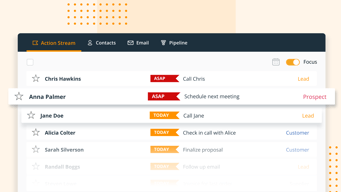
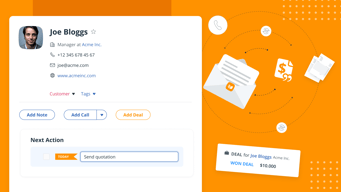
Our Next Action System encourages users to add one simple task that will help them move a sale forward for each contact. Type your action, set a date, and move on to the next. It's that simple. All your contacts are sorted by task priority in your Action Stream so you can go through them like a to-do list. This way, you can tune out the noise and nurture relationships, one action at a time.
Along with this unique feature, you can also avail of unlimited contacts, log calls and notes, send quotes in a few seconds, manage deals in a pipeline, send emails in bulk, and more!
Start a 21-day free trial today (no credit card required).

| Capabilities |
API
|
|---|---|
| Segment |
Small Business
Mid Market
|
| Deployment | Cloud / SaaS / Web-Based, Mobile Android, Mobile iPad, Mobile iPhone |
| Support | 24/7 (Live rep), Chat, Email/Help Desk, FAQs/Forum, Knowledge Base, Phone Support |
| Training | Documentation |
| Languages | English |







OnePageCRM gives you unlimited contacts, deals, fields, and tags on its €8.95 plan — the same as on its €25.95 plan. In a category where contact count is the standard meter, removing it entirely is the most consequential thing on the pricing page. You are paying for capability, not for the size of your database, which makes the cost predictable in a way most CRMs are not.
- What it is: A CRM built around a “Next Action” method that turns every contact into a task.
- Best for: Small sales teams and solo operators who work a list by following up rather than managing a pipeline.
- Pricing: Professional €8.95, Business €17.95, Max €25.95 per user monthly on annual billing. Verified July 2026.
- The honest catch: Email tracking and project management require Business at double the entry price.
What Is OnePageCRM?
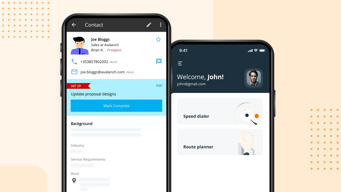
OnePageCRM’s organising idea is that a CRM full of contacts with no assigned next step is a database, not a sales tool. Every contact carries a Next Action — a specific task with a date — and the main view is an action list rather than a pipeline board. Clear an action, and the system prompts you to set the next one before moving on.

That is a genuine philosophical difference from Pipedrive or HubSpot, which visualise deals moving through stages. OnePageCRM suits people whose work is follow-up discipline — consultants, agencies, small sales teams calling a list — more than those managing complex multi-stage opportunities.
The 2026 product includes Claude and ChatGPT integrations on every tier, unlimited lead enrichment and capture, and unlimited email templates, again without gating by plan.
How OnePageCRM Works
- Next Action method. Every contact has an assigned next step; the main view is a to-do list.
- Unlimited contacts, deals, fields, and tags on all three plans — the defining commercial decision.
- Unlimited lead capture and enrichment, also on every tier.
- AI integrations included. Claude and ChatGPT connections from the entry plan.
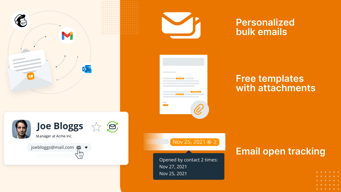
- Email tracking at Business. Along with project management.
- Automation at Max. Unlimited automation and the AI features.
OnePageCRM Pricing
Captured from OnePageCRM’s pricing page in July 2026 in euros with annual billing selected. OnePageCRM advertises four months free on annual plans, roughly a third off the monthly rate.
| Plan | Per user/mo | Contacts | Key additions |
|---|---|---|---|
| Professional | €8.95 | Unlimited | Lead capture, email templates, Claude and ChatGPT integrations |
| Business | €17.95 | Unlimited | Email tracking, project management |
| Max | €25.95 | Unlimited | AI features, unlimited automation |

What actually decides your plan:
- Contacts are not the meter, which changes the comparison entirely. Insightly caps records at 100,000 on its $29 plan; Klaviyo bills purely on profile count. OnePageCRM charges per user and leaves the database unlimited, so a solo consultant with 40,000 contacts pays €8.95 rather than being pushed up a tier by data they already own.
- Business doubles the price for email tracking and projects. €8.95 to €17.95 is the significant step, and what it buys is knowing whether your emails were opened plus a light project layer. Useful for a sales team, unnecessary for someone who simply works a call list.
- AI integrations are not gated. Claude and ChatGPT connections appear on the entry plan, which is unusual — most vendors put AI behind an upgrade.
- Max is for automation. €25.95 buys unlimited automation and the AI feature set. If you are not automating sequences, the middle tier is the ceiling worth paying for.
- Annual billing gives four months free. Roughly a 33% saving, and among the more generous annual discounts in this category.
- A free trial requires no card, with “Try Free” on every tier.
Who Should Use OnePageCRM
- Solo consultants and small sales teams. The clearest case, and where the Next Action method genuinely changes behaviour.
- Anyone with a large contact database and a small team. Unlimited contacts at €8.95 per user is exceptional value in that shape.
- Follow-up-driven businesses. Recruiters, agencies, and advisers whose work is remembering to call people back.
- Teams that want AI integrations without an upgrade. Claude and ChatGPT on the entry tier.
It fits poorly for complex pipeline management, where Pipedrive’s stage visualisation is stronger; for marketing automation, where Keap or Act! bundle email campaigns; and for teams wanting a free tier, where HubSpot CRM and Zoho CRM both offer one.
Honest Pros and Cons
Strengths
- Unlimited contacts on every plan. The standout decision, and rare in CRM pricing.
- Very low entry price. €8.95 per user with no database ceiling.
- The Next Action method works. It enforces follow-up discipline rather than merely recording it.
- AI integrations ungated. Claude and ChatGPT from the entry tier.
- Generous annual discount. Four months free, around 33%.
- Predictable cost. Per-user pricing with no usage meter to forecast.
Limitations
- Email tracking requires Business. Double the entry price.
- No free tier. A trial only, where HubSpot and Zoho offer permanent free plans.
- Not built for complex pipelines. The action-list model suits follow-up more than multi-stage deals.
- No native marketing automation. Campaigns need a separate tool.
- Automation is a Max feature. €25.95 before sequences are unlimited.
- Smaller ecosystem. Fewer integrations than the larger platforms.
OnePageCRM Alternatives and How It Compares
- Pipedrive is the pipeline-first alternative with stronger deal visualisation, at a higher price.
- Zoho CRM is cheaper still with a free tier, and far stronger inside the Zoho ecosystem.
- HubSpot CRM has a genuinely free tier, with costs rising sharply as you add hubs.
- Insightly adds project delivery for services businesses, and meters records.
- Freshsales and monday CRM are the modern-interface options at higher cost.
- Keap and Act! bundle marketing automation, which OnePageCRM does not attempt.
For a broader survey, browse our CRM directory.
The Verdict
OnePageCRM is unusually easy to price because it removes the variable that makes most CRM pricing unpredictable. Contacts, deals, fields, and tags are unlimited on all three plans, so your bill is simply your headcount multiplied by a tier — no record ceilings, no upgrade triggered by a database you have accumulated over years. For a small team with a large contact list, that shape is worth more than any individual feature, and at €8.95 per user the entry tier is among the cheapest credible CRMs available.
The product itself is opinionated in a way that will either suit you exactly or not at all. The Next Action method insists that every contact carries a specific next step with a date, and the primary view is that action list rather than a pipeline. If your sales work is fundamentally about follow-up discipline — consultants, recruiters, agencies, anyone working a list of people they need to call back — that structure genuinely changes behaviour. If your work is managing complex opportunities through defined stages with multiple stakeholders, Pipedrive’s board is the better mental model and you should use it.
The tier decision is straightforward: Business at €17.95 doubles the price to add email tracking and project management. Email open tracking is genuinely useful to a sales team and irrelevant to someone working a call list, so decide on that basis rather than on the price gap. Max at €25.95 is for teams automating sequences at volume. And take the annual billing — four months free is roughly a third off, one of the more generous discounts in the category.
FAQ
How much does OnePageCRM cost?
On annual billing, captured July 2026 in euros: Professional €8.95 per user per month, Business €17.95, and Max €25.95. OnePageCRM advertises four months free on annual plans, which works out at roughly a third off the monthly rate. All three plans include unlimited contacts, deals, custom fields, and tags. A free trial is available with no credit card required.
Does OnePageCRM limit the number of contacts?
No. Contacts, deals, fields, and tags are unlimited on every plan including the €8.95 Professional tier. This is its most distinctive commercial decision — most CRMs meter records or contacts, so a growing database eventually forces an upgrade. Here your cost depends only on how many users you have, which makes budgeting straightforward and rewards teams with large contact lists.
What is the Next Action method?
OnePageCRM’s organising principle: every contact must have a specific next step assigned with a date, and the main interface is that action list rather than a pipeline board. Completing an action prompts you to set the next one. It is designed to enforce follow-up discipline rather than simply record activity, and it suits consultants, recruiters, and small sales teams working through lists of people to contact.
What does the Business plan add?
Email tracking and project management, at €17.95 against Professional’s €8.95. Knowing whether your emails have been opened is genuinely valuable to a sales team and largely irrelevant to someone working a phone list, so the doubling is worth it or not depending entirely on how you sell. Max at €25.95 adds AI features and unlimited automation on top.
What is OnePageCRM best for?
Solo consultants and small sales teams whose work is driven by follow-up rather than pipeline stages, particularly those with large contact databases where unlimited records at €8.95 per user is exceptional value. It is a weaker fit for complex multi-stage deal management, for teams needing built-in marketing automation, and for anyone wanting a permanently free tier.

Compare OnePageCRM with other popular tools in the same category.
Email integration is flawless. I have used the most popular CRMs on the market, and NONE of them integrate with your email and make it as easy for you to integrate emails with your database, and for you to see within your email program which emails are logged inside your database.
I honestly do not have a feature or system within OnePageCRM that I dislike.
For me, it is an all-purpose CRM for a small business, so I mostly keep a log of customer and prospect interactions within it and hold relevant documents inside of it.
Ease of use. Excelletnt interface. Adding contacts & importing from Outlook makes it one of the easiest to use even if you are moving from an existing solution Reporting and Analytics are so easy.
If you have a large sales team, it starts to get expensive.
Tracking deals and making it easy to follow up.
Most helpful feature is the next action, and when you complete you need either write a next action, or close the sale. It ensures that I can always follow up with the people i need to follow up with. Its very easy to use and and I use it daily.
There is not much to dislike, From my experience it can't be used as a full crm, but for what I use it for it's an amazing product.
Having everyone i need to follow up with in one place with a next action, and if I reach out to someone and can't get in touch I just put a next action to follow up in a couple days. ''';
I love that I can use one-page CRM as a todo list for everyone in my network and pipeline. It does the thinking for me of who I should follow-up with.
I'd like it to intergrate better with my proposal and invoicing flow with bonsai. However, this isn't my main use case for it.
To keep in touch with current clients, past clients, and my network.

I like the fact that onepagecrm is so easy to use. They layout is simple and adding new people is a breeze
I wish there was a way to stop the next action section from starting every time you create a new contact.
It allows me to create a list of customers and monitor notes on each one. Mobile app is a lifesaver.
I love being able to see other platforms contacts are on so I can easily connect with them there. The pipeline management and email templates have been game changers for me and my business.
I'd love to be able to filter contacts on the mobile app and remove tags
It keeps all My deals in one place
Ability to communicate and schedule with team members and leads.
Unable keep calendar in the Onepage CRM.
Integrating with other CRM tools
The fact that I can see my pipeline business at a glance, and also diarise for follow ups and client interaction. Great management tool.
I have not yet experienced anything about the product I dislike.
Prevents forgetting about pipeline business, and helps with regular follow up and client interaction.

I've been using OnePageCRM daily for several years now and can no longer imagine life without it. The simple but powerful idea behind OnePageCRM is to simple keep track of the next action you need to take. I have 100's of customers to keep happy and lots of potential customers to woo at any given time, and with OnePageCRM I rarely drop the ball. I feel like we've grown up together, the platform was small and simple when my own needs were modest, and it was very easy to get started. They have grown into quite a robust solution, adding great collaboration tools, especially the email integration, just as I was expanding my team. Their API cam along right when I was ready to build integration allowing me to see customer information right from my own website. The customer service is also superlative, I even wrote about it as a good example for entreprenuers on my blog (https://www.billtrack50.com/blog/reflecting-on-10-years-as-a-small-business). OnePageCRM is the best money I ever spent.
Being completely all in with OnePageCRM, keeping the entire history of all of my relationships entirely in OnePageCRM, has kept me from exploring what else is out there. Their ever lengenthing list of integrations is helpful, but they can't really integrate with every single tool I might potentially find useful. I'm happy that I'm happy right now, because I am pretty darn committed to this solution at this point.
Keeping track of what I need to do next, and giving my whole support team visibility into the entire customer relationship to date.

OnePageCRM stands out amongst CRMs for its intuitive user experience, and its focus on features that actually matter for driving my business forward. Rather than flip-flop adding endless bells and whistles that dimish ease of use, the team at OnePageCRM only add what delivers value. Each new feature is well thought out.
Nothing. It's great! Don't change a thing!
Keeping in touch with customers and opportunities.

We use OnePageCRM as our bible in the company for all prospect and customer interactions. We love the email sync feature and the simplicity of the user interface. We love how accessible the team are if we have any questions.
We don't experience any downsides regularly.
One central place for all prospect and customer interactions, email and notes on calls/meetings gives visibility across our team.
Easy to use, very flexible, and supports my business
No Downside for me. I've been using One Page for many years
One Page lets me manage my contacts efficiently and market to them effectively. It also syncs with Mail Chimp, which i use as my marketing tech
I like the link between the company email account and the CRM platform. The quality of the onboarding was excellent, with simple tutorial videos. I am not an expert in CRMs but the simplicity of the platform is appealing for the basic sales actions like follow ups. I will explore the deeper functionalities at a later stage.
I disliked the fact that the calendar function isn't interactive and that you have to go back to the Action Stream. I couldn't filter contacts and bulk emails by company.
Management of actionable items in relation to new and existing customers/stakeholders
I enjoy using the pipeline feature. I'm always up to date on what deals need to be worked on. I like that I can tag customers/leads/propects, and send bulk emails to each segment.
My needs are simple. I need a pipeline, a place to store contacts and a way to email them. So, I haven't tested all the features, and couldn't say that there's a downside at this time.
The action stream helps me keep my promises to my clients. I like the next action feature which sets me up for the next task I have to do to move the sale forward.
It's really simple to use and gets the job done in terms of following up with leads. The customer support is also so far really great! Overall, nice, neat and simple app! Great job.
Nothing at the moment, I just got the app, for now, it's really nice and simple
Having reminders of actions towards leads
Getting customer data into is super easy and flexible. Most of the times I realize after the fact that the person I am emailing is a potential customer, partner etc. By using the email sync plus the browser extension I can easily get their info into OnePageCRM. Once a person's info has been added the next action way of working is super powerful. It makes sure nothing falls through the cracks with regards to customer relationships.
The way we move from lead to customer to adding deal information is a bit confusing. While there is a way to add metadata about our customers, the overall tagging UI/UX is clunky and seems like an afterthought. To be fair, that is not something I use a lot in the product.
We are an early stage product led SaaS. Keeping in touch with stakeholders like investors, angels, partners, leads and customers can be cumbersome. Usually at an early stage most people may choose to neglect this. But by using OnePageCRM for managing relationships our stakeholders remember us and this is critical for any early stage company.
The beauty of OnePageCRM is in its simplicity. It may not be robust enough for large organizations, but for small ones, it is ideal. Think of OnePageCRM as a self-ordering rolodex. Set a next action and due date for each contact. When completing the action, OnePageCRM immediately asks you for your next action and due date. This puts the contact back to their appropriate place in line. Along with email integration, it's very easy to keep all of your notes for each client in one place, and painless to maintain work relationships.
There are some minor UI improvements possible. Great news is that the team is very responsive and regularly updating the platform. They even give users access to their team's Trello board so you can see their upcoming changes. Many of us are looking forward to keyboard shortcuts!
Helping me proactively follow up with clients and partners
Everything is so accessible & user friendly, very useful if you are regularly inducting new people as we do, both for training & selling training
Very few if any as far as I am concerned. It is so right for us
Our team is so much more productive & nothing gets missed as everything, i.e. the history of the contact, is there in front of you when you open a contact
I've tried all of the CRMs out there. OnePage is the easiest to use with a great array of features and the ability to interface with other applications.
Email is confusing to set up integrate with Outlook
Keeping all contact and customer information organized
It helps to organise the deal sizes, profits, margins, cost to estimate the true value of business in piepeline
The notificaiton system can be improved, sometimes the amount of emails you get from the system is overwhelming.
OnePageCRM helps to not only provide a follow-up on your business pipeline, but also helps to estimate the value the business will bring. It made estimating margins and profit of future business deals easy.
Convenience, ease of use, support, and organization
What I would like is a way to create templated emails that are sent out in bulk in the future. Same reminder emails every month to my clients. That way I don't have to think about it and I know my clients would get all the updates they need and never forgotten because of human memory. That would be a great feature. If Onepage already has that feature it would be great is someone could show me how to use it
Organization. Having as many clients as I do - customer relationship/experience is what sets me apart from my competition. Having onepage as my form of organization I can continue to grow whilst keeping that same quality customer experience.
Most CRM's you kind of dread logging in. Not the case with OnePage. Its simplicity is a pleasure, and makes our outreach so effective and easy to manage. Good integrations with pretty much all the third party softwares we usse. Concise and clear instructions/videos on configuration, and the software is so intuitive that you'll rarely need support. And their support is stellar.
No real downsides - the only item on my wishlist that I would like is a Linkedin web-to-lead form, but as far as I know, Linkedin doesn't allow any any CRM to do this.
Sales pipeline management

It was great for our team at the time. Flexible on users. Easy to tag different sales funnels. Super easy to use - by far the easiest CRM I've ever used. I would definitely use this service again.
The big challenge was the price per user. We switched to a system that was free for the size of our team. It also had a lot of training modules that added value to a young sales and marketing team.
OnePage was our attempt to professionalize our sales and marketing team. Measuring sales and marketing outreach. Building sales funnels. Adding strategy and structure to our sales outreach and followup.
I love OnePage because I can create pre-presentation and post-presentation templates to quickly respond to prospects and modify the response as needed. I can also sent out bulk emails using the templates and still individually modify them.
I am not able to send out emails on a pre-set automated schedule. Emailing is manual
I've got a small business and I handle all the jobs. Sales and support. Keeping organized is a challenge. OnePage helps me manage my contacts and the thread of conversations. Being able to tag contacts and send emails in bulk and then change their status is very helpful.

It's super easy to toggle between desktop & mobile device use; I can look up client information while I'm out & about in real time.
Haven't used other CRMs extensively, so I don't have much to compare it to.
Keeping track of conversations we have with volunteers & donors, easy look-up of contact info for anyone in my organization.

OnePageCRM has a great visual pipeline that makes it easy to see where you stand with each deal.
I wish there was a "next action" feature within deals rather than just contacts. Sometimes I've had a deal with several contacts connected.
OnePageCRM keeps my contacts organized. I've never lost track of a communication with the two-way email function.
Its quite easy for sales business to track and monitor pipeline and customer. Its multi features like email and whatsapp is best..
Need to make a dashboard little creative abd user friendly
Its quite easy for sales business to track and monitor pipeline and customer. Its multi features like email and whatsapp is best..

Being able to quickly and easily track my daily activity and keep up with my prospect list.
Honestly, nothing. It's easy to learn and to use, zero complaints.
It's a simple way to set goals, track daily activity, and keep up with current prospects and clients.

Connects and syncs seamlessly with email. Focus on building connections is helped by AI that seeks the social profiles of my contacts.
Haven't found anything yet that I could dislike
Central resource for business contacts
Ease of use! Easy to add new leads and stay organized
Nothing, no complaints, and this text here is just to reach the character limit
Staying organized, keeping leads assigned to multiple reps