

OnePageCRM Reviews: 4.6/5 — Highly Rated
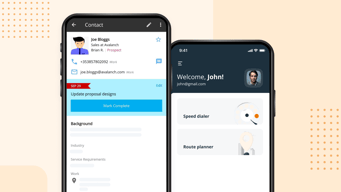
OnePageCRM transforms the complexity of a CRM into a simple to-do list. With this tool, every contact is actionable so you can say goodbye to a dead database and embrace full productivity.
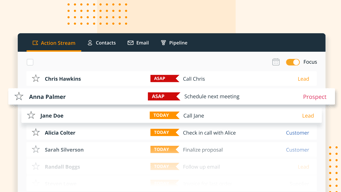
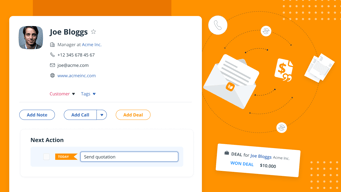
Our Next Action System encourages users to add one simple task that will help them move a sale forward for each contact. Type your action, set a date, and move on to the next. It's that simple. All your contacts are sorted by task priority in your Action Stream so you can go through them like a to-do list. This way, you can tune out the noise and nurture relationships, one action at a time.
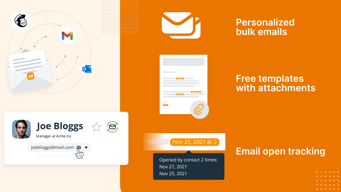
Along with this unique feature, you can also avail of unlimited contacts, log calls and notes, send quotes in a few seconds, manage deals in a pipeline, send emails in bulk, and more!
Start a 21-day free trial today (no credit card required).

| Capabilities |
API
|
|---|---|
| Segment |
Small Business
Mid Market
|
| Deployment | Cloud / SaaS / Web-Based, Mobile Android, Mobile iPad, Mobile iPhone |
| Support | 24/7 (Live rep), Chat, Email/Help Desk, FAQs/Forum, Knowledge Base, Phone Support |
| Training | Documentation |
| Languages | English |








Compare OnePageCRM with other popular tools in the same category.
Email integration is flawless. I have used the most popular CRMs on the market, and NONE of them integrate with your email and make it as easy for you to integrate emails with your database, and for you to see within your email program which emails are logged inside your database.
I honestly do not have a feature or system within OnePageCRM that I dislike.
For me, it is an all-purpose CRM for a small business, so I mostly keep a log of customer and prospect interactions within it and hold relevant documents inside of it.
Ease of use. Excelletnt interface. Adding contacts & importing from Outlook makes it one of the easiest to use even if you are moving from an existing solution Reporting and Analytics are so easy.
If you have a large sales team, it starts to get expensive.
Tracking deals and making it easy to follow up.
Most helpful feature is the next action, and when you complete you need either write a next action, or close the sale. It ensures that I can always follow up with the people i need to follow up with. Its very easy to use and and I use it daily.
There is not much to dislike, From my experience it can't be used as a full crm, but for what I use it for it's an amazing product.
Having everyone i need to follow up with in one place with a next action, and if I reach out to someone and can't get in touch I just put a next action to follow up in a couple days. ''';
I love that I can use one-page CRM as a todo list for everyone in my network and pipeline. It does the thinking for me of who I should follow-up with.
I'd like it to intergrate better with my proposal and invoicing flow with bonsai. However, this isn't my main use case for it.
To keep in touch with current clients, past clients, and my network.

I like the fact that onepagecrm is so easy to use. They layout is simple and adding new people is a breeze
I wish there was a way to stop the next action section from starting every time you create a new contact.
It allows me to create a list of customers and monitor notes on each one. Mobile app is a lifesaver.
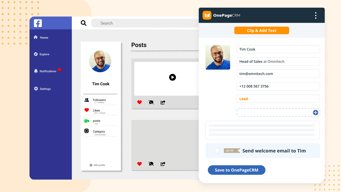
I love being able to see other platforms contacts are on so I can easily connect with them there. The pipeline management and email templates have been game changers for me and my business.
I'd love to be able to filter contacts on the mobile app and remove tags
It keeps all My deals in one place
Ability to communicate and schedule with team members and leads.
Unable keep calendar in the Onepage CRM.
Integrating with other CRM tools
The fact that I can see my pipeline business at a glance, and also diarise for follow ups and client interaction. Great management tool.
I have not yet experienced anything about the product I dislike.
Prevents forgetting about pipeline business, and helps with regular follow up and client interaction.

I've been using OnePageCRM daily for several years now and can no longer imagine life without it. The simple but powerful idea behind OnePageCRM is to simple keep track of the next action you need to take. I have 100's of customers to keep happy and lots of potential customers to woo at any given time, and with OnePageCRM I rarely drop the ball. I feel like we've grown up together, the platform was small and simple when my own needs were modest, and it was very easy to get started. They have grown into quite a robust solution, adding great collaboration tools, especially the email integration, just as I was expanding my team. Their API cam along right when I was ready to build integration allowing me to see customer information right from my own website. The customer service is also superlative, I even wrote about it as a good example for entreprenuers on my blog (https://www.billtrack50.com/blog/reflecting-on-10-years-as-a-small-business). OnePageCRM is the best money I ever spent.
Being completely all in with OnePageCRM, keeping the entire history of all of my relationships entirely in OnePageCRM, has kept me from exploring what else is out there. Their ever lengenthing list of integrations is helpful, but they can't really integrate with every single tool I might potentially find useful. I'm happy that I'm happy right now, because I am pretty darn committed to this solution at this point.
Keeping track of what I need to do next, and giving my whole support team visibility into the entire customer relationship to date.

OnePageCRM stands out amongst CRMs for its intuitive user experience, and its focus on features that actually matter for driving my business forward. Rather than flip-flop adding endless bells and whistles that dimish ease of use, the team at OnePageCRM only add what delivers value. Each new feature is well thought out.
Nothing. It's great! Don't change a thing!
Keeping in touch with customers and opportunities.