

Unclaimed: Are you working at Paymo?





Paymo Reviews: 4.6/5 — Highly Rated
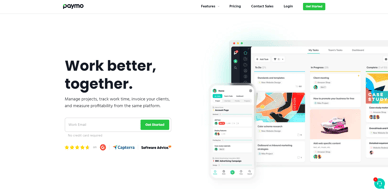
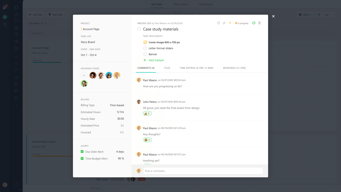
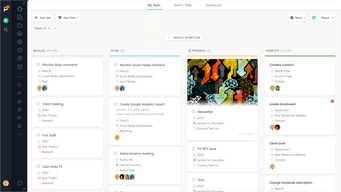
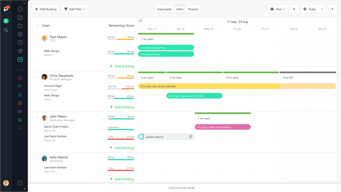
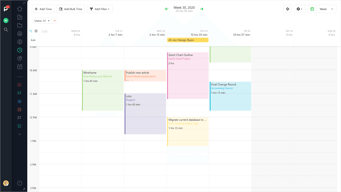
As a project management platform, Paymo has all the functionalities of similar industry-leading tools such as multiple task views, custom workflows, project templates, and tracking, monitoring, and reporting. What separates Paymo from other project management software is its extensive list of project billing features. It offers seamless invoicing from logged billable hours within the system as well as a capability to create accurate costings for new projects. It also has native integrations with top payment processing channels so you can track online payments right from the platform itself. These are all reinforced with a comprehensive list of profitability tracking benefits which include profit margin projection, employee-specific profitability metrics, and a client profitability tracker.





| Capabilities |
API
|
|---|---|
| Segment |
Small Business
Mid Market
Enterprise
|
| Deployment | Cloud / SaaS / Web-Based, Desktop Mac, Desktop Windows, Mobile Android, Mobile iPad, Mobile iPhone |
| Support | 24/7 (Live rep), Chat, Email/Help Desk, FAQs/Forum, Knowledge Base, Phone Support |
| Training | Documentation |
| Languages | English |
Paymo Pros and Cons
- Allows for real time collaboration
- Extensive bird’s eye view of individual tasks
- Supports multiple views
- Features advanced filters and notifications
- While the platform offers a free plan, it does come with a lot of limitations

Compare Paymo with other popular tools in the same category.
Paymo is so easy to use and it's very user friendly
I wish you could mark jobs completed a little easier.
We love using paymo as our billing software. It's time efficient and so easy to use.
The UI of the tool is very simple and easy to use. The mobile is also vey productive and easy to use, leeting the user complet information from anywhere. Also very intuitive to create new tasks and projects.
Some of the colours of the layout, in special the dark layout of the menu background and some of the icons in light green, hard to read.
controlling worked hours on projects.
I really like project Template and the time tracking app. The total flexibility of tasks and interface management is a must ! The ability to switch between different views is excellent : kanban, table view etc.
The only thing I dislike is that I can't disable Time Tracking in the reports.
Paymo helps me keep my projects and my bizness well organised. I can store all informations and resources directly in my projects instead of using several different services such Cloud, time trackers etc... This organisation can be reused with templates ! It's amazing the time I gain ! So I can work on the other aspects of my bizness like strategy. I also use Paymo to manage personnal projects ! It's one of my best investment !
I love the compatibility with Adobe products, coupled with the easy user experience.
I am not familiar enough with the product to ascertain if my struggle is due to my own ignorance or UX design
The time tracker has helped our small business determine, to the minute, what to charge our clients. This feature also allows our company to highlight the most time consuming aspects of a project.
It is easy to track time against tasks and projects, it helps to keep our firm focused and on track. As HR staff it makes tracking staff time easy.
Some of the task functions make it difficult for our current set up. We wish we could have only the assigned tasks for each user appear on a project as opposed to all tasks and allotted time. We don't want to make everyone managers and have not found a workaround to having all tasks and allotted hours show up for all users in a project. Also, we wish that we could integrate with our billing software, Sage50.
Project management and staff timesheets. We find it easy to stay on track and keep organized in our firm.
I like how we are able to create activities list in projects and keep track of time on each activity and amount of duration worked on each project.Allows to set priorities to each project. Also keeps history of clients and current projects associated with each client which is helpful.
I haven't used the app fully and i'm still in the process of understanding/utilizing the app in effective manner.
To track time and use the information from current projects and find better way to use time in an efficient manner
It’s easy I work for a freelance company and its how I track time
I forget to clock out which is my fault.
It’s jus easier
Paymo is simply great, we can find out the amount of time it takes us to make a project, with a variety of tools and sections to improve your performance and with a very easy to use interface. We can record and save the invoice data as well, which is a great help.
Paymo has a great disadvantage and is not being able to pay the monthly invoice through PayPal, we would like to add this feature to improve the user's experience because it is undoubtedly a great software that we want to continue using.
This excellent application has helped us at all times not to leave the required times and make the most of our time in some projects, deliver on time our tasks and others, there are many advantages in use, the characteristics of billing and time control are the top.
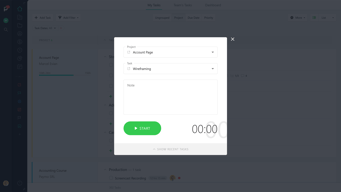
It's easy to understand how to use, no training required as it's intuitive. I especially like the time reports, they are super easy to setup and use. The 'add bulk time' feature is pretty awesome, exactly what I would expect from a timesheet system.
Would be great if you could reorder reports, for example, I would like my time reports in a specific order. It would also be good if you can load a default report when clicking onto 'time reports' as currently, the screen opens with no reports preselected (just an extra click to cut down on). perhaps add a tick box to report on yourself only? Currently, you have to select 'by user', find yourself as a user, then tick yourself as a user. If the tick box is ticked then the 'then include & group by' should be greyed out. Notifications do not stand out enough (i didn't really see them there) and there is no ability to mark all as read.
Logging my time so my manager can see what I have been working on. Scheduling time and projects.
Ease of use and functionality. Also, the time tracking and invoicing.
No Xero integration but we have just used Zapier which works well
Fast project management Ease of access of tasks across multiple customers and many projects Billing in one place and Stripe payments direct in the system Time management is incredible
What I like best about the Paymo application is how simple it is to manage your projects and complete actions per project/client. You have all the tools and actions you need to efficiently track time so it doesn't become a waste of time using the software. Everything is in front of you without a learning curve. I also love that it comes with invoice software which I think is a great addition to a time tracking software that I see missing most of the time.
I dislike that the main interface is web-based and I would prefer that the interface is all software based. I know that web applications are big right now and everything is headed in that direction but I still prefer software based products for now. Not the biggest problem but a personal dislike.
The business problem that I am trying to solve is being more efficient with my work. Paymo lets me track my time, charge money to clients, and review all the time me and my employees spend on a given project. The benefits I have realized is going back in time and analyzing the process and performance of time spent on projects.
Recurring payments for my domain clients, so I don't need to generate invoices monthly for hosting. Being able to see my income statistics.
The fact that when I allocate a payment, I'd like it to show up on the invoice. I'd like to be able to add a set discount not limited to a percentage, but a set amount. Client Statements would be excellent. I am not sure how expenses work, but what I need for my business is a cost to company so I can see what my actual profit is, so I'd like to add suppliers and their costs, so I could allocate that to my job/invoice to determine my profit.
I never really knew how many active clients I had, or what my monthly income is. I can now have a bird's eye view of my business income
Paymo is really easy to used and complete as a software management. I can manage all my business and even more in one app.
the phone app could be a bit better, especially with the clients section
Paymo as resolve my management problem !!!
I love how I am able to see how much time I have worked over the course of a day, week, or month.
I'd like to be able to customize the date range for time tracking. It would be nice to be able to see how many hours I worked within a pay period.
I work remotely, so Paymo helps me track the hours I work for my various clients.
I love the Paymo Plus app as it lists every I make in working for a client.
I dislike that I need to start to the timer. I would rather being prompted.
It solves a massive efficiency issue and the benefits are that I can know exactly how the time is managed at creating a project.

Great service. We have been using Paymo for several years now. This is really a universal tool for work. A handy mobile client and great widgets for Android. I always see the information I need. It greatly facilitates my life. Excellent opportunities for creating reports.
The mobile application is convenient only for viewing the current work, it is strongly limited in functionality. I would like those developers to improve mobile applications and add existing functions to it.
Paymo helps us keep everything up to date. With this service, I use my time more effectively, which means I can make my work even faster and better.
The time keeping widget and the reporting
I cannot generate invoices; my clients need for invoices to be in particular way.
I need to track my time by client, project and task and this makes it super easy
Easy to use. Intuitive Dashboard customizable and with the main information that you need to successfully manage all of your projects. Great for saving time and managing projects effectively when working with a team. It's also great for freelancers who want to monitor their projects and clients easily. I use Paymo remotely to communicate with my team and it helps me prevent errors. The interface is super easy and fun to use, and the unlimited project feature fits my needs perfectly. I will definitely use it for future projects as well regardless of the company I'll work at. I had no trouble adapting to the interface and I trust that you will too. This tool has improved my productivity and organizational skills as well.
No cons so far. Paymo updates their features regularly so they can keep up with my needs. I haven't come across any deal breakers.
It helps clear communication misunderstandings and distribute tasks evenly.
We use paymo to track time across our organisation, it allows us to track estimates against fixed price work, track T&M projects and track draw down against retainer work. It's easy to use and has a good API which we have used in part of our custom internal dashboards around the office, showing how long it's been since each user added time etc.
There isn't anything I dislike about Paymo. It would be good if it integrated with Jira somehow.
Tracking project time for fixed price, t&m and retainer.
The simplicity of the dashboard makes everything seemless.
I can't really complain about much. Maybe a choice of colors for the daahboard.
Project management was a huge task before we got this software. Now.ots simple
The solution very simple which made for successful user adoption.
Paymo was used with a single consultant. I found no limitations in that environment.
We needed a way to track and bill time by project tasks. Paymo allowed us to manage both.
I'm a self employed graphic and website designer and I have over 50 clients on the books. In a typical week I'll be working on at least 10 different jobs. Because of the nature of the work I often have to wait for a client to respond to a question before I can move onto the next stage. This means that in any given day I am working for at least 4 clients, usually more. To make things more complicated I charge depending on the work with 2 or 3 different payscales per job. Without Paymo I'd have to do this all by hand, or guess what projects I had spent time on. With Paymo I can easily just move from client to client or to a different project for the same client at the click of a button. At the end of the month it's easy to generate invoices and the clients can pay online. Honestly, if someone took Paymo away from me I'd sit down and cry. It is vital to the way I run my business and it frees me up to get more work done, and be paid accurately for it.
There is very little to dislike. It would be nice if the system automatically generated invoices for me at the end of the month but it only takes half an hour to do them manually.
I'm solving the problem of juggling multiple clients with multiple rates of pay. If I had to do this by hand it wold take an insane amount of time.
I love the ability to track my time in real time or retroactively. It's so easy to use!
I wish there was an interface that connected to Google Calendar. Many times I can book time spent in meetings to certain projects and I feel a calendar connection would make that tracking so easy.
We're solving a major time tracking problem. This way we have real time, accurate accounts of how our time is actually spent.

Easy to use, runs on all my devices, Great report functionality to issue invoices at the end of the month.
There is nothing that I don't like about this.
I am creating all my monthly invoices based on the timing results of this great app.
Its ease of use and the ability to generate billable hours.
Available payment option - doesn't accept Paypal
It eliminates the time spent on manual time tracking (of course) and be able to generate a branded time tracking report.
I love the simplicity of this tool! I just have to select the project and task and the time will track until I stop it. I can add notes to my tasks to keep track of exactly what I'm doing. I also can go back and add time I forgot to track, like a meeting that came up for example.
I dislike that the iOS app doesn't sync with the desktop version to show I'm currently tracking a project. For example, sometimes I have a meeting before I even get to my desk, so I track that on my phone, when I get to my desktop, however, it doesn't show that I'm currently tracking. I have to wait until I stop the clock before it shows on the desktop.
We have been able to track exactly how long we are spending on each brand in our company and that helps us plan for future projects and budgets.
The reason I picked Paymo against many other management systems was the ability to track work in an easy to be able to invoice hourly clients without counting and inputting numbers. It's really quick to then send off the invoices to clients and keep track of that process. The layout is also clean and intuitive which a lot of other project management apps lost for me when they preferred a masonry overwhelming type of system.
I wish there were more integrations with other software. I love the platform but it just does not connect to everything. I'm always looking for one app where I can do everything and Paymo would be that if it weren't for the fact that I can't easily track how much I will pay in taxes at the end of the year, forcing me to use other software so the accounting feature is not as useful and I would like it to me.
When I started working I did not have any platform to track my progress. I was looking specifically for a place to track my hours but with Paymo I was able to track down hours by subtask which I found very useful for pricing clients going forward.
* All-in-one solution for small projects -- no need for separate apps for time tracking, project management, billing, etc * Client portal for reports, invoices, and payment * Desktop and mobile time tracking options * Affordable price point
* One of the two desktop apps (Paymo Plus) is a little awkward to use * Some areas of the interface could use more polish, feels "clunky" at times (it does work though)
Time tracking, invoicing, project management, lightweight contact management for projects, collaboration. Have solved all of the above using the product.
What I love most about Paymo is that its project management and invoicing in one. For freelancing this is very important because I can see exactly how many hours I've worked for a client, exactly what I did during that time and I just hit a button to submit an invoice that has all this laid out for them.
I don't like that certain settings reset themselves after logging in. For example, when I am look at my projects bar I only want to see my current projects but every time I log back in I have to set it to that so the first thing I see isn't every single thing I've ever worked on.
This is jus a great all in one tool: project management, invoicing, just keeping everything thing in one place so I can pull it quickly and keep well organized.
Ease of use, and pictures of nature in the background
nothing at all. there is no problem that I have come across as of yet with this application.
being able to track and monitor my own time with my company.