

( 22 )
Unclaimed: Are you working at Podbean?
Podbean Reviews: 4.5/5 — Highly Rated
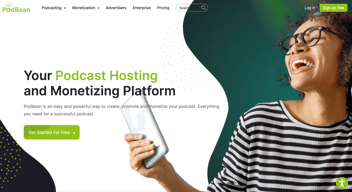
Podbean is a podcast hosting and management platform built to empower businesses to create and publish online podcasts, live stream audio shows, and promote marketing campaigns. It provide customization options. The platform allows easy integration with social media channels and easily engage with Podbean audience comments.

| Capabilities |
API
|
|---|---|
| Segment |
Small Business
Mid Market
Enterprise
|
| Deployment | Cloud / SaaS / Web-Based, Mobile Android, Mobile iPad, Mobile iPhone |
| Support | 24/7 (Live rep), Chat, Email/Help Desk, FAQs/Forum, Knowledge Base, Phone Support |
| Training | Documentation |
| Languages | English |
Podbean Pros and Cons
- • Offers unlimited storage on paid plans.
- • Supports PodAds and Premium Podcasting for revenue generation.
- • Offers mobile app support
- • Supports live streaming
- • Limited features under the free plan
- • No automatic audio enhancement
- • Basic analytics







Do you want to start a podcast but have no idea where to begin? In this review, we’ll talk about how easy it is to launch a podcast and earn from it using Podbean.
With Podbean, you’ll have access to all the features you need to host podcast episodes regardless of your skill level.
Interested?
Let’s talk about how Podbean can help you grow as a podcaster.
What Is Podbean?
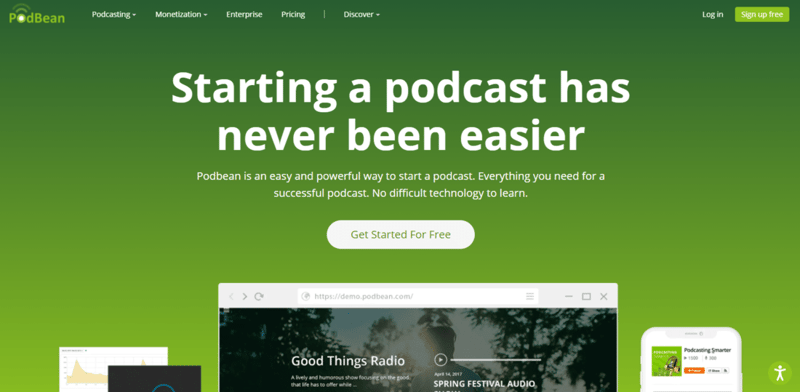
Podbean is a one-stop-shop for all your podcast needs. It’s mainly a hosting service where you can upload all of your podcast episodes.
However:
Podbean also has features that go beyond podcast publishing. Its solutions include distribution, monitoring, promotion, and monetization. We’ll discuss these in detail later on.
So not only does Podbean give you a chance to enter the exciting world of podcasting, but it also gives you all the tools you’ll need to grow and earn money from this venture.
How to Start a Podcast on Podbean
Getting started on Podbean isn’t a complicated process. After you sign up for an account, you’re only a couple of steps away from having an episode go live.
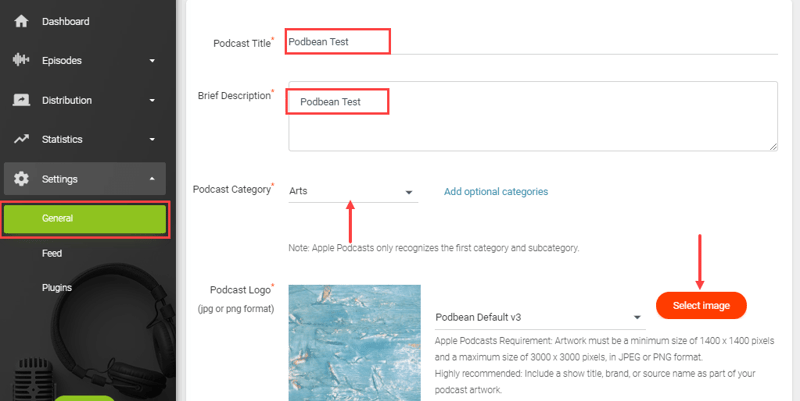
Under Settings > General, you can enter your podcast title, description, category, and logo. And from there, you can tinker with other options that’ll improve your podcast’s functionality.
Pick a Custom Subdomain
Every Podbean plan comes with a podcast site where visitors can check every episode you upload. By default, your site is a Podbean subdomain. This simply means that your URL will always end in “.podbean.com”
Let’s say your podcast’s name is Laughing With Larry. Then you could customize your subdomain to https://laughingwithlarry.podbean.com
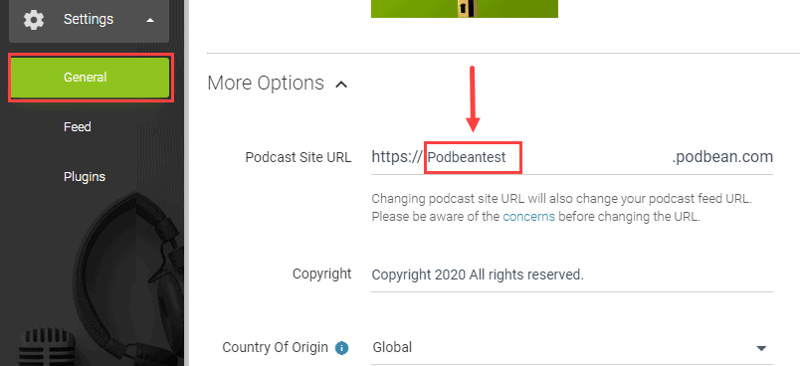
You can change your subdomain under Settings > General. There you’ll find the Podcast Site URL field where you can update your subdomain information. Do note that you should only change your subdomain when necessary. Any changes to the URL can affect the distribution of episodes on podcast streaming platforms like Spotify and Apple Podcasts.
If you don’t want to use a Podbean subdomain, you can use your own. Podbean has a guide on how you could use a custom domain on their platform.
Customize Your Website Layout
You have control over the appearance of your podcast website. When you go to Distribution > Podcast Website, you’ll find options to change your header image, background image, favicon, theme color, and more.
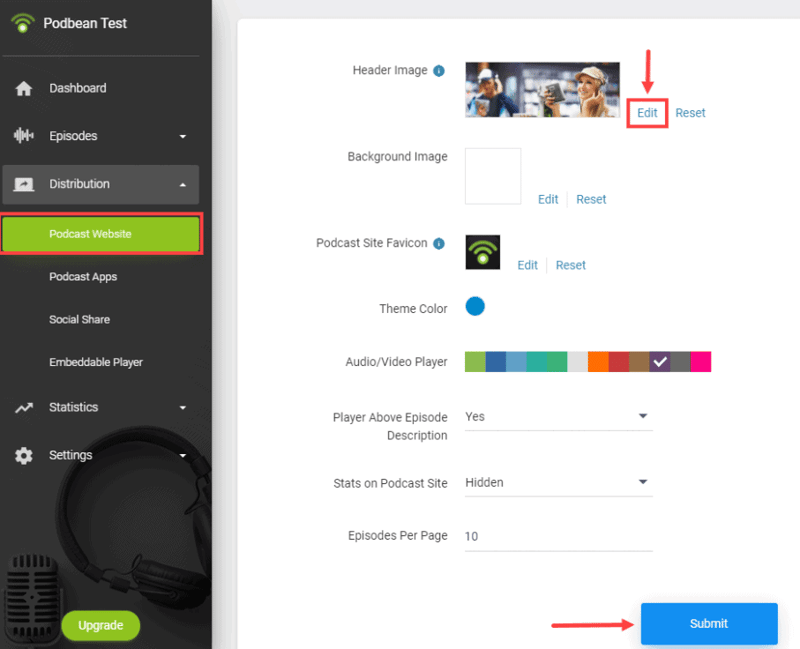
Granted, Podbean only gives you limited design options. But it’s a quick way to get a site up and running. Also, it doesn’t require you to mess with CSS and HTML. Meaning even those who do not know coding can use it with confidence.
Upload and Publish Your First Episode
Once you’re done recording and editing your first podcast episode, log into your Podbean account and go to Episodes > Episode List.
Click the New Episode button and select the file that you wish to upload. You’ll then have the chance to enter the episode title, description, and artwork.
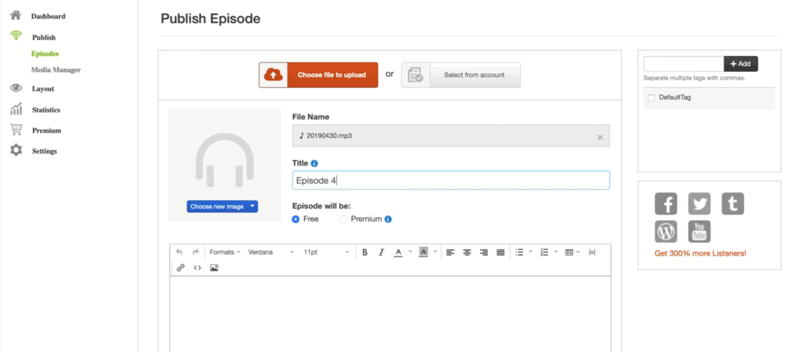
When you’re ready, just click the Publish button.
That’s it. Your podcast is now available for the world to enjoy.
Monetize Your Podcast
Podbean gives you four opportunities to earn from podcasting on its platform. So you’re never stuck to using one method. You’re free to experiment and see which one works best for you and your audience.
Here’s a breakdown of different podcast monetization programs that are available at Podbean.
- Patron Program — The Patron Program is there for podcasters who wish to offer a monthly pledge program for their supporters. You can set tiers from $1 up to $750 per month. You can also include monthly goals to show listeners what their donations will get you like equipment upgrades.
- Podbean Live — Podbean Live is a live streaming audio show. Your fans can interact with hosts through chat or by calling in. You can then set an admission charge to earn money. Listeners can also send virtual gifts that you can convert to cash.
- Premium Content* — Podcasters can upload premium content to fans who are willing to pay for exclusive episodes or series. Premium content can be anything. You can upload audio tutorials, behind-the-scenes antics, unfiltered interviews, or even extended episodes.
- Podbean Ads (PodAds) Marketplace — The Ads Marketplace is a platform where podcasters can connect with advertisers. PodAds will insert ads into your episodes automatically. And it will start and end a campaign for you too. That way, all you need to do is focus on publishing podcast episodes.
*Podbean will take 15% off your earned revenue for technical, billing, and customer support.
Podbean Review: Key Features
Like we mentioned earlier, Podbean has a couple of features that make it better than your average podcast hosting platform. Here are the reasons why you’d want to consider using Podbean.
Podcast Page Customization
Not only does your plan come with a website, but it’s also customizable. Even better, all plans come with themes that you could choose from. And you don’t even have to write a single line of code, meaning it’s accessible to even those who don’t know how to use CSS and HTML.
All plans (excluding the free version) come with unlimited storage and unmetered bandwidth. So you can upload as many episodes as you want.
Having a podcast website means you gain more credibility in your community. So it’s nice that Podbean gives you a domain that you could start promoting on day one.
SEO Features
One of the advantages of having a podcast website is that you can optimize it so that it appears on search engines for relevant queries.
Podbean lets you add metadata to your site through one of the available plugins.
All you need to do is go to apps.podbean.com and log into your account. From the list of available plugins, select the SEO Meta Tags plugin and click the Get the Plugin button.
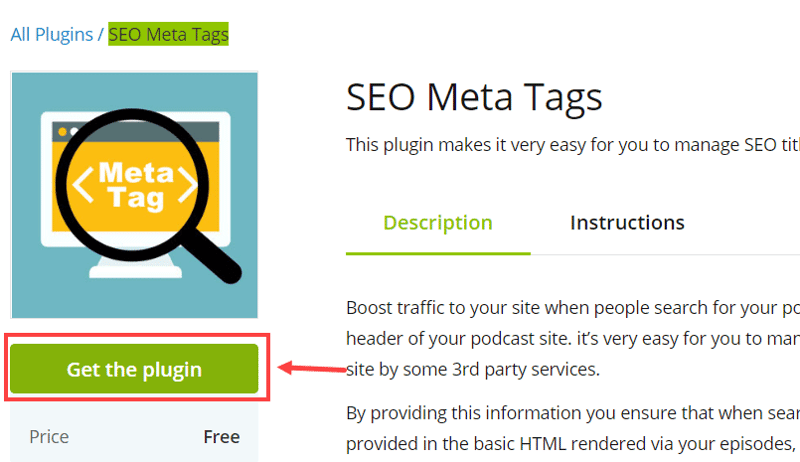
Once installed, you can now go to your main dashboard and navigate to Settings > Plugins. Search for SEO Meta Tags and hit the edit button.
From here, you can enter metadata for your podcast website. If you’re not used to adding meta tags and descriptions, just use the template below:
<meta name=”keywords” content=” your first keyword “>
<meta name=”description” content=” your podcast description “>
Just replace the words in bold with your keyword or description and paste it in the empty field. Hit Save and you should be all set.
Podbean Podcast Mobile App
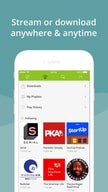
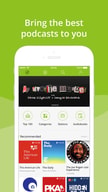
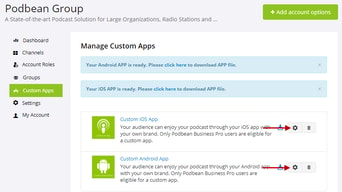
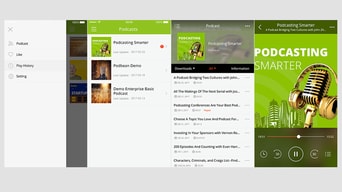
Podbean’s mobile app is very useful for content discovery. Users only need to download the app—available on Android and iOS, by the way—and they can start searching for shows that they want to listen to.
If you use Podbean, your podcast will appear as a suggestion for relevant categories and topics.
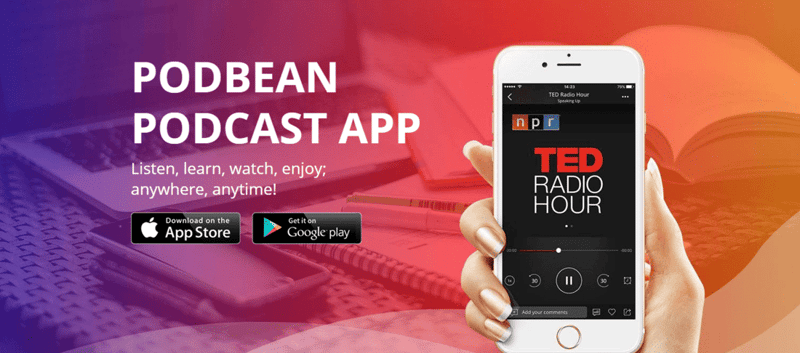
But Podbean’s app isn’t only great for listeners. As a podcaster, you can also benefit from installing the app on your mobile device. How? You can use the app to edit and publish content straight from your phone.
You can add background music; add sound effects; split, edit, and merge sound clips; and promote your episodes from one place. Now you can publish podcasts no matter where you are in the world.
Video Podcast Support
If you subscribe to Podbean’s high-tier plans, you can upload video podcasts.
Most podcast listeners are comfortable with listening to conversations without visuals. But having videos brings a whole new perspective that you can explore. Now you can share moments that you simply can’t capture when you’re only recording audio.
Another advantage of having video content is that you can promote your podcast on video streaming platforms like YouTube.
Uploading audio-only files won’t help you stand out on YouTube. But with video podcasts, you might generate interest. You can add links going to your Podbean website to generate site traffic.
It should be noted that not all podcast hosting solutions offer video upload support.
Analytics and Statistics
With Podbean, you can track and analyze the effectiveness of your podcast.
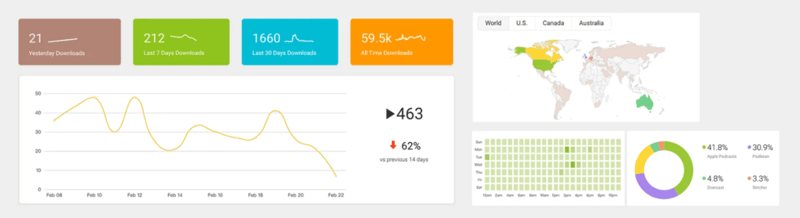
Podcasters need to review their performance so they know which episodes work and which don’t bring in listeners. That way, they can make all the necessary adjustments needed to stay on top of their competitors.
Podbean lets you see the following information:
- Downloads and Trends — See how many downloads each episode gets along with trends.
- Top 10 Episodes — Know which of your episodes are in your top 10. You can set the date range to get specific data.
- Listener Geographies — Figure out where most of your listeners are from. This is useful especially if you’re looking for advertisers with a target demographic.
- User Agents — Learn which devices and apps your audience uses to listen to your show.
- Downloads by Time of Day — Get an idea of what days and times your audience listens to your episodes. This information can help you establish which is the best time and date to publish an episode.
- User Retention — Understand how attractive your content is to listeners. You’ll know how many listeners you retain over the recent weeks.
Promotion and Monetization
Perhaps one of the most important factors to consider is that Podbean lets you promote and monetize your podcast.
What makes it more interesting is that these monetization features are so easy to integrate into your podcast. Once you set them up, you can continue running your podcast as normal.
The promotion aspect is also key. Since Podbean has an app, new users have a convenient platform to use if they want to find podcast content like yours.
Pros and Cons of Podbean
No podcast hosting platform is perfect. If you’re still trying to figure out if Podbean is the right fit for you, consider these points:
-
Pros
-
Really Convenient — Anyone can sign up for a Podbean account and get started right away. Even those who have never launched a podcast before and have zero knowledge will find the interface self-explanatory.
-
Makes You Money — For some, the goal of having a podcast is to make money on the side. With Podbean, you can make money through one of the monetization features available. No need to look for advertisers on your own. Just use Podbean’s built-in ad platform.
-
Live Streaming and Video Podcasts — You can use live streaming and video podcasts to promote your podcast to new users.
-
Cons
-
Limited Site Design Options — While it’s great that there are editable templates available, there aren’t a ton of options available for customization.
-
Limited SEO Capabilities — While it’s great that there is an app that lets you add meta tags to your page, it does leave you wanting more SEO features.
-
Patron Program and PodAds — While great, these are only available if you subscribe to higher-tier plans. That leaves you with fewer monetization options if you’re on the lowest-paid plan.
Podbean Pricing
There are four Podbean plans available:
- Basic — Free
- Unlimited Audio — See Podbean pricing for current rates
- Unlimited Plus — See Podbean pricing for current rates
- Business — See Podbean pricing for current rates
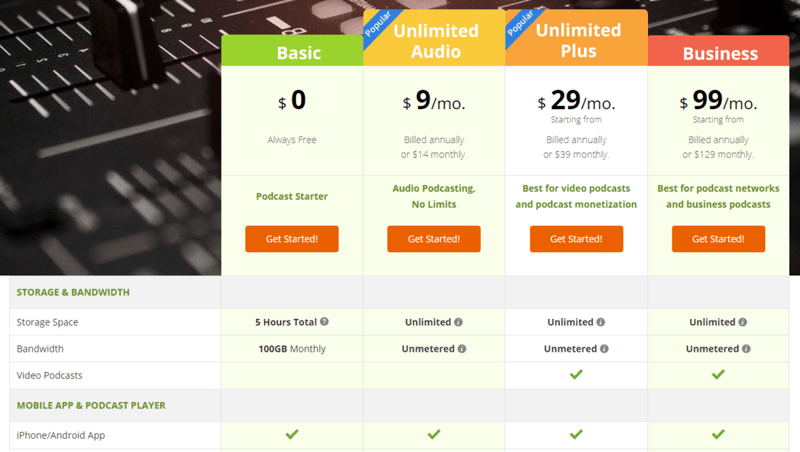
Note that all plans have unlimited storage space and bandwidth except for the free version.
Podbean’s Competitors
How does Podbean compare to its competitors?
- Podbean vs Buzzsprout — Podbean is still better for beginners but Buzzsprout has a lot more features to offer especially on its higher-tier plans.
- Podbean vs Spotify for Podcasters — If you plan to launch your podcast mostly on Spotify, then Spotify for Podcasters (formerly Anchor) is the better option since it draws analytics data directly from Spotify.
- Podbean vs SoundCloud — SoundCloud is a better platform for sharing music though you can use it for podcasts. But don’t expect to find some of Podbean’s features on SoundCloud.
Frequently Asked Questions
Q: Is Podbean really free?
Yes, Podbean does have a free version that includes limited access to some of its features.
Q: How much does Podbean cost?
There are three paid plans: Unlimited Audio, Unlimited Plus, and Business. See Podbean pricing for current rates.
Q: How to download podcasts from Podbean?
For PC/Mac users, you can go to the website of the podcast and click the download button. For iOS/Android users, tap the three dots in the episode list and then tap download.
Podbean Review: Conclusion
Podbean is a good alternative to other podcast hosting services out there. And it’s an easy recommendation for beginners too. If you want to learn more about how it can help you start a podcast, check out Podbean’s website.

Compare Podbean with other popular tools in the same category.

I find the user interface, reporting, and customer support to be exceptional. The price point is also extremely competitive in the space. I've been using Podbean for over 6 months and have been completely satisfied.
I've recently lost some FB integration with automatically posting the podcast link; however, I'm not entirely sure who is at fault. I also don't like that video podcasts and audio only can't be created under the same account -- you need 2 accounts.
PodBean houses the RSS and Video feed for our parent company's weekly podcast feed.
Easy of use with the UI. Acess to multiple Podcasting streams.
Have to move from "Home" page to favourites everytime you open up....would like to keep the "Following" items as the default view.
I am listening to broadcasts on the move. I am staying up to date with vendor and community announcements.

Podbean is a straightforward podcast hosting provider. I use it for video format podcasts on Apple and syndicate the audio-only version to the other podcast platforms. So far, I have experienced no downtime and fast uploads/downloads.
There isn't much to dislike about Podbean. If I could change one thing, it would be to automatically split up a video podcast into an audio-0only version to avoid double posting each week. Also, if you forget to hyphenate the filenames, it gets upset at the upload stage.
We are hosting our podcast, The Adapter's Advantage. We've had a very successful run so far, and we're going strong with a great deal of interest from guests from a variety of industries. The analytics is more than adequate for our reporting needs, and as I mentioned above, we've had no issues so far.

Changing web hosts, domain registration services, etc. is a real hassle. When I decided to enter into the world of podcasting, I did as much research as I could before choosing a host. Podbean was at the top of the list, so I went for it. The experience has been wonderful. The process to upload video and audio podcasts is intuitive and hassle-free. Podbean has been reliable in pushing my podcast out to the major players such as Apple Podcasts.
Adding graphics, or thumbnails is easy, but I have found finding information regarding dimensions and best practices to be lacking. I'm sure there are those who are experts at this, but I just need to keep things simple, fast, and intuitive. This is certainly not a deal-breaker.
In the early days of the web, it became imperative that businesses and non-profits have a presence on the Internet. As time has gone by, the bar has been raised, and we need to have media available, especially video content. Again, Podbean has come to the rescue for our organization.
with one click, you can distribute your podcast to all major podcast platforms. you also get a free website with a player for all of your episodes. did my research and out of all of the offers out there, this was the best option for what I needed.
When I first signed up, I didn't realize that each platform had it's own wait time to get your RSS feed approved. I didn't know so I waited for the launch day to publish and I missed my deadline because the episode didn't get launched. It would be very helpful to get a pop up with some sort of a reminder. "REMEMBER, SOME SERVICES MIGHT TAKE UP TO A WEEK TO APPROVE YOUR RSS FEED, WE RECOMMEND YOU PUBLISH A TRAILER EPISODE" or something of that nature. I know this was my mistake but that's a way of helping people not make the same mistake as a I did.
I'm solving my publishing needs with podbean, I launch my episodes weekly and this is super easy and a true time-saver for me. I'm solving the need of using multiple platforms to manage my podcast.
I love how easy it is to use podbean; it's user-friendly and beginner-friendly. I recommend it for everyone, the best software for the price.
I don't dislike anything about podbean; the only thing they could improve on is their pricing plans; the pricing itself is really great, but I would like to have the full customization for the beginner plan too.
I've solved the problem of not having to worry about where I'm going to publish my podcast. It's straightforward to use; you can post your podcast to all other significant apps and services from the same podbean admin panel.
I like that I can easily add new episodes to my podcast. The setup is intuitive and straightforward, so that is appreciated. Podbean is also cost-friendly for small businesses or solopreneurs.
I can't think of a dislike. Podbean offers an RSS feed that I have not used, so I can't speak to that, but once I get more episodes posted, then I will look into broadcasting on other sites my podcast.
I use Podbean to offer my website content in podcast form. It helps me connect with people that are interested in audio content as opposed to reading our website content.

I first discovered Podbean when I was tipped off on a specific podcast that wasn't posted on other platforms. It's now on the first screen of my phone so I can access it quickly. I love that I have my top listening picks on hand to listen to on my daily walks, and they're not lost in my libary of other stuff. Also, the "Recommeded" section is always on point.
Honestly, I haven't come up with a dislike yet. Usually my tech-dislikes have to do with streamlined aesthetics or clunky function, Podbean has neither. One minor thing, for some reason Podbean hasn't updated my "follows" on my account page, it is only showing the account I initially followed an not what I've added since. I do see them in the "following" section so can access them there, just odd it doesn't count them on my account page.
I have a few go-to listening apps I use, one for Podcasts, and one for Audiobooks. I LOVE listening to content and can get lost in the material. PodBean has become a place to keep a few of my favorite resources out of the bigger pool of things I listen to. This helps keep them top of mind and easy to find.

It's simple and doesn't get convoluted with a lot of unnecessary stuff. The sound quality from the app is great.
It's not more well recognized so it doesn't always get ALL of the podcasts you want on there.
I typically listen to some of the smaller podcasts who haven't been made big yet on there.
Podbean is easy to work with and uploads your content to multiple platforms at once.
Sometimes the website would glitch out and I wish it looked more professional.
This solved my problem of reaching different people on all different podcast platforms. Also it allowed me to easily upload content.
I love the value and reliability of PodBean. We have used Podbean for around 18 months and currently host a weekly podcast with 73 episodes and moderately heavy traffic. PodBean has been reliable and affordable.
I have almost no complaints about PodBean. I would like to see more customizable themes and slightly more control over the look and feel of the podcast website, but overall I am very happy.
We host a weekly podcast. We have posted 73 episodes with an average length of 35 minutes, and we have moderate and steadily-growing traffic. The hosting has been rock solid and very affordable.

I began podcasting almost two years ago. When I started, I used another hosting site which left me craving more. PodBean is unbelievably easy to fire up. Whether you're a podcast newbie or a seasoned veteran, you'll be publishing episodes in no time, with many customizable options. Every step of the way is explained, and you can crank out up to 10 hours with their free plan (upgrades are available in 3 other tiers). There are opportunities to monetize your podcast for serious creators, and the app has special features that I've never seen on other podcatchers.
It is very hard to find a detailed explanation for refunds and cancellations on their annual premium plan. I would like to consider this upgrade, but not before I can appropriately research it.
I wanted a simpler podcasting experience. No nonsense, no fuss. If I do wish to upgrade, it's only going to cost me $9 a month, and I will receive the upgrades I need and want. I'm appreciative that they don't charge you an arm and a leg to move to the first premium tier.
The backend interface makes this one of the easiest to use podcasting platforms out there. They also facilitate a lot of the ways to post so they make it easy to push your podcast to iTunes (No easy feat without help) and they also connect you to Spotify which is another difficult to navigate interface. The download metrics are easy to make comparisons across platforms and episodes as well as geographic data.
There are some hidden features on the back end that should not be hidden- for instance there is a limitor on episodes that is auto enabled and that means if you post over that number of podcasts then the earlier episodes will be removed. This is NOT an easy setting to find so I had to reach out to support (who was helpful and very fast to respond!) but it seemed odd that it was so difficult to find.
We are posting and hosting our podcast! We also use this platform to monitor who is downloading and what platforms we do best with.
Ease of Use, customer service, dashboard is easy to navigate and support is prompt and helpful
Can't reach people without internet access.
Reaching a wider audience
For the technologically hopeless PodBean is easy to use and navigate. Staying current on trends and products is important in higher education. Podbean allows schools to share what they are doing easily and cheaply. More importantly for small colleges, it is a resource that we can use that wont hurt our budget. What I love is despite the lack of cost, there was enough energy put into this app that makes it easy to navigate. My colleges who care barely download an app have learned how to use PodBean without any trouble.
The auto download and delete is not always functioning correctly and can fill up my memory quite fast if I am not paying attention.
Since larger colleges are using PodBean to share and discuss trends and resources.
I loved that podbean allowed me to distribute my show to a wide variety of platforms from one easy place. It also provided really useful analytics on our show listeners from each platform and showed us the country, time, and other variables of who was listening.
It was a little bit pricey and we could have paid a lot more if we wanted even more features, but overall it was a useful service that did the job it was intended for.
I used podbean to distribute my podcast to several platforms at once, track the analytics of my show to determine who listens where and when, and store the recordings for each of my episodes in one convenient place. It also allowed me to type one description for each show and distributed that to each platform which saved a lot of time.
I've been using Podbean for over 2 years now and its a great hosting platform. The dashboard is clear and I have everything available to me that I need.
I would like to be able to customize the dashboard a little bit more.
With PodBean, I can easily upload my weekly podcast episodes so that I can move on to the next episode.

For first-time podcasters getting started, PodBean is well laid out, easy to use, and has some great tools to get started with your show.
It's a little basic and lacks in some of the advanced analytics that some other hosting sites have.
It's easy to use and host your podcast on. It has a low monthly cost for hosting which makes it great for new podcasters.
PodBean is very easy to use and simply to navigate and upload podcasts.
There are times when it is glitchy and not as responsive.
Getting our podcasts out to a larger audience.

I upload several long podcasts every week. Before Podbean, I chose managed my own site. In doing that I had complete freedom in presenting my materials, but it took a lot of my time. I went looking first for a host that offered -unlimited space-, a modest price, great ease and timeliness of uploading, a simple interface, the ability to share to social media sites and a large and ready group of downloaders. Podbean has all of those features plus automatic uploads to the podcast giants like Itunes and Google Podcasts. Podbean has all of these features. I have been on Podbean for nearly a year now and have gained new followers - more than I expected - and my podcast has the potential of being heard all over the world, and very easily at that. OK - Podbean is EASY use and podcasts are Easy for a listener to find. And EASY for a newbie to get started fast and maintain with limited effort. I like all these features.
I do not like the way my podcasts appear. There are a few templates - and though my podcast falls into a major category (82% religion and spirituality), there are no templates that have anything to do with this vastly popular topic. Filling out the template is not WYSIWYG - it can appear to the podcaster one way and to the user another quite differently, especially in the "fill-in sections (fields)" - for me the default text often gets published with a background that obscures the text and/or text and background conflict. I guess I could build my own template; that is what I have done in the past which I wish to avoid. I would also like to be able to set the order of the podcasts, grouping them by subject matter, but there is little I can do about that. Of course, the uploads display in chronological order, but a great feature would be to implement a SQL service so they can be ordered as the author deems appropriate. Finally, the monthly price is a little steep at $29.
Because I usually do 3 - 4 50-minutes shows per week, with Podbean I'm saving loads of time in posting them. That was my biggest problem before, which is now solved. And I'm actually saving a little money by abandoning the prior company I used for this purpose - after 18 years on, that company really did my wrong, and I had to find an alternative fast. In a very short time with little preparation I was able to make the switch.

Absolutely nothing, it's been a miserable experience since the beginning
Everything. I told them I had a lot of content I need to upload and they told me I could do it via FTP. I told them I would need their system to extract the ID3 metadata from files while creating episodes and they ASSURED me that it can. It can't. I spent a lot of time uploading 16gb of files all for nothing. It doesn't read a damn thing and all still have to be manually named. Avoid at all cost. They have since stopped replying to my emails because they got caught lying.
There is no "solving" with these lazy, lying clowns.