

Unclaimed: Are you working at TeamGantt?






TeamGantt Reviews: 4.8/5 — Highly Rated
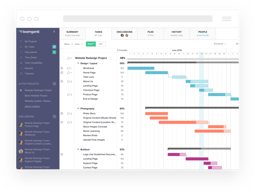
TeamGantt is a cloud-based Gantt chart and project planning solution specifically built for small, midsize, and large enterprises. With its comprehensive project collaboration tools it facilitates better efficiency within teams using Gantt charts, time tracking, file sharing, and task-level communication features. A drag-and-drop interface also ensures better usability and ease of use.





| Capabilities |
API
|
|---|---|
| Segment |
Small Business
Mid Market
Enterprise
|
| Deployment | Cloud / SaaS / Web-Based, Mobile iPad, Mobile iPhone |
| Support | 24/7 (Live rep), Chat, Email/Help Desk, FAQs/Forum, Knowledge Base, Phone Support |
| Training | Documentation |
| Languages | English |

Compare TeamGantt with other popular tools in the same category.
User Interface, easy to use, clear graphics, easy collaboration - get started right away
you cannot make the question-chat-box in the bottom of the screen go away (as far as I know...)
easy overview, better communication to project groups, department, stakeholders, management, better collaboration, involvement of all team members invited
Being able to setup a gantt chart quickly! We use it to rapidly size projects for communication and decision making.
I find that I have to refresh my browser frequently;When using Hours per Day it defaults to All Active Projects when I refresh - annoying
I use it for two purposes. First, to be able to draw a picture for upper/executive management of the workload; and second to help manage our Scrum process.
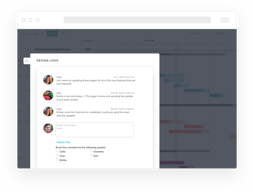
I love how easy it is to collaborate with my team members and external partners on project timelines that need regular updating. I like the notes feature and find the dependencies tool super helpful for giving a clear picture of events.
Not a big deal but I wish it was a tad quicker to export a pdf, or share a public link. Nice that it gives you pdf options before generating it, but it is still an extra click after I first configured my preferences.
Making it much easier to update timelines on projects and giving others visibility into those updates. I find the small formatting easier on the eyes than other platform because it lets you see it all in one screen without a giant monitor.
Easy to use, Integration with Trello, complete tool for tracking projects progress
not so friendly the horizontal scroll. But difficult to do better
producing milestone documentation
Best looking Gantt charting tool I could find in both the static and dynamic sense. I love using it in customer meetings to show progress and to live update how onboarding and implementation is going
Connectors can be displayed in a way that makes them distracting at times
Tracking our customer onboarding and implementation progress and sharing that project management view with them in regular check-ins
How quickly I was able to get a Project set up. The pre-made templates are really helpful as well and the help videos are short, to-the-point, and instantly made me feel like I knew what I was doing.
The only downside that I see so far is the inability to label a project for priority like Urgent, Important, Medium, Low. I understand that everything is based on due dates but having the feature to highlight certain projects would be ideal!
It has allowed me to assign specific tasks to my team members, allowed me to make notes on that specific task, or attached a document, and with the assignment of each task, there is accountability.
The customisability of the display is nice; it lets you combine tasks under a single heading to group things which is great.
The integrations with Trello could be a little more automated. The updates between the two don't always work well, especially when adding new Trello cards. Not sure if this is a Trello issue or an integration one, but having this resolved would be awesome.
Organizational issues! It keeps me on track and reminds me where I'm up to in my work. With many things on the go, it's a quick and easy visual tool to see what needs to get done.

I love that TeamGantt is easy to use. Its user interface is a step up from other management software I've used before when it comes to collaboration and communication. I can easily read what my co-workers are saying about the project because of its linear timeline design, just like Facebook.
Tracking spending and defining assets would be helpful.
Collaborating as a team has been made easier thanks to Slack. Now it's easy to distribute work by assigning duties and reviewing documentation. Thanks to Slack, it is also simple to know who's running behind or staying on top of things.

It's a great way to map various projects across a longer duration of time visually, and it's a simple way to show capacity for both the individual and the organization. As the team grew, we transitioned to a new brand. However, TeamGantt provided some excellent new features that may have swayed us(kanban was a great inclusion). I appreciated both how visually attractive this tool was and how simple to flip between different views was.
Early Start, Early Finish, Late Start, Late Finish, and other typical project management principles are unavailable.
It has substantially increased information and data sharing within our institution. This allows us everyone more time to work on our projects and streamline our team meetings.

It is a sophisticated tool that enables you to comprehend the status of your tasks. It guarantees the integrity of the information in case other co-workers use the app. Another advantage is that it enables you to view all processes in one location and ensure no missed methods. It's really convenient and provided some relief throughout the trial time.
It's hard to hate TeamGantt. One difficulty is establishing dependencies; at the moment, you can only bind the Finish to the Start. I'd want to have greater freedom with my project's dependencies.
I would suggest TeamGantt to those who need complete visibility into the planned project, the resources allocated, and the progress. The streamlined UI and ability to measure time spent on activities and compare them directly to your estimations outperforms any option we've discovered thus far.

Team gantt is easy to use, it makes beautiful shareable Gantt charts that can link to individual work plans and can be sorted easily for planning. I like that you can assign tasks to individuals, set up specific tasks as follow ons to primary tasks, and move things around quickly.
The tool it self is a bit fiddly, in other words you have to click a lot to move things where you may want them. But the real drawback is the cost. There just isn't quite enough value for the price. You need to pay per user if you want to allow users to update their own progress on tasks.
Our projects definitely run more smoothly with team gantt. The ability to track progress on a series of interrelated tasks is really helpful for figuring out roadblocks and pushing through them.
I'll be honest, color availability is one of my favorite features, because I can color-code my different tasks. Assigning different colors to different teammates also helps understand from a quick glance who is doing what. The ability to collapse and expand the tasks, tracing dependencies between groups of tasks is great. Viewing projects in a Gantt chart makes the whole schedule come to life. And once dependencies are traced, it is super easy to move a task and move the associated dependencies (if you wish).
The learning curve is a bit steep, especially for those who haven't used Gantt charts before. It's a bit hard to introduce tasks and subtasks in the right place. Names for what each section is (task vs. group of tasks) aren't that intuitive for many on the team. No integration with Jira is probably my biggest peeve. Dependencies are hard to trace sometimes, and scroll while tracing a dependency doesn't work in Mac all that well, so it is impossible to trace dependencies if the content isn't showing on the same screen.
Our team is now fully remote and growing pretty quick. We collaborate in different stages of the work, so TeamGantt allows us to view what state the tasks are in, when we will receive them, and if there is any delay. Percentages help our project manager keep us on track of the tasks.
The Gantt charts from TeamGantt are simple to build, quick to update, and nice to look at. My team's been using this daily for product stand-up calls, to see where we stand at a glance. TeamGantt seems to have found the subset of Microsoft Project functionality that I really need, without all the extra complexity.
For someone that needs some of the more heavy-duty features of project management - auto-leveling for example - TeamGantt isn't quite there yet (but I'm hoping they will).
My TeamGantt plan has quickly become the focal point of project status meetings, as well as the way in which we provide status updates to other teams and senior management. The export and reporting functionality is easy, and works really well compared to other project management tools I've used.
The timesheet is definitely practical, especially thanks to the filters (the filters actually help us with the issue I've mentioned below). It is quite customisable (days, colours, indentation). It's also great to be able to change the times we've entered for each task afterwards. Speaking of history, it's great to be able to save a table in csv format
We may have a specific use (we work in translation and subtitling): we have to plan a lot of short-term projects and task, which make the app slower. Our boss create a new table every month to avoid this problem, but it keeps on getting slower the more we add tasks to the table.
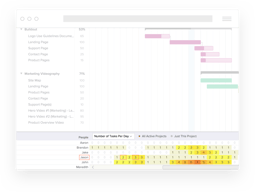
We now know how many hours of work each person in the team has to do every day: we can distribute incoming projects between the employees that still have time available. On a personal level, it's easier for me to know on which projects I have to work. I can visualise my workday better.
Project planning and team collaboration has been easy to undertake with TeamGantt.
TeamGantt is not easy to implement and integrate with other external apps.
Project prioritization Time and issue tracking

I enjoy planning my projects with TeamGantt. But most of all, I want teamwork. I still involve my partners in the project and distribute the work to us. This way I can see everyone's activities at a glance, making the planning process much more manageable. I also like that the employees are color-coded according to the projects assigned to them.
Changing the structure between different groups can sometimes be a challenge. For example, it's a little difficult to drag a group down from another group, especially in the schedule view.
I work for a company that develops mobile applications. In our industry, scheduling using agile methods is needed.
I think the aesthetics of it and the fact they've taken this basic and time-tested model of a Gantt chart and refreshed it for online use. It feels very intuitive, and making changes is very easy.
Each morning I have to sign in again to the program. This would be fine and normal at work, but it's a (very) minor inconvenience for someone working from home who just uses their home laptop. A few times the changes haven't synced and when I log back in it's not updated.
I'm using it for planning out a project for college, as well as sorting out tasks I have to do in my personal life. I would say the benefits are making my use of time more efficient by seeing what tasks are dependent on what and which I can complete at the same time. I'm solving the problem of feeling like I just have so much to do and not knowing where to start, but TeamGantt helps me break down the project into blocks and lets me visualise my path to its completion.

The graphic form in which the tasks are shown helps me visualize all I need to do
Moving tasks by mouse is a little laggy.
I'm organizing my personal projects as well as my team projects

The way Gantt is constructed here is effective and extremely useful. Since we began utilizing Team Gantt, we have been syncing more products, which has resulted in significant improvements in our work. This is awesome, and I will soon be offering a full service. I utilize Pause, Odoo, and Trello, all of which are excellent tools for communication. We're looking to expand our social media presence in order to increase visibility for each project.
When I reach a period unit, I would like to adjust the actual elapsed time. Allowing me to update based on projected time will allow me to update more quickly when updating the real time.
Having opportunity to configure resource management through several organizations is something I've never been able to do with Trello or Asana, and it's a wonderful experience.
We used a computer-based tool in the past, to which students were able to enter the computer laboratory. The Gantt charts were therefore static, only produced when necessary and seldom modified. They have been seen as a diversion instead of a help. It can be easily built, modified and used anywhere, anywhere with TeamGantt. We can now use these as our key method to address the progress of our projects.
I miss the mobile app or the website version, because I typed a question in the right place every time I tried to edit a Gantt chart on my computer.
Flow and development between Tauranga and Oakland ...... And since my new project includes video development and event scheduling, I can keep others updated and enable them to adjust my schedule.......
Layouting tasks in Gantt manner. It makes me see progress layout the most.
I haven't approach any problems so far. I'm pleased.
Tracking a progress of a software application.

I have never used a software with so many functions before that I would be overloaded with all the available options and buttons in it. It is basic, easy to use, and very simple to maintain. To move my work from my old site to this one, I simply had to import the CSV files into the database and display the data in table columns.
I want my company's logo to be on the links that I provide to my clients or my business partners. All white labels are good.
When developing a web project, it's critical to give the people you're working with access to the calendar. This is a good service for everyone to keep on top of the schedule.
The most helpful thing is the abundance of supporting videos, tips and articles that are available anytime. With regards to product features, I find the task resource assignment feature so helpful. I use it regularly and in making sure to adopt it wholeheartedly and keep it up to date I have a much better idea of how I am using my team's resources and help them to manage their time. I love that it gave me the insight to off load some of my frequently used team member's tasks to another member and give that person the breathing room they really needed.
I dislike the lack of proper task predecessor assignment tools. I am only using the free version at this time and I can't remember if this is a feature for premium users so if this is the case I have no complaints.
I am solving problems by balancing my team's workload. I realized just how much a small handful of people had in their workload and was able to off load some of their tasks to other team members. I can ease the stress of some team members while giving others an opportunity to learn different skills. This is really helping me to balance my team and also to ensure I am left with a lower risk of a single point of failure.
TeamGantt is OS independent. I can run it on my macBook, Ubuntu system and ChromOS laptop. The various videos makes it easy to learn the tool very fast and the template projects makes you start working on a project as a breeze. You can change the colors of the bars, so making categories of work items per assignee is very easy. Notifcations of overdue tasks via email is also very usefull.
Scrumboards are a premium feature which I would like to try out first before converting to a premium account.
Personal and professional projects to manage and prioritization
I have used TeamGantt for several years for campaigns with multiple deliverables, and to schedule project due dates for my students. Team Gantt has just enough features to make it robust and useful, but without all the bells and whistles that would require a steep learning curve. It' s pretty straightforward, and the end result looks clean and modern.
Sometimes the edit icon disappears next to the task in the Gantt view, and I have to click around the page to make it show up again. This could be because I have the browser window open quite narrow in my 2nd monitor though. The only real complaint is that when I introduced Team Gantt to my workplace years ago, I was the only one who used it to plan our marketing campaigns, production schedules and events. You can lead a horse to water, but you can't make them drink... but that's a workplace culture thing, not a Team Gantt thing. If TeamGantt could be integrated into Office 365 and Microsoft Planner, (or OMG, Adobe CC) it would be the best thing ever. Unfortunately because it's a standalone option, and doesn't integrate into existing workflows that well adoption by other teams mates is a hard sell.
Currently I am scheduling all of my class projects for the semester in a Gantt chart. This helps make sure I haven't made any mistakes. The visual Gantt chart makes is really obvious when I've assigned projects with clustered due dates, or too short turn around time (stressful for my students) if I've got the deliverables in the wrong order. Presenting my students with a TeamGantt workback schedule with their syllabus exposes them to a project management tool that many graphic designers use for managing big design projects, while helping them manage their time and workload. Exposure and familiarity with workback schedules and Gantt charts helps better prepare them for the workforce once they graduate. The Gantt chart was especially illuminating when students put in the project deadlines for all of their classes. This overview helped faculty visually see and understand the logjams and bottlenecks.
Click & Drag to set start date / end date and the auto update of dependent tasks whenever the main task is rescheduled
Limited number of free "People" who can update their progress
- Documentation of remaining tasks within the project - Reminder notification for the assigned people - Ability to monitor the project health & overdue tasks - Ability to estimate the overall project timeline
The tool is very intuitive and therefore very easy to use. Also the possibility to share projects and plannings with your team is really great. You have one perfect place for the whole team. The tutorial content is really exceptional.
The reports are not very great The communication options could be upgraded and improved
I have multiple small projects at the same time. With TeamGantt this is easy to manage. Also I can share the planning with my colleagues. The quick sharing is really a benefit I love. The easy overview of the projects has saved a lot of time discussing with my team.
It is one of my favorite software, because they are primarily idealized to planning and collaboration followed by projects that are in the middle of implementation, or those that are in the process of initiation, acquiring incredible features that make the work promotes a general flexibility, in the use of the application, everything you need to plan and execute because you can get it in one place, through this sophisticated system in this branch of work, one of the main features why I love this server, is because it allows us to make visual presentations, regardless of the degree of hierarchy of users who are registered to TeamGantt.
It seems that from my point of view, I can say that the task assignment matrix is something quite clumsy, since it doesn't fulfill its primary functionalities that it should normally execute, to achieve a good administration of the jobs that are currently being done, being a quite serious problem, that requires attention, to achieve a quite significant advance in this area of the program, in other aspects we can mention that it is something difficult to appreciate the correct distribution of the labor field that is exercised daily, through the software interfaces.
This software has been a great help to us, since it promoted us a position to show where the failures of our organization were, according to the administration in general, of all the processes and data that are carried out daily, because TeamGantt, led us to a quite prudent solution, as long as we refer to the planning of each one of the projects that are being directed and executed at present, significantly increasing the rate of information possibilities of the success of these works, increasing in the same way the collaboration between teams of the departments that conform the organization, without excluding that also we implemented the functionalities of this system, in the areas dedicated to the IT, since it adapts suitably to our labor field.

TeamGantt is a browser based cloud solution, which means it can be used anytime, anywhere. Bringing a project plan into a meeting for review and discussion is as simple as a clicking a shortcut or visiting the TeamGannt web address (URL).
I think one of the most important fatures requiring the Pro version, is the possibility to create baselines. When it comes to project planning, it's the planning process which is important, not the plan itself. Therefore, dynamic what-if sessions are a major feature of a project managament tool.
We have tested TeamGannt extensively in an interanl development project of medium scale. The benefits of ease of use is very important. As long as the level of detail is kept within the limits of what can fit on a single screen, TeamGantt stands out as very intuitive and useful.
Resources management. In projects I need see a simple view the ocupation status of team for planning. And the posibility to see in one Gant all projects its fantastic.
The price its a little high, if this subscription will include another user maybe my opinion will change
Resource planning Share status of projects with clients Share status of team to manager Simple way to leadering team activities Sync of trello cards for team