

Unclaimed: Are are working at WebinarGeek ?




WebinarGeek Reviews & Product Details
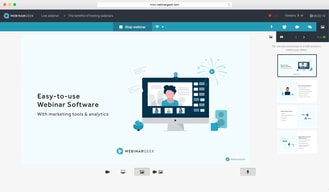
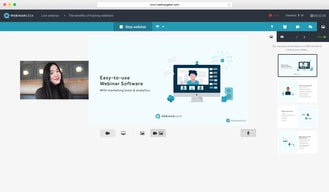
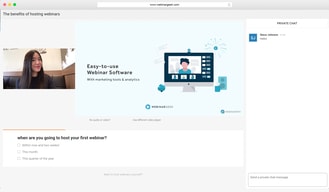
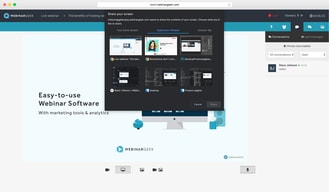
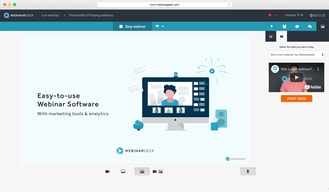
Largely considered one of the most user-friendly webinar software available today, WebinarGeek ensures seamless efficiency through powerful interactions and marketing tools. Users can enjoy real-time interactive virtual presentations that allows brands to easily customize events and present in high-definition quality. Users can also share PowerPoint of Keynote presentations with the audience, and easily switch between them during webinars. The platform also supports full screen or single window sharing.





( 1 )
| Capabilities |
|
|---|---|
| Segment |
|
| Deployment | Cloud / SaaS / Web-Based, Desktop Mac, Desktop Windows, Mobile Android, Mobile iPad, Mobile iPhone |
| Support | 24/7 (Live rep), Chat, Email/Help Desk, FAQs/Forum, Knowledge Base, Phone Support |
| Training | Documentation |
| Languages | English |
WebinarGeek Pros and Cons
- Supports live, automated, and hybrid webinars.
- Offers SEO settings for the registration page.
- Provides sales tools including CTAs and a sales page that lets you push leads
- Takes quite a while to set up.
- No integrated attentiveness tracking or metric
- Doesn’t let you send customized emails to viewers or non-viewers

Compare WebinarGeek with other popular tools in the same category.
The program worked very easily and intuitively. I started with a free webinar creation challenge in a two-week free trial, so I learned easily and step-by-step what is important in creating webinars. The outside, but also the inside.
The only thing that didn't work well was the evaluation form that you can add at the end of the webinar. I was unable to change the order of the questions and had to fill in the entire form again. I wouldn't expect that based on the rest of the program.
Ideally, the program will automatically send emails before and after the webinar. In addition, I can indicate the number of days that the replay is available. Naturally, the statistics are very nice and clear to analyze.

They are very helpfull by chat on the website. Next to that is the software easy to use and a great experience for the viewer. You will get a online book with a lot of tips to setup an even beter webinar. Very good en useable tips.
I want to see multiple webhosts in the screen. I heard that they are working on it. That will make the software even beter.
It solve the problem that it is easy to give a webinar. It is webbased so the audience don'w need to download something. Click and go. Next to that are there a lot of automation possibilities to get the maximum result.
Easy to adapt the invitation and a part of the webinar to your brand look and feel
Not possible to upload a powerpoint with videos
We've reached succesfully a large audience, no technical issues
Ease of use, rich in features, very complete for a fair price.
No e-mailtemplates to choose from, the CTA button during the webinar is at a kind of out of sight place.
Since I started using WebinarGeek, I have new customers every week iny online training program.
The support is great from te beginning. Nice startup video's . Also support during the webinar.
That i can change a poll during the webinar
I use webinargeek for on demand webinars and live webinars. This gives me more information and e-mailasdresses than if i would do this on Facebook.

Easy of use and it is full and complete of webinar tools
to create an automated webinar it is necessary a vimeo account so the viewers see start automaticcaly the webinar. With Youtube the viewers need to click "Start Here" in the play icon
Now we have a professional tool to share our webinar, live, automated or On Demand. Really cool the evaluation, the email managements
It's complete; salespage, email automation and it looks professional.
It takes some time to set up. Just book a Demo.
Webinar hosting without technical knowledge.

WebinarGeek is easy to start with. Just follow the instruction videos and keep going. It's quit simple and I tested it first but within 1 hour I had my first webinar online; love the integration with Mollie: no worries about the financial stuff. Marketing is easy with the links to Facebook and LinkedIn. Using video and PowerPoint pdf is easy and looks very good for the customers. Their reaction was positive.
Interactions are more complex to create; this could be more easy to use. It's all there but took more time to get used to it. Still, minor point.
Due to COVID-19 my "old" business model of doing live training and workshops is stopped completely; I needed to find a tool that could support me into transferring my material online and remote.

This software is easy to use, as we've set up a complete webinar in a few days without experience in such a tool. All the features we need are available, there is an integration with our marketing automation tool, and our partners that work with us on webinars, as well as the viewers, are very positive about the technical aspects and the quality of our webinars.
There are very few cons I've encountered, but there's one thing I'm missing. As I'd like to keep my webinar as branded as possible, I use the embedded registration form. The only downside of doing this is I am unable to track the traffic sources of the people that register for the webinar. If there comes an integration to do this I can get a clearer view on where my viewers come from.
We wanted to start doing webinars. As we didn't have any in-house knowledge about these (especially the tools), I've done some research. WebinarGeek came out as the tool with the most functionalities for the best price. This made me decide to start a demo, and eventually get the software. So far, it does exactly what I need and it doesn't cost me a lot of time to figure out how to use it. All the people involved are positive about the tool and it gets me the results I need, so I'm very happy with it.

This software was easy to use and it really helped me organizing some splendid Pubquiz nights. I'd like the way music and pdf could be integrated.
It wasn't clear how much GB I did use and could use until we used the software. But Webinargeek support helped out great!
We were able to present good quizzes. We were able to do this quiz with thousands of people watching.