

Unclaimed: Are you working at WebinarJam?
WebinarJam Reviews: 3.7/5 — Good for the Price
WebinarJam helps businesses create and conduct webinar sessions, designed to extend a business’ reach through its comprehensive tools. The platform can host events, teach classes, broadcast to your team, and increase sales as well as event attendance using just a single webinar system. It boasts the most extensive set of features at the most cost-effective price and is trusted by thousands of professionals across different industries.

| Capabilities |
API
|
|---|---|
| Segment |
Small Business
Mid Market
Enterprise
|
| Deployment | Cloud / SaaS / Web-Based, Mobile Android, Mobile iPad, Mobile iPhone |
| Support | 24/7 (Live rep), Chat, Email/Help Desk, FAQs/Forum, Knowledge Base, Phone Support |
| Training | Documentation |
| Languages | English |
WebinarJam Pros and Cons
- Easy social media integrations
- Provides automatic recording
- Lets you add surveys and polls in webinars
- Compatible with numerous browsers and OS
- Offers only annual subscription
- Requires additional purchase of EverWebinar to get automated, on-demand webinars








With average attendance rates ranging from 35-45%, statistics and studies show that webinars offer potential for significant revenue gains and for building relationships that generate leads and conversions. In this WebinarJam review, we want to figure out if the WebinarJam software supports your efforts to increase conversions and make significant returns like those studies mentioned.

Around 36% of marketers state that webinars are effective in creating leads that eventually convert to sales.

Therefore, we’re interested in figuring out if WebinarJam lives up to that potential. Does it make it easy for marketers to capture leads and sell offerings within the webinar? Is it affordable enough so as not to minimize profits?
Keep reading as we explain who should consider WebinarJam and which features stand out the most.
Who Should Consider WebinarJam?
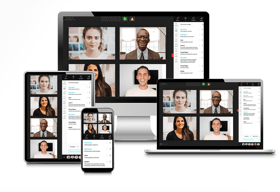
WebinarJam makes sense for those who crave high-resolution online video calls and webinars. It focuses on presenting your content, whether that’s a PowerPoint, images, or video, with perfect resolution, instead of having to worry about whether your viewers can read a statistic or see the expression on your face. It also works on all devices, and supports up to 5,000 attendees and 6 presenters. That makes it an excellent webinar tool for large online events, training seminars, and online courses where you know the users may end up on a mobile device.
Overall, WebinarJam looks like a winner for any organization that wants to expand its content creation outside of blog posts, infographics, and video content.
Webinars are often considered one of the most valuable content offerings by B2B buyers, so we like WebinarJam for those types of situations, especially to create uninterrupted webinars with flexible scheduling, replays, and intuitive communication tools.

The main restriction to smaller businesses may be the pricing. But overall, it should provide enough of a return on investment to make it worthwhile for the average business. Not to mention, the competition is often more expensive.
WebinarJam Review: The Features
Packed with communication tools and webinar design essentials, WebinarJam boasts an impressive set of features. Here’s a look into the top features we found during our WebinarJam review.
Paid Webinar Functionality and Active Offers
Not all webinars require monetization, but it’s nice to know that WebinarJam provides the elements needed to collect money and present offers. To begin, you get a paid webinars feature that links to a payment gateway. You can secure all webinar content with a password and only allow people in after they make the payment.
Furthermore, WebinarJam includes a way to display discounts and offers during your webinar with captivating live offerings. This way, it doesn’t distract too much from your presentation, yet you’re still able to make sales.

User Interaction Tools like Live Chat, Attendee Spotlight, and Polls
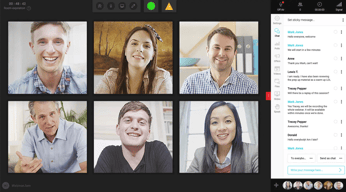
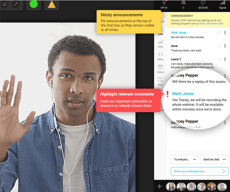
WebinarJam empowers creators with ways to interact with attendees through several features. The live chat box functions much like any other chat box you would see online, except it allows for both group and private chats. The presenter can see all chats that come in through the module and highlight comments. There’s even an option to make sticky announcements so the attendees always see important messages.

The attendee spotlight improves the overall interactivity of the video and chat box modules by choosing someone in the crowd who’s willing to speak. It switches to a person in the audience and zooms in on their screen. This way, it becomes more like a regular classroom or conference setting where the attendees see and hear their peers.

Finally, WebinarJam provides polls and surveys that you create prior to the webinar and send during the presentation. You can quiz people on what they’ve learned or simply use it as a way to get feedback.

Automated Recordings and Replays
WebinarJam provides a system that automatically records everything that appears on the screen during your webinar.
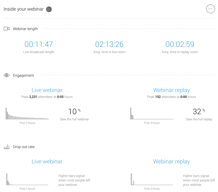
It’s not just the video or your PowerPoint presentation that gets recorded, but all chats, announcements, and polls that appear throughout. After that, you can send the recording to the Replica Replay feature to give attendees (and those who didn’t show up) a place to view the webinar.

An Automated Video Injection Tool
Another way to automate your webinar is by taking the “live” aspect out of the equation.

WebinarJam has an automated video injection feature that allows you to add a prerecorded video to your webinar. This way, you can plan the video and minimize pauses and technical difficulties.
Handouts and Drawing Boards
The handouts feature enables you to take a PDF, or any file, and share it with the attendees to supplement the information you talk about, or for them to complete homework on the topic.
This all happens during the live webinar. This way, you already have the files uploaded and ready on WebinarJam.

In addition, WebinarJam offers drawing boards for the presenters to dive deeper into a subject with drawings and hand-written notes. These notes get overlaid on top of your slides or media items, strengthening your points and helping out users with questions.

Email and Text Messaging
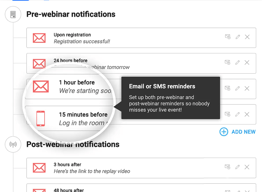
The messaging system focuses on private chats between individual attendees and presenters, as well as automated messages for reminders.

In short, you can send and receive emails and text messages to and from your webinar attendees. This empowers those unwilling to speak out in public, and opens up a line of communication for those who may have thought of a question after the webinar.
A Sleek Page Builder with Flexible Scheduling Tools
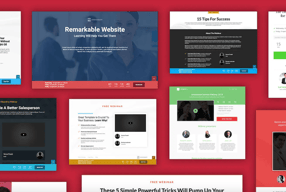
The website page builder forms the root of your design interface, meaning you don’t actually have to go out and find a different website host or content management system (CMS). Every design template that comes with WebinarJam is fully responsive for mobile devices. They’re professionally designed and optimized for conversions.

As a bonus, you can incorporate a calendar scheduler on your website, where users come to the site and see webinar times and dates.

Schedule a recurring series, set the webinar to run in the future, or start an immediate show.

Features Exclusive to the Professional and Enterprise Plans
The above features come with all WebinarJam pricing plans. However, a few advanced features are available when you upgrade to the Professional and Enterprise plans.
For instance, you receive a panic button and an “always-on room” when you sign up for the Professional pricing plan.

The panic button provides the following capabilities:
- A button to instantly save the meeting if you have technical difficulties.
- A way to automatically redirect all attendees to a new page.
- An instant booting feature to reset the page.
The always-on room includes:
- A webinar page that’s constantly ready for you to start a webinar, or to run a very long webinar.
- A never-changing link so your attendees find your page every time.
- Preset webinar settings.
- Options to name the room after your brand.

Along with an increase in attendees and presenters, the Enterprise plan offers a control center feature.
Here’s what to expect:
- A separate module for someone else (your staff) to moderate the webinar while you make the presentation.
- Options to control the chat and Q&A section.
- Tools to post offers, videos, links, and files.
- Full control of meeting attendees, with areas to manage payments and speakers.
- Real-time analytics.

What are the Main Benefits of WebinarJam?
During our testing we felt the following benefits stood out the most:
- WebinarJam’s low price.
- The interactivity tools.
- The automation tools.
- The mobile interface.
WebinarJam’s mobile focus makes sense, considering the growing number of connected devices per household. With smartphones and tablets in widespread use, people increasingly consume content across multiple screens.

That opens up many options outside of the traditional PC or Mac when people view webinars. As a result, it’s highly beneficial that WebinarJam caters to mobile users with its 100% mobile-friendly interface.
You’ll also find that the WebinarJam pricing beats out many webinar competitors, undercutting the market’s average pricing by close to 50%, and sometimes more.
And of course, the automation brings about potential for speedy webinar creation and flawless presentations, seeing as how you can upload a pre-recorded video. They also include automated recordings and a Replica Replay feature.
WebinarJam Customer Support
We’ve yet to talk about the WebinarJam customer service as one of its benefits. That’s because it’s not quite as powerful as other webinar software options.
Having said that, WebinarJam does provide a Support module for contacting a member of the customer service team. This portal is inside your dashboard for easy access, but it lacks essentials like phone support or reliable live chat. A live chat section is available, but the hours are short, from Monday to Friday, 8AM to 1PM PST.

Therefore, the main way to get in contact with WebinarJam is through the email ticketing system. As an alternative, WebinarJam offers a decent documentation Wiki with articles on topics like integrations, running a webinar, and using the API.

Finally, all WebinarJam customers have the opportunity to join the WebinarJam Facebook Group to discuss strategies and marketing thoughts with other users.
WebinarJam Review: Pricing
WebinarJam is competitively priced compared to many webinar platforms, making it a cost-effective option for most businesses.
WebinarJam breaks up its pricing into four plans:
Starter
Best for single user needs
- 100 attendees
- 1 host
- 1-hour max duration
Basic
Added Automated Webinars
- 500 attendees
- 2 hosts
- 2-hour max duration
Professional
Added “Always-On” Live Room
- 2000 attendees
- 4 hosts
- 3-hour max duration
Enterprise
Added Control Panel for staff
- 5000 attendees
- 6 hosts
- 4-hour max duration
See WebinarJam pricing for current rates. All plans are billed annually.
Each plan includes a 30-day money-back guarantee, allowing you to test out the system and see if it’s right for your organization. Unfortunately, a free trial isn’t available. They also don’t have a free plan. However, the guarantee should suffice as a way to understand the platform’s offerings without any risk.
Keep in mind that all WebinarJam pricing packages require upfront, yearly payments. That’s definitely a way for them to keep costs low, but it may present a barrier for some companies.
WebinarJam Ease of Use
Webinars require significant planning and knowledge, so we like to see webinar software that minimizes the need for any extra work.
In terms of its user interface, WebinarJam has a fairly speedy process for creating your webinar website, launching webinars, and setting presenters.
The dashboard is clean and easily understandable, with a few buttons in the menu for the main dashboard, your webinars, analytics, and registrants.

You can add a webinar with ease by adding presenters and other webinar essentials like the name and description.

You build the website with help from premade templates and builder modules, some of which help capture leads, manage your schedule, and explain the webinar.

Overall, WebinarJam manages to consolidate its primary features into an intuitive dashboard that even a beginner can understand. And that simplicity extends into the area where you run your webinar, seeing as how you have immediate access to buttons for Offers, Files, and more.

Summary
The fairly low pricing, automation, interactivity tools, and the mobile interface all show that WebinarJam has the power to help out many webinar hosts. Although you can’t pay on a monthly basis, and the customer support lacks some essentials, we recommend WebinarJam to those who crave simplicity and high-powered communication features.

Compare WebinarJam with other popular tools in the same category.
I liked how intuitive the platform is that you can pretty much teach yourself. It is very structured and the steps of use are very clear. It contains lots of valuable features and enables users to create cool webinars. The customer support system is probably one of the best I have dealt with. They go above and beyond.
I don't have many problems with this software as it has solved so many problems for me but one thing I noted was that it is important to be extra careful when playing around with it as I accidentally deleted a previous webinar and the system has no way of resurrecting deleted files.
Sign ups to our webinars increased dramatically as we finally found a system that has smooth integration and easy set up for viewers. I found with previous softwares our numbers were dropping due to technical difficulties and viewers don't have patience, it needs to be efficient.
I like how you are able to not just cast yourself but also can include other videos, photos and animations in the presentation and switch back and forth between them
Easy to use and great but sometimes feels a little less professional than other software services for webinars. We want to come off as experts!
Solving our need for easy access to one another and sharing presentations/ ideas in a professional manner with our clients and potential clients
I liked that I could upload slides and run power point presentations through with the audience. When I used adobe connect I had this problem
I dislike the lack of privacy in live streams - when I wanted to do a closed stream with my team (who are from all over) about unpublished results I realized there were people accessing it that were not invited.
When sharing research results the Jam Polls allowed us to ask research participants what their perceptions about what the results would be were, before sharing the results, I found the jam polls less glitchy than other options for example adobe connect which I do not like.
easy to use. you don't need to install anything like goto
It's impossible to cancel. And the webinar didn't work (the video didn't load).
I use to do pre-recorded webinars
WebinarJam was designed by high end marketers for marketers, and so it streamlines the process of delivering a webinar aimed to support selling things.
The software never delivered on its promises to make streaming to facebook live work. It has not been properly updated, and never did solve the lag problem completely. There are newer, cheaper products on the market which allow more than only four presenters at a time.
WebinarJam made it easy to register prospects to webinars and to keep in touch with them by sending reminders at regular intervals.
The marketing elements allow you to customise emails. We do not have a marketing department per se but the software is easy to navigate and the tutorials helpful. Once you have set up one webinar all others are very easy to follow.
I haven't seen many downsides. If I had a wish list I would like to add a better follow up feedback questionnaire to be sent to the attendees after the webinar. It would also be helpful if the presenters could select a better quality background to provide a more polished appearance.
During lockdown we have been able to continue to reach out to our client base and attract new clients via the internet rather than the traditional marketing methods.
Easy to set up a webinar Has lots of useful options
Good luck logging into the admin dashboard! It keeps logging you out every few seconds, and you got to login again and again until the system hopefully stabilizes and you're able to do your stuff! Super frustrating, obviously they don't put lots of efforts in improving their application.
Webinars runs well, that's the only good thing about WJ.
I love the partner service, everwebinar, (which you have to pay more for) that allows the participant to watch the webinar and feel as though it's a live webinar. This is great because we can then launch a webinar over and over again without having a person live online.
They have more problems than they’re worth. 1) The integrations with 3rd party software such as mailchimp is inconsistent on both the pushing the registrants over and the custom form field population. 2) Their email service is clunky, hard to edit, doesn't have html options, and their own form fields don't populate correctly. 3) Their email service doesn't consistently send to registrants, or report emails that have been sent. 4) The interface is not user friendly. The presenter has to toggle between videos, slides, files, etc.
I pay my staff only one time to deliver a presentation, which is our main method of marketing.
I like the Evergreen platform, if it works properly.
We used WebinarJam because they market that it's easy to use and effective. It all sounds good until you spend so much money on marketing to send clients to the WebinarJam system and prospects complained every week that they could not view my video, they got booted off the webinar, prospects were not able to log into the webinar and so much more. I put out a support ticket on this issue and no one responds back. They have poor customer service. Don't waste your time on these small webinar companies. We went back to Zoom and so glad we did as Zoom has the infrastructure to run effective zoom and webinars and have the team and experience to help when something goes wrong. We spent so much money monthly on marketing dollars to get people to our webinar and WebinarJam made us lose so many prospects and money.
Prospects had issue logging on, the webinar would not start, the webinar will freeze, prospects constantly had issues trying to log in.

Software isn't bad but there are so many so much better...
The experience was a nightmare from the beginning, not because of the software, let's say we understood the errors, the fact that we had one webinar where hosts couldn't hear each other at all, that all our data just disappeared over night but what is terrible is the Customer Service. After all the troubles we tried to stay positive and understood that those were just some errors and we have even upgraded with them. To do that they asked us to cancel our first plan (basic) and they said that they will send us a refund. We did that and asked them to just change the account because we've changed banks. They refused to send us the refund on the grounds that they only can send it to the card that made the payment. They accepted the new order on the new account but they didn't want to send us our refund back on the same account. Outrageous and horrible...PLEASE DON'T BUY!
Nothing.


