
Unclaimed: Are you working at WorkCast Present+?





WorkCast Present+ Reviews: 4.3/5 — Solid Choice
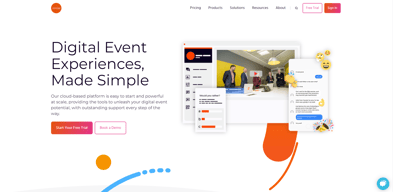
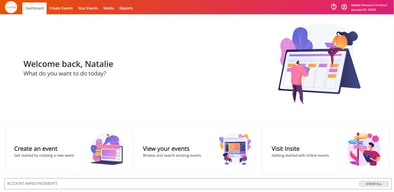
WorkCast Present+ is a comprehensive webinar tool with video conferencing features that empower users to quickly create webinars and empower visual communication through technology. The platform supports online registration, email communications, and live and on-demand events, with advanced branding features. Users also have the option to record live webinars automatically. Present+ is browser-based, accessible via mobile, and can be used across multiple devices--no app or plugin downloads or installation required.





| Capabilities |
API
|
|---|---|
| Segment |
Small Business
Mid Market
Enterprise
|
| Deployment | Cloud / SaaS / Web-Based |
| Support | 24/7 (Live rep), Chat, Email/Help Desk, FAQs/Forum, Knowledge Base, Phone Support |
| Training | Documentation |
| Languages | English |


Compare WorkCast Present+ with other popular tools in the same category.
I enjoyed working with the WorkCast team to create a simple and efficient virtual benefit fair. The team was straightforward to work with and professional. It was nice to have experts building the event for us.
I did not dislike anything about working with WorkCast. However, I would have preferred the live portion of the event to include live interactions with participants.
We used WorkCast for our annual benefits fair since we could not hold the event in person. WorkCast has been a great way to get information out to all of our employees quickly and efficiently.
The support, speed and attentiveness of the team was fantastic.
Nothing! I enjoyed everything that was made available to me.
I like that we can brand everything for our client and personalise the whole experience.
The functionality of platform and easiness for clients watching
No downsides. Support is always helpful.
Reach more clients
The simplicity of the webinar platform makes it easy to get even the most inexperienced user up to speed quickly. Guest speakers find it very easy to login and view audience questions for the Q&A sessions. The staff overall have been amazingly helpful, professional, and available to answer questions.
The reporting platform could use a makeover. While the system captures an amazing amount of information, it is not always presented in the best manner. Many of our clients have complained about the reports being difficult to follow.
Adding more of our content online in new ways. More live videos in the coming year.
Solid platform and excellent customer service and support (i.e., Bill was exceptional to work with and clearly knows the product; he was able to provide guidance in addition to resolving any technical issues)
As a North American client, having the platform hosted in the UK caused some issues with service delivery, but Workcast was able to resolve the issue after investigation. Reporting data requires conversion to NA timezone.
With many organizations moving to online delivery due to the pandemic, Workcast provided a robust, visually impressive, and functionally capable platform that nearly replicates an in-person event. We needed a solution that was a step ahead of Zoom and other impromptu/ basic online platforms. Some benefits included freeing up internal resources to focus on more strategic priorities and less on the technical production elements of hosting an online webinar, as well as showing a more polished presentation and experience to visitors.
The staff are quick to respond and they walk you through the process step-by-step.
Navigating the time difference is a bit challenging, but that is not an issue soley with WorkCast.
We are solving an issue with hosting an event during a pandemic. WorkCast's flexibility has been extremely helpful during all this uncertainty.
Basic tool that enables live streaming and on-demand videos
Not always the most user-friendly tool for our team
Ability to engage marketing leads and move them further down funnel
It's so easy to navigate through the process. Not an overly complicated program. I'm able to get all my work done within a matter of minutes.
I dislike the log in progress. I can't save my password word in the system. Otherwise I think it's an great program.
Keeping track of my previous order and able to click to reorder my stock. My coworker can edit some of the order if needed without me being there.
Workcast provides solid and reliable service and frequently updates and upgrades their system. They are very responsive to input and feedback and have often instituted changes we have recommended.
The Q&A interface a bit klunky and could benefit from being a bit more flexible.
Workcast's Producer+ system allows us to easily self-manage our webinars, with full access to all admin tools. This enables rapid updates and changes, allowing us to be hyper-responsive to our client's needs.
The experience from the workers knowing the best way to proceed
How slowly progress was made. Partly our fault, at the same time I would've liked workcast to be more prompt.
Having a 'home base' that every attendee can go to for the virtual event. It's better than having basic meeting invites on their calendar
The staff are great and really helpful. and respond to queries very quickly Having the staff on hand for live events is invaluable It is better than the system we used before
We've had a few technical issues with running prerecord sessions but they are doing everything to try to smooth out these problems. The poll function on the live events is quite clunky
Some technical issues when presenters are trying to screen share during prerecord sessions The poll function is quite clunky
We always receive great support from the event managers, and the portal is very intuitive.
The ease fo formatting the event pages could be improved. It's tricky to get the both the registration and auditoirum pages exactly how we'd like first time around.
Our clients have had the inability to run live in person events over the past 18 months, and Workcast has served as a great alternative.
If I have a query a member of the events team comes back to me quickly. The team is always super helpful, polite and very nice to deal with. The technical rehearsal is so useful for the speakers (and me) and no question is ever viewed as silly. WorkCast have a very knowledgeable and professional team. I would like to give a shout -out to the following main points of contact that I have worked with for this Webinar - Chloe Dixon Kirsty Carr Jess Riches Kate Mordecai and of course to our account manager who herself is very patient - Michelle Houghton And to all the other points of contact - thank you!
I wouldn't say dislike, but I would like the on-demand to show the poll questions even though the audience cannot vote, to show the results published. I also wonder if it is possible to get the on-demand view to fill the whole of the screen. We had four speakers and there is alot of space not utilised on the on-demand view.
We had a problem with the host of the webinar not being able to unmute his microphone. This resulted in a long section of video that was silent and was not representative of the professional webinar we had planned, WorkCast deleted this section of video on the on-demand video and liaised with us to ensure we were happy with the on-demand video before making it public on the auditorium.
The fast responses / support offered and that all feedback is taken onboard and implented when possible.
some of the tasks have to be carried out by workcast which delays processes a little / adds an extra email to the workload. It would be great to have more admin rights to action things like publishing changes
Onboarding presenters can be tricky. A lot of company wifi / VPNs block access to the platform so this takes a little time. We really like the studio and how we are now able to hide non video particiapnts
The team are always on hand to help. They go above and beyond to make the virtual experience look and run as requested. Last minute scrabbles were handled quickly and efficiently and really helped to make the experience on the day of the event very smooth.
It was difficult at times to explain to the presenters how the training sessions and presentation slots would work. It would help in the future to have more management from Workcast side in organising calendar invites etc as the automated emails from the system can be confusing.
My client needed a digital solution to connect their employees with the presenters where they usually would have seen them face to face. Using Workcast meant we could spread a wider net and increase engagement across employees.
The player is highly customisable and has great analytics. The team is a pleasure to work with and have a fast response time.
The max resolution is 720p, which is sometimes a limitation for some of our clients. There are also some issues with post-event emails when events have very high attendance.
Workcast allows us to create fully customised live streams for our clients at a competitive price. The RTMP integration is excellent, and the range of templates enables us to find the right look for a client.
Helpful customer service and the number of people we can present to in one event.
Not being able to copy events. We run the same event multiple times frequently and they all have to be done from scratch each time.
Reaching a large audience in one hit. Being able to decide how large participants engage with us during the event.
I like aspects of the reporting, for our virtual summits, when we have multiple sessions, it is great to break out reports by the sessions or different areas we have within our environment. I think it is very easy to add in the elements of the webinar (resources, slides, abstracts etc.) I like how quickly the MP4 is available after webinars GovLoop and Workcast have also built a good relationship over the year, we have worked closely with Bill since we started our contract and he is always willing to jump in to help us and explain information to us when I ask questions (which is often)
I dont like having usernames and passwords for each speaker, it is a huge hassle to make login after login. I dont like how only the person who pushes the polls on the backend can see the results I dont like how the reporting numbers can get extremly skewed (red vs. green numbers on the back end)
We are getting our content out to our audience in a virtual way. We also solved a huge issues, in 2020 we would have a large number of attendees enter our environment and then not do anything. We switched up the environment and in the last VS we only had 17 people enter and not do anything.
It works without any major hiccups, no streaming issues, or servers going down
The user interface is quite outdated. The API support is only available at higher-paying levels
Streaming webinars to our viewers
WorkCast's support team is hands down fantastic. Their tech support department is incredibly responsive, quick, helpful, and cheery. Likewise, our account manager is always happy to chat and even took the time to look into our organization beyond our preliminary conversations to really understand who we are and what we need. The platform itself is multifaceted and comprehensive and attractive from the audience's perspective.
This platform is definitely best for larger, complex events due to all the features and management support. The complexity can be a little clunky for smaller, one-off presentations. Likewise, some features that I hoped for were definitely missing-- for instance, I wish you were able to copy a past event to use as a template for a future event. Instead, you have to go through the support team and they have to create that duplicate for you as a whole new event template. Similarly, multi-registration pages don't come standard. It cost an extra $500 for a multi-reg template and I still have to go through the tech team to finalize set-up each time we use it.
Running highly interactive webinars that generate comprehensive reporting.
All the staff I have spoken with so far, including customer success, account manager and technical support, have been really easy to reach and helpful. No issues from a viewer's point of view, and it looks more professional than the interface of our previous platform.
We've been having some technical issues, including speakers not being able to join the platform or not being able to communicate. The backend could be more user-friendly.
We no longer receive complaints from attendees not being able to join the platform, so it's saving me time answering those. The conversion rate has been similar to what we had before.
Has a beautiful platform when doing a virtual event.
This platform is not very user friendly.
They told us they will try to make the platform more user friendly.
On the whole responses are reasonably fast. Onboarding team is great and much easier to work with
Very frequent errors leading to multiple emails asking for the same thing. Unenthusiastic and inattentive staff on prerecords. Booking webinars is a nightmare without a booking system customers can access to see availability. This would be much better rather than sending 10 emails to find a webinar slot in a particular month
Allowing us to run more webinars as in higher demand
Modern look, friendly customer service, easy to setup on-demand events from live events
Polling questions Disconnection between presenter, participant and host view Streaming issues Not possible to create folders or separation between different admins of the same account Not many languages are accepted
Event look
Some of the more experienced team members are great and have excellent customer service, but this doesn't seem to translate down to everyone in the company.
Sometimes it can be very difficult to get simple tasks done. The system seems to be very reliant on specific individuals doing a great job - which we took for granted. No longer feel I can trust WorkCast to deliver the event 100% of the time.
Running Webinars - generating leads
The platform is great for managing bulk events and hosting different types of sessions. It also has some great built-in features like Polls/Q&A and extra registration questions. It also has a reporting API which is vital for us.
The platform has problems with the quality of presentations. Pre-recorded media is embedded into powerpoints, and the actual dashboard is difficult and clunky to use when live. Certain functions can be patchy, like test event audio which sometimes works.
Scaling up webinars with workcast has been crucial. The flexibility to host events at any time of day (with the help of their US team) has allowed us to reach a global audience.
The admin team is great, and they get back to you quickly to confirm availability, bookings, etc. If you get an experienced event manager assigned to your event, then generally, it's a smooth process and the event goes well. They have good availability, and being able to have them do pre-records and editing is useful. They do try and be flexible where they can.
Had had several service issues/"human errors" happening over the last 12-months. Before COVID, it felt like we were a valued customer, with Workcast listening to feedback and making updates to technology/features etc. based on what was needed. Since then, they've clearly had a lot of demand and have not coped well. Service issues aside, the technology has not been updated/new features have not been rolled out in a long time - other platforms we've looked at are starting to overtake them in terms of functionality, usability and quality. In terms of service, when they get it right then it's really well done, but it's so hit-and-miss that we simply cannot rely on them and have to double-check everything; it's been very frustrating.
None
I like that the platform has its own video abilities, so you can avoid using Zoom or Webex.
The back end is hard to use, the front end is not user-friendly, and their workers are not organized.
They helped us solve the need for a virtual event platform. We won't be using them again.