

Unclaimed: Are you working at Zoho Projects?
Zoho Projects Reviews: 4.3/5 — Solid Choice
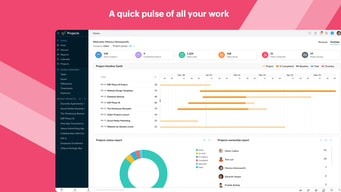
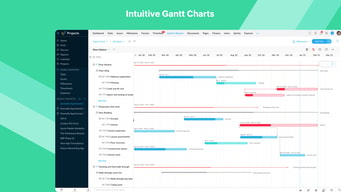
A PCMag.com Editors’ Choice Winner, Zoho Projects is a cloud-based project management platform that helps businesses plan projects, efficiently monitor progress, and foster collaboration among team members. Fundamental project management functionalities such as Gantt Charts, routine tasks automation, billable and non-billable hours time log and invoice generation, and robust customizations are all presented in an easy-to-use, intuitive user interface. It has built-in integrations with commonly used business apps while an equivalent mobile app allows project management portability, ideal for today’s highly mobile workforce.
| Company | Zoho Corporation |
|---|---|
| Year founded | 2000 |
| Company size | 10,001+ employees |
| Headquarters | Chennai, Tamil Nadu |
| Social Media |

| Capabilities |
API
|
|---|---|
| Segment |
Small Business
Mid Market
Enterprise
|
| Deployment | Cloud / SaaS / Web-Based, Mobile Android, Mobile iPad, Mobile iPhone |
| Support | 24/7 (Live rep), Chat, Email/Help Desk, FAQs/Forum, Knowledge Base, Phone Support |
| Training | Documentation |
| Languages | English |
Zoho Projects Pros and Cons
- Generally easy to set up and navigate
- Multiple ways to communicate in app
- Deep configuration options
- Strong time-tracking tools
- Great pricing tiers given available features per plan
- Does not include premade templates
- Slightly unusual resource management view
- UI for task searches needs improvement
- Frequent reports of dashboard bugs
- Risk management is unavailable






Compare Zoho Projects with other popular tools in the same category.

the option to export files to pdf or CSV
Sometimes the page loads slowly. So most times I had to the reduced font size to have it work easily.
Timesheet, Project reporting Analysis of information shared Documentation of projects file Feeds options
What I like most about Zoho is that it gives me reminders everytime an even from my Zoho Calendar is about to start.
Some pages doesn't load. I have to refresh them a couple times to load them completely. Also, zoho apps are very heavy. It makes my browser crash.
I am solving some tasks and I think Zoho Projects is very good when it comes to tasks organization and deligation.

Zoho Projects has a simple UI that was extremely easy to use. Several views are accessible, enabling me to select which of my activities and assignments can be conveniently analyzed. It makes really easy to move from one online system to several files between works. The dashboard screen offers custom buttons so I can really do my dashboard by showing only those parts that contribute to my job, making sure it is not overwhelmed with colored information graphs which do not correlate to my duties.
The Task and Time Tracking feature may need additional refinement criteria for an expanded knowledge base. Also, I think the reporting features may need some improvements, as sometimes it doesn't get enough.
We begin with an early adoption process of Zoho Projects within our company, and the overall experience with many of the Zoho products have been amazing. Each of our duties and responsibilities are often important for the entire project, and Zoho Projects helps us to work on each one properly. It includes the full-stack growth, spanning from server processing to internet and mobile applications.

Zoho Projects comes with everything a team needs to break down projects and manage their progress. When integrated with Zoho Desk, bugs filed by support staff through Desk are created as new issues on Zoho Projects and if this, in turn is integrated with Zoho Cliq, automatic channel notifications and progress reports can be scripted. The Time Sheets on Zoho Projects also greatly assist me in logging and tracking my time on a daily basis.
Zoho projects is great, however, it could benefit from better graphing tools. There are also times when I can almost feel Zoho gasping for memory like a man gasping for air, and at those moments the system performance and response times drop significantly. And aside from minor grievances like the List View unable to sort by priority, which would have simplified life ever so slightly, there's nothing fundamental about Zoho Projects that I dislike.
Zoho projects has allowed our tech department to evolve our methodologies towards a more productive and agile approach. This has increased the quality and quantity of work produced. When utilised in a Zoho "habitat", i.e. Zoho CRM, Zoho Desk & Zoho Viewer, Zoho Projects & Zoho Cliq, is where Zoho Projects truly shines though. The seamless communications between the applications truly does streamline our internal workflows

The registration in Zoho Porjects is very dynamic to allow registration from Google Account, Linkedin or Office 365, which is very convenient for customers who do not want to link their personal emails and want to avoid promotional emails. It is excellent the possibility of being able to add a personalized name to the portal, as a kind of free domain that will help us to locate in a simple way the different projects carried out. Currently have an improved version with a new interface and more friendly, this update is more professional and eye-catching because the previous version was very boring. The new version of Zoho Projects is fantastic, feels fresh and modern, in fact it is much better than Asana and project customization is freer to make changes. The status of a project is very varied and this is evident in other areas of Zoho where the options are very wide. In the same way it is very useful to see the percentage bar of progress of a project, this works as a motivator in the execution of that project because it allows to see in real time the progress of all projects. The contextual menu in general is very fast and effective in the execution of tasks, and it is very good to have a search engine in the configurations part to find what we want to modify.
Zoho Projects is improving its visual and contextual part with drop down menus and easy access but they could improve the platform a lot more to make it totally perfect. For this I recommend to simplify the options and group them in a single space so that the user is saturated with so many options. It is also annoying when you click on some parts of the web page and open a new tab in the browser, it is assumed that everything must be worked in a single tab to not lose the focus of the notes we are saving.
The program in general is very good for storing notes on ongoing projects that cannot be saved in the traditional methods of project management. I recommend using the free version because it provides enough tools to manage small projects and in any way each worker can create an account and share or create new projects and share them with the whole team. All this is possible at Zoho Projects.
Zoho Projects is fantastic for keeping track of daily tasks, as well as larger projects that are on-going. The statuses available are awesome for tracking. (Open, In Progress, At Risk, etc.)
I wish there was an option to use a "Projects Lite" version, almost. We don't use but a very small number of the features, so it is mostly left unused. If there were a simple "To Do List" sort of thing to check off daily tasks, that would be amazing.
We are able to see who is working on what and know that our customers will be covered all around.
It keeps files organized, you can add tasks to a specific project and then bill certain amount of time to specific tasks. You can also add projects/cases and add other users to the project
The login process takes long. Too many buttons to press to get to the projects page. Also once you have many projects entered in the database, it is nearly impossible to locate the one you want to find and add entries. There is a filter to sort by project name A-Z but it does not work very well. The A-Z feature does not sort every single file alphabetically, only a subset. This problem adds admin time when adding entries to timesheet
I'm entering my time for different cases and tasks through Zoho Projects. At the end of the day, it helps output the time spent on each case to prepare an invoice for the client. This is better than inputting in Excel. I have not used other programs to see if there is a more efficient way to do it. I know people can use it for project management and setting deadlines, but I don't do this. I just use it as an online timesheet platform
zoho projects is helpful tool for projects management especially resource allocation of team members which is provide broad view of team members and task management help to follow the timeline. In task management working hours locking feature is good to view the engagement of developer and other team members.
One thing which is bother as a user that i got notification of all projects either i am not assigned on that projects. So, it irritates user that which is getting irrelevant updates of different projects.
Task management is crucial for us to manage resources which help to generate flexible timelines for different type of projects. Continuous tracking of task status help to assign to task to idle resources. it also maintain the projects task history so that helpful for future projects resource selection.
Zoho projects is a very good project management tool and have almost all the features that are required for effective project management. 1. Option to create custom stage names is very useful as we can easily migrate our existing project to zoho projects without much work. 2. One of the other important features that Zoho offers is an option to map successors and predecessors of a particular task. 3. Tasks and issues are managed separately and thus easy to manage. 4. Can create a task list and milestones. 5. We can also update the dashboard according to our need and keep only the relevant reports on the dashboard.
1. Cannot be hosted on in house servers which were our first preference. 2. The UI can be quite confusing sometimes to navigate between different screens.
We use zoho projects to manage all the projects of our company
Very easy to get started. Frequent updates and enhancements so growing all the time. Good interface and easy to collaborate with others through various ZOHO products.
Can be a little cluttered, hard to navigate and daunting got beginners but plenty of online guides to get you started.
Effective planning, distribution and tracking of tasks and projects.
This is a very well thought out and designed product overall, with many integrations and details enveloped within the infrastructure.
The product itself is on the pricier end for it’s value and the free trial period only allows minimal features in comparison.
Managing projects and project components from start to finish.
You can create tasks and assign starting date and end date. It gives you a detailed timeline once you've created the tasks which is a paid feature in most of the other tools like Asana.
The UI is not very modern and sometimes it is slow. For eg: I click on any of the task and it take about 2-3 seconds to open that task. Also there is no loading sign when I am clicking anywhere to tell me that it is loading some data
Using it to manage all of our projects in my current company
I like the fact that I can see what tasks are still open and require fine-tuning. I also like that I can download the necessary files uploaded by my co-workers that are essential to my work. For example, my boss assigns me a project and instead of me having to search online for several PDFs, he/she uploads them on Zoho which allows me instant access to the files.
I haven't had much experience with the program as of yet, but so far there isn't anything that I dislike about the program.
Negates the necessity for my boss to ask me personally what projects have yet to be completed or have been initiated.
User friendly and easy to share with other stakeholders
nothing, the tool is self explaining for all
Multi functional project with different action owners and time lines
I really like the simplicity of Zoho projects and how easy it is for my team and me to use the software to track our hours and different projects.
I don’t even use half the stuff you can even use on Zoho. So I wish we could only pay for the project management side of it.
Easy to use and easy for us to track how many hours each of us are doing on each task assigned to us. It solves the problem of having to self-track your time.
User friendly platform allowing you to get the job done quickly. Easily keeps all your products aligned through the entire zoho suite offering varying softwares for all needs.
Less high customize tools than some of the other products out there. Very time consuming to input and remember to go back and check off all tasks upon completion (internal problem, not the fault of the software)
Keeping all of my tasks organized and in one place. Reminders help me be ahead of deadlines.
I really like the complexity of the program in terms of the multi-layers (i.e. Projects, Groups, Tasklists, Tasks, etc.), but I also enjoy how it's simple enough for anyone to be able to learn how to use the software. I enjoy that we can track the progress of our projects and can also assign specific projects to certain users. Being able to add comments, documents,
I dislike that you can't put templates in folders. I am always hesitant to creating multiple templates because it bogs down and clutters the template page, and most of my coworkers do not need the templates that I create.
We are solving issues such as lack of documentation, inability to prioritize, inability to track the progress of projects, etc. Our team is now able to be on the same page about every project, and are able to access the software from anywhere, at any time. It allows us to be consistent with our work and holds people accountable.
Its a great software to plan project activities, assign work, manage resources and collaborate with team members
Dashboard could be much more simpler. For example, when some graph doesn't have data to show, it can be hidden rather than showing empty data.
Zoho Projects gives you the added advantage of several other Zoho apps and third party apps through seamless integrations.
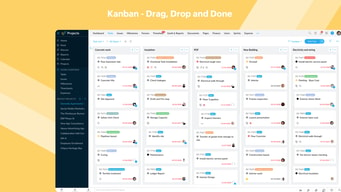
This is a simple project management tool, but provides all the features you need without the overdeveloped complexity of some software. You can create custom forms for projects and tasks, allowing you to add and report on your want you're interested in. Statuses are also configurable with a nice kanban view to make this more than a puritans project tool. The ability to email in tasks to projects is a nice feature allowing you to forward task ideas directly into a proejct.
Fairly minor: No tagging option in tasks which would enable easier categorisation and reporting. A task template in applied to all tasks in a project - it would be great if you could vary the task template away from the project default
We wanted as single place to store all our 'contributions' regardless of whether they were part of a formal project or recurring operational activities. We also apply 'agile' principles to defining and scoring our tasks and being able to configure a task template to include "Given... When... Then" was key to our choice
The way in which you are able to add users, track milestones and tasks. It is really efficient in tracking bugs as well.
Not able to bifurcate between logged hours across multiple users who would have been deleted previously.
It really helps in getting the team on the same page with regards to the status of a project and makes sure nothing falls into gaps.
Ease to manage the short task, milestone, internal and external discussion.
Mobile application should have delete functionality. As of user can not delete anything using mobile application.
Gratefull tool to communicate with client for short task to get clarification.
Ease of use. The application has a simple hierarchy that most non-technical businesses could use to manage their projects.
Complex, interrelated projects are not achievable in the current application.
One or our companies has started using this to manage their internal business projects. It is a better way to run projects and helped them move away from multi-tool communications and tracking.
It is a part of the Zoho Suite of products
Kanban is not default view, issue status not automatically updated when PR merged in github or deployed by CI.
Tracking development of SaaS software
It allows to keep track of tasks which are pending and also the percentage of task completed. We can retrieve the number of hours taken to complete a certain project which may help in billing the customer.
Changes from a certain window or tab does not always reflect in the overall report of the project. The login screen https://www.zoho.com/login.html takes a longer time to load.
Create tasks of the project and update the efforts made to accomplish the task. I can keep track the number of hours I work every day and what were the kind of tasks which took a longer time to complete.
Zoho has a simple and elegant interface making it easy to find what you are looking for. It's a great way to log time and view projects over a long period of time.
It's not always easy to attach images in the comments section and there does not yet seem to be an efficient way to sort of hand off a project to another person without it already showing up on their calendar.
It is easier to distribute hours per project to different people because you can easily see how long someone is working on a project for and how many hours a week they are dedicating to each task.
This is an easy way to keep all information in one place. We also like this because we can give access to our clients so they can see what is going on at a glance.
That I get emails everytime a change is made even if it is an account that has nothing to do with me. This might be a set up thing on our end, but that is the most annoying thing about Zoho people.
Project management for our clients and communication among staff.
What I like the best is allowing 25 contacts on free plan. Which is enough for get used to the product as a freelancer and it gives nice platform for startups too to boost up their accounting and sales management.
There is nothing I dislike in particular but the overall web experience could be improved. I found it sluggy sometimes.
When I started using this I was working in a design agency and I just loved helping clients better with this product. I know what is going and at what stage + how much contribution a particular client makes to our total revenue.
Ability to share information with colleagues, add and assign tasks.
Would like for there to be a clear path to adding Project deadlines to my calendar so I could get alerts without logging in to the software.
With a company that is 100% remote, this is very useful for collaborating on projects and tracking progress without sending emails or instant messages.
The ability to have my team connected and informed has been a huge benefit of Zoho Projects. We were communicating with email, and there was a tendency for projects and tasks to get lost or forgotten. I love the ability to have all communication related to the project in one place and visible to the entire team. The capability to edit documents in real time is a great time saver and prevents the download-update-upload cycle we were forced to use with our previous software. We also use the Gantt chart for keeping up with all of our timelines.
The facebook style user interface is not for everyone. Some of our "more mature" users find navigating the software somewhat confusing. I especially don't like that the documents uploaded in Dashboard or Forums don't appear on the "Documents" tab of the project. I would like the Gantt chart to have additional personalization features like the ability to color code tasks by department and have task dates auto-sync when a preceding task is changed.
We manage all our projects in Zoho. We are a large manufacturing company with many packaging projects going at once. Many teams are in motion at once, from R&D to Design, to Production, to Purchasing. ZOHO keeps us all linked and informed. We can keep tabs on the projects as they move through various departments and track input from team members all in one place. We also have a valuable history of the project when it comes time to review our performance after the project is complete.
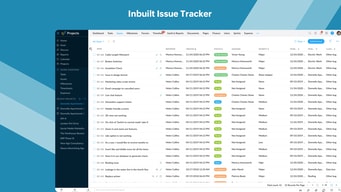
The interface is clean and easy to use. I also appreciate the flexibility in how I set up projects. The time tracking is very efficient and we use it heavily. The bug tracker is also very useful. The key function that made us choose Zoho over another platform was recurring tasks. Those are a must for us, and most other products lack that option.
The template could use some work. I'd like to be able to carry over document folders and some key users when I set up a new product. Failing that, user groups, so I could add an entire team to a project at once. Also, the interface to add users to projects is terrible. We have over 100 projects, and it takes a long time to add someone to multiple projects at once because the list is not alphabetized or organized in any way. We would also like to see RTF comments and the ability to sort comments from newest to oldest, especially on recurring tasks. Finally, the ability to carry over followers on recurring tasks is a gap that needs to be resolved.
We were looking to replace Central Desktop. Zoho has several similarities to our old system, which made the transition easier. The advantages of Zoho for us are price, stability, and robust time tracking.