
( 276 )
Unclaimed: Are you working at Zoom Events and Webinars?






Zoom Events and Webinars Reviews: 4.4/5 — Solid Choice
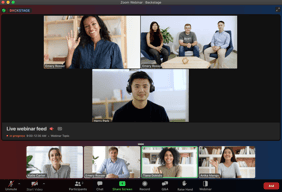
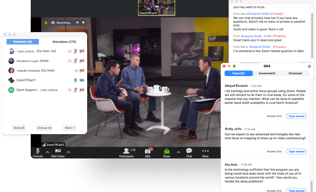
Zoom may be software that you're already familiar with but their Video Webinar is definitely a more robust and comprehensive communications tool that most have yet to explore. With Video Webinar, users get access to features such as presentation engagement tools, dual screen support, live broadcasting to YouTube, polling, and other features that are essential for webinar streaming and virtual events.





| Capabilities |
API
|
|---|---|
| Segment |
Small Business
Mid Market
Enterprise
|
| Deployment | Cloud / SaaS / Web-Based, Desktop Mac, Desktop Windows, Mobile Android, Mobile iPad, Mobile iPhone |
| Support | 24/7 (Live rep), Chat, Email/Help Desk, FAQs/Forum, Knowledge Base, Phone Support |
| Training | Documentation |
| Languages | English |
Zoom Events and Webinars Pros and Cons
- 'Access video meetings on mobile devices
- Remote keyboard and mouse control
- Live streams to your social media channels
- Supports large participant groups (up to 1000)
- Poor customer support
- No cloud storage on the freemium plan

Compare Zoom Events and Webinars with other popular tools in the same category.
Zoom Events and Webinars allow us to host online events for a large amount of employees within our district. We do not always want to leave our school sites to meet, so this allows 200+ employees to join.
The dislike I have for Zoom Events and Webinars is not one that can really be changed. Online webinars are just impersonal in nature. Knowing that, this one does allow for as much personalization as possible in a webinar.
It allows people from all across our district to come together without having to find a large venue to meet in person. People can remain at their own school sites.
I like the functionality of Zoom, especially the ability for organizers to make participants visible or not, muted or not, access chat features, and engage with the Q&A feature. As an attendee, I enjoy the 'reactions' option and breakout rooms.
As an organizer, sometimes the breakout rooms can be a bit complicated to navigate and properly randomize, especially with smaller groups. As an attendee I often find the chat doesn't work properly even when the organizer has permitted it as open to attendees.
Allows me to watch and learn either along with the live webinar/event, or in a post-event recording. Convenient to host online cooking classes.
With free version, we were able to connect to the maximum users when I started using it in the initial days.
The time limit for the meeting was limited to 40 mins for free user.
Ease of using, screen sharing and adding at least 10 participants to the meeting were some of the good options.
It is effortless to use and easy to install the app. Only the host can mute and unmute the attendee. Unlimited webinar session we can do. Team Viewer is standing against Zoom webinar but overall zoom slightly better than Team viewer. File option in mobile app is not there while in desktop it is there.
During the microphone connection via Bluetooth, my voice does not reach the other attendees. It was an automatic signout sometimes while the meeting was going on. Bluetooth connection to be improved.
File option in the mobile app must be available there. Overall, Zoom is suitable for professional work, and many features can use during the webinar.

The best feature Zoom has is hosting a large number of attendees when it comes to hosting events or webinars. Makes it a great software ever since the pandemic has comes in our lives. Great audio connectivity and video stability with loads of features. Options to use Breakout Rooms one of the best addition!
Need a little above average internet connection else the voices start to distort and it's frustrating sometimes. A little buggy due to its feature-loaded software.
It gives me ability to host meetings on a large scale with seamless connectivity. Break Out Rooms proves to be very useful tool where i can divide my meetings and teams accordingly.
Zoom Events and Webinars has a mobile application which is highly customizable. It offers DOLBY audio and HD video quality when conferencing.
Unfortunately, the free version doesn't allow users to exceed 40 mins of continuous video calls.
Scheduling, joining and inviting attendees to events via shareable links.
Ease of use and the fact that I don't have to be there for the entire time. Others can still log on or close out the meeting without me.
connectivity issues.... not something we can blame Zoom for, just a nuisance to have to deal with. The individuals need good internet connection in order to be seen and heard clearly.
We have found it easy to share the link so everyone can just connect directly without having to sign on using a meeting number.
The best part that anyone would like in any video conferencing is the video and voice quality and the ease of using this software. Being a professional recording option makes our life easier as we can record our session that can be accessed at any later time.
The team at zoom are very professional individuals; they resolve the issue before it gets a headache for the end-user. Being a loyal user of zoom, I would suggest increasing the session time from 40 min.
During the time of covid when the world was forced to work from home, zoom became the global platform to connect office meetings at home and made life easy for professionals to connect with their teams working remotely.

What I like most about Zoom is that I can still use it on old Smartphones and also on old low-end PCs. Another thing I want about Zoom is that I can share the screen very quickly from my Smartphone without it lagging, the same on my PC!
What I don't like about Zoom is that it is not yet a massively used social network like the social networks known to cite examples, Whatsapp and Telegram. Just comment on that from me.
I have solved the problem I had of not being able to use conference rooms which are heavier and jamming my Smartphone and PC. The benefits I have had are efficiency in my meetings ease to use on my smartphone; I am happy with Zoom!

UI is great, which makes it easy to use. The audio and video quality is excellent. Zoom webinar is very effective in organizing webinars for a large number of participants
Nothing to dislike as of now. It has been a valuable system for us
We are using Zoom Video Webinar to organize different types of webinar for a wider public in different countries

It allows us to host online events with 100+ attendees without compromising quality and speed. It also facilitates automatically recording sessions & repurposing them for later use. It comes with straightforward registration management that provides a database of our attendees who have filled the forms. We have integrated it into our CMS and use it to connect better with our target audience. It provides HD Video & audio quality and also facilitates video/audio sharing as well as screen-sharing options. The reports provided by the Platform help us to better engage with our attendees even post-event.
It's a comprehensive tool, and we use it both for hosting internal events and for an external audience. We are happy users and find it better than other tools available on the market.
We always wanted complete security and full control while hosting our online meetings and events. And that is facilitated by it. We also wanted to provide ease of use to our attendees to access the session from any device of their choice and location. All these specific needs & preferences are fully met for us.
If you have a small marketing team and are looking for a "bare bones" webinar platform that is easy to configure, highly reliable, and gets the job done - Zoom is a great option. Zoom lacks the features of many more sophisticated webinar platforms, but it does the job at a fraction of the cost and complexity. It will make you rethink your investments in more expensive platforms. You will miss some of the advanced features of other platforms like ON24 and Cisco WebEx. For example, there is no waiting room for presenters to huddle in before starting a live session. There is no way to upload presentation content in advance (limited to screen share). On the other hand, you don't have to spend days attending online training platforms to learn how to use the webinar platform. If you a familiar with Zoom's video conferencing platform then learning the webinars platform is simple. Furthermore, you won't lose any sleep the night before your webinar worrying about whether you configured all the various parameters correctly. Configuration with Zoom webinars is simple and straightforward. It just works!
Email confirmations are disappointing - You want to make it easy for registrants to easily access the live session. A key success factor is including the superlong personalized Zoom URL, dial in options, and calendar invitation attachment in the confirmation and reminder emails you are sending to registrants. It's challenging to get this right using an external email marketing platform so the safer play is to use Zoom's native email capabilities. However, the level of customization available in the Zoom email confirmation/reminder templates is minimal. Adding branding elements or your logo is painful. Zoom does not properly size the images when uploaded. The email templates do not have a responsive design so they do not render well on different screen size formats. Integration with Hubspot's marketing platform is limited, but highly reliable. Only a few fields such as name and email address can be synchronized between the two platforms. There is no way to send feedback to Hubspot on who actually attended the webinar (versus who just registered). However, the integration that does exist is rock solid, is super-easy to configure, and only takes a few minutes to setup.
Zoom offers a low-cost channel to host a high volume of marketing webinars. You can set up a new webinar in less than 30 minutes (if not 10). As a result, you can get a lot more done with less resources. You don't need technical staff or a marketing operations manager to run the webinars. Zoom is enabling us to do 3X the number of live webinars than we would be able to resource with other, more complex platforms at a small fraction of the cost.

I am going to mention what is liked the most in zoom points: 1. This is one of the most stable platform. 2. we can use it even at low speed internet connection. 3. few of the best feature in zoom i would like to mention are like recording webinar, unlimited chat option, galary view and many more options
To be extremely genuine here, I haven't find anything that i may dislike about zoom, this is an incredible, valuable, and secure stage for online live online classes, henceforth as per my experience, there isn't anything to despise about it.
above all else it assists me with imparting all around the world particularly with my lectures as I my classes are online due to corona. also it doesn't give mush issues with availability . it has a decent correspondence server.

I have used a few webinar platforms, and Zoom Webinar provides an easy-to-use interface that allows panelists and attendees to join smoothly.
I wish that Zoom Webinar offered a more customizable "waiting room" experience. We have learned with older participants; they expect to be automatically dropped into a live program, and the "waiting room" screen doesn't provide enough guidance to wait for the program to start.
We migrated to Zoom Webinar from another webinar platform because it offered the attendee a more effortless experience.
Easy functions to use, recording webinars are easy, sharing screening is simple and the interface is simple to use. The app works well on the phone as well on the computer.
I haven't found a function to save questions and answers during the love q and a. A little difficult to navigate.
Client calls and internal meetings with team mates

I like the interactive functions that allow participants to be more involved.
I don't like that the screen share takes over your entire screen. This makes it difficult to multitask.
I am able to have classes with students in an easy to use setting. I also find I have the least connection problems using zoom as opposed to other platforms.
This app is very useful to attend meetings from anywhere and from any device/ Desktops and it has unique features like only host can control the whole meeting and allow participants to enter in the meeting
One thing I don't like about this app is that only host can record the meeting . If one can try to record it it requires permission. Also this app slows down whene we share screen.
While taking classes this app helps me alot Also while taking meetings In offcie this app helps me to resolve problems of my clients and also help me to solve there problems my sharing my screen on-line.

ease of use and integrations with google calendar make it so much faster to schedule new meetings on-demand with few clicks within the organization and also for having zoom calls with clients.
Sometimes it's not intuitive that the user needs to be logged-in in order to be able to join the call that requires a password. The user interface could have a quick tip.
Scheduling call with colleagues on-demand and also having calls with clients. Especially when the number of attendees is unknown Zoom makes it convenient to have control over the list of people who can join.
It is very user friendly and you get a free version up to 40 minutes time limit. Very popular product that most people have access to
Free version has a time limit of 40 minutes. There has been an issue with the software getting hacked so security is a concern
I use it for work to do a full demonstration on physical security demo. Also use it for weekly meetings for my entrepreneurial group meeting. It saves me time so I don't have to travel

What I like best about Zoom Webinars is the separate Q&A option, the polls & raise hand features, and being able to record and monetize the webinars. I also like being able to reach a larger audience.
What I dislike about Zoom Webinars is that even though you can add your branding to the webinars, it is not very customizable aside from changing the colors, banner, and logo.
With Zoom webinar, I can share information with a larger audience in real-time or on-demand. This opens up a whole new revenue stream for small businesses like mine.
Zoom is intuitive and user-friendly for most people. I work with a lot of older folks who aren't very tech-savvy, so it's easy for them to get into meetings.
The share screen options could be easier to find. I think the website could also be a little more intuitive. I like how it's simple, but it's almost too simple.
Trying to teach someone how to share the screen virtually is tough. Having easier-to-view buttons would be helpful. It's a time saver to be able to meet with clients and the team virtually. The mobile app makes it easier to walk around homes if there is an open house.
Raise hand option for attendees for asking questions and responding to polls.
Documentation to develop a software application with zoom API.
We can mute/Unmute all the attendees once, promoting our icons, webinar landing page.

Zoom allows me to schedule video meetings or interviews in a world where things frequently take place remotely. I can set up an appointment and simply share the link with whoever will be in the meeting or on the call.
There is nothing specifically that I dislike about Zoom.
When conducting interviews, I prefer speaking with someone face to face to get a better feel for their personality and who they are. Zoom allows me that opportunity, even where we have been "socially distanced" as of late. It's a much better solution than over the phone.
The ability to connect with the audience with a simple and sleek UI with no bells and whistles complicating the user experience.
There should have been an option to automatically get the list of all the participants with their respective duration for which they had attended the session after the host closes the session.
We are using zoom webinars to engage with our customers and prospects, and It helps us keep in touch with our prospects at different stages of our sales process to close deals successfully.
Great way for secure, high-stakes/high attendance Zoom meetings
Engagement with and among participants is difficult
Secure video meetings. Increased security to other options.

Excellent user-friendly interface for users and admin. No configuration is required. Email automation reduces your work. Attendee receives a sequence of mail from the day they register for your event. Screen sharing is fantastic. We can record the webinar and share it with our participants.
Nothing to dislike. I have faced issues sometimes connecting audio with the phone. Rest all is excellent.
We are using Zoom Video Webinar for organizing a monthly webinar. This platform is easy to use with excellent customer support. Their team provides you training for hosting your event. We can record the whole meeting/webinar.
For my purposes, the "record meeting" feature has been the most helpful thing imaginable. The meetings that I help run are required to be on the public record, and I dislike our little hand-held audio recorder. Being able to record Zoom meetings has been a lifesaver in many ways. The audio is high quality (video's great, but I just need audio), and the resulting audio file size is much smaller/more compressed than my crappy little recorder.
Zoom has not caused any issues for me personally. I think it has been a helpful tool in my workplace, though I don't think any type of virtual meeting setting will replace the quality of in-person interactions.
I solved my audio recording issues with Zoom, which is major. Additionally, using Zoom has the benefit of making meetings available to members of our local population no matter where they are. It's easy for anyone to join in with public comments even if they are on vacation.

Zoom Meetings have always promoted an easy user experience, and that dedication holds true in the webinar platform, as well. Users can join the webinar easily and quickly, and users with limited technical expertise encounter few, if any, issues.
The back end of the webinar system needs a little more work to be more efficient, but the recent changes show that the platform is moving in the right direction. The registration options are a bit limited, but they do integrate with many third-party tools, including Hubspot, to help and fill in some of the gaps.
Working in the senior living industry, we need to have a way to share information with prospects and residents quickly and easily and a platform that is easy to use and understand for all levels. With Zoom, the participant just needs to click on a link and instantly join the video webinar. This has reduced calls for assistance with participants greatly.

Zoom provides a video webinar option that supports unlimited audiences to watch in real-time using presentation participation tools .This program provides a lot of flexibility for handling registration. This program is safe because it requires the use of a password or authentication. The intuitive design promotes rapid adoption by moderators and conference participants through easy-to-use and manageable controls. This is a virtual platform that can accommodate up to 50,000 people.
The upgrade between attendee levels is not very simple. When we underestimated the number of attendees we expected and couldn't add more participants to the open space, it got us into a dilemma. Also, the registration and confirmation emails on the login page are not customizable. We have to pay extra for some functions, which is not good.
This program enhances our appearance with "retouching" filters and studio effects. This platform can suppress background noise and use our slides as your virtual background. This program displays up to 49 team members on one screen.
Easy, fast and functional. participant can raise hands for questions, motions can be voted on.
Host can control the meeting and prevent a fair discussion by only calling on those that concur with the host
Solves meeting in person during lockdown and social distancing. Also avoids travel.