
( 276 )
Unclaimed: Are you working at Zoom Events and Webinars?





Zoom Events and Webinars Reviews: 4.4/5 — Solid Choice
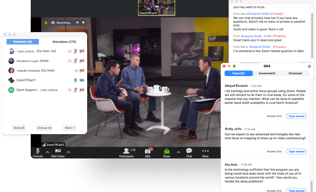
Zoom may be software that you're already familiar with but their Video Webinar is definitely a more robust and comprehensive communications tool that most have yet to explore. With Video Webinar, users get access to features such as presentation engagement tools, dual screen support, live broadcasting to YouTube, polling, and other features that are essential for webinar streaming and virtual events.





| Capabilities |
API
|
|---|---|
| Segment |
Small Business
Mid Market
Enterprise
|
| Deployment | Cloud / SaaS / Web-Based, Desktop Mac, Desktop Windows, Mobile Android, Mobile iPad, Mobile iPhone |
| Support | 24/7 (Live rep), Chat, Email/Help Desk, FAQs/Forum, Knowledge Base, Phone Support |
| Training | Documentation |
| Languages | English |
Zoom Events and Webinars Pros and Cons
- 'Access video meetings on mobile devices
- Remote keyboard and mouse control
- Live streams to your social media channels
- Supports large participant groups (up to 1000)
- Poor customer support
- No cloud storage on the freemium plan

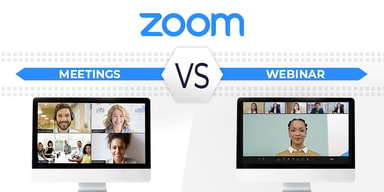
Compare Zoom Events and Webinars with other popular tools in the same category.
I can host my meetings for my business from any place! I wouldn't know what I would have done without it during the COVID times! I like how you can let multiple people be a host.
Nothing so far! Keep being a wonderful company.
I host my work meetings, fitness classes, and the college classes that I teach
The ease of use. Stable connectivity. Group Talk. Background Effects.
The 40-minute restriction. There should not be any restriction for P2P
Solving real-world needs as far as the Risk Management Sector is concerned.

It has a good quality of audio and video. The application is easy to use and access. It can also access on my mobile phone. Therefore, you can attend the webinar anywhere. The attendees are hidden, and there is confidentiality which are attending the event. Also, the attendees has no access in audo and video to avoid distraction. But they can interact using live chat and Q&A.
There is nothing I dislike in this application. For me, it is beneficial to attend my webinars just right in for the virtual training.
In the beginning, I was wondering why I couldn't see the other attendees in the event. Also, there is no option of opening a camera and mic. Then, I realized that the app's purpose is purely webinars, and as a participant, I can only interact in the event using live chat and Q&A.
Zoom has the best video conferencing features and tools-by far-than any other online conferencing platform, especially with its robust invite, recording, calendar plug-in, and support features!
I haven't found anything to dislike about Zoom, in that everything I have ever needed from this platform for video meetings and conferencing, it has performed exactly as I needed it to. Great platform!
Large meeting and virtual event hosting, with many benefits including attendee management and event recording features.
easy to have meetings, face to face, personal, and easy to share my screen with others to show analytics.
nothing so far. Everything is very user friendly
sharing analytics i also find that people are more likely to pay attention to me if they know I'm seeing their faces.
It's easy to use, ability to connect via pc or cell and it's free
Sometimes even via a zoom link you have to then input a password
Ability to connect and meet virtually especially during this pandemic. Working from home schedules are now varied at this 18+ month point into the pandemic so the ability to connect via zoom in these various locations is great.
What i like about Zoom Video Webinar is very easy to use,and set up. No hustle for the startups and is very cost effective. Scheduling meetings is easy,sharing the link is simple and invite with audience who need to be present is fast and convenient. Zoom handles multiple participants meeting very well through a centralized screen that allows you to see all participants, conduct group or individual chat sessions.
I have no drawbacks at all. Everything is working cool.
We use Zoom to schedule meetings with our clients,and this is so cost effective and time conservative. Its so scalable for small and medium sized business enterprises. Private chat feature makes it have a smooth presentation. Sharing screens and showcasing presentations are convenient.
Easy to set up different channels depending on panel member or visitor, like that chat and Q&A were separated, and the data to how many watched, and for how long, provided great insight on what we might want to scratch for future webinars.
It's quite a hefty price when you're a smaller company.
I was quite nervous to put up my company's first webinar on my own, but Zoom webinar made it a breeze from set-up with email invites, to going live, to post-webinar logistics of offering the webinar on demand to subscribers who might not have been able to make it.
The ease and straight forwardness of this software sets it apart from its competitors. I like that it was easy to connect to webinars my employer would host and it amazed me how many more people it could allow into the room than a standard zoom meeting.
I dislike how unsecure the platform is in terms of security. I've heard lots of horror stories about people's meetings or webinars being hacked.
Not having to meet in person is a huge benefit during these times with the pandemic. Video webinar in particular solves the problem of having to pay employees to travel to conventions or training because it allows you to broadcast a Zoom meeting to a MUCH bigger audience of people.
What i like most about Zoom Video Webinar it handles multiple participant meetings perfectly through a centralized screen, allowing the users to see all participants, conduct group individual chat sessions during the meeting and allows anyone to share documents in the meeting.
So far so good. Its been almost 4 years since this tool was successfully deployed in our organisation and i barely have no negative drawbacks.
The chat feature is very essential and helpful because it enables the participants/host to send text messages, including hyperlinks to one another. This is useful in allowing the instructor to share instructions that can be viewed in the breakout rooms.
I can easily share my screen with small groups or thousands. It is easy to initiate a zoom call, update the attendees if any changes are necessary. I have never personally had any audio or video glitches. I find it a good way to have an intimate conversation with a close friend or use to interact with a small group. With large groups, it works best as a "push" medium but "Chat" is available for some interaction among participants/attendees.
Integration with MS Outlook is not always consistent nor easy to learn. My main dislike, however, is the inability to BCC invitees.
Being able to maintain communication with disparate groups of geographically dispersed people, especially during the Pandemic when travel is not advised.
Very straightforward webinar platform which includes automatic sign up pages, a modern/simple interface (compared to their largest competitors), great audience participation tools, and very good recording quality to host after the fact for lead generation, reference, etc. As well, it scales to a good size of audience at an affordable price. Running a 300 attendee webinar is a breeze with Zoom, and quality is consistent. The tools included for polls, chat, Q&A, etc. are all great and don't limit like other webinar platforms I have used as an attendee or guest presenter/panelist.
As with other platforms, I wish that without extra work you could have a multi-view of presenters/hosts along with the material being displayed. This would be better for capturing panel discussions. It would be cool if they had more landing page customization, right now we build those in unbounce to drive traffic to the sign up page.
Hosting a webinar is great for customer education as well as lead generation, but you need a platform to run it on! I have hosted and participated in webinars on many platforms but Zoom has been the easiest to use and most consistent.
I like how easy it is to set up. The build in tech check is easy to follow and my team is usually able to do it without me.
I wish the registration page was more customizable and that the duration of the webinar was clearly listed on that on the registration page. I also wish that one somebody put a question or comment I was emailed and didn't have to go download the registration report to get that information.
We needed a host webinars and already use zoom for regular meetings.

I like that we can have more than one person at a time and that we can share the screen, I also like that we can let the other person take action on the screen as well.
I think we need to improve the way we take the meeting. Because my youngest also uses Zoom for school and the teacher's response seems confusing, we need to find a way so that the leader of the meeting can answer the students more accurately. more order.
I sometimes don't know where to go on closing out my tasks and the zoom allows me to connect to my colleges so that I get the question that I have answered and learn from others on how to be very sufficient with my Job.
Ability to connect virtually and reliable
No dislikes, it is a great tool to do trainings and classes
Ability to attend trainings and conduct classes and webinars
The best thing I like in zoom is the quality is extremely good when compared with other applications
Mostly there are no demerits as I am using zoom application daily not found any such
Live meetings and the communications are taking places instantly
I like how easy it is to use. We can log in and automatically see the presenters and their PowerPoint. I enjoy listening to the music while we wait for the presesnters to start and playing the ineractive games on the screens they have with the annoate feature. Zoom has so many features that people are unaware of, and it makes the experience enjoyable. I also like the poll option. We can ask filler questions to get a sense of how people are feeling and what they would like to do.
At times people disable the chat, and it's hard to interact with other people in the webinar. We could have the same questions and concerns. If that is possible, we could figure it out ourselves without being redundant in the Q&A section. I know it cuts down on then endless chatter, however some people could have repettive questions and allowing the Q&A to be open for at least the last 30 mintues could save a lot of time for the presenters reading the same questin over and over again. And for the particpants who have an acutal question that can be discouraging and frustating. I know it would be for me.
I mainly use zoom webinars as a participant, and I learn captciy building skills to help my community. I want to work in non-profits so learning how I can behind the scenes be fantastic for me, and having a one on one chance to hear people speak on it is a perk. I love how zoom allows me to listen to people I would never be afforded the oppournity to listen to speak before and I make sure I jump at the chance to hear them if I can. I hope we can always utilize zoom in the future for people who have a fear of flying, but would love to attend conferences and meetings. Since the pandemic has started, I have been able to attend due to finanaical reasons and I am so lucky I was able to attend. That is the number one benefit I have found out this past year using zoom.

Zoom video webinar is relatively easy to use. I like that it's integrated with other software applications - easy to add to a calendar invite. The ability to save & record the session is excellent. I also like the ability to save chat.
There isn't much I dislike about Zoom video webinar. I do wish the free version allowed for upto 50 min for a meeting of 3 or more or allow the free version to allow up to 5.
I can have a co-browsing experience with clients and demo products, services, features, conduct educational meetings, and have that face to face meeting without actually meeting in person,
Not provided
Not provided
Not provided

Zoom is a valuable for meeting, conference and some other joint. Individuals can accomplish their work by utilizing this software or mobile app remaining at home. In zoom, there are many element including like video calling, talking, and screen sharing and so forth by plan a meeting. While hosting webinars, it is simple for the host to control the climate - ensuring that participants are quieted during the introduction however permitted to pose inquiries during the applicable fragments. Straightforward webinar stage which incorporates programmed join pages, a cutting edge/basic interface (contrasted with their biggest rivals), great audience participation tools support devices, and excellent chronicle quality to have sometime later for lead age, reference. . It can likewise record video and sound calls and it is anything but difficult to record a meeting and other video calls and can hear it any time.
The fundamental downside is its client assistance isn't natural. The web association hinders then the sound and video quality doesn't clear and now and again call is naturally detach. While utilizing this device on mobile telephone nature of voice goes poor and upset entire call and mobile adaptation accompanies restricted highlights. Zoom needs more genuine webinar usefulness. The capacity to transfer the deck or recordings, and have any of the specialists advance the slides rather than only one individual sharing their screen. Post-webinar altering of the chronicles doesn't generally alter the accounts. Pre/Post occasion messages layouts are fairly restricted and there's no documentation on the accessible choices.
Zoom Video Webinar an efficient tool available for hosting and going to meetings, and furthermore efficient for video conferencing. The features are perfect and simple to utilize. It helps so well with revealing and examination, occasions help and on-request seeing. It offers excessive features which let have and go to video conference effectively it gives the best nature of sound and video and can have call's with incredible sound. Hosting webinars on this stage is extremely helpful for beneficial conversation and learning on the grounds that the members can be permitted to effectively add to the conversation through talk and video alternatives. It is additionally an extremely smooth stage with a straightforward and simple to follow format.
Zoom Webinar is excellent because it gets the job done. There is great connection, very rarely do I get disconnected when hosting. The capacity is very good for all my attendees to join, and I love the question and answer feature. I've found it especially helpful to have polls during my webinars to gage the audience's response.
I wish it were easier to share slides and videos. I have to share my screen and it's a hassle to do so, doesn't always work properly.
I use Zoom Video Webinar every time I do a webinar, and it is much simpler than the other things I've used. It's really easy to see analytics for my attendees and follow up wit them!

Zoom is a very useful for meeting , conference and any other hangout.People can do their work by using this software or mobile app staying at home.In zoom, there are many feature including like video calling,chatting,screen sharing etc. by schedule a meeting.I mostly like the screen sharing option.It's make my work so easy.This software is mostly useful for the students in this pandemic situation.there are also participant counting, video sharing, voice calling and chatting includes.
There is a problem i disliked, that is time schedule problem.Every meeting contain 40 min only if anyone use beta version. But the premium version is much costly.
I can do my university classes and some online courses by using zoom. Also connect with friend and solving my laptop problem by using zomm.
Tiene muchas ventajas con respecto a la interacción de los participantes en la sala de reunión, se pueden todos los rostros al mismo tiempo, cuando tienen activado la cámara: esto reconforta.
Es un poco inseguro cuando tienes más de 25 participantes, debido a que no puedes controlar a cada usuario que entre, tal vez no lo conozcas. Y si colocas todas las seguridades la interacción se pierde en la sala de reuniones.
El problema claramente esta en que no puedes controlar quién entra en la sala si tu invitación a sido difundida en redes.
Zoom is so easy to pick up. We switched to Zoom just as the pandemic hit, so I had to learn on the fly and train myself. Not being a digital native made me fearful, but it was so easy!
Sometimes it is difficult to get a quick answer, but that is no fault of Zoom.
We were having horrible problems with audio and just the quality of our webinars. Zoom has made things so much easier. We can interact with our members so much better now. And we have more options to connect with them using Zoom.

Hosting webinars on this platform is very conducive to productive discussion and learning because the participants can be allowed to actively contribute to the discussion via chat and video options. It is also a very smooth platform with a simple and easy to follow layout.
I dislike webinars in general if they are not made publicly available, but that cannot really be attributed to the app.
Zoom webinars allow you to have timeless digital instruction if they are recorded. You also get a record of the chat so you can refer to the discussion that occurred as well. It is a very good webinar platform for access to one-time information. This works best for one-off learning segments, as I presume it is intended for.
In my opinion, Zoom is by the far the easiest platform to use, compared to Skype and Webex. It has a simple interface, and can be used on laptops and mobile devices. I like especially the feature where you can see a lot of participants at once (if everyone is using their video cameras). Makes for a dynamic meeting/call.
If using a browser to access a meeting, it does not keep you in a "waiting room". So it your meeting host is not on you have to keep retrying until they begin the meeting, unlike other platforms that have you wait in a queue to be accepted in.
We are utilizing Zoom to have meetings and with small and large groups of people. Allowing for interaction from participants. It has been a great replacement for in-person meetings.
As an employee of a remotely located business, I find the Zoom Video Webinar to be a very great tool for communication. My team and I use this platform for conducting the meeting as it provides high-quality video conferencing facilities and recording calls is also very helpful for us. It is very user friendly and the interface is very easy to navigate it is very fast and reliable.
Using this platform through a mobile app is difficult than I expected. I would like the developers to add an option to indicate the number of calls made so that l can keep a record of them. The affordability is another issue of this platform because the price gets higher as the number of participants increase. Sometimes I find the link connections take a lot more time to connect.
One great advantage of this platform is that it can be connected through different platforms of both desktop and mobile like Windows, Mac, IOS, Android, etc. In this way, we can conduct different training sessions especially when we are located remotely. Zoom video webinar is great for conducting live virtual events on a larger scale.
I received a link via email on February 28 from a recruiter to register for Zoom in order to have a video interview with her. Registration was very easy. The day after I registered, the recruiter sent me a link to connect with her via Zoom. I used the webcam on top of my desktop computer for the audio and video. The sound and picture were very clear, and the recruiter was able to see and hear me clearly.
At first I couldn't figure out how to enlarge the image of the recruiter after I connected with them. After I clicked the icon to enlarge the image, it looked like "letterboxing" of a movie on a TV screen, that is, it was a horizontal bar with empty space above and below the bar. I would have preferred the image to be full-screen.
I had a one to one video interview with a recruiter for an open position. This was much more convenient than commuting to the recruiter's office. And it was much more personal than a phone call.

It has free plans that you can do unlimited meetings with 100 participants. When I first found the Zoom from my client in the USA. After that, we love to use it. Before Zoom we need to install all the applications like Skype but now you can simply download a single exe and run in your machine or otherwise there is a web app that only needs to open your browser. Moreover, Webinar had good video quality and full control of your presentation.
If we use the mobile app for the Webinars with low bandwidth video quality and sound both get lost. But it will be a good idea that when low bandwidth problems reduce the video quality keeping audio quality the same.
I had a meeting with my foreign client and his friends. One of my employes is on the way to the meeting on time but it was very important to connect this employee to this meeting. So at that time, my foreign client said let us use the zoom webinar because your employe can join the meeting so quickly. After all, Zoom save my day.
I prefer zoom over all other webinar platforms because it's fairly straightforward and simple to use. You also do not have to install software or sign up for an account, just simply accept whatever invitation is given and it pops up.
Nothing to criticize, zoom has met all my needs when it comes to hosting and organizing webinars.
Ability to broadcast information in a simple way. It is accessible even for those who struggle with technology, such as the older people.