

Unclaimed: Are you working at Act!?
Act! Reviews: 3.9/5 — Good for the Price
Act! is one of the pioneer brands in its space that evolved into a customer relationship management platform, and cloud-app with a browser-based front end. It offers an integrated email marketing platform that is ideal for small to mid-sized companies. The software also has an easy-to-use dashboard designer with a good marketing automation workflow builder.

| Capabilities |
API
|
|---|---|
| Segment |
Small Business
Mid Market
|
| Deployment | Cloud / SaaS / Web-Based, Desktop Windows, Mobile Android, Mobile iPad, Mobile iPhone, On-Premise Linux |
| Support | 24/7 (Live rep), Chat, Email/Help Desk, FAQs/Forum, Knowledge Base, Phone Support |
| Training | Documentation |
| Languages | English |







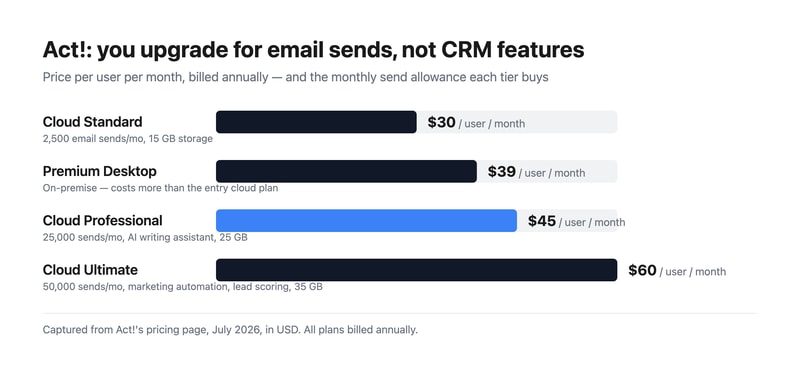
Act! sells three cloud tiers at $30, $45, and $60 per user, and what actually separates them is how many marketing emails you can send. Standard allows 2,500 a month, Professional 25,000, and Ultimate 50,000. The CRM underneath is broadly the same product throughout. Understand that and the pricing page stops looking like a capability ladder and starts looking like what it is — an email volume plan with a CRM attached.
- What it is: A long-established CRM for small and mid-sized businesses, bundling contact management with email marketing and, unusually, still offering an on-premise option.
- Best for: Small businesses that want CRM and email marketing from one vendor, and organizations with a genuine need to host data themselves.
- Pricing: Cloud Standard $30, Professional $45, Ultimate $60 per user monthly, billed annually. Premium Desktop $39. Verified July 2026.
- The honest catch: Premium Desktop costs $39 — more than the $30 entry cloud plan — so choosing on-premise is a premium, not a saving.
What Is Act!?
Act! is one of the oldest names in contact management, dating to the late 1980s and passing through several owners since. That history explains both its strengths and its reputation: it is deeply featured and genuinely mature, and it carries an interface lineage that reviewers routinely describe as dated next to newer competitors.
What distinguishes it in 2026 is scope. Most CRMs at this price handle contacts, deals, and activities and expect you to buy email marketing separately. Act! bundles both, and at the higher tiers adds marketing automation, lead scoring, quotes and payments, appointment scheduling, forms and surveys, website chat, event management, project management, and accounting integration. For a small business that would otherwise assemble four subscriptions, that consolidation is the real argument.
It is also one of very few CRMs still selling a genuine on-premise product. Act! Premium Desktop runs on your own infrastructure with networked access, which matters to businesses with data residency requirements or a firm preference for not putting their customer list in someone else’s cloud.
How Act! Works
- Cloud or desktop. Act! Advantage is the hosted line; Act! Premium Desktop is installed and managed by you.
- Email sends as the metering dimension. 2,500, 25,000, or 50,000 per month by tier — the clearest differentiator between plans.
- Contact and pipeline management. The core CRM, full-featured on every tier including the cheapest.
- Bundled marketing. Campaigns and nurture sequences from Professional, full marketing automation with lead scoring on Ultimate.
- Quotes, scheduling, forms, and chat. Standard versions from the entry plan, advanced versions from Professional.
- Cloud storage by tier. 15 GB, 25 GB, and 35 GB respectively.
Act! Pricing
Captured from Act!’s pricing page in July 2026, in US dollars. All plans bill annually.
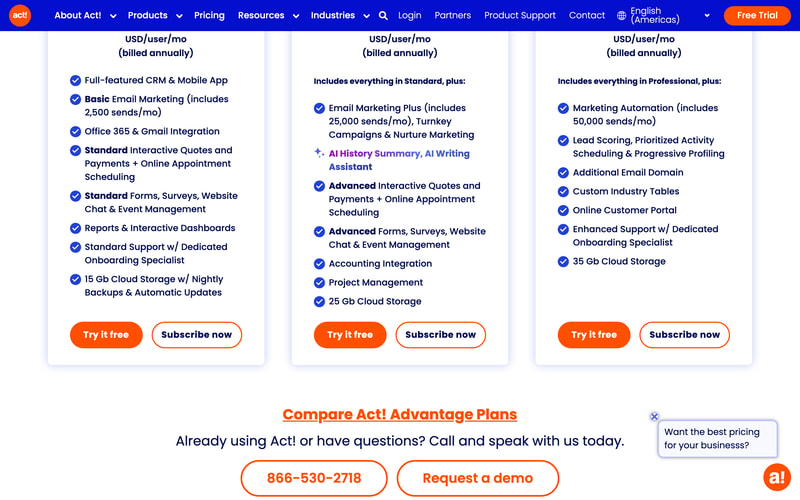
| Plan | Price/user/mo | Email sends/mo | Storage | Key additions |
|---|---|---|---|---|
| Cloud Standard | $30 | 2,500 | 15 GB | Full CRM, mobile app, Office 365 and Gmail, standard quotes, forms, chat |
| Premium Desktop | $39 | — | On your servers | On-premise deployment with networked access |
| Cloud Professional | $45 | 25,000 | 25 GB | AI writing assistant, nurture marketing, accounting integration, project management |
| Cloud Ultimate | $60 | 50,000 | 35 GB | Marketing automation, lead scoring, customer portal, custom industry tables |
What this means for your decision:
- The upgrade trigger is email volume, not CRM capability. Standard is described as a “full-featured CRM,” and it is. If you send 2,000 marketing emails a month, Professional’s extra $15 per user buys you send headroom and some marketing tooling, not a better CRM. Work out your send volume first — it is the number that picks your tier.
- 2,500 sends is genuinely tight. A list of 1,000 contacts emailed twice a month exhausts it. Any business doing real email marketing lands on Professional, making $45 the practical entry price.
- Desktop costs more than entry cloud. $39 against $30. On-premise is often assumed to be the cheaper, no-frills option; here it is a deliberate premium for control. Choose it because you need to hold the data, not to save money.
- Everything is billed annually. There is no monthly option advertised, so the free trial is the only low-commitment evaluation.
- Per-user pricing compounds normally. Five users on Professional is $225 a month, ten on Ultimate is $600.
- Consolidation is the value case. At $45 per user you are getting CRM, email marketing, quotes, scheduling, forms, surveys, chat, and project management. Assembled separately from best-in-class tools, that stack costs considerably more.
Who Should Use Act!
- Small businesses wanting one vendor. The clearest case. CRM plus email marketing plus quoting from a single subscription genuinely simplifies both billing and integration.
- Organizations needing on-premise. Act! Premium Desktop is a rare option in a category that has almost entirely moved to cloud.
- Established businesses with existing Act! data. Decades of contact history is a real reason to stay, and migration is genuinely painful.
- Teams doing moderate email marketing. Professional’s 25,000 sends covers most small-business campaigning without a separate platform.
It fits poorly for teams that prize interface quality, where Pipedrive and monday CRM are markedly more pleasant; for businesses wanting a free tier, which HubSpot CRM and Zoho CRM provide; and for sales-led organizations needing deep pipeline analytics, where dedicated sales CRMs go further.
Honest Pros and Cons
Strengths
- Genuine breadth. CRM, email marketing, quotes, scheduling, forms, chat, and project management in one subscription.
- Full CRM on the entry plan. The cheapest tier is not a crippled version of the product.
- On-premise option. Rare, and decisive for organizations with data residency requirements.
- Mature and stable. Decades of development show in feature depth.
- Bundled marketing automation. Lead scoring and progressive profiling at Ultimate, without a separate platform.
- Dedicated onboarding specialist included from the entry tier.
Limitations
- The interface shows its age. The most consistent criticism, particularly against newer competitors.
- Tight email allowance at entry. 2,500 sends pushes most marketing-active businesses to $45.
- Desktop costs more than entry cloud. $39 versus $30, which surprises buyers expecting on-premise to be cheaper.
- Annual billing only. No monthly option for a low-commitment start.
- No free tier. Where several major competitors offer one.
- Bundled tools are adequate, not best-in-class. The forms, chat, and project management are convenient rather than excellent.
Act! Alternatives and How It Compares
- Zoho CRM is substantially cheaper with a free tier, and far stronger if you use other Zoho applications.
- HubSpot CRM has a genuinely free CRM tier and a more modern interface, with costs rising sharply as you add marketing.
- Pipedrive is the better sales-focused pipeline tool, with a cleaner interface and less bundled marketing.
- Keap is the closest philosophical competitor — CRM plus marketing automation for small business — at a higher price.
- Insightly combines CRM with project delivery, which suits services businesses.
- Freshsales and monday CRM are the modern-interface options at comparable cost.
For a broader survey, browse our CRM directory.
The Verdict
Act! is a consolidation play, and judged on those terms it holds up. For $45 per user a small business gets a full CRM, 25,000 monthly marketing emails, quotes and payments, appointment scheduling, forms and surveys, website chat, event management, project management, and accounting integration. Buying those capabilities separately from category leaders would cost noticeably more and require the integrations to be your problem. If you want one vendor, one invoice, and one support number, that is a legitimate and underrated reason to choose it.
The way to price it correctly is to start from email volume rather than user count. Standard at $30 includes the full CRM, so the $15 step to Professional is buying send headroom — from 2,500 to 25,000 a month — plus marketing tooling. A business emailing a list of a thousand contacts twice a month has already exhausted Standard, which makes $45 the realistic entry point for anyone doing marketing at all. Conversely, if you genuinely only need contact and pipeline management, Standard is a complete CRM and there is no reason to move up.
Two honest caveats. The interface is the most consistent criticism in reviews, and if your team has used Pipedrive or monday, Act! will feel dated — that is a real cost in daily use, even if the functionality is there. And note that Premium Desktop at $39 costs more than entry cloud at $30; on-premise here is a deliberate premium for holding your own data, not a budget option. Choose it for control, and if control is not your requirement, the cloud plans are both cheaper and less work.
FAQ
How much does Act! cost?
Act! Advantage cloud plans are $30 per user per month for Standard, $45 for Professional, and $60 for Ultimate, all billed annually. Act! Premium Desktop, the on-premise option, is $39 per user per month. Prices were captured from Act!’s pricing page in July 2026 in US dollars. A free trial is available; there is no free tier.
What is the difference between Act! plans?
Primarily email send volume and bundled marketing. Standard includes the full CRM with 2,500 monthly sends and 15 GB storage. Professional raises that to 25,000 sends and adds an AI writing assistant, nurture marketing, accounting integration, and project management. Ultimate provides 50,000 sends plus marketing automation, lead scoring, a customer portal, and custom industry tables. The core CRM is full-featured on every tier.
Is Act! Desktop cheaper than Act! Cloud?
No — it costs more. Act! Premium Desktop is $39 per user per month against $30 for the entry cloud plan. On-premise deployment here is a premium option for organizations that need to host their own data, rather than a budget alternative. It also means you take on hosting, backups, and updates yourself, which the cloud plans include.
Is Act! still a good CRM in 2026?
It remains functional and unusually broad, bundling CRM with email marketing, quoting, scheduling, and project management in a way few competitors match at the price. Its weakness is the interface, which reviewers consistently describe as dated relative to newer tools. It suits businesses valuing breadth and vendor consolidation over daily polish, and existing Act! customers with substantial contact history.
What is Act! best for?
Small and mid-sized businesses that want CRM and email marketing from one vendor rather than assembling a stack, and organizations with a genuine requirement to host customer data on their own infrastructure. It is a weaker fit for teams prioritising interface quality, for anyone wanting a free tier, and for sales-led organizations needing deep pipeline analytics.

Compare Act! with other popular tools in the same category.
Straightforward CRM that allows you to do standard issue things like track contacts, companies, activity history (phone calls and emails). Can generate customer orders from it. Manage sales opportunities.
The reporting isn't very intuitive and there are no dashboard views.
Customer and account management. The benefit for us is a single source of record.
I like that while the design is simplistic and a bit basic, the actual product itself works well and does the job it set out to do.
The interface looks like a 1980's computer program. I feel like a coder
It feels a bit dated and doesnt give us everything we need in terms of analytics

I really like the amount of data that you can put into the database. You can put in a lot of fields. That is great when you are trying to capture a lot of custom fields.
There is no easy way to export the data. I wish the menus were more self-explaining on what does what.
I have been using it to organize exhibitors and groups for consumer shows. For someone who has multiple types of accounts, I appreciate the flexibility and custom options with this platform.
Act! allows us to manage all of our customer data and is a useful tool for reviewing historic notes relating to our customers. With several departments within our business, all can access predetermined areas with specific read and write privileges.
Act! is quite difficult to manage and perform administrative tasks. With new employees regularly requiring access to the system, learning how to use it can be a slow task and I don't believe we are taking full advantage of its features.
Act! allows us to communicate internally and review feedback left for each of our customers.
The software definitely has a lot of uses when it comes to organizing a client base. Everything from grouping, to attaching documents to your contacts, to setting appointments. It can even be integrated with a few other software platforms such as Mitel.
ACT!'s interface is fairly outdated. It's reminiscent of 90's era databases. Not unusable, and once you get a hang of it you can start zooming around it pretty easily. But the interface can become confusing and isn't very intuitive at times. There is, without a doubt, a learning curve.
Organizing a large amount of contacts, documents, and files into an easily searchable database with multiple methods of querying information. We've managed to take what would have been a records room worth of files and placed it into a database we can easily search through.

The dashboard metrics are really powerful and we can drill out the data we are looking for.
For instance when you send a mass e-mail bigger than a certain file size the process sends 6 emails and stops. No error message or warning is given. Calling tech support only recommended that I move to one of their paid mass mailing products.
ACT is an invaluable part of our data collection and contact management.
I liked how customize-able Act! is and that it's fairly easy to do. It's not so advanced that you need loads of training to figure it out. It's easy to add to client information and make changes when necessary
I found it troublesome to search for contacts; they just never seemed to populate. Also, creating templates with our letterhead was a pain. If I was doing a mass mailing the template images would move down a little with each contact. There may have been ways around these issues but I just didn't have the time to research it. Also, because it was a software on our desktop, it seemed to slow things down with it's large file size.
It was our sole CRM. It was an quick and easy solution at the time.
Their service is reliable, the program is easy to use and very self explanatory. The fields and options are very customize-able. The page organization looks nice and neat and is presented well.
It doesn't seem like they are as popular as Salesforce now. I'm not sure why. Maybe Act offers less options, or perhaps it's the price, but their competitors must offer something better in some regard.
Organizing our database of client info, sending emails to them, creating lists, tracking processes, running reports, etc.

Simple to use yet robust organization, search, and scheduling capabilities.
The biggest shortcoming is no Google integration. Difficult to sync calendar and records with phone and other outside apps. Primitive word processing integration and clunky email integration.
Maintaining communication with clients and developing new client relationships.
Keyword search, ability to create lookup and then filter by territory/company or any of the other columns
No app or cloud based access. Really need to use it on my phone sometimes when on the road or in classified meetings where laptop is checked
Customer history, notes on past and working designs, reminders
Ease of customization and access to database. Addionally, Act! Is a great option for a low end budget
database frequently has error messages and does not work
client management
I like the ease of adding customers, some of the reports available . I don't like the fact that you can have duplicate accounts without notice.
The service is terrible, it times out , act.com is FREQUENTLY not responding ...I mean EVERYDAY of WORK, it is costing me customers and efficiency and I will be looking elsewhere for a cloud data base or go back to the Desktop version. period they have no customer service if you don't upgrade and pay more ...I pay $38.33 a month that is enough ....so may be moving on soon.
I was trying to solve having used ZOHO that had limited records before you had to pay much more, and with Act! Cloud I can add as many customer accounts as I need. That's it.
You can customize the platform for your needs.
It needs to be simplified amd more user friendly for the basic or starting user.
Able to track work done, customer contacts, and create quotes.
We liked how easy it was to integrate when our company started using a CRM system.
It became very dated, very fast It also became difficult to make sure all data was up to date, and to go in and update information. We found that a lot of records became duplicated, and there was no notice of it.
We used this to build our initial CRM system. We were able to compile all customers and non customers in one place, where everyone within the company was able to access them.
The feasibility of keeping your contacts all in one place
It lacks in user-friendliness compared to Salesforce or other CRM software
Slow to load, customer service
The one-time fee, responsive support team, customizable CRM. Keeps a record of all communication with clients if linked to Outlook.
UI is not the best. Most of the functions are not intuitive. It does not work on OSX. I end up carrying two laptops around all the time, one for Act and my mac for everything else. I would not recommend this CRM to anyone just on the basis of the UI/UX.
Right now we're using Act to save contacts, generate documents like quotations, sending out marketing emails, and also for tracking communication history with clients. We also store the physical equipment bought by our contacts. For tracking leads/opportunities - not useful, we use excel sheets instead.

easy look up. You can search by a variety of ways to find the record you are looking for
screen appearance. The layout seems a little outdated and could use a facelift
we manage our contacts, export them to our email marketing software and manage our sales funnel. We are able to track future opportunities in ACT! and forecast more accurately.
I'm able to track all emails and contacts history.
Very slow system. Mobile app is not very good.
It's great for mail merges and sending groups of mails out.
Act! is a great database for keeping track of prospects. Each time I speak with a prospect, I enter all of their information along with a quick note to recap our conversation. This comes in handy when they call a year down the road and I can easily refresh my memory.
The software that we have is rather outdated. There is also no lead generation. All of the information that is in the database comes from our company inputting it.
I believe by using Act! it shows our prospects and customers that we care about them. It's nice for them to call in and not have to repeat their issues again.
I most like the ability to create fields which are easily searched.
I most dislike that it easily crashes which causes me to loose my look-up unless I have saved it as a group or query.
The problem I am solving is searching through contacts which have not been recently contacted by our company. The benefit of using ACT! is that I can save and sort through my searches.
My former business partner was already using ACT! and she felt it was effective enough and didn't want to make a change. So, I dove in head first. It does the basics, you can manage your contacts, notes, and communication. I did find it intuitive and easy to learn. Some more advanced features was relatively easy to figure out.
I love my mobile device and at the time, you couldn't do anything while mobile. I kind of remember a lot of upgrades too, that got irritating. It didn't work well with Outlook, well, it kind of worked. The bottom line, it had the basics but you had to buy additional modules to for everything and it just didn't feel like a solid and cohesive product. There are a ton of better options.
It was my CRM, it held all the data on my business contacts, notes, leads, customers, etc.
ACT! is a good solution for managing your contacts. I have only worked with it on a small business scale, and it met our needs perfectly, but I am not sure if it would be the best solution for larger corporations.
Because it is geared toward small businesses or individuals, you will eventually outgrow its capabilities.
Managing contacts to give us a 360 degree view of our interactions with our clients. It is a great CRM for small businesses.
It is a basic CRM and does the job and can be cost effective if you are on a budget
If you have been using an older version getting support can prove to be difficult (I no longer use this product but used an older version and in order to get support we were told that we would have to upgrade which was not very cost effective).
Not provided
ACT is a useful tool for the commercial real estate industry because it allows our team to track prospects and current clients easily. This is a tool we utlize on a daily basis and is easy to update and manipulate data. We are able to store an good amount of data without making any significant updates to the software.
The fact I cannot access this program outside of the office. Makes it difficult to contact to potential clients direct informaiton without being able to access remotely. Trying to connect all of our contacts to a email blast but having difficulty figuring out the proper steps in order to make that happen.
Not provided
The thing I like most about Act! by Sage is its user interface and its ease of use. I started using Act! at the first company I worked for. The majority of the sales team used Microsoft Access but since my job was business development I wanted something seperate for my own use so that I could monitor myself. After I started usaing it for a little bit I was asked to set up the software for the whole sales team.
At the time I started using ACT! there was no way to transfer content form Acess into the Sage databases. I beleive there is an easy way to do this now which would have saved me countless hours of work.
Not provided

It is a feature rich product with a long history of successful implementations across many industries. I do think that it is better suited to the SME, and has a low cost of entry too.
It is a bit clunky and the user interface perhaps doesn't look as fresh as many of the cloud solutions these days do.
Not provided

I suport a friends' business on ACT and it's not a bad tool for a 2 man shop. Extremely basic CRM capabilities. Good for contact management.
Not SaaS based and my friend would like to have a mobile option now. Also have issues with system backups and restore but I think it's a user issue.
Not provided
Like the account detail. Can keep track of many details.
Can't really get act to works universally on Laptop/Desk/top/ Phone. There is always something not working.
Keep all the cleint date in one spot.
It's rather easy to customize most things. I like that I can add categories on the fly.
The customer service and tech support is not easy to work with at all - to put it mildly. Running reports is not intuitive. The program needs to be more user friendly.
Keeps a list of my clients with room to include detailed notes. I would have liked to have the option to customize some of the headings. We also use it to create a to-do list.
I like link between database and calendar and the way that they work together.
There is a big language barrier - would like U.S. based customer support. Would also be nice to have ACT in Mac version.
Keeping an efficient client database as well as day to day calendar.