

Unclaimed: Are you working at Act!?
Act! Reviews: 3.9/5 — Good for the Price
Act! is one of the pioneer brands in its space that evolved into a customer relationship management platform, and cloud-app with a browser-based front end. It offers an integrated email marketing platform that is ideal for small to mid-sized companies. The software also has an easy-to-use dashboard designer with a good marketing automation workflow builder.

| Capabilities |
API
|
|---|---|
| Segment |
Small Business
Mid Market
|
| Deployment | Cloud / SaaS / Web-Based, Desktop Windows, Mobile Android, Mobile iPad, Mobile iPhone, On-Premise Linux |
| Support | 24/7 (Live rep), Chat, Email/Help Desk, FAQs/Forum, Knowledge Base, Phone Support |
| Training | Documentation |
| Languages | English |







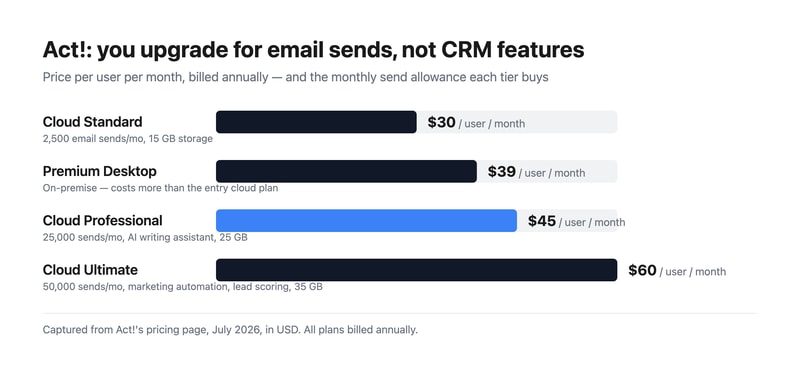
Act! sells three cloud tiers at $30, $45, and $60 per user, and what actually separates them is how many marketing emails you can send. Standard allows 2,500 a month, Professional 25,000, and Ultimate 50,000. The CRM underneath is broadly the same product throughout. Understand that and the pricing page stops looking like a capability ladder and starts looking like what it is — an email volume plan with a CRM attached.
- What it is: A long-established CRM for small and mid-sized businesses, bundling contact management with email marketing and, unusually, still offering an on-premise option.
- Best for: Small businesses that want CRM and email marketing from one vendor, and organizations with a genuine need to host data themselves.
- Pricing: Cloud Standard $30, Professional $45, Ultimate $60 per user monthly, billed annually. Premium Desktop $39. Verified July 2026.
- The honest catch: Premium Desktop costs $39 — more than the $30 entry cloud plan — so choosing on-premise is a premium, not a saving.
What Is Act!?
Act! is one of the oldest names in contact management, dating to the late 1980s and passing through several owners since. That history explains both its strengths and its reputation: it is deeply featured and genuinely mature, and it carries an interface lineage that reviewers routinely describe as dated next to newer competitors.
What distinguishes it in 2026 is scope. Most CRMs at this price handle contacts, deals, and activities and expect you to buy email marketing separately. Act! bundles both, and at the higher tiers adds marketing automation, lead scoring, quotes and payments, appointment scheduling, forms and surveys, website chat, event management, project management, and accounting integration. For a small business that would otherwise assemble four subscriptions, that consolidation is the real argument.
It is also one of very few CRMs still selling a genuine on-premise product. Act! Premium Desktop runs on your own infrastructure with networked access, which matters to businesses with data residency requirements or a firm preference for not putting their customer list in someone else’s cloud.
How Act! Works
- Cloud or desktop. Act! Advantage is the hosted line; Act! Premium Desktop is installed and managed by you.
- Email sends as the metering dimension. 2,500, 25,000, or 50,000 per month by tier — the clearest differentiator between plans.
- Contact and pipeline management. The core CRM, full-featured on every tier including the cheapest.
- Bundled marketing. Campaigns and nurture sequences from Professional, full marketing automation with lead scoring on Ultimate.
- Quotes, scheduling, forms, and chat. Standard versions from the entry plan, advanced versions from Professional.
- Cloud storage by tier. 15 GB, 25 GB, and 35 GB respectively.
Act! Pricing
Captured from Act!’s pricing page in July 2026, in US dollars. All plans bill annually.
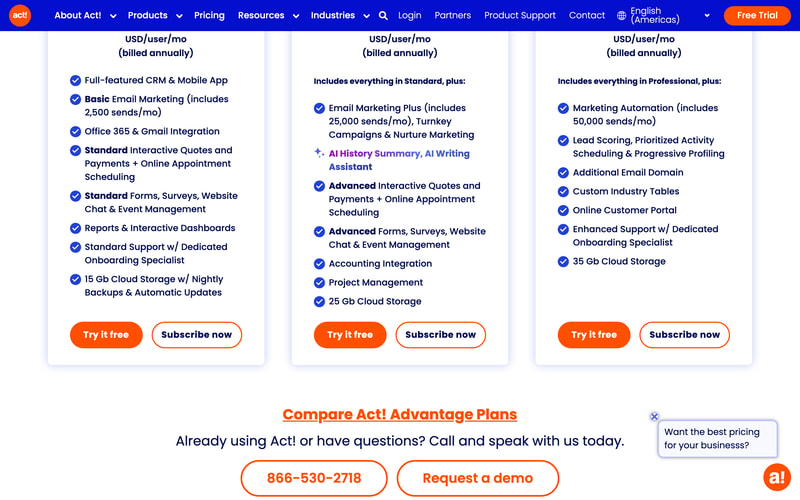
| Plan | Price/user/mo | Email sends/mo | Storage | Key additions |
|---|---|---|---|---|
| Cloud Standard | $30 | 2,500 | 15 GB | Full CRM, mobile app, Office 365 and Gmail, standard quotes, forms, chat |
| Premium Desktop | $39 | — | On your servers | On-premise deployment with networked access |
| Cloud Professional | $45 | 25,000 | 25 GB | AI writing assistant, nurture marketing, accounting integration, project management |
| Cloud Ultimate | $60 | 50,000 | 35 GB | Marketing automation, lead scoring, customer portal, custom industry tables |
What this means for your decision:
- The upgrade trigger is email volume, not CRM capability. Standard is described as a “full-featured CRM,” and it is. If you send 2,000 marketing emails a month, Professional’s extra $15 per user buys you send headroom and some marketing tooling, not a better CRM. Work out your send volume first — it is the number that picks your tier.
- 2,500 sends is genuinely tight. A list of 1,000 contacts emailed twice a month exhausts it. Any business doing real email marketing lands on Professional, making $45 the practical entry price.
- Desktop costs more than entry cloud. $39 against $30. On-premise is often assumed to be the cheaper, no-frills option; here it is a deliberate premium for control. Choose it because you need to hold the data, not to save money.
- Everything is billed annually. There is no monthly option advertised, so the free trial is the only low-commitment evaluation.
- Per-user pricing compounds normally. Five users on Professional is $225 a month, ten on Ultimate is $600.
- Consolidation is the value case. At $45 per user you are getting CRM, email marketing, quotes, scheduling, forms, surveys, chat, and project management. Assembled separately from best-in-class tools, that stack costs considerably more.
Who Should Use Act!
- Small businesses wanting one vendor. The clearest case. CRM plus email marketing plus quoting from a single subscription genuinely simplifies both billing and integration.
- Organizations needing on-premise. Act! Premium Desktop is a rare option in a category that has almost entirely moved to cloud.
- Established businesses with existing Act! data. Decades of contact history is a real reason to stay, and migration is genuinely painful.
- Teams doing moderate email marketing. Professional’s 25,000 sends covers most small-business campaigning without a separate platform.
It fits poorly for teams that prize interface quality, where Pipedrive and monday CRM are markedly more pleasant; for businesses wanting a free tier, which HubSpot CRM and Zoho CRM provide; and for sales-led organizations needing deep pipeline analytics, where dedicated sales CRMs go further.
Honest Pros and Cons
Strengths
- Genuine breadth. CRM, email marketing, quotes, scheduling, forms, chat, and project management in one subscription.
- Full CRM on the entry plan. The cheapest tier is not a crippled version of the product.
- On-premise option. Rare, and decisive for organizations with data residency requirements.
- Mature and stable. Decades of development show in feature depth.
- Bundled marketing automation. Lead scoring and progressive profiling at Ultimate, without a separate platform.
- Dedicated onboarding specialist included from the entry tier.
Limitations
- The interface shows its age. The most consistent criticism, particularly against newer competitors.
- Tight email allowance at entry. 2,500 sends pushes most marketing-active businesses to $45.
- Desktop costs more than entry cloud. $39 versus $30, which surprises buyers expecting on-premise to be cheaper.
- Annual billing only. No monthly option for a low-commitment start.
- No free tier. Where several major competitors offer one.
- Bundled tools are adequate, not best-in-class. The forms, chat, and project management are convenient rather than excellent.
Act! Alternatives and How It Compares
- Zoho CRM is substantially cheaper with a free tier, and far stronger if you use other Zoho applications.
- HubSpot CRM has a genuinely free CRM tier and a more modern interface, with costs rising sharply as you add marketing.
- Pipedrive is the better sales-focused pipeline tool, with a cleaner interface and less bundled marketing.
- Keap is the closest philosophical competitor — CRM plus marketing automation for small business — at a higher price.
- Insightly combines CRM with project delivery, which suits services businesses.
- Freshsales and monday CRM are the modern-interface options at comparable cost.
For a broader survey, browse our CRM directory.
The Verdict
Act! is a consolidation play, and judged on those terms it holds up. For $45 per user a small business gets a full CRM, 25,000 monthly marketing emails, quotes and payments, appointment scheduling, forms and surveys, website chat, event management, project management, and accounting integration. Buying those capabilities separately from category leaders would cost noticeably more and require the integrations to be your problem. If you want one vendor, one invoice, and one support number, that is a legitimate and underrated reason to choose it.
The way to price it correctly is to start from email volume rather than user count. Standard at $30 includes the full CRM, so the $15 step to Professional is buying send headroom — from 2,500 to 25,000 a month — plus marketing tooling. A business emailing a list of a thousand contacts twice a month has already exhausted Standard, which makes $45 the realistic entry point for anyone doing marketing at all. Conversely, if you genuinely only need contact and pipeline management, Standard is a complete CRM and there is no reason to move up.
Two honest caveats. The interface is the most consistent criticism in reviews, and if your team has used Pipedrive or monday, Act! will feel dated — that is a real cost in daily use, even if the functionality is there. And note that Premium Desktop at $39 costs more than entry cloud at $30; on-premise here is a deliberate premium for holding your own data, not a budget option. Choose it for control, and if control is not your requirement, the cloud plans are both cheaper and less work.
FAQ
How much does Act! cost?
Act! Advantage cloud plans are $30 per user per month for Standard, $45 for Professional, and $60 for Ultimate, all billed annually. Act! Premium Desktop, the on-premise option, is $39 per user per month. Prices were captured from Act!’s pricing page in July 2026 in US dollars. A free trial is available; there is no free tier.
What is the difference between Act! plans?
Primarily email send volume and bundled marketing. Standard includes the full CRM with 2,500 monthly sends and 15 GB storage. Professional raises that to 25,000 sends and adds an AI writing assistant, nurture marketing, accounting integration, and project management. Ultimate provides 50,000 sends plus marketing automation, lead scoring, a customer portal, and custom industry tables. The core CRM is full-featured on every tier.
Is Act! Desktop cheaper than Act! Cloud?
No — it costs more. Act! Premium Desktop is $39 per user per month against $30 for the entry cloud plan. On-premise deployment here is a premium option for organizations that need to host their own data, rather than a budget alternative. It also means you take on hosting, backups, and updates yourself, which the cloud plans include.
Is Act! still a good CRM in 2026?
It remains functional and unusually broad, bundling CRM with email marketing, quoting, scheduling, and project management in a way few competitors match at the price. Its weakness is the interface, which reviewers consistently describe as dated relative to newer tools. It suits businesses valuing breadth and vendor consolidation over daily polish, and existing Act! customers with substantial contact history.
What is Act! best for?
Small and mid-sized businesses that want CRM and email marketing from one vendor rather than assembling a stack, and organizations with a genuine requirement to host customer data on their own infrastructure. It is a weaker fit for teams prioritising interface quality, for anyone wanting a free tier, and for sales-led organizations needing deep pipeline analytics.

Compare Act! with other popular tools in the same category.
Not provided
Have to take my computer with me to use it on the road I have Deja office for the road connects to Act
I get the info on the cell thur Deja office yes I do and it works wess
The open format allows me to put in the information that I want and need. Synchronizing to Outlook gives me access to contact on my phone immediately.
Based on my needs, there is little to dislike. I used ACT starting in 2002-2004. I started using it again one year ago and wish I never left it, knowing how many contacts and information I left behind.
ACT allows me to keep track of the flow of conversations going, allowing me to not miss a step in the process. This provides greater trust, faster sales steps, and better sales results. I was #1 in the past and look to be #1 again in the future.
Act is comprehensive CRM software that allows you to integrate email and marketing along with contact information and prospecting notes.
I use an older version of ACT! (2013) so the tech support is minimal. It was purchased by Sage a few years ago so they only support the newer, web-based versions now.
It can be difficult to keep track of client information and contact notes. ACT! has helped me to keep everything in one place. The email integration has made finding communication between clients and myself much easier!
The ability to customize and really make this a system specifically for our use. We have used other CRM's in the past...and come straight back to act! as it is the only product we have found that can accommodate our needs.
When building additional contacts within a company, it often times comes up with "you are creating a duplicate record". This causes confusion but with training can be worked around. We would love the ability to access multiple databases at the same time as well.
We have several databases within act!. Our sales division, staffing division, and marketing divisions all utilize specific databases within the system. We have managed to integrate act! with our website, specifically dealing with our staffing side, which in turn has saved us over 800 man hours annually.
Easy to look up customers and contacts for quick reference.
Reporting is too complex and could be easier to gather information.
Tracking interactions with customer and contacts and sharing information among coworkers.
Available on desktop and cloud. Easy to customize. Maintain a history on activities or fields you choose. Works well with Office (word/outlook). Easy to use on a basic level (intuitive), very complete on a complex level. Very Fast. Will handle large database with lots of users. Extensive lookup's for every field are easy. Activity series are easy to create. Creating and maintaining groups of records is easy. Import and export using excel is easy. Can link and attach other databases.
Company support options leave something to be desired.
Multiple sales people with different territories work remote, changes internally with remote people work well. This program has increased our bottom line. If you feed it, it will feed you.
I like the mail merge - it's extremely easy to use unlike Microsoft Word.
adding relatives is not very easy. also i'd like to put both husband and wife's birthday in there.
We are solving the mail merge problem by using ACT instead of word. We will be utilizing the opportunities feature more as well.
I like the versatility of the program and that I can have access to my customers and review the notes all in the same folder
I wish the program was a little faster, but I think it's my computer and not the program itself
I've solved appointments that need to be addressed and that in itself has helped my business grow.
The versatility and ease of use. This program has helped me manage my contacts and appointments and allowed me to follow throught with necessary obligations I've promised my customers.
I love it! I tried out the program just as a trial and I use it all the time.
I'm able to keep accurate notes and follow up with prospects and customers as needed.
Everything I need to do, there are two or three ways of doing it. Instead of having to search through menus or toolbars to find what I'm looking for, I can quickly use a keyboard shortcut or right-click menu to get me there. SO much more convenient than SalesForce or SugarCRM where everything is move your mouse back to the menu, hover over something, click something that pops up, hover over something else, etc. I can get stuff done FAST in Act! We have also added some automation to our Act! through some third-party addons which has done wonders for making sure we enter information in the same way each time so that we can report on it and find it later. Act! has a ton of addons which are definitely worth checking out.
When I first got Act!, some of my older machines were really slow using it. Upgrading older workstations solved that problem, though. The web interface is also a mixed bag - it looks almost exactly like the Windows version. That makes learning the web interface easy, but some stuff could be changed to be more web browser friendly.
We were just using Outlook to keep track of everything we could. When it came time to share information about a customer, it basically meant we were forwarding email chains to each other. Act! solves all that by allowing us to just go to the record in the database and see the same thing as anyone else on the team. We can also keep track of phone calls in a much better way instead of just using the Notes in Outlook. We still use Outlook, but just for email.
I love that the program is so easy to use. I can train a new staff member on how to use it very quickly. We've used Act! to run every part of our business since 2004.
I would like to see a native MAC OSX version. But, my employees can still use Act! on a MAC OSX machine via Act! for Web or via Parallels.
Track sales pipeline. Follow up and follow through with support after point of sale. We also use Act! E-marketing to send out our monthly newsletter.
I use Act! on a daily basis. We use this in our office to coordinate our schedule. Track our sales funnel and cycle. We can keep all of the interactions with our prospects and customers in one place so that anybody can access them at any time. This makes working with our team much more streamlined and definitely helps with making sure nothing gets missed.
Needs some better compatibility with for the web client. (Chrome, FireFox) and needs to fix the DPI issues for higher resolution screens.
Sales tracking and keeping track of my upcoming events. It also helps me when trying to recall what i discussed with a prospect in the past if it has been a while.
I like the fact that all records and appointments are available under each corresponding contact as well as each company. There are many different features that work cohesively in this environment that are just what we need.
The only thing I don't like is that with this version I am unable to delete duplicate records without being the "main person". When I make a mistake in adding something incorrectly, I'd like the option to rectify that.
This has helped keep our sales team informed of who is handling what accounts. There is no confusion regarding what accounts are being actively pursued and what accounts need attention. The reporting feature is also very useful allowing as many different values as you'd like to pull.

I have used ACT since version 3.0 and every update brings better and more functionality in the product. It is the tool to do business in the 21st century. Much more user friendly than other products on the market and it integrates with all the other great tools available. Especially the integration with social networks is great, so you follow your contacts and explore new opportunities.
There is really nothing I dislike about this product, probably because I have been using it for a long time it is like an old friend, hard to find any faults.
My use of the product is for contracting purpose, i.e. similar to sales, as you have to make cold calls, follow up and stay on top of your activities. Love this product, it does exactly what I need it to do. The task pop-ups are my favorite, I never forget to follow up with contacts. ALso the automatic integration with outlook is wonderful, plus the dynamic groups is perfect for my needs.
Simplicity for small business management of sales contacts. Managing follow up activities was user friendly. Used this CRM tool at my former company. Perfect for group of 1-5 users.
Limitations on report generation
Not provided
Using Act is easy and their support is pretty amazing and helpful. They were able to help me recover old Act database of an old version which helped us a lot. Their video tutorials are very nice and guide your through the app to understand everything even if you are not familiar with CRM systems.
It's a bit pricy when you compare it to some other competitors and you have to pay for each device has the system so you can work in parallel with your colleagues.
Makes you handle a big amount of data, send bulk emails easily and professionally and to presonlise them to an extent.
Act can be customized with your own labels and categories. You can make it unique to your business and keep track of what you think is important. I'm an insurance broker and I can input all the vital policy information in with each customer.
I have a MAC so there is no software to download making sending out letters directly from act not possible. They really need to come out with software that is Mac friendly! I use the online version only and it works great but it could be better.
I'm able to keep track of all my active clients when their birthdays are so I can mail them a card and one glance and I know what carrier they have, what type a policy they are enrolled in and whether or not I've been paid commissions for their policy yet.

The ability to send personalized mass emails and letters.
It can be slow and a little glitchy. When I create letters or emails for merges I have to create it as the admin (log in as admin) and then to use it, I have to log out and log back in as a regular user. I wish it integrated better with Outlook. I know it can and I have it set up but it does not work and I do not know why.
It gives me the ability to categories my clients and prospects in groups and then send them specific communications that are personalized. I can send 500 communications in a day and it looks like I sent a personalized email to every one of them.
Customer contact information and record keeping.
Haven't found the mobile app to be very useful
managing customer lease expiry dates
Solid, simple to use, inexpensive, and customizable. The customizable screens and data is the greatest asset
I dislike that ACT is only available online on the cloud. I wish I could open other windows of ACT. Who knows maybe the cloud. I have so many POC that it would be prohibitive to have on the cloud
Act is is my CRM software. Once again it is easy to record data, make changes, customize and I like that it save work on screen automatically

One of the strengths of Act! CRM is its customizable interface, which allows users to tailor the software to their specific needs and workflows. The software also integrates with a wide range of third-party applications, such as Microsoft Outlook and QuickBooks.
Overall, Act! CRM is a comprehensive and flexible CRM solution that can help businesses streamline their sales and marketing efforts.
Act! CRM is a customer relationship management software that helps businesses organize and manage customer information, sales leads, and marketing campaigns. Some features of Act! CRM includes contact and lead management, sales forecasting, and marketing automation
Retention of all documents and correspondence. Customer support is awesome
Updates, we can download to server and push to users
Client management
Act! is used in my organization frequently to manage and follow up on leads, and its performance has been superb. It is an easy-to-understand platform and makes it easy to manage customer databases, sales, and marketing-related processes. I love its calendar feature; it makes everything more straightforward and organized.
It is not very open to integrating with many email applications, but it is limited.
Act! is excellent for us; it has allowed us to manage our marketing and CRM more efficiently and have a clearer perception of sales flow and salesperson performance. Tracking leads and sales are straightforward and generate excellent reports, which help make crucial decisions for the organization's growth.
ACT has some of the very straightforward tools when it comes to CRM. I can easily create a new contact, schedule meetings, calls with my clients. This tool is especially useful when you have lots of contacts. Right now I have about 2500+ contacts and I don't miss calling or emailing any of them due to the alarm feature of ACT, I get alarms for high priority meetings or calls. I can also automate email on various occasions or when a customer's AMC is about to expire.
ACT is not available on-premises anymore, although the cloud service is good now but no option for installed application anymore. While working on the same contact, it becomes a little-bit laggy.
I have primarily solved the issue of contacting clients on time, and automating emails on their birthdays, sales call, service renewal. Work has become much easier since we started using ACT.
Agir! permite que você se conecte a detalhes de contato e edições e rastreie interações e relacionamentos, incluindo oportunidades e status, entre outros. Ele permite que suas equipes de vendas classifiquem os clientes para que possam entregar campanhas de e-mail personalizadas com conteúdo e mensagens direcionadas. Você pode manter o controle de eventos e programações com um calendário compartilhado embutido no software.
As coisas seriam duas vezes mais confiáveis se você estivesse executando seu próprio e-mail ou processador de texto, em vez do Microsoft Outlook de passagem. Agir! anteriormente tinha coisas com mais integração. Teria sido bom se isso fosse levado em consideração. Parece que a Microsoft parou de jogar bem.
Agir! é um software danado. Muitas de suas funcionalidades são simplesmente fantásticas! Em primeiro lugar, quase consigo manipular meu banco de dados com o próprio software. A sincronização remota do banco de dados é simplesmente ótima!
The best part of Act is: 1. Complaint Management Software Implementation 2. CRM Software Integration 3. Best Customer Engagement Platform 4. Available as iPad CRM 5. Online CRM View 6. Small Business Can Easily Use This CRM Software
When searching for a person, it doesn't give you the option of having similar names - the spelling must be exact.
We want to use this as one place CRM software.

After input of a contact, reports can be configured with numerous choices.
New versions can easily be confused with older versions, and new versions appear too quickly when I don't require new features.
Easy to narrow focus of reports and make sales followup easy with auto email reminders set to preferences.
The data layout and reports are well put together
Almost too many "bells and whistles". It can be a little overwhelming for the "simple-minded"
Accessing customer data all from ONE source. A real time saver.
I've been using ACT since 1996. I like its easy customability, ie. I can add fields easily and I can change my template quickly whenever I need to start recording a new attribute for our database. The new email integration is great. Finally, I can quickly determine who is opening my emails and clicking on any hyperlinks I provide in my eblasts.
I wish that our ACT! could integrate with our Quickbooks Online. I had this integration several years ago when I was a single user and it was great. I miss being able to quickly determine how much a customer had bought from us and what their payment practices were.
As I grow ever older (i'm 63), my memory gets ever worse. ACT! ensures that all important followups are done in a professional and timely manner. Also, if ever a customer claims someone that I don't think is accurate, I can look at my ACT notes and quickly determine if I really offered them the extra discount or warranty extension that they think I gave them.