

Unclaimed: Are you working at Adobe Lightroom?
Adobe Lightroom Reviews: 4.5/5 — Highly Rated
Designed specifically for photo editing, Adobe Lighting is one of the most popular tools in the market used by professional photographers. Similar to photoshop, it’s considered a gold standard in editing, with a host of pre-sets available to help transform images in minutes. The platform is straightforward, and easy to use and makes it very easy to edit images using sliders, gradient, and brush adjustment tools. The platform is customizable and comes with numerous intelligence features such as facial detection that helps organize images easily.

| Capabilities |
AI
API
|
|---|---|
| Segment |
Small Business
Mid Market
Enterprise
|
| Deployment | Cloud / SaaS / Web-Based, Desktop Mac, Desktop Windows, Mobile Android, Mobile iPad, Mobile iPhone |
| Support | 24/7 (Live rep), Chat, Email/Help Desk, FAQs/Forum, Knowledge Base, Phone Support |
| Training | Documentation |
| Languages | English |
Adobe Lightroom Pros and Cons
- Convenient, customizable, and easy to use environment
- Blurring and fixing tools
- Pre-sets and filters available
- Camera and lens-based corrections
- Brush and gradient adjustments
- Fewer options than Photoshop
- No layers and blending modes





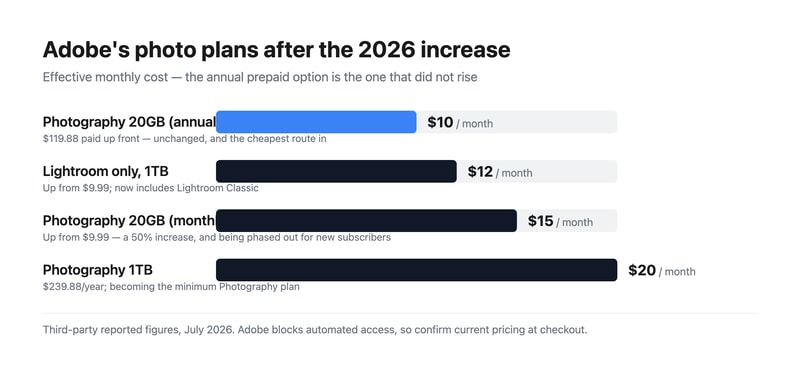
Adobe Lightroom remains the standard for photo editing and cataloguing, and Adobe just raised the monthly Photography Plan from $9.99 to $14.99 — a 50% increase. The annual prepaid option at $119.88 was not raised, which means the same plan now costs either $9.99 or $14.99 a month depending purely on how you choose to pay. That single detail is worth more to most readers than any feature comparison.
- What it is: Professional photo editing and cataloguing software built around non-destructive edits, presets, and library management.
- Best for: Photographers processing volume, where cataloguing and batch editing matter as much as the edits themselves.
- Pricing: Photography 20GB reported at $14.99/mo monthly or $119.88/year prepaid. Lightroom-only 1TB $11.99/mo. Photography 1TB $19.99/mo. Verified via third parties in July 2026.
- The honest catch: The cheap 20GB plan is being phased out for new subscribers, making the $19.99 1TB plan the effective entry point going forward.
What Is Adobe Lightroom?
Lightroom is two products sharing a name, and the distinction matters when you buy. Lightroom Classic is the desktop-first application built around a local catalogue, and it remains what most working photographers use. Lightroom (sometimes called Lightroom CC) is the cloud-native version that syncs across desktop, mobile, and web. Recent plan changes have blurred this: the Lightroom-only subscription now includes Lightroom Classic, which it previously did not.
The core proposition has not changed in years, because it does not need to. Lightroom handles non-destructive raw processing, meaning your original files are never altered and every adjustment is revocable indefinitely. Around that sits the catalogue — keywording, ratings, collections, and search across a library of hundreds of thousands of images — which is the part photographers find hardest to leave.
Its enduring advantage is batch work. Editing one photograph well is something many applications do. Applying a consistent treatment across four hundred photographs from a wedding, then finding a specific frame two years later, is where Lightroom’s design pays off and where the cheaper alternatives are still meaningfully behind.
How Lightroom Works
- Non-destructive editing. Adjustments are stored as instructions, leaving the original raw file untouched.
- Catalogue and keywording. The organizational layer, and the main reason long-term users stay.
- Presets and batch processing. Apply a look across hundreds of images, then refine individually.
- Masking and AI selection. Subject, sky, and object selection have improved substantially in recent releases.
- Cloud sync. Available on the cloud-native version, with storage as the metered dimension.
- Photoshop pairing. The Photography Plan bundles both, and round-tripping between them is seamless.
Adobe Lightroom Pricing
Adobe blocks automated access from our infrastructure, so figures are third-party reported for July 2026.
| Plan | Reported price | Storage | Includes |
|---|---|---|---|
| Photography (annual prepaid) | $119.88/year (~$9.99/mo) | 20 GB | Lightroom, Lightroom Classic, Photoshop |
| Lightroom single app | $11.99/mo (was $9.99) | 1 TB | Lightroom and Lightroom Classic |
| Photography (monthly) | $14.99/mo (was $9.99) | 20 GB | Lightroom, Lightroom Classic, Photoshop |
| Photography 1TB | $19.99/mo ($239.88/year) | 1 TB | Lightroom, Lightroom Classic, Photoshop |
What actually decides your cost:
- The billing term now matters more than the plan. The monthly Photography Plan rose 50% to $14.99 while the annual prepaid stayed at $119.88. Paying up front is roughly $60 a year cheaper for identical software. If you are going to use Lightroom for a year, prepaying is close to a free $60.
- The 20GB plan is being retired for new subscribers. The 1TB Photography Plan at $19.99 is becoming the minimum available. Existing subscribers on 20GB should think carefully before cancelling, because coming back may cost double.
- The Lightroom-only plan got better and more expensive. Up to $11.99 from $9.99, but it now includes Lightroom Classic and 1TB of storage. For a photographer who genuinely does not use Photoshop, this is a reasonable deal.
- Storage is the real upgrade trigger. 20GB is very little for raw files. Anyone shooting regularly and syncing to the cloud will exhaust it, which is precisely why the 1TB tiers exist.
- There is no perpetual licence. Stop paying and you lose editing access, though your original files and exported images remain yours. This remains the most-cited objection to the whole model.
Who Should Use Lightroom
- Photographers processing volume. The clearest case. Batch editing and cataloguing across thousands of images is what this software is uniquely good at.
- Anyone shooting raw. Raw processing quality and the non-destructive workflow are genuinely excellent.
- Photographers who also need Photoshop. The Photography Plan bundles both, which is far cheaper than the single-app Photoshop subscription alone.
- People with large existing catalogues. The switching cost is real, and the catalogue is usually why staying is the rational choice.
It fits poorly for casual photo editing, where free tools and phone applications are entirely sufficient; for anyone who objects to subscriptions on principle, since no perpetual licence exists; and for photographers wanting to own their software outright, where Skylum Luminar Neo and Corel PaintShop Pro offer one-off purchases.
Honest Pros and Cons
Strengths
- Best-in-class cataloguing. Nothing else manages a large photo library as well, and this is the real moat.
- Excellent raw processing. Consistently strong across camera systems.
- Genuinely powerful batch editing. Where the time savings actually come from.
- Photoshop included on the Photography Plan. Very good value if you need both.
- Strong AI masking. Subject and sky selection have improved markedly.
- Industry standard. Presets, tutorials, and workflows are built around it, which lowers the cost of learning.
Limitations
- A 50% increase on the monthly plan. From $9.99 to $14.99, which is a substantial rise for existing users caught on monthly billing.
- The cheap 20GB plan is being phased out. Pushing new subscribers toward $19.99.
- No perpetual licence. Access ends when payment does.
- 20GB is impractical for raw workflows. The entry storage tier is small enough to feel like a funnel.
- The Lightroom versus Lightroom Classic split confuses buyers. Two products, one name, different workflows.
- Lightroom Classic is resource-hungry. Large catalogues demand real hardware.
Adobe Lightroom Alternatives and How It Compares
- Skylum Luminar Neo is the leading subscription-free alternative, with strong AI editing and a one-off purchase option, though its cataloguing is weaker.
- Adobe Photoshop is the companion rather than the competitor — pixel-level work against Lightroom’s catalogue and raw processing.
- Adobe Photoshop Elements is Adobe’s buy-once option, though since the 2025 version it is a three-year term licence rather than a perpetual one.
- Corel PaintShop Pro and CorelDRAW Graphics Suite offer perpetual licences for editing and design respectively.
- Canva covers quick social and marketing edits, and is not a raw workflow tool at all.
- Capture One is the serious professional alternative, particularly favoured for tethered studio work and colour handling.
For a broader survey, browse our photo editing directory.
The Verdict
Lightroom is still the right answer for most photographers, and the reason is the catalogue rather than the editing. Plenty of applications process a raw file beautifully. Very few let you apply a consistent look to four hundred images, then locate one specific frame from three years ago by keyword in seconds. That capability compounds with library size, which is exactly why photographers who have used it for years rarely leave.
The pricing deserves clear-eyed attention this year. A 50% rise on the monthly Photography Plan, from $9.99 to $14.99, is a significant increase for a mature product. But the annual prepaid option held at $119.88, so the practical advice is simple and worth acting on: if you intend to use Lightroom for a year, prepay and save roughly $60 for identical software. Paying monthly is now the expensive choice for no benefit other than flexibility.
The strategic change is the retirement of the 20GB plan for new subscribers, which makes $19.99 the effective entry price going forward. If you are currently on a 20GB plan, that is a reason to keep it rather than cancel and return later. And if the subscription model itself is the objection, this is a good moment to look seriously at Luminar Neo — the gap in editing quality has narrowed considerably, even if the gap in cataloguing has not. Note that Adobe’s own Photoshop Elements is no longer a true escape from time-limited licensing: since the 2025 version it expires three years after activation.
FAQ
How much does Adobe Lightroom cost in 2026?
Reported figures put the Photography Plan with 20GB at $14.99 per month billed monthly, or $119.88 per year prepaid — an effective $9.99 a month. The Lightroom-only plan with 1TB is $11.99 monthly, and the Photography Plan with 1TB is $19.99 monthly or $239.88 annually. Adobe blocks automated access from our infrastructure, so confirm current pricing at checkout.
Did Adobe raise Lightroom’s price?
Yes. The monthly Photography Plan rose from $9.99 to $14.99, a 50% increase, and the Lightroom single-app plan rose from $9.99 to $11.99 while gaining Lightroom Classic and 1TB of storage. Notably, the annual prepaid Photography Plan stayed at $119.88, so prepaying for the year avoids the increase entirely and saves roughly $60 against monthly billing.
What is the difference between Lightroom and Lightroom Classic?
Lightroom Classic is the desktop-first application built around a local catalogue, and it is what most professional photographers use. Lightroom is the cloud-native version that syncs across desktop, mobile, and web. They share editing capabilities but differ substantially in workflow and file management. Recent plan changes mean the Lightroom-only subscription now includes Classic as well, which removes what used to be a common purchasing mistake.
Can I buy Lightroom outright instead of subscribing?
No. Adobe sells Lightroom only by subscription, and editing access ends when payment stops, although your original files and any exported images remain yours. If a perpetual licence matters, Skylum Luminar Neo and Corel PaintShop Pro are the leading alternatives. Adobe Photoshop Elements is a one-off purchase but no longer perpetual — since the 2025 version its licence expires three years after activation.
What is Lightroom best for?
Photographers working at volume who need cataloguing and batch editing as much as image adjustment — weddings, events, commercial shoots, and any workflow involving hundreds of raw files at a time. It is more than most casual users need, and its subscription-only model makes it a poor fit for anyone who edits occasionally or wants to own their software.

Compare Adobe Lightroom with other popular tools in the same category.
I like that I can edit all my images at once
Hard to navigate when you are new to the system.
Way quicker editing across large projects. Not having to edit images individually.
I love lightroom for its ease of adding presets.
I still can't figure the program out after using for a bit. Probably because I learned photoshop first, that's what I'm used to, I expect it to work the same, but that is not the case. overall, that is not the products fault, but the user's.
quick photo editing
Before and after comparisons side by side
I can do editing just as well on VSCO cam mobile app
It’s helpful when volunteers take bad pictures that I have to make easily viewable. Curves and such.
I like the option of editing multiple photos at the same time.
Slightly confusing to me when looking through folders and importing images.
I rarely use Lightroom at our business. I believe it be a very helpful tool however the ease of use with Camera Raw wins me over.
I haven't had enough experience to comment on what I like best
I am an intuitive person who trained myself on Quark, Photoshop, Indesign, Illustrator, Dreamweaver, etc.... but find this difficult for some reason.
wanted to edit large quantities of photos
the use of it’s cataloging . the ease of retouching and integration with photoshop.
it’s overly complicated to use.. this is not an easy application to understand. it takes more than a lot of practice to feel at ease with it.
composing images for advertising.
Cataloging is the key to this software. Some people find the software maddening slow. I'm one of them. I still use it for the data management. I'm hopeful that someone will step up and take this over from Adobe.
As I said before, it's slow and clunky on even the most modern machines. The system doesn't allow you to place your catalog on a NAS, which is annoying (though I have found a workaround.)
The benefits are keeping a local archive of shoots, but it complements PhotoShelter's products. I could never completely rely on it as a professional photographer.
I like its user-friendly intuitive interface.
I dislike that it can take a long time to process and save files.
Photo organization
The photo edits allow you to use different filters, which is really nice.
Its really confusing. I think sometimes the easier the better, there are so many options for edits it's overwhelming
Editing photos
Offers a quick and easy way to edit numerous images without destroying the originals
It may actually be too lite compared to the full version of Photoshop and may not be appropriate for more advanced profesionals
Touching up and editing of professional profile pictures and company logos
I liked the way it captured the photos and brought the light out in them. I also liked how they downloaded so quickly and how it sized it
the fact it is hard to put the words you want in and hard to put them in with the font size that fits the image
speed in making the banners and window art on the windows of the restaurants
I like this software and use it on regular basis. But there are lot of things they need to improve
I think lightroom should offer save as.. option for edited picture. This is crucial for user.
I use it edit official photos and personal photos.
I use Lightroom when I'm bulk editing photos from events with inconsistent lighting or levels.
Lightroom isn't always intuitive, and I wish it more easily integrated with other applications.
Again, I have successfully used Lightroom when I have a series of headshots that were taken in the same spot but in different lighting conditions. This is especially useful when I'm taking pictures of individuals who are part of a cohorted group.
Easy to use right away. Great for my health and wellness business showing before and after’s.
It would be nice if they had a few more editing options. I was under the impression there was more to it than what I actually got.
I’m in the health and wellness business and I make ads using Lightroom I also make before and Afters for customers and for ads as well.
I like how this program helps you organize your assets and find images quickly with the use of keywords and tags. I can do quick editing within the program and do this editing in batches. It backs up my images on the fly to the cloud. It's recent update to the interface looks really nice and looks a little more intuitive than it was before.
I disliked how hard it was for me to catch on in it's previous version. It was not an easy program for me to understand right away. I worked with it for about a week on and off then got impatient. Now that I'm back on it, I see there was some updates to it that look easier to understand when you're in a hurry. I am not fond of the way it stores to only the Cloud. I don't see an option to save any of my images to a particular Library. That is important for ease of use.
Once I get the hang of this program I'll be excited to have more organization of our image assets. It will save a ton of time quickly finding images.
I like that it gave me features to edit photography.
It’s really hard to use, without tutorials.
I’ve used it to sharpen images I took that weren’t in focus, and it’s good to change lighting. It’s basically a studio in the form of a software.
Integration with Photoshop is this program's best feature. Being able to send photos between the two programs with little overhead is a big plus.
Unintuitive UI, and slow-moving when it comes to loading in photos. The way LR lays out the UX is very confusing, and while I'm sure I could adapt to the program's quirks, it hardly seems worth the trouble.
Creating contact sheets and bulk editing with LR is useful when I need it.
There are so many options to modify and manage photos.
Can't say I don't like it, it's just not what I was looking for.
Nothing for business. More for my hobby.
I really don't like this program. I have had to try to learn it without any training, and it is not user friendly.
pretty much everything about it, and the rest of the Photoshop suite.
None.

Ability to add unique lighting to projects.
Sometimes overly complicated for my needs
It’s nice to be able to add unique lighting effects to my projects.
I don't really like anything about Lightroom, but I guess the ability to organize and tag photos from the program is useful.
I don't really understand the point of Lightroom. Photoshop and Bridge together offer a much better range of editing options and to me, the user interface is much easier to learn because it more closely mimics other Adobe programs.
We use Lightroom mainly to sort and organize our photos when we upload a batch. It is quicker than going through Bridge through Photoshop for this purpose.
Light room is a robust and fluid-to-use raw photo editor and organizer. It has excellent photo management and organization tools. The best management tools on the market today from its closes competitors. The layout is fluid and for the most part nicely laid out with a one or two faults. The basic editing tools are great and simple to use. The ease of use is by far lightroom's best feature, no over thinking just right out in front for you.
The speed. Lightroom's speed is unacceptable for a top of the line photo editing software. It is the slowest on the market for a raw editor. Something as simple as changing modules takes way to long. If you have to important an large project, you mind as well start it grab lunch and take a nap because it will be all day. Also there are outdated features like slideshow and web panel that have not been updated in years. Face detection and tagging is buggy and not very good.
Lightroom allows me to organize and manage my photos extremely well. I can add keywords, captions and copyright with ease. Culling it very simple and grouping almost 2nd nature. The plugin feature allows me to use lightroom as my management tool and an outside software as my editor of choice. Capture One is the only one coming close to lightroom's management capabilities but still falls short.
The way editing is so accessible and self-explanatory
I think the toolbar could be set up differently
The ability to have more control over raw photo files.
I'm a longtime user of the Adobe suite of design products and like the integration with Photoshop and other products in the suite. Despite my lack of personal results, I think I will eventually find it useful.
I have to say that, despite making several attempts and watching 2 video series, I still have trouble moving from the Aperture way of doing to the Lightroom method.
Since I have yet to get the hang of it, I have to state that I have not benefitted or solved any problems.
Is very easy to use already has many predetermined photographic effects that look amazing, as always the layer system is very necessary, if you are starting in the world of the photographic edition is good to use it for some things, Covers many needs in few cliks, when working by parameters allows to create different versions of the same image, are the Virtual copies. These allow you to have a camera original hard disk and in your Lightroom catalog several views of that image with different development without duplicating the image.
Is only for lazy in my opinion because all these effects and more can be done with photoshop is little margin of editing that has since the effects come predetermined, useful for simple touch-ups, only serves for photo retouching, can not be used for any other branch of graphic design, when you rearrange the photos and change them,lightroom gets confused and you have to re-link the files to it, so we need to be very organized with our photo archive from the beginning.
only photo retouching, To carry out extremely fast and quality work, Always work together with photoshop for better results, for example, is ideal for developing raw files, allows us to have an optimized workflow, do general retouching, order photo collections, combine files and editing functions in a simple way, among other things. But going further, Ps comes into action with many possibilities to make a tighter, creative and artistic process. It allows us to design over the photo and intervene, make complex selections, assemblies and use sophisticated brushes, among other things.

the user-friend ui makes it easy to make subtle changes to your imagery.
How restricted the software is to Photoshop however it was never designed for complex editing so that is no fault of the developers.
none really as my preference lays with photoshop.
I liked how the pictures turned out in the end
I felt like it was so much work to get a good final product. It would take me hours and hours to just get one finished product.
I was able to get to pictures into one. So when I had 2 different pictures and I wanted them together I was able to get them to be together.
I like how it makes picturesque lighter even if it’s taken at night!
There’s nothing that I hate about this app!
I take pictures at night and then I use Lightroom to edit them which makes the pictures turn out beautiful and the little things stand out