Unclaimed: Are you working at Adobe Photoshop Elements?
Adobe Photoshop Elements Reviews: 4.3/5 — Solid Choice
Adobe Photoshop Elements is a cloud-based graphic design software designed to help businesses create and edit images via a centralized platform. It offers built-in editing tools with various image effects, colored filters, and patterns or symbols for easy designing. It also supports integration with several third-party applications and in-house Adobe tools.

| Capabilities |
AI
|
|---|---|
| Segment |
Small Business
Mid Market
Enterprise
|
| Deployment | Cloud / SaaS / Web-Based, Desktop Mac, Desktop Windows |
| Support | 24/7 (Live rep), Chat, Email/Help Desk, FAQs/Forum, Knowledge Base, Phone Support |
| Training | Documentation |
| Languages | English |






Photoshop Elements used to be the answer for people who refused to rent software. It is not any more. Starting with the 2025 release, Adobe replaced the perpetual licence with a non-renewing three-year term: you pay once, and three years after you redeem the code the application stops working. That change is the single most important thing to know about this product, and Adobe did not make much noise about it.
- What it is: A consumer photo editor with Photoshop’s core capabilities in a guided, approachable interface.
- Best for: Enthusiasts who want capable editing without a subscription, and who accept a fixed three-year horizon.
- Pricing: $99.99 for Elements 2026, $149.99 bundled with Premiere Elements, $79.99 to upgrade. Reported July 2026.
- The honest catch: The three-year clock starts when you redeem the code, and when it expires only the Organizer remains accessible.
What Is Photoshop Elements?
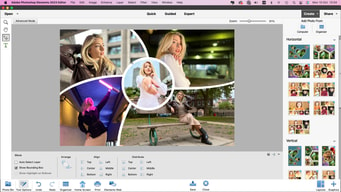
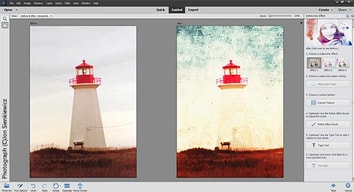
Photoshop Elements is Photoshop for people who do not want to learn Photoshop. It carries a substantial share of the full application’s editing capability — layers, selections, retouching, raw handling — wrapped in guided edits that walk you through a result step by step rather than assuming you know which tools to combine.
For a long time its defining feature was commercial rather than technical: it was the Adobe product you could buy outright. In a portfolio that moved wholesale to Creative Cloud subscriptions, Elements remained a one-off purchase with a serial number, and that made it the standard recommendation for anyone who objected to renting software.
That is no longer accurate. Elements 2025 and 2026 ship as three-year term licences activated by a redemption code. It is still a single payment with no recurring fees — genuinely different from a subscription — but it is time-limited, and when the term ends the application becomes inaccessible apart from the Organizer for viewing your catalogue.
How Photoshop Elements Works
- A single payment, a fixed term. $99.99 buys three years, not perpetuity.
- The clock starts at redemption, not purchase, so the code can sit unused without burning the term.
- Guided Edits. Step-by-step workflows for common tasks, which is the product’s distinguishing feature.
- Organizer. Cataloguing and tagging, and the only component that survives licence expiry.
- AI-assisted tools. Selection, sky replacement, and subject isolation drawn from Adobe’s wider research.
- No cloud dependency for editing, unlike Lightroom’s cloud-native tier.
Photoshop Elements Pricing
Adobe blocks automated capture, so figures are third-party reported for July 2026.
| Option | Price | Term |
|---|---|---|
| Photoshop Elements 2026 | $99.99 | 3 years, non-renewing |
| Upgrade from a prior version | $79.99 | 3 years, non-renewing |
| Photoshop + Premiere Elements | $149.99 | 3 years, non-renewing |
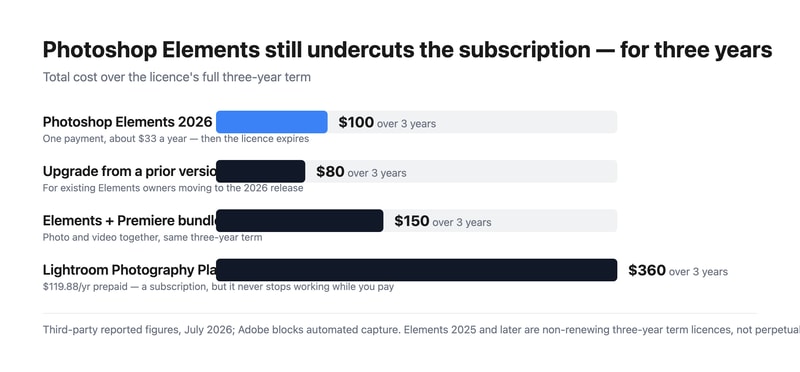
What this actually means:
- It is still much cheaper than the subscription. $99.99 over three years is about $33 a year, against $119.88 a year for Adobe’s Photography Plan — roughly a quarter of the cost. The change to term licensing narrowed the gap in principle but not in price.
- But it is no longer permanent, and that was the point. People chose Elements specifically to escape time-limited software. A three-year term is a longer lease, not ownership, and anyone recommending it as a perpetual alternative — including a great many published reviews and comparisons — is now wrong.
- The clock runs from redemption. Buying a code and not redeeming it does not consume the term, which is a small but genuine planning advantage if you buy during a sale.
- The Organizer survives expiry. You keep access to your catalogue and can still see your images; you lose the editor. That is better than losing everything, and worth knowing before the term ends.
- The upgrade path costs $79.99. So the realistic long-run pattern is buying in every three years at roughly $27 a year, which remains far below the subscription.
- The bundle is good value if you edit video. $149.99 for both Photoshop and Premiere Elements against $99.99 for one.
Who Should Use Photoshop Elements
- Enthusiast photographers avoiding subscriptions. Still the clearest case, provided the three-year horizon is understood and accepted.
- People who want guided workflows. Guided Edits genuinely help those who know what result they want but not which tools produce it.
- Families and hobbyists. Organizer plus straightforward editing covers most personal photo work.
- Anyone needing Photoshop-class editing occasionally. Paying $33 a year rather than $120 for capability you use intermittently.
It fits poorly for professional workflows, where Lightroom and Photoshop are the standard and the subscription is a cost of business; for anyone who genuinely requires permanence, where Skylum Luminar Neo and Corel PaintShop Pro still offer perpetual options; and for quick social graphics, where Canva is faster and free.
Honest Pros and Cons
Strengths
- Far cheaper than the subscription. Roughly $33 a year against $120 for the Photography Plan.
- One payment, no recurring billing. Still meaningfully different from a subscription.
- Guided Edits. The best implementation of assisted editing in a consumer tool.
- Real Photoshop capability. Layers, selections, and retouching from Adobe’s own engine.
- The Organizer outlives the licence. Catalogue access is retained after expiry.
- The redemption clock is user-controlled. Buy in a sale, redeem when ready.
Limitations
- No longer perpetual. The three-year term is the defining change and it is easy to miss.
- Most published reviews are out of date. Anything describing Elements as buy-once-keep-forever predates the 2025 release.
- The editor stops working at expiry. Only the Organizer remains.
- Weaker than Lightroom for volume. Cataloguing and batch processing are not comparable.
- No cloud sync across devices in the way the subscription products offer.
- Adobe was quiet about the change, which is the fair criticism here.
Photoshop Elements Alternatives and How It Compares
- Adobe Lightroom is the subscription route, far better for volume and cataloguing, at roughly four times the annual cost.
- Adobe Photoshop is the full professional application, bundled with Lightroom on the Photography Plan.
- Skylum Luminar Neo is now the leading genuinely perpetual option, with strong AI editing.
- Corel PaintShop Pro remains a buy-once Windows alternative.
- Canva covers quick social and marketing graphics, free and much simpler.
- GIMP is the free open-source option, capable but with a considerably steeper learning curve.
For a broader survey, browse our photo editing directory.
The Verdict
Photoshop Elements remains a good product and, on price alone, a strong one. Roughly $33 a year for Photoshop-derived editing with genuinely useful guided workflows is a quarter of what Adobe’s Photography Plan costs, and the Guided Edits are the best implementation of assisted editing in any consumer photo tool. For an enthusiast who edits occasionally and wants real capability without a monthly bill, it still makes sense.
What has changed is the reason many people chose it. Elements was the Adobe product you could own — a single payment, a serial number, software that kept working. Since the 2025 release it is a non-renewing three-year term licence: pay once, redeem the code, and three years later the editor stops opening. The Organizer survives so you keep access to your catalogue, which softens the landing, but the editor does not. That is a longer lease than a subscription, not ownership, and it changes the recommendation materially.
Two practical consequences follow. First, treat any review or comparison that calls Elements perpetual as out of date — a great deal of published material still does, because Adobe was not loud about the change. Second, if permanence is genuinely your requirement rather than just avoiding monthly billing, Elements no longer meets it and Luminar Neo or PaintShop Pro do. If what you actually wanted was to avoid a subscription and pay far less, Elements still delivers that comfortably, and the $79.99 upgrade every three years keeps the effective cost near $27 a year. Just buy it knowing what you are buying.
FAQ
Is Photoshop Elements still a perpetual licence?
No. Starting with the 2025 release, Adobe replaced the perpetual licence with a non-renewing three-year term licence activated by a redemption code. Elements 2024 and earlier used serial-number activation and remained usable indefinitely. When a current licence expires three years after redemption, the editor becomes inaccessible, though the Organizer remains available for viewing your catalogue.
How much does Photoshop Elements cost?
Reported pricing for July 2026 is $99.99 for Photoshop Elements 2026, $79.99 to upgrade from a previous version, and $149.99 for the bundle with Premiere Elements. All are one-time payments covering a three-year term with no recurring fees. Adobe blocks automated access from our infrastructure, so confirm current figures at checkout.
When does the three-year term start?
At redemption, not purchase. The licence is activated by a redemption code, and the three-year clock begins when you use it. That means buying during a sale and redeeming later does not consume the term, which is a small planning advantage. Once redeemed, the term runs continuously regardless of how much you use the software.
Is Photoshop Elements still cheaper than a subscription?
Substantially. At $99.99 for three years the effective cost is roughly $33 a year, against $119.88 a year for Adobe’s annual prepaid Photography Plan — about a quarter. Upgrading every three years at $79.99 brings that closer to $27 a year. The term change altered what you own, not the price advantage, which remains large.
What is Photoshop Elements best for?
Enthusiast and hobbyist photographers who want Photoshop-class editing with guided assistance and no monthly billing, and who accept a three-year licence horizon. It suits occasional and family photo work well. It is a poor fit for professional volume workflows, where Lightroom’s cataloguing is far superior, and for anyone whose actual requirement is permanent ownership rather than avoiding subscriptions.

Compare Adobe Photoshop Elements with other popular tools in the same category.

All the options in photoshop is very likely. Compared to others it has a nice interface. Thats because it very useful. So thati can easily edit my photos and can explore more options and effects. Some of the effects are unique init
The system will down when i use it. Then i dont have any dislike on it.
I got many effects. So i can apply each effect to each photos. It is easy to navigate and explore in photoshop. I switched to photoshop because of this easiness
I downloaded the original Photoshop Elements many years ago, I really like the new updates including the animation tools.
Adobe Photoshop products are quite expensive, you have to choose between Lightroom and Elements because getting both is not cost effective.
It's a solid photo editing software with a couple more features than Lightroom.
I mainly use this for replacing skys in pictures for listings photos that need some improvements. It's simple and saves me a ton of time and money doing it myself instead of outsourcing it.
There isn't much to dislike honestly, I got this for a specific purpose but ended up using it for marketing pieces, the web and more.
I'm able to transform real estate exterior photos with ease and it's simple and ultra professional

I love the fact that you can own this product. it does not require the adobe creative cloud subscription. for basic photo editing, this is a phenomenal program and will have most resources you need.
it is a basic program and missing a lot of what makes the full version great. The platform is also not so smooth and less user friendly than the full.
Touching up photos and simple fixes.
Brush tool is highly recommended tool from my side for anyone looking for digital painting or creating concept arts. This is most powerful tool of this software. You will also get amazing filters and effects to enhance your digital portfolio.
I didn't find any flaw yet. All is good.
Well, mostly for graphic design like visiting cards, digital painting or somtimes for even creating logos
Its intuitive and light for the computer.
Some tools are available only in a pro edition
Photo shoot. Results are incredible
What I really enjoy about Photoshop Elements is that it is designed to be much more intuitive and user-friendly than other complex devices. You still have a variety of features to choose from, but at the beginning it's much easier to find the ones you like. It's much simpler than Photoshop "complete." I say, Photoshop Elements is more than appropriate for you if you are not a graphical designer. Around the same time, as it all seems to be easy, you won't get lost. You can still do everything you need, like editing photos etc., in your everyday work, but you're not overwhelmed by many things you don't need.
A lot of disk space is required, which can be difficult sometimes if you do not have free space. This can also slow down the machine. For this application to run smoothly, a powerful computer is required. It may also be a concern for some users that Adobe Cloud doesn't include Photoshop Elements.
It allows me to edit images in a professional way. I don't need to go through all the functionalities that I don't use. It is easy to learn and allows me to do everything I need to do. With this program I can teach my students how to edit and create their own images professionally with simple steps. This helps them present better work in the university and create their design portfolio with great professional quality.
Although Photoshop Elements is considered to be a simplified version of Photoshop, I believe it has ample resources for professional photo editing. In most of my work, I have all the major tools needed. In Photoshop Elements the lower price is also fine. It's great for users who only start making raster graphics. Adobe photoshop software is much simpler than normal. The program has a lot of tools, but it has fewer options than the costly Photoshop versions. However, they are much easier to use, as I wrote before, and it will be enough for hobbyists.
More options than Photoshop's most costly edition, but Photoshop Elements price is certainly cheaper than you want. It has not as many features as Photoshop's full-blown apps. For what we get, I believe it is a good deal.
In comparison to using the standard Photoshop application, I tend to use Photoshop Elements if I want more basic editing. Compared to Photoshop, I think Photoshop Elements is usually easier to use. With Photoshop Elements instead of Photoshop I can also explain how my students would make improvements easier. This works 100 per cent for a young graphical designer, as I don't have to waste time dealing with graphics during courses. You can use the software quickly. It has a number of tools which work together very well and help you create very professional graphics.
Using the key features of Photoshop. However for those who don't know how to use this program the Company defines the key application. Nonetheless, it is simple to use and provides support. Easy photo editing and content creation for different events, project and services from printed material. I create a lot of content, sometimes I need a background removal or a combination of two images, and I can do it without any problems using this app. However, the use of the app turns several features into quick button clicks with the integrated functions.
There aren't any features I currently use with the full Photoshop update, so I do need to find other tools to complete some of the stuff I like. I know this program is a reduced complete edition, but I would like this edition to provide some of these features. I believe there were some modifications to the edition. There is no group function in the first versions. There's no room for CMYK, too.
My regular needs were addressed. I've been using it to edit my picture. However, navigating the menus and gui was often difficult. It's not like the first apps on the market. I like the ability to build and edit many images to achieve a skilled graphic designer's look and feel.
I like the ease of use it provides appart from the full photoshop app
Nothing to dislike, I think its an awesome app!
It allows my photo edits to fit seamlessly with the rest of my brand
The simplicity. Photoshop Elements is perfect for anyone not ready to tackle the enormity of the Adobe flagship program Photoshop.
I don't like having to connect to Adobe Creative Cloud, I prefer stand alone programs. However, there isn't much to dislike, but if I'm being greedy, I could always use for more filters, and effects.
I learned Photoshop Elements because it was available for Mac OS Catalina when regular Photoshop wasn't. It allowed very simple, yet powerful, edits and an a fairly advanced stripped down version of Photoshop, that solved immediate need to edit, before their other product was ready. Elements really can replace Photoshop for the basic user.
Photoshop elements is a trusted brand in the industry of photo editing. it is very is to use and simultaneously it has very good tools for the editing my pics at official as well as personal uses. it has been over come my business problems to make attractive pics in very limited timing. very important is this that there is no need to read the helping topics. definitely wonderful app for photo editing.
I feel it is a good software but on the other side it has some disadvantages too. it is a paid software and too expensive as it belongs to the adobe. Their most of the products are expensive. second is that it takes a quite large time when is once updated.
This is a perfect editor and time saving. i can make my creative according to my thought in my limited time. these two things are very important in your official timings. so , it is helping for me.
Photoshop elements is a well known software for my PC. like it accessibility for the limit of my demand. I can work it very fast as tools are very easy to use and so time saver for me. I satisfied with the editing my pics for desired one. Adobe company made it with nice dealing and no need for learning tools. I love such technical software.
This app has only one major problem i feel is that it can be used on the advanced system with a lot of space on our hard disk. but i have a quite an older version with low space, so my system get slow while using and hanging problems at the same time.
I can edit my pics according to my need with in limited time. It is trusted brand makes me satisfying on the hand of company point of view.
For beginners in the editing area, the software is easy to understand and wants to begin a new hobby. It has several features that are very easy to follow and it enables newcomers to have the best editing experience. The program is very streamlined and simple to follow, with all major features of the advanced edition. it is much easier to use. It can enable many users to edit images and it can be used as a move for bigger apps. Finally , the product has many various features which make the frequent updates and organization of the app easier for you to experience.
It isn't tiny when they have an upgrade and it notices stuff moving and it may take a few hours to figure out it again.
I started with this app, but I am using the advanced version now. This is a good way for beginners to learn, but the learning is not complete. I don't think many professionals want to deal with Photoshop Components, but it can be used as a side company like myself.
Photoshop Elements elements is a great image editing program. This belongs to the group of speakers worldwide known as Adobe. As everyone already knows Adobe is the leading brand in the world of video web photo editing ... Photoshop Elements belong to it and it satisfies everything a user requires to have a professional result. What I like most about Photoshop Elements is a large number of options. These options are easy to use and hardly any knowledge is needed.
s we already know, all programs have advantages and disadvantages. No matter how perfect a program is, it will have its disadvantages. The only downside to Photoshop Elements is the price. All of the adobe family of programs have a high price and its not worth. But photoshop elements in my point of view is not worth the money it is worth since it does not have as many functions as photoshop cs .
In our company, we use Photoshop Elements for many things, such as designing websites, banners, logos, buttons, tabs ... This program helps us save a lot of time since, as I said earlier, no type of professional knowledge to use Photoshop elements.
Photoshop Elements is an editing program that belongs to the leading publishing company called Adobe. It is known for being the best in all areas of the edition. Photoshop Elements is a product and does not fall below any other application of this company. What I like the most about it are the great benefits that you can get with it without hardly having any kind of knowledge in the world of image editing.
All applications today have their advantages and disadvantages. Photoshopo Elemnts is an almost perfect application but the one disadvantage that I see is the price. It is too expensive for the editing options that it offers and also the portable version of this takes a long time to start and I do not think it is my problem because it happens to many people.But as we already know that the Adobes family of products is expensive, it must be said that it is worth investing in because you always benefit.
In our company we use Photoshop elements almost every week to gradually redesign our website to meet the needs of customers. Thanks to it we can save hours on the work since no expert knowledge is needed to use it.
The program called Photoshop Elements is a program that will never disappoint you. Unlike Photoshop, this program is much simpler. It allows you to do small tweaks without having much experience with the program. In addition, it allows you to edit your photos in a very intuitive way. As it is a paid program it has an advantage, the interface is updated and renewed to make it more intuitive and easier to use.
As I said before, it has the advantage that it is updated frequently because it is a paid program. The price of the program is not for everyone, as it costs $ 99. I am not one of these types of people but there are people who pay the price of the program while other people download it from the Internet completely free of charge. And this is not fair for those of us who buy it.
We use Photoshop Elements in our small business. With this made almost all the banners on our website ("proxies24.com"). As we are a small team this tool allows us to save time since it is very easy to use. It has also allowed us to grow as a company since it helps us to have a better image of our product.

Photoshop Elements is great for users who are just getting started with creating raster graphics. The program is much easier than the usual Adobe Photoshop program. The program has a very large number of tools but they have fewer options than the more expensive versions of Photoshop. However, as I wrote above, they are much easier to use, which for amateurs will be enough.
Fewer options than the more expensive version of Photoshop, but the price of Photoshop Elements is definitely lower what wins.
The program began to serve me when I started my adventure with graphics. For a budding graphic designer, it works 100% because I didn't need to waste time on any courses that teach me how to work with graphics. The program is easy to use. It has a number of tools that work great together and help create extremely professional graphics.
Though Photoshop Elements is known to be a stripped down version of Photoshop, I think it has enough tools for it to be highly useful and capable when working on professional photo editing projects. I have all the major tools necessary to get most of my work done. The lower pricing is also a good thing about Photoshop Elements.
It understandably doesn't have as many features as the full-blown Photoshop software. I think that it's a good value though for what we do get.
I tend to use Photoshop Elements when I want more basic edits done compared to when I use the standard Photoshop application. I think that Photoshop Elements is generally easier to use compared to Photoshop. I can also explain how to make changes to other people easier when using Photoshop Elements instead of Photoshop.
The ability to make website ready photographs with ease.
Not that big of an issue, but the file sizes can be quite large. However, if you use a image compressor for your online files there is no problem.
The ability to go beyond the editing tools on Instagram in order to achieve more professional photo assets. Great for preparing images to use online and in applications.
Photoshop is a very useful tool where you can edit pictures in all ways. I use it for editing pictures and banners and logo's. I like it very much
Sometimes it's hars to find the option you need cuz you have tons of options
It's way more detailed and it's very proffesional.
It's a great way to edit my photos. Nothing I hate about this.
I think the only thing I don't like about this is it doesn't work as well as Adobe Phostoshop Express
No problems
I like that it as of now has various formats and presets that you can utilize and it shows you as well as accomplishes you explicit things to a photograph. As I would see it, it is past simpler that normal adobe photoshop. I grabbed this product in a matter of seconds and got things done to pictures that I couldn't do anyplace else! (Like removing out specific hues).
I detested that it made my PC super slow and would arbitrarily close down and I'd lose the work I did on my photographs yet I figured out how to spare them each opportunity to keep this from happening once more. I additionally feel like a few things I did on here made my photographs somewhat boisterous.
Not having to install the full version of photoshop is very helpful

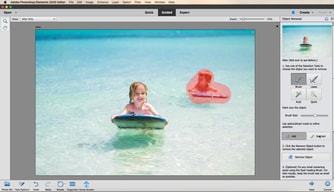
Photoshop Elements is easier to use than its bigger brother, full-fledged Photoshop, mostly because it comes with fewer features. It features the Guided mode, which includes basic tasks that you're likely to use a photo editing product for.
And that which is its best feature is also one of the things I dislike: there aren't enough features. One of the things I would like to see in Photoshop Elements is an easy way to remove objects in the background, like InPixio Photo Clip does.
I'm using Photoshop Elements to crop or alter photos and posters for various music groups in the horn studio at the University of California - Santa Barbara.
This is user friendly software. I don't have training in photo editing but I was able to use some basic tools in Photoshop Elements pretty quickly. Now I use it every day!
The selection brush tool needs to be easier and more intuitive.
Our non-profit organization can't afford expensive software. Photoshop Elements has enabled us to create professional-looking page headers, posters, and website images at a very affordable cost.
I loved all of the extreme photo manipulation tools, as well as the small installation and storage usage (for a beefy computer in comparison to other adobe products). I used this software almost daily.
When I was having an issue with a specific tool, what I found is that there isn't a dedicated space for help in the software. I went to google too often for my liking.
Lots of things, such as the "open closed eyes" tool. So many previously scrapped photos saved! Unfortunately my trial expired, but I am very heavily considering purchasing it.

I mostly like its ultimate cool filters which make the photo more attractive and also edit a photo to its best
photoshop elements is a paid software which makes its less user-friendly and size can be reduced also.
I am using this software in my college organizations to make the posters and invites of its events. Better than its competitors.
There is a vast selection of tools that you can use.
Sometimes there are so many tools you forget what some of them do. Better tutorials would be perfect.
It creates much better graphics.

Numerous incredible picture control instruments. Solid face-and geo-labeling capacities. Phenomenal yield alternatives. Auto-labeling and amazing hunt alternatives. Accommodating direction for cutting edge procedures. Competitors can't match Elements' array of photo effects, organizational tools, and sharing and output options. Elements makes doing a lot of the coolest Photoshop effects accessible to laypeople. It offers a generous subset of the pro editor's features in a simpler package.
Enormous disk footprint No HEIF support on Windows. No chromatic variation rectification or focal point geometry profiles. Needs numerous social sharing yields. No neighborhood help framework.
Adobe Photoshop Elements, our favorite consumer-level photo editor and organizer, adds AI-powered auto-curation, an open closed eyes tool, and new Guided Edits.

Es un software super completo que te ayudara a mantener tus imagenes a tu gusto, dandoles el toque que tu quieras darle, ofrece todas las herramientas necesarias para cumplir con tus requisitos, desde recortes, hasta eliminaciones de fondo con borrador magico, puedes tener total creatividad con tus imagenes y darle rienda suelta a tu imaginacion
Talvez en algunos momentos suela ponerse algo lento debido a abrir tantas ventanas para realizar todas las ediciones a las imagenes, me gustaria que en un futuro mejorara eso ya que puede retrasar un poco y quitarnos tiempo
Nos permite tener las mejores imagenes para nuestras publicidades, con la mejor calidad, tamaño y color. estamos muy contentos de haber escogido Photoshop Elements para esta labor ya que a sido muy facil de usar y nos a aportado todas las herramientas que necesitamos para tener resultados excelentes