Unclaimed: Are you working at Adobe Photoshop Elements?
Adobe Photoshop Elements Reviews: 4.3/5 — Solid Choice
Adobe Photoshop Elements is a cloud-based graphic design software designed to help businesses create and edit images via a centralized platform. It offers built-in editing tools with various image effects, colored filters, and patterns or symbols for easy designing. It also supports integration with several third-party applications and in-house Adobe tools.

| Capabilities |
AI
|
|---|---|
| Segment |
Small Business
Mid Market
Enterprise
|
| Deployment | Cloud / SaaS / Web-Based, Desktop Mac, Desktop Windows |
| Support | 24/7 (Live rep), Chat, Email/Help Desk, FAQs/Forum, Knowledge Base, Phone Support |
| Training | Documentation |
| Languages | English |






Photoshop Elements used to be the answer for people who refused to rent software. It is not any more. Starting with the 2025 release, Adobe replaced the perpetual licence with a non-renewing three-year term: you pay once, and three years after you redeem the code the application stops working. That change is the single most important thing to know about this product, and Adobe did not make much noise about it.
- What it is: A consumer photo editor with Photoshop’s core capabilities in a guided, approachable interface.
- Best for: Enthusiasts who want capable editing without a subscription, and who accept a fixed three-year horizon.
- Pricing: $99.99 for Elements 2026, $149.99 bundled with Premiere Elements, $79.99 to upgrade. Reported July 2026.
- The honest catch: The three-year clock starts when you redeem the code, and when it expires only the Organizer remains accessible.
What Is Photoshop Elements?
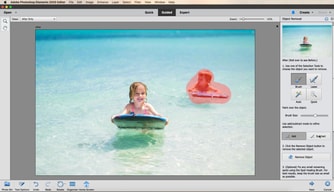
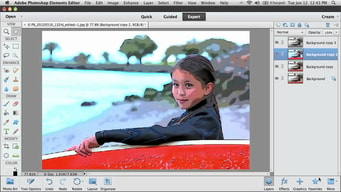
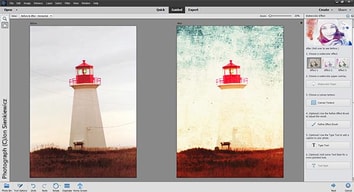
Photoshop Elements is Photoshop for people who do not want to learn Photoshop. It carries a substantial share of the full application’s editing capability — layers, selections, retouching, raw handling — wrapped in guided edits that walk you through a result step by step rather than assuming you know which tools to combine.
For a long time its defining feature was commercial rather than technical: it was the Adobe product you could buy outright. In a portfolio that moved wholesale to Creative Cloud subscriptions, Elements remained a one-off purchase with a serial number, and that made it the standard recommendation for anyone who objected to renting software.
That is no longer accurate. Elements 2025 and 2026 ship as three-year term licences activated by a redemption code. It is still a single payment with no recurring fees — genuinely different from a subscription — but it is time-limited, and when the term ends the application becomes inaccessible apart from the Organizer for viewing your catalogue.
How Photoshop Elements Works
- A single payment, a fixed term. $99.99 buys three years, not perpetuity.
- The clock starts at redemption, not purchase, so the code can sit unused without burning the term.
- Guided Edits. Step-by-step workflows for common tasks, which is the product’s distinguishing feature.
- Organizer. Cataloguing and tagging, and the only component that survives licence expiry.
- AI-assisted tools. Selection, sky replacement, and subject isolation drawn from Adobe’s wider research.
- No cloud dependency for editing, unlike Lightroom’s cloud-native tier.
Photoshop Elements Pricing
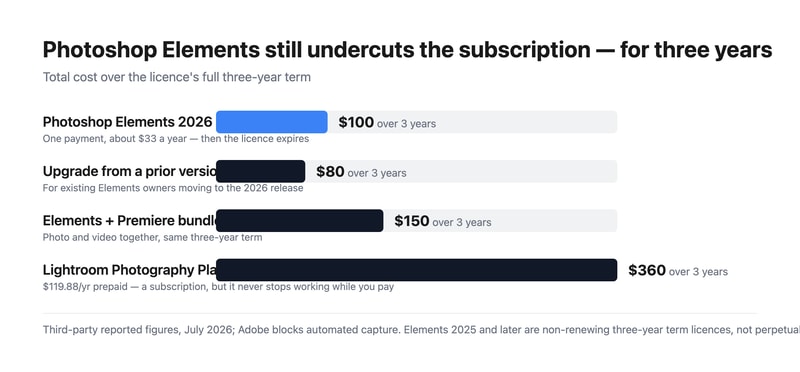
Adobe blocks automated capture, so figures are third-party reported for July 2026.
| Option | Price | Term |
|---|---|---|
| Photoshop Elements 2026 | $99.99 | 3 years, non-renewing |
| Upgrade from a prior version | $79.99 | 3 years, non-renewing |
| Photoshop + Premiere Elements | $149.99 | 3 years, non-renewing |
What this actually means:
- It is still much cheaper than the subscription. $99.99 over three years is about $33 a year, against $119.88 a year for Adobe’s Photography Plan — roughly a quarter of the cost. The change to term licensing narrowed the gap in principle but not in price.
- But it is no longer permanent, and that was the point. People chose Elements specifically to escape time-limited software. A three-year term is a longer lease, not ownership, and anyone recommending it as a perpetual alternative — including a great many published reviews and comparisons — is now wrong.
- The clock runs from redemption. Buying a code and not redeeming it does not consume the term, which is a small but genuine planning advantage if you buy during a sale.
- The Organizer survives expiry. You keep access to your catalogue and can still see your images; you lose the editor. That is better than losing everything, and worth knowing before the term ends.
- The upgrade path costs $79.99. So the realistic long-run pattern is buying in every three years at roughly $27 a year, which remains far below the subscription.
- The bundle is good value if you edit video. $149.99 for both Photoshop and Premiere Elements against $99.99 for one.
Who Should Use Photoshop Elements
- Enthusiast photographers avoiding subscriptions. Still the clearest case, provided the three-year horizon is understood and accepted.
- People who want guided workflows. Guided Edits genuinely help those who know what result they want but not which tools produce it.
- Families and hobbyists. Organizer plus straightforward editing covers most personal photo work.
- Anyone needing Photoshop-class editing occasionally. Paying $33 a year rather than $120 for capability you use intermittently.
It fits poorly for professional workflows, where Lightroom and Photoshop are the standard and the subscription is a cost of business; for anyone who genuinely requires permanence, where Skylum Luminar Neo and Corel PaintShop Pro still offer perpetual options; and for quick social graphics, where Canva is faster and free.
Honest Pros and Cons
Strengths
- Far cheaper than the subscription. Roughly $33 a year against $120 for the Photography Plan.
- One payment, no recurring billing. Still meaningfully different from a subscription.
- Guided Edits. The best implementation of assisted editing in a consumer tool.
- Real Photoshop capability. Layers, selections, and retouching from Adobe’s own engine.
- The Organizer outlives the licence. Catalogue access is retained after expiry.
- The redemption clock is user-controlled. Buy in a sale, redeem when ready.
Limitations
- No longer perpetual. The three-year term is the defining change and it is easy to miss.
- Most published reviews are out of date. Anything describing Elements as buy-once-keep-forever predates the 2025 release.
- The editor stops working at expiry. Only the Organizer remains.
- Weaker than Lightroom for volume. Cataloguing and batch processing are not comparable.
- No cloud sync across devices in the way the subscription products offer.
- Adobe was quiet about the change, which is the fair criticism here.
Photoshop Elements Alternatives and How It Compares
- Adobe Lightroom is the subscription route, far better for volume and cataloguing, at roughly four times the annual cost.
- Adobe Photoshop is the full professional application, bundled with Lightroom on the Photography Plan.
- Skylum Luminar Neo is now the leading genuinely perpetual option, with strong AI editing.
- Corel PaintShop Pro remains a buy-once Windows alternative.
- Canva covers quick social and marketing graphics, free and much simpler.
- GIMP is the free open-source option, capable but with a considerably steeper learning curve.
For a broader survey, browse our photo editing directory.
The Verdict
Photoshop Elements remains a good product and, on price alone, a strong one. Roughly $33 a year for Photoshop-derived editing with genuinely useful guided workflows is a quarter of what Adobe’s Photography Plan costs, and the Guided Edits are the best implementation of assisted editing in any consumer photo tool. For an enthusiast who edits occasionally and wants real capability without a monthly bill, it still makes sense.
What has changed is the reason many people chose it. Elements was the Adobe product you could own — a single payment, a serial number, software that kept working. Since the 2025 release it is a non-renewing three-year term licence: pay once, redeem the code, and three years later the editor stops opening. The Organizer survives so you keep access to your catalogue, which softens the landing, but the editor does not. That is a longer lease than a subscription, not ownership, and it changes the recommendation materially.
Two practical consequences follow. First, treat any review or comparison that calls Elements perpetual as out of date — a great deal of published material still does, because Adobe was not loud about the change. Second, if permanence is genuinely your requirement rather than just avoiding monthly billing, Elements no longer meets it and Luminar Neo or PaintShop Pro do. If what you actually wanted was to avoid a subscription and pay far less, Elements still delivers that comfortably, and the $79.99 upgrade every three years keeps the effective cost near $27 a year. Just buy it knowing what you are buying.
FAQ
Is Photoshop Elements still a perpetual licence?
No. Starting with the 2025 release, Adobe replaced the perpetual licence with a non-renewing three-year term licence activated by a redemption code. Elements 2024 and earlier used serial-number activation and remained usable indefinitely. When a current licence expires three years after redemption, the editor becomes inaccessible, though the Organizer remains available for viewing your catalogue.
How much does Photoshop Elements cost?
Reported pricing for July 2026 is $99.99 for Photoshop Elements 2026, $79.99 to upgrade from a previous version, and $149.99 for the bundle with Premiere Elements. All are one-time payments covering a three-year term with no recurring fees. Adobe blocks automated access from our infrastructure, so confirm current figures at checkout.
When does the three-year term start?
At redemption, not purchase. The licence is activated by a redemption code, and the three-year clock begins when you use it. That means buying during a sale and redeeming later does not consume the term, which is a small planning advantage. Once redeemed, the term runs continuously regardless of how much you use the software.
Is Photoshop Elements still cheaper than a subscription?
Substantially. At $99.99 for three years the effective cost is roughly $33 a year, against $119.88 a year for Adobe’s annual prepaid Photography Plan — about a quarter. Upgrading every three years at $79.99 brings that closer to $27 a year. The term change altered what you own, not the price advantage, which remains large.
What is Photoshop Elements best for?
Enthusiast and hobbyist photographers who want Photoshop-class editing with guided assistance and no monthly billing, and who accept a three-year licence horizon. It suits occasional and family photo work well. It is a poor fit for professional volume workflows, where Lightroom’s cataloguing is far superior, and for anyone whose actual requirement is permanent ownership rather than avoiding subscriptions.

Compare Adobe Photoshop Elements with other popular tools in the same category.
I like the simplicity of it, and it's good for basic needs.
I disliked not having all of the options Photoshop gave me.
Manipulating photos
Its fast, quick super narrow down version of photoshop.
sometimes I would need some other elements that i need thats not in elements
the quick ready to go render that needs 5 second improvement.
Easy to use design small learning curve and intuitive interface a learning gateway for the pro programs anyone is able to create and edit well
some of the features are either less powerful or lack of customization/interoperability
creating cohesive and enticing intros and such and it is a breeze
ease of use, design of interface, quality of tools, style options. I this its valuable tool to have in design
glitches, amount of space or memory, issues with loading certain tools
image retouching, sketch editing, color and texture if fabrics
It provides some of the most common Photoshop tools and gives the power to create and edit professional images on the go. The ability to jump between desktop and mobile provides a boost to work flow.
Many of the more comprehensive and detailed tools and masking are hard to pinpoint unless you are using a tablet
The ability to draft, edit and build on the go while using the essential Photoshop tools without bogging down your device or system with high CPU usage is a huge plus for quick renders
Photoshop Elements is a great introduction to Photoshop. In reality, if you are a beginner, with how deep and complex the full version of Photoshop is, Elements is honestly the perfect solution for so many people out there that are not advanced Photoshop users. Elements takes the super complex parts of out of Photoshop and leaves a cleaner and simpler version of Photoshop. Not only that, but the price tag is significantly lower as well!
I really don't like the limitations of Photoshop Elements compared to regular Photoshop, but honestly, that's exactly what the product intends to be. I'm an advanced Photoshop User so Elements isn't a product I spend much time on so critiquing it in this fashion is honestly just not fair. Realistically it's a great program.
I was able to learn Photoshop Elements and program my Photoshop Actions to be usable in Elements and still provide a decent level of service to my customers (I sold Photoshop Actions and taught basic Photoshop Classes). In so many ways, the full version of Photoshop is unnecessary for so many users and Elements is the perfect platform for a lot of people, which was true for many of my customers.
Easy interface. Very simple to use and process photos.
Limited editing ability. Not great for truly transforming photos.
Editing on the go is simpler.
several options for editing, easy to use and nicely organized
layout is a little cumbersome, having to negotiate several tabs to find the function. filters are hard to upload
photo editing, light correction
The thing I like best about Photoshop elements is that although it may seem complicated and overwhelming, once you get the hang of it there's no stopping to the things you can do.
I dislike that sometimes I have to spend longer than needed to find the tool I need.
Since using it, I'm realizing all of the potential my posts and work has to gain from Photoshop Elements.
Simple interface. Ease of use with little to no learning curve
Missing some of the options creative cloud offers
Solving our product making. Easy for first time users
The simplistic interface and ease of use.
Inability to export CMYK and the lack of plugins.
Getting interns who aren’t used to the photoshop interface some experience in editing
What I like best is photoshop express.
Vsco has better “filters,” and is easier.
Adjusting light to dark in pictures.
I am an experienced user of Photoshop, so my usage of this program is mostly for when I need a quick photo edit. It's easy to use, versatile and pretty powerful. It contains helpful guided edits as you go. It also provides excellent digital asset management. I like the tagging system which has improved. It helps quickly and easily search photos later. Smart Tags is my favorite feature. It will take longer to upload your images since the program is assessing each image during upload.
The program can be a little slow. Guided edits aren't integrated into the expert mode and there are limited sharing options. Sharing options is important to me since the whole point of using the program is to be quick about getting the images out.
I utilize Elements as a quick editing tool when needed. It saves me time in the long run which matters when I don't have a lot to do and I'm on a deadline.
Elements makes it a lot easier to do pretty much everything. It walks you through a ton of different photo editing techniques, and has extensive tutorials and automated processes. Elements makes it simple to work smarter instead of working harder — ie, to put in the minimal amount of effort for a good end result.
As an illustrator, Elements is not great. It works well for photographers and for those needing to get used to Photoshop's functions, but for more experienced Photoshop users and those who don't do much with photo editing, the extra features are unfortunately not very useful, and the missing features are a whole lot more prominent.
For photographers, Elements makes it so much simpler to edit photos as quickly as possible to meet deadlines.

Adobe Photoshop Elements is a raster graphics editor for entry-level photographers, image editors and hobbyists. It contains most of the features of the professional version but with fewer and simpler options. The program allows users to create, edit, organize and share images.It was very useful for beginners who are learning about photoshop and any other photoediting software..
The software's photo organizer is a separate application.You have to download that application for organizer.
I use for small editing and for those projects which does not require complicated tools like photoshop has.
Easy to use and user friendly, Elements is great for people just learning to use Photoshop for basic needs.
Not as many features are included in elements as there are in CC versions.
Elements runs great for my notebook laptop at home, which makes editing pictures easier. Being a smaller program with less features than CC, it makes for quicker and easier editing.
I like that there are some things that you can do very similar to regular Photoshop CS. But I'm not sure how you could do that without paying extra since elements is made for more of a beginner use.
I don't like how certain actions are certain plugins do not work with elements. It's much more affordable, but I like having full access to what I have in Photoshop.
I am able to create flyers and save in jpeg. That makes it easier for me to share files with others.
I purchased Photoshop Elements in high school when I was just starting to dabble with Graphic Design. It was the perfect stepping stone to the more powerful software that I would receive in college. It helped me become familiar with Photoshop so by the time I went to college, I had a fairly strong grasp on it's capabilities.
My version was slow and unreliable. I often had to reboot it.
Photoshop Elements opened up a whole new world of possibilities for me when it came to photo editing. I used tutorials to get a greater grasp on it's potential, and I used it often for both photo editing and photo manipulation. Although I currently don't use Photoshop Elements, I would have no problem going back to using it for basic photo manipulation needs. It has all the necessary basics.
The limited amount of functions to not overwhelm someone just starting out with graphic design/photo editing. This software was perfect for when I was learning graphic design in high school and was able to download elements for free on my personal computer at home. I definitely became more advanced being able to access the software at home as well as in school. Adobe does have student discounts for college students, but I think with the technology being found more and more in high schools, they should really re-think how to also offer them some type of deal.
That there's no use for it for someone more advance in Photoshop. It's a tool that you will use for a year or less, and eventually move on to bigger, better things. It would be interesting if this was a staple software in the adobe suite that had needed functions that other products did not have.
I don't think elements is used in business at all. I think of it used in schools and for personal use. The benefits of using it in schools is that it gives a great way to start out in the design field. Personal use is great because it is cheap and has enough functionality to do basic things.
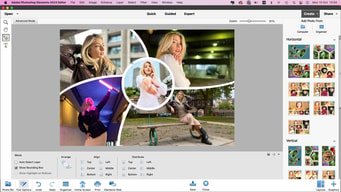
Photoshop Elements allows me to quickly create collages with easy/straightforward navigation.
I wish it contained some more options for photo editing that are available on Photoshop.
Creating boards for presentations, editing photos quickly.
Adobe has really been trying to bring the functionality of it's most prized product Photoshop to the everyday user. It's a great tool for anyone looking to do simple photo editing. It's a great introduction into the Adobe community and helps get you involved in their Creative Cloud platform. Photoshop Elements implements a feature that allows you organize your photos based on face recognition, places, etc. This may be Adobe's way to compete against giants such as Google, Facebook & Apple. They do a pretty decent job with the interface but it's nothing we haven't seen before.
It's not great for the professional already using Photoshop, or an individual already established in the Adobe community.
I'm able to quickly adjust certain things within a single app that can be easily migrated across all of the Adobe ecosystem.
Photo editing capabilities at a fraction of the cost of the regular version
Some limited functionality, I do not like the modes. I upgraded to Photoshop CS.
Photo edits for portrait photography.
Adobe Elements is one of the first programs I used for editing video, and I still use it, along with more powerful tools, because of its ease of use. For comparison, I also use Adobe Premiere Pro and Adobe After Effects. Adobe Premiere Pro is much more powerful, especially for global color correction, but it is far less intuitive, and quite a bit more picky about the types of video files it will accept. Similarly, Adobe After Effects is necessary for much of the titling work I do. However, the version I use insists on creating each rendered file as an uncompressed video file (ie, 2-10 GB per file), and the simplest way to compress these files is just to render and export them again in Adobe Premiere Elements. So for now, while I have more powerful tools, I still use Adobe Elements for all my basic, simple video editing.
3 major problems with Adobe Premiere Elements. 1, It will not allow you to change the resolution of the project. Did you accidentally set the project settings wrong before beginning your work? You're going to have to do the ENTIRE PROJECT OVER AGAIN! There is absolutely no way to change the settings, nor to even export and re-import them into a project with the right settings. OOPS! 2. Premiere Elements will override the settings you chose based on some of the files you import, unless a tiny box "force selected settings on to this project." is checked. If not checked, and you use different frame rate or size video clips in your project, you'll again have a video project which cannot be resized, and you have to do EVERYTHING ALL OVER AGAIN! 3. Adobe Premiere has a nasty habit of making global adjustments, including in other tracks, when you're working on one track, when you delete a clip or resize one. It's trying to be helpful, but it's a very unhelpful feature, and has cause me to have to redo large amounts of my video projects because the timing of audio and video was thrown off by a small adjustment I made in one track. I wish they would fix this feature.
It is a very useful tool for easy video editing, especially projects that I can give to my assistants. The more complicated tasks I tend to do myself, and often require more advanced video tools like the ones mentioned above.
It is easy to use on your smartphone to make edits
There aren't as many functions as the desktop Photoshop
editing images
Robust features and options that make using photo elements easy
Can be extensive with hardware requirements is all
It makes design and organization a snap.

I like that all the best parts of photoshop are used and a lot of the technically difficult features are left out.
It's still not a very intuitive framework, so YouTube is your friend when using this product.
I use PS Elements on my travel computer, for quick edits.
Easy editing guides to help a beginning photographer. It is an easy transition to other Adobe products.
Not enough access to applications and software. Photoshop CC has more applications to use.
Editing photos.
I like Photoshop Elements for its ease of use. I'm able to navigate around its familiar interface and do that tasks I need to get done. It's maintains the familiar interface I expect across the line of Adobe CS products.
Sometimes I'll accidentally exit out of or hide windows and then have to recall where to find the window I had hidden. This isn't so much a knock on the product as it is against my own clumsiness. Overall it's a solid product which I use daily.
Photoshop Elements gives me the tools I need to create graphic design materials for web and print in-house without the need of sourcing it to an outside team. This allows me to accomplish more in a shorter period of time.
It’s not as full featured as other programs, so it’s easy to go in and do a quick edit.
It feels very outdated compared to other applications I have used.
I am able to efficiently process and batch photos that allow me to have more time to actually post them online.
What I like best about Elements is that I can use this app from my iPad
At this time, I can't think of anything I don't like about Elements aside from wishing it had more compatible features.
Being able to edit photos on the fly from my iPad as opposed to needing a laptop or desktop with full Photoshop capabilities