

Unclaimed: Are you working at Buffer?
Buffer Reviews: 4.3/5 — Solid Choice
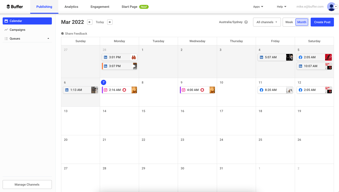
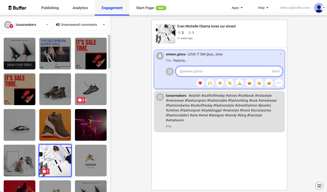
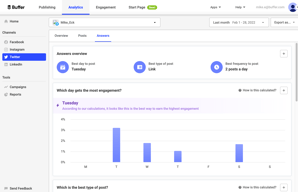
Buffer is a social media management platform that lets users schedule, publish, and analyze their social media content. Buffer offers content planning and creation tools and delivers comprehensive social media analytics, while at the same time supporting team collaboration and ensuring better consistency and efficiency for users’ social media strategies.

| Capabilities |
API
|
|---|---|
| Segment |
Small Business
Mid Market
Enterprise
|
| Deployment | Cloud / SaaS / Web-Based, Mobile Android, Mobile iPad, Mobile iPhone |
| Training | Documentation |
| Languages | English |









Buffer charges per channel, and its Essentials plan allows exactly one user account. On a five-channel setup that is $25 a month. Adding a sixth channel costs $5 more. Adding a second person means moving to the Team plan, which doubles the per-channel rate across every channel you already have — so the same five channels become $50. A colleague costs five times what a channel costs, and the pricing page does not put those two numbers anywhere near each other.
- What it is: A social media management tool priced by connected channel rather than by seat.
- Best for: Solo creators and small brands managing a handful of channels.
- Pricing: Free for 3 channels; Essentials $5 and Team $10 per channel per month on yearly billing. Verified July 2026.
- The honest catch: One user on Essentials — the second person doubles your whole bill.
What Is Buffer?
Buffer is a long-standing social scheduling tool, and its commercial model is genuinely unusual: “only pay for the channels you use.” Rather than charging per seat or by post volume, it meters connected channels, letting you add them as you grow and remove them when you don’t.
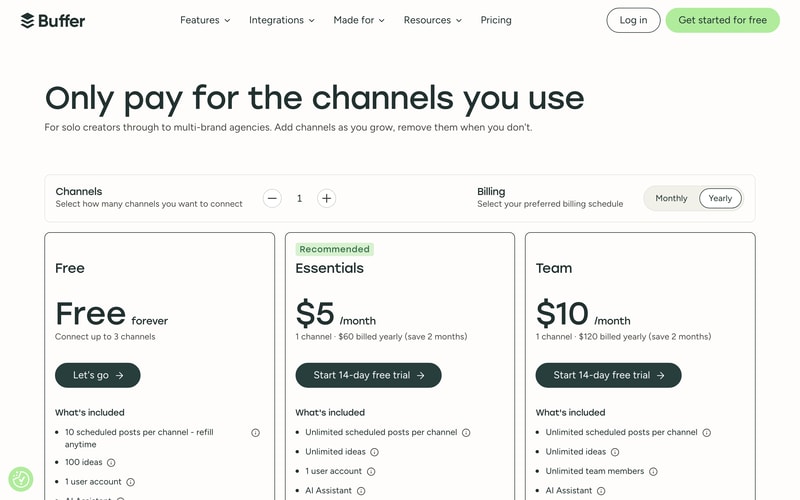
A channel stepper on the page lets you set your channel count and watch the price move. Both paid plans include unlimited scheduled posts and unlimited ideas, an AI assistant, advanced analytics, a community inbox, hashtag manager, and first-comment scheduling.
The free plan is unusually generous on breadth and tight on depth: three channels, but only 10 scheduled posts per channel at a time — refillable, so it is a queue depth rather than a monthly cap — plus 100 ideas, one user, and API access.
How Buffer Works
- Channels are the meter, not seats or posts.
- The rate is flat per channel — no volume discount at any count.
- Essentials allows one user account.
- Team allows unlimited team members at double the channel rate.
- Yearly billing saves exactly two months.
- API access on every tier, including free.
Buffer Pricing
Captured from Buffer’s pricing page in July 2026 in US dollars, reading both billing toggles and stepping the channel count.
| Plan | Per channel, yearly | Per channel, monthly | Users | API |
|---|---|---|---|---|
| Free | $0, up to 3 channels | $0 | 1 | 1 key, 3,000 req/mo |
| Essentials | $5 | $6 | 1 | 3 keys, 7,500 req/mo |
| Team | $10 | $12 | Unlimited | 5 keys, 15,000 req/mo |
| Channels | Essentials/mo | Essentials/yr | Team/mo | Team/yr |
|---|---|---|---|---|
| 1 | $5 | $60 | $10 | $120 |
| 5 | $25 | $300 | $50 | $600 |
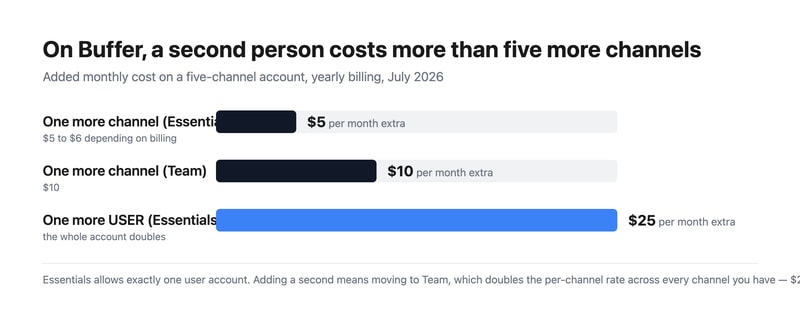
What actually decides your cost:
- The second user is the expensive addition, not the second channel. Essentials permits one user account. Team permits unlimited — but charges double per channel to do it. On five channels that is $25 a month against $50, so bringing in one colleague costs exactly as much as your entire existing subscription. There is no middle option, and no way to add a single extra seat.
- Channels price perfectly linearly. One channel is $5 on Essentials and five channels are $25; one is $10 on Team and five are $50. No discount arrives at any count, which matters because a normal brand presence spans five to eight channels. Budget your channel count times the rate and you have your bill exactly.
- “Save 2 months” on yearly billing is precisely true. Essentials is $6 monthly and $60 yearly — twelve months at $6 would be $72, so you save $12, exactly two months. Team is $12 monthly and $120 yearly against $144, saving $24. Both work out to 16.67%, and both claims check out to the cent.
- The free plan’s limit is queue depth, not monthly volume. Ten scheduled posts per channel, described as “refill anytime” — so it caps how much you can have lined up, not how much you can publish. On three channels that is thirty posts queued. For someone who batches a month of content on a Sunday, it will bind quickly; for someone posting as they go, it may never.
- API access is on every tier including free. One key and 3,000 requests a month free, three keys and 7,500 on Essentials, five keys and 15,000 on Team. Very few tools at this price expose an API on a free plan at all.
- Approval workflows require Team. Access levels and content approval workflows only appear on the top tier — which is consistent, since they are meaningless with one user, but it does mean any process requiring sign-off lands you on the doubled rate.
Who Should Use Buffer
- Solo creators. The clearest case — one person, a few channels, and a bill that scales exactly with what you connect.
- Small brands with focused presence. Three to five channels on Essentials is $15–$25 a month.
- Anyone whose channel mix changes. Add and remove channels freely; the price follows.
- Developers. API access on every plan, including the free one.
It fits poorly for teams, given that the second user doubles the bill; for agencies managing many client brands, where per-channel pricing compounds badly; and for anyone needing approval workflows on a budget.
Honest Pros and Cons
Strengths
- Pay only for connected channels — a genuinely fair model for narrow presences.
- Unlimited scheduled posts on both paid plans.
- A permanently free plan covering three channels.
- The two-month yearly saving is exactly accurate.
- API access on every tier, including free.
- Add and remove channels at will, with the price following.
Limitations
- One user account on Essentials.
- The second user doubles the per-channel rate across every channel.
- No volume discount at any channel count.
- Approval workflows require the Team plan.
- The free plan caps queued posts at 10 per channel.
- Per-channel pricing compounds for multi-brand work.
Buffer Alternatives and How It Compares
- Later is the visual-first option, strongest on Instagram.
- SocialBee offers category-based evergreen recycling.
- Tailwind specialises in Pinterest and Instagram.
- Zoho Social prices by brand rather than channel, and has dedicated agency tiers.
- Hootsuite is the enterprise incumbent, at considerably higher cost.
- Sprout Social targets larger teams with deeper analytics and per-seat pricing.
For a broader survey, browse our social media management directory.
The Verdict
Buffer’s pricing model is the most honest in this category for the person it is built for. Charging per connected channel rather than per seat or per post means a creator with three channels pays for three channels, and can drop one the month they stop using it. Both paid plans include unlimited scheduling, and the free tier covers three channels permanently with API access — something almost nobody else offers at zero. If you are one person managing a focused presence, very little here works against you.
The model turns sharply the moment a second person is involved. Essentials allows exactly one user account, and the only way to add another is the Team plan, which doubles the per-channel rate on every channel you have. A five-channel brand goes from $25 a month to $50 to bring in a colleague — the same increase as adding five more channels. There is no per-seat option and no middle tier, so a two-person team pays the same rate as a twenty-person one, which is generous at the top end and punishing at the bottom. Approval workflows and access levels also live only on Team, so any process requiring sign-off arrives at the doubled price by definition.
Two things worth crediting. The “save 2 months” yearly claim is exactly right — $6 to $60 and $12 to $120, both precisely 16.67%, which is more than several vendors reviewed here this month managed. And the free plan’s limit is worth reading carefully: ten scheduled posts per channel, refillable, is a cap on how much you can queue rather than how much you can publish. If you batch a month of content in one sitting, that will stop you almost immediately; if you post as you go, you may never notice it.
FAQ
How much does Buffer cost?
Captured in July 2026 in US dollars, priced per connected channel. On yearly billing, Essentials is $5 per channel per month ($60 a year per channel) and Team is $10 ($120 a year). On monthly billing those are $6 and $12. A five-channel account costs $25 a month on Essentials or $50 on Team. There is also a permanently free plan covering three channels.
How many users does Buffer allow?
One on the free plan and one on Essentials. The Team plan allows unlimited team members, but charges double per channel — $10 rather than $5 — across every channel on the account. There is no option to add a single extra seat, so a two-person team pays the same per-channel rate as a much larger one.
Does Buffer get cheaper with more channels?
No. The rate is flat at every channel count — $5 per channel on Essentials whether you connect one or ten, and $10 on Team. One channel is $5 and five channels are $25, exactly. That makes the bill trivially predictable, but it also means a broad social presence across eight or more channels costs proportionally more with no volume relief.
Is Buffer’s free plan worth using?
For a light posting schedule, yes. It covers three channels permanently with one user, 100 ideas, the AI assistant, insights, a community inbox, and API access with one key and 3,000 requests a month. The binding limit is ten scheduled posts per channel — a queue depth rather than a monthly cap, refillable as posts go out — which suits posting as you go rather than batching in advance.
What is the difference between Buffer Essentials and Team?
People and process. Both include unlimited scheduled posts, unlimited ideas, the AI assistant, advanced analytics, hashtag manager, and first-comment scheduling. Team adds unlimited team members, access levels, content approval workflows, and a larger API allowance — five keys and 15,000 requests against three and 7,500. It costs double per channel, so the upgrade doubles your whole bill rather than adding a seat fee.

Compare Buffer with other popular tools in the same category.
Buffer made it quite easy for me and the team to manage our clients social media profiles. It was convenient to juggle between multiple social media accounts to maintain a them. It has a great set of features that were very useful to us.
A few more features can be added and the UI can be improved.
It helped us manager multiple social media accounts and kept our social media game strong.

I do like that there is one window operation. Since i am a social media manager so managing my content for client's profile has got much easier. I can schedule posts for whole month with one click on every platform.
I am facing some issues regarding pinterest account. It gives glitches few times. My pinterest account does not gets connected some times. The time and date issue is also happening over here sometimes.
The buffer is saving time. At first i did used to go on seperate social media platforms and has to schedule seperately on every social media. But now with only 1 click i can schedule on many social media platforms for whole month.
I like that it brings convenience to managing social media accounts. It saves me lots of time by Scheduling posts in advance. Its a handy tool for maintaining a balance between staying active on Social Media and focusing on other important tasks.
One thing that I dislike about it is Pricing, Especially for those who are on their tight budgets or starting a business. The free version has limitations and the only solution is a paid plan.
It help me in scheduling tasks in advance.

The best part of the software is that is quite fluent and easy to navigate and understand. Also, they have responsive customer support which gives a great user experience. Mostly I use this platform daily to manage all my social media accounts and also schedule multiple posts at different timings for better results. It is quite easy to integrate it with all other social media accounts of our organizations in seconds.
The software is a good-to-go software and quite easy to understand but initially while using and implementing all the tools and functions of the software. It confused our team regarding how to go further with the advanced scheduling and post-queuing but gradually we learned the process and worked on it flawlessly.
The main problem that we were facing to managing all of our social accounts from a single source but now it has become possible due to buffer and we can manage all of the accounts with less resources and time. It is a great app and start-ups should must try it.
The best part of this tool is that when I was working as Social Media Coordinator, I was able to schedule my posts in different social media ahead of time, making my life easier.
I wish that the interface were a little more user firendly and make it a little more fun for the users. I also think that would be nice to have a collaboration option (Not sure if this is available now) but it was not available when I used it. And would be very nice to have the option of some kind or included software to review your text or post to have less mistakes when writing.
At my time working with social media, it was helping me to save time to work in other projects by managing the social media posts ahead of time.

Buffer is one of the best social media management platforms which allows us to manage all social media channels in one place, no need to log in separately for all accounts. It also offers features like creating, scheduling, publishing & analytics features, in a single dashboard we can monitor and control the content across all channels.
Sometimes scheduled posts don't get published and show an internal error or try again.
As a marketing communications professional for my company, Buffer has solved managing all social media channels in one place using this platform, I can monitor campaigns the performance, and analytics of all channels, and also can control, and monitor within a single login. no need to log into different accounts to publish the same content.
I can sleep and not worry about my videos to be posted at scheduled time. Its user interface is top notch and easy to cope up with. Its web page builder has lots of tools and easy to use too. I could create a web page in just few clicks and use it to drive traffic.
I could not add a profile picture in the platform, because there is no option for doing so. The pricing was unaffordable for me. Its not as advanced and customizable as other social media management tools. Buffer can use AI to automate web page designing which would be really useful.
Buffer is helping creators and business owners with a busy schedule to advertise their services online by posting the respective content for them online at the scheduled time. I used Buffer as a post scheduler for the youtube channel of my company, but at first I tried it with a demo channel and it worked amazing.
Buffer allows to schedule social media posts in advance and focus on creating better content. Buffer provides analytics of the various social media posts and also suggests the adjustments required as per the analysis. It also lets us create a short website that can be used to drive traffic to our social media platforms.
The plans can be expensive for some business as it was for mine. Its analytics feature is not as advanced as other social media management platforms. The biggest drawback is it does not have an integration with Instagram, which forces me to use other platform for scheduling posts on Instagram.
Buffer is a great social media management platform that is helping businesses as well as individuals to keep a track of their social media activity and also build short traffic driving websites. I used this platform for building a short website to drive traffic for social media page of my team member.
Buffer is a fantastic social media management tool that I highly recommend. It offers a wide range of features that make it easy to manage multiple social media accounts in one place. One of the things I like most about Buffer is its user-friendly interface. The design is clean and easy to navigate, making it simple to schedule posts, track engagement, and analyze performance. The customer support is also top-notch, with friendly and knowledgeable staff always available to answer questions. Overall, Buffer is an excellent tool for anyone looking to streamline their social media management and increase their online presence.
Pricing per social media platform. Tagging people and pages is still hard and we have to use links. It’s inability to pick content from productivity tools like Notion, Click Up etc.
I don't have to worry about post a certain post at a particular time of the day buffer can take care of that for me. Additionally I can manage multiple accounts in multiple time zones.

I love Buffer and their freemium model is incredible. Setting up an account with them was easy, and allowed me to try the services for free before purchasing a larger plan for my business. The robust reporting system that comes with each package makes it great for showing successes to stakeholders - and I also appreciate the ability to easily repost high-performing content via rebuffering. Their scalability also makes them suitable for businesses large and small, from startups to multinational conglomerates, making this one service necessary in almost any situation in the digital age.
I really dislike certain limitations in Buffer that were not always there. The cost is quite high, but it's understandable given the features of their product. Even with a premium version, having access to only eight accounts as a brand manager can be very limiting and unhelpful for companies or organizations that need to reach multiple platforms at once.
I'm so grateful to have Buffer as part of my social media strategy. It's made managing all the accounts for me - the individual consumer - painless and efficient. I no longer have to manually post across channels.

I find Buffer to be an incredibly powerful and easy-to-use tool for managing my social media presence. It's seamless integration of various features, including texting images before sharing them on any network or scheduling posts across multiple channels, makes it a breeze to use. I can send content that has been vetted before it is published because the interface is not only fast and intuitive, but also offers excellent review systems.
It is extremely frustrating for me not to receive email notifications when something goes wrong with a post. In addition, Buffer's inability to schedule multiple photos in Instagram posts is extremely inconvenient. Additionally, I'm disappointed that it's not easier to adjust photo sizes within the Instagram application; the process feels tedious and time-consuming.
By simplifying the process of managing my social media accounts, Buffer saves me valuable time. My updates now go out at the same time instead of switching between platforms constantly.
I love that I can customize the posts for each different platform I plan to post on. It really helps cater the message to the audience that uses different social media sites.
Sometimes the interface can get a bit wonky in Chrome but as I have used it more, I have adapted to that. I think that ensuring the default view for the posting calendar is the same as it was when I last used the site (rather than reverting to month, week, or day) would be helpful.
Buffer is solving the problem of having to be in front of my computer when I want a particular social media post to go out. Additionally, I greatly appreciate I do not have to queue posts from my phone but can instead use my PC.

Buffer helps save time and effort by making it easy to post (or schedule posts) to various social media channels with ease.
Nothing. So far so good. I am still adjusting to the dashboard but it is just new (not bad)
When you have multiple social media channels it can be time consuming to log in and post the same or similar content on each. Buffer makes it possible to do that at the same time and even tweak each channel and what will appear.

Buffer is a super easy-to-use tool for all your social media scheduling needs. They're regularly releasing upgrades that make it more convenient. You can sign up for free and get quite a few features as well!
I've been a long-time Buffer user. Nothing really comes to mind when thinking about what I dislike about the platform.
Buffer makes my life, and my team's life, easier! Rather than having to post natively through each social media platform, you can create one post, customize as needed and share all with the clicke of a button. It saves time and it's nice to pre-schedule posts.

Buffer comes packed with features like scheduling posts, recording insights and managing feed.
Instead of a 14 day trial, I would really like to have a 30 day trial
I own an Instagram page and buffer helps me keep a track of posts, schedule them and read insights
It seems a program with great effectiveness and, above all, dynamic at the time to manage and correctly manage all social networks, either Pinterest, Facebook, or Twitter, among others, from one place. It has a set of automated publishing tools simplifying even the peak hours of visualization in each of our platforms, has a quality interface making Buffer an option of great strength and best of all is the price that makes it accessible to anyone who wants an incredible effectiveness for a considerable cost.
Buffer's performance tends to slow down, crashing when we need to upload multiple images or manage various accounts automatically simultaneously, bringing us a bit of a delay as our team works on different projects throughout the month.
A work innovation, allowing us to easily enable our clients to realize how important and beneficial social networks are for sales. Buffer now notifies us when a post is rejected and what possible solution it quickly has to queue the command again. One of the benefits that we consider most important is being able to direct user traffic to our publications by personalizing each of our platforms with specific hashtags.

It's a great program that deserves recognition for allowing me to cover many possibilities for creating and building targets. It is reliable and has made me more efficient in managing social networks. Whenever you hear Buffer, you automatically think of reliability across all your social media platforms. Buffer's user interface is well organized and provides us with the tools we need to post our material quickly and consistently.
We are happy to use it, with no downsides or complaints.
This unique and practical program has allowed us to synthesize the concept of doing great work, which has significantly impacted us. He aids our efforts to dominate the social media industry. Thanks to the many options Buffer makes available to us, we have been able to expand the scope of our data collection significantly and improve the efficiency of our operations. The program is excellent, and I wholeheartedly recommend it as the best option for building a successful business strategy through social media. The results are better content management and increased productivity.

Buffer builds an engaged audience. it knows what to post where! It helps business or brand to grow by sharing content on their rightful channels and with the suggested hashtags #️⃣
Buffer needs explicit concentration in order to work better. I rate it highly though 👌
Buffer solves time wastage as it it is highly reliable when it comes to scheduling posts. It solves time wastage across social media platforms by even building more trust!
Easy to use for a beginner. You can also connect up to 4 Social Media Accounts for FREE. The paid version provides much needed analytics and great for multiple accounts.
Sometimes Facebook disconnects, and I don't need all 4 profiles sometimes I want to use the app for just my twitter accounts.
Brands to be relevant on Social Media. Sign into one platform to post on your social media accounts. Let's you re post popular content.

Can schedule social media posts for various network with ease
You can not see the mentions and reply back that is something not so good about it
It is giving ease of scheduling the post on various platforms . It saves lot of time
Appearances are the best to integrate a good social media team to get sales, this software gives us a bit of that and contributes to social media management. It is extremely solid and has a very competitive interface. The price is highly accessible and without a doubt, it works wonders. It is highly recommended to easily manage the social networking accounts of your clients or company.
The program does not have very fast performance, sometimes it slows down when I have multiple accounts in automatic management.
We are very attentive to our clients and one of the reasons why Buffer is so amazing is for the simple reason of raising awareness of technology for the benefits of social media for sales and new customers. We have been able to adapt a spirit of competition far superior to the other contenders. It was sent.

Buffer is very popular social media tool, What I like about them is they provide lots of features in free plan. It is robust.
As there are lots of social media tools which provide affordable pricing plans compare to buffer. They should look into the pricing.
We use buffer to schedule and manage all of our and client's social media activity. It is helping us to stay ahead in social media space.
Buffer is a very good tool when it comes to automation of your post. you can schedule your post for any date and time. Must try it for social media marketting Thank you.
Nothing to dislike here. Buffer has many competitor. They are doing good job when it comes to scheduling. Rest nothing much to say.
Buffer is basically helping me in schheduling the post for my client. It helps me with the time and date when I can post on social media platform.

Powerful, interactive and one place for almost all the required features to run campaigns in this dynamic and fast moving world. I can monitor and study customer responses of different social media platforms from one place.
The only serious problem that hurdles my work is glitches that occurs when you try to ulpoad multiple images at the same time. I think this problem should be tackle on first priority because companies dont work on single project for whole week.
You find more people on social media than streets so the demand of advertising on social media platforms also increased but with the help of buffer I can easily manage my entire campaign single handledly. I can engage with my customers from one screen without changing my platforms. And the best part is poll vote that we can share it among our customers to know what they prefer over the others. Even the ROI comparison is outstanding the software is cheap but the amount of ROI you can generate from it is also tremendous.

Buffer makes Social Media management very easy. You can control different aspects of Socia Media- be it scheduling posts, campaign management, responding to comments super easy.
I have been satisfied with this product so far. However, I feel, Buffer can do a slightly better job at Social Listening that can help brand improve their Brand strategy.
It saves a lot of time for marketers by making Social Media Management super easy. It also provides great social media analytics that helps in social media campaigns optimization.
The dashboard looks great. There are quite many features in the free plan.
Some results might not be 100% accurate, sometimes maybe it takes time to update the metrics for a particular social profile.
Social media management is made simpler by Buffer.

It's an ultimate saas application to easy management and schedules social media posts at what time I need. The best thing is just to integrate the channels which I like to and then I can add post details from a single platform and schedule on all of them which are integrated...All Done!
The pricing is a bit high because social media posting is not that fruitful but it's mandatory. So I don't think to pay that much amount, a free version is better for me.
Solving the posting challenge at a specific time. Insights about post activity is a plus thing to make me a fan of the buffer. It saves me lots of time by social media easy posting schedule.

Buffer is a time-saving tool by using this tool we can schedule/share post on a specific time or real time on differnt social media handles. It gives me features to integrate popular social media handles on a single plateform.
When buffer publishes our post on a social media channel, then it shows our website link as a buffer link so the user gets confused about which website link we have shared.
It's saving my time to login into different accounts on different time for different post.Also it can post on schedule time which i might not be available so it gives me a time freedom. it has a great insight tool to let me know how my post performed.
This software is an amazing social media management tool. It is the best tool to manage multiple social media accounts altogether in one place. It is very easy to schedule the content to grow the audience. It has also got an extension to help post really quickly.
Tagging doesn't work quite seamlessly in comparison to offerings by competitors. It is not possible to share more than one media file via buffer in a single post.
Buffer has made our social media management relatively easy. We are able to manage multiple different accounts from a single platform and also schedule our social media posts in advance.

Easy to use interface, simple to add new profiles, sleek and clean
Expensive after you hit a certain number social accounts, would like if you could group social channels together by client
Easy social media scheduling for our clients, way better than using Native platforms, increases productivity