

Unclaimed: Are you working at Glide?
Glide Reviews: 4.7/5 — Highly Rated
Build a powerful, data-driven app or website, without writing a line of code. Over 250,000 people & companies have made millions of apps with Glide. Reduce cost and time to market by using Glide.

| Segment |
Small Business
Mid Market
Enterprise
|
|---|---|
| Deployment | Cloud / SaaS / Web-Based, Mobile Android, Mobile iPad, Mobile iPhone |
| Support | 24/7 (Live rep), Chat, Email/Help Desk, FAQs/Forum, Knowledge Base, Phone Support |
| Training | Documentation |
| Languages | English |







Glide goes from free to $199 a month with nothing in between, and the paid plan is metered on something most buyers do not think about: updates. You get 5,000 a month, and every one after that costs $0.02. An update is any row Glide writes or changes, so an app that a team actually uses all day consumes them far faster than a headcount-based estimate would suggest.
- What it is: A no-code platform that turns spreadsheets and databases into working web and mobile apps.
- Best for: Teams turning an existing spreadsheet workflow into a real internal tool without hiring a developer.
- Pricing: Free tier. Business from $199/month billed yearly. Enterprise quoted. Verified July 2026.
- The honest catch: The gap between free and $199 is a cliff, and update overages can exceed the base price on a busy app.
What Is Glide?

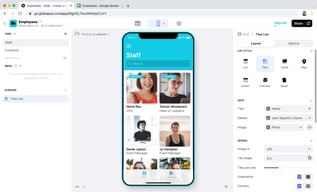
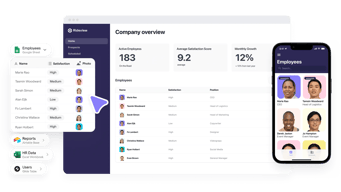
Glide’s proposition is narrow and well-executed: point it at a spreadsheet or database and it produces a functioning app with a real interface, permissions, and workflows. Its own tagline for the paid tier — “turn your spreadsheets into tools” — describes the job precisely.
The reason it matters is that most companies run meaningful operations on spreadsheets that everyone knows should be an application: inventory counts, field inspections, client onboarding, equipment checkouts. Building those properly means a developer and weeks of work. Glide gets to something usable in an afternoon, with 40-plus components, workflows, an API, and support for over 100 data sources at the Enterprise tier including HubSpot, Stripe, Salesforce, QuickBooks, and PostgreSQL.
The trade-off is that you are building inside Glide’s model. It is excellent for CRUD-style internal tools built on tabular data, and a poor fit for anything needing unusual interaction design or complex client-side logic.
How Glide Works
- Data first. Connect a spreadsheet or database; the app is generated from the table structure.
- Updates as the meter. Every row Glide writes or changes counts. 5,000 included on Business, then $0.02 each.
- Editors versus users. 1 editor on Free, 10 on Business; 30 app users included, then $5 each.
- Row limits. 25,000 on Free, 100,000 high-scale rows on Business.
- Workflows and APIs. Business adds workflows, Call API, and the Glide API.
- Custom domains and branding on Business, SSO and backups on Enterprise.
Glide Pricing
Captured from Glide’s pricing page in July 2026, in US dollars, with yearly billing selected. VAT is added at checkout.
| Plan | Price | Editors | Users | Updates/mo | Rows |
|---|---|---|---|---|---|
| Free | $0 | 1 | Unlimited personal | — | 25,000 |
| Business | from $199/mo yearly | 10 | 30, then $5 each | 5,000, then $0.02 each | 100,000 |
| Enterprise | Quoted | Custom | Custom | Custom | Custom |

What decides your real bill:
- Updates are the cost that surprises people. Five thousand a month sounds generous until you consider what generates one. A team of twenty logging a handful of records each per day reaches it inside a month, and at $0.02 each the overage compounds quietly: 10,000 updates is $299 a month, 25,000 is $599. Model your write volume, not your headcount.
- The free-to-paid gap is a cliff, not a step. There is nothing between $0 and $199. A solo builder with a working app and no budget has no intermediate option, which is the most common complaint about Glide’s pricing and the reason people compare it unfavourably against Softr or Airtable.
- The free tier is genuinely usable for building. One editor, unlimited personal users, and 25,000 rows is enough to build and validate an app properly before paying anything.
- Extra users are cheap; extra updates are not. $5 per user beyond 30 is reasonable. The metered updates are where an app’s success turns into a bill.
- “Starting at” is doing work in that $199. It is the floor for Business, not the price for a real deployment with users and usage.
- A 14-day free trial covers Business features, which is the right way to measure your actual update consumption before committing.
Who Should Use Glide
- Teams with a spreadsheet that should be an app. The clearest case, and what Glide is built for.
- Operations and field teams. Inventory, inspections, checklists, and dispatch are natural fits for its data model.
- Businesses without developers. A working internal tool without a hiring decision is a genuine saving.
- Companies validating an idea. Build free, prove the workflow, then decide whether $199 is justified.
It fits poorly for consumer-facing apps at scale, where update costs and the platform model work against you; for complex custom logic, where Bubble offers far more control; and for solo builders on a budget, given the absence of anything between free and $199.
Honest Pros and Cons
Strengths
- Genuinely fast. A working app from a spreadsheet in an afternoon is not marketing.
- A usable free tier. One editor and 25,000 rows is enough to build and validate.
- Good data source coverage. 100-plus sources at Enterprise including Salesforce, Stripe, and PostgreSQL.
- Cheap incremental users. $5 each beyond the 30 included.
- Workflows and API on Business. Real automation rather than static views.
- 14-day trial of paid features.
Limitations
- No tier between free and $199. The most-cited weakness.
- Update overages can exceed the base price. $0.02 each compounds on a busy app.
- Update consumption is hard to forecast before you have real usage data.
- Only 1 editor on free. Collaborative building requires Business.
- Constrained by the data model. Excellent for tabular CRUD, limited beyond it.
- VAT added at checkout, so the headline is not the invoice.
Glide Alternatives and How It Compares
- Softr is the closest competitor for turning Airtable and databases into apps, with a gentler pricing ladder.
- Airtable is the database layer many Glide apps sit on, and its own interfaces cover simpler cases without a second tool.
- Bubble offers far deeper control for genuinely custom applications, at the cost of a much steeper learning curve.
- Notion covers lightweight internal tools and documentation where an app is more than you need.
- Make handles the automation side if what you actually need is workflow rather than an interface.
- Zapier and AppSheet are the other names commonly shortlisted, the latter being Google’s equivalent for spreadsheet-driven apps.
For a broader survey, browse our no-code platforms directory.
The Verdict
Glide is very good at one job: taking a spreadsheet that has quietly become business-critical and turning it into an application with permissions, workflows, and an interface people can actually use on a phone. For an operations team running inventory or inspections out of a shared sheet, that is a real problem solved in an afternoon rather than a quarter, and the free tier lets you prove it works before spending anything.
The pricing is where care is needed, in two distinct ways. First, there is nothing between free and $199 a month — a cliff rather than a ladder — which makes Glide awkward for solo builders and small teams whose app works but cannot justify a four-figure annual commitment. Softr and Airtable both handle that middle ground better.
Second, and more importantly, updates are the meter and they are difficult to forecast. Five thousand a month is the Business allowance, every additional one costs $0.02, and an update is any row written or changed. That means your bill scales with how much your app is used rather than how many people can log in — so the more successful the tool becomes internally, the more it costs, in a way headcount-based budgeting will not predict. Ten thousand updates is $299 a month; twenty-five thousand is $599, or triple the advertised price.
The practical advice follows directly: build on the free tier, then use the 14-day Business trial with real users doing real work, and watch the update counter rather than the feature list. That number, not the $199, is what determines whether Glide is cheap or expensive for your particular workflow.
FAQ
How much does Glide cost?
Glide has a free tier, a Business plan starting at $199 per month billed yearly, and a custom-quoted Enterprise plan. Yearly billing saves 20% against monthly. Business includes 10 editors, 30 app users with additional users at $5 each, 5,000 monthly updates with additional updates at $0.02 each, and up to 100,000 rows. VAT is added at checkout, and a 14-day free trial of Business features is available.
What is an “update” in Glide?
An update is any row that Glide writes or changes — creating a record, editing a field, or a workflow modifying data. Business includes 5,000 per month and charges $0.02 for each one beyond that. Because updates track how much the app is used rather than how many people can access it, consumption is difficult to estimate in advance and is the most common source of unexpected cost.
Is Glide’s free plan good enough?
For building and validating, yes. It provides one editor, unlimited personal users, up to 25,000 rows, 40-plus components, and unlimited drafts, which is enough to construct a real app and confirm the workflow. It stops being sufficient the moment you need multiple editors, custom domains, workflows, or a team using it in production — and at that point the only step up is $199 a month.
Why is there nothing between free and $199?
That is Glide’s chosen structure, and it is the most frequent criticism of the product. There is no intermediate tier for a solo builder or small team whose app works but cannot justify roughly $2,400 a year. If you are in that position, Softr and Airtable’s own interfaces both offer gentler pricing ladders for comparable internal-tool use cases.
What is Glide best for?
Turning existing spreadsheet workflows into proper internal tools — inventory, inspections, checklists, dispatch, and similar operational data — for teams without developers. It is fastest where the data is genuinely tabular and the app is CRUD-shaped. It is a weaker choice for consumer-facing apps at scale, for anything needing unusual interaction design, and for budget-constrained solo builders.

Compare Glide with other popular tools in the same category.
Glide is extremely flexible, while remaining easy to learn and use. We used it to replace a disjointed process consisting of a Google Sheet and a bunch of Typeforms; it's now a unified app that handles that whole process from start to finish. It also helped us surface better information, in real-time, for our internal teams. I had a working proof-of-concept inside of a day, and a fully-built application in about a week. It's made life easier for our internal users, it's improved the quality of our data, and it's enabled us to automate other key processes.
Glide could support more robust backend options. Glide Tables doesn't really feel fully developed, and I worry that in 2-3 years we'll outgrow our Glide Page.
We used Glide to streamline and automate a disjointed, spreadsheet-based process. Glide helped us reduce entry errors and improve data quality, simultaneously making the process easier and more pleasant for those who do it.
I love that it can continue to be updated, fixed, and added to without starting over.
Not everyone wants to download another APP. It has a slight learning curve. I would like to see more how-to videos that would help beginners to use more affectively.
It has allowed my ESL Ts to have links to information at their fingertips and be able to stay productive in their work.
Flexible using google drive. Also, the ability to integrate with external fetch API. I am not a programmer but I could still make great projects and improve my skills.
I find some limitations to personalizing the positioning of the objects. It would be nice to also to group elements applying the same folder and visibility settings.
I can use Glide without the need for complicated settings or a backend programmer to publish updates. All the basic logic and business models i could do by myself in hours or minutes.
I appreciate glide integrating so easily with my google drive & google sheets. I also like that updates for the apps are made in real time.
I haven't experienced a downside of using Glide.
Glide solved the problem of needing to know how to write code or hire someone who knows how to write code. I'm able to build out my ideas myself & that is ideal for me for now.
1. The ability to quickly import data into the app by title 2. Glide Academy with full video tutorials 3. Clear and specific paid packages suitable for many audiences 4. The free plan is great, helping users experience and want to upgrade to higher levels 5. Decentralize by activating the row owner
1. Chưa hỗ trợ khả năng chuyển đổi ngôn ngữ hiển thị (nghĩa là các user từ nhiều quốc gia khác nhau có thể sử dụng chung app bằng cách thay đổi ngôn ngữ) 2. Not yet support to login and get PIN by phone number
Glide solves the problem that a person who doesn't know how to code can also make an app (1) and even make multiple apps, cloning apps at a breakneck speed (2)
- Easy to use. - Fast to create products. - Great UX/UI. - Great components - Best alternative for prototyping fast.
- Can't customize with code (HTML / CSS / JS) - Can't pay annual
Create an app fast (1 week) using scraped data hosted in a Google Sheet.
The speed of development with such a fresh, clean look. I needed an app for document management of applications sent to state governments. It had to be simple, reliable and with good features and functionality. I hired a Glide Expert, Megann Lock, who in a few short hours delivered a perfect solution. I'm so happy I'm beside myself! Being an old database application manager, Megann was able to develop something in hours that would have taken be 6 months in my former life with legacy platforms. Thanks so much - I'm blown away!
I have no dislikes, everything works well.
Delivery of legally required documents to clients and affected parties. I have previously used ShareFile, DropBox, hard copies via FedEx and 3" CDs in the mail.
It's so easy to spin up solutions and test ideas. We have no in-house devs and the ability to build with no-code is key. Shared our first app with our community within a week of starting out and haven't looked back. Works well with our existing tech stack (zapier, sheets, salesforce, etc). The community support forum is also an incredible resource.
Included colour schemes are clean and simple, but not a lot of ability to customize further without CSS.
Internal processes like program admin and CRM functions are made easier by creating purpose-built interfaces that utilize and update data from multiple sources. Community activities, public and private, like conference reg, collective decision-making.
The no code App maker was the most simple solution for us at The Fabindia School, being in a remote area we do not have access to software engineers and students found this most helpful.
Glide must have freeware for schools and children, and be better priced for the Indian market.
Created a simple site map for us and helped us get over the complexity of creating wire-frames, trying to do a course in App making and was simple enough for teachers to access.
Glide support and community are second to none. Any issue or question I've had is easily and quickly answered. GUI is easy to work with and functions correctly and reliably. Due to being low/no-code, some options are limited directly but almost everything I've tried to do, can be achieved using more complex workarounds and creative database use. For advanced users, this is great. I love that the core features are easy to work with and in most cases if the feature isn't directly there, you can work around it
Nothing. Some customization options and direct functionality are limited but this is an unavoidable by byproduct of low/no-code. In many ways, customizations and functionality can be achieved using more complex workarounds so it's not a big deal for advanced users but low code target audience are left behind in this. To be clear, I don't dislike this, in fact, I think it's a huge positive.
Glide puts the power to create custom applications and sites in the hands of non/semi-technical users. It is vital to groups looking to develop a custom product that either doesn't exist or one that is less complicated to use, especially if they don't have resources for their own developer or staff

I use Airtable for the backend of a website I am running and being able to use Glide to show the data that is collected is the best.
Nothing. Everything is great and they are always improving.
An easy way to show the data that I have in Airtable.
Super easy, intuitive and powerful tool that helped our company organize, gather and share data very easily across our network in France (35 shops). Way faster, cheaper and simpler to use and shape than traditional ready-to-use apps on the market. Simple to integrate with other tools
There is virtually any interface you can build on Glide so I sometimes get lost imagining other uses for our company. Not sure that it's a flaw.
Gathering data from teams in our shops (opening times, parcel tracking, user details, furniture needs, IT support, etc.) Sharing data (weekly newsletter with the company performances, weekly performances by shop, contact details)
Easy to use and very powerful once you figure out custom actions. Makes it super easy to deploy to the web and works brilliantly on mobile browsers.
More customisation options for views would be nice.
Glide helps us launch and develop client and internal apps using our existing database. The rate of improvement is significant compared to our old manual development cycle.
It is so easy to use! And really, the options are endless for what you want to create! I also love that it is spreadsheet-based, made for easy learning!
The security rules/ability to create user accounts.
It's allowing me to provide an app with information to my users that is extremely easy to build, customize, and update along the way!
Our clients could access the app without a problem, whether they had android or apple. It was easy to set up, make changes, and add pictures if we needed them. Our project was very successful because of the time we saved.
I don't dislike glide, and we believe it's a great tool if you need a quick app even our coworkers who are not tech savy can make changes and work with the app's progress.
Because of the pandemic, we started to use Glide as our quick shopping cart app. We added our catalog and offered it to some of the schools in our area, reassuring that their students could get the material on their phones and get them directly to their homes to respect social distancing. The event was a success.
That i can build a demo for a needed app in just a few hours.
Information cannot be stored in the device using the app to be later downloaded to the cloud.
The control of inputs and outputs in to an industrial warehouse.
Easy to use and powerful to build your internal small business tools or even an MVP for your startup. It has many integrations giving you flexibility. I would recommend it to everyone, and it's free.
I don't dislike anything, but I would say I wish it had an integration with MySQL. It would be more powerful as a tool and it can easily scale better if what you are trying to build has more users
Internal product for my small team to manage a pipeline of deals. Most CRMs out there did not meet the requirements we wanted or were expensive, so we resorted to Glide.

Easy to create great mobile apps. Great Ui and a great suuport
More plans in order to be able to choose the one you better need for your company
To create mobile app you need much more mone usually and you can not control your own data so easily

Glide has made it so easy for me to develop my app. I love that I can create an app without knowing code. It makes me feel like I don't have to wait on someone else to get things done.
I am not so big on crowdsourcing answers when I have questions and waiting for someone to respond.
I was able to create a minimum viable product (MVP) to test my concept.
Lo más útil son los layout y las formulas matemáticas que facilitan las relaciones entre tablas, ya hice 5 aplicaciones súper fáciles
Lo que le faltaria será dejar añadir iconos propios, de nuestra autoria y dejar integrar otros medios de pago locales, que no solo sea stipe o paypal
En mi país y ciudad no hay sistema cashless y solución de pedidos rápidos y lo estoy implementando en hoteles

I like the pricing model of Glide Apps. Their unlimited users model plan allows me and my team to access the app without incurring additional costs.
I wish their MySQL connectivity was in place as in ReTool. Also it is slow updating data when a backend update has been made
A front end app that we extensively use when on the field. As school photography company it is very helpful for us not having to deal with data.
There is a pretty shallow learning curve. You can get started in mintues.
There are design limitations if you do not know how to code.
We created an intranet site and a CRM.
Simple to understand. Not cluttered. Very powerful.
I do wish the videos and help tutorials were broken down into simpler components.
Glide is helping me to help music producers and songwriters complete their unfinished songs and monetize their talents via an app I am developing with various features.
Building apps with Glide is an absolute pleasure. Every detail has been well thought out and beautifully designed. And I'm always floored by how powerful it is!
I only wish I had a tiny bit more control over the visual design of my apps.
In the education world, we have a tremendous need for niche software, and a limited budget. Glide allows us to quickly and easily build and deploy customized tools that meet our needs.
It is so fast to develop prototypes! Unreal really... I wish I knew Glide before, would have save sooo much time and money
Well you need to know exactly what you want, its the hardest part :) Either learn the program or, what I prefer, get an expert to make things even faster!
Interactive scheduling system based on different tiers, connecting workers with patients, removing the need for a human making errors that could have been automated with what I thought would require years of coding... Now everything runs smoother, saving tremendous amounts of time and money

I am really very happy to say that Glide is a platform which enables a lot business to use true power of technologyto grow their business. We improved Time To Market speed by 30x speed for our business ideas.
There not much items to dislike, but yes if Glide can provide a way to generate Android and IPhone store based apps, it will be a real game changer. We are really looking forward to those features.
Time To Market.
No-code experience and being able to manage many things via Google Sheets is a goal for me. and the ability to see all activities on Google Sheets too makes a lot of sense. I came across Glide when I almost lost hope of how my event attendees can easily sign without hassle, and it was my first time on the platform, the funniest part of it was I spent less than 10mins to study and understand how it work, and my event attendees fell in love with the seamless check-in method I introduced.
The user limitation is my major concern about it, and I will it can give room for more users per account with that small and medium scale business will be fearless.
Event attendee check-in
I love the ability to build software and rapidly prototype ideas that have workflow logic in an intuitive way. I also love that I'm able to co trip visiabily of individual components, pages, or lists based on user roles and anything else I can define.
I don't like that a pin is emailed to log in and you can't default to a traditional username and password. Tye pin emails are often sent to junk/spam folders and sometimes take a long time to show up. I also don't like that I have to describe how to add the app to a users Home Screen to get it to act like a real app. Most of my users just end up with the app in a browser and the experience is not ideal. I really wish there was an integrated way to publish my app to the Apple App Store like Adalo does.
A quick and easy way to create a two way connection with a database that I understand (ie Airtable and Google sheet)
I initially built the app for myself because I was a new first responder with our Ambulance squad. I needed to know how to get to the ambulance bays, not the walk-in ER entrances. Once I made it, people asked for it. Then the Chief asked for us to include all of our responders. Then we added common medications and what they treat. It just grew from there. Now our app is an integral part of orientation for our new first responders.
It doesn't work in areas where the cellular service is weak. It would be helpful if we could download the information and access the app regardless of the quality of the cellular service.
It helps us find ambulance bays and automatically connect to map and traffic apps. It allows us to call our dispatcher and town services from the app when we need information or snow plowing, for example. It enables us to see where our fellow responders live and reach out to them by phone, text or email as we determine who will respond to the scene vs. get the ambulance. It enables us to look up medications and figure out what they might be treating in patients who are not able to communicate this information to us.
I still can't believe how straightforward it was to build a mobile app for my side project with Glide. Glide makes building mobile apps incredibly accessible for anyone with no programming knowledge or experience. This tool is very user-friendly. With its drag-and-drop interface and intuitive design, you can quickly and easily create attractive mobile apps with no difficulty. The most incredible feature is that Glide automatically creates a first draft version of your app based on your data. The apps look gorgeous immediately, and you don't have to spend countless hours on design and style. You'll create gorgeous mobile apps in minutes and have them ready to share in no time. Highly recommended!
One drawback may be that more intricate workflows in your project or automations needed can necessitate more advanced features and may have a steeper learning curve.
Glide is helping me to build a mobile app for my business idea, a fully functional proof of concept for my side project.