
Unclaimed: Are you working at HubSpot Sales Hub?
HubSpot Sales Hub Reviews: 4.4/5 — Solid Choice
If you want to supercharge your sales process, Hubspot Sales Hub is a powerful and seamless solution that offers sales engagement tools, provides configure-price-quote (CPQ) functionality, and robust sales analytics that is essential for any growing business. Like anything within the Hubspot ecosystem, the platform is rooted in the brand’s powerful and reliable service platform, delivering more in-depth insight, better leads, and better solutions that teams can rely on.

| Capabilities |
AI
API
|
|---|---|
| Segment |
Small Business
Mid Market
Enterprise
|
| Deployment | Cloud / SaaS / Web-Based, Mobile Android, Mobile iPad, Mobile iPhone |
| Support | 24/7 (Live rep), Chat, Email/Help Desk, FAQs/Forum, Knowledge Base, Phone Support |
| Training | Documentation |
| Languages | English |


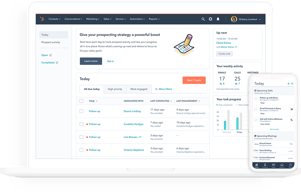
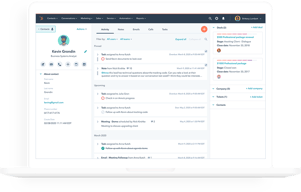


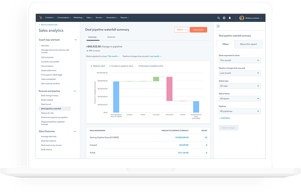





HubSpot Sales Hub has the best free tier in the CRM market and one of the steepest upgrade cliffs, and both facts matter equally when you evaluate it. Getting started costs nothing and the product is genuinely good. The question is not whether you will like it, but what happens to your bill when you outgrow Starter.
- What it is: A sales CRM platform built on HubSpot’s Smart CRM, with pipeline management, calling, sequences, forecasting, and AI agents layered on top.
- Best for: Teams that want a free or cheap start, and mid-market sales organizations that also use HubSpot for marketing and want one connected system.
- Pricing: Free for up to 2 users. Starter from $7/seat/month, Professional from $90/seat/month, Enterprise from $150/seat/month. Verified on HubSpot’s pricing page in July 2026.
- The honest catch: Professional and Enterprise carry mandatory one-time onboarding fees of $1,500 and $3,500 respectively, and Professional requires an annual commitment even if you pay monthly.
What Is HubSpot Sales Hub?

HubSpot began as a marketing software company and built its CRM outward from there. Sales Hub is the sales-facing product in that suite, sharing one contact database, the Smart CRM, with Marketing Hub, Service Hub, Content Hub, and Data Hub. That shared foundation is the strategic argument for HubSpot: if marketing and sales work from the same records, the handoff between them stops being an integration problem.
The free CRM is the reason most people encounter HubSpot at all. It is not a trial and not a crippled demo. Contact management, deal pipelines, email tracking, meeting scheduling, and basic reporting are available at no cost for up to two users, and HubSpot has kept that promise for over a decade. As a growth strategy it works because the free product is good enough to build a business on.
The independent ratings are strong and consistent: roughly 4.4 out of 5 on G2 across more than 12,000 reviews, and about 4.5 out of 5 on Capterra across more than 4,400. Ease of use is the most-cited strength on every platform. Pricing is the most-cited weakness on every platform.
How HubSpot Sales Hub Works
- Smart CRM as the foundation. Contacts, companies, deals, and tickets live in one database shared across every Hub. Buy Marketing Hub later and it reads the same records, with no sync to configure.
- Pipeline and deal management. Customizable pipelines and stages, deal tracking, and task queues. Straightforward and well executed, which is why non-technical teams adopt it quickly.
- Engagement tooling. Email tracking and templates, meeting links, and calling. Sequences for multi-step outreach are the feature most teams eventually need and the one most commonly reported as gated to higher tiers, so confirm its availability on the plan you are pricing.
- AI agents and credits. Breeze Prospecting Agent and Data Agent on Starter, Agent Hub on Professional, and AI transcript enrichment on Enterprise. These run on HubSpot Credits, a consumption currency priced at $9.00 per 1,000 credits on annual billing, with each plan including an allowance of 500, 3,000, or 5,000 credits.
- Analytics and forecasting. Conversation intelligence and forecasting arrive at Professional, alongside the Sales workspace. Deal splits, deal journey analytics, and pipeline approvals are Enterprise features.
The credits model is new enough to deserve attention. Bundled allowances sound generous until agents are used at volume, at which point AI becomes a metered line item on top of per-seat pricing. Ask what your realistic consumption looks like before assuming the included allowance covers it.
HubSpot Sales Hub Pricing
The list prices are only part of the cost. Figures verified in USD on HubSpot’s Sales Hub pricing page in July 2026.

| Plan | Price | Credits included | Mandatory onboarding | Key additions |
|---|---|---|---|---|
| Free | $0 | — | None | Up to 2 users, free marketing, sales, service, content, data and revenue tools |
| Starter | From $7/seat/mo | 500 | None | Calling, Breeze Prospecting Agent, Data Agent, intent signals, task queues |
| Professional | From $90/seat/mo | 3,000 | $1,500 one-time | Agent Hub, conversation intelligence, forecasting, sales workspace |
| Enterprise | From $150/seat/mo | 5,000 | $3,500 one-time | AI transcript enrichment, deal splits, deal journey analytics, lead form routing, pipeline approvals |
The details that decide your real cost:
- The onboarding fees are mandatory, not optional. HubSpot’s own pricing page states that Professional requires a one-time $1,500 onboarding fee and Enterprise requires $3,500. A five-seat Professional deployment is therefore roughly $5,400 in year-one subscription plus $1,500, and no competitor comparison that omits this is honest.
- Professional requires an annual commitment. The billing toggle on Starter offers monthly commitment. On Professional, the monthly option still commits annually. You are signing a year regardless.
- The Starter to Professional jump is more than 12x. From $7 to $90 per seat is the single largest cliff in mainstream CRM pricing. Know which specific feature is forcing the upgrade before you accept it.
- Current prices are discounted. Starter shows $7 struck through from $20 and Professional $90 from $100. Treat the lower numbers as promotional and check what renewal looks like.
- AI is metered separately. Credits at $9.00 per 1,000 on annual billing, on top of seats.
The free tier is genuinely free and genuinely useful, capped at two users. That cap is the real constraint, and it arrives quickly.
Who Should Use HubSpot Sales Hub
- Solo founders and two-person teams. The free plan is the best free CRM available, full stop. There is no reason not to start here.
- Small teams on Starter. At $7 to $20 per seat, Starter is competitive with any entry-level CRM and better connected than most.
- Organizations already running HubSpot Marketing Hub. The shared Smart CRM is a real advantage and the strongest reason to accept Professional pricing.
- Non-technical sales teams. Ease of use is HubSpot’s most consistently praised quality across thousands of reviews, and adoption is usually the hardest part of any CRM rollout.
It is a poor fit for high-volume outbound teams, who report the sequencing and dialing tooling as thinner than purpose-built sales engagement platforms, and for cost-sensitive mid-market teams that need Professional features but not the HubSpot ecosystem. In that second case, Pipedrive or Zoho CRM deliver comparable capability for substantially less.
Honest Pros and Cons
Strengths
- The best free CRM available. Not a trial, not crippled, and sustained for over a decade. For up to two users it is genuinely hard to beat.
- Ease of use. The most-cited positive theme on every review platform, and it translates directly into adoption.
- One shared database across Hubs. If you use HubSpot for marketing, the sales handoff is not an integration problem.
- Strong ecosystem. A large app marketplace, extensive documentation, and a deep pool of agencies and consultants who know the product.
- Starter is well priced. At the current $7 per seat it is competitive with anything in its class.
Limitations
- Mandatory onboarding fees. $1,500 at Professional and $3,500 at Enterprise, disclosed only in footnotes, and frequently omitted from comparison articles.
- The upgrade cliff is severe. More than a twelvefold increase from Starter to Professional, and the most common complaint in independent reviews.
- Annual commitment at Professional. Even the monthly payment option commits you for a year.
- AI costs are metered. Credits at $9.00 per 1,000 are a variable cost layered on top of seats, and consumption is hard to forecast in advance.
- Thin for high-volume outbound. Reviewers scaling SDR teams report limitations in sequencing and dialing that push them to specialist tools.
- Reporting can lag. Dashboard data trailing real-time activity is a recurring complaint, sometimes resolved only by upgrading.
HubSpot Sales Hub Alternatives and How It Compares
- Pipedrive is the strongest value comparison. Purpose-built for sales pipelines, far cheaper at the tier where HubSpot gets expensive, with no onboarding fees. Weaker marketing tooling.
- monday CRM offers more customization for teams whose process does not fit a standard pipeline, with a three-seat minimum to factor in.
- Zoho CRM typically undercuts HubSpot substantially at comparable depth, with a less polished interface and steeper configuration.
- Close and Salesflare are better suited to small outbound teams that need real calling and sequencing rather than a marketing-adjacent CRM.
- Salesforce is the enterprise comparison. More configurable and more expensive, with implementation costs that make HubSpot’s onboarding fee look modest.
For a broader survey see our guides to the best CRM software and the best free CRM software.
The Verdict
HubSpot Sales Hub is two products in commercial terms. Below Professional it is one of the best-value CRMs available, and the free tier is the single strongest starting point for a small team that has never used a CRM. Recommending it at that level is easy.
Above Starter the calculation changes sharply. Professional at $90 per seat plus a mandatory $1,500 onboarding fee, on a compulsory annual commitment, is a serious purchase that deserves a serious comparison. If you also run HubSpot Marketing Hub, the shared database usually justifies it. If you only need sales, Pipedrive or Zoho CRM will deliver most of the same capability for a fraction of the cost, and neither charges you to be onboarded.
The practical advice is to start free, move to Starter when you outgrow two users, and treat the Professional upgrade as a genuine buying decision rather than a natural next step. Identify the one feature forcing the move, then check whether a cheaper specialist tool solves it. And whatever you conclude, factor the onboarding fee into your comparison, because most reviews will not.
FAQ
Is HubSpot Sales Hub really free?
Yes, with a meaningful limit. The free plan supports up to 2 users with no credit card and no time limit, and includes contact and deal management, email tracking, meeting scheduling, and basic reporting. It is a genuine free product rather than a trial. The two-user cap is the constraint most teams hit first.
Does HubSpot charge an onboarding fee?
Yes, on the higher tiers. HubSpot’s pricing page states that Sales Hub Professional requires a one-time onboarding fee of $1,500 and Enterprise requires $3,500. These are mandatory and are additional to the per-seat subscription. Many comparison articles omit them, so factor them into any first-year cost estimate.
How much does HubSpot Sales Hub cost in 2026?
Free for up to 2 users. Starter starts at $7 per seat per month, discounted from a listed $20. Professional starts at $90 per seat per month, discounted from $100, plus the $1,500 onboarding fee. Enterprise starts at $150 per seat per month plus a $3,500 onboarding fee. AI features consume HubSpot Credits, priced at $9.00 per 1,000 on annual billing.
What are HubSpot Credits?
A consumption-based currency that powers HubSpot’s AI agents and features. Starter includes 500 credits, Professional 3,000, and Enterprise 5,000, with additional credits at $9.00 per 1,000 on annual billing. If AI agents are central to your workflow, model your likely usage rather than assuming the bundled allowance is sufficient.
Is HubSpot Sales Hub better than Pipedrive?
For teams that also use HubSpot for marketing, yes, because of the shared database. For teams that only need a sales CRM, Pipedrive is generally the better value: it is purpose-built for pipeline management, substantially cheaper at the tier where HubSpot jumps to $90 per seat, and it charges no onboarding fee.

Compare HubSpot Sales Hub with other popular tools in the same category.
it gives me my days workload, who I need to reach out to
I wish when a call comes in, that Hubspot would pull up the contact if they are in the system..
having the ability to track what I've done for the day/week/month in sales and contacts
You get many benefits with HubSpot Sales, what I like the most is that helps you to close more sales, you have all the information handy and you build stronger relationships.
I haven't found any negative in using HubSpot, everything has helped me to improve my sales and relationships, sometimes the tool is down but hasn't affected my sales.
I found many benefits with HubSpot Sales, it takes your sales to a next level, is easy to use, it's analytical, and you can track your deals and identify potential leads easier.
such an effective way to contact and follow up with leads. I love how i am able to keep up with open rates and click rates when sending an email
Nothing at the moment, hubspot has been super helpful with my career
basic functiond
I love using hubspot as it allows me to manage all of my relations very easily and manage my daily workload. Through utilizing hubspot calling and emailing, all of my conversations are saved and easily viewed by myself and my manager. It also allows me to keep track of deals and upcoming tasks very easily.
The only downfall would how the structure of services are across paid plans. I wish that some services, such as, sequences were available at the more economical paid plans.
The best thing Hubspot does for our team is make it easier to track activity with our clients and deals - makes it very easy to review the deal and know exactly what needs to be done moving forward without searching through various platforms.
Easy navigation, user friendly, accurately logs and tracks what I need to.
Honestly nothing. I have used almost every CRM out there, and I have always preferred Hubspot
The ability to make more calls in less time which leads to more appointments.
It's super easy, user-friendly, intuitive, and makes my job a lot easier.
I honestly don't have any major complaints.
It's a lot easier to keep all of my work and contacts organized.
I love that you can queue up calls and easily roll through them.
I wish there was a way to send mass emails.
Solves the problem of using multiple windows on my computer to track calls.

Interface as well as the vibrant colours
At times, you have to manually refresh it
It is making the transition and communication between sales and customer services more efficient
I like the ability to manage my day to day, track my emails and calls, schedule tasks as well as have a full overview of contacts associated with my companies. I like that Hubspot is fully customizable to suit any individuals needs.
Sometimes, unfortunately you are not able to send an email through hubspot, but it is truly not that often.
The ability to manage my day to day operation, and clearly see who I have communicated with and when. This allows no mistakes and errors in resending emails, and also allows for me to schedule follow up emails or tasks with that client.
I like being able to set follow up tasks from either a phone call or an email. This allows me to stay on top of all of my customer contacts.
I would like the ability to send texts directly through HubSpot. In such a mobile world, text messaging is an efficient contact method where voicemails tend to be deleted without acknowledgment.
HubSpot solves the issue of tracking customer contacts whether sent within the HubSpot site or directly from Outlook, so that exchanges are easily reviewed prior to initiating a call back or follow up.
I like seeing our outreach program and getting the intelligence out of it. This solution helps us create high-level decisions for our marketing effort and impact.
Bounced email sometime is not consistently shown in the Hubspot timeline. Removing associated contact doesn't remove the associated timeline, which is sometimes confusing.
The single view on deals we are working on greatly benefited us in marketing. As a BDR, I am tasked to contact prospects through LinkedIn, email and call and track them.
I like that it's intuitive, everything is all in one place, and that it helps me manage my work and time efficiently.
It's overwhelming at first. However there are several tutorials that walk you through it. I do wish there was a better system for leaving notes in accounts.
Time management, accurate reporting, and easily tracking upcoming tasks is making it easier for me to connect with prospects and clients quickly.
I love HubSpot because the workflows are so user-friendly and make my job easier. I love to be able to sort by almost any field to find the specific prospects I am looking to contact. EMailing and calling is simple and quick within HubSpot. Creating tasks that allow me never to forget to follow up is also effortless. I have used many CRM's and this is by far my favorite ever! Also support is a chat away and always helpful.
Occasionally I want to use many filters to find exactly who I need to contact, and the filters don't always produce the results I am looking for. I've chatted with HubSpot support and sometimes the filters need to be used in a specific order.
Tracks all my activity, love the templates for emailing prospects quickly. Allows me to contact many prospects per day and know if they are opening and clicking so I can engage with the active ones.
Hubspot makes it so easy to keep your contacts (sales leads) and tasks organized. Reminders are a must-have for me to keep my pipeline growing and moving in the right direction. Service Hub is also a must-have!
I do not have any downside. Everything works and functions exactly as it should.
Time managment, sales goals, training and most importantly staying connected when my customers need me.

How easy it is to log a call and send an email with the read receipts.
How often it goes down and something cant load but that what happens with a internet based tool
reminding me of the tasks i need to do and when they are scheduled
We can customize the CRM properties, and create dashboard reports
There are occasions when access is slow.
I can identify the teams priorities, and push for a close earlier and with less risk
It's very easy to use, even for first time users. Most things are where they are supposed to be. It allows you to organize your day and track your activities very easily.
Sometimes there can be some lag on some services or tabs that take a bit of time to load, but these issues are sorted out quickly. The inbound calls tab is a great new feature but needs a bit of work.
Mostly it allows me to not drown in a sea of contacts, emails, and calls. It enables you to stay organized even if you have hundreds of activities to do and the notifications on opens lets you know what contacts to prioritize

The functionality of Hubspot is top notch and as good as anything else in the sales and market space, but what separates them is their customer service. I don't know how they do it, but 100% of my interactions with their extremely responsive service department have been enjoyable and helpful. Huge fan of Hubspot here.
Not much at all. There is really nothing that I would change at this time.
Really, just having all the functionality needed all in one place.
It's user friendly ability to make the process a smooth and simplistic one.
It requires updates often, and it has repeating errors with logging activity on a weekly basis on and off.
Maintaining a detailed list of potential partners, while keeping track of detailed conversations amongst them.
Extremely easy to track potential orders
The quotes feature could allow decimal points, without allowing decimal points, quotes are often inaccurate.
Prior to using HubSpot we found it very difficult to track which quotes we had followed up with and why they had been lost. Being able to track this accurately has greatly helped our sales team to bring more quotes through the door.
HubSpot Sales Hub is very user friendly and simple platform to enter the information we need for our sales & marketing team. The dashboard feature is very helpful when presenting the data to the Executive team. And I love Hubspot Academy! Also, the Hubspot community is great to discuss any issues, give suggestions to the development team (which they do respond to!) and of course, network with other users.
There a a few small issues with editing meeting messages but we have found a work around. The development team does listen to suggestions and keeps the community informed about improvements and new features
Gives the inside look at the activity of your prospects. That really helps us to focus in on those prospects that are interested in our message. And they go to the top of our call list! Opens and clicks are a great thing!
SOUND AND THE CLEARNESS OF IT ARE VERY GOOD
NONE. KRISP IS WAY BERTTER THAN OTHER APPS FOR NOISE CANCELING
The problem that occurred when I could not log in before was an issue about the password
Hubspot provides a user-friendly platform that was straightforward to learn. It allows me to keep track of all my tasks and leads in a strong way. Best platform for beginners.
Nothing is unhelpful about hubspot. Only thing that I suggest isn't working the best is when it notifies you when a lead clicks/opens your email/email links. It will notify me that a lead has clicked 4 different links in >30 seconds which isn't accurate. In addition, it notifies me when I opened the lead's email as if the lead did.
Convenience, labor reduction, and organization. Helps me track the best times to contact leads with scheduled emails. Helps keep track of lead information and prospecting.
Can create & keep email templates, work tracking, data utilization, making contacts, email campaigns, calling, scheduling, emailing tasks at one place & many more
Nothing much; searching contact is quite tricky; creating criteria to search contacts can be improved, and the rest of the things are fine. In email template there should be an option of attaching docs from desktop
Scheduling a call has become easy; emailing bulk audiences and getting calls scheduled has become very easy & convenient. Tracking & maintaining notes for each call
What I love best about Hubspot is its user-friendly and great asset to our daily leads.
nothing , great program !! No complaints.
no problems with the system.

How easy it is to pick up; it's really straightforward in terms of the interface. I also love the customization in the search features and how you can adjust your views to be specific to the information you need at hand.
In terms of our business, I think our reps get confused (however, some need more training) on how to track a single facility, versus a physician group, versus a hospital system. It would be nice if a feature compared new entries to what is already in the system so we could avoid duplicates at conception.
It is mostly helpful for tracking our business in sales, and the relationships we have with the facilities we work with. It is also a hub for contact information.
It is a best tool for lead management and enhance to bring more sales outcome. I strongly feels it's great technology for a sales person to improve the company objectives
I don't feel any negative thing using hotspot.some times i found very slow in updating the things .That i advice to improve further.
It will help for the data management and calling updated on daily basis and understand upcoming follow ups and further information on the upcoming sales closure
HubSpot has helped us grow our Cleaning Business considerably since we started in 2021. We have had a smooth experience with the Gmail inbox linked to the CRM, HubSpot email tracker and notifications with Chrome and HubSpot mobile application. As a first-time user, it was quite easy to use the platform. The demo videos and the free user tutorials were easy to understand and useful.
There can be confusing glitches like different users shown as owners for contacts/companies. The email tracker hasn't always been accurate. The payment plans have been expensive.
It keeps track of everything that happens with a company from the moment we approach a client.
The ease of navigating through everything. Super easy to find stuff and get used to.
I wish the dashboard was more customizable and had more stuff.
Having all my info in one spot that is easy to use.

the AI tools and automation reduces the work like 10 times
nothing as such its perfect for my use..
it helps connecting calls and automating emails which help alot