






LiveWebinar Reviews: 4.5/5 — Highly Rated
LiveWebinar is a cloud based webinar option that allows companies, both big and small, to easily manage webinars and online meetings. The platform is especially useful for marketing teams and HR departments to host industry related gatherings virtually for their audience. It features like screen sharing, presentations, and broadcasting to major social media platforms like YouTube, Facebook, and Vimeo. The platform also allows users to personalize registration forms to boost branding opportunities and provides numerous engagement features such as voting, surveys and polls.





| Capabilities |
API
|
|---|---|
| Segment |
Small Business
Mid Market
Enterprise
|
| Deployment | Cloud / SaaS / Web-Based, Desktop Chromebook, Desktop Mac, Desktop Windows, Mobile Android, Mobile iPad, Mobile iPhone |
| Support | 24/7 (Live rep), Chat, Email/Help Desk, FAQs/Forum, Knowledge Base, Phone Support |
| Training | Documentation |
| Languages | English |
LiveWebinar Pros and Cons
- Offers a WhiteBoard feature that helps make presentations more engaging
- Fully mobile responsive webinar room
- Allows main rooms to split into break-out rooms during live meetings
- Can host up to 1000 attendees
- Complicated user interface that demands a steep learning curve for first time users
- Users often report issues when trying to upgrade services

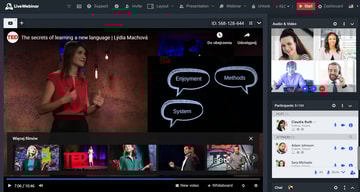
Webinars are a pretty big deal these days.
Although webinar learning opportunities have been gaining attention for a few years now, demand for webinar platforms has grown substantially as remote and hybrid work became the norm.
Companies, educators, and thought leaders are beginning to turn to webinar content as a way of forming deeper connections with their audience. However, there’s still plenty of room for companies looking to get ahead of the curve. After all, 83% of marketers find webinars effective, and webinar adoption has grown steadily, with virtual events now a standard part of most business communication strategies.
LiveWebinar is a popular, easy-to-use webinar creation software, built to help people create engaging webinars for their target market. Today, we’re taking a closer look at LiveWebinar, and just how effective it is at allowing companies to take advantage of the online learning market.
Who Should Consider LiveWebinar?
LiveWebinar advertises itself as the most advanced webinar software available, allowing companies to collaborate anywhere, and build engaging experiences with speed. Rather than just offering webinar functionality (like most webinar software), LiveWebinar sets itself apart as a cloud-based solution for webinars and meetings in one.
Existing customers include Infoshare, Marketer+, Kaplan, and many other reputable organizations. LiveWebinar boasts around 153968 users and has hosted more than 1277876 meeting rooms to date.
If you’re trying to digitally transform your communication strategy, LiveWebinar offers a relatively affordable way to access meetings and webinar experiences. There’s a free service for people on a tight budget if you’re happy to stick with only 5 attendees.
LiveWebinar Review: The Features
LiveWebinar is a cloud-based solution for streaming meetings, sharing screens, and hosting or recording webinars. The platform has become pretty comprehensive over the years. Here are some of the features you should know about:
Live Webinars
LiveWebinar is suitable for both meetings and webinars.
Let’s start by looking at webinars. The LiveWebinar platform is easy to access, with the option to access the room from any browser, without the need for a download. You’ll also have the option to customize your webinar experience, adding and removing features at your will, and you can embed the webinar directly within your website.
Webinars are delivered in crystal-clear HD quality, with state-of-the-art connections, to ensure you have a professional impact on your audience. When designing your webinar, you can:
- Use an API to embed your webinar into your existing tools
- Allow audience members to join from any device, from their browser
- Access integrations with various tools (like marketing automation services)
- Create phone bridges to call in and out to your webinars.
- Organize webinars in various forms: including training sessions and presentations
- Live stream your own webcam
- Draw and write to share your ideas on a virtual whiteboard
- Share your webinar on social media.
LiveWebinar will allow you to share both your camera feed and your screen in real-time with your audience. You can also store and share files safely through the LiveWebinar personal cloud. If you want to stream your content online while you’re mid-webinar, you can connect to Vimeo, YouTube, and Facebook to do so.
Evergreen Webinars
Evergreen webinars are an alternative to the standard “live webinars” experience. With this strategy, users can pre-record webinar content in HD, then make the content feel more live and engaging with a range of additional tools. The Evergreen Webinar service includes:
- Simple recording in HD quality
- Scheduling, to determine when your content should be available
- Custom CTAs to help your audience get involved
- Recording for live webinars (So you can re-use them later)
- Embedding in your own domain
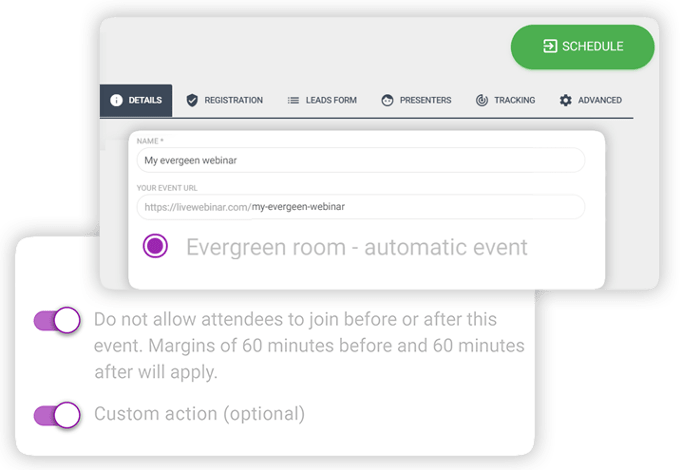
When you record webinars with LiveWebinar you can store the information in the cloud, then access the in-built editing tool to adjust your content. You’ll be able to edit the frame rate of your recordings, choose you preferred cloud storage provider, adjust resolution and even change the recording layout however you choose.
Webinar Customization and Branding
Whether you’re producing an Evergreen webinar you want to share again later, or you’re designing a webinar to share in real-time, you need the right branding opportunities. The branding templates in LiveWebinar make it easy to ensure you’re delivering a familiar experience with every event.
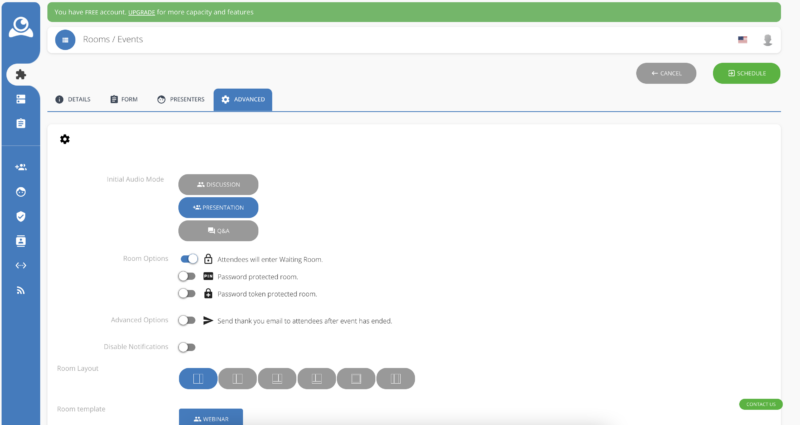
You can click on the “schedule webinar” section in the free version of the tool and get a handful of options like:
- Room password protection
- Audio mode
- Room layout
- Room templates
Unfortunately, if you want to add your own brand colors and logo, you will need to upgrade to a paid account. When you do this, you’ll be able to make various changes to the color and appearance of your rooms on a greater scale. You can also save multiple branding templates and add them to your future webinars, so you don’t have to build everything from scratch each time.
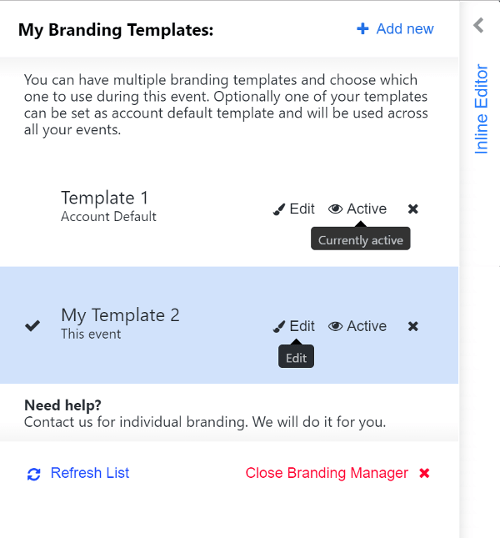
For Evergreen webinars, there’s also the option to edit the content you save to the cloud with the LiveWebinar Recordings Editor. This means you can put your logo or a branded page at the beginning of a recording, add a branded song, and even customize your own outro.
Editing also allows you to:
- Watermark your recordings
- Trim recordings do the perfect size
- Upload a default ending screen or introduction
Webinar user interaction and engagement
LiveWebinar gives users a variety of ways to engage with your audience.
Once you’ve chosen your Webinar room template, you can find various tools for getting your audience involved with the experience, from polls and surveys to Q&A sessions. Options for audience engagement include:
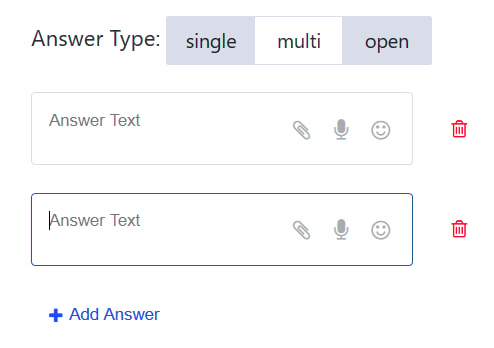
Tests and surveys: Tests and surveys allow users to collect information from their audience and analyze useful feedback. You can choose what kind of surveys you want to run, whether you want your customers to leave written answers or choose from a scale of numbers, and more.
Once you’ve finished the survey, LiveWebinar creates a handy chart to show your results.
Presentations and screensharing
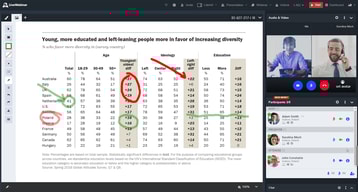
Presentations in LiveWebinar allow you to create slideshows of visual information to help you make a more impactful presentation. You simply upload the information for your presentation into the LiveWebinar environment before your event, and you can access it whenever you’re ready.
Presentations come with a bunch of handy features, like the option to “sync slides” to ensure everyone is watching the same slide as you at all times. You can also turn on a pointer to help customers or viewers see what you’re trying to emphasize.
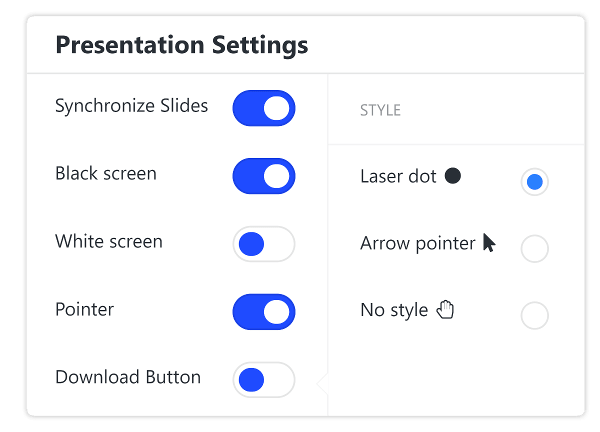
While you’re presenting, you can also make notes, draw on the screen, and pull attention to important information using the whiteboard feature.
You can share your screen from any device with LiveWebinar too, making it much easier to add context to a conversation. You can show people what you’re working on by sharing the entire screen, or just a single application.
Interactive whiteboard
The interactive whiteboard can also be a standalone part of your webinar presentation. It comes with a range of drawing tools, whiteboard page templates and grids to help you with sharing information. You can change your cursor style to make it look like a laser pointer and give different people in the presentation nicknames so your viewers can see who is drawing what.
One particularly fun thing about the whiteboard is the ability to download the content you create. This means you can share written notes with your audience after the webinar.
Chat
The live chat function, available for both meetings and webinars, allows you to connect with your audience on another level. You can share emoticons and links, drag and drop files, and even access in-line translation for some languages.
There’s also the option to create a “moderated chat” where you can delete and remove messages, or attendees who might not be acting appropriately.
The chat configuration feature within LiveWebinar allows for a few customization options, like adjusting font size, and changing the background color of the chat app.
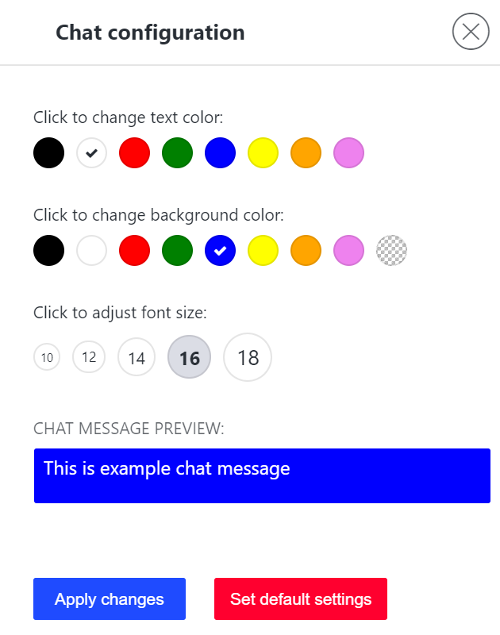
You’ll also be able to add voice recording options to chat in some cases, which means that people can share snippets of voice in the chat room.
LiveWebinar: Registration and Forms
Collecting potential attendees for your webinar is simple enough with LiveWebinar. The solution comes with it’s own lead forms and registration forms.
As a free user, you can only create up to 3 registration forms. The Registration form makes it easy to predict how many people you’re likely to have attending your next event. These forms also prevent people from simply sharing the link to your webinar with uninvited guests when the event is running.
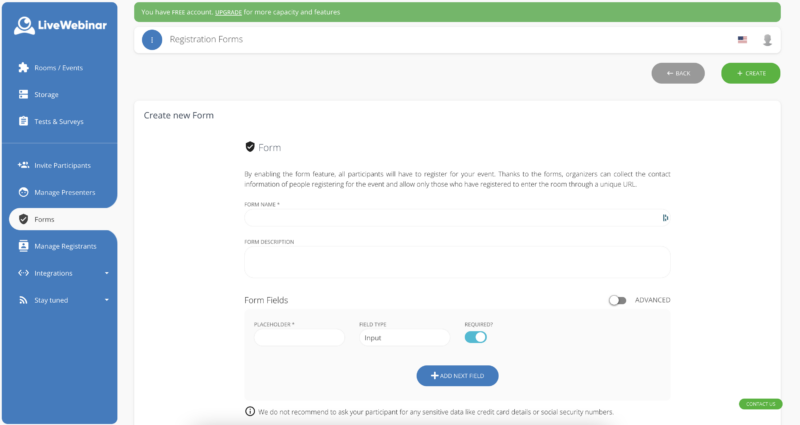
You’ll be able to name your registration forms and create custom fields (depending on your pricing plan). You can also integrate these forms with tools like MailChimp, Freshmail, and Active Campaign. Email marketing integration means you can nurture excitement for an upcoming event, and potentially convince previous attendees to come back to future webinars.
Advanced “leads” forms, allow you to capture information from your attendees when they log into your webinar too, so you can collect more information for segmenting your audience.
Aside from giving you registration and lead forms to connect with your participants, LiveWebinar also offers things like:
- Smart “thank you” pages so customers can add your event to their calendar
- Real-time alerts and reminders so customers don’t miss your event
- Personal (non-transferable) event links
- Phone bridging for customers who need to dial in to meetings
- Waiting rooms, so you can decide when to allow access to the event
If you want to invite participants to a webinar directly, you’ll have the same solutions as you get when inviting someone to a meeting. Options include email invitations, text message invitations, call-in invitations, and mass invitations.
LiveWebinar Meeting Rooms
Webinars might be the central feature of LiveWebinar – but they’re far from all you can do with the service. Users can also host all kinds of immersive meetings, with multiple presenters, call out and dial-in options (for people without an internet connection), and comprehensive participant lists, so you can keep track of who’s present in any conversation.
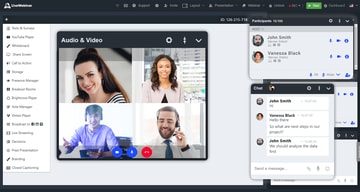
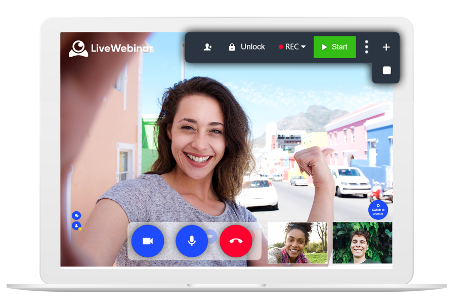
Just like the webinar template, LiveWebinar also has a “Meeting Interface” template designed to help you reach all your attendees at once. The template comes with a big grid camera layout, so you can see multiple people at once. You can also access live chat at the same time as participating in audio and video conversations, so it’s easier to share messages, ideas, links, and files.
The LiveWebinar meeting experience is extremely easy to use, with an intuitive interface that allows you to control your video and content sharing view. You can even turn the taskbar transparent, so it’s not taking up excess screen space. Other features of your LiveWebinar meeting room include:
- Instant meeting buttons with custom links for quick conversations
- Chat history and real-time chat, with link and document sharing
- Screen sharing and control (for adding context to meetings)
- Meeting waiting rooms and breakout rooms (For group conversations)
- Presence (to check who’s available and online)
The online meeting software even comes with storage, so you can keep track of crucial business applications in the cloud.
LiveWebinar: Extra Features
Aside from the huge number of webinar and meeting features mentioned above, LiveWebinar also commits to constantly updating and improving its feature list. There are currently a huge number of bonus features available, though your access to these will depend on your LiveWebinar plan. Features include:
- Waiting rooms with meeting agendas
- Website embedding (so you can host your own meeting or webinar)
- Room security and compliance services
- Connection testing
- YouTube and Vimeo players
- Multiple audio modes
- Language interpretation
- Moderated chat
- In-Webinar Call To Action
- Vote manager and polling
- Statistics and reports
- Advanced APIs
What are the Main Benefits of LiveWebinar?
LiveWebinar is a highly flexible and scalable solution for hosting meetings and webinars on the same platform. During our testing these features stood out most:
- Access to meetings and webinars in the same platform (and on any device)
- Range of engagement tools, like polls, CTA options (in the webinar) and chat
- Registration pages and forms available for converting leads
- Customizable questions on the registration page
- Affordable pricing for a multi-featured tool
With a free plan to get you started, and discounts on annual packages, LiveWebinar is one of the more generous webinar and meeting tools on the market. Access to constantly updating sets of features, and developer support via integrations and APIs also means that LiveWebinar is ideal for companies that may need to scale their webinar strategy rapidly.
LiveWebinar: Customer Support
LiveWebinar customer support is one of the few features that seems to be quite lacking in this software. If you visit your profile page, you’ll see the “Contact Us” button in the bottom left, but you’ll only have the option to choose between email support for sales, or support.
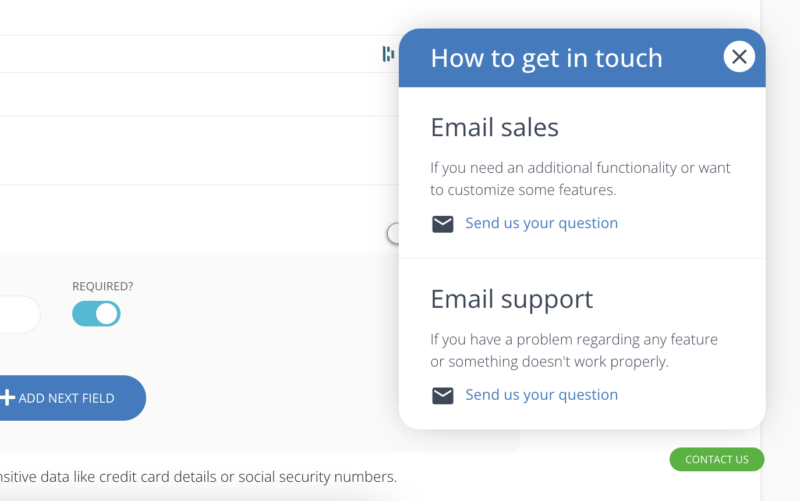
There’s no live chat for LiveWebinar, or phone number that we could find. However, they do seem to respond to their emails relatively quickly (within about 48 hours). You can always access the range of LiveWebinar manuals and tutorials to help you if you’re looking for DIY support.
LiveWebinar Review: Pricing
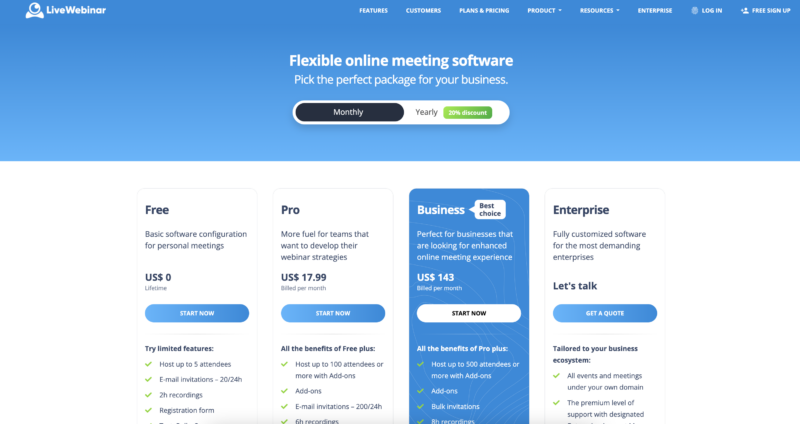
LiveWebinar’s pricing structure is easy enough to understand. There’s a free package available for small teams and individuals. Here, you won’t be able to brand your webinars or meetings, but you can access polls, tests and surveys within webinars, and record up to 2 hours of content. Other features of the free service include:
- Meetings and presentations for up to 5 attendees
- Screen sharing
- Marketing automation tools
Paid plans include Pro, Business, and Custom tiers with increasing attendee limits, recording hours, and features. See LiveWebinar pricing for current rates.
LiveWebinar Ease of Use
All great webinars require plenty of planning and preparation. A good webinar software can help to reduce the amount of work you need to do to connect with your audience, by simplifying your hosting experience. LiveWebinar offers a simple, clean, and effective environment for meetings and webinars.
With various templates to help you get started faster, and quick launch features, you’ll be able to design live and Evergreen webinars in no time. The dashboard is clean and easy to navigate, and all of your features are organized neatly into a sidebar to help you find them.
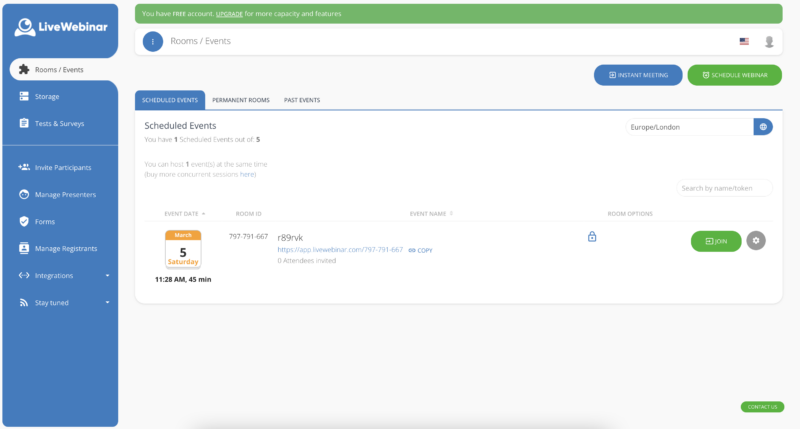
When the time comes to launch a meeting or webinar, LiveWebinar simplifies this too. You can choose templates and layouts that suit the kind of presentation you want to create, customize your content with branding, and invite participants in a host of different ways.
Even adding a co-host is simple enough, so you can quickly share the spotlight.
In Conclusion
As an affordable and straightforward solution or both webinars and meetings, LiveWebinar checks a lot of boxes for today’s business leaders. If you want to host an engaging webinar, or simply bring your teams together for better meetings, LiveWebinar has you covered.
Looking for LiveWebinar Alternatives? Check out…

Compare LiveWebinar with other popular tools in the same category.

I like the fact that there are many functions and possibilities on the platform. Moreover, it is interesting because at Livewwbonar they continue to give and create further services
In the beginning I had some technical problems and some further requests and needs. It was not always possible to do everything, but it was easy to solve problems and the team at Webinar is available for support.
Comunication with customers. Webinars, seminars online
Easy interface, great streaming and awesome support
Might be a bit of a learning curve but it's well worth it
Helps me sell one to many and build authority through webinars
I primarily use LiveWebinar for realtime meetings - replacing Zoom about a year ago. There's no software to download and easy to use and manage. When I do use it for webinars, I love how easy it is to setup either a one-time or on-demand webinar. It's a great software and truly amazing if you're able to get the lifetime deal like I did.
Sharing your screen or other content isn't quite as intuitive as Zoom, but definitely not difficult.
Zoom, especially when you add the webinar feature, can get expensive. I was able to purchase the lifetime deal for LiveWebinar so the cost savings alone have been awesome. I primarily do video conferencing and this just works. My clients don't have to download software or anything so it's WAY easier than something like GoToMeeting (which I can't stand).

Excellent software. I use it for multiple uses: Webinars, Meetings with clients 1 to 1 and Meetings with groups of students. Very good usability and translated into my native language (Spanish).
There are some improvements to make to the Spanish translation but nothing serious :)
Now I can have Webinars, Meetings with clients 1 to 1 and Meetings with groups of students.
I use LiveWebinar to put on both paid and free online classes. The features included are fantastic for the price. Gives you full control over your participant's interactivity and setting up for each webinar is super easy!
The platform can feel a little outdated so it can feel a little clunky compared to zoom and other webinar options. An update to the interface would be fantastic so it doesn't feel like I'm using a windows XP. But this is more about the look a feel rather than functionality because it works perfectly!
it provides a safe a secure place for me to put on both paid and free online classes. One great features is the ability to only allow those that signed up for my class to enter the classroom so I don;t have to mess around with admitting the right people.

It has everything you need to do professional webinars, plus the cost is not even comparable with competitors
Nothing I don't like, I appreciate all the features
I use it for counseling, both 1-on-1 and when I have to have meetings with multiple people
I like all the features of LiveWebinar mostly it's meeting room feature. LiveWebinar works on all the browsers so no need to install.
I like all the features nothing i dislike in this software.
It solves the in person presentation in conference. Anyone can attend and present their research from anywhere in the world with the help of this software.

I had the chance to get a lifetime license with LiveWebinar to replace my Zoom membership. On top of having access to a videoconferencing tool, I can receive registrations to webinar, integrate my mailing list, have ongoing webinars and even record my rooms. Plus I can assing a permanent room to my team and they can open it up whenever they want!
A while back, I had some clients who were not able to connect easily using their iPhone. They had to close their microphones and cameras so they can join the call.
LiveWebinar helped me being able to do many things that I would have needed to get from separate platforms. My UX is smoother and I can reuse the content I create as I record easily my session with Livewebinar.

I like the fact that I do not need to download any software to hold a webinar or web meeting. Instead, I can simply provide a link, clink on that link myself, and meet with a client or group immediately!
I think the webinar interface could use a facelift. It is a bit legacy. However the functionality works so well you get used to it. A more contemporary look would be beneficial but not a deal killer.
I dislike Zoom. Although it is what everyone uses, more than once I've had meetings that I forgot that I accepted pop up on my computer in the background. As I appreciate my privacy, I prefer an organization that respects that. Further, the automation implementation has made a big splash on my ability to quickly create meetings with my clients without any input from me!
Event notifications arrive to participants without delay, regardless of the servers where the participant has an e-mail account. Screen sharing works perfectly and quickly. I also appreciate the stability of the connection.
Personalizing the appearance of the event pages does not always work. Besides, I need the ability to quickly set up a landing page with a LiveWebinar registration form, preferably on my subdomain.
It provides an easy-to-use and reliable webinar tool. It earns money for us, allowing us to multiply sales. I can easily meet my team members online and chat with excellent quality.
What I like best is that my clients don't have to install anything on their computer in order to join my meetings and trainings with them, and also that I can have an evergreen room open all the time for quick hop-on calls as necessary.
The only thing I don't like is that I have to click on each user's audio when they join so they can hear me.
LiveWebinar is a low-cost alternative to Zoom and Goto Meeting which allows me to have meetings and conduct trainings with my clients.
LiveWebinar is easy to use, sends emails for you, and makes integrating with other products easy.
The interface is customizable but only within each webinar. It would be nice if you could set a permanent brand style.
I was looking for an affordable webinar solution that offered the same benefits as other webinar solutions.
I love that I don't have to worry about time limits for meetings
The UX needs some improving. It is difficult to allow others to share screen
LiveWebinar is giving us a professional conferencing solution that works well with little bloat.

Reliable software that delivers what they promise. We currently use embedd in our platform.
Presenters capacity could be bigger, today is currently 10 presenter at the same time.
Using live webinar embedded in our platform, we have already used zoom and clickmeeting but live webinar is much better.
I have been using LiveWebinar for more than a year. I love the flexibility, the customization, and the functionality.
I cannot think of any downsides to using LiveWebinar
I love having the "Always Open" meeting space for my customers to join.

The software is easy to use and very flexible and clean interface.
HD option is payable , also need some improvement on the customer service.
It works form educational conferences very well and iterates smoothly
The ease of use, fairly intuitive and have managed to use breakout rooms and get everyone back when ready, no small feat using webinar tools. Also, the ability to share images easily during meetings.
When you put people into a breakout room, it seems clunky to have to go into each room and unmute everyone and start the video. Perhaps I have not mastered allowing all to have the video at once, each room has to be activated manually.
I lead Group Coaching and Group Meditation and it's been a lifesaver to have this. And, as an Executive Recruiter I use it to let clients interview applicants; set them up in rooms. The hiring managers love it!
I have found the layout and structure of LIveWebinar to be so user-friendly. I have not encountered glitches as I have on other platforms. I appreciate the excellent tech support as well.
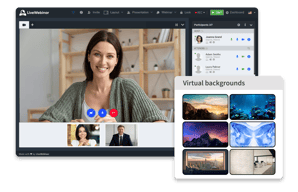
It would be nice to be able to have more options with changing themes and backgrounds.
I am in the mental health industry, so webinars hosting large audiences has been most beneficial for me.

poder personalizar mis salas y asignar un formulario para cada evento esome gusta mucho poque tengo la libertad de presonalizar todo logo colores botones en fin todo
que los usuarios les cuesta mucho ingresar y la camara en los dispositivos moviles a veces no se pueden conctar o salen y entran muchas veces para poder estar definitivo en la transmicion
que puedo conectar con mi autorespondedor y captar clientes lo unico es que falta integraciones nativas con otras aplicaciones aunque creo que puede ser mas facil

It has given us the necessary functions to carry out real-time group chats or to create communications with employees for fear of online meetings. We can manage all essential documents, surveys, content and integrations with various social networks.
There are no additional functions that you need to add, it is one of the best platforms to collaborate through audio and video conferences and share files through chat and messaging with the entire work team.
It is the best way to carry out remote communications, it gives us great functions and browsers that facilitate access to carry out seminars and live broadcasts; in the same way, it provides us with a whiteboard to capture all our ideas.

I originally chose LiveWebinar for two specific reasons: 1. Browser-based, so there is no additional application or software. 2. They have good privacy policies. In addition, their customer support is awesome, and tech issues are as simple as refreshing the browser or trying another.
The layout is a bit simplistic and feels dated.
We host 2-4 events per week using Live Webinar to connect with our audience and potential customers. It's a brilliant way to personalize education.
One of the best things about LiveWebinar is the interactivity with webinar attendees. Presenters can respond in the chat like on other platforms, but also can present surveys, and can have interactive whiteboards to make the most of the time in the webinar. With those tools, actual work can get done instead of attendees just being lectured to.
In the past, I've had some issues with LiveWebinar when hosting international webinars. For example, I'm in the U.S., some of the attendees in Australia had very low video quality even with adequate local internet speed. This may have been due to the network between the U.S. and Australia at that time, but I haven't had that issue with competing platforms.
Using LiveWebinar's tools like their interative webinar, surveys and chat, I've been able to convert more prospects than I would have with a standard webinar platform. Interactivity helps!

The ease of use and the slick interface!
Streaming can sometimes be laggy but the team is working on this.
Mostly doing live webinars to a larger audience of users of our product.
From the beginning, the ease of using the webinar software is very noticiable.
There is not anything I could come up with that I disliked
I bought my product with lifetime access. Having a reliable way to communicate and meet with my clients without haveing to use Zoom or other platforms with a monthly fee is a plus to my business budget.
No need to download, multilingual chat, instant meeting creation, knowing where the are connecting from
Not easy to work in iphones (only works in chrome browsers)
We used it in a multilingual chat and in a multi country event to share local streamings

Easy to use, LiveWebinar worked fine on browsers and needed no installation. The HD video quality was suitable for my meetings and calls. The creating of events was quick and uncomplicated, and participants could show great engagement during our events - LiveWebinar helped well in that.
There was not possible to create a custom email.
For me, the benefits here are comfort in use, good organization and productivity.

It's a platform specifically for webinars which is a great tool to have. It doesn't claim to do everything, so a precise tool with specific toolsets. But the best part is Support,made a mistake on my end and they were able to fix it imediatly.
I haven't found anything yet that I dislike at the moment.
It can host people of a collaborative community!
Easy to use, great support, many configuration options
Low transmission quality in cheap packages
We organize many trainings and webinars, thanks to which we managed to survive the pandemic period
The simplicity of the tool and awesome added extras to make our meetings more engaging
Nothing, I had a question which the support resolved for me instantly! Amazing Customer Support team!
The ability to collaborate, particularly with the whiteboard! with my team across the world!

LiveWebinar offers me the flexibility to change the look and feel of my meetings and webinars to meet my client's ever-changing needs.
The interface isn't always the most intuitive, but it is pretty easy once you get the hang of it.
We struggled for a long time finding a tool with a reliable audio/video feed that wasn't grainy or choppy.