

Unclaimed: Are you working at Ninox?





Ninox Reviews: 4.7/5 — Highly Rated
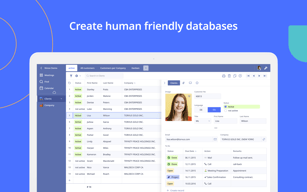
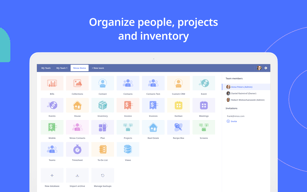
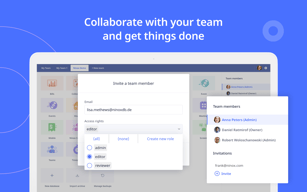
Ninox coding software is a platform that lets users create custom databases, automate workflows and manage data. It provides a user-friendly interface for building custom forms, reports, and charts, making it easy for non-technical users to create and manage databases. The software also integrates with other apps and platforms, making it easy to share data and work collaboratively. With its robust feature set and ease of use, Ninox is an ideal choice for small businesses, freelancers, and teams looking to streamline their data management processes.


| Capabilities |
API
|
|---|---|
| Segment |
Small Business
Mid Market
Enterprise
|
| Deployment | Cloud / SaaS / Web-Based, Desktop Mac, Desktop Windows, Mobile iPad, Mobile iPhone |
| Support | 24/7 (Live rep), Chat, Email/Help Desk, FAQs/Forum, Knowledge Base, Phone Support |
| Training | Documentation |
| Languages | English |

Compare Ninox with other popular tools in the same category.
It's flexible - I can do a lot of diverse calculations and automations
The documentation is pretty poor. It's hard to find the information on the site or forums, since the search is not good either. I'd suggest implementing the Google Search
Making day-to-day manual tasks more automated
The app makes it easy to use after everything has been built out.
Building tables should have a copy/paste function for creating multiples of similar entries. It would save a significant amount of time.
Reducing our paper usage.
Quick development of simple to moderately complex databases. API access looks promising. Interesting features such as Signature and Localisation. Identical experience on App, browser and iPad.
As far as I can see: - Rights and roles are somewhat complex. - No way to have an external access to users except by using API. - No automation possibilities (ex: send reminders). - The Calendar feature is a bit buggy
Ability to build internal databases. Ability to build databases for clients.
The adaptation of the database to your own needs can be implemented flexibly.
It is not always possible to implement your own ideas, as additional programming skills are required. A selection of technical literature is unfortunately not available.
Whenever standard software is too inflexible and does not reflect the needs and processes of the business, Ninox can show its strength.
Manages to answer any question I throw at it, and present the answer neatly - and quickly.
It looks very plain, and there are no options to open more than one window at a time.
It took me a while to get into working with Ninox, but I was looking for something a lot more than a spreadsheet and a simple database - I needed something to manage the publishing process of a magazine, and also to manage subscriptions, template based communication, orders from different sources.. I'm 'still working out what else it can do. Ninox is not only looking after the process, it is making me think about the processes more clearly, and helping me to organise things better in the real world. I've enjoyed the challenge of working with the coding as well, probably more than I should do with getting on with the job.

Building highly complex interdependent data sheets. Being able to generate invoices from initial quotes. Having complex contact person sheets. Being able to create a small database to start with and then expand as you find out more and more about the real needs of your company towards such a database. In our case we implemented "Met this contact at the following trade show:", which became an important info. Having a database programmer implement this later into your database can be a costly experience, when you use ninox though, it's a matter of minutes or less to omplement an option like that.
Automation of f.i. emailing prints / pdfs not implemented. Overall design at the moment. I hit the wrong button after altering the database, instead of Änderung sichern I hit Änderung verwerfen, because they look the same, you have to read. Better would be a disc-icon and a cancel icon and the two possibilities separated a little bit. Happened to me at least 10 times. Plus my users can delete things (accidentally possibly) and there is no command-z / undo for that, as far as I can see. An option to have users actively save their changes would be good. Possibly checkable for the admin, so that there is the choice of save button or no save button.
Customer database for a magazine with quotes, convert those into invoices and print them as pdf. Overview over each issue with ads booked and content (pages filled / not filled yet). A secong database for my personal design clients, charging by the hour, contacts.
Ninox réussi avec peu de code, là ou les autres base de données ont besoin de beaucoup de connnaissances. C'est un logiciel complet qui mérite d'être appris.
Il est relativement jeune dans son développement. L'interface est rudimentaire et mériterait d'être amélioré. Les rapports sont sa faiblesse.
J'ai facilement réussi en trois mois a remplacer filemaker dans mon utilisation courante (CRM, Programme d'évaluation, Planning, Prise de décision, Budget etc....)
The possibility to see in real-time the stock and inventory of our products including list prices
If you have to search for more different numbers he needs time to react and change the window
We were able to support customer during the meeting with inventory or stock information
Being able to use emojis and pics for coding.
It doesn’t already display information when you tap on a row. You have to change the view first.
I use Ninox for a crm. I capture leads and handle accounts.

Great database and versatile application maker. Stable and powerful enough, with lots of clever features
User Interface is ugly, lacks a lot of refinements UserExperience-wise and in particular how to make reports, exports, consultation but tier users enjoyable and a little bit more fun or at least elegant
Was able to create a powerful CRM and a Projects Management tool that suits really and thoroughly our business flow

Adoro la facilità dell'interfaccia e la possibilità di editare il file in uscita PDF
Si potrebbe migliorare la gestione dei campi nulli e la possibilità di nascondere automaticamente quelli vuoti
Gestione dei piani di allenaemento e piani partita in quanto Basketball Coach
It is very easy to quickly set up a functional database. It also seems to be quick on search and returns reliable answers.
In my use of Ninox so far, I have not found anything I don´t like, although I have yet to explore more detailed dB functions.
I have now managed to start organising my archive, to be able to quickly find any document.

Ninox Database has a very good set of features that make it work for most situations.
While Ninox Database is simple to pick up and start using in a basic way, some of the ways it works aren't as intuitive as they could be, and may of its features have a steeper learning curve.
As an author, I use Ninox Database to keep track of a lot of different things—characters, books, book submissions, and so on. I also use it for my everyday needs, such as software registration information, household inventory, and movie and book collections. It's a very convenient place to store a lot of different kinds of data.
What I like best is the verity offered. The possibilities seem endless.
What I like the least is the learning curve. The assumption seems that those using this have some training in these things. But I must say, there seems to be an abundance of helps online. If have the time and you're not lazy, you can learn all you need to.
The problems solved is maintaining an overview of many areas, including finance, CMR, outsourcing, u.A.
simplicity of entering data, ability to easily search and associate data.
just a very minor quibble - i found the side and bottom scroll bars difficult to use especially on iPad
researching the affect of U-Boats campaign in WW1 on the merchant fleet of Cardiff the major port for export of steam coal. We needed to cross reference vessel information, details of the attacks and the crew that lost their lives and where they came from, This was achieved and the results published on our website.
I like the compatibility with IOS and MAC and the synchronisation in the cloud. It's cheap and we can build very interesting solution that we can use OFF line. Last, the support is great and very helpful
I don't like the documentation. It's not really easy ! There are many features I can't use because of this poor notice. I would like more examples for scripts to help and to know how to use the functions
I built my own quotes and bills solution I can use with my iPad Pro. That's great, I can build the solution with my MAC and use it with the iPad. I can email directly the quote to my customer of print it with my futur mobile Printer.
Super easy and quick to learn, even without any knowledge around data-based.
Styling and freedom to create reports is still a bit limited.
small business, customer/supplier management, warehouse
Flexibility to build everything what I need, and to stripp what not. It fits perfect my workflows.
Nothing found yet. Maybe some finetuning on the interface.
Small business ERP for a pottery shop. Tried a lot for ERPs, but the simple ones do not fit my workflows, the bigger ones have too much overhead I don't need.
Fully customisable features that can adapt as our business needs change, and grow with us. Very affordable with excellent (and prompt) customer support if needed.
Might be a little difficult to pick up for people with no - or little - database/spreadsheet experience. The online help can sometimes be a little advanced in language, not always for the everyman.
We were struggling to find an affordable workflow solution for our business because it is quite niche. Every other software we tested had gaps, and was very expensive, especially considering it wasn't quite right. Ninox was very easy to set up; for expediency I picked a template that was closest to our needs, and was then able to fully customise it to suit. Within a week we were up and running an utilising the new system. Now everyone knows exactly what stage each job is at, what their responsibilities are, and when it needs to be done. Our staff are happier, and our customers are getting a better service with less mistakes.

The feeling to contribute to some big project that everybody is involved in.
Sometimes it's not as responsive as I would like - e.g. image upload was quite slow recently.
Our company uses it as a wiki regarding company knowledge as well as a CRM tool
It has an easy to use interface. I like the simplicity of it, it's just gets the job done with minimalism; the support is phenomenal and free!
needs much better documentation that is easier to use (ie not written by developers for developers, but written for normal people)
making custom application for our business
the fact that I can personalise all the tables
the design is very simple and I need to master the formulas for excel for a lot of things
the management of my database for invoices It saves me time!
flexibility and availability, easy to learn, cross platform
Kind of old fashion look, bad drawing possibilities, text formatting with less possibilities
Task tracking
Ninox is al about personalization, you can create databases based on your necessities.
The user interface could be improved, more user friendly for some features
Database can be shared
I like the interface, the simplicity in use, the stability and versatility.
Opportunity to integrate easier a weekly calendar in a data set, maybe in a template.
Clinical data base, projects for the organisation of the department where i work
Cost, platforms for iPhone, iPad, and desktop. support seems responsive.
The documentation/help could be improved upon. I spend a fair amount of time looking for solutions on how to do something.
Project Management
Ninox is very easy to learn and set up. They have tutorial videos on youtube that get you going right away. The developers respond very quickly to inquiries, and often give you a solution the same day. There is a growing community of Ninox users who are also helpful.
The scripting language that Ninox uses for more complicated functions and equations is not documented well.
I am able to track donors gifts, correspondence and keep their contact information up to date with ease.
Easy to use the basics, flexible enough (via code) to make a useful Mac "app" using the software. Has a good look and feel to it. No where near the complexity of other Mac database options like Filemaker
Disjointed documentation - some things are in the manual, some you have to look thru the release notes, and some are not documented at all - find out thru Forums and such. There is almost NO documentation on the scripting language that you can put into buttons and triggers and such - so a lot of that is trial and error - which is a shame because it's very powerful when you can figure out the right terms to use.
Using it for personal use currently
Simple to set up relational tables with simple design processes and simple data entry formats
Copying Field designs within the same table, especially the "Choice" field. Often I need more than 6 choice options that I need to repeat several times in a table and it is painful and laborious to have to reenter the design every time I set up the choice fields and cannot seem to copy the fields or duplicate and rename the fields within the same table The Date field has problems with assigning years prior to 2000 albeit that this appears to be functional. Thus entering Date of Birth records is difficult or one has to resort to using a text base field
I have used my NINOX database for my academic studies. I have needed to design tables and a database for research purposes, so that I can link authors, topics, source material, and quotes
It's ability to retain full functionality with no Internet service for long periods of time, then it knows what to upload/download when there is an Internet connection.
It doesn't always let me know the status of the upload/download. It hadn't been uploading for several weeks, but I didn't know it except to see in the cloud that no new records were being added.
We are using it in Haiti for a medical missions organization (www.three-strands.org). We are tracking all patient records as well as the various medications that come into/out of the pharmacy, so our US staff know what type of issues the patients are being treated for and teams that come over can bring the most needed medications.