Unclaimed: Are are working at Notion ?
Notion Reviews: 4.7/5 — Highly Rated
Notion is the all-in-one workspace that combines docs, wikis, and project management. Tens of thousands of teams around the world use it to collaborate, stay informed, and get more done together.
Notion is also often used as Knowledge Base of choice in Venture Capital and Personal Productivity tech stacks.


| Capabilities |
API
|
|---|---|
| Segment |
Small Business
Mid Market
Enterprise
|
| Deployment | Cloud / SaaS / Web-Based, Desktop Mac, Desktop Windows, Mobile Android, Mobile iPad, Mobile iPhone, On-Premise Linux |
| Support | 24/7 (Live rep), Chat, Email/Help Desk, FAQs/Forum, Knowledge Base, Phone Support |
| Training | Documentation |
| Languages | English |



Notion Review: Is This Project Manager Right For You?
While a relatively new entry into the project management space, Notion has evolved quite quickly to meet the needs of its users. It’s a platform that is notable for its versatility, and it is a well-known option for individuals and teams who want a reliable tool to organize and manage tasks–from note-taking to in-depth project management.
But does it incorporate the best project management techniques to help you or your team get organized?
Let’s find out.
What is Notion?
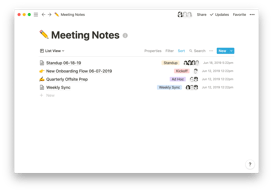
Notion is a cloud-based workspace where individuals and small teams can take notes, create documents, track projects and organize and manage tasks all in one place. It’s often referred to as an “all-in-one” workspace because users can collate all of their projects onto a single platform.
Notion’s popularity among professionals and students is credited to its personalization that caters to any workflow. As a user, you’ll have the freedom to customize the layout of your workspace, while still getting helpful guidance and templates to help you get started.
Background on Notion
Founded in 2016, Notion started as a note-taking app but has evolved into a comprehensive project management tool for solopreneurs and small teams. The platform’s mission is to make it possible for people to shape the productivity tool they use every day to match their needs.

Getting Started with Notion
Every feature on Notion is designed to help users be as organized as possible.
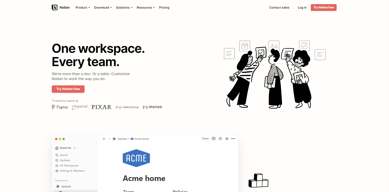
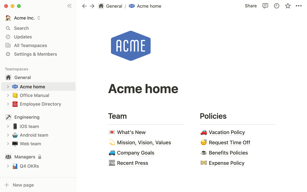
The platform is segmented into pages that can be nested or interlinked at your convenience. As soon as you sign up, you’ll be redirected to your Welcome screen containing some tips to get started. This includes linked videos that guide you in creating your first page and setting up your to-do lists and projects.

On the left side, you’ll find a list of default pages, such as ‘Quick Note’, ‘Personal Home’, and ‘Task List’ which you can customize and add. Whenever you create a new page it will show up on the left panel. You can add personalized header images, descriptive comments, and add associated icons to your pages.
Simply click anywhere on a page to add blocks for individual pieces of content such as text, lists, media, links, and sub-pages. You can also just type “/” to bring up a menu of blocks you can add to your new page. 

How Notion Works: Key Features
Although Notion started as a note-taking app, it has become far more than that. The tool has promising features that go beyond creating to-do lists and make it a competent productivity and project management app.
Integrated User Guides
A commendable feature of Notion is that user guides are already embedded in the platform. For example, if you want to create a new document, you’ll find guides on how to get the most out of the preinstalled page.
Of course, this can be a hit or miss. Some users may be grateful for the step-by-step guides, while others may be frustrated with manually deleting pre-installed guide pages to clean up their workspace.

Customizable Pages & Templates
Notion makes it easy for you to create pages and documents in whatever style you want. Pages are like folders where you can store all information related to a particular topic. You can include a range of blocks or items on your pages such as text, toggle lists, to-do lists, images, video links, tables, boards, and maps.
Every change you make to a page or block is automatically saved in Notion. So you can always go back and view the history of a page if there’s something that you want to restore. This is pretty useful for when you make a mistake or just want to experiment with different versions of a page.

Notion is also very generous when it comes to templates. It provides users with a ton of options, whether they’re creating blog posts, articles, event schedules, or product launch plans. Fortunately, all templates are fully customizable so you can modify them to your taste without having to build from scratch. The platform also encourages users to submit their own templates so the library grows to fit a wider range of needs.

Collaborative Workspaces
Users can create different workspaces for different projects, which is useful if you need to manage multiple projects at once. Every workspace will have its own pages so all your information will remain separate and organized.
Notion allows you to invite other people to your workspace so you can collaborate in real time. The limit of guests you can have at a time depends on the plan you choose.
Integrations
As a good workspace should, Notion integrates with a wide range of popular productivity tools so you can easily share information across the platforms you use. These tools include Slack, GitHub, Zoom, Trello, Google Drive, and more.
For instance, you can make use of the Google Drive integration to quickly add and share files from your Google Drive directly to your Notion workspace.

Notion AI
Notion AI is a core feature for workspaces. It’s a connected assistant powered by multiple large language models that’s developed to help boost your creativity and write content faster. Essentially, it eliminates the need to jump between your work and a separate AI-powered tool.
The feature can help you generate ideas for blog posts, social media posts, press releases, job descriptions, meeting agendas, and more. You’ll also be able to summarize pieces of content, correct spelling, and grammar, and translate text (English, Spanish, Chinese, and French).

Notion Use Cases
Solopreneurs
Individuals who are working freelance will benefit from an organizational tool like Notion. It can help with a variety of processes such as:
- Documenting and managing career goals
- Organizing projects for different clients
- Managing content creation schedules
Professional teams
Small professional teams can benefit from Notion’s features because it ensures that all team members can collaborate on the same tool for multiple purposes. These purposes include:
- Planning meetings and recording meeting notes
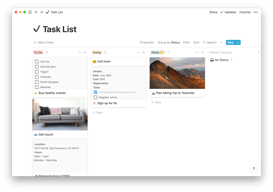
- Setting task lists based on priority
- Drawing up onboarding documentation for recruits
- Brainstorming internal team goals (digital suggestion box)
- Organizing a company roster

Students
Students also make great use of Notion because of its impressive note-taking and organizational capabilities. Students can easily organize their notes by class and keep track of all reading and assignments (by the due date) for each class. The best part is Notion can even allow easier collaboration for group projects since the free plan allows sharing with up to 10 guests.

What makes Notion stand out from other platforms?
Notion stands out in two major ways; it’s very customizable to support any workflow, and it brings all work together in one shared location.
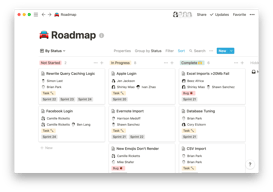
Unlike many productivity tools, Notion doesn’t just focus on solving one problem, such as organization. The way Notion is designed gives users the freedom to mold their workspace in a way that works best for them. On one hand, individuals can use it to keep their notes, to-do lists, calendars, and journals in one accessible platform. Additionally, professional teams can use it to build collaborative docs, product roadmaps, and wikis for their company.
Notion Pricing
Notion has four pricing plans: Free, Plus, Business, and Enterprise. Visit Notion’s pricing page for current rates.
- Personal (Free): The forever-free plan allows users to create unlimited pages and blocks with an allowance of 5MB file uploads. You can also share or collaborate on projects with a maximum of 10 guests, and receive basic page analytics, 7-day page history, and integration with other tools such as Slack or GitHub.
- Plus: The Plus plan is geared towards small professional groups. On this plan, you can invite up to 100 guests for collaboration. You’ll also get unlimited file uploads and 30-day page history.
- Business: This plan is for companies that use Notion to connect many teams and tools and you can invite up to 250 guests. You also get authentication features (SAML + Single Sign On), private team spaces, bulk PDF export, advanced page analytics, and 90-day page history.
- Enterprise: This subscription is targeted toward medium to large businesses and offers more advanced capabilities. You will need to contact the Notion sales team to discuss the pricing plan that fits your business’s complex needs. You can request a trial of this specific plan if you’d rather try it before making any significant investment.
Notion AI is included in all paid plans at no additional cost.
Beyond its core workspace, Notion has expanded its product suite with Notion Calendar, a standalone calendar app that integrates directly with your workspace, and Notion Sites, which lets you publish any Notion page as a polished website.
Notion’s Pros and Cons
Pros
- The customization features are better than most.
- A great solution for note-taking and creating to-do lists.
- You can use Notion to create wiki pages or simple websites with useful information about your business or products.
- Pricing is affordable for solopreneurs and small teams.
- The forever-free plan has sufficient features for solopreneurs.
- The structure of folders allows for shortcuts so you can reach your content from multiple places.
- Notion’s tutorials are comprehensive for everyone to understand and the support team is responsive and helpful.
Cons
- Although Notion’s UI is very usable, it can sometimes get cluttered once you start adding multiple projects, which can be overwhelming for newbies.
- Advanced project management features, such as reporting, time tracking, and Gantt charts are lacking.
- Managing multiple projects on Notion can become tedious.
- May not be the best option for those looking for project management software for software development.
Is Notion Right For Your Organizational Needs?
Notion should be commended for its simplicity, familiarity, and affordability. If you need a straightforward entry-level solution for creating content and planning and managing projects then Notion is a great choice.
With that being said, large businesses that have complex needs may not see the platform as comprehensive enough to streamline their project management. However, Notion is a tool that keeps evolving and works hard to improve its capabilities to fit businesses of all sizes.
If you want to keep checking other project management software that may suit you better, Findstack has more helpful reviews and insights that you can take a look at. Our goal is to help you find the right tool for your needs.

Compare Notion with other popular tools in the same category.

Great types of tools to help you organize your documentation, very helpfull integrations like Power point, Miro and Figma. Also you can choose which pages you want to share with others.
It does have a learning curve, so you need to use it to understand the potential do you have in your hands, but with time, it gets easy to use.
Notion helps us document our research and is good for drafts and ideas that won't be used at the moment. Another great people control feature is page access.

Notion's UI is very user-friendly and can be used by even a school student without any difficulties. Notion also provides many advanced features like databases, sorting and filtering, relations etc., which professional users much appreciate.
As per my experience with Notion, I found no drawbacks with respect to other similar functionality applications. But I did find a few hiccups when using its offline mode.
Notion is helping me to organize my notes and thoughts better. It solved my problem of using different apps for daily tasks, note-making, schedules etc. Notion integrated my life and made it easy.
How easy it is to customize to your needs, as long as you take your time to create within its capabilities.
Nothing, Notion is great. Pricing could be cheaper though.
Notion helped me adapt all my roadmap, kanban and wiki needs to my use, instead of rebundling dozens of apps via integration.
- Simple and clever - Great flexibility of features: embedding and integration options - intuitive tool: no need to search for help during hours in a knowledge base - outstanding search tool (top left) - useful option enabling "showing deleted pages." - awesome, helpful and kindful support teams
- timeline view could be improved (more color options). It happened I missed an event because I couldn't see it clearly - It could be cool to have the possibility to have the "LOAD MORE" button at the top of a table view (and not to have to scroll and click many times so as the entire table appears) - the same when we want to register a new record in a table
- Collaborative tasks are easier - Work can be shared more quickly - Content is structured perfectly through linking pages. No waste of time any more in opening various files. - Multiples view options allow us to get all-tools-in-one
I like that I can keep my notes in one place and collaborate with team members
At times limited integration with Microsoft Office software
Keep track of tasks for different projects and helping with productivity and efficiency
What I like best about Notion is its flexibility and versatility. It's a tool that adapts to my needs rather than the other way around. I can use it for note-taking, project management, task tracking, and even as a knowledge base. The ability to create custom databases and templates makes it incredibly powerful and customizable. It's a one-stop solution for organizing my personal and professional life.
What I dislike about Notion is that, at times, it can feel a bit overwhelming due to its extensive feature set. It has a steeper learning curve compared to simpler note-taking apps, and it can be challenging to set up intricate databases and templates. Additionally, while the free version offers a lot, the pricing for the premium plans can be relatively high for some users. Nonetheless, once you get the hang of it, the benefits often outweigh these initial drawbacks.
Notion is solving several problems for me, which is immensely beneficial. Firstly, it helps me consolidate my scattered information and tasks into a single, organized space. This reduces the clutter and chaos of using multiple apps or tools for note-taking, project management, and knowledge management. Secondly, Notion aids in collaboration and knowledge sharing within my team. It allows us to work on projects collectively, centralizing all relevant information and progress tracking. This streamlines communication and enhances productivity. Thirdly, it provides a flexible and adaptable framework for my personal and professional needs. I can create custom databases, templates, and workflows to suit my specific requirements, which is a tremendous advantage. Overall, Notion's ability to solve these problems has made my work and life more organized, efficient, and collaborative, ultimately leading to increased productivity and better results.

Creativity, flexibility and versatility There are so many options to choose from, you can create the perfect workspace that is tailored to your exact needs
Would like to be able to sync my calendar a little easier rather than needing third party add-ons to complete the task
Compiling all my thoughts, to-do lists, action items, calendar entries etc into one single location

What is most helpful about notion is it's well thought-out organizational features. Notion has many advanced features, but the learning curve to get started using them is relative low considering how complex the app is. Inclusion of AI capabilities enhances its usefulness further, making it even easier to organize your thoughts and accomplish tasks within the app. The ability to share pages on Notion is also very useful. For instance, I used Notion to build a travel page for our upcoming family vacation. In addition to the calendar schedule and map features, which worked well for planning, organizing and quickly updating our itinerary, I used AI to generate a list of things to do in the area based on certain situations and criteria. Then I was able to share this page with family who are attending the trip.
While it's fairly easy to learn how Notion works, it isn't always intuitive and can be a little clunky. It is jam-packed with features and the ability to create around databases, but sometimes it gets in the way of ease and setting things up in a more customized way. Also, Notion's lack of a true search function can be inhibiting when you have a lot of data stored within the app, especially within databases. This has directly impacted how often I use Notion vs other organizational and productivity platforms where I can easily find what I'm looking for amongst various projects.
Notion is excellent for organizing multiple items within multiple business projects. For someone who has multiple projects in gear or in planning at anyone time, Notion keeps me from having to access multiple apps, platforms, databases, and spreadsheets to plan and organize business projects. Also the AI feature cuts down on content writing and idea generation, allowing me to focus on the details of managing various projects. I also use Notion to create a 2nd Brain setup, which furthers the app's usefulness.
In my personal experience, the most helpful aspect of Notion has been the way it effortlessly combines multiple productivity tools into one cohesive platform. I've found it incredibly useful for organising my thoughts, planning projects, and tracking progress all in one place.
It can initially feel overwhelming due to its extensive features and customisation options. It may take some time to get accustomed to the platform and understand how to make the most of its functionalities.
Notion is helping me solve several problems related to my writing process, which include improving my writing, proofreading, and brainstorming. My performance has remarkably increased.

I love the fact that I can use this as a custom CRM for my real estate business
It's learning curve was a bit long, I had to watch a lot of youtube video to get it to workt the way I wanted.
I used Notion as my a custom CRM for my real estate workflow as a agent.


