

Unclaimed: Are you working at Paymo?






Paymo Reviews: 4.6/5 — Highly Rated
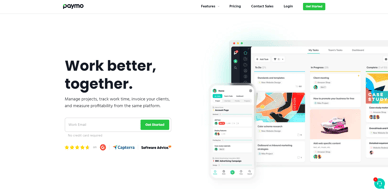
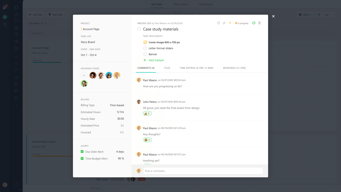
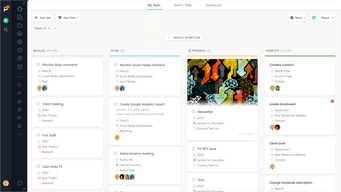
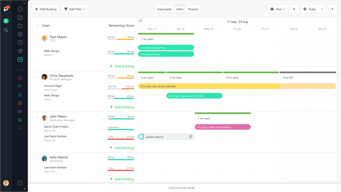
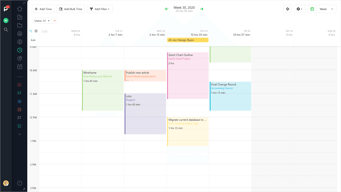
As a project management platform, Paymo has all the functionalities of similar industry-leading tools such as multiple task views, custom workflows, project templates, and tracking, monitoring, and reporting. What separates Paymo from other project management software is its extensive list of project billing features. It offers seamless invoicing from logged billable hours within the system as well as a capability to create accurate costings for new projects. It also has native integrations with top payment processing channels so you can track online payments right from the platform itself. These are all reinforced with a comprehensive list of profitability tracking benefits which include profit margin projection, employee-specific profitability metrics, and a client profitability tracker.





| Capabilities |
API
|
|---|---|
| Segment |
Small Business
Mid Market
Enterprise
|
| Deployment | Cloud / SaaS / Web-Based, Desktop Mac, Desktop Windows, Mobile Android, Mobile iPad, Mobile iPhone |
| Support | 24/7 (Live rep), Chat, Email/Help Desk, FAQs/Forum, Knowledge Base, Phone Support |
| Training | Documentation |
| Languages | English |
Paymo Pros and Cons
- Allows for real time collaboration
- Extensive bird’s eye view of individual tasks
- Supports multiple views
- Features advanced filters and notifications
- While the platform offers a free plan, it does come with a lot of limitations

Compare Paymo with other popular tools in the same category.
I am constantly changing what projects I am working on throughout my day. I will start and stop my time for different clients as I switch from project to project. This software helps me keep it organized without having to think and at the end of the month I can look at how much time I have spent on each client and invoice for that time. I love making specialized reports as well. My business depends on this software. I also have to mention the support team! They are amazing and get right back to you.
The only thing I do not like is not having the option to include my project notes (or time stamp notes) within the invoice itself. It may be possible, but I just haven't found it yet.
I am a sole proprietor so this software helps me bill out my time to my clients without having to hire an employee to take care of my finances. Its brilliant.

Paymo orders me, helps me to prioritize, to value my work, to structure my day, to manage my accounts, my time on projects, in short, is my assistant in all areas that need to cover as a freelancer. Every month is becoming more important.
I would like to optimize the automation of some customized periodic reports.
As I said, for my work it is very important to control how many hours I'm dedicating to each project, I solve the administrative issue and management reports that I introduce you to my clients monthly.

Paymo is a very easy to use platform for time keeping services. It's user friendly, can be accessed from a smart phone when necessary, the ability to customize the time keeping reports are great. And the ability for the users to add notes to the tasks are even better. We are currently using this program for household staff time keeping and are looking to transition our business employees over to the program next.
It would be great if they had a app for the smartphones. We worked around that by bookmarking the web address to the smart phones directly, but an app seems like the next logical step. Or maybe they have one and I just haven't found it yet.
Time keeping for employees that are not all located in the same place. We need to recognize employees time while off premises running errands. And at times those errands are finished away from our business, this program allows users to track time without being tied to a time clock. Remote access was key for us.
Paymo offers an intuitive service for tracking hours employees work. I have largely used Paymo as an employee, so I have spent most of my time logging hours on the website. You can track hours as you go by inputting hours directly or starting a timer that you stop when you have stopped working on that task.
The mobile app is not as easy to use or intuitive as the desktop site. I almost entirely use the website from my laptop instead, though I do have the app on my phone. I have rarely used the app because it is much easier to use the website outright.
I believe Paymo is used to track hours and maintain a record for payroll as well as simply to track the time employees spend on each task they are assigned. It offers a way for people to determine if someone is working too slowly on some areas of her/his job or if she or he is claiming more hours than seems reasonable. This is an area of Paymo I am, however, less familiar with as I mainly only track my own hours.
It's very easy to use - especially with the Paymo Widget. And if I'm away from my computer, I can easily log in to the app on my phone. This way, not time ever gets missed.
Nothing I actively dislike. I would like to see more functionality and customization for reporting on the dashboard.
I'm able to track my time much better, which is important for billing, but also for keeping myself accountable.
I like that Paymo helps me have a good overview of my projects and the tasks ahead or completed and at the same time give me information about used time.
I dislike that I can't see a kind of gantt chart which could show me all my project and their progress and milestones at the same time.
I do project management concerning plannings. I have seen that with Paymo it s much easier to give the tasks to my team and see how they are carried out and see that everything gets done.
I've used Paymo for years, I use the Project Management side of things and time everything! The report tools are great for sharing time records and costings with customers too.
I personally don't need the invoicing side of the software but I don't dislike anything.
Time spent in each project on each task is critical for us as a business to get pricing right. I also like the dashboard for a quick overview on what time has been spent of, that week and month.
I was attracted to Paymo because it's web-based, so I don't have to worry about working on-site at a location where I can't bring my business laptop, and has a user-friendly UI. It's turned out to be a massively helpful resource that I use to manage and organize all of my consulting contracts. Additionally the Kanban board option for prioritizing and managing tasks is one of my favorite new features--I use it (literally) every day.
Since I started using Paymo when it was free, I was less happy when they began charging for it, but given the site upgrades they've been pushing out, I understand and respect the apparent need for it. I only use about half the features on a regular basis, since I'm a REALLY small business, so it was annoying that my left navigation bar was always junked up with features I didn't utilize. However, now that the site supports a "grooming" of the nav bar so I can add or remove from viewing the things I want/don't want, I'm happier with it.
This site solve my issues with project and task organization and accurately tracking my time. Once I started getting contracts on a regular basis and began working multiple companies' projects in one day, I really needed something to make it easy for me to switch from tracking time on one project to tracking time on another.
The dashboard time graph, tracking time on individual tasks, and the timesheet page.
There is not responsive design for the web app.
Being able to manage time for multiple projects and clients at the same time. Keeps everything organized.
It is very easy to manage my time and projects, generate invoices, I would
It would be great to be able to sync with an app.
I don' t have to fill timesheets anymore!
Prior to using Paymo my time tracking solution was average at best. Paymo was a game changer and I wish I had known about it earlier in my business. I love the Time Reports feature that allows me to see exactly what has been done for a specific client and/or project. I also use that feature when running payroll for my subcontractors. I can't recommend Paymo highly enough.
The only negative thing I have experienced is with the desktop widget. Mine always has bugs. I use the online version and app, and I'm always happy with their performance.
I record notes whenever I track time which can help me know exactly how long certain tasks take and be able to report back to clients accurately. I can set these notes to show up in every report I run, too, which is a win!
I went through an internet search of "project management software" and tried out at least 20 different leading products. I came on Paymo as one of my final trial runs - and i immediately bought a full subscription after using it for a few minutes. It combines all the functionality that you need into one piece of software; time tracking, reporting, project/client management, invoicing and reporting, and more.
The only downside is that you can't share a project with someone outside of your company. So if your colleague has their own paymo account, you cant work on a project across accounts - one person has to sign up as a user for the other account. Not a huge deal but would be helpful sometimes.
Instead of using 3 different tools for time tracking/management, and invoicing, i can just use Paymo. It has made my freelance contracting life 100x easier, no question.
As an Independent Design Consultant, keeping track of clients / tasks / hours and invoices is an essential part of my business — and Paymo makes it all super easy, saving me hours of work every week.
Nothing. The team at Paymo is doing a good job and the product has greatly evolved since I started using it.
I work with a very diverse bunch of cilents ranging from the typical Shoreditch 2-3 person start-up to leading product companies and marketing agencies, and here's my list of the top Paymo features I use at different stages of a project. New client / project - Project budgeting + planning - Project / task setup Ongoing work - Project / task management - Time Reports (clients love the ability to see in real-time where we are budget-wise) - Misc. client communication Project / sprint comletion - Invoicing (pulled from Time Reports)
easy to learn, easy to use, great features
I believe that the android version could be improved but the product is great
I can keep track of my hours, tasks and invoices and generate reports.
Paymo has streamlined my task management and invoicing. It just happens automatically for me now. No fuss, easy interface. I don't dread billing and losing lost billed hours anymore - it's all organised.
Integration with xero or myob online would be good
project management and invoicing
Seeing the overall period of time. How i spent the day and how the month goes. With the downloaded app I can track my day without thinking about it. It helped me to see when I've spent too much time with unimportant things (social media or inspiration) With the desktop app every morning I just start the timer and ready to go :) Later the day I can finetune the tracked time if something wasn't tracked properly. Its nice to see if I was away from the computer and I can decide if i like to count that time for a project or not.
Because of the local law I can't use Paymo invoicing, with that everything could be solved in one place. Sometimes I feel the navigation between the projects is not the best, when I like to add time later for a project I need to switch to the desktop app, but this is minor thing.
Interesting to see how a project is divided to the inspirational - sketch - production - and final changes states, I'm learning from it every time I'm finishing a project! I realized I'm underestimating some projects and now I'm able to provide detailed statistics how different versions progressed and if clients should count with additional charge for the extra work I've made.
The desktop app makes paymo easy to use across multiple computers and makes time keeping for multiple projects very easy to do. I like how I can easily add up all my time on a project which allows me to better estimate my pricing for future projects and clients, speeding up my proposal process.
Honestly, there is not very much to dislike... I could say I wish it was free or cheaper but knowing that someone is working just like I am on something they enjoy that provides a service for others would be an insult to myself.
I can easily track time for small tasks which I never would have before since I was previously using pencil and paper for the most part to record my hours. With the desktop app its easy to make a new task and better forecast my time and therefore cost for my clients. I have realized how to utilize my time as a small business owner as well as my clients time more effectively.
The dashboard is easy and simple to navigate. The level of detail and depth that the users are able to assign in each project is amazing. With this program, we have been able to become completely paperless without any interruption to the high quality of service our customers have come to expect.
Sometimes there are too many options within a task and it can get a little too complicated...if you let it.
We have been able to move our office to a paperless system using Paymo. In addition, assigning and keeping track of tasks for direct reports, is much smoother and requires less dialogue or follow-up, which can interrupt people's workflow. Being able to manage and keep track of our time has been priceless. When discussing performance reviews with employees, it's hard for them to argue with reports and charts as opposed to their manager's opinion of how efficiently they're working.
The simplicity of configuration and the easy interaction with the user.
Nothing to say about the Paymo APP. Everything works perfect
Task management with time control; Easy to connect different elements of the company; Setup app's for different platforms (mac, windows, iOS, android, etc)
We have been using Paymo for more than 5 years in our electronic engineering consulting business. We love the way we can set up multiple projects with multiple tasks per project and track time per project and task, and then use the invoicing system to invoice our clients. We often work on multiple projects simultaneously and without it we would not be able to work as effectively or track our time as accurately. It also allows us to analyze our effectiveness and enables us to more accurately quote on future projects. Intuitive interface and easy to use
Nothing to dislike about Paymo. Fulfills all our requirements
Accurate time tracking Good project management Effective team collaboration
Excellent billing solution for my business
nothing I do not like, it's an excellent program
Invoice management
It's easy to use, it comes with widget for your Mac or PC and with a mobile app, it does everything I needed for my freelancing business.
I had to switch back to the old version of the widget because the upgraded one wasn't so intuitive.
Tracking work time for billing every worked minute to my clients.
Paymo allow me to control each project adding custom or pre-configured task-lists and tasks. I use zanier to connect with my CRM, so everything works fine and integrated.
Pre scheduled cronograms would improve my capacity to preview future exceeded hours budget.
With Paymo I can analyze my entire company performance and analyze inside project progress.
There are many aspects that I like with Paymo. 1. One client can have multiple projects. 2. Each of those projects can have different billing and time tracking rates. 3. The desktop application tracks every window opened and worked on and can then be assigned to each client it relates to. 4. Invoicing is pretty straight forward and allows the client to review and pay online.
The pricing structure. While pretty decent in price, sometimes you just don't need to purchase extra projects and instead just need to purchase extra invoicing.
As you are working on a clients work, another client needs assistance. With Paymo, and the desktop application running in the background, you don't have to stop your timer for the one client and restart it for the next client. You can, instead, leave your timer running and then when the day is over, go through each task and assign it out. You are also able to add rules for certain tasks. I tend to use different browsers for different clients, therefore I am able to automatically assign a certain section to a client.
PayMo allows me to keep track of my professional, freelance, and personal tasks. I have a much better idea of where I am spending my time, and as a result, I have become much more efficient.
The PayMo app does not have as many features as I would like. However, since I mostly use PayMo when I am working on my computer, this has not been a major issue.
PayMo lets me coordinate tasks with other individuals. This has greatly cut down on unnecessary emails and streamlined our communication.
I really like the ease in time keeping, project tracking and invoicing. It's a simple system that meets both my needs and those of my clients.
I have no issues with the system. It meets my needs.
The system has enabled me to have comprehensive reports for my clients, invoice effectively and track my time working on projects.
I use it at the Office, in my consulting business and to track everything else that needs tracking! My client really appreciate the level of details that they get with the invoices and reports. I like that it's user friendly, and always upgrading itself to new heights! I'm recommending Paymo everywhere I go!
It would be nice if it would be possible to identify some tasks as non-billable (free) for the client.
My manager wanted to track everything we do for a month in a certain project to look for improvement ideas, I told her I had the last 3 years completely tracked with Paymo! We were able to track problematic issues and save time and money!

Paymo is an extremely fast and intuitive web-based application. All of our engineers use Paymo on a daily basis to enter their time, etc... Despite being "in the way" of their actual duties (time sheet programs are always perceived as a burden to end users), Paymo's aesthetically pleasing user interface makes it a breeze for everyone to properly enter and record their tasks. Internal Project Managers are able to visualize progress and milestones easily thanks to Paymo's dashboarding functionality, some of which we can even share online with our clients. Invoicing is a breeze as Paymo maintains it all: billable time, expenses, ...
We would like more granularity in the tasks creation and a better template management system
Accurate time keeping and invoicing, flexible and customizable reporting and dashboarding, collaborative PM

A very clear and customized dashboard which gives you an overview of time spend, tasks, financial information about your projects and/or clients. Integrates with multiple partners which brings information all together at one place.
The electronic approval of timesheets by customers would make my life even easier as a freelance consultant.
Clear overview of projects, tasks, billable hours, open invoices, it's all at hand.
I like the power and simplicity that it provides. As a freelance designer, I dislike having to spend time manually keeping track of my time. The "time clock" feature makes it easy to start and stop, while automatically updating the time sheets. The second feature that I am extremely happy with is the Invoice creation and tracking. You can quickly and accurately create an invoice based on the company you are working with and their specific project/tasks.
There is not much to dislike. The price point is excellent for the features provided. The only suggestion I would have for PAYMO is to add a GANTT chart view if possible. It would be great to see more project based controls. Another suggestion that I have is adding a "chat" option. It would be helpful to be able to quickly chat with customers/clients for quick answers to questions.
Utilizing the time sheets and Invoice features have been extremely helpful and convenient. I am the sole employee of my business, so having the ability to quickly and accurately submit invoices and reports with little effort is valuable.