

Unclaimed: Are you working at TeamGantt?






TeamGantt Reviews: 4.8/5 — Highly Rated
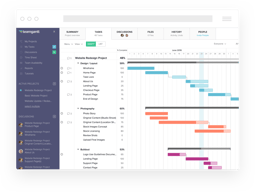
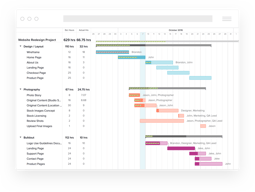
TeamGantt is a cloud-based Gantt chart and project planning solution specifically built for small, midsize, and large enterprises. With its comprehensive project collaboration tools it facilitates better efficiency within teams using Gantt charts, time tracking, file sharing, and task-level communication features. A drag-and-drop interface also ensures better usability and ease of use.





| Capabilities |
API
|
|---|---|
| Segment |
Small Business
Mid Market
Enterprise
|
| Deployment | Cloud / SaaS / Web-Based, Mobile iPad, Mobile iPhone |
| Support | 24/7 (Live rep), Chat, Email/Help Desk, FAQs/Forum, Knowledge Base, Phone Support |
| Training | Documentation |
| Languages | English |

Compare TeamGantt with other popular tools in the same category.

The clear view is the best part about Team Gantt
Would be good to be able to connect to iCal or google calendar.
Project management is so much easier with Team Gantt
I highly recommend using TeamGantt for your daily project management activities. Video hints - rock! The interface and features are amazing and I love the attention to details in this tool.
Not sure that it’s a dislike but it’s something to improve maybe. Some of the tasks might be interrupted and there is no way to split them. For example: I started the task on March 10th, March 11th was my day off, so I want to see an empty spot on this date and then continue the task starting from March 13th.
TeamGantt gives me a clear vision on the Epic’s progress against the baseline.

user friendly portal and prefer to recommend to my company to purchase this software for permanent used for up coming projects. Comparatively better portal for any project schedule. very effectively update my customer on the project schedule and future plan to invite our customer to join the termagant chart to participate and have real time activities update lively. Management was happy tat i was implemented this portal to my company and they're trying to get MIS to fix this portal for china team join and used. So update delay can eliminate when used termagant chart.
free trail can give at least more participant to join so that group can convenience and can motivate them to purchase this app. Try get more valuable package to the member. Prefer to have notification thru email or instant message to trigger the task assign person to take action and complete the task effectively. Customer service better to have live chat instead of reply thru email. When have live chat option then the user can approach the customer service immediately and can solve the problem they're having instead of waiting for email solution.
my overseas colleagues can easy to update they're schedule and we can review and update the team daily basis and reduce email update and focus on the timeline achievement. effective update and valuable to chase the right and respective person for each task and also the PIC also showing more involvement to reach the task to 100%. Due to management are involve and watching out movement delinquently. So eel like each person take they're responsibility and will not missed out the schedule.
Easy to learn, good tutorials for novices, provides users with powerful tools. Has multiple user-levels. Novice to expert. Fits small, medium and big projects.
It is very expensive, particularly for small-scale startups with few staff members and very limited income. I would like to suggest an approach similar to Solid Works that allow for a full year of "testing-and-trying" before starting to partially charge for usage and then charge fully for a company with a limited number of users. It'd help startups get off the ground and deliver huge income boost once the successful ones scale up. Once you learn Team Gantt, you do not want to leave. Why should you? :) So, helping startups get up and moving would be great. It's pretty expensive as-is.
Getting projects done on-time and valuating the impact of every member on the project. Reorganizing is a breeze.
Very easy to use, the way to organize is fast and logical in a way that you can link and separate each step of the project, also is very efficient in a way that you can change the deadline of each project and drag and drop to another timeline.
Sometimes takes time to load the whole graph
Project organization, it helps me to see the deadlines and try to manage all the projects so it does not take more time than it is needed.

It is very friendly, elegant, and time-efficient. I used it to make the planning and timeline for my graduation project. After looking for many other solutions, this was the most convenient out of all. It offers many amazing features including making a good-looking timeline for the project, show the progress of every task created, add task details and assign them to other team members, and the ability to share the project with other people and work collectively on the same project could be life-saving. I used TeamGantt several months ago and here I am using it again with my team members in order to work on our projects. The most amazing thing is all that is for free! They give you all kinds of support and tutorial in order the create the best Gantt chart possible.
The only drawback that I noticed that when working in teams with other members on the same project, the chart does not update instantaneously and requires refreshing the page for the changes to show up. It would be nicer if it was able to sync on time and also show what the other team members are doing in order to make the process of organizing better.
It makes project management much easier. You can include all the tasks, their timeline, and their assigned team members in one place. I used it to organize my graduation project, work on assignments, and other freelancing projects.
Easy access of business plans from everywhere, cloud style Good team responsivness
A few somehow basic features, eq - sorting by some criteria - find tasks by numbers in their names - VERY usefull feature in all business adctivities (in both list and gannt formats) - availability also has not a filtering option, so if the team is big is very difficult/annoyng to scroll every time to the desiered person that you look for
Manage tasks off all kinds, keepeng teams beter organized
Easy to use drag and drop functionality. Very useful to see deadlines, clashes, individual employee workloads and combined deadlines. The daily feature of highlighting the current day is also good to see where you are versus where you should be.
No quick way to zoom out and see a whole project. Instead, you have to use the print view. To be able to zoom out and easily see how small changes near the start affect the end date would be useful.
We use TeamGantt to manage property renovations. It is very useful to see what work has to be completed by when. We can then very clearly communicate deadlines to contractors and ensure that the project progresses smoothly. We have not run over time or over budget on a project that we have mapped out using TeamGantt.
The ability to edit and drag projects around without having to go into the settings of each project.
Nothing so far! I have been using this for about 2 months now and it has worked at/ above my expectations.
I am organizing my schedule along with my peers to get things done as fast as possible to move on to the next projects.
GANTT & PERT charts can be daunting. But this is remarkably straight forward! It's very easy to make orderly entries for tasks then adjust their position relative to others, modify their related resources, change their duration or start/finish dates, etc. It's visually clear & provides a level of flexibility that doesn't complicate the organization of things.
There's not much I'd change. If you have a really big project, you'd probably love to have a REALLY BIG monitor. It's like a large CADD drawing or spreadsheet in that you're likely to be scrolling around a bit if you're dealing with the overall disposition of a project. More narrowly focused activities are extraordinarily easy to manage.
Design & construction management for interior renovations. Like I said... KEEPING MY ACT TOGETHER.

The most helpful things about TeamGantt are the ability to assign tasks and create subtasks for a parent task. I have found the upside of TeamGantt is that it works well with other applications that my organization uses such as Trello.
The least helpful thing about TeamGantt is that it doesn't exist on my desktop and even though I can create a shortcut I would love for it to have its own application on my desktop.
The problems we have solved and continue to navigate are project management especially now that we are all working in various locations, our team is learning how to stay up to date with each other while working remotely.
Even the free version allowed a lot of really important features, such as the ability to assign tasks to individuals, who then get email reminders Also this was the only software that allowed me to set dependencies between tasks The interface is intuitive, straightforward. I trialled four or five different project planning tools and Team Gannt was head and shoulders above them all
Dependencies only allow finish to start - many tasks need to start before their dependent task finishes
I planned a research project in Nigeria, which was exceptionally difficult during COVID. The benefit was particularly a degree of control over the many work streams
i like that everything is really easy going, and very friendly to use.
didnt find something yet but im sure that if i would find the support will immediately will give me a solution...
we want to solve the productive problem in our company and i think that we will manage to do this with TeamGantt
projectmanagement based on gantt charts combined with kanban boards
printing, reporting, timetracking could be improved
with TG it is now much easier for us to handle 25+ architecture projects at the same time

The teaching materials the folks at TeamGantt put out on the art/science of project management.
No Kanban board functionality, though, that is coming soon.
I'm in academia. I use TamGantt to plan my research, teaching, and service objectives. These are usually moving targets so I always thought that using a productivity app geared for delivering products with fixed deadlines/budgets in an industry setting would not be very compatible. I was not trained in project management. The folks at TeamGantt have helped me translate the concepts of scope, process, expectations, and change to say submitting a grant application, organizing a seminar series, or planning research tasks to get that article ready for peer-review.
Easy-to-use to produce professional schedules that can be shared with clients.
I can't think of anything at the moment. Its been great for all my needs and exceeds my expectations.
Construction schedules constantly change. It's easy to keep clients and subtrades on the same page with regards to deadlines.
More hours in the day. It's one thing everyone wants, and yet it's quite impossible to achieve. But since I've started using TeamGantt, I can free up a significant time of my workday, just by quickly planning all of my objectives and tasks in one place. The platform is very intuitive and also stimulates me to get things done two times faster!
I wish TeamGantt integrated with more third-party apps.
TeamGantt has an excellent overview of tasks and projects. We are using to help streamline workflow and increase team collaboration to get things done faster, especially now with everyone working from home.

Ease of building and adapting, as well as tracking progress.
Be nice if you could see the names of months at the top of Gantt Charts rather than just numbers. Eg when printing out it shows 9/20, 10/20 instead of September, October etc. Month names show up on screen when editing, but when I print it reverts to just numbers. Have been trying to work out if I can change that - no luck so far. Maybe I'm dumb.
Tracking critical path to make sure we can deliver projects within agreed timeframe.
My favorite feature of TeamGantt is the baseline tracking feature. Being able to project a timeline is much different than where a project ends up during its life.
I keep TeamGantt open in my browser on a weekly basis. I dislike that it doesn't auto refresh.
Being able to build out project timelines then export .pdf's for clients and vendors is awesome. Also, cross-team GANTT editing is key for my team!

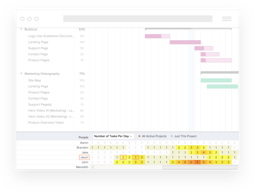
It works. Very intuitive and direct. I was able to start even without tutorials 🤓 Pure interface without any distractions. It's quick. You can move tasks with no time delay. Useful free version. Cool visual feature to see number of tasks per day for team members.
You need subscription to use it for several projects. Free will be nice for one project only.
I visualize my big project time frame, per day tasks, team members work load. I can schedule and control my project much more accurate and precise.
the system doesnt really require training its pretty self explanitory
nothing at all it really is super cool very good product
i am using it to log my time sheets as due to covid we working from home

The ease of using the planning function, and the fact that I can make a plan with many activities and areas in a few minutes
The timeline is fixed in the free version - it gives some work when rescheduling a task over a longer time stretch
Planning marketing and funding activities for my start-up I can involve my partners in the time schedules and the priority of the tasks ahead when using the plan
I love the visualization of each phase of our business, it keeps us organized and moving forward.
Nothing at all! It serves its purpose well.
It isn’t a task management software so try not to use it as one, it is designed for timeline visualization and dependencies from the upper level.
The tracking function is one of the best parts. At the beginning of the semester, I create a group for each course and enter everything for that course, line up the correct dates, color code tests and quizzes red and then I'm ready. Then I almost never look at the overwhelming large chart again because it is a lot. I usually look at the list function and narrow the display to show everything due in 2 weeks, hide the completed tasks, and get to work on the most important course. This saves me so much time rummaging through canvas (literally the worst educational management tool). Every time I check a box for a completed assignment it is like a little bit of drug lol.
I dislike that the "my tasks" function does not make much sense, I do not know what exactly needs to be fixed about it but I do not look at it very often because it is not helpful to me. The other function I do not like is that I have to assign a person to task every time even though I am the only person, I wish it just removed the part for singular projects.
I am literally staying afloat academically because of TeamGantt. I have realized that my school workload is actually quite manageable and I am staying on top of it like I never have before.

Drag and Drop feature is very comfortable and create base line very help ful for tracking history
I think is hard when want to remove dependencies
Problem : For dependencies, I have to click with carefully and click X button Benefit : Can create many multiple project and Baseline help me for check movement history
It is a really visual tool and very easy to use. It gives you the control of schedules and deadlines. There is a tasks dependency, which allows you to link tasks. You can get a lot with the free version.
At the free version, you can only create one project. I work around that by putting my projects as tasks groups of my only project. You can add a checklist to a task, but it would be better if the checklists also were synced automatically from Trello. The milestones appear as a dot on the timeline, it would be more visual if it were a vertical line, common to all the tasks I assign it.
By setting the deadlines and time spent on each task, I can identify points that need improvement. Because of the task dependency feature, when a task is delayed the dependent tasks deliver date will also move showing the amount of days my epic will be delayed. With the milestones , it is easy identifiable the important dates of the project.
I like that you can assign tasks, add details and easily move things if needed. TeamGantt is like a super helpful checklist with all the things a normal checklist doesn't offer. I am using this for our fundraising season and having it all mapped out, specific tasks and milestones and details about each task all in one place makes managing projects really great.
I have not found anything that I dislike - this is easy to use and helps me stay organized.
TeamGantt helps me visualize and take notes, set timelines (extend them if needed) and really know how far along we are with each task. It creates accountability, sends email reminders when you have due dates coming up and is a great tool for planning ahead.

I'm quote new ti project management tools but with TeamGantt everything gas been very fast and Easy. All tutorial helped me to grow my skills and to Better focus on project tasks.
I work with Trello too and I think that the integration between those tools must be improve because, IMHO, TeamGantt needs a card based visualization.
Keeping tasks in time and understand if there are too many things in the same time. My projects nows proceed faster and clearer.
The ease in which tasks are added and arranged on the gantt chart, resources are added and assigned and the availability charts.
I haven't found anything yet. Limited to trial so far.
I'm using it to schedule activities on a piece of equipment and determine workloads for personnel.
It gives you a simple yet complete visibility about the project statuses and next steps towards the goal. Every meeting when someone pops up a question about what to do next Its everything right there. When you add the team members to the project board, everyone know and see the impacts of postponing a delivery or not completing something. This makes the team share the project responsibility and improves the overall commitment.
I still learning the tool but I miss some kind of kanban visualization for the tasks. I understand that it is not the point to the Gantt chart itself, but when it comes to the colleagues, the simpler the better. I imagine that some kind of child area for the pairs to see their tasks only and manage them.
It gives you an instant visualization of what's next for the project so It's very practical to have it open on your browser when attending to the planing meetings. When the whole team can see the impact of their taks on the project, the overall commitment is improved and even when something gonna be late It's way better to handle previously. Align this with SCRUM and you gonna be in the Project Management heaven.