

Unclaimed: Are you working at Accelo?
Accelo Reviews: 4.4/5 — Solid Choice
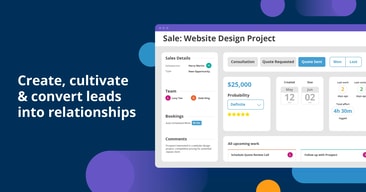
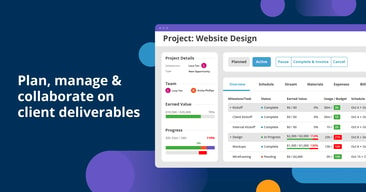
Accelo is a professional services automation software featuring an end-to-end cloud-based platform that manages all aspects of client work delivery, from prospect to payment, including sales, projects, tickets, retainers, timesheets, resourcing, and more, regardless of where you are.

| Capabilities |
API
|
|---|---|
| Segment |
Small Business
Mid Market
Enterprise
|
| Deployment | Cloud / SaaS / Web-Based, Mobile Android, Mobile iPad, Mobile iPhone |
| Support | 24/7 (Live rep), Chat, Email/Help Desk, FAQs/Forum, Knowledge Base, Phone Support |
| Training | Documentation |
| Languages | English |
Compare Accelo with other popular tools in the same category.
Look and feel, navigation, simplicity of execution for non-complex workflows and scenarios
In our experience it's not best suited for complex scenarios, large scale users, or heavyweight financial processing.
We use Accelo to run our services business on a daily basis (excluding invoicing). It's been helpful for our business to replace disparate systems for timesheets, projects, and CRM with the Accelo platform.
Project management, control over budget and avoid project overrun
Editing previously lodged activities...
Budget control, easier invoicing process
The best part is you can easily log work without losing time. Afterwards you have a clear overview per project and you can review were you are spending too much time and are losing money.
I currently miss the ability to easily share timelines with customers. a website were you can see the progress and deadliness would be great!
By using this tools we are able to optimize our internal processes and improve our pricing were needed.
Before we used Accelo, time spent on work was gathered via a rather ugly Outlook task list workaround, which was neither practical nor scaleable. Accelo's project and retainer scheduling functionality allows us to book-in large projects much more easily than before, and also ensures that time is tracked more accurately, allowing senior management to find true profitability of projects and marketing services.
Of course there are a few elements of Accelo that could be improved, but one of the benefits of working with Accelo is that they listen to their clients. I am constantly in touch with Geoff and the team to offer ideas and help with beta testing, which makes me feel like a valued customer.
We are solving many problems with Accelo, from project scheduling and timesheeting through to sales forecasting and email tracking.
The quoting process is simplified by having easily editable templates set up. We also have different currencies available in our account which makes quoting globally much easier. It is easy to input your time in timesheets and manage your team's. Putting holiday requests in is simple too. The Support team are fabulous- if you have a question about the product, their responses normally solve the question first time round.
In timesheets, weekly calls/recurring appointments seem to fall off the radar but I understand that this is a fix for 2016. It would be great in timesheets if you've put in holiday/time off that it shows in timesheets so as to account for missing days of holiday/time off/absence.
Automating quotes - having templates pre built really saves time. You can also convert a quote from completed to a project once it is signed and assign tasks to your team there and then so everyone gets a notification.
Ease of entering new companies and contacts. Email and chat support is excellent.
Mobile app is still developing. There's lots of features we don't use that kind of get in the way and clutter things up like invoicing, time tracking, graphical interfaces of work performed. For us, it would be a cleaner experience if we could simply turn off, hide or make inactive the features we don't use ...
Keeping track of all the people we meet that ask for our help! Nothing falls through the cracks anymore once we developed the habit of using it ... (apparently the brain implant to input what we're thinking is still in the works).
Large feature set and growing list of integrations. Development team seems to be proactive about refining features and introducing new ones.
Interface can be a little confusing at first but overall user -friendly.
Time tracking, ticket management. CRM
Being able to manage and process contacts and leads.
The only other CRM that I've used is Salesforce. I'm still learning the ins and outs of Accelo but I'm impressed with what I'm seeing so far. No dislikes up to this point.
Currently using as a CRM to manage and process leads for a start up company. I've been able to effectively manage contacts and potential prospects.
The integration with Google Apps emails, the automatic capturing of emails, the relation to the relevant client and the stream view which shows you a full timeline history with your client. Also, it is giving really useful tools to manage an agency.
The task / tickets management lacks a lot more intuitive UI. The JIRA integration needs more improvements and better synchronization (planned to get improvements on Q4 2016 as per Accelo roadmap). A bit of slow performance because most of the UI actions are required a whole page refresh (planned to get improvements on Q4 2016 as per Accelo roadmap).
Track of time logs across all the company activity. Knowledge sharing across the team. Ticket management. Budget management.
Accelo is rapidly improving and the support and development staff are very responsive to issues and questions. In the 6 months we have used the product, we have had multiple requests incorporated into the product and all issues we have had have been resolved.
Whilst the interface is very responsive, there are some aspects that are slightly more cumbersome than necessary, requiring navigating multiple screens.
For us, the single tool to see all our quotes, sales, projects and tickets has greatly improved our visibility of our own companies problem areas. Accelo has also made managing our retainers/monthly contracts with customers a much simpler process.

I like the ability I have to manage my own tickets and while also being able to track my teams progress as well. The automation features really help cut down on time spent on writing responses and helps to deliver good service to our end users. The ability to search past tickets seemingly from the beginning of our service with is insanely helpful when trying to remember back what I did to resolve a specific issue. The stream is also a great tool to see what the team is up to.
I dislike that it's web only. I feel that having a local app that looks to the online data would open up a world of possibilites. I struggle with the fact that when I open a note or start sending an email I cannot reference ANYTHING on the ticket or site. The note or email consumes the screen. Being able to minimize that window or better yet have all the information on one screen so you can reference past notes on the ticket or review past responses and details in previous emails. Currently it's painful to do and it is hands down my least favorite aspect of the service.
We use Accelo solely for a service ticket platform. It is where our service team works everyday. We track our time here we use it as a crm as well. Once I became accustomed to how the search functionality works this was been the single best tool we have at our disposal. Being able to quickly reference old notes and tickets is critical to resolving issues and looking professional. The timers are immensely useful. It helps keep you honest and makes you realize how much time you spend on specific issues. These timers help us determine how long it should take to perform a certain task - Thereby helping us scale up as a business.

- Ability to take quote and convert right to a project - Everything is in one location (sales, quotes, projects, time logs, dates) - Very easy to log time - Provides the information/interface needed to make data-driven business decisions - Task dependencies make timeline creation/adjustments a breeze - Different invoicing types provide many options for clients
- Applying/charging sales tax to clients in different states and for only certain deliverables is a challenge - The variety of date options (planned, scheduled, predicted, actual) are confusing for users
Accelo is housing all of our delivery assets in one location, is providing us with a helpful resource for resource management, and is providing a direct tie for project budgets/time tracking for employees. With all of our project data housed in one location, we are able to analyze quoting/project success to make data-driven business decisions.
I like there are multiple ways to do things like log time, create tasks, etc.
I find the being able to do certain activities multiple ways and having the platform be so nuanced and intricate means consistently using it in the same way across all team members can be a challenge
It allows us to see where each of our projects are at and update to date correspondence etc with all clients
It's helpful for keeping track of time and there are multiple ways to do so. You can log it manually or you can use a timer.
I am not a fan of the task area's interface. I feel like it's hard on the eyes and you cannot insert hyperlinks like in Asana.
At first my company used Asana and Harvest to do project management and time tracking. Then we switch to Accelo because it was everything in one plus a client portal
The software has many different categories, schedules and charts to allow full functioning and tasks to be completed within the programme. It is also easy to share among colleagues.
Things can easily be missed if created as one task but need a different set up. There are a lot of steps and processes to establish a task, project or retainer and it can be time consuming.
Day-to-day tasks within the business, internal communications, scheduling and project management. It provides full visibility over workload and capacity for everyone in the business.
Comprehensive functionality that goes from sale to project completion. There is a lot of functionality that can be customized to what you need. It can easily be a great enterprise solution.
Wish finding things and using the functionality was a bit more intuitive. Sometimes things are hard to find, or the process of completing a quote is not quite simple enough, although it is accessible through support or video training.
That it is a comprehensive solution within the business. It integrates with QuickBooks and is enterprise enough to be a good solution for the company. Would like to have an HR component to this - maybe it does and I just don't know that side of it yet.
- Sales, Quotes, Projects, Project Plans, Metrics, Billing, Time Tracking, all found in the same place! - Ability to create Project templates is a time saver - Ability to create dependencies makes planning easy - Adaptive scheduling feature helps projects progress in real-time; no matter if you are working ahead, on-track, or behind
- There isn't a good solution for dealing with sales tax on only select deliverables - Adaptive, auto start, and planned date functionalities don't work as expected together - Robust tool with a lot of nuances. Isn't an out-of-the-box solution
- We no longer have to use multiple tools for project quoting and project management; everything is now in one system which is a time saver for our client services team and one less system we need to have a contract for - Project deliverables are easily visible and accessible, and through the use of dependencies we can easily change the dates of the whole project instead of manipulating dates for individual tasks, which is a big time saver - Data related to time spent on tasks is very transparent which saves us the time of pulling specific reports to see how we did on time quoted vs. actually spent
The versatility to customize your set-up
The extensive dashboard and different places to search
Imvoicing and tracking time spent
The Accelo platform has lots of customisation opportunities in order for us to make it work for the way we do business
Sometimes the features have little hickups or things hang and freeze which can be annoying
The built in timesheeting allows us to keep track of what billable and non billable work we do directly against tickets and projects rather than having to log it in a different app.
I like how easy it is to pull time reports, creat customized project lists, and update section of a project plan when a date changes.
I do not like how there is not a calendar view of the project plan, how you cannot add Forecasted Vlaur to the project list next to Project Budget, and how inflexible the client portal is.
Project management for multiple team members, clients, and projects within the studio.
Timers, log entries, and emails management. If you lost track of the project, Accelo provides a way to do a quick review and check for pending items. Not so different from competitors
Number of click to go to a project, milestones configuration, project access trough log time. Just one screen to upload time, there are too many versions to do the same thing.
Project Management, we have to send reports to customers and Accelo is helping when they ask about the remaining budget and pending milestones. Accelo has helped me keeping track of my tasks pending
Easy to use for time sheets. The feature of it importing time doesn't appear to be of much value.
A little cumbersome to make changes. Can't add time in advance (like if I know I am traveling and will be working all day, I can't go ahead and log that time).
Using for time mainly, but we are starting to use for contact logging. It just isn't robust enough yet for managing contacts to be able to really use as a CRM.
I appreciate how robust Accelo is and how customizable it can be for different scenarios. We have found ways to streamline our more time-consuming processes, like entering projects, by creating templates. Features like this make Accelo very functional for my firm.
There are times we have very specific needs and find that the functionality isn't working for us in that regard. For example, our firm sets up various types of retainers and we are unable to customize the setup of a retainer to fit our objective. We have found workarounds but it's not ideally how the product should function.
By streamlining processes, we are able to spend less time trying to get projects/tasks set up and more time focusing on the work. It's beneficial to us that we also have a way of documenting the flow of work so that's one way our project templates work for us.
Solid navigation throughout the site, and lots of ways to customize your workflow
Can be a bit confusing at the beginning, but once you get used to it accelo is nice. I wish they would add exclusion filters for tasks and projects
Organization of multiple clients and multiple projects per client. Each project has a handful of tasks as well, so it helps keep everything in line
in terms of general interaction with the platform, the structure is well thought out and mostly intuitive. it is sometimes so comprehensive as to be slightly overwhelming, but ultimately better that than under.
i think more room for customization of the onboarding process might be helpful. it seems a bit cliched that every creative agency would feel unique -- when in fact we all mostly do the same thing(s) -- but being able to tailor training sessions to "studio uniques" might be helpful.
we believe accelo is going to allow everyone in our studio to rely on a single source of truth when it comes to our clients, projects, tasks, timelines, and budgets.

I like that Accelo can help you budget for a project while breaking it into digestible milestones and individual tasks. This specified budgeting helps our company manage our time better and determine billable hours to optimize our profitability per project better and even per day.
I dislike how limited the Accelo interface can feel, whether modifying a task description or repositioning a task in a different project milestone. These changes, which should be simple, require multiple steps due to an overall clunky interface. Accelo has made some changes to our interface in recent years, but these interface updates have mainly been aesthetic changes. They have not resulted in any meaningful improvements to the UX design.
We are solving the issue of project profitability by using Accelo to better manage our billable hours and project budgets. By segmenting projects into identifiable milestones and tasks with allocated hours, we can better track how close we are to using up our budget and blowing our profit margin.
I like the organization of Accelo. Anytime I need to assign out a task out to someone, I am able to use the scheduling tool effectively. It makes me stay organized
Honestly, there is nothing I would say I dislike. As someone who just started working in project management, its an amazing tool to use! Easy and quick to learn
I am able to solve the maximum number of hours I can resource somebody out. Its a great tool to see my coworkers schedule and figure out if they have time to complete a task
The daily work schedule in Accelo is very helpful to be able to complete tasks as you work, this can be scheduled way out ahead so you know what work is in the pipeline.
The job/task completion part can get confusing, the time logged on tasks once you complete part of the task or in full is frustrating cause there are so many variants of how this can be done, and time sometimes gets wrongly accumulated on task completion.
We are a big organisation that uses Accelo, with all the clients and tasks we are on, Accelo really helps align the work for all teams, we are able to track open jobs and completed jobs.
One of the things I like about Accelo is the activity links. When using any messaging system it can be hard to find the thread or go back and see what was replied to and keep contact with you customers. By copying the activity link I can easily send the task to my fellow teammates where they can access directly by giving them that specific link.
One of the things that I dislike about Accelo is that there isn't a good way to search. The search option is limited to Subject/Title which is hard to find past messages without the activity link.
Some of the benefits of Accelo is keeping the thread together as you reply and as others reply it is super helpful for related items that may have several people involved the thread of the conversation is all together
I like how accelo has is becoming the central hub for all the admin work. the automation of a lot of processes is a great time saving tool if you put in the work to set everything up correctly. the workshops with accelo representatives were also very helpful early on.
Some parts can be quite complicated which may be off putting to new users but persistence is key to get the best out of accelo
The automated processes are great for saving time and the rapid generation of quotes and risk assessments based on inputted formats is also very useful