

Unclaimed: Are you working at Adobe Experience Manager?
Adobe Experience Manager Reviews: 4.0/5 — Solid Choice
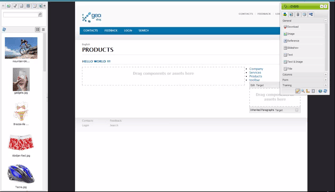
Adobe Experience Manager is a cloud-based content management solution to help businesses create websites, mobile applications, and web forms. The AI-enabled platform lets content creators create, manage, and deliver marketing content to customers using machine learning algorithms. Additionally, it enables content designers to create, modify or publish web pages using the in-context WYSIWYG interface and drag-and-drop functionality.

| Capabilities |
AI
API
CLI
|
|---|---|
| Segment |
Small Business
Mid Market
Enterprise
|
| Deployment | Cloud / SaaS / Web-Based, On-Premise Linux, On-Premise Windows |
| Support | 24/7 (Live rep), Chat, Email/Help Desk, FAQs/Forum, Knowledge Base, Phone Support |
| Training | Documentation |
| Languages | English |
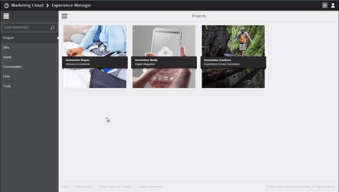






Compare Adobe Experience Manager with other popular tools in the same category.
A platform to build and manage webpages, mobile applications and content. It gives us freedom to optimize our digital experiences across various channels.
Sometimes it get stuck or gets very slow.
Marketing automation enables us to automate various marketing workflows.
AEM is one of the best Adobe tools to have for managing front-end websites. It is a very user-friendly tool where we can add components as per our requirements, which can be displayed at the customer's end. It gives a wide range of components we can add to our template. Also, it has DAM, which works as a repository that we can directly integrate with our website. The Styles and configuration provide for components really help modify the website content in an efficient way.
UI can be improved to enhance the user experience.
Components provided for different Templates Regular updates which enhance the performance DAM-Digital asset management Author and Publishing mode AEM makes development and deployment fast.

Adobe Experience Manager's front-end experience is top-notch. It was the most user-friendly, drag-and-drop experience I had seen across all enterprise-level content management systems. It also felt very much apart of the Adobe ecosystem, so design teams would feel at home.
The backend side can be very complicated. You need to ensure that your back-end team has a high-level skillset in Java. It can be rather confusing on how to best architect this, compared to other less complicated solutions; however, it does give you more flexibility to customize the architecture.
Adobe Experience Manager offered us the enterprise-level content management solutions that we needed. Large organizations need a product that can scale up and outwards, as well as can be reliable enough to ensure minimized down-time. Stability and scalability are two important aspects that we benefitted from.
The platform gives good DAM capabilities. It can be used by marketing teams and agencies to author pages easily and run campaigns as per their plans. This removes dependency on day to day operations from IT teams.
The infrastructure is complex and needs lot of maintenance. The development paradigms are also not very straight forward. Issue debugging also takes a lot of time.
It is solving problem of running best in class digital experiences for customers and also helping marketing team create their own pages and campaigns without any dependency on IT teams.
It's a versatile and powerful tool that if you have a good Web developer available can be customized to your needs. It makes website management easy once you get the hang of it.
There is nothing that pops to mind. Because it's so powerful and versatile, it can be a bit overwhelming to new users but the training resources makes that easier to navigate.
It makes it easier for us to manage our website by allowing us to decentralize the workflow of editing and creating pages and content. Works great once you figure it out.
I like the diversity of services and evaluation options.
All is fine, but it's not as user friendly as I wish it to be. Especially when one is not tech-related person, it can be way difficult to work with.
It helps bring traffic to my website and measure it, as well as enrich it with relevant content.
It helps to do A/B Testing and analytics the result of user's performance. To splits the audience over the region using Adobe Target. We can create multiple offers to check the user response. It helps to improve the audience of the app. we can also add recommendation strip to the web page where we need to append the stip module with ML data.
For E-commerce platforms, When testing large-scale e-commerce applications, it flickers, so, from the user perspective, it shows bad user experience. And we can't use multiple frameworks in Adobe target offers. It's use only HTML.
Body hiding for single-page applications. Collecting metrics data is quite complicated for single-page Applications. With the help of analytics data, we can choose the right features for the applications.
Headless CMS leading to decoupled approach and high performance Integration with other adobe marketing cloud platforms DAM for saving all digital assets in one place
High cost as compared to peers leading to increased marketing cost Only suitable for organizations having website backend designed on JAVA platform for compatibility Not up-to mark support experience
Design websites on AEM Communication resources such as email templates, images being retrieved from AEM Easy to make changes to website avoiding long development cycles

I like the product is very flexible to customize the features depends on customer requirements. I am using AEM product to design very complex website. Its very easy to build multi language site, organize the digital assets and publish the content where ever you want.
Complex for beginner Adobe support team does not resolve the problem if you have done the customization.
To build a multi-language website with rich digital assets is very simple.

Using Adobe Experience Manager, we can build enterprise-level websites. It can be easily customized to suit our needs for designing websites. Also, it can be integrated with Adobe Analytics to extract data regarding the performance of various campaigns on our websites.
If we want to make significant tweaks to our websites designed using Adobe Experience Manager, then we will need the help of an AEM developer.
It's very easy to design banners for our websites using Adobe Experience Manager. Also, it's quite effortless to schedule updates to our websites using Adobe Experience Manager. The Analytics tagging on AEM helps us to integrate it easily with Adobe Analytics for pulling data related to our websites. Also, it requires very few people to manage our websites using AEM.
Depending on how your dev team configures your components, it's an easy process to create, edit, stage and publish web pages. AEL also has a great DAM but it does require discipline to configure where you put files and images or else they can end up everywhere.
You have to make sure you toggle back to editing mode from HTML mode while configuring headlines and body content. If you don't, none of the changes you make will save. And depending on how long you work in the tool, content menu items may not show up unless you re-sign in.
We are moving toward global components and we are working on a video playback component. It's useful that we have access to IT2, UAT and PROD environments, but not all of them offer the same capabilities.

As a developer, creating customizable content components is intuitive. Adobe has great documentation and tutorials for getting started. As a Product Manager, this is a great product to recommend to clients and vendors for its ease of use, high customization and user experience design, and technical support.
There were rare instances that the default components didn't quite fit our needs and developing a new component from scratch meant a lack of consistency.
Creating more front end customization for a non-technical content and marketing team.
We can customize reports , so there is likely a way to measure anything if you’re willing to search. I am Tealeaf Admin, and we integrated Tealeaf tool with Adobe to achieve goals like 'Maximize the integrated value of Tealeaf with Adobe Analytics' & 'Make Tealeaf capabilities easily accessible by Adobe Analytics users'.
There is a steep learning curve present with Adobe Analytics
I am Tealeaf Admin, and we integrated Tealeaf tool with Adobe to achieve goals like 'Maximize the integrated value of Tealeaf with Adobe Analytics' & 'Make Tealeaf capabilities easily accessible by Adobe Analytics users'
AEM can be used as a responsive repository. This can also publish sites and microsites .It has integration to almost all applications to help user experience coming from any legacy or new technology platform.
This is costly and have a lot of support restrictions to even provide training or sandbox environment to its enterprise users which is not great .
We are showing decisioning offers to users on AEM published Web as well as using AEM sensei repository for our application to provide users a great front/back end experience. This has provided us facility to interact with user in their preferred language ,channel and doc sizes and to the point . This has shown us increase in revenues upfront.
Manages our systems well. Pretty adaptive to your needs.
Takes a bit of time to learn the ends and outs.
Organize our projects and helps push information.
AEM is intuitive and user-friendly. I like that I can make changes quickly and efficiently.
Scheduled page updates can sometimes be unreliable. 6.4 seems to be a bit less intuitive than 5.6.
Our firm uses AEM for content authoring of our digital properties. By doing so and giving the author more flexibility and power, we are able to be more efficient and save time.

It is a fantastic platform and giving reliable services. It is a combination of digital asset management and content management system and a powerful content always makes a difference. Because you have to customize it according to your customer demand, which is the main tool of bringing business growth. It has made scaling effortless for us, because of it automated tools we can manage our stuff across all the channels. We are spending our time in searching for the things we needed to create our content, in fact ‘Abode experience Manger’, is providing everything for us.
We are having a wonderful experience with this amazing software and every day we discover its new approach towards content and web management, we are its satisfied customers.
We are happy and satisfied customers of Adobe experience manager. It is great tool when it comes to web management which includes web pagers and digital data, forms and everything related to web. It is providing us a way to generate our content-led experiences in the outer world.

Now Adobe Experience manager has given me an easy way, it has automated tools that help me to source, adapt and deliver my valuable work to my customers. It is the perfect tool for digital organization of works. It is the best ever tool which helps to transform your paper based interaction into digital assets. The robust CMS will help you to create your content with speed and much ease.
I wish there could be some text editors for spell check. But I am having a great experience with this application so I cannot yet found any as such complex to tackle cons.
You will find no issues to create and maintain pages and you can easily pick up with images and tools. Adobe marketing cloud let you combine your two businesses at one place. Through Adobe Experience Manger I am experiencing a new way to deal with marketing.
Ease of creating the pages and doing the social engine optimization.
Absolutely fantastic tool without any flaws. Ease of migration from ECM to AEM.
Create the global pages, article pages and topics pages. Ease of tracking pages and click through ratio. Ease of bifurcating the pages globally and locally.

I like your web design since it achieves attractive and efficient results, allows users to efficiently manage their savings in one place.
It should improve the capacity of easy since it presents problems in this section and improve the updates that can get to damage some documents.
We use Adobe experience manager to have a usable editing program in 80% of the activities of our Company it is very easy for new web developers to use this since the handling is fast and without any problem improving the organization and personalization.
Well, The integration of this software is seamless and effort less. Its is recommended for smaller companies with focus on marketing perspective but I can say It helped us a lot, we as a team in a Tech giant used this product for formatting documents to the format suitable for web. Translation function was well working as we required some of the pages to be translated for the clients in different areas. It allows to manage structural content which came very handy as it is more focused towards constant customer satisfaction.
I genuinely didn't dislike any feature of this software as it is far better than the companions but some how it was little difficult for me as an individual to transfer or export or migrate the data into different formats, but that is an individual opinion , for a team it was great to work with as we had no problem integrating.
Its is recommended for smaller companies with focus on marketing perspective but I can say It helped us a lot, we as a team in a Tech giant used this product for formatting documents to the format suitable for web. Helped us to collaborate with different teams very easily which as a result saved us alot of time and pain.
Very efficient and effective tool to get the job done. Helps me organize and provide quick response.
The user interface could be improved but overall I enjoy using the tool
Efficientcy has improved and it's allowing me to document important pieces of my business

Super user friendly to create and update website contents
Sometimes you think you can have some more component to make your work easier
I can create and update philips page for global and local pages in less than 5 mins
When it comes to its advantages, first of all, AEM lets you manage multiple sites using just one solution and translate your pages into different languages. It's especially helpful when you have a complex website and market your product in different countries.
In general, I think that AEM is a robust solution, however, its complexity may be found difficult at the beginning, especially for users who have never had any experience with such a tool before.
Adobe Experience Manager (AEM) is scalable which is a huge plus for large organizations. The one piece that many people forget is that AEM is a web application, not just a CMS. This means that only your imagination is holding you back from what AEM can do or be and it can be connected to just about anything with a computer: the large TV screens in Time Square, the touch screen drink machines at restaurants, in car display monitors, etc

The many options available to edit webpages and how user friendly is the tool in terms of adding or editing sections
I dislike that some of the options are not explicit to know what to do for example when copying a section to another webpage.
Adaptation of materials to the countries I use it in the different locales
system allow you build templates for pages and place them in different kind of content on the pages
high complexity AEM is build on uniques structure requires a fair bit of knowledge from end users
it is a enterprice content managent system at my work
Great interface to manage content quickly and inemediata that helps the marketing department to reduce time and distribute content at high speed providing flexibility to workers.
Adaptive web design I personally think that it does not optimize elements like the design, the size of the text, in the way that it should adapt. This presents some problems when the customer chooses how they should be.
One of the benefits you have is that it has fewer incidents and more escalation and security in the cloud. The cloud is the key. Thanks to the cloud you can really manage content at the business level, and get privacy and scaling.
I work a lot on creating content for multiple websites, which means keeping track of different home pages, content, and having fast turn around. When use AEM, it makes my edits visible while I'm making edits. In the editor, I have a clear view of how my content is going to be presented once I publish it.
I'm still new using this and it's intimidating to know that if I push something into the system, that everyone else in my team and company will see it. This means if I make certain mistakes, people will know it was my mistake. I'm sure this feeling will go away once I get more comfortable using the software.
I work with multiple teams at once, one problem I was having was working in conjunction with other content managers and us not being able to collaborate as effectively as I would like. This helps us work well together.
Love the functionality with ease of use.
A tad on the costly side but definitely worth it.
It has allowed me to eliminate some HR procedures while allowing for ease of use
It makes editing content more easy and organized! I love the fact that it's connected to the cloud!
It's perfect. No complaints at the moment!
Helps me maintain organization with my project files.