Unclaimed: Are you working at Adobe Illustrator?
Adobe Illustrator Reviews: 4.6/5 — Highly Rated
Another go-to design solution from Adobe, Illustrator is the preferred design software for numerous designers and illustrators who want to access an intuitive interface with tools that can simplify the entire design process. The dashboard is simple and streamlined. Collaboration is at the forefront of this platform, with cloud-sharing capabilities supporting document sharing and easy collaboration. Customer support is also available so you can get the most out of your service.

| Capabilities |
AI
|
|---|---|
| Segment |
Small Business
Mid Market
Enterprise
|
| Deployment | Cloud / SaaS / Web-Based, Desktop Mac, Desktop Windows, On-Premise Linux |
| Support | 24/7 (Live rep), Chat, Email/Help Desk, FAQs/Forum, Knowledge Base, Phone Support |
| Training | Documentation |
| Languages | English |
Adobe Illustrator Pros and Cons
- Intuitive experience: Everything about Adobe Illustrator feels like it was built to make your life easier. You can create full patterns with a single click and use AI enhancements to transform your project. It’s slick and streamlined
- Cloud sharing: Like most Adobe products, Illustrator is all about collaboration, you can store your documents in the cloud, share them with your colleagues, and work on everything together.
- Customer support: Aside from giving you a great user experience with the interface, Adobe also ensures that you can get the most out of your service with guides and tutorials.
- Also includes a compulsory installation of unnecessary Adobe CC software
- Cost might be an issue for non-professional users as it is significantly more expensive than more basic vector and illustration tools





Compare Adobe Illustrator with other popular tools in the same category.
As an avid user of Adobe PS, I'm happy to find a similar interface and familiar tools when working in Illustrator. The vector art in AI is crisp as you'd imagine, and I'm still discovering new uses for some tools. When you bundle this program into the Adobe Cloud, the creative freedom you're allowed is unparalleled to other graphic design programs.
There is a slow road to mastery. I did not know how several items in the tool panel worked when I first started and although Adobe offered various tutorial videos with the package, they were not my cup of tea in teaching style. The way I got better was through task-oriented learning, using YouTube videos as a guide to target the specific ideas I was trying to bring to life.
I have been creating graphics for several organizations on campus, much to their delight. Using a vector-based program for this task was important due to preservation of quality when scaling. Oftentimes, my peers will misjudge the needed size of a graphic or logo for the purposes of a shirt, poster, etc and this is where Illustrator shines. I can quickly rescale images and send them back without compression, quality, nor file size becoming an issue. Try doing this with a rasterized image or lossy bitmap in PS and see where it gets you.
I have been using the Adobe Creative Suite for about 20 years. I do not work in vector art much but when I have too I have little problem using it.
I will it integrated better with Adobe Premiere (actually all of the Adobe Suite).
Working with vector art.
Creo que no existe un programa mejor para diseño como el Adobe illustrator, lo que más destaca sin duda es poder vectorizarlo todo, tanto algo pequeño, como son logos, como carteles publicitarios y escalarlo a tu gusto según la demanda. Me gusta que se vaya actualizando constantemente para hacer que las cosas sean más sencillas.
Quizás si tengo que ponerle alguna pega a este programa es su precio elevado. Existen programas alternativos gratuitos, pero no son tan completos y eficientes. También es un poco difícil de utilizar sin conocimientos previos, por lo que tendrás que estar bastante familiarizado con el programa para sacarle partido.
Es muy útil para diseño gráfico, márketing, publicidad etc. Yo personalmente lo utilizo para crear imágenes de entradas de posts nuevos, para carteles informativos y por supuesto para logotipos.
It helps me when making vector arts for my customers. My customers loves my works for them and what they didn't know is, this Adobe Illustrator is my only secret. I always like the output of my masterpiece. The details especially the pixels are really perfect. It allows me to access and even import pictures, graphics, templates and more. I can also import my work in a very high-definition. I can also make 3D images with the help of Adobe Illustrator. I just learned about it with my friends and YouTube. A big thanks to Adobe!
Sometimes, it causes lags and malfunctions with my system, that's the only problem I think. Maybe it's because of the capability of my computer. But the good thing is, every time I have problems with Adobe Illustrator, the Adobe team and customer service will help me with it.
I can't have my work now if I don't have this amazing Adobe Illustrator as the platform to make vector arts, cool images, my very-own logos and more. Also one more thing, I am really impressed with their unique and built-in presets that helps me with my projects. It transforms my work into very different type of art. Adobe Illustrator is really recommendable.
I like that it is such a detailed and precise software giving me the lines and perfect measurements I need. It is perfect for making flyers, documents, business cards, and so much more. It is easier to master once you get the hang of it. I also love the vibrancy of the colors and shapes they have.
Sometimes it get can get a little confusing with all the buttons and menu options. It definitely does take some time to understand where everything is and when to click each button. Overall I used Lynda and different tutorials on YouTube to figure everything out.
We are using it to create detailed visuals making sure they are perfectly measured. We use the colors, images, and brushes to get a beautiful design whether we are marketing a product or a film. The vector tools also help a lot too. They are a great asset to this software.
Love the ease and tutorial data base available if you’re even just a beginner.
That it’s a monthly/ yearly subscription now instead of the old school download to own.
Creates a faster way to create and design billboards the more I get comfortable with it. It’s all in learning the tips and tricks!
You can align text and images with the guides
It can be difficult to trim off edges and connect anchor points
If the injection mold needs a small adjustment, rather than changing the whole cad model, I can draw the changes like so
It is very similar to Adobe Photoshop as far as buttons and features. I like that it has a clean scalable size which results in manageable file sizes. Sometimes when creating a file in another software, the file size becomes too large due to the features used in the file itself. The percision that Illustrator has is really good. This goes back to the scaling feature I mentioned, but all the tabs, texts, images in-line with each other.
It has a steep learning curve and you can't just dive into it. Luckily I came across some tutorial videos, but I had to play around with it to get a hang of it. It also takes a lot of time to create a clean looking drawing or template and not make it all over the place. The limitation to photo-editing in Illustrator. This is why we have both Illustrator and Photoshop.
We are using Adobe Illustrator to create specification documents for our products. By using Illustrator, it also for us to have clean and easy to read documents that our customers use to learn about our products and what we have to offer.
Illustrator is relatively easy to learn if you have prior design experience. I can make designs quickly with little effort, and the products I produce with my designs have always turned out well.
Illustrator has some settings that are automatically turned on, such as snapping to points. I only recently realized I could turn these settings off, which made creating my design much easier. It would be nice if these were turned off by default.
Adobe Illustrator is compatible with my university's makerspace technology. I use it to create designs for shirts for events my organization (the library) runs, advertisements for the organization, and other promotional items. This is beneficial because I can produce products in-house, instead of relying on outside companies that'll charge me for creating them.
Favorite thing about Illustrator would be it’s power. I can do so many vector based designs on the spot and all of my tools are right there in the tool panel.
It goes against modern minimalism and simplicity. Definitely a very steep learning curve. Patience is the key!
I’m able to crest all of the marketing graphics I need all in one program
Illustator offers a wide range of instruments that allow you to work in a clean and professional way. Once you have learned the tools, and learned the various techniques to work in vector, it is very easy to create any kind of graphic project. Also, there is the part of Illustrator online which is an economical way to get access to an incredible tool. Without talking of course the vast amount of examples and tutorials that are around the network and on the official site of Adobe.
Illustrator is great software, but sometimes it can be difficult to customize settings. Moreover, like all software of a certain scope, it consumes a lot of resources, so we need powerful machines.
Illustrator helps us a lot in the creation of advertising material, obviously of high quality. We use it to create advertising campaigns for our customers who have a website, or even pages on social media. The limit is imagination.
The ability to control and produce architectural drawings that convey an idea or concept
The difficulty in switching and linking drawings from Photoshop to illustrator
Pitching and selling architectural solutions to clients
many functions, easy to use, easy to generate different file types. It is a good community for people to use the software, users share their knowledge and skills used in the software. There are also plenty of videos on YouTube teaching other people how to use it.
Different versions of ai are not compatible; some functions are confusing, for example, I always have difficulty using the eraser. It will be better if there are more tutuorial from the offical website to teach the users how to use the software better.
For making figures used in presentations. Great illustration to the audience. The figures made by the software can make difficult concepts easy to understand.
Illustrator is always our best and foremost option to select and work for the vector graphics. The ease of bringing the sketch to life with the help of most convenient tools and preloaded services makes adobe quite suitable for our graphics work. Along with the vector work, it also enables me to put in the best colour contrasting and get away with any design that I want it to be.
Adobe always comes in a package which usually cost a little more. The tools in the software are also quite hard to use and implement for newbies.
Adobe Illustrator enables me to produce high quality graphics advertising material. The digital prints for online campaigns are much easier and quicker to produce with illustrator.
I am a self-taught avid user of Illustrator Online. It's an inexpensive way to have some access to an incredible tool. There's so many tutorials out there that show you how to do the things you want to do. The online version has everything necessary to do whatever project you want to do, just not the sticker shock of the actual program. No connectivity is needed once it's downloaded, and you can use it anywhere. Automatic updates keep it fresh and [somewhat] bug free.
I find that there are times when the color schemes get locked out and I'm unable to access the palettes for some reason. It's not often, but when it does happen, it hinders any sort of design for that time.
An inexpensive way to create in-house marketing, branding, and designs.
The smooth transition between CAD applications and illustrator. since illustrator uses vectors, it makes much easier to do the editing for graphics in it. I designed my work portfolio using Adobe Illustrator and it helped present floor plans, sections and other technical drawings in a very simplified way, yet attractive.
Sometimes I feel like I'm on my own using Illustrator, some commands that are meant to be simple (such as selection tools) are made complicated.
Create portfolio, organize presentation boards especially the ones with technical drawings. Marketing floor plans presentation, produce images for the website use.
What I love about Adobe Illustrator vs Photoshop, is that using Adobe Illustrator is like being a surgeon. The metrics are accurate to the scale, making the perfect shapes and objects for your artwork. Then you save files as an .ai file and those are scale-able to any resolution.
I dislike that i'm unable use Illustrator to make simpler designs for our PSD Web Designs. It make's it difficult when we want to scale our website, but seems to work perfect to make out pamphlet and other marketing material.
What i love is that with illustrator is that we're able to make our own marketing material from icons and artworks that can be scaled to any resolution. This make making web pics easy and making art on our marketing material easy for placing.
One of my most favorite features is Patterns. They allow you to easily create and manipulate patterns from one icon or a single collection of icons. Illustrator also allows you to convert images into vector graphics with a single click using live trace. Great tool for beginners or advanced illustrators
Text warp and mesh features never seem to work as I need them too. I end up having to create additional shapes or work through additional steps to achieve what I needed.
I typically use illustrator for t shirt designs, icons, and infographics. Illustrator makes it easy to manipulate shapes and layers for great print ready designs
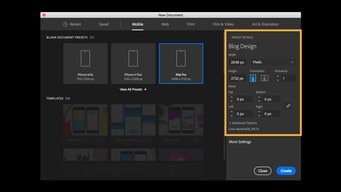
I like how you can now do mobile optimized work in it. Love the array of tools and help tutorials.
I dislike that the keyboard commands and shortcuts are not consistent across Adobe and with other well known programs.
Creativity and asset creation
I enjoy the product result that I get when I use Illustrator. I feel like everytime I create something, regardless of how it looks in terms of beauty, technically, it is great. Clean edges and exports well.
I dislike how you cannot crop a picture in Illustrator. This is one of the worst things about the program.
Illustrator saves time when having to create something with vectors.
The integrity of the tool is incredible - illustrator is the best tool for creating clean, professional graphics simply once you have gotten the hang of it. From colors, to quality, to different dynamic options for shaping, lines, and cuts this tool is the best option for creating graphics I have used.
It's not the most intuitive software and will take some time to learn. The best part is that there are so many forums online and advice/help from adobe themselves which make it easy to learn.
We use logos, brands, and graphics creatively to engage our audience and are in the process of forming a recognizable brand image. We use it almost daily to make this happen, and it has increased our visibility 40% in the past 3 months.
The capabilities of creation of designs are incredible with this tool, it offers a total control of designs in each work table that you initiate, you can create several tables of work in the screen and be able to work of more efficient form, fast and have the same result, this helps to save time rendering each design, it is also one of the most popular tools in vector designs and thanks to this you can easily find templates to help you and speed up your work even more.
It is a tool of vector designs and working between layers to achieve what you need this often complicates the work on images since it does not have the same filters as other photography editing program, but even so it is at par, also the rendering of the Layers can be a bit frustrating since most designs have more than twenty layers.
Handling adobe illustrator brought a great difference in terms of designs for marketing pieces due to its great utility in the creation of elements such as advertisements since it is specialized in vector works, this allows a flow of maneuverability with the design.
I had a great time learning how to use Adobe Illustrator, especially since it's such an important skill to have these days. Learning how to use Adobe Illustrator enabled me to create a logo for a new program that we launched in a nonprofit organization that I am involved with. What I liked best was how easy it was to design a logo and visuals in order to market this new market. I particularly enjoyed being able to use creativity when designing a logo.
What I disliked is that anything you do on Adobe Illustrator will require you to be very involved. Designing a logo can take a significant amount of time, much more than what I thought would be needed for a project such as that. I really disliked how everything had to be done manually.
Launching new programs are expensive as marketing it is required. With Adobe Illustrator, I was able to create visuals that would be used on our social media, website, and emails. This was very beneficial as it was cost-effective and helped yield great results.
Ease of use, part of the Adobe CC, faster learning for clients and students than other graphics software or apps
The program is great for the most part, but there are small updates that could make it more user-friendly. It can be difficult to customize settings. For the most part, though, I have no complaints.
Creating Infographics by the hour. Communicating visually in a more effective manner. Standarizing graphic look across platforms
All of the different ways I can tweak a design--Including tons of color options.
It takes a long time to open and I wish others could work on the same file at the same time.
Fitting graphics for emails and making GIFs
The versatility of the software and that its an Adobe product so it has many characteristics that I'm familiar with because of Photoshop/InDesgin
Some of the functions can get a bit tricky and complex if you don't know how to use them. Nothing a good youtube search can't fix. This is not so much a dislike but a wish list item, to see if there can be a plugin for Archicad/Revit graphics. We can export to DWG and DXF from Archicad but sometimes the files don't translate well over to Illustrator.
We can expand our library of graphics and logos easily while maintaining the quality that comes with Vector Form
Illustrator is a powerful tool that has all the individual creation tools you might need to create vector graphics like logos quickly.
The learning curve is big because this is a complex tool with loads of creation tools, editing tools and setting. That having been said, once you learn it, there is a lot of power available to you.
We create all sorts of Vector graphics with Illustrator-- Like Logos and Process maps.
I am an artist, and have drawn by hand my entire life. The idea of drawing digitally was very daunting, and I resisted for a long time. THen, I got a client who insisted on digital renderings, so I forced myself to learn Illustrator to accmoodate this client. So glad I did! It is so much easier and straightforward than I could even have imgined! The different drawing tools and layers give so much more dimension to my work. And the final product looks great, which is the most important thing of all!
I tend to use my Wacom in illustrator, but I find it tedious to move back and forth between my pen and my mouse. I wish the pen was a little easier to use on navigation menus and things like that. But it's a minor inconvenience in the grand scheme of things.
I am taking on a variety of new clients now. Some people just want digital work. That's the look they're going for. So now I can offer than on top of my hand drawn style.
Adobe Illustrator is graphic-driven software used primarily for creating vector graphics. Developed with Adobe Photoshop..Adobe illustrator is used for creating logos, graphics, cartoons and fonts for the photo-realistic layouts of Adobe Photoshop.
Nothing to dislike I’m able to make graphics for work easily with no problems
I can accomplish all my projects at work using this site
What I like best is that Adobe Illustrator can be used for so many different purposes. If you are working on social media or branding, then this will pretty much be the only program that you will need to use in order to finish what it is you need to do. My favorite part has absolutely got to be the ability to draw and create my own logos, which is ideal if your organization is going through branding changes.
What I really disliked is that as my experience with other Adobe products, this is not very user-friendly for beginners. As someone who was new to graphics content creation, I had a difficult time when first learning how to do the different things on Adobe Illustrator. However, after using this for a few days, it tends to get much easier!
The business problem that I solved with Adobe Illustrator is creating branding content for a program within our organization. By being able to create a logo and some banners, I was able to help launch the new program with some stunning graphics to follow with it! This was great particularly for posting about our program on Facebook and Instagram.