

Unclaimed: Are you working at Adobe Lightroom?
Adobe Lightroom Reviews: 4.5/5 — Highly Rated
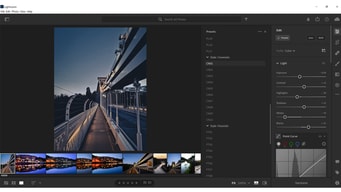
Designed specifically for photo editing, Adobe Lighting is one of the most popular tools in the market used by professional photographers. Similar to photoshop, it’s considered a gold standard in editing, with a host of pre-sets available to help transform images in minutes. The platform is straightforward, and easy to use and makes it very easy to edit images using sliders, gradient, and brush adjustment tools. The platform is customizable and comes with numerous intelligence features such as facial detection that helps organize images easily.

| Capabilities |
AI
API
|
|---|---|
| Segment |
Small Business
Mid Market
Enterprise
|
| Deployment | Cloud / SaaS / Web-Based, Desktop Mac, Desktop Windows, Mobile Android, Mobile iPad, Mobile iPhone |
| Support | 24/7 (Live rep), Chat, Email/Help Desk, FAQs/Forum, Knowledge Base, Phone Support |
| Training | Documentation |
| Languages | English |
Adobe Lightroom Pros and Cons
- Convenient, customizable, and easy to use environment
- Blurring and fixing tools
- Pre-sets and filters available
- Camera and lens-based corrections
- Brush and gradient adjustments
- Fewer options than Photoshop
- No layers and blending modes







Adobe Lightroom remains the standard for photo editing and cataloguing, and Adobe just raised the monthly Photography Plan from $9.99 to $14.99 — a 50% increase. The annual prepaid option at $119.88 was not raised, which means the same plan now costs either $9.99 or $14.99 a month depending purely on how you choose to pay. That single detail is worth more to most readers than any feature comparison.
- What it is: Professional photo editing and cataloguing software built around non-destructive edits, presets, and library management.
- Best for: Photographers processing volume, where cataloguing and batch editing matter as much as the edits themselves.
- Pricing: Photography 20GB reported at $14.99/mo monthly or $119.88/year prepaid. Lightroom-only 1TB $11.99/mo. Photography 1TB $19.99/mo. Verified via third parties in July 2026.
- The honest catch: The cheap 20GB plan is being phased out for new subscribers, making the $19.99 1TB plan the effective entry point going forward.
What Is Adobe Lightroom?
Lightroom is two products sharing a name, and the distinction matters when you buy. Lightroom Classic is the desktop-first application built around a local catalogue, and it remains what most working photographers use. Lightroom (sometimes called Lightroom CC) is the cloud-native version that syncs across desktop, mobile, and web. Recent plan changes have blurred this: the Lightroom-only subscription now includes Lightroom Classic, which it previously did not.
The core proposition has not changed in years, because it does not need to. Lightroom handles non-destructive raw processing, meaning your original files are never altered and every adjustment is revocable indefinitely. Around that sits the catalogue — keywording, ratings, collections, and search across a library of hundreds of thousands of images — which is the part photographers find hardest to leave.
Its enduring advantage is batch work. Editing one photograph well is something many applications do. Applying a consistent treatment across four hundred photographs from a wedding, then finding a specific frame two years later, is where Lightroom’s design pays off and where the cheaper alternatives are still meaningfully behind.
How Lightroom Works
- Non-destructive editing. Adjustments are stored as instructions, leaving the original raw file untouched.
- Catalogue and keywording. The organizational layer, and the main reason long-term users stay.
- Presets and batch processing. Apply a look across hundreds of images, then refine individually.
- Masking and AI selection. Subject, sky, and object selection have improved substantially in recent releases.
- Cloud sync. Available on the cloud-native version, with storage as the metered dimension.
- Photoshop pairing. The Photography Plan bundles both, and round-tripping between them is seamless.
Adobe Lightroom Pricing
Adobe blocks automated access from our infrastructure, so figures are third-party reported for July 2026.
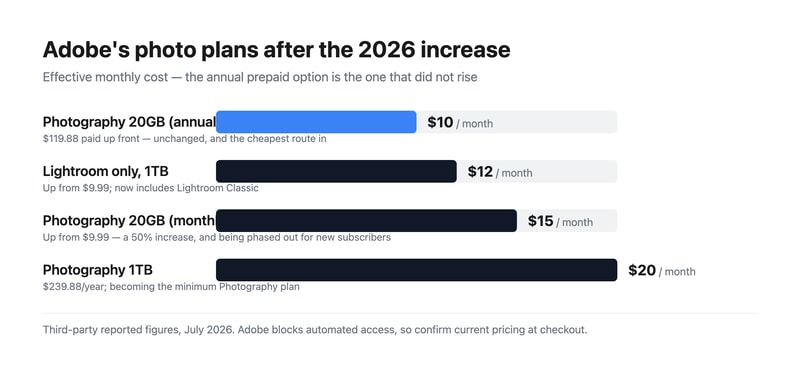
| Plan | Reported price | Storage | Includes |
|---|---|---|---|
| Photography (annual prepaid) | $119.88/year (~$9.99/mo) | 20 GB | Lightroom, Lightroom Classic, Photoshop |
| Lightroom single app | $11.99/mo (was $9.99) | 1 TB | Lightroom and Lightroom Classic |
| Photography (monthly) | $14.99/mo (was $9.99) | 20 GB | Lightroom, Lightroom Classic, Photoshop |
| Photography 1TB | $19.99/mo ($239.88/year) | 1 TB | Lightroom, Lightroom Classic, Photoshop |
What actually decides your cost:
- The billing term now matters more than the plan. The monthly Photography Plan rose 50% to $14.99 while the annual prepaid stayed at $119.88. Paying up front is roughly $60 a year cheaper for identical software. If you are going to use Lightroom for a year, prepaying is close to a free $60.
- The 20GB plan is being retired for new subscribers. The 1TB Photography Plan at $19.99 is becoming the minimum available. Existing subscribers on 20GB should think carefully before cancelling, because coming back may cost double.
- The Lightroom-only plan got better and more expensive. Up to $11.99 from $9.99, but it now includes Lightroom Classic and 1TB of storage. For a photographer who genuinely does not use Photoshop, this is a reasonable deal.
- Storage is the real upgrade trigger. 20GB is very little for raw files. Anyone shooting regularly and syncing to the cloud will exhaust it, which is precisely why the 1TB tiers exist.
- There is no perpetual licence. Stop paying and you lose editing access, though your original files and exported images remain yours. This remains the most-cited objection to the whole model.
Who Should Use Lightroom
- Photographers processing volume. The clearest case. Batch editing and cataloguing across thousands of images is what this software is uniquely good at.
- Anyone shooting raw. Raw processing quality and the non-destructive workflow are genuinely excellent.
- Photographers who also need Photoshop. The Photography Plan bundles both, which is far cheaper than the single-app Photoshop subscription alone.
- People with large existing catalogues. The switching cost is real, and the catalogue is usually why staying is the rational choice.
It fits poorly for casual photo editing, where free tools and phone applications are entirely sufficient; for anyone who objects to subscriptions on principle, since no perpetual licence exists; and for photographers wanting to own their software outright, where Skylum Luminar Neo and Corel PaintShop Pro offer one-off purchases.
Honest Pros and Cons
Strengths
- Best-in-class cataloguing. Nothing else manages a large photo library as well, and this is the real moat.
- Excellent raw processing. Consistently strong across camera systems.
- Genuinely powerful batch editing. Where the time savings actually come from.
- Photoshop included on the Photography Plan. Very good value if you need both.
- Strong AI masking. Subject and sky selection have improved markedly.
- Industry standard. Presets, tutorials, and workflows are built around it, which lowers the cost of learning.
Limitations
- A 50% increase on the monthly plan. From $9.99 to $14.99, which is a substantial rise for existing users caught on monthly billing.
- The cheap 20GB plan is being phased out. Pushing new subscribers toward $19.99.
- No perpetual licence. Access ends when payment does.
- 20GB is impractical for raw workflows. The entry storage tier is small enough to feel like a funnel.
- The Lightroom versus Lightroom Classic split confuses buyers. Two products, one name, different workflows.
- Lightroom Classic is resource-hungry. Large catalogues demand real hardware.
Adobe Lightroom Alternatives and How It Compares
- Skylum Luminar Neo is the leading subscription-free alternative, with strong AI editing and a one-off purchase option, though its cataloguing is weaker.
- Adobe Photoshop is the companion rather than the competitor — pixel-level work against Lightroom’s catalogue and raw processing.
- Adobe Photoshop Elements is Adobe’s buy-once option, though since the 2025 version it is a three-year term licence rather than a perpetual one.
- Corel PaintShop Pro and CorelDRAW Graphics Suite offer perpetual licences for editing and design respectively.
- Canva covers quick social and marketing edits, and is not a raw workflow tool at all.
- Capture One is the serious professional alternative, particularly favoured for tethered studio work and colour handling.
For a broader survey, browse our photo editing directory.
The Verdict
Lightroom is still the right answer for most photographers, and the reason is the catalogue rather than the editing. Plenty of applications process a raw file beautifully. Very few let you apply a consistent look to four hundred images, then locate one specific frame from three years ago by keyword in seconds. That capability compounds with library size, which is exactly why photographers who have used it for years rarely leave.
The pricing deserves clear-eyed attention this year. A 50% rise on the monthly Photography Plan, from $9.99 to $14.99, is a significant increase for a mature product. But the annual prepaid option held at $119.88, so the practical advice is simple and worth acting on: if you intend to use Lightroom for a year, prepay and save roughly $60 for identical software. Paying monthly is now the expensive choice for no benefit other than flexibility.
The strategic change is the retirement of the 20GB plan for new subscribers, which makes $19.99 the effective entry price going forward. If you are currently on a 20GB plan, that is a reason to keep it rather than cancel and return later. And if the subscription model itself is the objection, this is a good moment to look seriously at Luminar Neo — the gap in editing quality has narrowed considerably, even if the gap in cataloguing has not. Note that Adobe’s own Photoshop Elements is no longer a true escape from time-limited licensing: since the 2025 version it expires three years after activation.
FAQ
How much does Adobe Lightroom cost in 2026?
Reported figures put the Photography Plan with 20GB at $14.99 per month billed monthly, or $119.88 per year prepaid — an effective $9.99 a month. The Lightroom-only plan with 1TB is $11.99 monthly, and the Photography Plan with 1TB is $19.99 monthly or $239.88 annually. Adobe blocks automated access from our infrastructure, so confirm current pricing at checkout.
Did Adobe raise Lightroom’s price?
Yes. The monthly Photography Plan rose from $9.99 to $14.99, a 50% increase, and the Lightroom single-app plan rose from $9.99 to $11.99 while gaining Lightroom Classic and 1TB of storage. Notably, the annual prepaid Photography Plan stayed at $119.88, so prepaying for the year avoids the increase entirely and saves roughly $60 against monthly billing.
What is the difference between Lightroom and Lightroom Classic?
Lightroom Classic is the desktop-first application built around a local catalogue, and it is what most professional photographers use. Lightroom is the cloud-native version that syncs across desktop, mobile, and web. They share editing capabilities but differ substantially in workflow and file management. Recent plan changes mean the Lightroom-only subscription now includes Classic as well, which removes what used to be a common purchasing mistake.
Can I buy Lightroom outright instead of subscribing?
No. Adobe sells Lightroom only by subscription, and editing access ends when payment stops, although your original files and any exported images remain yours. If a perpetual licence matters, Skylum Luminar Neo and Corel PaintShop Pro are the leading alternatives. Adobe Photoshop Elements is a one-off purchase but no longer perpetual — since the 2025 version its licence expires three years after activation.
What is Lightroom best for?
Photographers working at volume who need cataloguing and batch editing as much as image adjustment — weddings, events, commercial shoots, and any workflow involving hundreds of raw files at a time. It is more than most casual users need, and its subscription-only model makes it a poor fit for anyone who edits occasionally or wants to own their software.

Compare Adobe Lightroom with other popular tools in the same category.
I LOVE lightroom, once you know what you're doing inside that software you are SET. All of the content and photos I was creating turned out incredible, and in the correct formats for our printing team to do their thing
if you dont know how to use lightroom you really have to sit down and take a course in it
solved the problem of not having edited photos or photo content, and the ease makes it so i spend less time finicking with the program just to edit photos
I like that its main purpose to allow you to edit your photos from anywhere. Its as easy to use as photoshop since it is a program that is linked to your photoshop.
There really is not anything that i dislike. I love being able to access my work from anywhere.
if I need to edit on the go or am traveling i am able to work while i am en-route.
I like when importing RAW files, you can change almost everything about how you shot the photo. If you accidentally shot at too low of an exposure, or the tint of the shot is too cool for your tastes, it is easy to slide the bars to correct it. It gives the driver of the software full control to edit the photograph exactly to their own style, taste, and final project needs. It is easy to duplicate photos if you never several edited or cropped differently, and to copy and paste edits from one photo to the next for consistency of color and tones. It is easy to delete bad or unneeded shots from your roll as well.
I wish it had a few more of the photography editing tools that Photoshop itself contains to precisely edit out blemishes, apply filters, and clone patterns. I also wish there was a better way to organize each grouping of photos, whether the people in the photos, or the moments for exporting faster.
I use Photoshop Lightroom from very basic edits with cropping and exposure control, to batch editing hundreds of event photos in a timely manner for clients. I like being able to look at all photos I have taken in one program, versus individual windows or tabs in other programs. The best feature is that it automatically backs up your progress, so you can step away from it without fear that your hours invested into a several hundred photo gallery would disappear. It makes me a more efficient photographer and keeping up with happy clients who get their edited photos quickly!
I love the instant gratification you get from editing through lightroom. It is such a streamless program to use.
There are a lot of controls and I feel like I will never know exactly how to use everything lightroom has to offer without taking a class
Photo editing mostly. I will say I have't used lightroom since college, but my sister in law is a regular user and it seems to have had really good updates since my last using it.
Lightroom makes it easy to edit your photos. Whether you are working on lighting, exposure, shadows, color, or just changing resolution, it is all available for use. As a beginner, it has really helped me improve my photography skills.
The learning curve can be a bit steep at first as there are many different things cluttering the dashboard. It can be a bit overwhelming at times.
I mainly use lightroom to edit photos. This has helped me improve my ability to find the correct composition/lighting in photos that I take before I need to edit them.
I use Lightroom for automotive photography. It has dramatically increased our VDP Clicks. I use it to adjust lighting and apply filters
there isn't very much I dislike about Lightroom. It has so much helpful stuff maybe if things were a little bit easier to navigate.
When a vehicle picture is too dark, has too many shadows, or where the brightness is interfering with the integrity of the photo its easy to fix with lightroom.
I love how easy it is to edit photos and export them.
I wish it were easier to delete a large portion of photos using the delete key.
It's fast and easy for quick edits that need to be sent out right away.
I love its ease of use and tools! I hadn't used many of the adobe creative suites but when I started using lightroom, it became my go-to!
None come to mind. It's perfect for the beginner to photo editing.
It's made editing photos quickly a snap! Very easy to figure out how to uses it.

I like how it can memorize my settings and I love all the filters included.
I don't like how much it costs me to keep it going but it's a good program.
I am a freelance photographer so it really helps with editing.
LR is the best photo editor for raw photos taken on a DSLR. I love that I can change granular details in photos that make all the difference, including altering how colors appear along with their saturation. It is also great for consistency because you can take edits from one photo and then sync that filter on all your photos without having to edit each specific one. Those filters then transfer over across all devices on the Creative Cloud.
My only dislike at times can be the speed of how photos sync with the filters and then the export (that can also depend more on your hardware of the system as well)
LR is the kind of software that eases my mind as a photographer, knowing that what I see captured can look pristine, professional, and flaw-free in LR. The benefits that I have realized is that it will make my photos 100000 times better and I am able to create my own custom filters.
I like the easy integration between LR and other Adobe suites. Can enhance images and then bring into photoshop without losing quality.
Can’t say there is much downside as it just takes practice and tutorials to get the full swing.
For the purpose I need Lightroom to function, it works great. Really. Photos become clearer and brighter in one click. Maybe I could suggest a wider array of preset filters for beginners.
Lightroom is my go-to software for basic image editing. As a photographer I often shoot large batches of images and I use Lightroom as my first step in the editing process. I find the interface extremely easy to use and intuitive. I love that you can batch process images, which really speeds up my workflow. Most of the time, I only need lightroom to fully process my images. I also love the ability to create presets and quickly apply those to images as needed.
I find that lightroom is not the best option if you are needing to do any refined retouching, this software is meant to make basic image edits and not more complex edits.
Making simle edits to images, especially in batches is made so much easier with Lightroom. I can quickly tweak my photographs and make adjustments without opening them up individually in Photoshop. Creating and importing presets is extremely simple and can simplify my workflow quite a bit. I also love the ability to batch-export and rename files as well as create contact sheets. Lightroom is always my first step in my image processing workflow and I often can complete any adjustments I need to make without engaging a second software.
I was able to edit many photos at once, great for weddings when you have a lot of material to edit
Not as easy to understand as photoshop, but it might be if I started with Lightroom instead
It’s very fast and able to edit a lot. I can do a lot in a little amount of time
Import, organize, and correct any photos.
Raw conversion can be very slow at times.
APL is the perfect addition to any marketing campaigns that require the use of photos outside of stock photos. We use the face detection feature in so many situations to help speed the identification process with customer photos. The new changes with the Healing Brush are a very nice addition to the new update. Most of us think of the image touch-up being a circular brush. With the new updates you can actually change the brush t be something a little more accommodating to the items that need to be restored. Another great feature is theMaps function, which we have used a lot in the business. You can simply pull up the map to see the location that the photo was actually taken. It has helped us in the past with some photos where we were trying to identify a conference by the faces and the look of the room. Sometimes we have multiple conferences in different locations on the same day. Using this feature, we were able to identify exactly where it took place.
Lightroom has tons of editing features, including selective editing and healing. The editing capabilities are not complicated at all so anyone can use them.
I don't see any downsides to Lightroom.
Lightroom has a mobile app that allows me to make edits away from my desk. It is my go to editing software for photos. It also integrates perfectly with Adobe Portfolio.
I think Photoshop lightroom has own stand ..
May b dialike only price other wise it is good
Faster and smooth
Great program used for work & personal.Definitely user friendly.
Nothing. Seems to function as expected in most cases. Sometimes compatible with printers/scanners automatically.
N/A
It's easy and powerful. I haven't used a single photo processing software that's even close to competing with lightroom.
It's difficult to relink files if you move them after importing. Sometimes I change a files location on the harddrive and it causes lightroom to lose it, which is inconvinent.
I previously used Camera RAW for processing, and it was super inconvenient. I love that lightroom has tools for both organizing and editing, making it much easier to process lots of photos.
With Photoshop Lightroom we are able to create stunning pictures for our social media and instore slideshow displays. This program is of such high quality and runs smoothly for basic and intermediate use. With complex editing more RAM than just your average PC is recommended but not needed.
Sometimes it seems as if there are almost too many tools to use. sometimes a confusing layout. The flow of projects from one program to another could use some work.
Our Social Media presence has definitely increased. The community and product support are amazing
I like how much there is to do and how easy it is to use! It has me covered on all fronts
It is kind of expensive for the average person, but definitely worth the money. I will take a little to get to know the different features, but when you get to know it it will make your life easier.
I work for a printing company so i do a lot of photo touch-up for our clients and Photoshop Lightroom makes this process so much easier and saves me time.
Bulk edit makes everything a breeze! I like how I can use the bulk edit feature when I need to edit lots of photos. It also enhances my photos pretty well.
Like other Adobe Creative Suite Products, using the program can be a challenge at first. I also don't like how it occupies a lot of my drive space to make it function.
Lighting and natural tweaks in photographs. Again, it's a breeze to bulk edit everything!
Lightroom has completely changed the game for quick photo editing. The newer cloud based feature has completely changed my life!! I love that I can edit a photo session on my computer, and then it shows up on my Lightroom Mobile app automatically! I also love that I can create and save my own presets. It's totally streamlined my editing and sharing process.
I don't love that the photo previews take up so much space on my computer. I wish it would automatically delete photo previews after a month.
I'm able to edit photo sessions faster than ever before. I love that I can edit a photo, make a preset of those edits, and then apply the preset to a group of photos in a single click. It's saved me hours of sitting at my computer over the years.

I love the ease in which the program allows you to use it.
You do have to know exactly what you are doing to use the program so it is not for beginners.
No problems and the biggest benefit is being able to switch between screens easily.
Ease of rating is the most useful tools and editing is very easy to do. Gets complex as you go further down the develop module, would like better tutorials to learn those.
Don't always know what each slider does. Menus can be confusing too.
Allows me to sort through photos quickly and edit them easily.
Photoshop Lightroom allows users to import and manage their photos. It gives user easy access to photos for editing.
The software requires first class knowledge on how to use in a professional manner
Managing and editing photos.

I love that Lightroom can rescue RAW photos that were either poorly lit or shot with the wrong white balance. I've even saved wedding photos that were taken in harsh sunlight, completely blowing out the bride's dress. I also really appreciate that the preset lens correction fixes warping and vignetting.
I wish that I could open a single photo file and just edit that like I can in Photoshop rather than importing an entire library.
When switching between very different lighting situations during a single shoot leads to occasional incorrect camera settings, Lightroom can fix all but the worst screw-ups. Combined with Photoshop, my clients are basically guaranteed great photos.

1. Easy to use 2. Very intuitive 3. Clean layout
1. Too many features 2. Updates are not regular
I have done lots of photo editing for my personal work and I love using it because it is very simple and streamlined and it saves me a lot of time.
Now that Creative Cloud included Lightroom, I finally had a chance to use it and I love it! It was like teaching an old dog new tricks because I am so used to Photoshop, but Lightroom really has some exclusive features that can make your pictures pop.
Learning the new hot keys (My muscle memory from 20+ years of using Photoshop makes me crazy)
Making dull cell phone photos into works of art, making movie posters look pro

that i can use so many diff presets and adjust the colors
it looks old and is clunky/bulky to use doesnt feel like an apple product
catalogues are diff to navigate great presets
What I like about Lightroom is the ease with which I can select quality photos and either apply batch edits or dive in and make intense edits on a photo-by-photo basis.
There's not much to dislike about Lightroom. Potentially the only drawback is it can use a lot of system memory, so be sure to use it with a computer with at least 16GB of RAM if you hope to use it with other programs.
Lightroom allows me to edit photos for marketing materials, both in the print and digital space.