Unclaimed: Are you working at Adobe Photoshop Elements?
Adobe Photoshop Elements Reviews: 4.3/5 — Solid Choice
Adobe Photoshop Elements is a cloud-based graphic design software designed to help businesses create and edit images via a centralized platform. It offers built-in editing tools with various image effects, colored filters, and patterns or symbols for easy designing. It also supports integration with several third-party applications and in-house Adobe tools.

| Capabilities |
AI
|
|---|---|
| Segment |
Small Business
Mid Market
Enterprise
|
| Deployment | Cloud / SaaS / Web-Based, Desktop Mac, Desktop Windows |
| Support | 24/7 (Live rep), Chat, Email/Help Desk, FAQs/Forum, Knowledge Base, Phone Support |
| Training | Documentation |
| Languages | English |


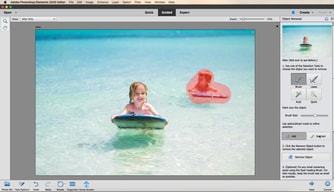





Photoshop Elements used to be the answer for people who refused to rent software. It is not any more. Starting with the 2025 release, Adobe replaced the perpetual licence with a non-renewing three-year term: you pay once, and three years after you redeem the code the application stops working. That change is the single most important thing to know about this product, and Adobe did not make much noise about it.
- What it is: A consumer photo editor with Photoshop’s core capabilities in a guided, approachable interface.
- Best for: Enthusiasts who want capable editing without a subscription, and who accept a fixed three-year horizon.
- Pricing: $99.99 for Elements 2026, $149.99 bundled with Premiere Elements, $79.99 to upgrade. Reported July 2026.
- The honest catch: The three-year clock starts when you redeem the code, and when it expires only the Organizer remains accessible.
What Is Photoshop Elements?
Photoshop Elements is Photoshop for people who do not want to learn Photoshop. It carries a substantial share of the full application’s editing capability — layers, selections, retouching, raw handling — wrapped in guided edits that walk you through a result step by step rather than assuming you know which tools to combine.
For a long time its defining feature was commercial rather than technical: it was the Adobe product you could buy outright. In a portfolio that moved wholesale to Creative Cloud subscriptions, Elements remained a one-off purchase with a serial number, and that made it the standard recommendation for anyone who objected to renting software.
That is no longer accurate. Elements 2025 and 2026 ship as three-year term licences activated by a redemption code. It is still a single payment with no recurring fees — genuinely different from a subscription — but it is time-limited, and when the term ends the application becomes inaccessible apart from the Organizer for viewing your catalogue.
How Photoshop Elements Works
- A single payment, a fixed term. $99.99 buys three years, not perpetuity.
- The clock starts at redemption, not purchase, so the code can sit unused without burning the term.
- Guided Edits. Step-by-step workflows for common tasks, which is the product’s distinguishing feature.
- Organizer. Cataloguing and tagging, and the only component that survives licence expiry.
- AI-assisted tools. Selection, sky replacement, and subject isolation drawn from Adobe’s wider research.
- No cloud dependency for editing, unlike Lightroom’s cloud-native tier.
Photoshop Elements Pricing
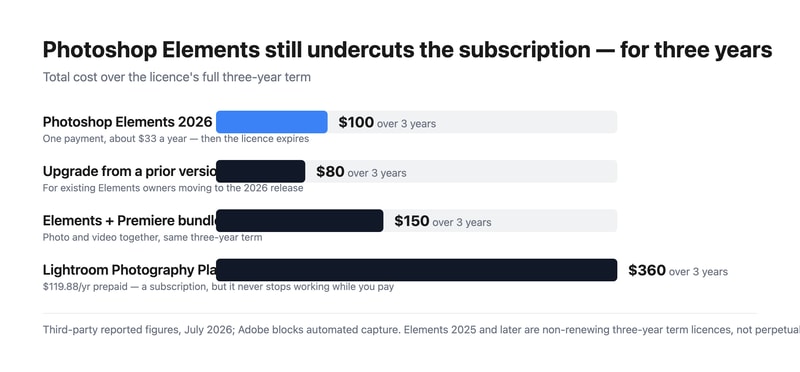
Adobe blocks automated capture, so figures are third-party reported for July 2026.
| Option | Price | Term |
|---|---|---|
| Photoshop Elements 2026 | $99.99 | 3 years, non-renewing |
| Upgrade from a prior version | $79.99 | 3 years, non-renewing |
| Photoshop + Premiere Elements | $149.99 | 3 years, non-renewing |
What this actually means:
- It is still much cheaper than the subscription. $99.99 over three years is about $33 a year, against $119.88 a year for Adobe’s Photography Plan — roughly a quarter of the cost. The change to term licensing narrowed the gap in principle but not in price.
- But it is no longer permanent, and that was the point. People chose Elements specifically to escape time-limited software. A three-year term is a longer lease, not ownership, and anyone recommending it as a perpetual alternative — including a great many published reviews and comparisons — is now wrong.
- The clock runs from redemption. Buying a code and not redeeming it does not consume the term, which is a small but genuine planning advantage if you buy during a sale.
- The Organizer survives expiry. You keep access to your catalogue and can still see your images; you lose the editor. That is better than losing everything, and worth knowing before the term ends.
- The upgrade path costs $79.99. So the realistic long-run pattern is buying in every three years at roughly $27 a year, which remains far below the subscription.
- The bundle is good value if you edit video. $149.99 for both Photoshop and Premiere Elements against $99.99 for one.
Who Should Use Photoshop Elements
- Enthusiast photographers avoiding subscriptions. Still the clearest case, provided the three-year horizon is understood and accepted.
- People who want guided workflows. Guided Edits genuinely help those who know what result they want but not which tools produce it.
- Families and hobbyists. Organizer plus straightforward editing covers most personal photo work.
- Anyone needing Photoshop-class editing occasionally. Paying $33 a year rather than $120 for capability you use intermittently.
It fits poorly for professional workflows, where Lightroom and Photoshop are the standard and the subscription is a cost of business; for anyone who genuinely requires permanence, where Skylum Luminar Neo and Corel PaintShop Pro still offer perpetual options; and for quick social graphics, where Canva is faster and free.
Honest Pros and Cons
Strengths
- Far cheaper than the subscription. Roughly $33 a year against $120 for the Photography Plan.
- One payment, no recurring billing. Still meaningfully different from a subscription.
- Guided Edits. The best implementation of assisted editing in a consumer tool.
- Real Photoshop capability. Layers, selections, and retouching from Adobe’s own engine.
- The Organizer outlives the licence. Catalogue access is retained after expiry.
- The redemption clock is user-controlled. Buy in a sale, redeem when ready.
Limitations
- No longer perpetual. The three-year term is the defining change and it is easy to miss.
- Most published reviews are out of date. Anything describing Elements as buy-once-keep-forever predates the 2025 release.
- The editor stops working at expiry. Only the Organizer remains.
- Weaker than Lightroom for volume. Cataloguing and batch processing are not comparable.
- No cloud sync across devices in the way the subscription products offer.
- Adobe was quiet about the change, which is the fair criticism here.
Photoshop Elements Alternatives and How It Compares
- Adobe Lightroom is the subscription route, far better for volume and cataloguing, at roughly four times the annual cost.
- Adobe Photoshop is the full professional application, bundled with Lightroom on the Photography Plan.
- Skylum Luminar Neo is now the leading genuinely perpetual option, with strong AI editing.
- Corel PaintShop Pro remains a buy-once Windows alternative.
- Canva covers quick social and marketing graphics, free and much simpler.
- GIMP is the free open-source option, capable but with a considerably steeper learning curve.
For a broader survey, browse our photo editing directory.
The Verdict
Photoshop Elements remains a good product and, on price alone, a strong one. Roughly $33 a year for Photoshop-derived editing with genuinely useful guided workflows is a quarter of what Adobe’s Photography Plan costs, and the Guided Edits are the best implementation of assisted editing in any consumer photo tool. For an enthusiast who edits occasionally and wants real capability without a monthly bill, it still makes sense.
What has changed is the reason many people chose it. Elements was the Adobe product you could own — a single payment, a serial number, software that kept working. Since the 2025 release it is a non-renewing three-year term licence: pay once, redeem the code, and three years later the editor stops opening. The Organizer survives so you keep access to your catalogue, which softens the landing, but the editor does not. That is a longer lease than a subscription, not ownership, and it changes the recommendation materially.
Two practical consequences follow. First, treat any review or comparison that calls Elements perpetual as out of date — a great deal of published material still does, because Adobe was not loud about the change. Second, if permanence is genuinely your requirement rather than just avoiding monthly billing, Elements no longer meets it and Luminar Neo or PaintShop Pro do. If what you actually wanted was to avoid a subscription and pay far less, Elements still delivers that comfortably, and the $79.99 upgrade every three years keeps the effective cost near $27 a year. Just buy it knowing what you are buying.
FAQ
Is Photoshop Elements still a perpetual licence?
No. Starting with the 2025 release, Adobe replaced the perpetual licence with a non-renewing three-year term licence activated by a redemption code. Elements 2024 and earlier used serial-number activation and remained usable indefinitely. When a current licence expires three years after redemption, the editor becomes inaccessible, though the Organizer remains available for viewing your catalogue.
How much does Photoshop Elements cost?
Reported pricing for July 2026 is $99.99 for Photoshop Elements 2026, $79.99 to upgrade from a previous version, and $149.99 for the bundle with Premiere Elements. All are one-time payments covering a three-year term with no recurring fees. Adobe blocks automated access from our infrastructure, so confirm current figures at checkout.
When does the three-year term start?
At redemption, not purchase. The licence is activated by a redemption code, and the three-year clock begins when you use it. That means buying during a sale and redeeming later does not consume the term, which is a small planning advantage. Once redeemed, the term runs continuously regardless of how much you use the software.
Is Photoshop Elements still cheaper than a subscription?
Substantially. At $99.99 for three years the effective cost is roughly $33 a year, against $119.88 a year for Adobe’s annual prepaid Photography Plan — about a quarter. Upgrading every three years at $79.99 brings that closer to $27 a year. The term change altered what you own, not the price advantage, which remains large.
What is Photoshop Elements best for?
Enthusiast and hobbyist photographers who want Photoshop-class editing with guided assistance and no monthly billing, and who accept a three-year licence horizon. It suits occasional and family photo work well. It is a poor fit for professional volume workflows, where Lightroom’s cataloguing is far superior, and for anyone whose actual requirement is permanent ownership rather than avoiding subscriptions.

Compare Adobe Photoshop Elements with other popular tools in the same category.
I create a lot of graphics in at my job, and Photoshop elements lets me be more creative, and allows me to do what my families want me to do. Anytime I do not know how to do something, I am always able to find an easy tutorial online, making it an easy to use product.
Some processes are a little tedious, and complicated to learn. I am looking forward to learning how to use this product more with a couple classes.
When a family comes to me and asks me to do something with a picture, before Photoshop elements I had to tell them I could not do it. But now, I am able to meet the needs of the families I serve.
Ease of use with three levels of "expertise."
Some filters and photo-altering techniques are difficult to find. Sometimes I do an online search to find something that should be easy to find in the menu.
Photo altering for book covers.
Ease of use. It is easy to pick up on the tools and tricks.
There isn't really anything that I dislike. It is similar to other photoshop programs which makes it easier to use, and more user friendly.
Customers who need their files adjusted and need help.
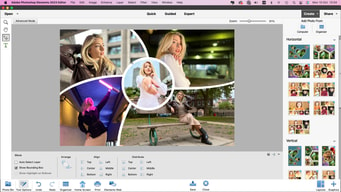
I like everything about this program, it is necessary that it be used before the user starts working with Photoshop, Photoshop Elements is the start to the editing, it is a simple and simple program but with the necessary tools that besides teaching you and getting started in This world, allows you to create collages and edit photos in a fast way and with professional quality.
I feel that the program is a little empty, I think they should add more editing elements but not so advanced so that the program does not lose its essence of simplicity, but it is necessary to add a few tools that allow the user to perform better jobs in all your editing projects.
When it comes to a simple editing job or creating a collage, Photoshop Elements will always be my first choice, it is the program I use the most when I make or send me to do simple works in which I need to edit an image, and I do not really have No complaint about the work I have done here
It's very user friendly. Simple, but you can get a lot done with it.
There are a few features I wish were easier to use.
Photoshop Elements allows me to do simple editing without using as much processor speed as regular Photoshop.
It is a program that is much easier to use than photoshop and has almost the same editing tools, with the difference that it is more focused on retouching photos than editing images themselves.
Being a photo editor, you may have an option to share them within the same program. But in general it is an excellent editing tool.
It has helped me edit photos in a faster and easier way than Photoshop CC itself.
Its a powerful tool for non professionals, and it has many powerful image manipulation tools, its very easy know how to use it because it is created for beginners in the area of photography, but also can be used by professionals
It has limited media share options and requires a lot of ram to work propertly... Oh, and it is a little expensive for a beginner.
With it, sometimes, I can do my work faster, because is easier than use Photoshop or lightroom
I love the posterize design element it allows me to take a photo, posterize into 6-10 element levels and then use that photo to create a quilt or fiber art
There is so much in possibility of the program, it seems impossible to use it all
I am able to create faster, more efficiently and mass produce
Once you're familiar with Adobe products, it's really easy to adapt to their different solutions and Photoshop Elements is no exception, specially once you are proficient at Adobe Photoshop. Its ease of use makes it easy for beginners and painless for experts. As a graphic designer myself, adding logos on photoshop elements makes my life so much easier.
I don't really love the fact that once youre proficient with photoshop, this feels really simple and sometimes you feel like you need to go back to photoshop to finish your edits. I understand Elements makes it easier but sometimes we love complex things. I also think that their photomerge and noise reduction features, could be improved.
As the editor and art director of Revista Velvet, this kind of software makes my life so much easier as I have a lot of materials to edit and review before they can be used and published.
ease of use especially for beginners and how it mirrors the full program
there's not really anything I don't like, it mirrors the full program
quick for social media posts
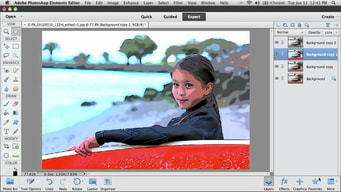
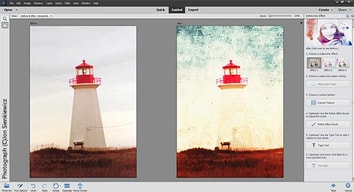
I love that Photoshop elements is easy to use for all skill levels with its "Quick", "Guided", and "Expert" settings. I like going between Guided and Expert when I am using the program for different projects. I also like that I am able to save the images in a variety of formats and qualities.
The Organizer feature. Occasionally I accidentally click on the Organizer when starting on Photoshop elements. I only use the program for its photo editing and saving capabilities. I organize photos in other programs.
For my job, I must be able to take cellphone snapshots of museum objects in order to document them. Often times, the photo's are being taken under poor conditions such as bad lighting in the room, or the perspective is skewed in the photo. In Photoshop elements I am able to fix all those little problems and end up with an acceptable finished product. This benefits my institution because I am able to continue using my phone to take quick record shots, instead of having to go through the motions of setting up the objects in a photo studio. Photoshop enables me to fix the photos I take very easily and efficiently.
Its the best tool to learn how to use edit tools like Light Room or Photoshop
In my opinion, it is a very good tool, created for beginners... 10/10
It helped me to learn how to use edit tools when I a was a beginner, because it, I know how to use Photoshop, for example.
As far as Photoshop goes it's pretty easy to use if you know the basics. It's reasonably priced as well.
It's missing a few features that I used to use in the full service Photoshop.
Allows me to create beautiful brochures and social media ads
An outstanding feature is the conscious content movement tool. This feature allows you to select a person or object and move it to another place. The Content Aware function fills in the hole where the person used to be. This is probably the best object removal tool on the market, but sometimes it can take some attempts to function properly. The content-aware tool works incredibly well to eliminate unwanted objects and fill space credibly.
This program does not have an easy HDR tool, but you can create HDR images by merging photographs with different exposure levels and The software photo organizer is a separate application.
Well, I usually use it for my corporate work as well as for my independent work, usually to edit photos for publication. Good in my personal opinion Editing graphics to use on websites is much easier using this tool than others I have tried.
This program is a great alternative if you cannot afford the full version of photoshop. You can do almost everything as fancy version, but the programmers moved around things. It has most of the tools, file formats, layering, etc. as full version.
Nothing, it's great! It's a wonderful and affordable version of photoshop.
It is so much more affordable and is perfect for novices or people who just want basic photoshop tools. It's no frills.

The simplicity of this compared to the full version of Photoshop! Has most of the basic features I need and it is much more user friendly.
It is very expensive for a trial version of a software.
Doesn't work well when collaborating with others who have the full version of Photoshop.
Photoshop Elements is a step away from Photoshop CC. This low cost editor is perfect for beginner photographers. It has great features such as face recognition and guided edits, the photo editor has much to offer for both beginners and experienced users. Elements' photo editor is split into three editing modes, Quick, Guided and Expert. This allows you to edit photo's according to your skill level which is one item I really like!
Some of the guides were not very helpful - they were hard to understand and didn't' have many choices.
We aren't solving any problems but by using this program it is allowing us to edit our photos for business purposes.
This could keep me learning for years...which is a good thing. Once I've learned a procedure, the outcome is always excellent. It's easy to use and easier for the beginner photographer. nice and cheap
This app is good for basic stuff that are for beginners and if you use adobe Photoshop then you will feel that there are lot's of feature that's are missing.
Making filters, little retouching and little amount of Photoshop stuffs.
Adobe is considered a standard in the photo editing software industry. Guided mode is great for beginners love the filter gallery
the price! besides being expensive and a beginner, this product has it all
Add motion blur to images Turn images into paintings
I've been using this program for over ten years and like how, even as new elements are added, everything I learned how to do 10 years ago is still relevant and easy to use.
There's nothing I can think of that I dislike with this product.
I am able to re-touch photos with ease and love how easy it is to pull photos from Lightroom into Photoshop, edit and save them, and they appear right back in Lightroom!
I like the ability to take my floor plans and render them with color and texture to make them more real for my clients.
There's nothing that I dislike. I took a class to learn to use the program properly and it does what I need it to do.
My clients are able to visualize their new floor plans and layouts in a real way. When the client can visualize, they're more likely to proceed with the project.
I LOVE the fact that the feature list is exactly what is needed to do a simple project. I have been using this program for a little under a year now and It is my go to for simple editing projects/ads.
even with a fast system sometimes the program can run a little choppy, however the fact that the software is hosted in the cloud makes up for it.
It allows me to create videos for pastors who need them done quickly, an alternative to the full feature premiere program which i am still learning
I find the effects tab to be helpful and fun. The preloaded effects and filters add a nice touch to my graphic work.
I'd like to see more stamps and shapes come standard. I also miss the ability to compress the PDF documents as high as I could in CS6 version.
I use Photoshop Elements for all my graphic needs.
Love the layers feature for making film graphics, the editing team can enable and disable as needed
Sometimes vector images are needed, easier to create in illustrstor
I make graphics with multiple choices in one file, layers lets the production staff pick and choose which to enable.
Photoshop Elements is great. If you are not a professional photographer this software will be your best ever image editing tool and will do all that you need. You get almost everything that you get with Photoshop for very little money. I had Elements on my previous MacBook Pro and it did a fantastic job.
I can't say that I would dislike anything about Photoshop Elements. The only shortcoming was that I couldn't convert files to CMYK but that's why it is the Elements, not the actual Photoshop, so nothing wrong with that.
As above, Elements is almost as great as the actual version of Photoshop. It took care of 90% of my image editing needs.
Ease of use is superior to every other product ive used
Cant really complain about anything here
Creating signage is a breeze now
What I like best is that you can customize the software to serve what's best for what you are trying to accomplish. There is so much you can do with this product especially if you work in media. I like that all of the softwares can integrate and work with one another. Photoshop is amazing and so is Indesign.
It takes a lot of time to learn everything, which really isn't a dislike. I don't need to use everything offered. There are definitley somethings I find confusing.
Newspaper designing. Adobe Elements is an excellent way to create newspaper layouts, infographics. Photoshop is a great way to edit photos for publishing. InCopy is awesome in that our designers can work on layout while at the same time writers can work on their stories and its linked together. I wish there was a way for there to be automatic updates to links in InDesign. That would be helpful.
Adobe Photoshop Elements is easy to use and helps a lot in organizing photos.
There is nothing in Adobe Photoshop Elements that I dislike.
I am a photographer and photo editor so Adobe Photoshop Elements helps me a lot in organizing photos and quick edits.

Being a PhotoShop user for over 10 years, PhotoShop Elements provides me with all of the design and creation tools I need. I easily import and export files as needed. I typically know what I need to do in my head before using PhotoShop Elements to create my final result. The basic brushes, filters, fonts and operations that come standard are more than I typically need to create my project.
I am a big fan of PhotoShop, always have been. I find that I for the most part can figure out what I need within the basic PhotoShop operation list of commands. I recently have had difficulty in changing the canvas size of my image or project, but this is more of a user error.
I create social media images, edit sales documents, create custom logo items from scratch to sell my products to customers. I find that I take control of my designs without having to outsource to someone else to accomplish my needs. I am solving the need to hire someone else, because I can do it myself.
I really enjoy using Photoshop Elements for it's powerful features
The interface takes some getting used to.
I work a lot with graphics and photo editing, so this software is key in my work!