Unclaimed: Are you working at Adobe Photoshop Elements?
Adobe Photoshop Elements Reviews: 4.3/5 — Solid Choice
Adobe Photoshop Elements is a cloud-based graphic design software designed to help businesses create and edit images via a centralized platform. It offers built-in editing tools with various image effects, colored filters, and patterns or symbols for easy designing. It also supports integration with several third-party applications and in-house Adobe tools.

| Capabilities |
AI
|
|---|---|
| Segment |
Small Business
Mid Market
Enterprise
|
| Deployment | Cloud / SaaS / Web-Based, Desktop Mac, Desktop Windows |
| Support | 24/7 (Live rep), Chat, Email/Help Desk, FAQs/Forum, Knowledge Base, Phone Support |
| Training | Documentation |
| Languages | English |


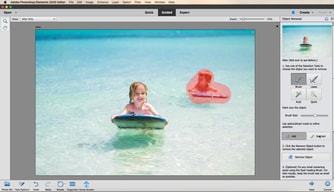
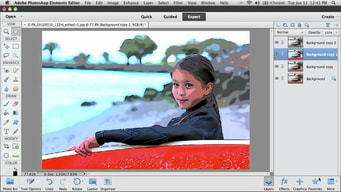
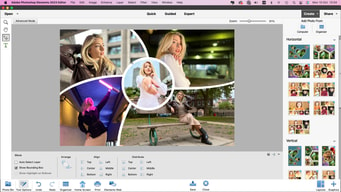





Photoshop Elements used to be the answer for people who refused to rent software. It is not any more. Starting with the 2025 release, Adobe replaced the perpetual licence with a non-renewing three-year term: you pay once, and three years after you redeem the code the application stops working. That change is the single most important thing to know about this product, and Adobe did not make much noise about it.
- What it is: A consumer photo editor with Photoshop’s core capabilities in a guided, approachable interface.
- Best for: Enthusiasts who want capable editing without a subscription, and who accept a fixed three-year horizon.
- Pricing: $99.99 for Elements 2026, $149.99 bundled with Premiere Elements, $79.99 to upgrade. Reported July 2026.
- The honest catch: The three-year clock starts when you redeem the code, and when it expires only the Organizer remains accessible.
What Is Photoshop Elements?
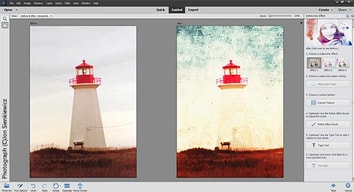
Photoshop Elements is Photoshop for people who do not want to learn Photoshop. It carries a substantial share of the full application’s editing capability — layers, selections, retouching, raw handling — wrapped in guided edits that walk you through a result step by step rather than assuming you know which tools to combine.
For a long time its defining feature was commercial rather than technical: it was the Adobe product you could buy outright. In a portfolio that moved wholesale to Creative Cloud subscriptions, Elements remained a one-off purchase with a serial number, and that made it the standard recommendation for anyone who objected to renting software.
That is no longer accurate. Elements 2025 and 2026 ship as three-year term licences activated by a redemption code. It is still a single payment with no recurring fees — genuinely different from a subscription — but it is time-limited, and when the term ends the application becomes inaccessible apart from the Organizer for viewing your catalogue.
How Photoshop Elements Works
- A single payment, a fixed term. $99.99 buys three years, not perpetuity.
- The clock starts at redemption, not purchase, so the code can sit unused without burning the term.
- Guided Edits. Step-by-step workflows for common tasks, which is the product’s distinguishing feature.
- Organizer. Cataloguing and tagging, and the only component that survives licence expiry.
- AI-assisted tools. Selection, sky replacement, and subject isolation drawn from Adobe’s wider research.
- No cloud dependency for editing, unlike Lightroom’s cloud-native tier.
Photoshop Elements Pricing
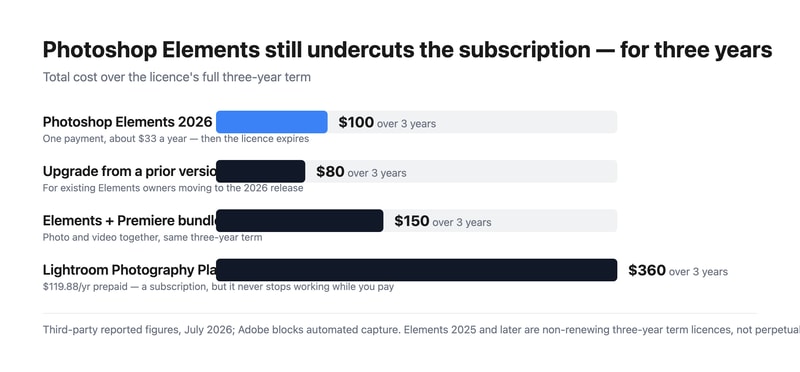
Adobe blocks automated capture, so figures are third-party reported for July 2026.
| Option | Price | Term |
|---|---|---|
| Photoshop Elements 2026 | $99.99 | 3 years, non-renewing |
| Upgrade from a prior version | $79.99 | 3 years, non-renewing |
| Photoshop + Premiere Elements | $149.99 | 3 years, non-renewing |
What this actually means:
- It is still much cheaper than the subscription. $99.99 over three years is about $33 a year, against $119.88 a year for Adobe’s Photography Plan — roughly a quarter of the cost. The change to term licensing narrowed the gap in principle but not in price.
- But it is no longer permanent, and that was the point. People chose Elements specifically to escape time-limited software. A three-year term is a longer lease, not ownership, and anyone recommending it as a perpetual alternative — including a great many published reviews and comparisons — is now wrong.
- The clock runs from redemption. Buying a code and not redeeming it does not consume the term, which is a small but genuine planning advantage if you buy during a sale.
- The Organizer survives expiry. You keep access to your catalogue and can still see your images; you lose the editor. That is better than losing everything, and worth knowing before the term ends.
- The upgrade path costs $79.99. So the realistic long-run pattern is buying in every three years at roughly $27 a year, which remains far below the subscription.
- The bundle is good value if you edit video. $149.99 for both Photoshop and Premiere Elements against $99.99 for one.
Who Should Use Photoshop Elements
- Enthusiast photographers avoiding subscriptions. Still the clearest case, provided the three-year horizon is understood and accepted.
- People who want guided workflows. Guided Edits genuinely help those who know what result they want but not which tools produce it.
- Families and hobbyists. Organizer plus straightforward editing covers most personal photo work.
- Anyone needing Photoshop-class editing occasionally. Paying $33 a year rather than $120 for capability you use intermittently.
It fits poorly for professional workflows, where Lightroom and Photoshop are the standard and the subscription is a cost of business; for anyone who genuinely requires permanence, where Skylum Luminar Neo and Corel PaintShop Pro still offer perpetual options; and for quick social graphics, where Canva is faster and free.
Honest Pros and Cons
Strengths
- Far cheaper than the subscription. Roughly $33 a year against $120 for the Photography Plan.
- One payment, no recurring billing. Still meaningfully different from a subscription.
- Guided Edits. The best implementation of assisted editing in a consumer tool.
- Real Photoshop capability. Layers, selections, and retouching from Adobe’s own engine.
- The Organizer outlives the licence. Catalogue access is retained after expiry.
- The redemption clock is user-controlled. Buy in a sale, redeem when ready.
Limitations
- No longer perpetual. The three-year term is the defining change and it is easy to miss.
- Most published reviews are out of date. Anything describing Elements as buy-once-keep-forever predates the 2025 release.
- The editor stops working at expiry. Only the Organizer remains.
- Weaker than Lightroom for volume. Cataloguing and batch processing are not comparable.
- No cloud sync across devices in the way the subscription products offer.
- Adobe was quiet about the change, which is the fair criticism here.
Photoshop Elements Alternatives and How It Compares
- Adobe Lightroom is the subscription route, far better for volume and cataloguing, at roughly four times the annual cost.
- Adobe Photoshop is the full professional application, bundled with Lightroom on the Photography Plan.
- Skylum Luminar Neo is now the leading genuinely perpetual option, with strong AI editing.
- Corel PaintShop Pro remains a buy-once Windows alternative.
- Canva covers quick social and marketing graphics, free and much simpler.
- GIMP is the free open-source option, capable but with a considerably steeper learning curve.
For a broader survey, browse our photo editing directory.
The Verdict
Photoshop Elements remains a good product and, on price alone, a strong one. Roughly $33 a year for Photoshop-derived editing with genuinely useful guided workflows is a quarter of what Adobe’s Photography Plan costs, and the Guided Edits are the best implementation of assisted editing in any consumer photo tool. For an enthusiast who edits occasionally and wants real capability without a monthly bill, it still makes sense.
What has changed is the reason many people chose it. Elements was the Adobe product you could own — a single payment, a serial number, software that kept working. Since the 2025 release it is a non-renewing three-year term licence: pay once, redeem the code, and three years later the editor stops opening. The Organizer survives so you keep access to your catalogue, which softens the landing, but the editor does not. That is a longer lease than a subscription, not ownership, and it changes the recommendation materially.
Two practical consequences follow. First, treat any review or comparison that calls Elements perpetual as out of date — a great deal of published material still does, because Adobe was not loud about the change. Second, if permanence is genuinely your requirement rather than just avoiding monthly billing, Elements no longer meets it and Luminar Neo or PaintShop Pro do. If what you actually wanted was to avoid a subscription and pay far less, Elements still delivers that comfortably, and the $79.99 upgrade every three years keeps the effective cost near $27 a year. Just buy it knowing what you are buying.
FAQ
Is Photoshop Elements still a perpetual licence?
No. Starting with the 2025 release, Adobe replaced the perpetual licence with a non-renewing three-year term licence activated by a redemption code. Elements 2024 and earlier used serial-number activation and remained usable indefinitely. When a current licence expires three years after redemption, the editor becomes inaccessible, though the Organizer remains available for viewing your catalogue.
How much does Photoshop Elements cost?
Reported pricing for July 2026 is $99.99 for Photoshop Elements 2026, $79.99 to upgrade from a previous version, and $149.99 for the bundle with Premiere Elements. All are one-time payments covering a three-year term with no recurring fees. Adobe blocks automated access from our infrastructure, so confirm current figures at checkout.
When does the three-year term start?
At redemption, not purchase. The licence is activated by a redemption code, and the three-year clock begins when you use it. That means buying during a sale and redeeming later does not consume the term, which is a small planning advantage. Once redeemed, the term runs continuously regardless of how much you use the software.
Is Photoshop Elements still cheaper than a subscription?
Substantially. At $99.99 for three years the effective cost is roughly $33 a year, against $119.88 a year for Adobe’s annual prepaid Photography Plan — about a quarter. Upgrading every three years at $79.99 brings that closer to $27 a year. The term change altered what you own, not the price advantage, which remains large.
What is Photoshop Elements best for?
Enthusiast and hobbyist photographers who want Photoshop-class editing with guided assistance and no monthly billing, and who accept a three-year licence horizon. It suits occasional and family photo work well. It is a poor fit for professional volume workflows, where Lightroom’s cataloguing is far superior, and for anyone whose actual requirement is permanent ownership rather than avoiding subscriptions.

Compare Adobe Photoshop Elements with other popular tools in the same category.

I love that I can quickly edit images/logos to help my companies marketing campaigns and catalogs.
Of course since I am not a professional I do look up videos on how to do certain things... I with Photoshop had an official video site that would share with users how to accomplish certain things.
A huge benefit is us not having to outsource projects to graphic designers who cost a lot of money.
Photoshop Elements is easy and simple to use yet it is a very powerful editor. I really liked the way color and light temperature can be easily manipulated. The filters are also very impressive
The only draw back is sometimes the app crashed when applying certain filters. It seems this was fixed relatively quickly but was a little annoying
Adjust the white balance and temperature of web photos
I appreciate that when logged with my adobe account I can easily transfer images from one platform to the next.
Nothing really. It’s pretty seedless and if I need something more robust I use my laptop.
Social media limitations for image editing.
The best thing in adobe photoshop elements is its automatic editing features. It also gives a better performance in comparison with other available software.
Many automated features are not for everyone so it depends on the users which tools is better for them.
I use this software for quick editing purpose. And I find this really quick and easy. It is also easy to get and install.
It was a great beginning software for editing my photo for my clients. I have upgraded to photoshop but I still used photoshop elements.
I dont have any dislikes. I enjoyed the software
It was useful in enditing photo flaws and making adjustments.
Photoshop Elements gives a wide range of options from editing photos to creating documents. Virtually anything you need to edit can be done with this program.
The platform can be difficult to master and complicated, and has a steep learning curve.
We have edited photos, made photos to have transparent backgrounds, created cards, and created files for presentations. This enables us to be created and customize our files to our specific needs.
I like how Adobe has packed a lot into such a small package. It seems like the vast majority of what I want to do is at the ready with this product. They've put much thought into the user as well, which makes for an easy to use photo editor.
I can't say that I've run into anything in this release that I dislike. I've been well served thus far and expect to continue enjoying Photoshop Elements.
This allows me to quickly move through a set of photos and do a relatively great job with minimal level of effort
Love all of the elements everything works great, efficient use
iPad versions need a little bit of work
Not provided

What I like best about Photoshop elements is that it's easier to use and manage compared to Adobe Photoshop. When I was first learning, I used this software all the time then switched to Adobe Photoshop. Another thing that I like best, is how there are so many featured tools for editing so you can create better content.
Honestly, there wasn't much of anything that I disliked about Elements. It is affordable (which is a big deal to me) and easy to navigate. It was perfect for my graphic design uses.
I used it mostly for graphic design purposes. We have a lot of different softwares for each thing so for elements I used it for design. I love all the editing tools that help make each image unique!
organizing, editing, creating, and sharing your photos on Social media, Email, and can send as attachments
Spending hours trying to find a rectangle on a screenshot. Other than that this website works wonderfully.
Reintroduce Adobe Bridge for Photoshop Elements users. Organizer may suit some people but there are others like me who would prefer a managed file system like Bridge.
I love this product since our ministry posts a lot of images in our social media accounts. Taking the white background out of photos makes the picture look sharp and professional.
I don't dislike anything about this software. It's awesome!
As mentioned above, the photos clean up nicely, and it really makes a difference for the image of our ministry.
I love that I can easily organize and choose the photos I’d like to edit, open them in a quick edit or I can take my time with editing the photos.
I’m not exactly sure, I haven’t ran across anything I dislike. There is some features I have not fully been able to use. I am personally not a fan of the little stickers or clip art.
Any editing needed like, switching eyes that are closed to open! Let me tell you that feature is so easy and absolutely a savior! Also TIME CONSUMING! Yay!
Like other photoshop programs, it produces great quality edits.
There is nothing to dislike about the program!
Producing quality edits.

I love how, firstly, the app allows for you to simply add itself as an editing extension from iphone’s Primary photos app itself- just as if you were going to use “mark up” or edit it within the iPhone photo edit settings.
I cannot name anything I specifically dislike. I can only suggest to keep on making additions to what users can do, though the options are already plentiful.
With photoshop elements, I can edit out flaws that are too small to eliminate with many photo editing apps within the iPhone. These same flaws are large enough to see and are sore to the eyes. Photoshop elements provides several ways to accomplish flaw coverup, along with helping shine light on an idea that you may not have thought of before. This then leaves you more open minded and with more options than before for your next photo edit.

All kinds of photo processing and editing can do your work. It offers a simple interface. In a few seconds, it makes the flawed photos look extraordinary. To whiten teeth, to show the sky more blue, to correct color, contrast and lighting has never been easier. Use one-step shortcuts. You can also remove the redundancies in photos instantly. Would you like to correct a photo from the beginning, add a vignette effect, or create a perfect portrait? Here, Photoshop elements will make them very easy. Even if you're not professional ! Contains more than 100 brush effects. I like the Photo Editing and Collage side. Other favorite features are as follows; -Adobe Sensei new auto-generated slides with artificial intelligence. - Re-designed photo collages. - Better performance and HEIF support. - Re-designed “Quick Edit "
I can't get more efficiency when adjusting the line sharpness when you don't increase the softening value. When you upgrade, the corners are slightly erased. Other than that, I have not yet compared a problem.
We bought the software because it is extremely cheap. There is no shortage of other professional programs. We are organizing the photos we will add to our customers website, web site and social media with this program. For our customers, we create calendars, album pages, cards and more in minutes using professionally designed templates.We find our photos and videos easily according to locations, events, albums and favorites. We purchased this program for our employees who have difficulty in using Photoshop CC. Even after buying a professional like me even photoshop cc has become more uses. Supported by Adobe Sensei is an automatic photo editing feature and has helped us a lot. Our photos look more beautiful.
Photoshop is always changing and upgrading and becoming more user friendly.
Sometimes the changes seem a little useless- there was no reason to change the resizing tool.
Personalized marketing is a lot easier to make.

I love this product. It is like a miniaturized version of Adobe Photoshop but with less space.
I wish I can get the whole thing without having to pay for anything.
It has helped so so much because I can make so many cool images.

What I like about Photoshop is the different tools that are available for editing photos. Often I’m given photographs that required a lot of editing before submitted to be included in printing materials. Photoshop elements is useful in these types of tasks.
There is no major issue that I dislike about Photoshop. I would just say just it took some time to learn all the different tools that are available in the program
I am currently having to reproduce materials that previous designers screwed up and so Photoshop is a good help me to clean that up for my clients.

I like how it takes much from Adobe Illustrator since i know alot about illustrator and its benefits and i could find them here in elements!
after a month's use i am still unable to see why we needed Adobe elements separately, we could have simply merged it into illustrator and could have saved alot on resources. Maybe the company thought illustrator would get heavy? but its almost the same as that!
It has been helpful, and like all adobe products, this one comes to the rescue when ever needed!
I love that this is a simplified version of Adobe Photoshop. It is a bit more basic but has a way more user friendly interface!
Because it is a simplified, easier version of Adobe Photoshop, you are limited in regards to what you can actually do in the program.
We now have users that have less of a proclivity towards these types of programs finding they are able to finally learn and work with graphics!
Photoshop elements offers us automatic creation of slide shows and collages. It also has an easy photo editor, which even a novice will understand.
Sometimes the program fails, but this phenomenon happens very rarely.
Easy photo creation and editing
Lightweight, good amount of tools, integration
Could have more customizable tools and interface
Quick on the fly photo edits. Quick fixes.
I love the new filters added in 2018. These filters often fulfill my needs with minimal tinkering.
A few of the tools are buried. It always takes me a while to find the advanced tools I need if I haven't used them in a while.
I use PSE to edit photos, create media for Twitter, and create covers for my books. It is a MUST HAVE tool for me.
It works really well with normal Photoshop
Needs some more features throw some things in there please
A lot
Photoshop elements was the perfect software for my editing platform. I use it all the time to process my images in my business.
I have no dislikes currently with photoshop elements.
I am able to process photos faster through this program. I highly recommend this to all my photography friends.
For this era of social networks, images play an important role in sharing emotions, sharing our knowledge, offering a service, offering products, the easy and quick editing of these images with a tool like photoshop element is essential, It is very easy to learn how to use it so anyone can become an expert without much previous experience
What do I like about Photoshop Element ?, I would have to say that the price, but obviously if we want quality it has a price, in terms of its design I have no complaints about it
It really does not solve a problem in itself, but it does play an important role in editing the images I use to offer my graphic designer services through my social networks
Photoshop elements is a simpler version of photoshop, great for beginners or casual users. It still holds many features, but it gets straight to the point and allows for editing to be done quickly and efficiently.
After using this compared to Photoshop, it is lacking in some areas. I do use these programs in a professional setting however. Photoshop Elements is not necessarily what I go to every time, but it is definitely worth a try for a more casual user.
Simple photo editing for photos that are already close to perfect.
Easier to use than photoshop and a great platform for beginners to learn how to use photoshop before switching to the full version.
Inability to do some more advanced techniques so this is not appropriate for an industry professional.
This makes photo editing more accessible to people because it is easier to learn how to use and therefore more people can have the ability to make basic corrections to images.
The ability to edit images and graphics.
The only thing I don’t like is the cost.
The benefits are that it is great for raster graphics and image editing.
I love how all the basic tools are easy to find in the default layout settings. I also enjoy the way that I can search within the application to find any settings or tools that are not clearly visible when you first load the program.
I dislike how expensive it is, although I understand that I am getting what I am paying for and nothing less, so I do not mind completely how pricey it can be.
I realized that its cheaper to buy in bulk and you can use Photoshop Elements for a lot of the same projects as you would if you were using flash or dreamweaver.