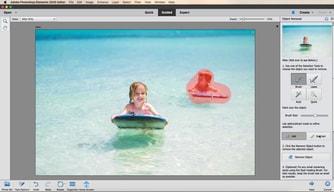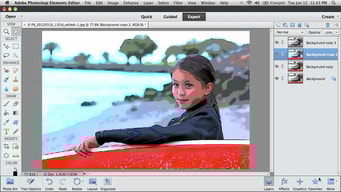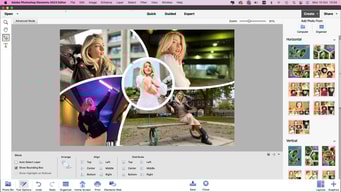

Adobe Photoshop Elements background blur-sm
Adobe Photoshop Elements Photo Editing Software logo
Adobe Photoshop Elements
4.3

( 749 )

Why Findstack is free?
Findstack is free for users because vendors pay us when they receive web traffic and sales opportunities. Findstack directories list all vendors — not just those that pay us so that you can make the best-informed purchase decision possible.
Advertising disclosure: Findstack offers objective, editorially independent comparisons to help you find the best software. Some links on this page are affiliate links — we may earn a commission when you visit a vendor through our links, at no additional cost to you. Affiliate relationships never influence our ratings, rankings, or reviews. Disclosure policy | Methodology

Adobe Photoshop Elements Reviews: 4.3/5 — Solid Choice

Adobe Photoshop Elements Overview
What is Adobe Photoshop Elements?

Adobe Photoshop Elements is a cloud-based graphic design software designed to help businesses create and edit images via a centralized platform. It offers built-in editing tools with various image effects, colored filters, and patterns or symbols for easy designing. It also supports integration with several third-party applications and in-house Adobe tools. 

Company Adobe
Year founded 1982
Company size 10,001+ employees
Headquarters San Jose, CA
Social Media
Adobe Photoshop Elements Categories on Findstack
Crevio E-Commerce Platforms logo
Crevio
Sponsored
5.0
(1)
Free plan available
Crevio is an AI-powered platform that runs your business while you sleep. Describe what you want to se... Learn more about Crevio
Ask Questions about Adobe Photoshop Elements
What Adobe Photoshop Elements is best for?
How does Adobe Photoshop Elements compare to Adobe Photoshop?
What are the pros and cons of Adobe Photoshop Elements?
Adobe Photoshop Elements Product Details
Capabilities
AI
Segment
Small Business
Mid Market
Enterprise
Deployment Cloud / SaaS / Web-Based, Desktop Mac, Desktop Windows
Support 24/7 (Live rep), Chat, Email/Help Desk, FAQs/Forum, Knowledge Base, Phone Support
Training Documentation
Languages English
Adobe Photoshop Elements Features
3D Editing
Automatic Adjustments
Background Removal
Batch Processing
Brush Tools
Clone Stamp
Color Correction
Cropping
Custom Brushes
Face Recognition
Filters and Effects
Gradient Editor
Adobe Photoshop Elements Media
Adobe Photoshop Elements video thumbnail
Adobe Photoshop Elements 0
Adobe Photoshop Elements 1
Adobe Photoshop Elements 2
Adobe Photoshop Elements 3
Adobe Photoshop Elements 4
Adobe Photoshop Elements Screenshots
Adobe Photoshop Elements screenshot 1
Adobe Photoshop Elements screenshot 2
Adobe Photoshop Elements screenshot 3
Adobe Photoshop Elements screenshot 4
Adobe Photoshop Elements screenshot 5
Adobe Photoshop Elements Expert Review

Photoshop Elements used to be the answer for people who refused to rent software. It is not any more. Starting with the 2025 release, Adobe replaced the perpetual licence with a non-renewing three-year term: you pay once, and three years after you redeem the code the application stops working. That change is the single most important thing to know about this product, and Adobe did not make much noise about it.

  • What it is: A consumer photo editor with Photoshop’s core capabilities in a guided, approachable interface.
  • Best for: Enthusiasts who want capable editing without a subscription, and who accept a fixed three-year horizon.
  • Pricing: $99.99 for Elements 2026, $149.99 bundled with Premiere Elements, $79.99 to upgrade. Reported July 2026.
  • The honest catch: The three-year clock starts when you redeem the code, and when it expires only the Organizer remains accessible.

What Is Photoshop Elements?

Photoshop Elements is Photoshop for people who do not want to learn Photoshop. It carries a substantial share of the full application’s editing capability — layers, selections, retouching, raw handling — wrapped in guided edits that walk you through a result step by step rather than assuming you know which tools to combine.

For a long time its defining feature was commercial rather than technical: it was the Adobe product you could buy outright. In a portfolio that moved wholesale to Creative Cloud subscriptions, Elements remained a one-off purchase with a serial number, and that made it the standard recommendation for anyone who objected to renting software.

That is no longer accurate. Elements 2025 and 2026 ship as three-year term licences activated by a redemption code. It is still a single payment with no recurring fees — genuinely different from a subscription — but it is time-limited, and when the term ends the application becomes inaccessible apart from the Organizer for viewing your catalogue.

How Photoshop Elements Works

  • A single payment, a fixed term. $99.99 buys three years, not perpetuity.
  • The clock starts at redemption, not purchase, so the code can sit unused without burning the term.
  • Guided Edits. Step-by-step workflows for common tasks, which is the product’s distinguishing feature.
  • Organizer. Cataloguing and tagging, and the only component that survives licence expiry.
  • AI-assisted tools. Selection, sky replacement, and subject isolation drawn from Adobe’s wider research.
  • No cloud dependency for editing, unlike Lightroom’s cloud-native tier.

Photoshop Elements Pricing

Adobe blocks automated capture, so figures are third-party reported for July 2026.

Option Price Term
Photoshop Elements 2026 $99.99 3 years, non-renewing
Upgrade from a prior version $79.99 3 years, non-renewing
Photoshop + Premiere Elements $149.99 3 years, non-renewing

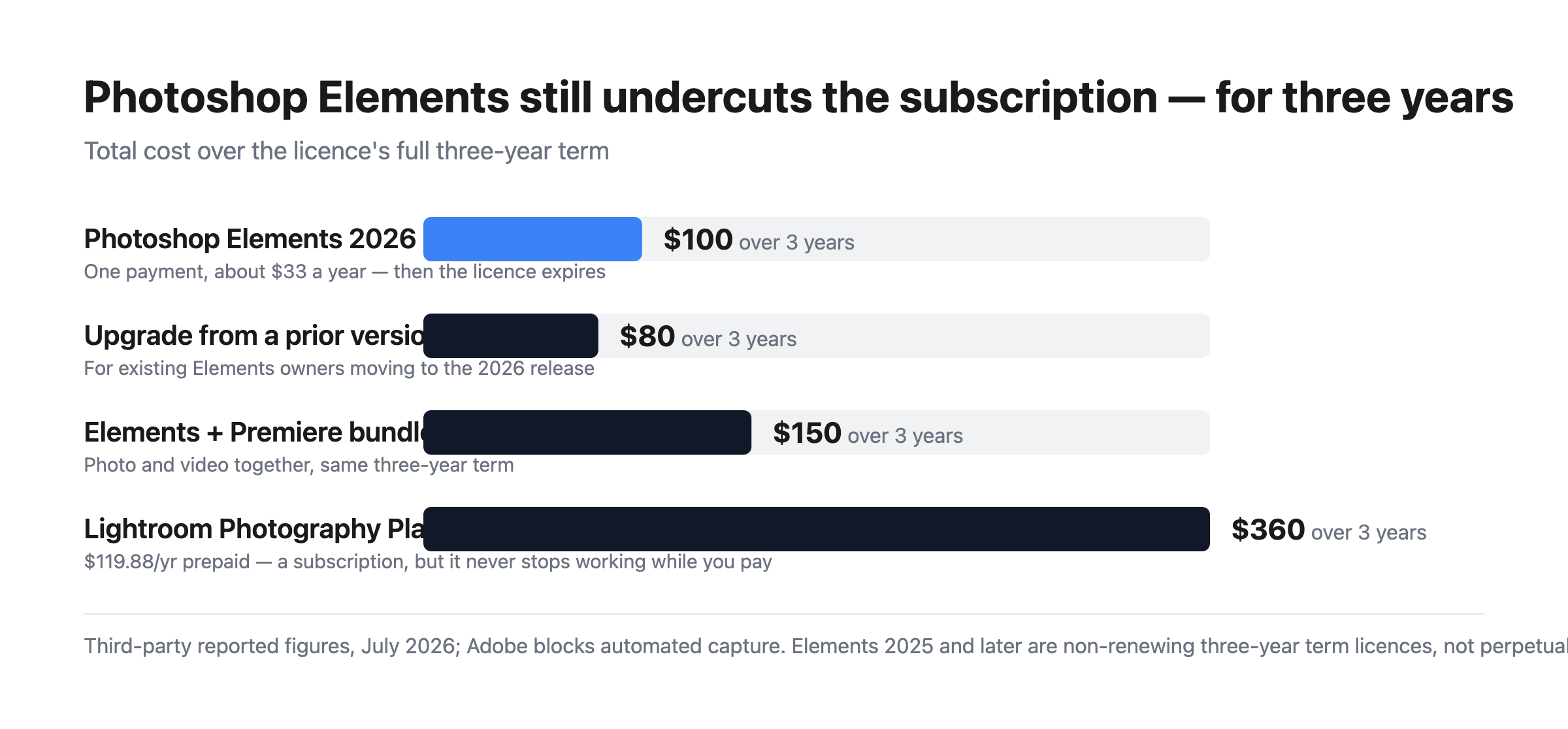
Bar chart of three-year costs: Photoshop Elements at $99.99, an upgrade at $79.99, the Elements and Premiere bundle at $149.99, against Adobe’s Lightroom Photography Plan at $359.64 over the same period.

What this actually means:

  • It is still much cheaper than the subscription. $99.99 over three years is about $33 a year, against $119.88 a year for Adobe’s Photography Plan — roughly a quarter of the cost. The change to term licensing narrowed the gap in principle but not in price.
  • But it is no longer permanent, and that was the point. People chose Elements specifically to escape time-limited software. A three-year term is a longer lease, not ownership, and anyone recommending it as a perpetual alternative — including a great many published reviews and comparisons — is now wrong.
  • The clock runs from redemption. Buying a code and not redeeming it does not consume the term, which is a small but genuine planning advantage if you buy during a sale.
  • The Organizer survives expiry. You keep access to your catalogue and can still see your images; you lose the editor. That is better than losing everything, and worth knowing before the term ends.
  • The upgrade path costs $79.99. So the realistic long-run pattern is buying in every three years at roughly $27 a year, which remains far below the subscription.
  • The bundle is good value if you edit video. $149.99 for both Photoshop and Premiere Elements against $99.99 for one.

Who Should Use Photoshop Elements

  • Enthusiast photographers avoiding subscriptions. Still the clearest case, provided the three-year horizon is understood and accepted.
  • People who want guided workflows. Guided Edits genuinely help those who know what result they want but not which tools produce it.
  • Families and hobbyists. Organizer plus straightforward editing covers most personal photo work.
  • Anyone needing Photoshop-class editing occasionally. Paying $33 a year rather than $120 for capability you use intermittently.

It fits poorly for professional workflows, where Lightroom and Photoshop are the standard and the subscription is a cost of business; for anyone who genuinely requires permanence, where Skylum Luminar Neo and Corel PaintShop Pro still offer perpetual options; and for quick social graphics, where Canva is faster and free.

Honest Pros and Cons

Strengths

  • Far cheaper than the subscription. Roughly $33 a year against $120 for the Photography Plan.
  • One payment, no recurring billing. Still meaningfully different from a subscription.
  • Guided Edits. The best implementation of assisted editing in a consumer tool.
  • Real Photoshop capability. Layers, selections, and retouching from Adobe’s own engine.
  • The Organizer outlives the licence. Catalogue access is retained after expiry.
  • The redemption clock is user-controlled. Buy in a sale, redeem when ready.

Limitations

  • No longer perpetual. The three-year term is the defining change and it is easy to miss.
  • Most published reviews are out of date. Anything describing Elements as buy-once-keep-forever predates the 2025 release.
  • The editor stops working at expiry. Only the Organizer remains.
  • Weaker than Lightroom for volume. Cataloguing and batch processing are not comparable.
  • No cloud sync across devices in the way the subscription products offer.
  • Adobe was quiet about the change, which is the fair criticism here.

Photoshop Elements Alternatives and How It Compares

  • Adobe Lightroom is the subscription route, far better for volume and cataloguing, at roughly four times the annual cost.
  • Adobe Photoshop is the full professional application, bundled with Lightroom on the Photography Plan.
  • Skylum Luminar Neo is now the leading genuinely perpetual option, with strong AI editing.
  • Corel PaintShop Pro remains a buy-once Windows alternative.
  • Canva covers quick social and marketing graphics, free and much simpler.
  • GIMP is the free open-source option, capable but with a considerably steeper learning curve.

For a broader survey, browse our photo editing directory.

The Verdict

Photoshop Elements remains a good product and, on price alone, a strong one. Roughly $33 a year for Photoshop-derived editing with genuinely useful guided workflows is a quarter of what Adobe’s Photography Plan costs, and the Guided Edits are the best implementation of assisted editing in any consumer photo tool. For an enthusiast who edits occasionally and wants real capability without a monthly bill, it still makes sense.

What has changed is the reason many people chose it. Elements was the Adobe product you could own — a single payment, a serial number, software that kept working. Since the 2025 release it is a non-renewing three-year term licence: pay once, redeem the code, and three years later the editor stops opening. The Organizer survives so you keep access to your catalogue, which softens the landing, but the editor does not. That is a longer lease than a subscription, not ownership, and it changes the recommendation materially.

Two practical consequences follow. First, treat any review or comparison that calls Elements perpetual as out of date — a great deal of published material still does, because Adobe was not loud about the change. Second, if permanence is genuinely your requirement rather than just avoiding monthly billing, Elements no longer meets it and Luminar Neo or PaintShop Pro do. If what you actually wanted was to avoid a subscription and pay far less, Elements still delivers that comfortably, and the $79.99 upgrade every three years keeps the effective cost near $27 a year. Just buy it knowing what you are buying.

FAQ

Is Photoshop Elements still a perpetual licence?

No. Starting with the 2025 release, Adobe replaced the perpetual licence with a non-renewing three-year term licence activated by a redemption code. Elements 2024 and earlier used serial-number activation and remained usable indefinitely. When a current licence expires three years after redemption, the editor becomes inaccessible, though the Organizer remains available for viewing your catalogue.

How much does Photoshop Elements cost?

Reported pricing for July 2026 is $99.99 for Photoshop Elements 2026, $79.99 to upgrade from a previous version, and $149.99 for the bundle with Premiere Elements. All are one-time payments covering a three-year term with no recurring fees. Adobe blocks automated access from our infrastructure, so confirm current figures at checkout.

When does the three-year term start?

At redemption, not purchase. The licence is activated by a redemption code, and the three-year clock begins when you use it. That means buying during a sale and redeeming later does not consume the term, which is a small planning advantage. Once redeemed, the term runs continuously regardless of how much you use the software.

Is Photoshop Elements still cheaper than a subscription?

Substantially. At $99.99 for three years the effective cost is roughly $33 a year, against $119.88 a year for Adobe’s annual prepaid Photography Plan — about a quarter. Upgrading every three years at $79.99 brings that closer to $27 a year. The term change altered what you own, not the price advantage, which remains large.

What is Photoshop Elements best for?

Enthusiast and hobbyist photographers who want Photoshop-class editing with guided assistance and no monthly billing, and who accept a three-year licence horizon. It suits occasional and family photo work well. It is a poor fit for professional volume workflows, where Lightroom’s cataloguing is far superior, and for anyone whose actual requirement is permanent ownership rather than avoiding subscriptions.

Last reviewed: · Our methodology
Founder & Software Review Editor
Axel Grubba is the founder of Findstack, a B2B software comparison platform, with his background spanning management consulting and venture capital where he invested in software. Recently, Axel has developed a passion for coding and enjoys traveling when he is not building and improving Findstack.
Business Software Reviews SaaS Product Evaluation CRM Software
Disclaimer
Our research is curated from diverse authoritative sources and meant to offer general advice. We don’t guarantee that our suggestions will work best for each use-case, so consider your unique needs when choosing products and services. Feel free to share your feedback.
Last updated: September 09, 2026
Adobe Photoshop Elements Photo Editing Software logo
749 Adobe Photoshop Elements Reviews
4.3 out of 5
Small Business (50 or fewer emp.)
Nov 24, 2019
 Source
Overall Rating:
5.0
Vicki W. avatar
Vicki W.
Lead Direct Support Professional
Share
"Cheap & Easy to use"
What do you like best about Adobe Photoshop Elements?

Elements is a great budget friendly alternative to regular photoshop that lens amateur users great tools to complete editing and projects

What do you dislike about Adobe Photoshop Elements?

Something i dislike about elements is that the tool settings pops up and constantly blocks half the screen. It would be great to have a setting that eliminates the need to pop up

What problems is Adobe Photoshop Elements solving and how is that benefiting you?

I use photoshop primarily for art editing or to make flyers

Small Business (50 or fewer emp.)
Nov 09, 2019
 Source
Overall Rating:
5.0
AS
Andrew S.
Owner
Share
"Amazing brother to the bigger one and still packs a punch! "
What do you like best about Adobe Photoshop Elements?

You can recreate anything and it's easy to use after a while.

What do you dislike about Adobe Photoshop Elements?

There's so much on there it's difficult to differentiate between some of the buttons and what they mean!

What problems is Adobe Photoshop Elements solving and how is that benefiting you?

It's enabled me to create great business logos as well as advertisement material.

Small Business (50 or fewer emp.)
Nov 06, 2019
 Source
Overall Rating:
5.0
RF
Rabin F.
Network / Hardware Technician
Share
"One of the best Compact Editors"
What do you like best about Adobe Photoshop Elements?

I love the interface and UI Design. It has almost all the Tools needed for a quick edit on the go

What do you dislike about Adobe Photoshop Elements?

I feel like the sharing option on Photoshop elements could be improved as i faced a lot of issues sharing pictures i've edited

What problems is Adobe Photoshop Elements solving and how is that benefiting you?

Fewer crashes than the Actual software, Quick Load time, its good to have on a vacation or a corporate shoot.

Mid Market (51-1000 emp.)
Nov 06, 2019
 Source
Overall Rating:
5.0
Javier M. avatar
Javier M.
Diseñador Gráfico
Share
"Crea lo mejor en retoque y diseños"
What do you like best about Adobe Photoshop Elements?

En mi trabajo crear Diseños es mi tarea diaria y lo mejor es poder contar con las mejores herramientas para crear lo mejor de lo mejor y Photoshop Elements tiene todo lo que necesito

What do you dislike about Adobe Photoshop Elements?

Para mi es difícil decir algo negativo ya que con Photoshop Elements todas mis imagenes siempre lucen de maravilla. Todas sus características son geniales y su interfaz es amigable e intuitiva por lo que siempre es fácil de usar

What problems is Adobe Photoshop Elements solving and how is that benefiting you?

Diseñar es un trabajo hermoso y de verdad conseguir herramientas que me permita darle lo mejor a mis clientes ha sido un trabajo arduo, con Photoshop Elements he encontrado todo lo que necesito puedo retocar mis imagenes reales y hacerlas ver profesional, me permite crear los mas divertidos collague y colocar efectos increíbles, además de todo lo que me ayuda en mi trabajo, también me da entretenimiento ya que con ella hago los mejores memes incluso para mis redes sociales y mis fotos personales no las subo a mia redes si no pasan por el suavizado de Photoshop Elements

Small Business (50 or fewer emp.)
Nov 02, 2019
 Source
Overall Rating:
5.0
AG
Verified Reviewer
Founder
Share
"Easy to use"
What do you like best about Adobe Photoshop Elements?

Very simplified version of photoshop, but still has all the essential functions.

What do you dislike about Adobe Photoshop Elements?

I find it quite buggy at times, and often times have difficulty finding solutions readily available online.

What problems is Adobe Photoshop Elements solving and how is that benefiting you?

I don’t have much design experience, so using this program is inexpensive and intuitive. Easy to create mock up defend to use.

Mid Market (51-1000 emp.)
Oct 31, 2019
 Source
Overall Rating:
5.0
PS
Prem Kumar S.
Software Developer
Share
"Easy and time saving photo editor and collage maker."
What do you like best about Adobe Photoshop Elements?

Photoshop elements is amazing and has many features like auto edit and auto collage maker. It is perfect for making collages with AI features and auto guided mode. It is light weight and has some great features like slideshows and collage making.

What do you dislike about Adobe Photoshop Elements?

I just don't understand why it is a separate software for doing these things when it could have easily been provided in the Adobe Photoshop software. Though it is working great and nothing to dislike other than this.

What problems is Adobe Photoshop Elements solving and how is that benefiting you?

I just use this for creating collages and slideshows. Many other features are also there but I use these common features. It is also providing auto mode so highly time saving and guided edits is beneficial.

Small Business (50 or fewer emp.)
Oct 31, 2019
 Source
Overall Rating:
5.0
Chris H. avatar
Chris H.
Vice President Of Sales
Share
"Great Product for great price"
What do you like best about Adobe Photoshop Elements?

I really like that you can edit and change images and artwork in a very easy to use interface. You don't have to be a professional.

What do you dislike about Adobe Photoshop Elements?

The only thing I don't like is that you can't open PDF layers, but that was something I already knew.

What problems is Adobe Photoshop Elements solving and how is that benefiting you?

I need to do basic changes to images and artwork and it is very easy to do that. I also have to resize images from standard size photos to square, so this makes that easy.

Small Business (50 or fewer emp.)
Oct 22, 2019
 Source
Overall Rating:
5.0
Katelyn R. avatar
Katelyn R.
Licensed Realtor
Share
"Great For Beginners"
What do you like best about Adobe Photoshop Elements?

I like that it already has different templates and presets that you can use and it not only shows you but helps do you specific things to a photo. In my opinion, it is beyond easier that regular adobe photoshop. I picked up this software in no time and did things to pictures that I couldn't do anywhere else! (Like extracting out certain colors).

What do you dislike about Adobe Photoshop Elements?

I disliked that it made my computer super laggy and would randomly shut down and I'd lose the work I did on my photos but I learned to save them each time to prevent this from happening again. I also feel like some things I did on here made my photos a little noisy.

What problems is Adobe Photoshop Elements solving and how is that benefiting you?

I'm now able to give my clients more of what they want. Especially if they want pictures a certain color or if they want me to take out something from a photo and still make it look professional and not be able to tell that anything has changed!

Mid Market (51-1000 emp.)
Oct 18, 2019
 Source
Overall Rating:
5.0
AG
Verified Reviewer
Founder
Share
"Nascent User"
What do you like best about Adobe Photoshop Elements?

I like photoshop because of it's ubiquitous reach and ability to translate to other platforms. I started editing graphics on Canva.com, a free online software that provides SOME graphics editing features and abilities. Because Photoshop is so innate (in some ways), I was able to translate the skills that I learned using Canva to the photoshop elements platforms and build on the ideas that I knew. Though this could be relevant to any graphic design software, because of Photoshop Elements widespread influence, I was able to learn readily using Youtube videos and other tutorials.

What do you dislike about Adobe Photoshop Elements?

I dislike some of the controls. I understand that it can be customizable but some things are buried too far (in my opinion). It would be nicer if stuff (like Gaussian blur) for example, were able to be reached from the control panel instead of having to jump through a million hoops and keyboard clicks to find them. Again, even if this is able to be changed, it can be discouraging to a novice user who wants to make it through a tutorial but is having trouble finding the right command to click.

What problems is Adobe Photoshop Elements solving and how is that benefiting you?

I am editing my photos! And learning about lighting, photography, graphics and so much more. I'm also editing my videos. It is helping me to become a better producer and visual storyteller.

Small Business (50 or fewer emp.)
Oct 16, 2019
 Source
Overall Rating:
5.0
AG
Verified Reviewer
Founder
Share
"Easy-to-use, great for beginners or experts"
What do you like best about Adobe Photoshop Elements?

Photoshop Elements is easy to use, with great tutorials, but also a great product for the more experienced designers with Photoshop. It's a versatile product.

What do you dislike about Adobe Photoshop Elements?

Some things (ie cropping on an angle, etc) are difficult to figure out as a beginner, and I wish the HELP section was a bit better in this sense.

What problems is Adobe Photoshop Elements solving and how is that benefiting you?

We have easily improved our social media platform and content through graphics made with Photoshop Elements.

Small Business (50 or fewer emp.)
Oct 10, 2019
 Source
Overall Rating:
5.0
AG
Verified Reviewer
Founder
Share
"Head designer"
What do you like best about Adobe Photoshop Elements?

ITs a great tool for photo manipulation, also for art and design is very useful. Ive been using this software since i started in design.

What do you dislike about Adobe Photoshop Elements?

Sometimes the software is not strong enough, like photoshop itself, but is very easy to use

What problems is Adobe Photoshop Elements solving and how is that benefiting you?

When i dont have a lot of time to run the adobe suite i can easily work with elements to solve things easy and quick.

Small Business (50 or fewer emp.)
Oct 05, 2019
 Source
Overall Rating:
5.0
⛰R
⛰ Jordan R.
Co Founder & #No Code Cto
Share
"Perfect for most image editing"
What do you like best about Adobe Photoshop Elements?

Great software! I keep trying newer photo editing software & can't stop going back to this - love it!

What do you dislike about Adobe Photoshop Elements?

I really like it - can't say much negative about it. I prefer an outdated version, and don't want to learn the newest version, but other than that - it's a great software.

What problems is Adobe Photoshop Elements solving and how is that benefiting you?

I use it consistently for logo creation, photo editing, and graphic design work!

Small Business (50 or fewer emp.)
Oct 04, 2019
 Source
Overall Rating:
5.0
CS
Courtney S.
Owner
Share
"Perfect Version of Photoshop"
What do you like best about Adobe Photoshop Elements?

I love that this is the "Elements" of photoshop. As an early user of Photoshop (I started at 4.0), this breaks it down to the basic needs of a user and is a lot like the original versions. It's simplified and allows an ease of use that may not be available for someone with the full version of photoshop.

What do you dislike about Adobe Photoshop Elements?

Sometimes it is limited but there are always ways around the limitations if you get creative in your editing.

What problems is Adobe Photoshop Elements solving and how is that benefiting you?

Basic editing techniques and photo manipulation. If I need to do quick edits on photos this is the program I go to.

Small Business (50 or fewer emp.)
Oct 01, 2019
 Source
Overall Rating:
5.0
AG
Verified Reviewer
Founder
Share
"Best software out there"
What do you like best about Adobe Photoshop Elements?

What I like the best is that the platform is fairly easy to use and the outcome is phenomenal, always.

What do you dislike about Adobe Photoshop Elements?

There is a lot to learn. Yes it's easy to use but only when you start to learn how to do photoshop in general.

What problems is Adobe Photoshop Elements solving and how is that benefiting you?

My problem is trying to navigate and understand everything.

Small Business (50 or fewer emp.)
Sep 30, 2019
 Source
Overall Rating:
5.0
Tori Patricia H. avatar
Tori Patricia H.
Assistant Varsity Softball Coach
Share
"Great product for the Price"
What do you like best about Adobe Photoshop Elements?

Easy to use entry level version of photoshop. It gets the job done

What do you dislike about Adobe Photoshop Elements?

That it's doesn't have as high of a quality of tools as photoshop

What problems is Adobe Photoshop Elements solving and how is that benefiting you?

I mostly use photoshop elements when I don't have access to the full photoshop. Much like photoshop, I use photoshop elements to finalized and correct photos and artwork. The tools that photoshop elements has for the price, is great.

Small Business (50 or fewer emp.)
Sep 24, 2019
 Source
Overall Rating:
5.0
SK
Sanjeev K.
Software Developer
Share
"Great software for making collages and slideshows"
What do you like best about Adobe Photoshop Elements?

The features like guided edits, AI edits, Sketching etc are great and helps in many ways. I like to create memes and creating new images and collages with Photoshop Elements.

What do you dislike about Adobe Photoshop Elements?

I feel it is little costly in comparison of Adobe Photoshop which has much things to do. The other thing is that to use it is necessary to sign in in adobe account.

What problems is Adobe Photoshop Elements solving and how is that benefiting you?

I use it for making sketches and collages and slideshows. It is really beneficial and helps a lot. saves time and works perfect.

Enterprise (> 1000 emp.)
Sep 23, 2019
 Source
Overall Rating:
5.0
Macy H. avatar
Macy H.
Account Manager
Share
"Back to basics!"
What do you like best about Adobe Photoshop Elements?

Photoshop Elements was what I learned to edit on in school and I love the ease of use!

What do you dislike about Adobe Photoshop Elements?

Nothing that I can think of! The program rarely freezes.

What problems is Adobe Photoshop Elements solving and how is that benefiting you?

Editing all photos to perfection!

Small Business (50 or fewer emp.)
Sep 22, 2019
 Source
Overall Rating:
5.0
Matt D. avatar
Matt D.
Author
Share
"Simple to use, but deep in function"
What do you like best about Adobe Photoshop Elements?

Photoshop Elements has all the core features you could need. As such, it offers plenty of design options of your styling to learn how to use it. At the same time, the basic functions are quick and easy to pick up. That has made graphic design for the site a breeze.

What do you dislike about Adobe Photoshop Elements?

Though perfectly suitable for use, the learning curve for the advanced options is quite steep. Unless you've used a previous incarnation of the software, that may put some off.

What problems is Adobe Photoshop Elements solving and how is that benefiting you?

Creating PSD templates had allowed me to create a uniform look for my website posts. It had also removed the need to start from scratch with post headers, allowing me to work quicker and more efficiently.

Mid Market (51-1000 emp.)
Sep 19, 2019
 Source
Overall Rating:
5.0
CA
Chris A.
Web Assets Manager
Share
"Free doesn't always mean CHEAP!"
What do you like best about Adobe Photoshop Elements?

The user-friendliness of the software is the most appealing draw for me. It's rich features and intuitive workflow effects are powerful yet simple to implement. unlike Adobe CC, you are not saddled with a perpetual license, making it VERY wallet-friendly. In one sentence it is easy to train a child to use and with a little bit of imagination achieve highly polished results. If you are a beginner and want to see how members of the elements community use the product, links in elements social media platforms like Twitter, and Facebook are there to get you started.

What do you dislike about Adobe Photoshop Elements?

The unfortunate aspect of using elements is that the software is the free version of Adobe's more advanced photo editing software like Photoshop CC & XD or Illustrator, and lacks advanced formatting features available to CC and other tools found in the adobe creative suite. for instance, you can't do the following *No glyphs, *No 3D modeling *no logo embedding * No rasterizing due to the fact that it is an advanced feature found on the paid/subscribed versions of the adobe creative suite

What problems is Adobe Photoshop Elements solving and how is that benefiting you?

If you want a quick fix on non-professional projects, like personal projects, I can use elements. Cropping highlights image improvements etc slide shows

Small Business (50 or fewer emp.)
Sep 17, 2019
 Source
Overall Rating:
5.0
AG
Verified Reviewer
Founder
Share
"Pro Level Editing for Everyone"
What do you like best about Adobe Photoshop Elements?

Elements has most features of full fledged Photoshop but also has more user friendly options. A person can easily add effects with one click from a pre made selection of effects that otherwise will take much longer to create in Photoshop. Each of the premade effects can further be edited to suit the exact requirements of the user. This is just brilliant and much needed for anyone who wants Pro Level Editing instantly.

What do you dislike about Adobe Photoshop Elements?

With more options Elements occasionally is slower than Photoshop and few of the important features in Photoshop are missing so for a person who need it for professional use it would not be enough. Elements also can get a bit confusing at times especially for a beginner who clicks on a feature and a complicated output is created however its a small learning curve that anyone can easily master.

What problems is Adobe Photoshop Elements solving and how is that benefiting you?

I used Elements for creating designs for posters, banners, shirts and so on. The easiness of using Elements was the biggest benefit according to me. I used to also use some impressive effect in Elements and then find out all the features used to create it thus got new ideas.

Mid Market (51-1000 emp.)
Sep 16, 2019
 Source
Overall Rating:
5.0
AG
Verified Reviewer
Founder
Share
"Its a Element for the editing business"
What do you like best about Adobe Photoshop Elements?

Adobe Element is very useful for the design business but for the other companies also its very useful like I am from the education sector for this sector also it's very useful. To create all the design for clubs, institution fest. department work. Also for home and photo editing, I use to it

What do you dislike about Adobe Photoshop Elements?

Dislike is you need to be learned. Then you can work on it very well. it can be easy to learn by the tutorials that are available on youtube.

What problems is Adobe Photoshop Elements solving and how is that benefiting you?

Web designing, pamphlets, photo editing, photo collage making, On the home you can use it for personal photo editing and some design for your wall.

Small Business (50 or fewer emp.)
Sep 13, 2019
 Source
Overall Rating:
5.0
AG
Verified Reviewer
Founder
Share
"A truly qualified photo editor"
What do you like best about Adobe Photoshop Elements?

If you need a truly qualified photo editor, Adobe's Photoshop Elements is the program that works best for you.a bit missing according to photoshop for advertising shots

What do you dislike about Adobe Photoshop Elements?

for me the price / performance ratio is the most awesome program. I don't know if there is a program that works so cheap compared to an adobe program

What problems is Adobe Photoshop Elements solving and how is that benefiting you?

282/5000 adobe program that lets you do your work with a simple interface without getting involved in the cs mess. you cannot get much efficiency if you do not increase the smoothing value when adjusting the line sharpness; it has not yet compared with a problem.

Enterprise (> 1000 emp.)
Aug 11, 2019
 Source
Overall Rating:
5.0
Wisdom H. avatar
Wisdom H.
Chief Executive Officer
Share
"An amazing app for editing"
What do you like best about Adobe Photoshop Elements?

It makes my work easier. An easy app for retouching graphics and creating new designs

What do you dislike about Adobe Photoshop Elements?

I don't dislike anything about Adobe photoshop elements. It has all the elements and a great user friendly interface

What problems is Adobe Photoshop Elements solving and how is that benefiting you?

Problems with lightens and every other problem with photos can be corrected with elements. This is very beneficial to me as a graphic designer

Mid Market (51-1000 emp.)
Jul 31, 2019
 Source
Overall Rating:
5.0
AG
Verified Reviewer
Founder
Share
"Photoshop Elements...YEET"
What do you like best about Adobe Photoshop Elements?

It’s easy to use, “usually” quick to boot up, and provides me with all the editing things I need

What do you dislike about Adobe Photoshop Elements?

It’s adobe...they have become pretty a pretty malicious in their consumer services requiring so many different subscriptions for mediocre programs.

What problems is Adobe Photoshop Elements solving and how is that benefiting you?

Simple photo edits. It is a little faster than other programs I’ve used

Mid Market (51-1000 emp.)
Jul 19, 2019
 Source
Overall Rating:
5.0
Grace A. avatar
Grace A.
Pharmacist
Share
"User friendly."
What do you like best about Adobe Photoshop Elements?

Easy to log in and so easy to use the software.

What do you dislike about Adobe Photoshop Elements?

Requires skilled personnel to install and hangs when there are so many users.

What problems is Adobe Photoshop Elements solving and how is that benefiting you?

It has enabled so quick exchange information concerning the companies operations.

Small Business (50 or fewer emp.)
Jul 05, 2019
 Source
Overall Rating:
5.0
AG
Verified Reviewer
Founder
Share
"Awesome software for doing image manipulation with automated tools."
What do you like best about Adobe Photoshop Elements?

I like its automated tool for editing the images and the templates for automatic slideshows and collages. I often use this automatic tool for creating slideshows and collages to save time and effort. Creative guided edits and instructions helps in minimizing the effort.

What do you dislike about Adobe Photoshop Elements?

I use Photoshop Elements for my simple works and I find it very useful for me. So I don't have any reason to dislike anything in the software.

What problems is Adobe Photoshop Elements solving and how is that benefiting you?

I use Photoshop Elements for doing image editing and creating collages and slideshows. It really helps and save time and effort with the automatic tools provided by the software.

Mid Market (51-1000 emp.)
Jun 25, 2019
 Source
Overall Rating:
5.0
MP
Maria P.
Graphic Designer And Photographer
Share
"A powerful program for the efficient editing and organization of your digital photographs. "
What do you like best about Adobe Photoshop Elements?

A powerful program that offers you two important features and functions, one of them is to edit and retouch photographs and the other is that you can organize elements efficiently through its interface, it offers a great variety of graphic editing tools, with multiple options and functions to edit with quality and give you an easy to use options menu, also allows to create great collages, photo and video presentations with incredible detail quality, an important quality is also Create incredible photographs, is to provide options for a editing in an automated way, giving you step-by-step instructions, to adjust the color and exposure and contrast, to correct your old photos, open eyes closed as if it were magic. In addition, you can apply striking effects to give your photos a nice visual perspective.

What do you dislike about Adobe Photoshop Elements?

Its modern interface can sometimes confuse beginners a bit, despite being from the Adobe family, this program has similarities but with changes of functions in its menu, I recommend having previous knowledge in editing, although this is not an impediment use this software, you will have to use it frequently to be able to know all its functions and everything it offers, and you need computers with good performance and sometimes good internet connection to work without problems.

What problems is Adobe Photoshop Elements solving and how is that benefiting you?

This powerful program is based on its brother Abobe Photoshop, but, with simpler tools to facilitate each editing project, it also offers two main functions, which is to be an organizer of elements and an image editor. The two tools complement each other perfectly and you can access them easily through the menu at the top of its elegant, intuitive and efficient interface, which provides a wide variety of tools and a range of options that will help you improve, organize and Share your Photos with friends like a professional.

Small Business (50 or fewer emp.)
Jun 24, 2019
 Source
Overall Rating:
5.0
TJ
Tanya J.
Software Developer
Share
"Easy to use, edit and creating images with automated tools"
What do you like best about Adobe Photoshop Elements?

Many automated features and tools are given which guides in creating image, collages and slideshow content. I like its automated collage and slideshow creations using the AI technology.

What do you dislike about Adobe Photoshop Elements?

Photoshop elements is good for creating image contents and edit. But it forces us to sign in with a Adobe id which I don't like.

What problems is Adobe Photoshop Elements solving and how is that benefiting you?

I use photoshop elements for editing images with the templates given in the software. The auto selection, auto curate and auto creations helps in doing image manipulations faster.

Small Business (50 or fewer emp.)
Jun 21, 2019
 Source
Overall Rating:
5.0
HH
Hannah H.
Nauseb
Share
"GREAT PRODUCT"
What do you like best about Adobe Photoshop Elements?

I use this product all the time! Best photoshop around. Tell your friends and family to go home and get it for themselves they won’t regret it. Your photos will never be the same - and for the better! Do it, do it, do it!

What do you dislike about Adobe Photoshop Elements?

Honestly? There is no con. It was very good to use.

What problems is Adobe Photoshop Elements solving and how is that benefiting you?

None! Benefits include more appealing on Instagram now.

Small Business (50 or fewer emp.)
Jun 19, 2019
 Source
Overall Rating:
5.0
Tara O. avatar
Tara O.
Student
Share
"Best photoshop app"
What do you like best about Adobe Photoshop Elements?

I’ve used many different photo editing platforms and this one is the best. It is very user friendly

What do you dislike about Adobe Photoshop Elements?

I dislike that the app is slow sometimes

What problems is Adobe Photoshop Elements solving and how is that benefiting you?

Made much better instagram posts