

Unclaimed: Are you working at Basecamp?





Basecamp Reviews: 4.1/5 — Solid Choice
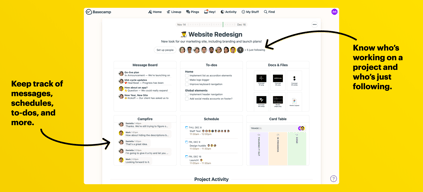
Basecamp has evolved as a project management platform since its launch in 2004 but its mission to help remote teams stay organized, productive, and efficient remains. One new feature that Basecamp recently added is called Basecamp Hill – a visual representation that divides the component of a project into a phase of uncertainty, unknowns, and problem-solving (uphill) and a phase of certainty, confidence, and execution (downhill). This is on top of Basecamp’s core features which include a Message Board, To-dos, Calendar, Documents and Files, Group Chat, and Automated Check-ins. It’s a top-down and bottom-up platform for everyone in a business or organization – from proprietors and C-level executives to project managers and individual team members.





| Capabilities |
API
|
|---|---|
| Segment |
Small Business
Mid Market
Enterprise
|
| Deployment | Cloud / SaaS / Web-Based, Mobile Android, Mobile iPad, Mobile iPhone |
| Support | 24/7 (Live rep), Chat, Email/Help Desk, FAQs/Forum, Knowledge Base, Phone Support |
| Training | Documentation |
| Languages | English |
Basecamp Pros and Cons
- Excellent for schedule and to-do list management
- Automatic check-ins and group chat for remote work
- Helpful message board
- Useful for finding crucial documents
- Easy and customizable environment
- Requires third-party integration for time tracking
- Features need to be a bit more flexible to achieve better functionality

Compare Basecamp with other popular tools in the same category.

The best thing about the Basecamp is that the interface is very easy to use. Integration of this software is very well designed For example, taking one action will also notify several team members that helps me to do my daily work faster instead of sending the numerous e-mails to all of my team members. We can share different types of files/documents with my work colleagues on a daily basis. The simple layout of projects and tasks - Clients can be trained easily. Collaboration is so simple. Creating new projects from templates is a great feature I use all the time. One of the things I found cool about Basecamp is the clap feature, which is a bit interesting than the typical like button. The organisation is excellent. There's a whiteboard for everyone, the files section makes it easy for you to trace a file and either download or delete it.
There is nothing that I disliked about Basecamp but sometimes it goes offline due to technical issue or for a quick maintenance. Also for many projects it is important to know who viewed the announcement so there must be a option that shows us who have seen the announcement and who have not.
Earlier I use to send emails to the team member or to my manager about the projects, status but now I just send a single message with the help of this tool. It is saving a lot of my time.
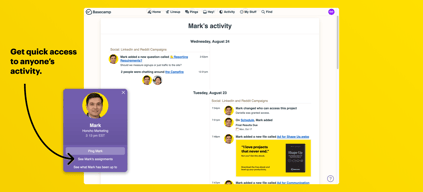
It's the place where everything is, understand what everyone’s working on, and know exactly where to put the next thing everyone needs to know about.
You don't have a roadmap view like Jira or other Project Management tool.
Team communication and delivery of content to all teams that use this content in the company. Establish deadlines and people responsible for specifics.
I like that when working with a team, Basecamp allows you to assign tasks with deadlines to team members, helping with accountability.
I don't think there is anything I dislike, the interface could be a little more modern looking.
Basecamp helps with organization and accountability for a team.
Setting up and organizing projects in Basecamp. Assigning tasks and checking up on the dashboard.
How tedious it is to archive stuff. Sometimes I wish I could leave notes on a folder under documents and files.
Project management with a team that's based in different locations.
We are currently using it to connect with different teams to create strategies to enhance workflow. It has a lot of tools that have made this an easy task!
I like everything. I don’t have anything bad to say about it.
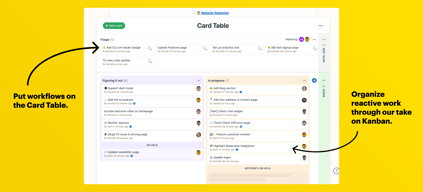
We are solving work flow issues I love the task board. It’s a to do list for the group and you can set deadlines.
Organization is at its best now and I don’t feel so scattered
Nothing yet still getting used to everything. Seems to be very simple
Organizing documents and keeping track of projects with the team so everyone is on the same page
Basecamp is very easy to navigate and it keeps me organized through all my different projects.
It's easy for message boards to get lost when there are so many within a project.
Organizational issues have been resolved.
Being a creative, right brained person, I tend to be disorganized at times. Basecamp really provides a way to organize all projects, project details, reviews, calendar, to do lists, etc. so that everyone is on the same page. It's especially great as a central hub when working remotely, so its easy to check up on what everyone else is doing.
The only thing I really feel like could get unorganized is if people don't take advantage of the organization features and keep threads on topic, keep posts efficient so notifications aren't popping up like crazy every second, and only include you on threads that you are a necessary party in. But thats not a problem with the actual software, just how some people use it. Sometimes Basecamp goes down, but not often.
Keeping projects organized and have all the details in one spot. It really is just like a central hub of productivity to keep your whole team on the same page. Being notified when there is an update to a project is great, and it gives a way to submit work for approval/discussion - whether you are at the office or at home.
The easiness and convenience. It does what its for and how you set it. It has certainly been help and great for me and my team. We use it on a daily.
I really don't have anything that I could say I displace about "basecamp" at the moment. For me, I use the basics features and tools. But, it has helped a lot and kept me focus on my tasks.
I would say there is a lot of benefits to using basecamp. We use it for team organizing, tasks and updating the company on new features, supports and the overall product. It has help me and my colleagues communicates on various tasks and assignments.
We needed to merge from an in-house, programmed database to something more dynamic and gave us flexibility. The years-ago programmed database had no room for improvements and was over 10 years old. I like that Basecamp can adapt to changes in our processes, without the loss of previous data. it's easy to use, easy to train others.
I love the reports, but sometimes, I wish they were alittle bit more robust. I have not found a way to tie our master spreadsheet of classes and books to the books and conversion data on Basecamp. it would be nice to have it all in one place.
Using Toggl along with Basecamp is keeping our student workers and staff more honest about time reporting. And the reminders keep us on task. We can also generate much better reports - we were culling data by hand previously, which would take weeks.
Basecamp is great for our team. We use the project feature and to dos the most.
I don’t like the notification defaults. But they can be adjusted.
We are eliminating meetings. We are communicating better.
It is a good real-time communication app that helps in arrange meetings
It is slightly expensive as it costs 50$ especially for large businesses
Keeping the team on the same page and arrange meetings
I find the way you can collaborate with your team on a specific project is the most helpful. You are quickly able to see edits, ideas and changes from your colleagues and there is always a history of the workflow to reference back to.
There was nothing I disliked but finding a way to set up projects I.e marketing channels, products, etc it was a bit tricky to sometimes quickly find things. However, the team was able to come up with a great method on organized projects and owners which helped a lot.
Basecamp helped manage projects across the team and provided an organized calendar for deliverables for campaigns.
It is a very usefull tool that perfectly works for your organization
It is pretty new in the market and sometimes people doesnt trust until it has some good feedback.
We have better comunication among employees and we organize better all our meetings and everything related to work, proceses and staff.
The biggest advantage of Basecamp is that it is very easy to use. The task responsibilities and deadlines are much clearer, which drastically increases the effectiveness of the employees and boosts company efficiency.
I think that the biggest con that Basecamp has is its user-friendliness. With a very unsophisticated interface leaves out some very demanded features. These features can be easily added by integration with other software, but I think that a perfect project management tool should have everything available in just a few clicks.
Basecamp has provided me and my company with a number of benefits. The projects seem to be deployed and implemented with ease. Everything is easily tracked which saves a lot of time.
Useful tool for businesses that have more than one department, you may pick and choose which ones you want to be a part of.
There is nothing that I dislike in the short period I have been using Basecamp.
All of the forms and notifications for the department I work for are in one spot. Everything is easy to find.
My first introduction to working with a team with through Basecamp, it easily allows file-sharing, multiple people working on the same thing at the same time, it allowed many people from multiple countries to be working together, regardless of the time in their location. I love how it's in a web interface, they provide a list of things that are of upmost importance when you login and finally you're able to manage multiple projects at the same time. Finally, it's brilliant that multiple organisations who have their own basecamp setup can be all using it at the same time.
At first I found it super confusing, mainly that the company that designed the product has settled where everything goes - which is likely different from agency to agency.
Main problems that were being solved were how we were able to work with our developers in the Ukraine whilst designing in Sydney Australia - this was by and large the easiest way of sorting out the day to day development problems we'd encounter.
Easy to communicate with my phone when we can’t meet face to face!
Nothing it works great! Love the ease of use!
None Easy to send videos and files
I like that Basecamp makes it easy for a team spread out in multiple locations to collaborate on a single project.
The tool feels a little cluttered and confusing to navigate if you are completely new to it.
We are working with another company to create a database, and this tool allows us to deliver the information we need to them while they can communicate back through basecamp with project updates.

We use basecamp for our board communication and I love that I can always back and review something from the path and don't necessarily have to print it out or download it.
I can't think of anything right now. It just seems so easy to use and convenient when communicating with each other.
We discuss topics such as speakers for our annual conference, issues that need our attention, annual updates, committee sharing topics, etc.
Basecamp is very user friendly, I love having every person involved in my business in one place so we can get everything together. Great for beginners!
It's not the best for integration with other software, this is not really an advanced site.
I can have programmers, developers, and other coworkers communicating on one platform so we know exactly what projects have to be completed and when!
It was very easy to learn how to communicate with peers through Basecamp
There wasn't anything that I disliked about Basecamp
We were able to follow-up after retreat and meetings for feedback

In an easy way and with a simple interface to manage a project or multiple projects of a business in collaboration and communication with the team in command. What I like most is the ability to freely integrate the client into a project with their respective permissions (such as show or hide certain information to the client) and thus keep informed with updates to the built-in client that can also add comments to the same project with in order to get a good feedback between company and client.
Its learning curve is completely short because as I mentioned earlier to learn about basic functionalities and some features to execute a project correctly it is simple and easy. But when it comes to managing collaboration with the work team, it becomes a bit complicated and more when some co-workers do not know how to use such software. It is also a bit confusing how to assign task to others since it can be very new to the software, they should create some small tutorials when you first start all the software's functionalities.
For me and the environment where I work Basecamp is the backbone since this software offers an excellent project management platform while working collaboratively, it also allows me to manage several projects at once. In short, it helps me keep everything organized and helps my co-workers and clients to be in remote contact about updates and developments of the project in general.
I like the ease of use and the ability to access large file sizes and downloads.
The search function is too specific and needs to be more general (broader search capabilities)
Organization, team building and communication. Ease of use and accessibility.
The interface and the communication and the way it streamlined the spproach
Nothing it was great working and communicating without team
Building a integrator from our old information to new website
Basecamp allows us to easily assign, manage, and track progress on tasks. Keep up with personal to-do lists, and is very user-friendly.
For the most part, Basecamp works with no issues. However, at times I noticed that email alerts can be slow.
We use basecamp to manage and assign small tasks and large projects. We enjoy the collaborative platform, ease of use, and management assistance the platform provides.
basecamp is a nice communication tool for internal communcation within a company. There are few deatures which i would like to mention is like making groups / pings of several employees for the whole team communicarion.Making a group is pretty much easy. announcement and birthday portals made by HR energize us to work hard.Birthday wishes gives us a friendly environment in our company . I don't have to walk to other cabins for talking to my colleagues or giving instructions , making a ping and asking/telling from my seat is very comfortsble.I can communicate with people who are at other branches of company(different cities) as well from basecamp.so overall it's a handy tool.
Each tool have some some backlogs as well.such as basecamp doesnt have features for audio or video meetings. more emojis will be helpful as well.
easy to use.can solve my doubts without moving from my desk.easy to share files as well.
I love how easy it is to toggle in between multiple projects at once and keeps me organized
Don’t love how long it takes to scroll down if it’s a long thread
Internal team communication and organization

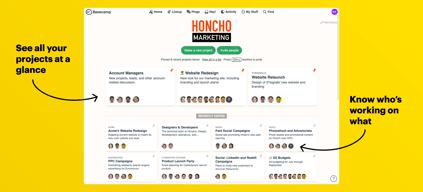
I like that Basecamp makes it easy for remote teams to communicate and accomplish goals. I particularly like the chat function to message team members in real time, and message options to send a direct message to individual team members--so that you're not adding to and confusing group thread. Also, I like the "homepage" that you land on when you log in because it gives you a helpful overview of all of your projects--so that you're reminded of what's on your plate. And I like the drag-and-drop document function. It's just plain fun to drag documents into projects, and it's easy to find them. I also love the search function--very helpful if I know the topic I need information about, but can't remember which project includes that topic.
I dislike that there's no pop-up (I don't think there is, anyway) to alert you when someone chats you. I'd like some type of pop-up function so that I see a chat or direct message immediately. Getting an alert email is helpful, but sometimes I don't see the email immediately and so don't respond right away.
I've realized that Basecamp makes it easy to idea share. I'm in a few groups where we just share ideas, tips, best practices, and resources on content creation. Basecamp makes it easy to store all of that in one place and it allows us to avoid clogging up our inboxes with individual emails and long threads that can get confusing.
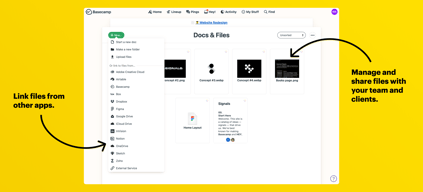
It helps us organize our projects and keep track of our teams progress. It also allows us to share information easily within one platform instead of needing to use google drive and Dropbox.
The formatting can be a little clunky but it’s great for communicating.
Keeping everyone’s work, messages and files in one location.