

Unclaimed: Are you working at Basecamp?





Basecamp Reviews: 4.1/5 — Solid Choice
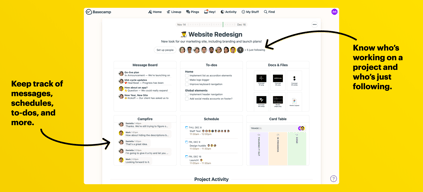
Basecamp has evolved as a project management platform since its launch in 2004 but its mission to help remote teams stay organized, productive, and efficient remains. One new feature that Basecamp recently added is called Basecamp Hill – a visual representation that divides the component of a project into a phase of uncertainty, unknowns, and problem-solving (uphill) and a phase of certainty, confidence, and execution (downhill). This is on top of Basecamp’s core features which include a Message Board, To-dos, Calendar, Documents and Files, Group Chat, and Automated Check-ins. It’s a top-down and bottom-up platform for everyone in a business or organization – from proprietors and C-level executives to project managers and individual team members.





| Capabilities |
API
|
|---|---|
| Segment |
Small Business
Mid Market
Enterprise
|
| Deployment | Cloud / SaaS / Web-Based, Mobile Android, Mobile iPad, Mobile iPhone |
| Support | 24/7 (Live rep), Chat, Email/Help Desk, FAQs/Forum, Knowledge Base, Phone Support |
| Training | Documentation |
| Languages | English |
Basecamp Pros and Cons
- Excellent for schedule and to-do list management
- Automatic check-ins and group chat for remote work
- Helpful message board
- Useful for finding crucial documents
- Easy and customizable environment
- Requires third-party integration for time tracking
- Features need to be a bit more flexible to achieve better functionality

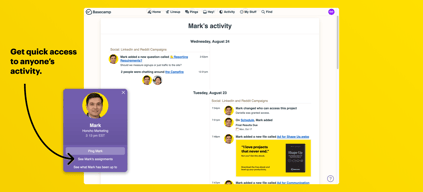
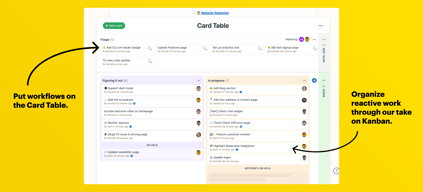
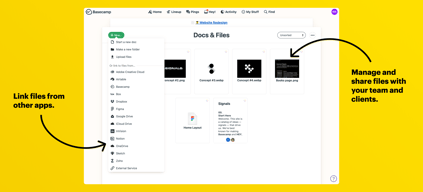
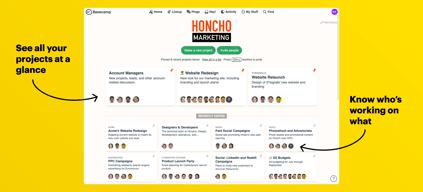
Compare Basecamp with other popular tools in the same category.
My team used it to manage communications, tasks, and projects.
Sometimes, it was unclear which project or task I was replying to on a thread.
Basecamp has saved my team and me a lot of time not having to write emails for everything. It has also saved clutter in my email inbox. We used it to manage mobile app testing projects.
It is a Unfriendly tool which is useful for both manager and the Workers, This tool is a modern way of agile and sprint management, on top of this it has all the tools needed by the user for his day to day activities in the organization, such as chatting , group chatting, call's and conference, task and bug creation, groping the workers into teams and projects, and it has much more interactive things in it, the auto updates collector feature ensures every one updates there status by the EOD, it gives organization wide visibility, we can reduce the cost by cutting down different tools and use the consolidated basecamp,
There is a lot of learning to be done in this tool, Need much more configurable options like in jira, not always, but some times the UI hangs
we are a product pricing company, using basecamp we drive our sprint activities, using this the users bandwidth is optimized, and can concentrate more on development rather then spending time on scrum calls

I like the message board and to-do features. The message board was a great way to consult others regarding my work. The to-do feature was a useful checklist that helped me see how far along I was on a project and how productive I am on a daily or weekly basis.
I dislike that it can easily get clunky if no one is putting time in to organize everything.
The main problem I've solved using Basecamp would be having a hard time getting feedback from my team. When I used Basecamp, I didn't see some team members that often. It was hard to reach them, but they would use Basecamp frequently meaning I could get feedback within 24 hours.
I like the way how Basecamp has combined the functionality of group chatting like slack messenger, calendar, drive like feature for file sharing and task management tool etc in a one single well organized platform, supports third party integrations its open culture style is one of the best, so that one can see what others in the organization is up-to and be well updated, automatic check in feature ensures that everyone updates there daily statues, we can do much more in this tool , social media stuff's like posting, commenting, liking, feedback, survey etc, we can maintain teams and projects inside which we can have all these functionalities within the scope i hope base-camp incorporates much more in this tool, like maintaining employ hierarchy etc..
I don't see effective custom dash boarding like we have in jira, there is lot of learning curve for the administrator and a little for the end user
we are mainly using it for team management, in which we manage the tasks and we us it for chatting and collaborations
I absolutely love how user friendly it is. I had a group of much older employees that had no problem learning how to navigate the program and access the customer profiles and then record updates and new data.
I strongly disliked when they updated to a new version of the program. Sometimes new isn’t always better and this was definitely the case with Basecamp. I felt as if the updates actually slowed down the features I was using the most.
Keeping the records and data of all of my customers organized in one place.

I like that it gives people from all different companies and agencies the ability to collaborate. Also, appreciate the ability to respond within the website, app or by replying to the email. I use it to work with different human services agencies so it can help when trying to brainstorm different items or auditing.
It feels discombobulated. Sometimes multiple conversations would be occurring, and it can make it hard to follow if you are not on the website or the app. Using the digest option to the email can help, but it still doesn't flow as well as I could like. I would also like the option to select whom you want to see the post or select specific people to address the message to, like a private message board.
I work in the world of supporting adults with intellectual and developmental disabilities on the quality assurance side. The cloud database that we use, Therap, uses this to help all quality assurance Therap users as a central brainstorming and sharing of ideas and helpful tools. It has been extremely useful in connecting with other agencies across the globe to implement tools that work for them and sharing things that I have seen work successfully.
Basecamp is an easy and reliable way to share information with large amounts of people. It is very convenient to have all communication and files in one place digitally. The notification system makes it easy to make sure you’re not missing anything.
Could maybe be more intuitive in terms of setup and navigation, but otherwise suited the needs for our organization.
Communicating important information to stakeholders. Being able to select who needs to see what information. Store all information in one spot vs. searching through emails. Available to login from anywhere or the app!

Basecamp allows me to organize my team's projects in an efficient way, ensuring that our tasks are up-to-date and our time is not wasted slugging through emails and meeting notes. Basecamp's project management solution is an effective way of running the show.
As Basecamp upgrades its services, there are sometimes features in older versions that are left out, such as time tracking and different file management solutions that my teams have found particularly useful in the past. I wish that each version of Basecamp came with the same features throughout or that we could add features we wanted via modules or add-ons instead of deciding which version to use based on the features alone. We want the most up-to-date version, but we also want leftout features. This is something that I have expressed to Basecamp directly several times.
Basecamp allows me to manage my team's projects, see progress on agendas and keep a general eye on the status of my department's work. This helps me as a manager stay on top of where my employees are with regard to their work, and also allows me to take this information to my superiors without constant back and forths with my staff wondering what the status of certain projects are.

Task tracking and chat windows for specific projects are really useful. We used it when managing third party agencies and found it very useful to store all files and conversations relevant to it in one place. The to-do lists and being able to assign them to teams is very useful. It's at a glance project management.
It is a little bit self contained, while the documents etc... are very versatile (many formats are compatible) you are kind of stuck to a desktop device for anything large.
Managing remote teams and organizing all of the files associated with large projects - in our case we managed website builds through it.
It is great to be able to create to-do lists and tick off tasks as you go. The collaborative nature of the platform means that everyone involved with a certain project can view the to-do list and clearly see who is responsible for the completion of certain tasks. Automatic check ins are a great way to remind everyone to provide a regular status update, meaning that the team can clearly see the progress that has been made. I like that there is both the Campfire feature and a more formal message board. The Campfire area is a great way to chat informally about ideas before nailing down a more formal plan. The whole interface is laid out very nicely and it is an efficient way to manage multiple projects in one place.
It can sometimes be slow to reply to someone's message or status update.
Basecamp has provided us with a way of organizing projects that we didn't have before. Rather than discuss individual projects on an internal chat platform, Basecamp allows everyone who is needed on a certain project to be added so that everyone can stay up-to-date on the latest developments. Before, poor communication meant that relevant people were sometimes missed from emails or chat messages, but now, everyone is notified in Basecamp whenever progress is made or something needs resolving. The to-do list feature also removes the need for an alternative job list, putting everything to do with a project in one place.

- 99 dollars pricing works - Short learning curve - Scalable to external users which is helpful
- Pace of new feature development is slow
Team long form discussions and knowledge sharing

I liked the live spreadsheets. It helped when we were all assigned a task to source locations and they were in one place. I prefer other tools for project management and would rely on Basecamp more as a community bulletin board. It just takes too much time and effort to dial in.
I did not like the lay out. Very basic in where to find documents. Also, be best to turn off your notifications or you will have to clean out your email every morning.
That makes the work to let you config and plan your trip and that you can share and use routes from other users. Basecamp provide a central location for collaboration among teams. It also has features for employee engagement outside of their specific job duties.
It is very useful for internal communication and general company workflow.
It can be hard to find which pages are more important for communication. It can be complicated to create a new post.
Ease of communication within workplace.

Supports integration with a wide variety of service (e.g. cloud services such as Google Drive & DropBox), usable free version without any credit cards, practical project management and featured companion mobile application.
Interface especially the reporting section can get better. There is room to improve and adding advanced features. There is a very limited number of projects on the personal plan.
Team collaboration management. Save time and increasing productivity.

The inclusion aspect where you can easily include and exclude anyone in your team as needed, whether they're internal or not. I also like that it's easily accessible remotely and sends the email notifications whenever something relevant pops up. It helps mediate some of the shortcomings.
It's a little disjointed with all the different options and places to comment. Like comments in files, to-dos, message board; sometimes it can be confusing or hard to remember where a particular comment was left.
We're solving our lack of communication with global teams. This has made it easier to collaborate on projects without the need to jump in a meeting.

It is easy to use and has a modern design. It doesn't charge per user and allowed us to keep all our project info in one place.
Lacks some advanced features and Interface can be confusing at times.
Tasks assignment, oversee project progress and client communication.
Basecamp is a great resource to manage everything you need for projects and jobs. I personally utilized Basecamp while training for a new position and it was very handy. Basecamp made it easy to access training videos and activities. It also is one single hub for all of the training documents, materials and videos. It even redirected to Youtube in some cases which was extremely convenient.
I don't have many dislikes for Basecamp. As said previously, I utilized it for training purposes and the only con that I really have, was it was sometimes hard to navigate. Sometimes certain documents may become buried and make them harder to find but I'm not sure if Basecamp is to blame for that or the Project Manager for organizing the platform that way.
Basecamp helps you store all your materials in one space. It helps keep you organized an don track and it's easy to find training materials if you ever need to go back.

Basecamp has really occupied very good features since it was implemented, and has provided the best possible functions to allow compliance with everything promsed from the beginning. I believe that Basecamp has been an extremely complete platform, which had a good performance since it was successfully implemented in our company, since it provided us with everything necessary to make projects of unsurpassed quality. During my experience, several positive factors have emerged which have allowed a pleasant experience during all this time, these factors were: 1.- It provides a lot of diversity with respect to the templates, which allows the user to place the template that best suits the project he will be talking about. This diversity of templates is really unsurpassed by any other platform. 2.- This platform helps me to carry out projects with the help of my entire work team, which allows me to provide them with the permits to edit and manage each project that is being prepared, in order to receive various ideas and points of view.
Basecamp has worked amazingly, far exceeding all my expectations before using it, however, something I did not like about this platform is its operation on my mobile device. The Basecamp App is not optimized enough, because when a project has a lot of information between text and images, the App starts to work a little slow, causing various interferences during the user experience. I believe that this App should be improved, to increase the user experience every day. It is very important to highlight the fact that the Basecamp App would be very useful if it was sufficiently optimized, it would greatly simplify remote projects.
I am very satisfied with all the results obtained so far with the help of Basecamp, this platform has really stood out a lot and has helped us to carry out all kinds of projects within the company I am currently working on. I also consider that Basecamp has helped us to work in a team and to have a greater interaction during the creation of projects, communication is very important during projects, and it is something that Basecamp has taken into account to enhance performance and success of each project. I hope to continue enjoying these great benefits that Basecamp offers me every day.
Basecamp allows you to connect with all your co-workers as well as clients. It enables you to communicate with your team and work efficiently by saving time and also improves the office environment.
Once a group ping is created we cannot add a new person in the ping after that, we have to create a new ping to add that person. Also it works slow in mobile phones as compared to PC. Rest all is good.
With the help of Basecamp i can share documents and images frequently with my co-workers and client who are at distant locations in friction of time which is the best thing. Creating To-Dos and daily tasks in Campfire also helps to maintain track of daily works.
I just like that it actually does what its supposed to do--manage our projects and make us work more efficiently. Its so great at allowing us to track tasks, integrate across departments, and keep everything on pace to finish by deadline.
I do wish sometimes that it was easier to setup tasks within the system. Sometimes it can be cumbersome setting up a project and all of its tasks. Its definitely worth the effort in the end, but could be faster.
Before Basecamp, our projects were everywhere and it was hard to keep track of things. Projects and tasks got lost in the shuffle all the time. Basecamp dramatically improved this problem for us.
All my experience with the Basecamp platform has been considerably good, as a it has perfected the way we create and distribute the various business projects. I believe that this platform is complete enough and yields the essential functions to allow very well designed projects, where information in particular is better organized. Basecamp has very good features that it offers for all its users. During my experience with this platform, I obtained several positive factors which allowed me a correct a performance and an exponential development, these factors are: 1.- Basecamp has excellent templates for each project, these come with a truly innovative design that manages to establish an improvement in the project, makes it much more organized and gives the public a better look. 2.- It offers an excellent team chat, which is very useful for collaboration during the process of creating work projects. This team chat is extremely stable and allows a correct development of group activities.
This platform has left a great performance thanks to its excellent functions, and has provided the best positive factors to continue choosing it, however, several negative factors have also emerged that have significantly affected our development or our adaptation to the platform, these factors are: 1.- Basecamp has an application that only serves to communicate with the team, and not to develop projects. This application is very useful for communicating in any place where the person is, however, I would like the projects creation system to be available, to develop them from any device. 2.- The UI of this platform is what I liked least, since it has a too simple UI, and I would need to implement a more renewed UI, with a better design and provide the comfort that we all need.
Despite all these negative factors mentioned above, we have had the privilege of obtaining excellent results from this platform, since we have had a notable improvement in the creation and administration of projects. Basecamp day by day helps ui create group projects within the company I am currently working on. I am really grateful to this platform, it has had an excellent performance and the creation of projects is much simpler compared to other platforms that offer a service similar to this one.
Basecamp is a great project management software that let internal and external users easily communicate for a project. The app is easy to use, and user can just reply the email from their mail client to log the communication in basecamp.
The email message from basecamp is not able to form as a conversation in outlook, not sure where the problem is. It take me some time to filter and search all the conversation is I don't access to the web site.
We are currently hiring a software house to develop a program to manage our business logic. We use basecamp to as the project management interface between our internal team and external development team. It can track all the conversation between 2 parties to provide a single source of true.

The ability for everyone to contribute to threads and meet deadlines in a hassle free way!
File/ space limitations for users. We typically have to drop in server links to avoid file limit alerts.
Solving: Communication issues between teams Benefits: File sharing, email notifications, assignment capabilities

What I like best in basecamp is that it is vey easy to learn how to use it. Very organized and not complex.
So far, i could not recall any thing that i dislike about this software.
The benefits of using basecamp is that you have the opportunity to work on your projects with your team without even having a physical meeting. All details are complete and very easy to track updates.
Creating projects and being able to organize them.
Nothing. Base camp has all the tools I need.
Creating to dos and meeting deadlines for projects.
I note down few things who make basecamp to smarter 1. Sending Large size data 2. Send messege with your own body or style 3. Add multiple people to In single project 4. Basecamp also give Calendar where you can mention Holliday and evening or upcoming status call.
I really dislike one in base-camp is UI. I thin, you should need to Improve UI Part.
It's give good impact for agile work environment
I especially like the To-Do list format.
There could be better messaging capabilities.
Project management; team collaboration
I like being able to share content to different team members, setting timelines, deadlines, etc.
I don't like that other collaborators need to be Basecamp members in order to use the service. I collaborate with a lot of outside organizations that don't necessarily have access, and I would prefer a more streamlined solution that lets me integrate outside members. $99/month is a big barrier to entry for a service that seems relatively barebones.
We are trying to collaborate on a grant program. The ability for everyone to see what we are all working on is great and allows us to set clear expectations and goals and complete tasks independently.
Easy access through the App, the ability to categorize topics, to pick and choose who gets to see what, to allow clients to use BaseCamp to communicate with staff, one another, and personalize BaseCamp to fit their needs, especially in regards to receiving notifications. I love how you can sync calendars too, though I have not done so yet. I absolutely Love how EVERYTHING we discuss in meetings can be put in basecame in one form or other to reflect back, to confirm, and remind. Too many times we discuss something in the past and it was forgotten by the director, this way its in writing in one spot!
How confusing it is to find a particular message you saw once but cant remember where it was seen the first time. I also dont like the To Do format. Seems that you make a ToDo list then after you write everything , under that box give you another box to fill out with more descriptions and details and then allows in that box to assign it to someone, a date to do it by and who to alert etc. Why not just have all that in the first box to begin with--its hard to relocate assignments with that format
WE are solving client attrition, lost revenue, organizational conflicts, missed deadlines, lost or forgotten progects. I love that BaseCamp can work like an instant messaging, or text messaging, but since its within the Base Camp you can choose to read it immediately or later knowing that its business--in case you dont want to interrupt you private home life with work related things.

I liked that I was able to easily communicate ideas with my team.
I had some issues uploading and sharing different file types.
Our team communication greatly improved with the program, especially since teammates were frequently out of the office.