

Unclaimed: Are you working at Basecamp?





Basecamp Reviews: 4.1/5 — Solid Choice
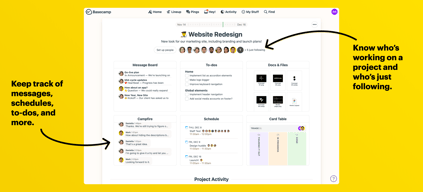
Basecamp has evolved as a project management platform since its launch in 2004 but its mission to help remote teams stay organized, productive, and efficient remains. One new feature that Basecamp recently added is called Basecamp Hill – a visual representation that divides the component of a project into a phase of uncertainty, unknowns, and problem-solving (uphill) and a phase of certainty, confidence, and execution (downhill). This is on top of Basecamp’s core features which include a Message Board, To-dos, Calendar, Documents and Files, Group Chat, and Automated Check-ins. It’s a top-down and bottom-up platform for everyone in a business or organization – from proprietors and C-level executives to project managers and individual team members.





| Capabilities |
API
|
|---|---|
| Segment |
Small Business
Mid Market
Enterprise
|
| Deployment | Cloud / SaaS / Web-Based, Mobile Android, Mobile iPad, Mobile iPhone |
| Support | 24/7 (Live rep), Chat, Email/Help Desk, FAQs/Forum, Knowledge Base, Phone Support |
| Training | Documentation |
| Languages | English |
Basecamp Pros and Cons
- Excellent for schedule and to-do list management
- Automatic check-ins and group chat for remote work
- Helpful message board
- Useful for finding crucial documents
- Easy and customizable environment
- Requires third-party integration for time tracking
- Features need to be a bit more flexible to achieve better functionality

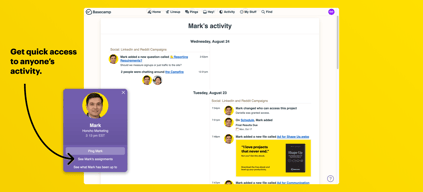
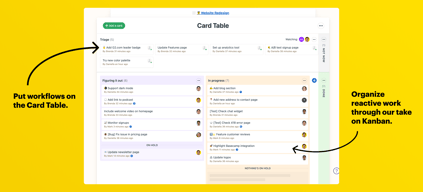
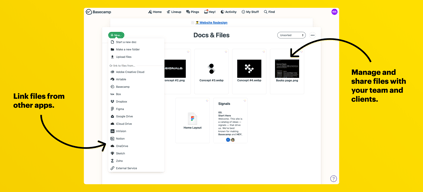
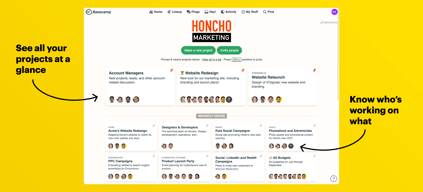
Compare Basecamp with other popular tools in the same category.
This is a great way to push info to all of your teammates. It also allows managers to check in on tasks.
The notifications were super annoying. I got emails every day. And the problem with it is that it augments communication tools we already use. So it feels unnecessary.
We had a problem setting up breakout teams. Base amp allowed us to do that seamlessly.
That it tried to organize projects better than random emails.
It wasn't very intuitive to use and everything felt disjointed.
Trying to organize web design and development projects. I didn't realize benefits as I left the software for an easier to use and more intuitive software.
neat timelines, ability to set milestones, and sort deliverables.
Not a great solution for internal project planning that involves multiple areas of business (accounting, marketing, construction)
Project planning in a team situation
tracks projects, well-known app, colloboration with different team members
complicated to learn, cluttered, ugly interface
project management
i liked that everything could be filed in one location.
As a company it was difficult to track and search for projects
It was easy to upload documents and share them for our redesign
I like that you can collaborate with people across an organization and keep everyone in the know.
Incredibly difficult to find what I'm looking for. I'm part of many projects and there is no search function to find a certain task or thread. I have to hope that someone pings me or dig through all my projects to find what I am looking for. I also dislike that people can assign you a task and due date without you confirming it.
Collaboration and keeping the entire team in the know about projects
They really know how to maximize a metaphor
Too many different features means important information gets scattered
A shared calendar is helpful
Centralized communication. We were able to track progress on delegated tasks.
Not very intuitive. Learning curve for new team members had a negative impact on contributions.
Drafting a business plan. Centralized area to delegate and track tasks.
That everyone gets to see all the files uploaded onto Basecamp and comment on them.
There is no folder system, so it's always a task to go through individual files.
We use it regularly for various projects. It's great for coordinating various people working on different tasks within the organization.
Ease of use, easy to move the tasks around.
no easy way of changing the UI of the line items Doesn't foster communication within teams not an easy tool to integrate with MS suite of applications
digital strategy
Daily notifications. But awkward among users. Something missing to the concept.
Requirement to log in each time. Notification emails should be in different format.
Group activities and task lists. Action items to be performed.
Team collaboration when everyone is using the tool
Difficult to get user adoption to maximize usage
We are trying to manage several projects on basecamp
Basecamp offers excellent service and user support; they release a regular stream of updates and the user interface is intuitive enough that even my most technology apprehensive clients have an easy enough time using it.
Instead of maintaining a single development trunk, Basecamp has a problem with releasing major updates as entirely new, yet mutually exclusive, platforms. As a result, migrating projects is a nightmare and with every new major release comes an entirely new pricing structure. Those new pricing structures always favor large users; meaning, if you need less than a few dozen projects, you end up getting stuck with a 30 percent or more price hike. At this point Basecamp 3's entry level price point is unrealistic.
Basecamp is good for coordinating client/provider communication and the integration with email client response functionality makes clients more apt to use it.
Very easy on the eyes. The layout is dynamic and easy to edit.
Workflow, how to close out a task isn't really apparent. Even if it is only an admin level capability.
We are using it for workflow and assigning tasks to employees. Tasks don't get lost as easily (such as in a email inbox).
It worked pretty well as long as there were 5-10 employees within the company. It's affordable and easy to manage, and I'm sentimental about it as it was my first tool in my first job.
The bigger the scale, the more significant the communication problems using Basecamp. Also, the UI was always a bit heavy for me, the colours etc. It wasn't great to start the day off looking at Basecamp.
It addresses the communication matter within the company, and that's the first tool we used, the to-do list. It helped us open our minds to a different management patters.
Having a central place to meet for work tasks
Just didn't care for the layout and design.
None, that why we are using Monday

The only main seller for Basecamp is in its name and history in this space. That's about it. Basecamp was revolutionary when it first came online and sure, it probably helped organize and build successful companies in the past. Rework was and still is a great book by the founder of Basecamp but it seems that after the book's release, they failed to follow or even eat any of their own "dogfood". A rough breakdown IMO of their success and downfall... 1999: Founded 2001 - 2007: Cool stuff 2007 - 2013: Golden Years 2013 - 2017: The struggle into stagnation 2017 - Present (2022): Dinosaur era / Extinction
* This is the nostalgic old tool that longtime marketing managers and PM's rebuy whenever they need to quickly source a project management tool. It's just familiar and routine to them. It's god-awful for the actual people working in the trenches (I'm forced to use it for a sub-contract client's projects, which has severely impacted my time and broken my project management processes. I use Plutio). * The product and UI have not changed one bit to adopt new and proven UI practices * No noticeable updates. It resembles those times when you go to visit your great uncle's house and it still has the same smell, decor, layout, etc. * It's a one-way, non-customizable experience. You either stick to using their concrete framework and lack of customization options or you can't play in the Basecamp sandbox * Chat function lacks any editing, rich text, or reaction features (emoji's are here because they 100% have become a faster way of communicating thoughts) * Highly unorganized linear flow. For example, if you have to find a document or thread topic from weeks prior, you have to go back up the stack and then navigate downwards through other modules, rather than just have a stagnant floating menu or variables * Chat has no code or additional text formatting options * Markdown is not supported * Basecamp's website is really slow and the lack of a modern JS static framework is noticeable. This is both time-consuming and highly carbon inefficient when it comes to a website and server having to reserve all of the page's files when a new tab is opened. Switching between pages is obnoxious * File uploads and downloads are slow * Notification emails are often lost or not sent (lack of granular preferences too) * Integration with other file management solutions seems non-existent * Search feature is very limited and not regex friendly, no advanced filter options * Repeating from another user's review: "Team Activity overview on any given project seems to be about 70% whitespace. You have to scroll quite a bit to see everything." * No actual desktop client so you're forced to use it in a browser * There are few integrations so tracking projects and work requires a ton of copy/pasting and using other tools alongside this * Overpriced
They still exist for old-school managers to satisfy their familiarity with web 1.5 products. BASECAMP DOESN'T BENEFIT my company. It is eating away at our internal time and productivity.
It's easy to share a status update with people or create a new board to organize a project. Everything is shareable internally as a URL and you can customize the layout of things pretty easily.
It is terrible for organizing lists, filtering through tasks, collaborating on large projects, etc. The UX of this product is dated and very hard to navigate once you put a lot of projects / updates in it.
It is supposed to help our company work asynchronously, but I'm fairly tech savvy (for a non-engineer) and it has caused more of a burden for me than it has been a help.
Basecamp was rather difficult for me to use. It was not simple or user-friendly. I did not understand why my organization needed to use it instead of just using Google Docs and/or GroupMe to stay in contact.
It is not simple, at all. I did not like the interface of this application. I believe that I am very tech-savvy; however, this application was not user-friendly. I dreaded using this app and refused to use it all together.
We were using Basecamp in order to assign tasks to an upcoming Urban League Christmas Gala event. I truly did not see a use for it when we stayed in contact and kept each other up to date using GroupMe.

Unfortunately nothing. It was handy about 10 years ago. But over the last 5 years, there have been so many alternatives (that are far superior).
How some companies can still use older versions that what's actually current. It gets confusing switching between the different versions on different projects.
Nothing
Sharing access between users is straightforward, and the search functionality is really detailed.
There's almost too much flexibility with organisation and management, leading to messy systems with no standards, and then not enough functionality beyond basic lists and text. More recently their internal policy has made a marked departure from our own company values and it has soured the experience of using the tool at all.
We've used Basecamp for a long time to manage projects in dedicated folders, and it has been helpful to have a directory of documentation for projects. We've also used Campfire for live chat.
The only thing that seems to work well are the "to-do" lists and automatic check-ins. However, any project management software is going to have checklists, and there's plenty of automated check-in software which integrates into other tools (such as Slack). For some people the lack of organization in basecamp is a plus. You can put things wherever you want. But unless you and your colleagues are good at planning your own organization rules and following unenforceable rules, everything will be chaotic within a week. It's really easy to setup basecamp and have something workable within a few minutes. If you're a startup with 1-5 people this might be a good tool to slap together an MVP.
There are so many things. * The product feels abandoned. I haven't noticed a single update in a year. * Highly-opinionated flows. If you don't subscribe to "the basecamp way" of doing things (aka: Shape-Up), you're going to have a bad time. * Chat has no edit feature in the event you make a typo, or press enter too early * Chat has no reaction options (emojis). This leads to a chat experience where you're encouraged to be less expressive with one another, and requires you to reply to acknowledge something (which pings everyone). * Chat formats all multi-line messages as quotes. Sometimes it seems to randomly nest quotes. * Chat has no code formatting options * No syntax highlighting anywhere * Markdown is not supported * Website is slow. Switching between pages is obnoxious, so I always end up with 50 basecamp tabs open. * File uploads are slow * File downloads are even slower. I've waited more than 10 minutes for a 30 second screen recording to buffer (and I'm on gigabit internet). * Search feature is very limited * Team Activity overview on any given project seems to be about 70% whitespace. You have to scroll quite a bit to see everything. * No swimlanes to organize tickets as progress is made on them. We've had to integrate a bunch of bots to simulate the behavior by moving things between custom task lists. * No real desktop client. There's an electron app which locks you into their website, but it doesn't do anything special or load anything faster. It seems like basecamp may have been a good tool in its current state about ten years ago. However, since every company developing software already uses some form of git, the features of github, gitlab, etc. and they have almost all the features as basecamp, there's no reason to use basecamp. Your git platform of choice + slack is going to have more features, and odds are you're already using them.
We use basecamp for project management, permanent communication, documentation, and product development. From my understanding, the company I work for now used to have no project management software before they introduced basecamp to the mix. In that regard, basecamp is better than nothing. But beyond other tools I've used in the past, there are no noticeable benefits.
I guess it is fairly simple to use and organize. I also like that you can customize your dashboard to see all of the boards relevant to you and hides one you no longer wish to see. The internal chat function is also helpful when reminding someone of a specific deadline or issue.
This program does nothing special. Basically all of the other programs that are used throughout the day include services that encompass all that Basecamp does making Basecamp redundant for many things. Support was tough to get in touch with - I actually fixed my own problem with a quick google search while waiting on a chat response from support. I also had to turn off notifications. Even if nothing happened, I would get 2 emails a day updating me on all things that happened within Basecamp.
Basecamp mainly solves issues with communicating with our Executives. Certain departments use this for organization and sharing specific dates, documents, and items with members of the executive team all in one platform. Basecamp also improves organization for some of our departments that do not need access to our main document storage platform. This, in turn, also makes the search function more easy to use.
Basecamp is helpful to keep track of workflow. It is also helpful to know the progress of projects and status of completion.
I think basecamp is messy, it is not very user friendly and requires too much time to enter projects.
We use basecamp to keep track of projects and avoid tasks falling through the cracks. I realized that it is beneficial because we have limited email space and communicating through basecamp saves email space.
The use of notifications is good and setting up deadlines. This gives everyone accountability.
Basecamp is not my favorite platform to use as it looks very old school. There are other platforms I prefer that the teams find easier.
The agency used to have Basecamp, but we have shifted away as it was not useful and we moved over to other easier methods.
The communication tracking in the software is helpful. Allows for easier tracking of participation.
Not much, I was a third party on a project
We were on a project and the vendor initiated the program
I would pretty much consider Basecamp as essentially a Forum. I am able to create and comment on message boards, upload media like documents and how-to tutorials and more, and I am able to integrate it with my Outlook and Calendars. It also has a platform for an online group chat that allows me to talk with other co-workers who are online which is handy.
I do not like how this program costs me $99 per month. It is just unnecessarily expensive. All of these products nowadays have recurring subscription costs and to be honest, it is getting annoying, especially when they cost as much as this does. For something like this, I wouldn't even want to spend more than $50 per month. We have enough expenses as it is and to have something like this that raises that expense costs up by a lot is just not even close to good.
This program allows us to be more productive and keep things in order, keep track of things, and more. It allows us to build our own forum for our company and collaborate with and advance our output. Compared to some other competitors of Basecamp, we are also saving a lot of money as others tend to charge multiple hundreds for the same or worse.
Basecamp is both freeform and structured. It gives us real flexibility in how we organize shared information on multiple projects and programs.
I would love to see a more comprehensive search function. Sometimes it is difficult to locate older files.
We just had folders of data before and now we have a real system for storage and collaboration, Basecamp has saved us several hours per day per person.
Organized themes / topics for collaboration
Hard to navigate between sections. Not great visibility.
Was fine for housing meeting notes and agendas for historical reference
You can keep project assets in one place
I receive too many emails on subjects I don't need to be concerned about.
Keeping everyone somewhat on task.