

( 224 )
Unclaimed: Are you working at BlueJeans Virtual Events?
BlueJeans Virtual Events Reviews: 4.4/5 — Solid Choice
BlueJeans is a cloud-based video conferencing platform that was built to facilitate communication and empower users to collaborate seamlessly on a digital workspace. The app was recently acquired by Verizon, which led to the software offering more advanced features and tools including webinar and virtual event applications in addition to its virtual meeting app. It’s also a pioneering platform that connects desktops, mobile devices, and room systems into one video meeting

| Capabilities |
API
|
|---|---|
| Segment |
Small Business
Mid Market
Enterprise
|
| Deployment | Cloud / SaaS / Web-Based, Desktop Mac, Desktop Windows, Mobile Android, Mobile iPad, Mobile iPhone |
| Support | 24/7 (Live rep), Chat, Email/Help Desk, FAQs/Forum, Knowledge Base, Phone Support |
| Training | Documentation |
| Languages | English |









Compare BlueJeans Virtual Events with other popular tools in the same category.
allow thousand of people to connect at the same time allow multiple of features content sharing, meeting recording, text-based chat, and support for multiple participants
latency issue is there .video lacking problem is the main problem
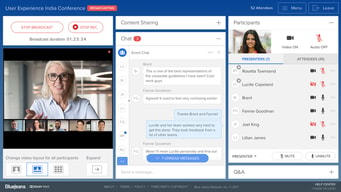
High-quality audio and video streaming is provided by blue jeans even when more than ten thousand people are connected at the same time.The platform provides interactive features such as live polls, Q&A sessions, User-friendly interface
BEST ABOUT BLUE JEANS IS IT OFFER A COMPETITIVE WEBCASTING AND GOOD STREAM LIVE VIDEOS,
LATANCY ISSUE IS THERE .NEED IMPROVEMENT IN IT
we can use it to up to 50,000 attendees, stream webinars via video, wit good quality streaming

Good vedio quality and chat option is the best thing
Latency issue is there .they have to work on it to fix that issue
allows businesses to host events of up to 50,000 attendees, stream live videos, and generate meaningful analytics reports.

Efficiency, smooth live events , easy to connect and reliable . It's a big virtual platform and easy to operate.
Nothing face like that .but yes sometimes connection problem user faced
Long distance meetings issue now resolved with virtual platform
It provides with an Increased Conference size and also is a cost saving and efficient tool
The one thing I faced is that the software becomes glitchy when trying to connect via external platforms. Also, when the software update comes, it delays the meeting time.
conference attendee size is huge wrt other playforms
BlueJeans Virtual Events has truly transformed the way we connect and engage in virtual gatherings. The platform offers a robust set of features that make hosting and attending events a breeze. The interface is user-friendly and intuitive, allowing participants to navigate effortlessly through sessions, breakout rooms, and networking opportunities. The high-quality audio and video streaming ensure a seamless and immersive experience, even for large-scale events. The interactive tools, such as live Q&A sessions, polls, and chat functions, foster engagement and meaningful interactions among attendees. Furthermore, the platform's customizable branding options provide a professional and visually appealing environment for events. BlueJeans Virtual Events has become my go-to choice for hosting successful virtual gatherings.
While BlueJeans Virtual Events offers a reliable and feature-rich platform, there are a few areas that could be improved. One aspect that stands out is the limited flexibility in customization options. While the branding options are available, there could be more room for event organizers to personalize the virtual environment to align with their brand identity. Additionally, although the overall performance is stable, there have been occasional instances of audio or video lag during high-traffic events. Lastly, the customer support response time could be faster, as it sometimes took longer than expected to receive assistance. Despite these minor drawbacks, BlueJeans Virtual Events remains a dependable choice for virtual gatherings.
BlueJeans Virtual Events benefits me as an attendee and event organizer in several ways. As an attendee, I can access and participate in a diverse range of events from the comfort of my own location, without the need for travel or geographical limitations. It allows me to engage with experts, network with peers, and gain knowledge and insights without the constraints of physical attendance. As an event organizer, BlueJeans Virtual Events simplifies the planning process, reduces costs, and expands the potential reach and impact of my events. It enables me to create engaging and interactive experiences for participants, fostering meaningful connections and collaborations. Overall, BlueJeans Virtual Events enhances convenience, accessibility, and engagement, making it a valuable solution for both attendees and organizers.
The Video quality of the event, even while transtioning from one video to another it was absolutely smooth
Everything worked well and there was no video isssues / buffering for the entire event.
Because of Pandemic and people working remotely it is difficult to bring the same mind people for the physical event, hence participation from the global audience is also a limitation and BlueJeans virtual event is really helpful to address these challenges
I'm writing this as an individual, not a company representative. We use BlueJeans events for our company meetings and it's a very effective way to get lots of people on at the same time. It's also very simple to use and the sound and visuals are great. I also like the music before and after the events.
It would be nice to be able to get the attention of the speaker while you are attending the meeting.
I attend company meetings and it helps to bring people together.
It is a very reliable platform that offers a lot of features other than video conferencing, you can capture highlights at the end of meetings, I like that feature, plus how reliable it is for creating events.
Great platform no dislikes for now and that's great :)
It has helped a lot in collaboration between team members in real-time, creating events quickly which means it has been a great solution.
BlueJeans is a very easy-to-use platform, even more than the most popular ones on the market. You don't even need to install it when someone shares the link to join the meeting. You don't need to configure hardly anything to start using the platform, and even less when you are not the host of the meeting. The tools for managing the conference are perfect, even for handling meetings with a large turnout. It has helped me to have uninterrupted team meetings.
The notifications don't work perfectly. They are not really bad, but we resort to other means to inform about the business meeting so that no one is left out. I think it is an easy detail to fix.
The software is perfect for attending all the conferences that are done in the company: meetings with my team, oral reports for superiors, client progress, etc. There are exciting features that you should use for any business meeting, whether whit the team or with clients: - Record the conference to have evidence of what was discussed. - Activate subtitles to facilitate understanding, especially if there are several participants.
I like this platform because it is very efficient and encourages online communications through easy coordination, it is fully functional on many devices and browsers. It allows me to me easily schedule meetings and invite members to join from any device. I liked being able to share items, set dates, and coordinate meetings online.
The initial setup is good for new users however, I wish it would show more details and be easier to use at first.
It helps us maintain communication in our organization by planning our organized online meetings and video conferences, and helps us a lot with effective collaboration in other departments.
I liked this platform, it is very good and reliable for scheduling upcoming events quickly, I liked the options including specifying the time and duration of the event, I also liked the virtual Q&A, it is one of the best conferencing tools I have to exist.
I like this tool and I don't have any dislikes, everything is fine for now.
It is used almost daily for meetings with the marketing team, and also for events and webinars, it is an excellent solution.
Many work experiences with tools have shown me that BlueJeans is the best software for having a videoconference. BlueJeans is an easy-to-use platform. It works well because you don't need to have any knowledge of technology to use it very well. And it has an attractive dashboard. It can also manage meetings with large audiences. This feature is perfect for some events and working with a big team.
We have experienced problems with the notifications. It sometimes does not arrive in certain areas. It has made it difficult to use the software because we needed to notify all members by other methods about the meetings.
High-quality streaming technology makes it easy to increase productivity. Our communication is soft and clear when we use BlueJeans and its functions. We use this platform as an online programmer as well as a pollster to answer immediate questions about our products: we use BlueJeans to program events, online meetings, and videoconferences. In addition, the live stram will able us to know about our auditions and their opinions quickly.
Many virtual event solutions are available, but BlueJeans has raised the bar with care and a robust infrastructure. The performance is more significant; it allows an incredible audience and a large number of speakers. Features are many, from music on hold between lectures to high-quality streaming.
The only thing I don't like is the individual room cost per year for Microsoft Teams integration. Still, the prices are compatible with its competitors, and the quality is much higher.
We get better connections at significant events, with many audiences and a lot of speakers. The control and organization of the event also improved significantly.

I love the screen sharing feature, whiteboard feature, and the quality audio/video streaming that Blue jeans offer to its customers. Also Blue jeans has the best customer service ever! Love that about them.
Sometimes the quality of audio highly depends of the internet bandwidth, this annoys me a little while I'm in meetings and the audio or video suddenly drops off completely and I have to re-join again.
I'm currently solving the issue of not having the proper software to host virtual conferences and webinars. Blue jeans offer software with a wide range of features that helps us to carry out these activities with the maximum advantage.
There are many best feature, but the most important is the easy recording feature and q&a and poll feature. It also provides one to one meeting option. It is chrome, safari, and firefox compatible. It offers a whiteboard sharing option if we need to explain things.
It is not so known in the nonbusiness world like schools and colleges. One reason for not being so popular in the nonbusiness world is 25 people restriction at a time. Sometimes it lags, and the screen becomes unresponsive. Steaming options depend on employers and clientele with their streaming speed, and they decide the quality of the stream.
It has been beneficial during covid times for office meetings and sometimes while talking to near and dear ones. now it has become a regular application in our mobile phones.
Cost-effective prices that has made it easy to upgrade and bring the benefits of video meetings across offices BlueJeans has made communication easy and simple since it supports reliable multi-party events livestreaming Has ability to adapt to changing network conditions supporting multiple meetings sequentially
Had difficulties using it for the first time on my laptop but I alternatively used the mobile version
Removed barriers between video conferencing systems, platforms and devices Easy adoption allowing employees from remote offices to meet face to face through video enabled device Managers and employees connect for meetings without requiring room reservation

What I love about BlueJeans virtual events is the ability to hold a large town hall and have real (organized) communication with attendees.
There isn't a built in ability to have virtual backgrounds.
BlueJeans virtual events enabled hospital wide communication and interaction as a substitute for overly formal emails. This kept interactions personal.

Blue jeans is a fantastic platform that allows presenters to interact over videos. It is a great, especially during this pandemic, for presenters to stream their event and interact with viewers. It's useful for making calls and conducting meetings as well.
I dislike the fact that you cannot share files and recordings for the me plan. I also dislike that the high-quality steaming options are limited by employers and clientele with their streaming speed.
The problems we are trying to solve with bluejeans virtual events are being able to have events and meetings during COVID times. It completely takes out the need to do in person meetings as of late due to everyone having to be remote during the pandemic.
It is easy to set up and invite participants, and the video is always high quality and very intuitive; it is reliable and high quality too for video conferencing and webinars. It is the most useful tool we have had at the moment.
I like everything, but sometimes there are some details that I don't like, it tends to be slow when there are a large number of participants, and sometimes we cannot enter the platform.
It is perfect for people from all walks of life, and we are really using it, and it has been more than useful, and we received a lot of benefits, and it was the solution to our problems when it comes to having regular meetings and attending webinars.
Dividing virtual meetings into smaller groups for enhancing discussions. Participants can freely and flexible choose to move in or out of sessions. Facilitates interactive virtual hangouts among employees
This program has no waiting room but it is not much of a big deal because we don't need to use the waiting room as such. May be in future improvements it can be included we may need to use it
Paved way for us to simplify our recruiting efforts for our remote teams. The quality of calls vastly improved and we were able to hire at a higher ratr due to increased time savings
BlueJeans makes tele-events super easy. You do not need to be a tech wiz to use this platform. I highly recommend it for your next remote event. Beats its other competitors.
Again I think Blue Jeans as a platform is not as well known. This issue is not a BlueJeans software problem - it's more of a marketing issue. This platform should be more common.
I'm an actor, and BlueJeans Virtual Events makes auditioning from home more accessible than ever! I highly recommend for any who works in entertainment as this platform is highly user-friendly.
I like that solution because I can use it to share screens and chat, and it ends up being very useful, especially in difficult times, I like the quality and stability of the sound, it is excellent for events and also has the alert capacity, and that reminds me of any events.
I would like to see a more beautiful and realistic interface. The rest is perfect.
It is used all the time for events and to be able to communicate in meetings and understand projects.
HD video with Q&A, rich moderator controls and polling. Multi-way idea exchanges, audio and content sharing amd live streaming capabilities
Not very popular among many businesses. Some have never used it and takes time to explain how it works. Wish they could try it out themselves and see its capabilities
Scalable way for our remote teams to communicate more efficiently and expanded our current video infrastructure. BlueJeans Virtual Events quicjly became the invaluable means for conferencing

For the period we have acquired this product our virtual events have been running smoothly. It has great and flexible user interface that our members find it easy to follow and contribute to our virtual meetings. It keeps on giving updates on agenda discussed on a particular event and set date of convening another meeting.
The product performance has been reliable and each team member in our organization has been satisfied. All the included features correspond effectively with our virtual event activities.
It helps us during learning programs when updating our customers on mortgage financial changes. Customers can easily reach our customer support team and inquire for any information through virtual communication. We have been able to reduce cost incurred during physical trade events especially during this period of the Covid-19 Pandemic.
I like it because it is easy to use once I load and configure it; I can synchronize it without any problem; I really like how easy it is to record a meeting and then watch it again and remember something. It's a nice tool that works great, and I also like that you click on a link and voila.
You've been using it so far and getting excellent service for online meetings, and I have seen anything wrong.
It's great for being a virtual meeting tool because it's been used a lot more than before, its a great conferencing product, and it solves our problems.
It is so simple to use, you just connect to an Internet browser and go even if you have never used video conferencing before as long as you have a Web camera
You may experience some technical issues when the internet connection is poor, therefore it is recommended to have a great internet connection at all times
The executive team is able to travel anywhere around the world and be able to do a video conference. As we hoped for from the start, certainly cost savings and also benefited from additional collaboration
I like audio and video quality which is clear and best among teams. I like the ability to assign moderator, presenter and attendee. Depending on conversation topic, i like the fact that employees can answer questions on a named or anonymous basis.
I'm still in the process of learning the application so i have nothing to point out as a dislike about it.
Ability to have a direct chat with my customers since they are able to sign in successfully with hiccups. The application is very easy to use both for the participants and the host. It is easy for new participants to connect to meetings and it's easy to schedule meetings.
Bluejeans provides a sleek experience during webinars and video calls. I used the product during a lot of team meetings, company-wide announcements and webinars.
I ran into some audio troubles while using it on the Linux-based distros. Additionally, many folks prefer using Google Meet over Bluejeans for a smoother experience which can be definitely implemented.
It has helped me concentrate further during team meetings, communicate well across the team and reduces the stress while using video calls and misconfiguring something.
I find BlueJeans Virtual Events very user-friendly and easy to learn and use. I like how it is easy to set up and invite participants. BlueJeans Virtual Events video quality is always very high making it an exceptional and outstanding application for virtual meetings. When I'm in a call and the wifi disconnect, BlueJeans Virtual Events quickly switches to cellular data.
BlueJeans Virtual Events customer support team is always excellent and it can be used by large groups. Nothing much to point out as a dislike about BlueJeans Virtual Events.
I like how quick it is to start a meeting with BlueJeans Virtual Events. I can send my participants a link and quickly they join the meeting. Video and audio quality is very nice.