
Unclaimed: Are you working at Capsule CRM?
Capsule CRM Reviews: 4.6/5 — Highly Rated
Help your customers and audience make easy work of their sales and customer relationships with Capsule's easy-to-use CRM while you build a new revenue stream at the same time.

| Capabilities |
API
|
|---|---|
| Segment |
Small Business
Mid Market
|
| Deployment | Cloud / SaaS / Web-Based, Mobile Android, Mobile iPad, Mobile iPhone |
| Support | 24/7 (Live rep), Chat, Email/Help Desk, FAQs/Forum, Knowledge Base, Phone Support |
| Training | Documentation |
| Languages | English |

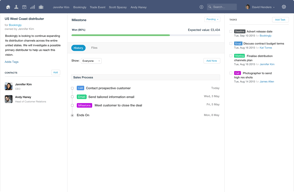
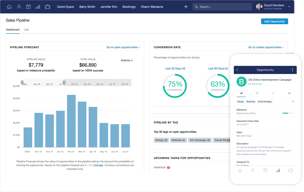




Capsule CRM keeps you on a single sales pipeline until €28 per user per month. The €15 Starter plan raises your contact limit from 250 to 30,000 but does not add a second pipeline — multiple sales pipelines arrive on Growth, alongside workflow automations and most of the AI suite. If your business sells more than one thing in more than one way, that is the number that matters, not the entry price.
- What it is: A straightforward CRM for small businesses, covering contacts, opportunities, tasks, and light project delivery.
- Best for: Small teams who want a tidy, uncomplicated CRM and can live within one pipeline at the entry tier.
- Pricing: Free for 2 users, Starter €15, Growth €28, Advanced €49 per user monthly on annual billing. Verified July 2026.
- The honest catch: The free plan caps at 250 contacts, which is a genuinely small list.
What Is Capsule CRM?
Capsule is a deliberately uncomplicated CRM: contacts, opportunities, tasks, and — from the mid tier — project boards for delivering the work you win. It has been around long enough to be mature without having accumulated the sprawl that makes larger platforms daunting, and it is rated 4.7 on G2 by its own citation.
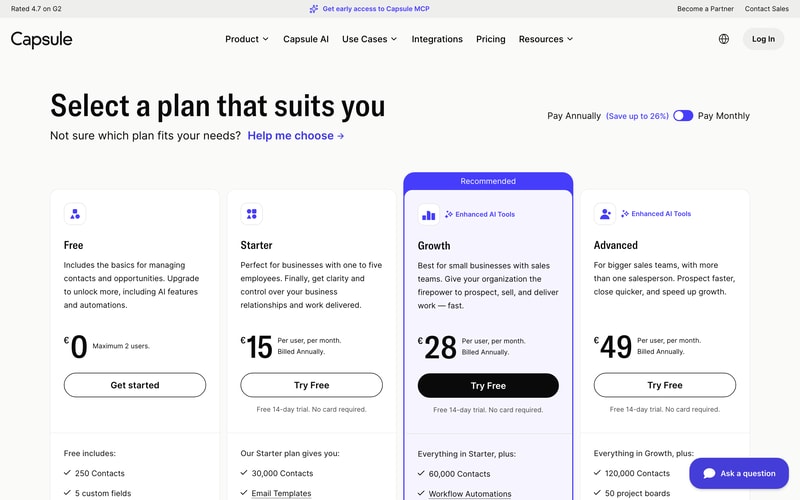
The 2026 product leans into AI across the upper tiers — business enrichment, contact enrichment, summaries, and meeting preparation in beta — and Capsule is currently offering early access to Capsule MCP, which would let AI agents work with your CRM data directly. That places it among a small but growing group of business tools shipping agent access rather than talking about it.
Contacts are the meter: 250 free, then 30,000, 60,000, and 120,000.
How Capsule CRM Works
- Priced per user, per month, with a free tier for up to two people.
- Contacts are the primary limit, rising steeply between tiers.
- One sales pipeline on Free and Starter; multiple from Growth.
- The AI suite lands at Growth — enrichment, summaries, and meeting prep.
- Project management arrives at Growth, with boards laddering to 50 on Advanced.
- A 14-day free trial on every paid plan, no card required.
Capsule CRM Pricing
Captured from Capsule’s pricing page in July 2026 on the euro price list with annual billing, which is the page default. Capsule advertises saving up to 26% on annual billing; we were unable to read the monthly rates directly and so quote only the annual figures the cards label as such.
| Plan | Per user/mo | Users | Contacts | Pipelines | AI |
|---|---|---|---|---|---|
| Free | €0 | Max 2 | 250 | 1 | — |
| Starter | €15 | Unlimited | 30,000 | 1 | Pipeline generator only |
| Growth | €28 | Unlimited | 60,000 | Multiple | Full suite |
| Advanced | €49 | Unlimited | 120,000 | 50 | Full suite |
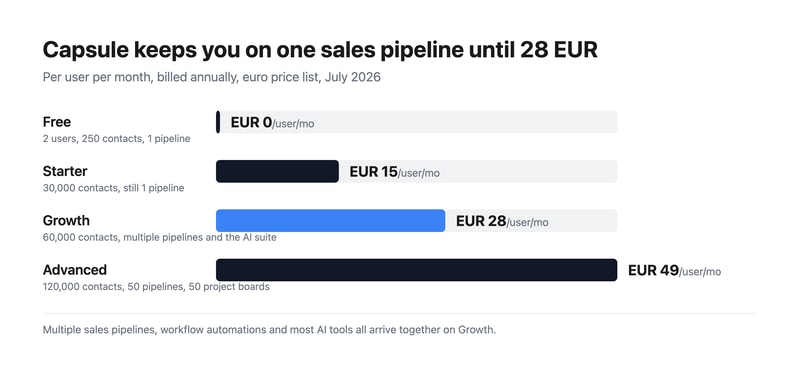
What actually decides your plan:
- Multiple pipelines start at Growth. Starter’s list of additions is generous — 30,000 contacts, email templates, a shared mailbox, premium integrations with Xero and Zendesk, goals, and an AI pipeline generator — but a second sales pipeline is not among them. A business with two distinct sales motions, or one selling to two segments, needs €28 rather than €15.
- The free plan takes two users, which is unusual. Most free CRM tiers are single-user; Bigin’s is one seat. Two people sharing a CRM at no cost is a real proposition for a founder-and-assistant setup — provided 250 contacts is enough, which for most growing businesses it will not be for long.
- Almost all the AI is on Growth. Starter gets the AI pipeline generator; business enrichment, contact enrichment, summaries, and meeting prep all sit at €28. If AI-assisted prospecting is why you are interested, price from Growth.
- Project management is a Growth feature too. Boards, team and access controls, and advanced reporting all arrive together, which makes Growth a much bigger step in capability than the €13 price gap implies.
- The contact ladder is steep and generous. 30,000 on Starter is far more than most small businesses will ever use, so contacts are unlikely to be what pushes you upward — pipelines and AI will be.
- Compare the entry tier honestly. At €15 for one pipeline and 30,000 contacts, Capsule sits above Bigin at €7 for three pipelines and 50,000 records, and OnePageCRM at €8.95 with unlimited contacts. Capsule’s case rests on interface quality and the project layer rather than on price.
Who Should Use Capsule CRM
- Small teams wanting simplicity. The clearest case — Capsule asks less of you than most CRMs and looks better doing it.
- Two-person businesses. The free tier genuinely supports a pair, which almost no competitor does.
- Services businesses. Project boards from Growth mean you can track delivery as well as sales.
- Xero and Zendesk users. Premium integrations from Starter connect the tools small businesses actually run.
It fits poorly for multi-pipeline sales at a budget, where Bigin gives three pipelines for €7; for very large contact databases, where OnePageCRM’s unlimited model is cheaper; and for marketing automation, where Keap or HubSpot bundle campaigns.
Honest Pros and Cons
Strengths
- A free plan for two users, which is rare in this category.
- Genuinely clean interface, with a 4.7 G2 rating by Capsule’s own citation.
- Generous contact limits — 30,000 from the entry paid tier.
- Project management included from Growth, not sold separately.
- Capsule MCP in early access, ahead of most CRMs on agent support.
- A 14-day trial with no card on every paid plan.
Limitations
- One sales pipeline until €28, on both Free and Starter.
- 250 contacts on the free plan, which is a small list.
- The AI suite requires Growth, not Starter.
- More expensive than close competitors at the entry tier.
- Custom activity types need Growth, and custom milestones need any paid plan.
- Monthly rates are not shown by default, only the annual figures.
Capsule CRM Alternatives and How It Compares
- Bigin by Zoho CRM is markedly cheaper at €7 with three pipelines and 50,000 records, and a stronger free tier for a single user.
- OnePageCRM gives unlimited contacts on every plan from €8.95, built around a next-action method rather than pipelines.
- Pipedrive is the pipeline-first specialist with stronger deal visualisation, at a higher price and with no free tier.
- HubSpot CRM has a free tier with unlimited users, and costs escalate sharply once you add hubs.
- Insightly is the closest match on the sales-plus-projects combination, metering records more aggressively.
- Freshsales and monday CRM are the modern-interface alternatives at comparable cost.
For a broader survey, browse our CRM directory.
The Verdict
Capsule is a well-made CRM that knows what it is. It does contacts, opportunities, tasks, and — from the middle tier — the projects that follow a won deal, and it does them with an interface that will not intimidate anyone. For a small services business that wants to see both its pipeline and its delivery in one place, that combination is genuinely useful and not especially common at this price.
The gate to check before you buy is pipelines. Both the free plan and the €15 Starter plan give you one sales pipeline. Starter is otherwise a substantial upgrade — 30,000 contacts, shared mailbox, email templates, Xero and Zendesk integrations, goals — but if you sell two different things, or sell to two segments with different stages, you cannot model that until Growth at €28. The same tier also brings workflow automations, project boards, team controls, and the AI suite, so Growth is a much larger step in capability than €13 suggests. Many buyers will find it is the plan they actually needed.
Two other things worth weighing. The free tier takes two users, which is unusual and genuinely useful for a founder plus one — the binding constraint is 250 contacts, not seats. And on price, be clear-eyed: at €15 for one pipeline, Capsule sits above Bigin at €7 for three pipelines and 50,000 records, and above OnePageCRM at €8.95 with unlimited contacts. Capsule’s argument is the quality of the experience and the project layer, not the number on the card — which is a perfectly good argument, provided you know you are making it.
FAQ
How much does Capsule CRM cost?
On the euro price list captured July 2026 with annual billing: Free for up to two users, Starter €15 per user per month, Growth €28, and Advanced €49. Contact limits are 250, 30,000, 60,000, and 120,000 respectively. Capsule advertises saving up to 26% on annual billing; the cards display annual rates by default. All paid plans include a 14-day free trial with no card required.
How many users does Capsule’s free plan allow?
Two. That is unusual — most free CRM tiers allow a single user — and makes Capsule’s free plan genuinely workable for a founder and one colleague. The real constraint is the 250-contact limit and the single sales pipeline, so it suits a very early business rather than one with an established customer list.
Which Capsule plan includes multiple sales pipelines?
Growth, at €28 per user per month on annual billing. Both the Free and Starter plans are limited to one sales pipeline, so a business running two distinct sales processes needs Growth regardless of contact volume. That tier also adds workflow automations, project boards, advanced reporting, team and access controls, and the AI enrichment and summary tools.
What AI features does Capsule CRM include?
Starter includes an AI pipeline generator, which builds a custom sales pipeline from a description. The rest of the suite — AI business enrichment, AI contact enrichment, AI summaries, and AI meeting prep in beta — arrives on Growth at €28. Capsule is also offering early access to Capsule MCP, which would let AI agents interact with CRM data directly.
Is Capsule CRM better than Bigin or OnePageCRM?
It is more expensive and, for many small businesses, better looking and easier to live with. On raw value, Bigin gives three pipelines and 50,000 records for €7 against Capsule’s one pipeline and 30,000 contacts for €15, and OnePageCRM gives unlimited contacts from €8.95. Choose Capsule for interface quality and the built-in project boards; choose the others if pipelines or price are what decide it.

Compare Capsule CRM with other popular tools in the same category.

Had to email cust service for help,they got back to me and really helped
Have not had any issues and I am horrible at tech stuff
As a carpet cleaner I use it to write notes on customers and what makes then happy so I know each time
Easy to use and flexible options for customisation that suits your needs.
If I have to name one, it would be Capsule hasn't had integration with Xero Practice Manager (XPM).
Helping our multi-industry teams to collaborate in one job/lead management platform

It's user friendly, intuitive and you instantly find your way around the program. Customer support is fast, on point and friendly. The way it connects with Outlook is so smooth and nice.
I can't think of any downside to using Capsule. I guess I would enjoy more statistics but that is probably available in more expensive user plans.
Helps structuring and planning my work and gathers the data for my opportunities in an organized way. All this without spending unnecessary time on structuring my documentation.
There are so many that I can't think of them all. I only use the Professional plan so there are some more advanced functions that are not available. However, things I love are - dropbox function, the sync with Quickbooks and Mailchimp. the Outlook integration including the Outlook Add-on. and the integration to Better Proposals. I don't use the projects/cases much, but when I have, it's very easy to use and customise. Any issues I have had have predominantly been solved by a quick search through the extensive help files. All in all the platform is very easy to get familiar with and Use.
Not being able to amend tasks and calendar events outside of Capsule (i.e. in Outlook) is a bit o a pain as I use MS 365 extensively for mail and calendar - although this is minor and more of a mindset change - you need to use Capsule as the hub of everything - which is what I don't do at the moment.
Managing my own business, with only me working on and in the business. It helps customer communications, sales and marketing effrots.
Best part of the system is that its very easy to use. You can setup the software and make changes easily with minimal to no support. Setting up workflows is also very user friendly
reporting functions is not at par with other CRM.It would be better if they also improve there search functionality. At time you feel restricted because of these missing features
I just wanted easy to use CRM. HUbspot was good but very complicated. It was hard to train employees on the hubspot and with so many things i used to get lost myself
Easy to create lead, add lead, delete in simple you can easy put different leads with different stages which help us to differentiate between hot & cold leads. Easy tk create pipeline & follow up.
Some time bugs causes laging of crm, they should add popup or remainder for your task on screen which help us to follow the lead on time & get your work done easily.
- To Mange lead types like hot or cold lead -To differentiate leads stages -To create pipeline -To follow up the task on time. -Easy to use interference. -With Awesome backin support if any issues happen.
Being able to log events and keep track of all tasks efficiently, allowing us to be more effective in meeting our targets.
There isn't anything at all that i dislike about Capsule CRM.
This solves potential loss of business just because of how well it's setup.
Capsule meets all our needs for a CRM. The best part, is that it's super intuitive meaning anyone can log in and easily figure out how it works without extensive training. Functionality is solid for our team needs - it's easy to find/extract groups of contacts as well as upload/sort/etc. The supporting documentation is good and help is an email away with quick response times. Best of all, it's a huge value compared to other CRM programs and again, no expensive trainings or extensive migration issues to deal with making it perfect for managing the contacts for our small, non-sales team.
Not much really, it works well and does the trick.
We previously kept our contacts on multiple spreadsheets so you can imagine the nightmare of managing/updating. With Capsule, it's easy to update, track and make notes and the whole team can have access online without hassle.

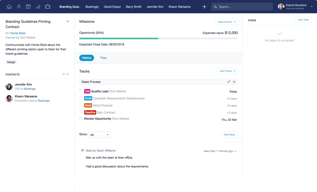
Being able to set up tracks of tasks that I do regularly so I don't have to remember what I have and haven't done. Just having all my admin and contacts in one place so in effect Capsule manages my office tasks and it's so easy and intuitive to use.
It's hard to find anything I don't like but one tiny thing is that when it saves emails my logos are saved separately as icons - though that is a very minor issue that I have got used to
Managing all my contacts in one place. Managing and prioritising all my tasks. Managing all my cases and opportunities. managing my calendar and meetings. Creating a to-do list that I can see each day. Colour coding to help identify tasks and events etc. Linking with software. Saving emails and contacts with clients. Just taking everything out of my head and into the system to free me up to do my job.
It's very user-friendly and versatile with lots of flexibility, customization and integration.
I'd like a lot more education about all of the features + more ability to pare down duplicate contacts in batches.
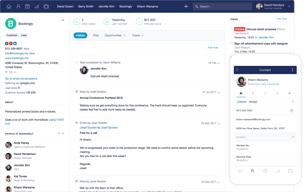
I use it mostly to keep track of contacts and the trail of their related emails. It's very helpful to retrieve the last time I had an email conversation with a particular contact and review details in order to follow up.
Capsule CRM has customizable filters for tags and data tags. Capsule CRM supports multi factor authentication. Capsule CRM integrates with a lot of other popular software platforms that we use internally. And using Zapier we are able to take the integrations even further as we were able to integrate with our phone answering service.
We could not find a way to add data tags in bulk. While it's not a deal breaker, it would be nice to have this feature.
Our business is able to organize our prospecting and client list with the ability to filter these contacts in many different logical ways (across verticals, based on size, based on opportunity, based on products or services they have or do not have, based on where they are in the sales process, etc). From there, we can easily manage ongoing marketing campaigns and update any changes with ease. We never understood the power and potential of a CRM platform prior to using Capsule CRM. We were referred to Capsule CRM by a fellow colleague and we are so glad that he made this recommendation to us as it is now a very integral part of our solution stack.

It is an easy-to-use and easy to configure platform. With Capsule CRM, it has become easier to set up tracks and view workflow. It does not require training and special programming due to which anyone can easily use it and figure out about its working. The supporting documentation is very informative and helpful. It integrates seamlessly with other solutions. The customer support is very responsive and every problem is resolved efficiently and quickly.
Its integration with Mail chimp is not smooth. Also, it does not allow to list contacts alphabetically which is a great downside of this tool. It does not contain some essential marketing features. It needs to improve the user interface and make it more productive especially on the calendar view. The contact sorting is quite disappointing. It would be nice if it allows users to set screen filters.
It provides numerous useful features and covers the needs of almost every business. It enables you to keep info tracked in the program. It helps you manage the data of consumers and organizations effectively. It develops an efficient way to track and link milestones to success factors and thus, made it easier and simple to manage sales-related businesses. It provides an activity reporting feature that enables you to control interactions' frequency and avoid letting customers drift off by way of infrequent contact. With Capsule CRM, you can easily personalize your activities as it provides features with which you can schedule and organize a calendar of activities easily.

This software help pulls together all of our Sales and Marketing efforts. Our intranet business loves using this! https://www.thisisattollo.com/
There isn't anything that we would change at the moment.
Transparency across our organisations! It means that we are all on the same page.

East to use, intuitive. No need for special programming just start and use.
Not the most used crm like sales force where there are a lot of custom side apps to load on.
Good for small business but can be cumbersome for businesses larger than a few individuals.
Capsule is very easy to use and very easy to configure. In my last firm we had Salesforce with took a year to implement for 30 users cost nearly $100k in fees. We are only two people but got 90% of the configuration/functionality of Salesforce in a few hours with no integration fees and at a great value.
Just started to use the Office 365 integration which is great
Manage sales pipeline, contacts, meetings, notes, correspondence - single vison of contacts, links brilliantlt with Xero

Capsule is the first CRM my company has used, and I'm delighted at the range of functionality and integrations it has. I rely on it more and more to keep track clients and prospective clients and as a repository of all our information about everything.
One wish would be for it to integrate more easily with Mailchimp. Plus my business partner would like the contacts to be listed in alphabetical order. I also wish that you could retain meetings/appointments in the calendar without them remaining in the task list, so that I have a record of what I've done.
See above.
I have set Capsule up for several clients in the past, when I ran my own business helping SMEs to systemise & document their business processes, so now I have a "proper" job and when my current employer asked me to come up with a simple but effective CRM system, Capsule was of course my first choice! My main priorities were: ** Simple to use - clear interface that's easy for anyone to pick up ** Easy to set up and adapt to our own requirements - plenty of customisations of fields etc ** Great value for money and monthly billing (if it turns out they DONT like it, there's no major issue! They love it by the way!) ** Easy to expand for more users as and when required ** Fantastic help screens and OUTSTANDING & friendly support whenever its needed
Not really dislikes, but things that could maybe be incorporated in updates? ** Ability to set your own options for default opening screens - eg Sales Pipeline in list view with a specific saved list showing ** Ability to sort saved lists by ANY column, and by clicking on column header instead of going into settings ** App to connect with Outlook so as to avoid having to look up opportunity dropbox addresses
** Capture of new contacts via website ** Capture of opportunities - even when at early stages of discussion prior to quotes being prepared (previously hidden in the 2 x Directors heads and their overflowing, disorganised email inboxes!! ** Full visibility for both Directors (and prospective buyers) of pipeline values for the business.

We've used Capsule for 5+ years. I was seeking a tool to organize and advance the services we provide to 100's of clients each year. Capsule has worked beautifully for us, it doesn't break the bank, and support has been phenomenal.
It took a bit of brainpower to get our system set up. It felt like too much of a blank slate in terms of guidance at the beginning, but I persisted and it came together. Setup tools may be better now.
Capsule allows us to track client service delivery progress accurately and easily. I also love the quick access to client notes and files.
I've tried multiple competitors, and for the price, this is hands down the best product on the market. Its integration with Outlook is invaluable. Using a Dropbox interface, messages are easily linked to the correct contact for later review. The activity reporting is also handy: it lets you control the frequency of interactions and avoid letting clients drift off through infrequent contact. Finally, the importation of contacts was about as problem free as any I've encountered: very nice AI.
The contact sorting and display is a bit underwhelming. It would be helpful to allow the user to set a screen filter and always come back to that presentation. As it is, you have to log on and change from the default every single time.
I can now proactively manage the frequency of interactions thereby making sure my company is not forgotten due to inattention.
I like the simplicity and the right amount of features for small businesses around the world, specially for emerging economies where CRMs and a Sales Pipeline discipline is far from being a continuous and extended practice. One of the most useful features is the 3 alternative views of the Sales Pipeline, plus the ability to define stages according to any business reality.
Nothing at all. Due to the nature of my business a few features are not used (i.e. cases).
For a small business like mine I have been able to completely forget using excel spreadsheets to review & track business opportunities, plus improving coordination within our sales/consultant team, plus using a 100% cloud & app solution approach.
Data tags help us create robust records.
I wish there were more direct integrations with other products. We use Zapier as a workaround though
We were using Salesforce Essentials but struggled to make it work for our small business. CapsuleCRM is just right for us as a startup- it’s simple and intuitive and let’s us spend less time managing a CRM and more time using it
One of the best things is its capacity to send out records into whatever you need. You can get them as CSVs, Worksheets, or even put them straight into MailChimp. The capacity to dole out assignments is another incredible component of Capsule. It's reasonable who should do what when. It likewise permits what appears as though a boundless number of fields you can include so you can be as explicit as could be expected under the circumstances. It's pleasant that there are fields yet in addition labels, so there are a couple diverse approaches to seek dependent on what you're searching for.
I feel that the business pipeline could utilize some refreshing and be progressively complete like different CRMs I have checked on. The business pipeline for others is by all accounts progressively itemized and coordinated instead of straightforward/essential needs.
Concentrating client data, monitoring extraordinary assignments.

Capsule has all the elements I need for my small business to function well, and these elements are organized clearly in an incredibly easy-to-navigate system. I love that I can customize fields for my particular business, and that the sales pipeline tools give me a very clear picture of all my sale opportunities. The look is very clean! It also integrates with other systems I use (GSuite, Freshbooks, MailChimp, etc.), and the support team is awesome. I've only had a couple of support issues and these were handled VERY quickly.
It's not always super keyboard-friendly, and I prefer to use my keyboard more than my mouse. But this is minor.
Before Capsule, I was using this amazing technology called PAPER. No, don't Google it. I mean literal paper. Not a great system. I was ready to grow my team beyond myself, so Capsule allows us to collaborate. I also had very poor follow-up on leads previously, but being able to assign a customized track to my Opportunities in Capsule keeps these leads from falling through the cracks. I'm doing a much better job of maintaining contact with my clients (I'm in a service business that requires a high level of personal communication), again with customized tracks of to-do tasks. My business has certainly grown in ways it wouldn't have done without Capsule.
The clean and simple interface, the diary and the pipeline
Some of the search methods are a little clunky. For example if I want to search for something that has NOT got several tags I can't just select them from a tick list I have to use the dropdown for each one, or precisely type each one in
Helps me organise my day, and see what prospects I have in the pipeline
Capsule is so easy to use; I love the interface and the ease of adding custom fields. My favourite feature is Tracks which gives me peace of mind that no step in my various processes is every missed.
I'd like to be able to export tasks. This is not currently possible although tasks can be printed.
It provides me with a repository for client data, manages workflow and associated task management.
Very easy product to get set up, continuous innovation from the company means great new features. We especially like the global search function and the telephony integrations. The Mailchimp integration is really useful for us too. The new Kanban board is just awesome.
Its too fast sometimes, the filtering functionality is due an upgrade.
Managing customer and prospect data in a secure and compliant manner, ensuring all our business communications are logged and visible to authorised team members. The product ticks all the boxes for our needs as a small business, and looks to have the features we will need as we scale up.
I like how the task, case, and track features gives each of our employees the ability to see exactly where we are with each client without wondering who has done what. By looking at "notes," I can see who has last called a client and what needs to be done next. My staff appreciates that I don't need to ask them where they are on projects because I can see their individual tasks and deadlines. These features alone give me peace of mind!
I wish the search feature was better developed. With my terrible memory, I don't always remember a potential client's name or company. I've put in a request to improve this feature at Capsule CRM, and they have always been receptive to my suggestions. I like working with them for that very reason.
COMMUNICATION! I've been in business for over 40 years and communication between myself and my staff have always been the most important, yet most frustrating problem in my service business. Clients need to know that the right hand is talking to the left hand, and up-to-the-minute updates is impossible when emailing or talking to a large staff. That's why I love Capsule. When everyone inputs last conversations, copies of emails, and updates, we run a well-greased machine! During meetings, we all create tasks for ourselves so nobody drops the ball. I find that staff appreciate having all of the information right at the tips of their fingers so they can make strategic moves that benefit our company.
Capsule CRM is easy to use, makes it easy to track interactions with customers and clients, is helpful in managing work reminders through recurring tasks, and integrates well with other services through the use of Zapier
no dislikes, it is simple enough to use and works for my business needs
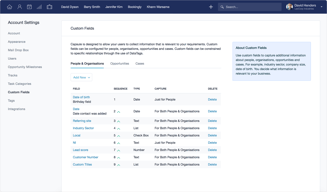
Custom fields makes the CRM a little more configurable, but it works well as is to manage cases, tasks, reminders and more.
Very tight integration directly in Google mail, combined with clean, uncluttered stands alone app make this a very efficient crm too for startups and small companies.
Unfortunately integration only works with Google mail and not Google inbox.
Standard crm needs of tracking contacts and message and tasks reacted to those contacts. Solid pipeline management.

I was looking for a CRM solution like this for near a year. As I'm in service sector most important to me is a CRM that have a good contact history with my standard clients. Defintions of data fields for clients is fantastic feature. Other necesity was that I can define my own protocols for clients (standard clients, une-time clients, state company, etc). One more thing is to have always defined repetitive tasks.
Pipeline is rough, it's look like not finished part. Cases is still a mystery to me as there is practicaly no help regarding this feature. Help in general is missing.
I solved many problems with CAPSULE: - client management/history - orders protocols - task management.