

Unclaimed: Are you working at CorelDRAW Graphics Suite?
CorelDRAW Graphics Suite Reviews: 4.3/5 — Solid Choice
CorelDRAW Graphics Suite is a full-featured design toolkit that lets users create vector illustrations and layouts as well as tools that support photo editing, and typography projects. The platform is offered via a budget-friendly subscription platform that provides incredible ongoing value with instant, guaranteed access to exclusive new features and content, peak performance, and support for the latest technologies.
| Company | Corel Corporation |
|---|---|
| Year founded | 1985 |
| Company size | 501-1000 employees |
| Headquarters | Ottawa, Ontario, Canada |
| Social Media |

| Capabilities |
AI
|
|---|---|
| Segment |
Small Business
Mid Market
Enterprise
|
| Deployment | Cloud / SaaS / Web-Based, Desktop Mac, Desktop Windows, Mobile iPhone, On-Premise Linux |
| Support | 24/7 (Live rep), Chat, Email/Help Desk, FAQs/Forum, Knowledge Base, Phone Support |
| Training | Documentation |
| Languages | English |
CorelDRAW Graphics Suite Pros and Cons
- Great for productivity: The collaborative and productivity features on Corel Draw aren’t just there for show. This software really does make it easier to get connected and make progress on a shared project.
- Versatility: You can use Corel Draw on virtually device, including smooth drawing surfaces, laptops, and desktops.
- Tons of exporting options: You can export up to 48 different file types with Corel Draw, including PNG, JPG, and even CAD for 3D content.
- Huge community collection of assets: The collection of assets available is incredible. You can access fonts, templates, frames, photos, vectors, and brushes. Plus, there’s a full organized library system for keeping everything in the right place.
- No app for your smartphone if you’re working on the move
- Does require a lot of initial learning due to the wide range of features









CorelDRAW Graphics Suite will still sell you the software outright. That single sentence is why it remains on shortlists in 2026. Adobe moved professional design to subscription years ago; Corel offers a one-time purchase alongside the annual plan, and by our arithmetic on its published prices the outright licence costs less than the subscription from roughly month 20 onward. If you are tired of renting your tools, this is the mainstream alternative.
- What it is: A professional graphic design suite covering vector illustration, page layout, photo editing, and typography, for Windows and Mac.
- Best for: Print, signage, and production designers who want to own their software rather than rent it.
- Pricing: Annual plan 1,137 zł for the first year then 1,750 zł; one-time purchase 2,270 zł. Verified July 2026.
- The honest catch: The perpetual licence is frozen at the 2026 version — no future upgrades, no AI credits.
What Is CorelDRAW Graphics Suite?
CorelDRAW is a full design suite rather than a single application: vector illustration, page layout, photo editing, and typography in one package for both Windows and Mac. Its historical stronghold is production work — signage, print, apparel, engraving, and vinyl cutting — where its file handling and colour management have long been trusted and where the switching cost of decades of .cdr files is real.
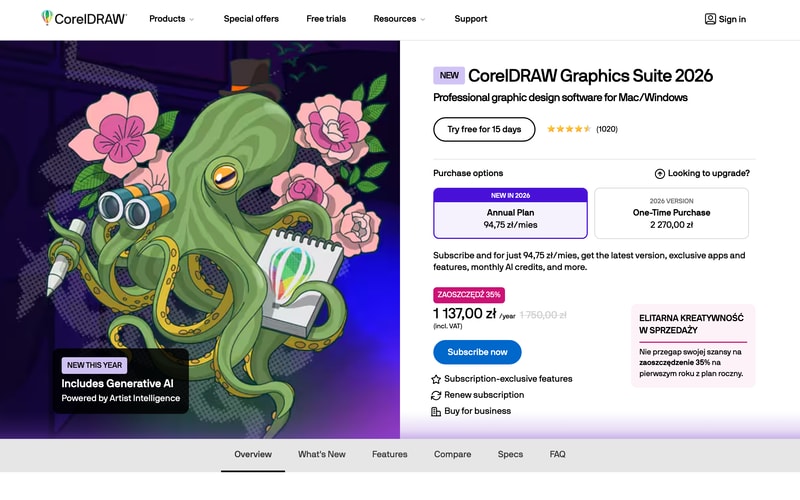
The 2026 release leads with generative AI under the “Artist Intelligence” name, and Corel has made AI credits a subscription-exclusive benefit. That is the structural point of the whole pricing page: the subscription is not simply a payment method, it is a different product with ongoing feature delivery attached.
Corel reports 4.5 stars from 1,020 reviews on its own product page, and offers a 15-day free trial with no purchase required.
How CorelDRAW Works
- Two purchase routes, which is now unusual in professional design software.
- Annual plan at 94.75 zł a month, billed 1,137 zł for the first year.
- One-time purchase at 2,270 zł, locked to the 2026 version.
- AI credits are subscription-only, as are “subscription-exclusive features”.
- Windows and Mac from the same licence.
- A 15-day free trial, no card mentioned.
CorelDRAW Pricing
Captured from CorelDRAW’s product page in July 2026. Corel geolocates aggressively — our capture returned the Polish price list in złoty including VAT, and the same figures appeared on both the international and US URLs. The structure is what transfers; check your own market for the numbers.
| Option | Cost | What you get |
|---|---|---|
| Annual plan, year one | 1,137 zł (94.75 zł/mo) | 35% off, all features, AI credits |
| Annual plan, thereafter | 1,750 zł/year | Latest version, ongoing updates |
| One-time purchase | 2,270 zł | The 2026 version, permanently |
| Free trial | — | 15 days |
What actually decides which you buy:
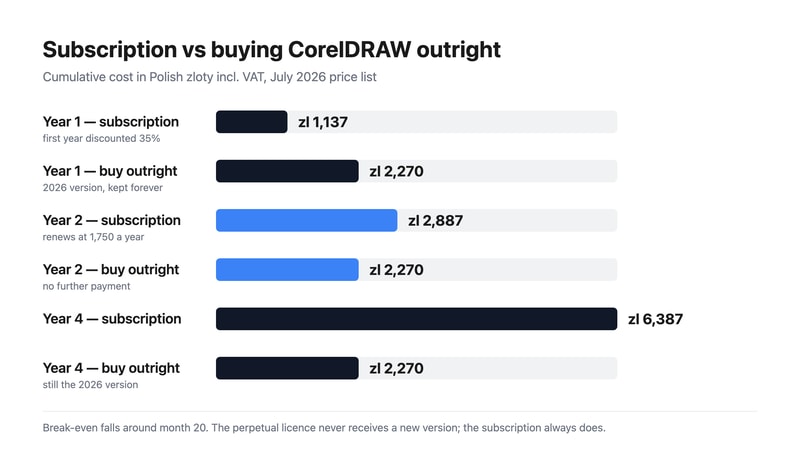
- The break-even is around month 20. Year one of the subscription costs 1,137 zł, so the outright licence is 1,133 zł more expensive at that point. Renewal then adds 1,750 zł across year two, and the subscription passes the perpetual price roughly two-thirds of the way through it. Past that, every month favours having bought.
- The 35% discount is first-year only. The strikethrough is honest — 1,137 zł against a standard 1,750 zł — but the second invoice is the real rate, and it is 54% higher than the first. Budget from 1,750 zł.
- The perpetual licence is a snapshot, not a subscription without payments. You keep CorelDRAW 2026 indefinitely; you do not get 2027, and you do not get the AI credits or the subscription-exclusive features. Whether that matters depends entirely on whether you have historically upgraded every year or every five.
- AI is the lever Corel is using to defend the subscription. Generative AI is the headline feature of the 2026 release and its credits are subscription-only. If the AI tooling is why you are interested, the perpetual option is not really available to you.
- Compare against Adobe on total cost, not monthly cost. Adobe Illustrator has no perpetual option at all, so over a five-year horizon the comparison is a fixed 2,270 zł against five years of subscription — a different question from which app you prefer.
- A 15-day trial is short for a suite this large. Learning vector illustration, layout, and photo editing in a fortnight is optimistic if you are switching from Adobe; plan the trial around one real project rather than exploration.
Who Should Use CorelDRAW
- Print and production designers. Signage, apparel, engraving, and vinyl work, where CorelDRAW has decades of established workflow.
- Anyone who wants to own their software. The clearest reason to choose it in 2026, and there are few alternatives at this level.
-
Existing CorelDRAW users. A large
.cdrarchive is a genuine reason to stay, and the perpetual option keeps that archive readable without a running subscription. - Windows-first studios. CorelDRAW’s Windows heritage is deeper than its Mac support, though both are covered.
It fits poorly for teams collaborating with Adobe-standard agencies, where file interchange creates friction; for UI and product design, where Figma is the standard; and for casual or marketing design, where Canva does the job at a fraction of the cost.
Honest Pros and Cons
Strengths
- A genuine perpetual licence. Almost unique among professional design suites.
- Break-even inside two years against its own subscription.
- A complete suite — vector, layout, photo, and typography together.
- Strong production heritage in signage, print, and apparel.
- Windows and Mac covered by one purchase.
- A published, transparent price. No quote, no sales call.
Limitations
- The perpetual version never updates. 2026 forever, including no AI credits.
- The first-year discount does not repeat. Renewal is 54% higher.
-
Adobe compatibility is imperfect where agencies and printers expect
.aifiles. - Smaller ecosystem of tutorials, plugins, and hireable talent than Adobe’s.
- A 15-day trial is short for a suite this size.
- Aggressive geolocation makes cross-market price comparison awkward.
CorelDRAW Alternatives and How It Compares
- Adobe Illustrator is the industry standard for vector work, subscription-only, and what most agencies and printers expect to receive.
- Adobe Photoshop covers the raster half of what CorelDRAW bundles, again by subscription.
- Affinity Designer is the other serious perpetual-licence option, considerably cheaper and narrower in scope.
- Inkscape is free and open source, capable for vector work and weaker on production colour management.
- Canva and Figma solve adjacent problems — marketing design and interface design — rather than competing directly.
For a broader survey, browse our graphic design directory.
The Verdict
CorelDRAW’s case in 2026 is not primarily about features, and pretending otherwise would be dishonest. Illustrator is the industry standard, the ecosystem around it is larger, and most agencies and print shops will assume you are sending .ai files. What CorelDRAW offers that Adobe does not is ownership. The one-time purchase is a real perpetual licence, and in a market that has almost entirely moved to rental, that is a genuine and increasingly rare proposition.
The arithmetic supports it if you keep software for a while. Year one of the subscription is 1,137 zł against 2,270 zł to buy, so buying costs about a thousand more up front. But the discount is first-year only — renewal is 1,750 zł — and the cumulative subscription passes the purchase price around month 20. By year four you would have paid 6,387 zł to rent against 2,270 zł to own. If your upgrade cadence has historically been “when something forces me to”, buying is straightforwardly cheaper.
The counter-argument is real and Corel has built the pricing around it. The perpetual licence is frozen at 2026 — no new versions, no subscription-exclusive features, and no AI credits, which matters because generative AI is the headline of this release. So the decision is not subscription versus purchase in the abstract; it is whether you want the 2027 and 2028 releases. Designers who upgrade every cycle should subscribe. Designers running a production shop where the software has to work rather than improve should buy, and the 15-day trial is the right way to confirm the suite handles your actual files before spending either way.
FAQ
How much does CorelDRAW Graphics Suite cost?
Captured in July 2026 on the Polish price list including VAT: the annual plan is 94.75 zł per month, billed 1,137 zł for the first year — a 35% discount from the standard 1,750 zł annual rate — and the one-time purchase of the 2026 version is 2,270 zł. Corel geolocates pricing aggressively, so check your own market; the two-option structure is what transfers.
Can you still buy CorelDRAW outright?
Yes, and it is one of very few professional design suites where you can. The one-time purchase gives you CorelDRAW Graphics Suite 2026 permanently at 2,270 zł. It does not include future versions, subscription-exclusive features, or the AI credits that come with the annual plan, so it is best understood as buying a specific release rather than a subscription without payments.
Is the subscription or the one-time purchase cheaper?
The subscription is cheaper for the first roughly 20 months, then the purchase wins. Year one of the subscription is 1,137 zł against 2,270 zł to buy; renewal at 1,750 zł pushes the cumulative subscription past the purchase price about two-thirds of the way through year two. By year four the figures are 6,387 zł against 2,270 zł. The trade is that the purchase never receives a new version.
Is CorelDRAW a good alternative to Adobe Illustrator?
For print, signage, apparel, and production work, yes — it is a mature suite with decades of established workflow and it bundles layout and photo editing that Illustrator does not. The reasons to prefer Illustrator are ecosystem and interchange: it is what agencies, printers, and collaborators expect, and the pool of tutorials and hireable talent is larger. If you work independently and want to own your tools, CorelDRAW is the stronger choice.
Does CorelDRAW include AI features?
Yes. The 2026 release leads with generative AI under Corel’s “Artist Intelligence” branding, and monthly AI credits are included with the annual subscription. They are explicitly a subscription-exclusive benefit, so the one-time purchase does not include them. If the AI tooling is a significant part of why you are considering CorelDRAW, the subscription is effectively your only option.

Compare CorelDRAW Graphics Suite with other popular tools in the same category.

Creating hoardings, banners, pamphlets and editing vector images, there is no competition in the market. For in-depth detailing, CorelDRAW never disappoints the users. Easy to use and no space for error while working on CorelDRAW.
As per my experience, I've never seen any bad reviews about this software as it's straightforward to work on it. Once a user gets hands-on with CorelDRAW, then that user can work on any other designing software.
In my experience, Colaboration with other creates on a single platform is remarkable and the accuracy the company is providing with the help of this sorfware is highly up to the mark and has a great creditabilty in the market.

I used CorelDraw for many years while working in our marketing department. It is a straightforward program to learn with intuitive drawing commands for those familiar with design technology.
CorelDraw has gone through many transitions over the years, with each version improving with more tools. However, when there has been an "add-on" option they often change how the original tool functions making it necessary to spend time learning the same process over again.
Easy layouts for marketing materials and comes with templates. I can use CorelDraw for my personal use when creating art projects or desire to morph photos or text.
There are many tools that help me to make anything and create many picture
It's some times disrupted by recources of PC especially RAM and processor
Make banner and logo

The ease of drawing, the tools, the variants in colors helps me to design my required graphic easily. I just love the Pen Tool, I have hands on it and trust me its amazing.
This question should be eliminated for COREL DRAW
Easily trace my graphics, design quickly the Ads, The brochures and many more.

I thoroughly enjoy using CorelDRAW for its versatile design capabilities, which have greatly streamlined my graphic design work.
Nothing to say bad about CorelDRAW as it is very much helpful to me.
CorelDRAW is solving design and layout challenges efficiently, resulting in more polished and professional graphics, ultimately benefiting my business with enhanced visual appeal and brand presentation.

Программа мерит и создаёт чертежей много фунционально и четко можно с фото или дизайнером стать
В нее ненравиться то что очень много требует от оперативного памята компютера
Ну васновно дизайнерскые услуги или для создание любых целей
Corel draw is best of all designing apps because it comes with all extra ordinary features and is easier to use.Its UI is great for doing things around designing logos. as a beginner it is not difficult to work .
Its size is really big so it occupies a lot of space CorelDraw sometimes crashes automatically. It has some limitations when working with vectors.its sometimes crashed and not working system is hang.
With Corel I made more than a hundred graphic pieces for printing: brochures, folders, cards, marriage . Great, smooth, fast, efficient program for designers it solve my logos and designing work so eficient.

Coreldraw is one of the best designing software for print ready graphics and illustrations, the UI is very user friendly and easy for graphics designers. The features and tools are very satisfying
I think the price for purchasing this software is high for beginners and sometimes for creating complex designs it is difficult to handle this software as compared to other softwares
Sometimes this software helps me to create print ready graphics . But I personally choose Adobe illustrator as compared to vector designing softwares

The vector drawing features are great and accessible to everyone, even those with less graphic design knowledge.
Lacks on screen guidance to know where to find all the available features.
Satisfying business needs to create quality vector graphics and a variety of export options allows for greater productitivy
The videos showing how to use the different and new products within the program. Also how simple they make things.
When it chokes on something and completely crashes but you don't know which backup to open without doing it again.
Helps us vector images and create vectors for screen printing and vinyl cutting.

The most beautiful thing I admire is memory usage. Corel Draw runs smoothly even on my low end older laptop, making it super convenient. My second favourite thing is the ability to export layers as png with a couple of clicks easily. It is beneficial whenever I need transparent images for web usage.
I always have to customise the default look & feel with every new install. This is true with the latest releases. I prefer the minimal approach of the older Corel Draw interface.
Time-saving boosts productivity and the ability to export any layers as transparent PNG with just a click. Since it's very lightweight on memory compared to Adobe's Illustrator, I can carry it on my laptop and never leave behind on deadlines.
I love its uncomplicated user-friendly interface and find it easy and quick to do all my designs, and the extensive toolset makes it easier for me to do a wide range of design tasks. So I have chosen CorelDRAW to do all my creations.
The main problem here is that the creations made by the new edition cannot be opened through the previous edition. It should be, but preferably updated to at least two previous versions or so that this can be extracted.
CorelDRAW's ability to handle both vector and raster graphics and support for most graphics formats has made our design easier due to the compatibility of our design workflows. This is used in various departments of the institute to create all the textbooks, monthly Sagara plans, etc., of our school, and a 03-month study program has been prepared for the students regarding this software. This has saved our cost and time.
This is the best place to present the creative skills of the children in our educational institution. This is a software with all the requirements we expected, and it is equipped with tools that can be learned easily and quickly, and the ability to use all the tools very smoothly is very strong. Easy to use on every computer we have.
Works well without any problems and can be recommended as the best choice for all our needs. CorelDRAW is the best one is Victor and printing graphics and artwork design.
I have successfully designed the primary logo of our institute with this software, and all our students are very excited to use this software three lecturers are teaching children in our recommended art department. Their current recommended software is CorelDRAW software.

I love that the UI is user-friendly and appealing to any user. The software is straightforward to navigate and to use. I also love that it has remarkable tools and features that help to bring the user's vision to life.
I love the software and I have not found anything that I have hated about it yet.
When it comes to designing our vision board we use CorelDRAW. Its been a phenomenal solution that has added great value to our meetings. A great solution.
Currently, I have been designing this software for over 10 years and compared to other software, the tools here are easy to handle and very helpful in making my designs smooth and realistic.
I don't have any problems and this software can solve the problems by using the compatibility computer. The price of the new editions is high and any concessions would be appreciated
This software saves our time and effort as we use this software extensively in our organisation, and designs and other graphic designs can be done very smoothly and very quickly and can be exchanged without any problem.

This perfect tool is the best software for printable designs; it shows the pixel-by-pixel quality and apparent colors.
There hasn't been anything I didn't like about this program when I used it, so there isn't one right now.
It's a productive technique to produce unique representative maps and update existing maps to emphasise or highlight particular features.
CorelDRAW is a highly versatile and user-friendly graphic design software that has become a go-to tool for both amateur and professional designers alike. Its vast array of features, including vector drawing, image editing, and typography, make it an all-in-one solution for any design project. One of the things I like most about CorelDRAW is its intuitive interface that allows me to quickly create stunning designs without any prior experience. highly recommend CorelDRAW to anyone looking for a reliable and efficient design software that is easy to use and delivers great results.
Sadly, not a lot of people use CorelDRAW nowadays, because all of the new softwares.
Simplifies the design process: CorelDRAW's user-friendly interface and intuitive tools make it easy for designers to create stunning designs quickly and efficiently. Increases productivity: With features like multi-page layout and batch processing, CorelDRAW streamlines the design workflow, allowing designers to produce more work in less time.

CorelDRAW is a product that is very easy to learn and use. The features and capabilities of this product are impeccable, and it's a reliable design software that brings your vision to life.
The price may be the only downside that comes with using this product. For small and medium-sized companies, the product may be too pricey.
We use this product during the planning stage when making our regular vision board targets. It has greatly revolutionized how we do our reporting.
The most user friendly software with high quality output.
Almost nothing. I could find to dislike the program.
Coreldraw helps to solve all design problems like good quality brochures, newsletter, logo design besides data visualisations/infographics
I have been searching for software from mobile to pc for creating clear HD logos but it has been a challenge, up until i stated using corel draw, yes it can be a challenge.
I cannot say its a dislike persay, but whew the software is packed with options, its more of spoilt for choice and can be difficult to locate information during project creation.
cost effective designing solutions.As a new organization iam aiming agt cost effective options and that means i have to take up the design task on my shoulder. Understabndiung how to use this software is beneficial to the growth of my organization.

I think Corel draw is the king of all designing apps because it comes with all features and is easier to use. I use Corel to create music artwork, fliers and even logos. And with a vectorized image, your logo design is good to use by anybody and any company for any period. I mean, come on. It is CorelDraw.
Since I started using this app, I have not encountered any dislikes, so there is no con for now.
As a music artist, I use CorelDRAW to create my music artwork, I also design fliers and logos for people while making money with it. I started using it a year now, and it has been a great experience.

Complete software I like the most. No one can beat it.
Photo editing: in this software we can't able to do fine photo editing.
It is suitable for print media

Easy to use interface and very intuitive. I prefer the drawing tools over Illustrator. The ability to convert files to and from other vector programs.
Colour shift going from RGB to CMYK and vise-versa. Better to use Photoshop for this purpose.
Access to essentially all file formats. CorelDRAW is also its own page layout program eliminating the need to use a secondary drawing program.

What I do like best about CorelDraw is it boosted my creativity.
About CorelDraw I have no bad words, it's just so good.
Drawing vector images and creating logos and illustrations was so easy with it.

This software very useful for Illustration and Graphic designing. It's also very very useful for Manual Creation or Technical Writing. User friendly ease to use.
Create file size too high. Not ease for tracing as compare to other need to improvements features. This is also need to improve commands for shortcut rapid action.
It's very useful and help to create graphic with high standard. Creates very neat and clean illustration. Very useful to Writing manual, service bulletin and Templates.

Interface is very good. Commands used is also very easy to understand and daily can use frequently. Illustration can be done very easily and output is top quality
Image editing is less convenience in comparison to other illustration tool. 3D images should be editable in coral draw but it was not there like isodraw. 3D effect are not filtered into it.
I am working as a technical illustrator and this software is very usefull for me in my daily work.Like I have to create illustrated view so it is very easy to be created in this. We can freely move any thing from one place to another place
The best part of CorelDraw is the ease of use. Maybe it's because I had been using CorelDraw since CorelDraw3, but I don't remember ever struggling to get anything done. CorelDraw is very user-friendly, and as far as functionality has always been very intuitive. I tried using Illustrator because it is a better-known product, and it had the reputation of being the best graphic design program available at the time. However, every time I picked up Illustrator, I would end up getting frustrated and would always return back to CorelDraw. One of the best features of CorelDraw has always been the bezier curve. With this tool, I could quickly start with simple shapes and create entirely new designs. Another great tool was the add, subtract, and weld functions, and the node edit tools. These three tools used together seemed to create magic. My coworkers were always amazed at how fast and quickly i could design a new idea.
The biggest drawback to using CorelDraw was what seemed like constant new versions. Of course, I would always break down and get the latest version because it was a great product, and I wanted to be ahead of the pack, but I realized that the new features didn't warrant the price as they were usually minor upgrades to functionality. Also, it seemed like there were always quite a few bugs in every other version, so I learned to skip a version and wait for the more stable version that would replace the buggy version.
During the time that I was using Coreldraw, I was doing quite a bit of Logo work as well as digital printing that required very crisp lines and scalability. It is impossible to work with other formats such as .jpg or .png due to the enormous file sizes generated as you scale up.

CorelDRAW is the best vector-based tool for graphic designing, Easy to work with different sheets in a single CDR file & tracing a reference image that two things I like and logo making i sso easy.
The license purchasing price range for beginners is a little high. Except for this one, Corel draw is best for graphic designers and helps to make professionals in graphic designing field.
Corel Draw is the best tool for graphic designing. I have used much other software but after selecting Corel I have made a lot of income. It's helped me to grow as a professional because it's easy to use with good detailing.

All the essential tools required to design any content is available in corelDraw. Tracing, cutting, overlapping, framing is there.
Some time copying any logo and tracing is not 100% accurate.
Making instant flyers, ads, quick editing and making logos are very helpful for us.

I think CorelDRAW is one of the best tools for vector-based drawing and graphic design. for me, it has been helpful in helping me create all types of great designs. I have been able to use it to create brochures, Programmes, flyers, etc.
the coreldraw application takes a lot of memory space, this i have noticed. Sometimes during designs, the system becomes slow. Coreldraw cant be used to work on real live pictures or videos
Coreldraw is helping me solve a lot of design-related issues. I am able to quickly use CorelDRAW to design anything i want, thereby increasing productivity. In terms of ROI, I would say it is okay.