

Unclaimed: Are you working at Elementor?
Elementor Reviews: 4.5/5 — Highly Rated
Elementor is the most popular landing page builder software for the platform that provides full control of every aspect of the landing page design. Numerous templates are available to use or users can create their own from scratch. Users also have the option to integrate third-party tools to get additional functionality. Elementor works with just about any WordPress theme and plugin. Design changes can easily be viewed thanks to the visual builder interface.

| Capabilities |
API
OSS
|
|---|---|
| Segment |
Small Business
Mid Market
Enterprise
|
| Deployment | Cloud / SaaS / Web-Based |
| Support | 24/7 (Live rep), Chat, Email/Help Desk, FAQs/Forum, Knowledge Base, Phone Support |
| Training | Documentation |
| Languages | English |
Elementor Pros and Cons
- You can immediately see the changes you make thanks to the visual builder interface
- You’re working with some of the best design templates available
- It works great with most WordPress themes
- There’s a learning curve when you first use the tool
- There are some issues with their landing page’s mobile responsiveness
- It lacks design flexibility in some areas








Elementor’s two plugin plans include “0 One credits” — and credits are what unlock AI generation, image optimization, site accessibility, cookie consent, and email deliverability. So on Essential at €5 and Advanced Solo at €7, that entire half of the feature list is not gated behind a higher tier; it is simply switched off. Elementor’s pricing page is really two products side by side, and the €5 headline belongs to the smaller one.
- What it is: The most widely used website builder plugin for WordPress, now also sold as a hosted all-in-one platform.
- Best for: WordPress users who want visual design control, and — on the One plans — hosting and optimisation bundled.
- Pricing: Essential €5, Advanced Solo €7, One €15, One Agency €36 per month billed annually. Verified July 2026.
- The honest catch: Custom code and CSS, popups, and eCommerce features are all excluded from the €5 plan.
What Is Elementor?
Elementor is the drag-and-drop editor that made WordPress design accessible without touching a theme file. Its Theme Builder, dynamic content, and form builder let you construct headers, footers, archives, and templates visually, and it has become the default recommendation for anyone who wants design control inside WordPress.
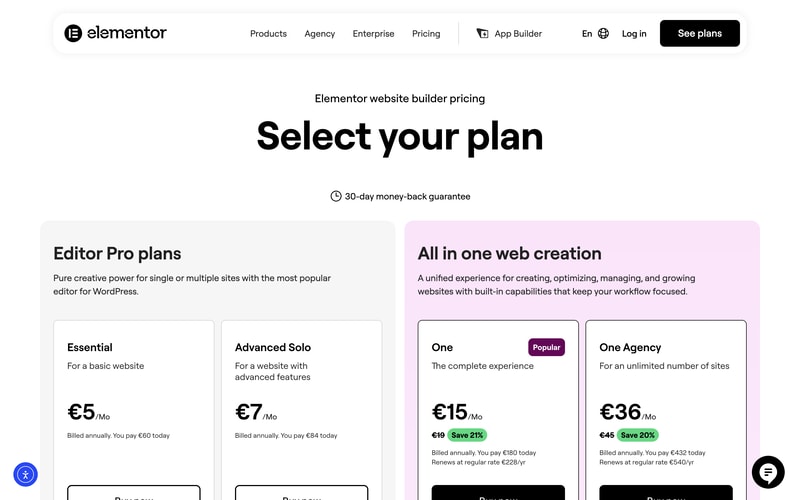
The 2026 page splits into two families. Editor Pro plans are the plugin: you bring your own WordPress hosting and get the editor. All in one web creation bundles hosting, AI generation, image optimization, accessibility tooling, cookie consent, and email deliverability into a single subscription measured in “One credits”.
A 30-day money-back guarantee applies across the range.
How Elementor Works
- Two product families — the plugin, and the hosted all-in-one platform.
- Credits are the third meter — 0 on plugin plans, 25,000 and 350,000 monthly on the One plans.
- Sites ladder — 1 site on Essential and One, options up to 25 on Advanced, unlimited on One Agency.
- Widget counts differ — 57 on Essential, 85 on every plan above.
- The One plans state their renewal price on the card itself.
- A 30-day money-back guarantee on all plans.
Elementor Pricing
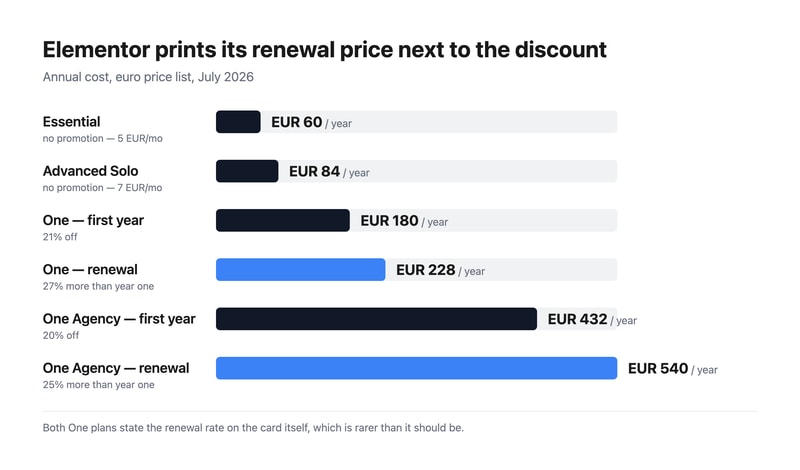
Captured from Elementor’s pricing page in July 2026 on the euro price list with annual billing.
| Plan | Year one | Renewal | Sites | Credits/mo | Custom CSS | eCommerce |
|---|---|---|---|---|---|---|
| Essential | €60 (€5/mo) | €60 | 1 | 0 | No | No |
| Advanced Solo | €84 (€7/mo) | €84 | 1 (3 and 25 available) | 0 | Yes | Yes |
| One | €180 (€15/mo) | €228 | 1 | 25,000 | Yes | Yes |
| One Agency | €432 (€36/mo) | €540 | Unlimited | 350,000 | Yes | Yes |
What actually decides your plan:
- Essential cannot do custom code or CSS. For a design plugin aimed at people who want control, that is the most surprising exclusion on the page — along with the Popup Builder and eCommerce features. Essential gives 57 widgets, the Theme Builder, dynamic content, and forms. Anyone who expects to write a line of CSS needs Advanced Solo at €7.
- Zero credits means zero optimisation features. Both plugin plans show “0 One credits”, and Elementor states that credits unlock AI generation, image optimization, site accessibility, cookie consent, and email deliverability. Those are not tier-gated features you could buy up to — without credits they are unavailable, which is what separates the two families.
- Elementor prints the renewal price, and you should read it. One is €180 in year one and €228 a year afterwards; One Agency is €432 then €540. That is 27% and 25% higher respectively. Stating renewal on the card is genuinely uncommon — several vendors in this category advertise a first-year discount and leave you to discover the real rate — so credit where it is due, but budget from €228.
- The two plugin plans have no promotion at all. Essential and Advanced Solo carry no strikethrough, so €60 and €84 are the standing rates rather than introductory ones.
- Elementor values its own bundled components. The One card lists image optimization at €60/yr, site accessibility at €120/yr, and email deliverability at €60/yr — €240 of stated value inside a €228 renewal. That is Elementor’s own valuation rather than an independent one, but it is at least an arithmetic claim you can check against buying those tools separately.
- One Agency is the agency answer. Unlimited sites and 350,000 monthly credits — 14 times One’s allowance for 2.4 times the price. If you build sites for clients, that ratio is the argument.
Who Should Use Elementor
- WordPress users wanting design control. The clearest case, and why Elementor became the category default.
- Agencies building client sites. One Agency’s unlimited sites and large credit pool is priced for exactly that.
- Small businesses wanting one bill. The One plans fold hosting, optimisation, and accessibility into a single subscription.
- Anyone needing accessibility and cookie consent. Both are bundled on One rather than bought as separate plugins.
It fits poorly for non-WordPress projects, where Webflow or Framer are the right tools; for people wanting to write CSS on a budget, given Essential excludes it; and for high-performance hosting needs, where WP Engine is the specialist.
Honest Pros and Cons
Strengths
- Renewal prices printed on the card, which much of this category hides.
- A genuinely cheap entry point at €60 a year for the plugin.
- The most mature WordPress editor, with the largest template and add-on ecosystem.
- Accessibility and cookie consent bundled on the One plans.
- Unlimited sites on One Agency, priced sensibly for agencies.
- A 30-day money-back guarantee across the range.
Limitations
- Essential excludes custom code and CSS, plus popups and eCommerce.
- Plugin plans get zero credits, so the optimisation suite is unavailable.
- One renews 27% higher than its first-year price.
- Two product families on one page makes the €5 headline misleading.
- Only 57 widgets on Essential, against 85 everywhere else.
- You still need WordPress hosting on the Editor Pro plans.
Elementor Alternatives and How It Compares
- WordPress.com hosts WordPress itself, with its own block editor rather than Elementor’s.
- WP Engine is the managed-WordPress host you would pair with an Editor Pro plan.
- Webflow and Framer give designers more control outside the WordPress ecosystem.
- Wix and Squarespace are the all-in-one builders that require no WordPress knowledge at all.
- 10Web and Duda target agencies managing many client sites, 10Web on WordPress specifically.
- Hostinger bundles cheap WordPress hosting with its own builder.
For a broader survey, browse our website builder directory.
The Verdict
Elementor earned its position as WordPress’s default visual editor, and on the design side it deserves it — the Theme Builder alone removes the need to touch theme files for headers, footers, and archive templates. What has changed is that the pricing page is now two products, and reading it as a single ladder from €5 to €36 will lead you to the wrong plan.
The plugin plans include zero One credits, and credits are what run AI generation, image optimization, site accessibility, cookie consent, and email deliverability. Those features are not something Essential has less of; they are something it does not have. And Essential also excludes custom code and CSS, the Popup Builder, and eCommerce features — which for a €5 design plugin is a real constraint, not a nudge. If you want to write CSS, Advanced Solo at €7 is your floor. If you want the optimisation and accessibility layer, One at €15 is.
Then read the renewal line, which Elementor deserves credit for printing. One is €180 in year one and €228 a year thereafter — 27% more — and One Agency goes €432 to €540. Several products in this category advertise a first-year rate and let you find the real one on your second invoice; Elementor puts it on the card. Budget from the renewal figure, note that the two plugin plans carry no promotion at all so €60 and €84 are simply the price, and if you build for clients, compare One Agency’s unlimited sites against per-site licensing before anything else — 350,000 monthly credits for €540 a year is where its economics actually make sense.
FAQ
How much does Elementor cost?
On the euro price list captured July 2026 with annual billing: Essential €5 per month (€60 a year), Advanced Solo €7 (€84), One €15 (€180 in year one, renewing at €228), and One Agency €36 (€432 in year one, renewing at €540). The two Editor Pro plans carry no introductory discount; the two One plans do, and both state their renewal rate on the pricing card.
What is excluded from Elementor’s cheapest plan?
Essential at €5 a month excludes the Popup Builder, custom code and CSS, eCommerce features, AI generation, image optimization, site accessibility, cookie consent, collaborative notes, email deliverability, and site management. It includes 57 widgets, the Theme Builder, dynamic content, the form builder, and 10 cloud templates for one site. Advanced Solo at €7 restores popups, custom CSS, and eCommerce.
What are Elementor’s One credits?
They are the usage meter for the hosted platform’s optimisation features — Elementor states that credits unlock AI generation, image optimization, site accessibility, cookie consent, and email deliverability. The One plan includes 25,000 monthly credits and One Agency 350,000. Both Editor Pro plugin plans include zero credits, which is why those features are unavailable rather than merely limited on them.
Does Elementor’s price go up after the first year?
Yes, on the One plans, and Elementor says so on the card. One costs €180 for the first year and renews at €228 a year — 27% higher — while One Agency costs €432 then renews at €540, 25% higher. The Essential and Advanced Solo plugin plans have no introductory discount, so their €60 and €84 rates are what you pay every year.
Is Elementor better than Wix or Squarespace?
They solve different problems. Elementor is a plugin for WordPress, so you keep WordPress’s flexibility, portability, and plugin ecosystem — and you take on managing hosting unless you buy a One plan. Wix and Squarespace are self-contained platforms that are easier to start with and cannot be moved elsewhere. Choose Elementor if you want WordPress; choose the others if you would rather not think about WordPress at all.

Compare Elementor with other popular tools in the same category.
Every WordPress developer knows elementor is the best page builder ever, it's very easy to use and beginner-friendly
some times editor will crash on slow internet and low memory servers, except that there is no issues so for
easy to create WordPress pages, and it is a very quick solution compared to any other page builder
1. Elementor is the best free-of-cost web page designer 2. Help to create responsive and creative web pages 3. Elementor is easy to handle with a drag and drop system.
We can't import one-page item to another page with a simple copy and paste, and this is the only problem I face when I want to copy web data from one page to another page, rest Elementor is a fun tool.
Easy to create a pop-up. The drag and drop system helps to do less code work. Live preview helps to make our page more attractive.

Drag and Drop Feature and simplified forms with 100% customisation.
Sometimes it doesn't load properly and the support is not very responsive at times. They really need to work on their e-commerce part as well.
Creating robust websites for our clients easily and quickly. Customization is the name of the game. Very beginner-friendly and quickly grows on you and you try new and different features of the software. A great solution for website creators and
Even though it is a drag and drop type of website builder, Elementor still gives so much creative and design freedom. Also, the ability to use other plugins and design tools does not break the visual aspect of the site. The widgets they have are so modern and innovative (especially if you can add ElementsKit to it).
It does take up a lot of computer resources. So if you do not have at least 8 GB of RAM and a solid internet connection than it may take sometime to load.
We do not need a professional web coder or developer on our team and can simply use Elementor and their tutorials and YouTube to create and maintain our beautiful site.

Elementor Pro has streamlined my page design by cutting down on time spent and providing tools to make the pages functional.
It is difficult to duplicate a page without the design getting altered. There are many competing add-ons, and it's easy to end up with duplicate tools.
I can create better responsive pages in less time.

I really love used Elementor builder and their services because help me to build my website easier and more fun. They provide complete elements that I need for my website to look beautiful, fully functional, fast website and the most important is to connect with my audience.
I have no doubt about their builder and service and very trust their team. If something they should improve is about adding more functions relate to funnel builder. It's great if I can build sales funnel just by using Elementor without using an additional plugins.
Elementor help me build a website and my business that visitors love.

Elementor is the best plugin for a WordPress page builder. Elementor has many prebuilt templates and useful user-friendly features that are very easy for the user to make outstanding professional websites. It's a very easy-to-use plugin. Elementor helps web builders for making stunning websites without coding knowledge.
Elementor helps us to save lots of working efforts. It has hundreds of widgets, integrations, website templates, and design tools that just required customization for its own website banding. Also, there is nice WooCommerce compatibility. Also, the Elementor support team is really helpful for us if we face any technical issues. That's why I can not dislike it.
We have created many stunning websites using Elementor. We are using Elementor pro plugins that open many functions. We can easily design a sticky header, professional footers, popup, and professional menu bar using Elementor. It's a really amazing, easy-to-use, user-friendly plugin. And once again I tell, above I mention it's saving our lots of working efforts.
I've been using Elementor for several years now across various websites. Our main website is built on the Elementor platform. It's easy to use, easy to customize, and has countless prebuilt layouts and templates that make it even easier. I really appreciate the support team that stands behind the product. There are plenty of page builder plugins out there, but Elementor sets itself apart through its team. They have been consistently seeking out and listening to community feedback and then acting on that feedback to make their product better.
One of the only main downsides to Elementor is the added bloat that using a page builder adds to your website. Until recently, using Elementor made it virtually impossible to get good Google Pagespeed scores, which hurt rankings. However, Elementor listened to feedback and made their plugin much less bloated, solving this issue for the most part
One of the best things about Elementor is the way it makes it possible for our team to manage our website with little to no coding experience. I have a fair amount of HTML/CSS experience and could code pages manually, but that would prevent our team from making updates as needed. Elementor makes it easy to train your team to change things quickly and easily without having to go through a developer.
I love how Elementor is user-friendly and I have been able to have several people update their personal websites with the tool. I can literally throw a page together in minutes and have the ability to show people how a page will look in real time.
While I love Elementor it can be a little buggy at time. Every once in a while I have to save and closeout then go back to make some changes because they won't show the changes (even though if you do a preview the change is shown!)
Wordpress can cause a lot of problems for people and actually has an update that feels like Elementor but nothing compares. Elementor is elegant, easy to use, and I can show people how to use it so they do not need to rely on expert advice. one of the pure joys has been showing people how to use and seeing pages come to live from people with little to no website building experience.
One of the best parts about the Elementor is even a person having basic coding skills or no coding skills at all can build web pages quickly and easily. This tool works with most of the WordPress Themes chosen. In a nutshell, one can make an impressive page without any experience in website making.
The navigation speed is very slow. It takes by default forced styling which is not based on style of the theme used. Sometimes it is having compatibility issues with some of the WordPress Themes.
I am using Elementor for - - Creating web pages and their layout - It is easy to duplicate web pages created to build another similar web page which only requires changes in contents - I can quickly edit the content anytime
As I make a website on freelance purpose and in that part Elementor helps me a lot to create webpages which satisfy client requirements also. We get lots of templates from Elementor free of cost. We can create any responsive webpage which supports mobile, desktop screen resolution.
While checking preview, we didn't get the updated data on the respected webpage even after reloading. Elementor gives us the option to use their predefined class and id's, but there is no description for Class and Id and how to use them.
One reason that I am using Elementor is it gives us a code-free environment and has a drag and drop functionality which increases my experience and holds me to use Elementor only for website design.
It is easy to use even if the client does not know much or nothing about programming, it is a matter of drag and drop. It has pre-made blocks and templates that get the job done pretty fast, has custom icons and fonts, and lots of widgets.
It does not have good customer service if you have the free version, if you want a better service you must hire the paid version, some of its guides on its website seem outdated, it needs an advanced SEO function and the speed of navigation when opening and closing is slow.
I use it to modify or create some websites because of its responsiveness, it has amazing and functional widgets, it is useful for developers, graphic designers and the marketing area.

I can build sites in more than half the time with Elementor Pro. I gave up on building websites with Wordpress sites and buying themes and had switched to Webflow. Once I discovered the immense flexibility of Elementor Pro and how quick I could go from mockup to test site to live site, I was sold.
There are a few things I dislike about Elementor Pro. One is the lack of certain features out of the box. They are constantly improving the product but still could add more custom post type support and even a custom grid loop builders. The Post Widget should have more options for design layout. The menu widget also could use a lot more features for mobile in the pro version! Also, with some significant updates lately, there have been some issues upon updating the plugin. Sometimes JS scripts stop working, and the solution is to delete the plugin and reinstall it again.
The problem I had was first building a website with themes where each theme UI was different and you had to relearn everything or scroll through 1000 options on the backend to change something on the frontend. The second problem (with Webflow) was the price of software, and even though Webflow is a beautiful WYSIWYG editor and builder, you need to understand CSS and JS if you want to do some complex things. Elementor Pro for the price is fantastic (I bought the unlimited sites yearly package and have been grandfathered in to keep it). Learning the ins and outs of Elementor is not so hard, and I can train my clients in various tasks very easily. The user interface is pretty good, and I save time building websites.
Elementor is flexible in all environments and situations, and it can set with every theme and plugin installed in our WordPress. Elementor is the most potent webpage tool to make any design possible with its drag and drop tools. Easy to use and handle its interface.
The only point I don't like about Elementor is we cant create deep sections as it only gives us the power to make only one subsection, and after that, we have to create our own section with its HTML code option.
My company's entire website is created with Elementor page builder. I don't have to code anything in elementor as it provides all the tools required in page editing and creation. Easy and fast.

Elementor has a simple drag & drop interface, lots of pre-built templates for all different kinds of websites that you can choose from, and even if you don't find any template that suits your need, you can always easily create a new one from scratch without any prior coding knowledge. And there are tons of tutorials also available on their official youtube channel and if you don't find what you're looking for then there are a lot of web developers on Youtube who regularly upload videos on how to use Elementor. Plus if you're not satisfied with what you've got in Elementor pro, then you can also download addons like essential addons, mighty addons, and many more.
One thing that I did not like about Elementor is that after installing it, the page load time increased drastically because Elementor comes with its own set of JS and CSS, so now you have to figure out how to deal with this problem, I've installed a W3 caching plugin that also minifies Javascript and CSS to increase my website speed. Also, there are only a few layout options available for the dynamic blog page with little customization.
I have been using Elementor for more than a year now, and to date, I've built like 5 websites. Also, Elementor gives you an option to build Pop-ups, therefore you don't need any additional pop-up maker tools to do so and in that case, it saves a lot of money. Elementor is an amazing tool to build awesome responsive websites.

As a relative novice, I found it intuitive to use to edit my website.
There are some little tricks to remember so you can save what you did and to make it active. You can make a bunch of changes but if you don't save it correctly it is all for naught.
Using elementor has helped us develop a professional looking website template without needing expensive coding and customization through the overhead of a high tech organization.
The best part is it is available free ho cost for WordPress just go in plugin part install elementor and your tool is ready. Best editing tools are provided by elementor without any coding, just drag and drop system, which attracts me lot. Lots of free templates helpful in easy webpage creation.
The only thing i don't like about elementor is we can't create nested section when required which I don't like. Nothing more to dislike.
I have done 9 WordPress projects and elementor is the only editor i use because of its ease of use and security, We much helpful in page managemnt.
Easy configuration and easy handling of tools, Easy download and best part is its interface which is easy to understand and use. Free of cost templates reduce design thinking problem just use them and mould them according to our workflow.
No dislike till now while using elementor but developer should reduce their pro version cost so we can access every tool offer by elementor
I designed so many web pages without using any HTML coding just dragged the option edit that and my work is done in few minutes. Help me a lot to satisfy my clint requirements. Elementor is the part of my extra source of income

Elementor is a great page builder for non-techies or even developers looking to easily create eye-catching WordPress sites. The free version has many options but to take full advantage I recommend purchasing Elementor Pro.
It is possible to overdo it and create a laggy site with Elementor. On occasion some of the past plugin updates have interfered with performance on my sites. There are a couple of minor bugs, for example one that causes the widgets to "stick" to your mouse pointer fairly often during editing, which can be annoying.
Elementor allowed me to jump in with creating unique, beautiful websites. It saves a lot of time. Doesn't require coding knowledge.
Lo que más me gusta es la facilidad y versatilidad. Tener la posibilidad de implementar una web en un par de días es algo fantástico. No paran de sacar actualizaciones, widgets, mejoras, nuevas plantillas y lo más importante de todo, sus valoraciones medias no se han resentido a pesar del crecimiento tan explosivo que han tenido. Por lo que para diseñar paginas de WordPress no hay muchas opciones y menos gratuitas que sean buenas. Y las que había tampoco es que fueran la panacea, cada uno tenia sus defectos, para una cosa eran buenos y para otra dejaban mucho que desear o por lo menos esa es mi opinión. Elementor llegó para cambiar esas dificultades.
Les hace falta un sistema que le pregunte a los usuarios las implementaciones que más se necesitan y las hagan realidad rápidamente. Otra de las cosas que les hace falta a la plataforma es una licencia vitalicia. Creo que hay muchos clientes que nos hemos comprometido con su uso y pagar todos los años en el largo plazo se puede volver costoso.
Realizar webs y landings de forma rápida y eficiente.
Elementor made the design of our company's WordPress-based website very easy. What I like the most is the number of wigdets Elementor has to create the appearance of the page such as buttons, separators, forms, image carousels and more. Also, I find it very useful that there is a change history function in case I make a modification by mistake.
The only thing I dislike about Elementor without a doubt is its price for the professional version. I consider that they have very high prices and the difference with the free version is not very great.
With Elementor it has been very easy to create the appearance of our home page, which has saved me a great workload. It was as easy as adding the sections and adding widgets to each one. In addition, we were able to add an image slider and another very important widget today such as the Google map.
It's purely drag and drop with live view of website as you build on it. So many pre-designed templates to make your page building a breeze. Responsive by default, no need to configure page for mobile responsiveness later.
No auto save as draft, everything goes off if you mistakenly refresh without publishing or manually saving as draft.
I build landing pages, custom posts, woocommerce product and pages with Elementor. I made my website mobile responsive by rebuilding the static pages with Elementor.
With Elementor creating a professional website can be a really simple process. It has many elements to drag and drop on the page, and then edit its content. For example, you can insert images, headers, separators, videos, Google maps, forms, and more. Another feature I like is that it includes fully responsive pre-built templates for just modifying their content.
You have to be very careful with the amount of elements that will be added to the website, since it can reduce your loading time significantly.
Our website is created with Elementor. The main benefit is that we did not have to design any templates, since we use a template that Elementor makes available to developers in its directory. In addition, with this software it is much easier to modify the content of the site, for example add ads or publish images.
Makes website design fast and easy with integrated mobile responsiveness on the go. Live preview on the go. Direct CSS editing. 3rd party addons and modern elements.
It doesn't' work efficiently with every theme. No way to create custom headers and footers.
Set up landing pages, websites, demo pages, and pop-ups. Collaboratively design websites with ease. Make web pages responsive and SEO
The page builder of the future, modern look and feel. Smooth and lightweight page builder with a live editor and easy element modification. Saves time and data resources while editing. Ability to export pages and elements as templates to other pages and even sites.
Doesn't come bundled with most premium themes like the competition. Not compatible with some themes. No way to create or edit header or footer or any repetitive section.
Build websites and landing pages with ease. Design responsive websites with ease. Make user experience rich and build modern website interfaces. Build websites faster and easier.
It's easy to use, drag and drop page builder. Pages built with elementor are fast and light weight. It's efficient and saves time as it's based on frontend WYSIWYG design system showing the designer exactly what they are doing.
Limited and old styled elements. Limited range as most wordpress theme demos are NOT built with elementor. It doesn't come pre bundled with most premium themes.
Design web pages with ease and efficiency. Save time and cost in setting up landing pages. Save page columns and elements as templates for easy insertion in other pages.
Desde hace un par de años que comenzó la lucha de los CMS por contar con editores de página en bloques, Elementor no para de mostrar una verdadera ventaja sobre el resto de constructores de paginas en bloques específicamente para WordPress. Después de probar un par de opciones he decidido optar por Elementor, por su facilidad de uso, su practicidad para construir paginas bonitas y eficaces, por la integración con cientos de características adicionales (aunque muchas de ella cuestan demasiado dinero a mi juicio), por la calidad de su desarrollo, por mencionar las características que para mi opinión lo hacen destacar.
Lo que realmente debo mencionar que no me agrada mucho, no es realmente una característica propia de Elementor, sino mas bien de los cientos de integraciones que existen para agregar capacidades al constructor de paginas. Lo que no me gusta (de algunas de ellas) es el costo que tienen estas extensiones. Pero debemos valorar, entre mayor costo también en muchas ocasiones obtenemos mayor calidad.
Diseño de paginas bonitas en algunos de mis sitios Web sin necesidad de manejar código de programación. Esto me ayuda a realizar mi trabajo de forma mas ágil y oportuna, mejorando asi el tiempo de implementación.
Elementor is a great page creator for WordPress users,, the things I like the most are: - Very easy to use visual editor with true WYSIWYG - Good control over positioning details of elements in your page - Free version has a lot of capacities and i's useable without paying for the pro versions - Comes with many ready to use templates (again, even in the free version) - The created code is clean with no special codes so you can use other tools to edit your site easily - Can be used to create complex and attractive pages with no coding knowledge - Integrates well into Wordpress standard content creation work flow
Not much not to like about this plugin. but you may come across some bugs here and there, mainly in the text editing and styling and link styling. There are many competitors in the market, so you may want to check if they are better for your specific needs.
Fast and attractive page creation for Wordpress sites. for Free.
Elementor has a very robust free version and a reasonably priced pro version as well as developers license for creating multiple sites. Tons of add-on features so you are less reliant on third party integrations which also helps keep bugs and conflicts to a minimum as everything is under one hood.
Not really much to dislike. They have done a great job listening to customers (via frequent surveys & polls
Streamlining design process but starting with "blueprints" of commonly used themes and plugins