

Unclaimed: Are you working at Elementor?
Elementor Reviews: 4.5/5 — Highly Rated
Elementor is the most popular landing page builder software for the platform that provides full control of every aspect of the landing page design. Numerous templates are available to use or users can create their own from scratch. Users also have the option to integrate third-party tools to get additional functionality. Elementor works with just about any WordPress theme and plugin. Design changes can easily be viewed thanks to the visual builder interface.

| Capabilities |
API
OSS
|
|---|---|
| Segment |
Small Business
Mid Market
Enterprise
|
| Deployment | Cloud / SaaS / Web-Based |
| Support | 24/7 (Live rep), Chat, Email/Help Desk, FAQs/Forum, Knowledge Base, Phone Support |
| Training | Documentation |
| Languages | English |
Elementor Pros and Cons
- You can immediately see the changes you make thanks to the visual builder interface
- You’re working with some of the best design templates available
- It works great with most WordPress themes
- There’s a learning curve when you first use the tool
- There are some issues with their landing page’s mobile responsiveness
- It lacks design flexibility in some areas







Elementor’s two plugin plans include “0 One credits” — and credits are what unlock AI generation, image optimization, site accessibility, cookie consent, and email deliverability. So on Essential at €5 and Advanced Solo at €7, that entire half of the feature list is not gated behind a higher tier; it is simply switched off. Elementor’s pricing page is really two products side by side, and the €5 headline belongs to the smaller one.
- What it is: The most widely used website builder plugin for WordPress, now also sold as a hosted all-in-one platform.
- Best for: WordPress users who want visual design control, and — on the One plans — hosting and optimisation bundled.
- Pricing: Essential €5, Advanced Solo €7, One €15, One Agency €36 per month billed annually. Verified July 2026.
- The honest catch: Custom code and CSS, popups, and eCommerce features are all excluded from the €5 plan.
What Is Elementor?
Elementor is the drag-and-drop editor that made WordPress design accessible without touching a theme file. Its Theme Builder, dynamic content, and form builder let you construct headers, footers, archives, and templates visually, and it has become the default recommendation for anyone who wants design control inside WordPress.
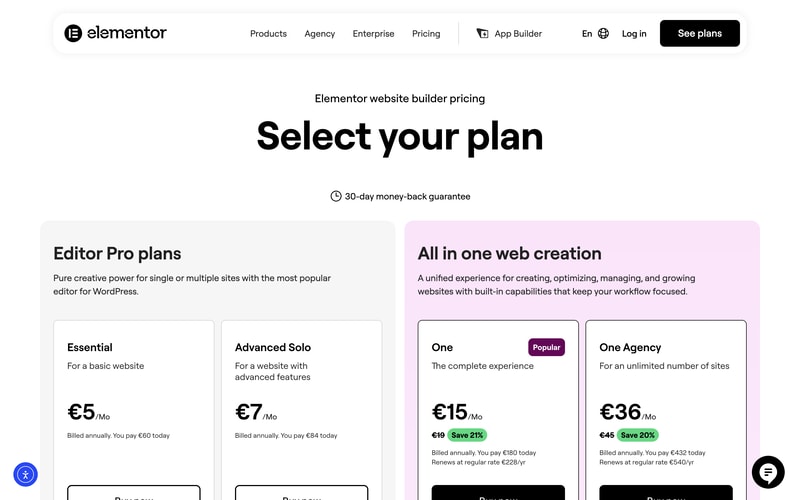
The 2026 page splits into two families. Editor Pro plans are the plugin: you bring your own WordPress hosting and get the editor. All in one web creation bundles hosting, AI generation, image optimization, accessibility tooling, cookie consent, and email deliverability into a single subscription measured in “One credits”.
A 30-day money-back guarantee applies across the range.
How Elementor Works
- Two product families — the plugin, and the hosted all-in-one platform.
- Credits are the third meter — 0 on plugin plans, 25,000 and 350,000 monthly on the One plans.
- Sites ladder — 1 site on Essential and One, options up to 25 on Advanced, unlimited on One Agency.
- Widget counts differ — 57 on Essential, 85 on every plan above.
- The One plans state their renewal price on the card itself.
- A 30-day money-back guarantee on all plans.
Elementor Pricing
Captured from Elementor’s pricing page in July 2026 on the euro price list with annual billing.
| Plan | Year one | Renewal | Sites | Credits/mo | Custom CSS | eCommerce |
|---|---|---|---|---|---|---|
| Essential | €60 (€5/mo) | €60 | 1 | 0 | No | No |
| Advanced Solo | €84 (€7/mo) | €84 | 1 (3 and 25 available) | 0 | Yes | Yes |
| One | €180 (€15/mo) | €228 | 1 | 25,000 | Yes | Yes |
| One Agency | €432 (€36/mo) | €540 | Unlimited | 350,000 | Yes | Yes |
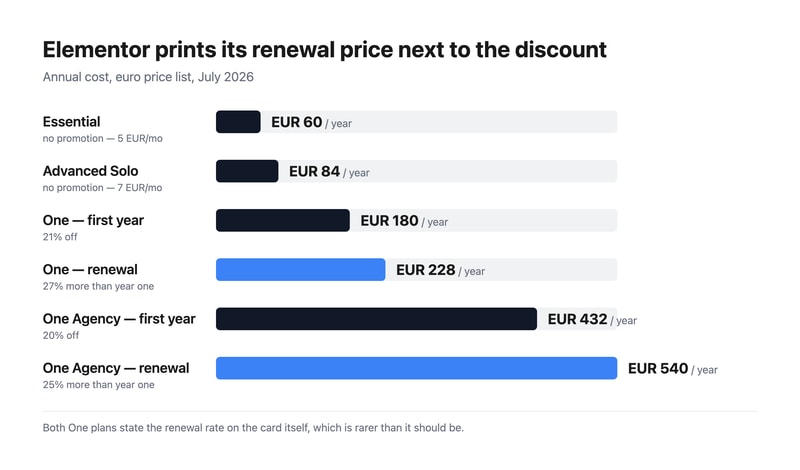
What actually decides your plan:
- Essential cannot do custom code or CSS. For a design plugin aimed at people who want control, that is the most surprising exclusion on the page — along with the Popup Builder and eCommerce features. Essential gives 57 widgets, the Theme Builder, dynamic content, and forms. Anyone who expects to write a line of CSS needs Advanced Solo at €7.
- Zero credits means zero optimisation features. Both plugin plans show “0 One credits”, and Elementor states that credits unlock AI generation, image optimization, site accessibility, cookie consent, and email deliverability. Those are not tier-gated features you could buy up to — without credits they are unavailable, which is what separates the two families.
- Elementor prints the renewal price, and you should read it. One is €180 in year one and €228 a year afterwards; One Agency is €432 then €540. That is 27% and 25% higher respectively. Stating renewal on the card is genuinely uncommon — several vendors in this category advertise a first-year discount and leave you to discover the real rate — so credit where it is due, but budget from €228.
- The two plugin plans have no promotion at all. Essential and Advanced Solo carry no strikethrough, so €60 and €84 are the standing rates rather than introductory ones.
- Elementor values its own bundled components. The One card lists image optimization at €60/yr, site accessibility at €120/yr, and email deliverability at €60/yr — €240 of stated value inside a €228 renewal. That is Elementor’s own valuation rather than an independent one, but it is at least an arithmetic claim you can check against buying those tools separately.
- One Agency is the agency answer. Unlimited sites and 350,000 monthly credits — 14 times One’s allowance for 2.4 times the price. If you build sites for clients, that ratio is the argument.
Who Should Use Elementor
- WordPress users wanting design control. The clearest case, and why Elementor became the category default.
- Agencies building client sites. One Agency’s unlimited sites and large credit pool is priced for exactly that.
- Small businesses wanting one bill. The One plans fold hosting, optimisation, and accessibility into a single subscription.
- Anyone needing accessibility and cookie consent. Both are bundled on One rather than bought as separate plugins.
It fits poorly for non-WordPress projects, where Webflow or Framer are the right tools; for people wanting to write CSS on a budget, given Essential excludes it; and for high-performance hosting needs, where WP Engine is the specialist.
Honest Pros and Cons
Strengths
- Renewal prices printed on the card, which much of this category hides.
- A genuinely cheap entry point at €60 a year for the plugin.
- The most mature WordPress editor, with the largest template and add-on ecosystem.
- Accessibility and cookie consent bundled on the One plans.
- Unlimited sites on One Agency, priced sensibly for agencies.
- A 30-day money-back guarantee across the range.
Limitations
- Essential excludes custom code and CSS, plus popups and eCommerce.
- Plugin plans get zero credits, so the optimisation suite is unavailable.
- One renews 27% higher than its first-year price.
- Two product families on one page makes the €5 headline misleading.
- Only 57 widgets on Essential, against 85 everywhere else.
- You still need WordPress hosting on the Editor Pro plans.
Elementor Alternatives and How It Compares
- WordPress.com hosts WordPress itself, with its own block editor rather than Elementor’s.
- WP Engine is the managed-WordPress host you would pair with an Editor Pro plan.
- Webflow and Framer give designers more control outside the WordPress ecosystem.
- Wix and Squarespace are the all-in-one builders that require no WordPress knowledge at all.
- 10Web and Duda target agencies managing many client sites, 10Web on WordPress specifically.
- Hostinger bundles cheap WordPress hosting with its own builder.
For a broader survey, browse our website builder directory.
The Verdict
Elementor earned its position as WordPress’s default visual editor, and on the design side it deserves it — the Theme Builder alone removes the need to touch theme files for headers, footers, and archive templates. What has changed is that the pricing page is now two products, and reading it as a single ladder from €5 to €36 will lead you to the wrong plan.
The plugin plans include zero One credits, and credits are what run AI generation, image optimization, site accessibility, cookie consent, and email deliverability. Those features are not something Essential has less of; they are something it does not have. And Essential also excludes custom code and CSS, the Popup Builder, and eCommerce features — which for a €5 design plugin is a real constraint, not a nudge. If you want to write CSS, Advanced Solo at €7 is your floor. If you want the optimisation and accessibility layer, One at €15 is.
Then read the renewal line, which Elementor deserves credit for printing. One is €180 in year one and €228 a year thereafter — 27% more — and One Agency goes €432 to €540. Several products in this category advertise a first-year rate and let you find the real one on your second invoice; Elementor puts it on the card. Budget from the renewal figure, note that the two plugin plans carry no promotion at all so €60 and €84 are simply the price, and if you build for clients, compare One Agency’s unlimited sites against per-site licensing before anything else — 350,000 monthly credits for €540 a year is where its economics actually make sense.
FAQ
How much does Elementor cost?
On the euro price list captured July 2026 with annual billing: Essential €5 per month (€60 a year), Advanced Solo €7 (€84), One €15 (€180 in year one, renewing at €228), and One Agency €36 (€432 in year one, renewing at €540). The two Editor Pro plans carry no introductory discount; the two One plans do, and both state their renewal rate on the pricing card.
What is excluded from Elementor’s cheapest plan?
Essential at €5 a month excludes the Popup Builder, custom code and CSS, eCommerce features, AI generation, image optimization, site accessibility, cookie consent, collaborative notes, email deliverability, and site management. It includes 57 widgets, the Theme Builder, dynamic content, the form builder, and 10 cloud templates for one site. Advanced Solo at €7 restores popups, custom CSS, and eCommerce.
What are Elementor’s One credits?
They are the usage meter for the hosted platform’s optimisation features — Elementor states that credits unlock AI generation, image optimization, site accessibility, cookie consent, and email deliverability. The One plan includes 25,000 monthly credits and One Agency 350,000. Both Editor Pro plugin plans include zero credits, which is why those features are unavailable rather than merely limited on them.
Does Elementor’s price go up after the first year?
Yes, on the One plans, and Elementor says so on the card. One costs €180 for the first year and renews at €228 a year — 27% higher — while One Agency costs €432 then renews at €540, 25% higher. The Essential and Advanced Solo plugin plans have no introductory discount, so their €60 and €84 rates are what you pay every year.
Is Elementor better than Wix or Squarespace?
They solve different problems. Elementor is a plugin for WordPress, so you keep WordPress’s flexibility, portability, and plugin ecosystem — and you take on managing hosting unless you buy a One plan. Wix and Squarespace are self-contained platforms that are easier to start with and cannot be moved elsewhere. Choose Elementor if you want WordPress; choose the others if you would rather not think about WordPress at all.

Compare Elementor with other popular tools in the same category.
Elementor (especially the paid version) is my go-to tool when creating websites for clients who need it fast. It's easy to change anything that you see visually and Elementor gives you the possibility to insert anything effortlessly. Installation takes just a few minutes and it requires no prior knowledge. It's easy to implement as well, as most themes already come with Elementor. I also love that it's easy to design the site for each device: pc, mobile and tablet. I use it every time my clients need a site "yesterday".
I personally don't like the yearly subscription, but it's not that expensive to be sensitive about. Sometimes when going deep with settings, it's hard to find out which element is causing a visual glitch.
Elementor helps me deliver time-critical projects. Sometimes I only have to spend an hour on a landing page.

I love the interface, the easy and intuitive way to create web pages, its contents, the integration with artificial intelligence, I use it daily, it is very easy to implement, it has integrations with many apps.
So far, everything has seemed very good to me.
The ease and speed of generating the content we need for our website.
The thing that I like best about elementor is that we can easiy create universal header and footer that disables theme header and dispays customized header.
Elementor login widget is the most annyoing feature because when some one enters a wrong password it sends him to admin login page.
Building various type of websites without depending on third party themes

I love how user-friendly it is for less tech-savvy professionals. Without coding, I am able to customize amazing websites.
I don't like the fact that I am unable to use some features without upgrading to the pro version like most apps.
Elementor has been a great tool in creating appealing, brand-coherent websites for my organisation without the stress of coding.
Elementor's intuitive drag-and-drop interface makes website design a breeze, even for our non-profit team with limited technical expertise. The extensive library of pre-designed elements and templates allows us to create visually appealing and professional-looking pages effortlessly.
While Elementor is a fantastic tool, occasionally, some updates may cause compatibility issues with other plugins. However, the Elementor support team has been responsive in addressing these concerns.
Elementor has streamlined our website development process, enabling us to quickly create engaging and dynamic pages for our non-profit initiatives. The ease of use has empowered various team members to contribute to the website, fostering collaboration and reducing our reliance on external developers.

Es mágico crear sitios web utilizando este constructor, puedes diseñar paginas web a partir de plantillas o comenzar con un lienzo en blanco. Con solo utilizar el editor de arrastrar y soltar se va dando forma al sitio web.
No hay nada que no me guste de elementor ya que es muy sencillo de utilizar, amigable y versatil. Tiene todo lo que buscas para ir diseñando a gusto un sitio web.
He diseñado mis sitios web utilizando este constructor porque hace que todos los procesos sean sencillos y dinámicos. Me beneficia porque puedo crear sitios web profesionales, a la medida que requiera el cliente y de forma rápida.
Elementor Pro is my go to plugin/page builder. It's reliability, constant updates and features and flexibility makes it the best. I wouldn't be able to go back to any other page builder at this stage as Elementor is just so intiuative.
Price is expensive since they updated their tiers. I'm grandfathered in thankfully. I think their cloud option may be good for people looking to just make a website for themselves but for someone who builds websites for client, you need to look at the higher tiers and if you're being paid well, it is worth it for the ease it brings.
Speed, templates, flexibility. Speed: Elementor is extreemely intuitive, the UI / UX is friendly and just makes sense. I can quickly mock up a website in less than a day which is great for client work. Templates: They have many free and premium templates avaible within the plugin but theres so many websites out there that self templates. I use Envato Elements which is great value. Flexibility: You can customise an entire site in minutes and the interface is drag and drop / copy and paste which streamlines the entire process.
The numerous add-on compatibility of Elementor made me choose it for our non-profit corporate website.
Although Elementor's free version allows customization to an extent, however, it gets pricy if more add-ons are to be used to veer into advanced customization.
I needed to build a highly responsive corporate website with varying functionalities such as fundraising, embedded forms, and a modern user interface for my non-profit organization in a very short duration. Elementor helped me to deliver this perfectly.

Our webdeveloper has implemented our website using elementor in order to allow us more room for autonomy
Constant updates and no automatic updates on ad ons
let it us bring our website from wordpress to a more user friendly display so we can have more control al users

Lo que más me gusta de elementor es la libertad para jugar con los diferentes bloques de diseño y las plantillas. Las opciones de "copy" - "paste" son las que más utilizo al igual que las de "guardar plantillas" ya que me soluciona muchisimo a la hora de hacer las diferentes páginas de mi web. Es una forma muy fácil e intuitiva de montar tu propia página web.
El soporte de atención al cliente. Tardan algunos días en contestar y hay veces que las consultas son urgentes.
Me ha ayudado a contruir mi web de forma mucho más visual, intuitivo y sin necesidad de conocimientos específicos y profesionales.
Elementor makes designing and rolling out live websites in Wordpress easier than ever
The fact that it's WordPress and doesn't have the ability to convert WordPress sites to static sites. Can't say I'd expect it to though.
I'm using Elementor in cases where I have a client that wants to maintain their site after I build it. That and quick landing pages that haven't been proven yet.
Intuitive layout. Continous updates. Easy to do. Integrations with other plugins.
Nothing. I really like Elementor. It's easy to work with.
You don't need a lot of coding experience to build a professional website. Integration with other platforms is easy. It solves and helps me to attract leads.

Elementor is a great tool to build and implement websites with ease. Elementor has good compatibility with WordPress. There are a lot of features that help you to build an attractive website with Elementor. It also allows users to use it any number of times.
The Customer Support Team of Elementor has been improved A lot in recent times and very easy to reach them.
The User-friendly interface helps me to use the elements of it very easily to design the website. The drag-and-drop way made the elementor more unique to use in WordPress to build websites. The free and Pro version is great to use and helps to create many websites for my clients with proper responsiveness.
Flexible, empowering in design creation, integrated on the best themes, fast, allows to create design very quick
the update cycle is very fast, many satellite plugins depends on that too, it can lead to some issues if updates are not planned well
Elementor allows an easy editing and is perfectly integratd within our theme, with easy access to widgets for the shop and for other types of content

Elementor is so easy to use and it incorporates just about everything you need to create useful and practical web pages on WordPress.
Elementor could use an easier user interface for detailed control of the elements on your website. It's challenging to get exact modifications such as spacing or of different elements of your page.
It was challenging to get a website to look the way you wanted it before Elementor. Now it's a breeze with Elementor.
The drag and drop feature of elementor is best in class, I've tried other drag and drop website builders also but this is the best plugin availabe for wordpress. Elementor also creates mobile friendly websites and is very easy to install and use. We are using elementor on most of our wordpress websites.
Sometimes it lags and alignment of text is disturbed in mobile sites.
With elementor we can easily create websites with just drag and drop feature.

Super easy to style and create wordpress pages with Elementor. Elementor Pro makes it even easier with custom CSS and a lot more elements that can be used.
The learning curve can be a little hard with some things buried quite deep in menus. Can also get a little confusing if you are using a theme with a lot of customizations built in.
Our entire E-commerce store is styled and created with Elementor. We use it alongside Woocommerce and everything works seemlessly.
Elementor is one of the best website building tools for WordPress and is reasonably affordable (I pay USD99 a year for their cloud hosting package) which is a very reasonable price. I can have a site up and running in a few hours compared to days of work beforehand. I like the ease of use for non-developers or people who aren't web designers
Downside currently is the cost, they don't have a monthly plan so you'll need to ensure that the amount required to renew is available.
Elementor has allowed me to create a beautiful website for my photography business
Elementor has very user friendly UI and it makes easy to implement website pages. It has a large community through which you will get customer support . Using Elementor for the wordpress projects has high frequency. It provides all features and widgets and easy to integrate.
Elementor has very limited features in free version which I felt there should be more features to be needed.
Elementor gives us easy feature implementaion and custom css to modify those elements more likely to the required design. More customisable elements which saves time instead of spending most time to create customised element from scratch.
I can not knwo code to use it and still build a good looking website, and functional website.
Its a learning curve to use none the less, this is balanced by the amount of tutorials online provided by themselves.
Its adding AI to the mix which allows to weave functionality better, assist with code and it also keeps adding plug ins to assist with non-code additions like forms, navigations, blog articles, etc.

It´s so easy to use and due to drag and drop it´s also fast. Besides usability I like the included Themes, ready website designs and included Widgets. Besides complete websites, I use it also to create quick landingpages or Popups.
Sometimes it´s a bit slow in the editor but it´s not often and therefore not a big thing to complain. What is a bit strange is the License Options for the Pro Plan. 1 site costs 59 a year and the next available package is 25 Websites. A 10 Websites Options would be more budget friendly.
Help to create websites, popups and landing pages. It save me a lot of time and with the included packages it gives me also inspiration and a starting point when I have days that I am not that creative. As it´s a low code/no code tool even integrations with i.e. Forms are totally easy.
A few years ago I didn't like Elementor or any other visual page builder for that matter. But now for almost every WordPress project I use elementor. And after they introduced the flexbox the designing possibilities just got endless. Earilier my biggest issue with elementor was with multiple nesing. But that has been fixed with flexbox containers. I can create complex designs, and I can add code snippits, html blocks. And there are log of 3rd party add-ons that you can get which adds, new elements and advanced features like copying the settings and styles from one element and pasting it to another.
Now another problems I have with page builders are doing repeated tasks, option for having a global settings for a bunch of similar elements. Currently I don't think there are any such option in core elementor. Though there are 3rd party plugins that helps in copying style of an element and pasting it on another.
Elementor is one of the most awesome tool I have used, it helps in creating and managing web pages really easy. And after they have added the support for the flex container, the functionality has gone to a whole new level. I can almost build any web page design that I can build using a html/css, and creating different layout has become much more flexible with the flexbox support. Also it let's me add class, and id so I can add easly change the element design with a external stylesheet.

I have been building websites for over 15 years now and by far this website builder is one of the easiest to use. Drag and drop at its finest.
I don't dislike anything about it. There is so much to love about elementor.
Elementor makes it easy to use without the need for programming language. You can easily animate sections of your website without know any coding.

Using elementor plugin for my website development was very much easier for me, because of its ease to add blocks and elements on it. I get to add or editwhatever type of content i want right at the place with the live preview of the website.
The only thing which i disliked about it is its uncompatibility with some of the theme on wordpress. For me i was unable to edit "pure portfolio" theme with the use of elementor.
The elementor is guiding its user to build their website with a simplified editing tool. In my case, as a new user of website developer it was very difficult to figure where to add text from and edit it on a theme, but using elementor was very simple and easier for me.

Elementor is the best selling theme on wordpress I think. The pro theme I bought for my website at https://thereach.ai/ uses Elementor (comes included) so I can use it to customize my website however I want. The drag and drop functionalities, widgets, layout etc Literally took 2h to set up the website. Incredible really.
While I have the product and use it, receive regular updates for it, because I don't pay the monthly fee I can't benefit from their customer service. That seems a bit strange.
I built my entire website: https://thereach.ai with Elementor. It takes a few minutes to create a new page, to move things around or change the layout of the pages that I want. Insane time saver.

When you are creating a Website or Page with Elementor, you actually seem to have more control over how the page looks. It has tons of pre-made templates, awesome editing options... & few other addon plugins that take Elementor page creation experience to next level. Overall these things make it easier to create Pages / Websites even when you don't know much about coding.
Enabling staging site license with Godaddy's managed wordpress hosting doesn't seem to be that soft... as Godaddy doesn't use 'staging.domainname.com' or 'dev.domainname.com' URL structure.
I'm helping businesses creating websites, lead generations pages, sales pages, etc. using Elementor. With already available themes like Astra, pre-made templates that Elementor provides, and the editing options that Elementor provides... Website creation is easy.
Elementor provides in-depth, building blocks style page builder design, meaning our content team can create whatever content asset we need. We've used Elementor to create a new blog theme, with a complete page template, widgets, and head navigation features. We are enabled to take our mockups and design whatever our creative content marketers have imagined. It enables us as a content team to have our blog stand out from a noisy, crowded SaaS content marketing landscape through creative, well-designed UX.
There is a steep learning curve, as there is with any design-centric tool. However if you invest the time in learning the basics, you'll be able to start creating landing pages and blog articles in no time.
CMS page builder. Widgets for the blog. Creating demo and newsletter CTAs and pop-ups. Elementor provides us with a no-code solution for owning the entire blog UX, without needing to rely on technical support. It also has unlocked our content marketing team's potential by owning its complete UX design.
many third-party add for templates and block
make admin slow when installing many addons on the plugin
Times and website designer

The Elementor page builder offers an amazing & awesome web design experience. It's more than 3 years today that I've been working with this WP page builder and it's cost-effective and simple to work with. The premium version supports custom CSS which is great for making advanced designs. It has a nice and very simple UI and works flawlessly on the latest versions of WordPress. It's the ideal builder for eCommerce, landing pages, and interactive website projects. The live editor is fast-responsive and the overall user experience is incredible. It helps us to create nice pop-ups, modal forms, newsletter forms, menus, and much more.
Elementor sometimes slows web pages especially when too many addons are installed.
It's a great plugin for fast-building WordPress pages and I highly recommend it
It offers world class features. The drag and drop elements, saving templates and using them across pages/posts and being able to style websites according to my preference without much coding knowledge stands out for me.
Elementor has been vital in our company designs and updates. Nothing negative to report.
Time saving! And they say time is money. Elementor has offered a smooth operating platform for any user regardless of their coding expertise.